Recycle Bin - Pin to Taskbar

How to Pin the Recycle Bin to the Windows 7 Taskbar


   Information
The Recycle Bin provides a safety net when deleting files or folders. When you delete any of these items from your hard disk, Windows places it in the Recycle Bin and the Recycle Bin icon changes from empty to full.

This will show you how to create a Recycle Bin shortcut with Empty Recycle Bin in the context menu, and how to pin this shortcut to the taskbar as a toolbar.

   Note
Removable drives do not use or have a Recycyle Bin. Files deleted from removable drives are permanently deleted instead.


EXAMPLE: Recycle Bin Unpinned and Pinned from the Taskbar

Taskbar-1.PNG

Taskbar-2.PNG

Taksbar_Left.jpg
Here's How:
1. Make sure the Recycle Bin is on the desktop.
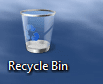
Recycle Bin on desktop.PNG
2. Right click on the desktop and select New and Folder , then rename it anything you like. (i.e. Trash Bin)
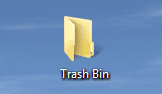
New Folder on desktop.PNG
3. Drag & drop the Recycle Bin on the new Folder to create a shortcut.
NOTE: You could also Pin to Start Menu this new Recycle Bin shortcut by pressing and holding Shift, then right click on the shortcut, and click on Pin to Start Menu.
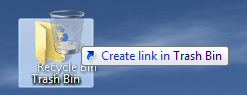
Drag & drop recycle bin.png
4. Save the new Folder (containing Recycle Bin shortcut) to the directory of your choice (i.e. C:\Trash Bin) by dragging and dropping.
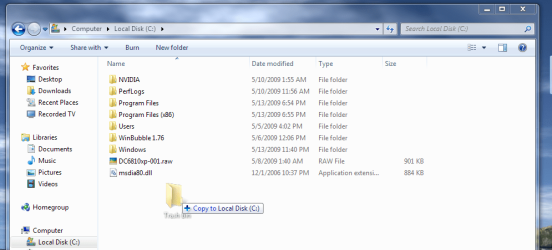
Drag & drop new Folder.png
5. UnLock the taskbar.

6. Right-click on the taskbar and select Toolbar and New toolbar...
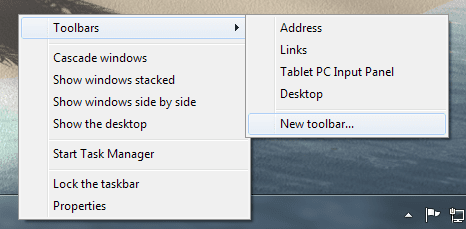
Toolbars-New toolbar.png
7. Navigate to the location you saved the New Folder (Ex: Trash Bin), select it and click on the Select Folder button.
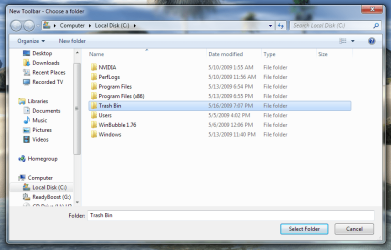
Choose a folder.png
8. This places the new Toolbar and a Separator (dotted lines) on the taskbar.
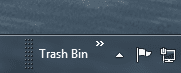
New Toolbar and Separator.PNG
9. Right click on the Separator and uncheck Show Text and Show Title.
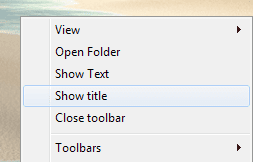
Show title.png
10. Right click on the Separator and select View and Large Icons.
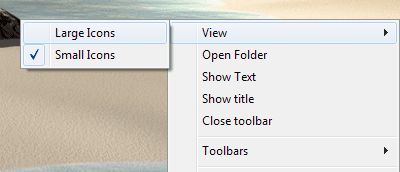
Large Icons.png
11. You now have the Recycle Bin pinned to the taskbar.
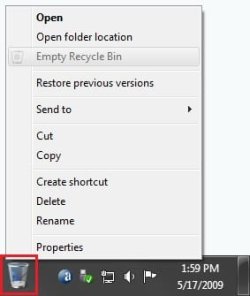
Recycle_Bin.jpg
12. To Keep the Recycle Bin on Right Side of Taskbar
A) Left click on the Separator to the left of the folder and hold, then drag it to the left and right to make any adjustments to how you want the Recycle Bin positioned on the right side of the taskbar. (See screenshot above)

B) Release the left click when done.

C) Go to step 14.
13. To Have the Recycle Bin on Left Side of Taskbar
A) Left click on the Separator of the pinned taskbar programs on the far left side and hold, then drag it to the right past the Recycle Bin and release. (See screenshot below)

Left-1.jpg
B) Left click on the Separator of the pinned taskbar programs on the now right side and hold, then drag it to the left next to the Recycle Bin and release. (See screenshot below)

Left-2.jpg
14. Lock the taskbar.

15. Remove the Recycle Bin from the desktop.

   Note
You do know that when you drag & drop copied shortcuts from the Start Menu in with the Recycle Bin shortcut, that those automatically become Quick Launch items beside the Recycle Bin. By doing it that way you can "kill two birds with one stone".(See screenshot below)

Recycle Bin - Quick Launch Combo.PNG
Enjoy,


Last edited by a moderator:
Thank you. :)
 

My Computer

Computer Manufacturer/Model Number
Hp Pavilion
OS
Windows 7 Build 7600 x86 (Clean Install)
Memory
2 gb
Monitor(s) Displays
17''
Keyboard
MICROSOFT Business Hardware (A4B-00013)
Mouse
MICROSOFT Business Hardware (A4B-00013)
Internet Speed
not enough...
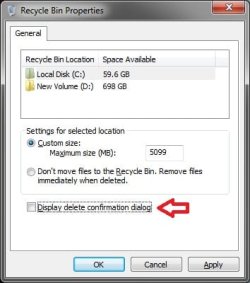
Thanks for the tutorial. Now I find myself emptying the trash quite frequently. I'd like to know how to disable the "Are you sure you want to delete?" pop up. I have it unselected in the recycle bin properties but with this shortcut the warning still pops up.
 

My Computer

Computer Manufacturer/Model Number
Assembled by me
OS
Windows 7 Professional 64-bit
CPU
Intel Core i7-960 Bloomfield 3.2GHz 8MB L3 Cache Quad-Core
Motherboard
ASUS P6X58D Premium LGA 1366 Intel X58 SATA 6Gb/s USB 3.0
Memory
12 gb Corsair Dominator DDR3 1866 (PC3 15000) Triple Channel
Graphics Card(s)
XFX Radeon HD 5770 1GB 128-bit DDR5
Sound Card
Asus Essence STX Audiophile Heaven!
Monitor(s) Displays
ViewSonic VP201b
Screen Resolution
1600 x 1200
Hard Drives
(1) Crucial Real SSD C300
(2) WD Velociraptor 300gb
(1) Seagate DB35 750gb
PSU
Seasonic 750 Gold
Case
Lian Li 2100
Cooling
Noctua
Keyboard
Microsoft Wireless Comfort 5000
Mouse
Logitech USB Trackman Wheel
Internet Speed
1gp/s
Hello Barefoot,

The delete confirmation option is only for when you delete a file to the Recycle Bin. It will always ask you "Are you sure?" when emptying the Recycle Bin. Sorry. :(

Delete_Notification.jpg

Hope this helps,
Shawn
 

My Computer

Computer type
PC/Desktop
Computer Manufacturer/Model Number
Self built custom
OS
64-bit Windows 11 Pro for Workstations
CPU
Intel i7-8700K OC'd to 5 GHz
Motherboard
ASUS ROG Maximus XI Formula Z390
Memory
64 GB (4x16GB) G.SKILL TridentZ RGB DDR4 3600 MHz
Graphics Card(s)
ASUS ROG-STRIX-GTX1080TI-O11G-GAMING
Sound Card
Integrated
Monitor(s) Displays
2 x Samsung Odyssey G7 27"
Screen Resolution
2560x1440
Hard Drives
1TB Samsung 990 PRO M.2,
4TB Samsung 990 PRO PRO M.2,
TerraMaster F8 SSD Plus NAS
PSU
Seasonic Prime Titanium 850W
Case
Thermaltake Core P3
Cooling
Corsair Hydro H115i
Keyboard
Logitech wireless K800
Mouse
Logitech MX Master 4
Internet Speed
2 Gb/s Download and 100 Mb/s Upload
Antivirus
Malwarebyte Anti-Malware Premium
Browser
Google Chrome
Other Info
Logitech Z625 speaker system,
Logitech BRIO 4K Pro webcam,
HP Color LaserJet Pro MFP M477fdn,
APC SMART-UPS RT 1000 XL - SURT1000XLI,
Galaxy S23 Plus phone
Isn't it strange how some of the innermost workings are customizable and other seemingly simple ones are not.
 

My Computer

Computer Manufacturer/Model Number
Assembled by me
OS
Windows 7 Professional 64-bit
CPU
Intel Core i7-960 Bloomfield 3.2GHz 8MB L3 Cache Quad-Core
Motherboard
ASUS P6X58D Premium LGA 1366 Intel X58 SATA 6Gb/s USB 3.0
Memory
12 gb Corsair Dominator DDR3 1866 (PC3 15000) Triple Channel
Graphics Card(s)
XFX Radeon HD 5770 1GB 128-bit DDR5
Sound Card
Asus Essence STX Audiophile Heaven!
Monitor(s) Displays
ViewSonic VP201b
Screen Resolution
1600 x 1200
Hard Drives
(1) Crucial Real SSD C300
(2) WD Velociraptor 300gb
(1) Seagate DB35 750gb
PSU
Seasonic 750 Gold
Case
Lian Li 2100
Cooling
Noctua
Keyboard
Microsoft Wireless Comfort 5000
Mouse
Logitech USB Trackman Wheel
Internet Speed
1gp/s
Indeed. :(
 

My Computer

Computer type
PC/Desktop
Computer Manufacturer/Model Number
Self built custom
OS
64-bit Windows 11 Pro for Workstations
CPU
Intel i7-8700K OC'd to 5 GHz
Motherboard
ASUS ROG Maximus XI Formula Z390
Memory
64 GB (4x16GB) G.SKILL TridentZ RGB DDR4 3600 MHz
Graphics Card(s)
ASUS ROG-STRIX-GTX1080TI-O11G-GAMING
Sound Card
Integrated
Monitor(s) Displays
2 x Samsung Odyssey G7 27"
Screen Resolution
2560x1440
Hard Drives
1TB Samsung 990 PRO M.2,
4TB Samsung 990 PRO PRO M.2,
TerraMaster F8 SSD Plus NAS
PSU
Seasonic Prime Titanium 850W
Case
Thermaltake Core P3
Cooling
Corsair Hydro H115i
Keyboard
Logitech wireless K800
Mouse
Logitech MX Master 4
Internet Speed
2 Gb/s Download and 100 Mb/s Upload
Antivirus
Malwarebyte Anti-Malware Premium
Browser
Google Chrome
Other Info
Logitech Z625 speaker system,
Logitech BRIO 4K Pro webcam,
HP Color LaserJet Pro MFP M477fdn,
APC SMART-UPS RT 1000 XL - SURT1000XLI,
Galaxy S23 Plus phone
i followed your excellent tutorial to the letter and all went well. i had a lovely Recycle bin icon on my taskbar next to the notification area, so i removed the desktop icon via the personization menu. Then the problem happened.

When i now delete things they dont goto the recycle bin. i checked that the settings were ok (dont move files to recycle bin was UN checked). so i thought i would try deleting the recycle folder from C:\ and this gave me the message - The recycle bin is corrupt, do you wish to empty it? therefore i did this and tried deleting a file again. This time it went to recycle bin ok. However i thought i would delete a 2nd file just to be sure, and sure enough this DIDNT goto the recycle bin.

any ideas?

Edit: FIXED! i needed to delete my recycle bin from all my drives (3) and this seemed to fix the problem.
 

My Computer

Computer Manufacturer/Model Number
Toshiba Satelite
OS
windows 7 RTM
CPU
AMD Athlon x 2 64
Memory
4gb
Now my desktop is clean, just the way I like it :D

97570105.png
 

My Computer

OS
Windows 7 Ultimate 6.1.7600 Build 7600 64-bit
CPU
Intel(R) Core(TM)2 Duo CPU E8400 @ 3.00GHz
Motherboard
Gigabyte GA EP35-DS3
Memory
4X DDR2 1GB PC6400 (800MHz), Kingmax
Graphics Card(s)
Gigabyte ATI 3870 512 DDR3
Sound Card
Realtek ALC889A + ATI High Definition Audio Device
Monitor(s) Displays
Sony 40" 40W4000
Screen Resolution
1920x1080
Hard Drives
Samsung HD321KJ 320GB
PSU
Antec 380W 80+
Case
Antec NSK4480B
Cooling
1 x 120mm @low
Keyboard
Logitech Cordless Desktop S510
Mouse
Logitech Cordless Desktop S510
Internet Speed
2Mbit DSL Flatrate
Pin to Start Menu ???

How do i pin the recycle bin yo the start menu... tried it but it doesn't show empty recycle bin option
 

My Computer

OS
Windows7 Ultimate x64
Follow example...

How do i pin the recycle bin yo the start menu... tried it but it doesn't show empty recycle bin option

I am not sure what might have gone wrong... but if the tutorial is followed as I wrote it, you should be able to right click and have the option of emptying the recycle bin from the context menu...

If you have multiple drives, you might have to address each drive individually.
 

My Computer

Computer type
PC/Desktop
Computer Manufacturer/Model Number
Custom by Charbroil57
OS
Windows 7 Home Premium x64 (clean install 8/05/2015)
CPU
AMD Phenom II X2 550 Black Edition 3.1GHz
Motherboard
Gigabyte GA-MA790X-UD4P AM3/AM2+/AM2 AMD 790X ATX AMD
Memory
8 GB (4 x 2 GB) Corsair 6400C5 800 MHz
Graphics Card(s)
BFG 512MB GDDR3 9600GT OC
Sound Card
Realtec HD Audio 5.1
Monitor(s) Displays
DVI Viewsonic VA2231
Screen Resolution
1920 x 1080 (1080p)
Hard Drives
1 TB SATA 6G Seagate Barracuda (Boot drive, limited to 3G due to Mobo)
500 GB SATA 3G Seagate Barracuda
500 GB USB Seagate Desktop Drive
PSU
Ultra X4 750w Modular(upgraded)
Case
Antec Sonata
Cooling
Stock (80w CPU)
Keyboard
Microsoft Wireless Desktop Elite
Mouse
Wirless Intellimouse Explorer 2.0
Internet Speed
Xfinity Broadband (Home 75 MB Download)
Antivirus
Norton Internet Security
Browser
Firefox 39 (default) and IE 11
Other Info
SATA HP Lightscribe DVD RW
SATA Samsung Lightscribe DVD RW
How do i pin the recycle bin yo the start menu... tried it but it doesn't show empty recycle bin option

Are you using the standard recycle bins, or icons from another file?
 

My Computer

Computer Manufacturer/Model Number
Gateway, Toshiba Laptop, and Home Brew
OS
Windows 7 x64 HP, Windows 7 HP, Windows 7 Ult
CPU
Intel I3, Cerelon, Pentium 4 @ 3Ghz
Motherboard
Intel, Intel, Asus
Memory
8G, 3G, 3G
Graphics Card(s)
On-board Intel, On-board nVidia, nVIDIA card
Sound Card
on-board, on-board, SoundBlaster
Monitor(s) Displays
Hannspree HF237, Toshiba, SyncMaster 931B
Screen Resolution
default (all)
Hard Drives
1T internal, 320G internal, 160G internal, 1T networked
PSU
300w, unk, 650w
Case
black, black, grey
Cooling
air (all)
Keyboard
standard wired (all)
Mouse
standard wired (all)
Internet Speed
6M down, 768K up
Other Info
Home LAN through Linksys hub to 4 port and wireless switch/router. Networked HP 2600n. Wife's computer running Windows 7, and spare laptop running Ubuntu "Karmic Kola" (9.10).
How do i pin the recycle bin yo the start menu... tried it but it doesn't show empty recycle bin option

Hello Dregatar,

You will not be able to pin the same Recycle Bin shortcut created in the tutorial and have a option to pin it to the Start Menu. Only to the taskbar as it was intended in the tutorial.

Instead, you will only be able to pin the default Recycle Bin on the desktop to the Start Menu. As you discovered, it has no "Empty Recycle Bin" context menu option though. :(

Sorry, but if you do not want the Recycle Bin on the Desktop, you will have to have it pinned to the taskbar as in the tutorial to have the "Empty Recycle Bin" option.

Hope this helps,
Shawn
 

My Computer

Computer type
PC/Desktop
Computer Manufacturer/Model Number
Self built custom
OS
64-bit Windows 11 Pro for Workstations
CPU
Intel i7-8700K OC'd to 5 GHz
Motherboard
ASUS ROG Maximus XI Formula Z390
Memory
64 GB (4x16GB) G.SKILL TridentZ RGB DDR4 3600 MHz
Graphics Card(s)
ASUS ROG-STRIX-GTX1080TI-O11G-GAMING
Sound Card
Integrated
Monitor(s) Displays
2 x Samsung Odyssey G7 27"
Screen Resolution
2560x1440
Hard Drives
1TB Samsung 990 PRO M.2,
4TB Samsung 990 PRO PRO M.2,
TerraMaster F8 SSD Plus NAS
PSU
Seasonic Prime Titanium 850W
Case
Thermaltake Core P3
Cooling
Corsair Hydro H115i
Keyboard
Logitech wireless K800
Mouse
Logitech MX Master 4
Internet Speed
2 Gb/s Download and 100 Mb/s Upload
Antivirus
Malwarebyte Anti-Malware Premium
Browser
Google Chrome
Other Info
Logitech Z625 speaker system,
Logitech BRIO 4K Pro webcam,
HP Color LaserJet Pro MFP M477fdn,
APC SMART-UPS RT 1000 XL - SURT1000XLI,
Galaxy S23 Plus phone
did anyone figure out how to remove the annoying gap in the taskbar when using large icon for the recycle bin?
 

My Computer

Computer Manufacturer/Model Number
HP Pavilion dv5
OS
Windows 7 Professional
CPU
Intel Core 2 Duo CPU T5800 @ 2.00GHz
Memory
4.00GB
Screen Resolution
1280X800
Hard Drives
320GB
Internet Speed
50Mb/s
Hello SicklySlick, and welcome to Seven Forums.

Sorry, but no it currently cannot be removed. :(
 

My Computer

Computer type
PC/Desktop
Computer Manufacturer/Model Number
Self built custom
OS
64-bit Windows 11 Pro for Workstations
CPU
Intel i7-8700K OC'd to 5 GHz
Motherboard
ASUS ROG Maximus XI Formula Z390
Memory
64 GB (4x16GB) G.SKILL TridentZ RGB DDR4 3600 MHz
Graphics Card(s)
ASUS ROG-STRIX-GTX1080TI-O11G-GAMING
Sound Card
Integrated
Monitor(s) Displays
2 x Samsung Odyssey G7 27"
Screen Resolution
2560x1440
Hard Drives
1TB Samsung 990 PRO M.2,
4TB Samsung 990 PRO PRO M.2,
TerraMaster F8 SSD Plus NAS
PSU
Seasonic Prime Titanium 850W
Case
Thermaltake Core P3
Cooling
Corsair Hydro H115i
Keyboard
Logitech wireless K800
Mouse
Logitech MX Master 4
Internet Speed
2 Gb/s Download and 100 Mb/s Upload
Antivirus
Malwarebyte Anti-Malware Premium
Browser
Google Chrome
Other Info
Logitech Z625 speaker system,
Logitech BRIO 4K Pro webcam,
HP Color LaserJet Pro MFP M477fdn,
APC SMART-UPS RT 1000 XL - SURT1000XLI,
Galaxy S23 Plus phone
could we change the recycle bin icons to make it smaller? or that doesnt work either
 

My Computer

Computer Manufacturer/Model Number
HP Pavilion dv5
OS
Windows 7 Professional
CPU
Intel Core 2 Duo CPU T5800 @ 2.00GHz
Memory
4.00GB
Screen Resolution
1280X800
Hard Drives
320GB
Internet Speed
50Mb/s
Hello SicklySlick,

Yes, at step 10, you can select (check) to use Small Icons instead if you like. :)
 

My Computer

Computer type
PC/Desktop
Computer Manufacturer/Model Number
Self built custom
OS
64-bit Windows 11 Pro for Workstations
CPU
Intel i7-8700K OC'd to 5 GHz
Motherboard
ASUS ROG Maximus XI Formula Z390
Memory
64 GB (4x16GB) G.SKILL TridentZ RGB DDR4 3600 MHz
Graphics Card(s)
ASUS ROG-STRIX-GTX1080TI-O11G-GAMING
Sound Card
Integrated
Monitor(s) Displays
2 x Samsung Odyssey G7 27"
Screen Resolution
2560x1440
Hard Drives
1TB Samsung 990 PRO M.2,
4TB Samsung 990 PRO PRO M.2,
TerraMaster F8 SSD Plus NAS
PSU
Seasonic Prime Titanium 850W
Case
Thermaltake Core P3
Cooling
Corsair Hydro H115i
Keyboard
Logitech wireless K800
Mouse
Logitech MX Master 4
Internet Speed
2 Gb/s Download and 100 Mb/s Upload
Antivirus
Malwarebyte Anti-Malware Premium
Browser
Google Chrome
Other Info
Logitech Z625 speaker system,
Logitech BRIO 4K Pro webcam,
HP Color LaserJet Pro MFP M477fdn,
APC SMART-UPS RT 1000 XL - SURT1000XLI,
Galaxy S23 Plus phone
i meant cant we change the the recycle bin icon (like use a different icon, not using the small icon option) that is 40pixels high? would that solve the problem?
 

My Computer

Computer Manufacturer/Model Number
HP Pavilion dv5
OS
Windows 7 Professional
CPU
Intel Core 2 Duo CPU T5800 @ 2.00GHz
Memory
4.00GB
Screen Resolution
1280X800
Hard Drives
320GB
Internet Speed
50Mb/s
i meant cant we change the the recycle bin icon (like use a different icon, not using the small icon option) that is 40pixels high? would that solve the problem?

I have not tried it to see how it looks, but yes you can change the Recycle Bin icon to another one to see if it may help.
 

My Computer

Computer type
PC/Desktop
Computer Manufacturer/Model Number
Self built custom
OS
64-bit Windows 11 Pro for Workstations
CPU
Intel i7-8700K OC'd to 5 GHz
Motherboard
ASUS ROG Maximus XI Formula Z390
Memory
64 GB (4x16GB) G.SKILL TridentZ RGB DDR4 3600 MHz
Graphics Card(s)
ASUS ROG-STRIX-GTX1080TI-O11G-GAMING
Sound Card
Integrated
Monitor(s) Displays
2 x Samsung Odyssey G7 27"
Screen Resolution
2560x1440
Hard Drives
1TB Samsung 990 PRO M.2,
4TB Samsung 990 PRO PRO M.2,
TerraMaster F8 SSD Plus NAS
PSU
Seasonic Prime Titanium 850W
Case
Thermaltake Core P3
Cooling
Corsair Hydro H115i
Keyboard
Logitech wireless K800
Mouse
Logitech MX Master 4
Internet Speed
2 Gb/s Download and 100 Mb/s Upload
Antivirus
Malwarebyte Anti-Malware Premium
Browser
Google Chrome
Other Info
Logitech Z625 speaker system,
Logitech BRIO 4K Pro webcam,
HP Color LaserJet Pro MFP M477fdn,
APC SMART-UPS RT 1000 XL - SURT1000XLI,
Galaxy S23 Plus phone
thanks for the tutorial, it works great. However i have one small problem with it. i am using a theme in which a portion of my taskbar is a different color than the sides. when i added the recycle bin to the taskbar the 2nd color disappeared. is there a way to get it back?
 

My Computer

Computer Manufacturer/Model Number
Gateway T-1628
OS
windows 7 home premium sp1 x86
CPU
AMD Turion 64 x2 Mobile Technology 2.0 GHz
Motherboard
GATEWAY (Socket M2/S1G1) ATI RS690/RS690M Chipset
Memory
3gb DDR2 RAM
Graphics Card(s)
ATI Radeon x1200 series
Sound Card
SigmaTel High Def audio
Monitor(s) Displays
Generic PnP Monitor
Screen Resolution
1280x800
Hard Drives
250gb Western Digital
Hello Gohardsupreme,

Does moving the Recycle Bin around to a different location on the taskbar make any difference, or using a small icon instead?
 

My Computer

Computer type
PC/Desktop
Computer Manufacturer/Model Number
Self built custom
OS
64-bit Windows 11 Pro for Workstations
CPU
Intel i7-8700K OC'd to 5 GHz
Motherboard
ASUS ROG Maximus XI Formula Z390
Memory
64 GB (4x16GB) G.SKILL TridentZ RGB DDR4 3600 MHz
Graphics Card(s)
ASUS ROG-STRIX-GTX1080TI-O11G-GAMING
Sound Card
Integrated
Monitor(s) Displays
2 x Samsung Odyssey G7 27"
Screen Resolution
2560x1440
Hard Drives
1TB Samsung 990 PRO M.2,
4TB Samsung 990 PRO PRO M.2,
TerraMaster F8 SSD Plus NAS
PSU
Seasonic Prime Titanium 850W
Case
Thermaltake Core P3
Cooling
Corsair Hydro H115i
Keyboard
Logitech wireless K800
Mouse
Logitech MX Master 4
Internet Speed
2 Gb/s Download and 100 Mb/s Upload
Antivirus
Malwarebyte Anti-Malware Premium
Browser
Google Chrome
Other Info
Logitech Z625 speaker system,
Logitech BRIO 4K Pro webcam,
HP Color LaserJet Pro MFP M477fdn,
APC SMART-UPS RT 1000 XL - SURT1000XLI,
Galaxy S23 Plus phone
Back
Top