Microsoft Security Bulletin(s) for August 9 2016

NICK ADSL UK

MS MVP Consumer Security
Guru
Local time
11:24 AM
Messages
163
Location
London/Gatwick
Microsoft Security Bulletin(s) for August 9 2016

Note: There may be latency issues due to replication, if the page does not display keep refreshing

Today Microsoft released the following Security Bulletin(s).

Note https://technet.microsoft.com/en-us/security/default and https://technet.microsoft.com/en-us/security/dn440717 are authoritative in all matters concerning Microsoft Security Bulletins! ANY e-mail, web board or newsgroup posting (including this one) should be verified by visiting these sites for official information. Microsoft never sends security or other updates as attachments. These updates must be downloaded from the microsoft.com download center or Windows Update. See the individual bulletins for details.
Because some malicious messages attempt to masquerade as official Microsoft security notices, it is recommended that you physically type the URLs into your web browser and not click on the hyperlinks provided.

Bulletin Summary:
https://technet.microsoft.com/en-us/library/security/ms16-aug


Critical (5)
Cumulative Security Update for Internet Explorer (3177356)
Microsoft Security Bulletin MS16-095 - Critical

Cumulative Security Update for Microsoft Edge 3177358 }
Microsoft Security Bulletin MS16-096 - Critical


Security Update for Microsoft Graphics Component (3177393)
Microsoft Security Bulletin MS16-097 - Critical


Security Update for Microsoft Office (3177451)
Microsoft Security Bulletin MS16-099 - Critical


Security Update for Microsoft Windows PDF Library (3182248}
Microsoft Security Bulletin MS16-102 - Critical


important(4)
Security Update for Windows Kernel-Mode Drivers (3178466)
Microsoft Security Bulletin MS16-098 - Important

Security Update for Secure Boot (3179577)
Microsoft Security Bulletin MS16-100 - Important

Security Update for Windows Authentication Methods (3178465)
Microsoft Security Bulletin MS16-101 - Important

Security Update for ActiveSyncProvider
(3182332)
Microsoft Security Bulletin MS16-103 - Important


Please note that Microsoft may release bulletins out side of this schedule if we determine the need to do so.
If you have any questions regarding the patch or its implementation after reading the above listed bulletin you should contact: For home users, no-charge support for security updates (only!) is available by calling 800-MICROSOFT (800-642-7676) in the US or 877-568-2495 in Canada.
 

My Computer My Computer

Computer Manufacturer/Model Number
acer 7720
OS
windows 7
CPU
2.66
Motherboard
intel
Memory
6GB
Graphics Card(s)
ATI
Sound Card
REALTEK
Monitor(s) Displays
SAMSUNG
Screen Resolution
1680 x 1050
Hard Drives
WD X 3 TB
PSU
1200
Case
ACER
Cooling
FAN
Keyboard
LOGITECH
Mouse
LOGITECH
Internet Speed
8MB
I wish I could get updates on my Win 7. Been way over a month since the last updates. I let it sit for almost an hour today but still searching for updates. My Win 10 updated right away.
 

My Computer My Computer

Computer type
PC/Desktop
Computer Manufacturer/Model Number
My Own Build
OS
Windows 10 64 bit
CPU
Intel i7 6700K
Motherboard
ASUS ROG Maximus VIII Hero
Memory
16GB Corsair Dominator
Graphics Card(s)
Intel CPU Graphics
Sound Card
RealTek
Monitor(s) Displays
27" Dell S2719dgf
Screen Resolution
2560X1440
Hard Drives
1 TB Samsung 850 EVO SSD for Win 10 Pro
500GB Samsung 850 EVO SSD for Win 10 Insider
2 TB drive for backup
PSU
EVGA Supernova 750G2
Case
BeQuiet Silent Base 600
Cooling
Deepcool Captain 120EX
Keyboard
Microsoft Wireless 2000
Mouse
Microsoft wireless
Internet Speed
100 MB/sec (Cable)
Antivirus
Microsoft Defender and Malwarebytes
Browser
Edge/Firefox
Other Info
Cakewalk (Sonar) by BandLab and Studio One 4.1 Pro recording studio software. MOTU 896Mk3 Hybrid recording interface, Frontier Tranzport wireless control unit, Behringer X-Touch Control Surface.
Five USB connected optical drives for CD Audio production using Nero BurningROM
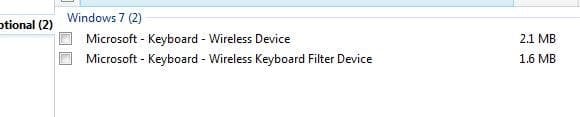
Whats with the optional updates (2) about keyboards? I think it is just the help menu, but using the words keyboard is confusing.
 

Attachments

  • op.JPG
    op.JPG
    14 KB · Views: 69

My Computer My Computer

Computer type
PC/Desktop
Computer Manufacturer/Model Number
Self Build
OS
Windows 7 Professional X64 Service Pack 1
CPU
AMD Phenom II X4 955 3.20GHz
Motherboard
Gigabyte GA-MA790X-UD4P
Memory
8G
Graphics Card(s)
GX550 Ti
Sound Card
On board
Monitor(s) Displays
Asus VW246H & Syncmaster 2243swx
Screen Resolution
1920x1080 & 1920x1080
Hard Drives
M4-CT128 SSD2, Samsung 840 256GB, 1 WDC 1TB
PSU
Corsair TX750W-V2
Case
Antec
Cooling
2 120mm fan
Keyboard
Microsoft Wireless 3050
Mouse
Microsoft Wireless 5000
Internet Speed
72/6Mbs (Cable)
Other Info
Asus AC1900 router, 8 port Trendnet Switch - Logitech Webcam Pro 9000
What needs to be installed manually to avoid long Windows update check/install times?
 

My Computers My Computers

System One System Two

What needs to be installed manually to avoid long Windows update check/install times?

There's been a few things over the last 6 months or so. For me windows updates check today took less than two minutes and currently downloading and installing the updates.

Also to fix things it seems to depend upon which versions of WUC still show up as installed updates.

You'd need to report what this finds:

Code:
get-hotfix -id KB2990214,KB305026,KB3065987,KB3075851,KB3083324,KB3083710,KB3102810,KB3112343,KB3135445,KB3138612,KB3138615

EDIT: Also check which of these are installed if any:

Code:
get-hotfix -id KB3161664,KB3161608,KB3172605

From Elevated Command Prompt type Powershell and wait for the PS prompt to appear then run the above.

Note: For anyone reading this do not assume that all of the above updates need to be installed. Some of them are needed but some are problematic and should be removed.
 
Last edited:

My Computer My Computer

Computer type
Laptop
Computer Manufacturer/Model Number
ASUS
OS
Microsoft Windows 7 Home Premium 64-bit 7601 Multiprocessor Free Service Pack 1
CPU
AMD C-60 APU with Radeon(tm) HD Graphics
Motherboard
ASUSTeK COMPUTER INC. X501U
Memory
4.00 GB
Graphics Card(s)
AMD Radeon HD 6290 Graphics
Sound Card
(1) AMD High Definition Audio Device (2) Realtek High Defi
Screen Resolution
1366 x 768 x 32 bits (4294967296 colors) @ 60 Hz
Hard Drives
Hitachi HTS545050A7E380 SATA Disk Device
Antivirus
Comodo CIS & FW, SecureAplus App Whitelisting, Threatfire
Browser
Cyberfox 64bit, Opera 64bit, Airfox
Other Info
Spy-The-Spy, HitmanPro.Alert, Norton Connect Safe, MJRegWatcher, BitDefender TrafficLight, Voodoo Shield, Zemana AntiMalware
I asked because it seems that every month there is an update to install manually on Vista to aid with the update check. I've already gotten an alert for updates on 7 however in the past the download was stuck on 0kb of 0kb for hours. I wanted to try and avoid that. It looks like I am missing one from your second set and three from your first. Do I need to install those manually?

PS C:\Users\Administrator> get-hotfix -id KB2990214,KB305026,KB3065987,KB3075851,KB3083324,KB3083710,KB3102810,KB3112343
,KB3135445,KB3138612,KB3138615

Source Description HotFixID InstalledBy InstalledOn
------ ----------- -------- ----------- -----------
VIRTUAL7 Update KB2990214 NT AUTHORITY\SYSTEM 5/6/2015 12:00:00 AM
VIRTUAL7 Update KB3065987 NT AUTHORITY\SYSTEM 7/22/2015 12:00:00 AM
VIRTUAL7 Update KB3075851 NT AUTHORITY\SYSTEM 8/5/2015 12:00:00 AM
VIRTUAL7 Update KB3083710 NT AUTHORITY\SYSTEM 10/17/2015 12:00:00 AM
VIRTUAL7 Update KB3102810 NT AUTHORITY\SYSTEM 11/11/2015 12:00:00 AM
VIRTUAL7 Update KB3112343 NT AUTHORITY\SYSTEM 12/12/2015 12:00:00 AM
VIRTUAL7 Update KB3135445 NT AUTHORITY\SYSTEM 2/12/2016 12:00:00 AM
VIRTUAL7 Update KB3138612 virtual7\Admi... 4/16/2016 12:00:00 AM
PS C:\Users\Administrator> get-hotfix -id KB3161664,KB3161608,KB3172605

Source Description HotFixID InstalledBy InstalledOn
------ ----------- -------- ----------- -----------
VIRTUAL7 Update KB3161608 Ben-virtual7\Admi... 7/15/2016 12:00:00 AM
VIRTUAL7 Security Update KB3161664 Ben-virtual7\Admi... 6/16/2016 12:00:00 AM
 

My Computers My Computers

System One System Two

Hi,
Yep a manual search was pretty quick to see these come up
8-9-16 new updates.PNG
 

My Computer My Computer

Computer type
PC/Desktop
Computer Manufacturer/Model Number
Custom assembled by me :}
OS
Win-7-Pro64bit 7-H-Prem-64bit
CPU
i7-5930K 2nd i9-9940x both water blocked VRM's too
Motherboard
ASUS SABERTOOTH X99 2nd ASUS x299 Apex
Memory
Trident-z 3200C14 2nd Trident-z 3600C16
Graphics Card(s)
EVGA 1080ti ftw3 2nd Titan Xp both water blocked
Sound Card
Built-in Realtek
Monitor(s) Displays
1-AOC G2460PG 24"G-Sync 144Hz/ 2nd 1-ASUS VG248QE 24" 144Hz
Screen Resolution
1920 x 1080 144Hz
Hard Drives
2-Samsung M.2 Evo & Evo Plus
2-Samsung 850 EVO 500GB SSD's/ 3-2.5 W.D. Black 1tb-&3-1tb/3-3.5 WD Black 1tb hdd's
PSU
EVGA SuperNOVA 1000-P2 2nd 1200-P2
Case
2-Corsair Obsidian Series 450D Black ATX Mid Tower
Cooling
Custom water loops
Keyboard
Logitech G710+/ 2nd Logitech G910
Mouse
2-RedDragon M901 Perdition 16400 dpi Gaming mouse = wired
Internet Speed
Comcast Ping 19ms 89.31mbps download speed 6.12mbps upload
Antivirus
Malwarebytes Pro/ Superantispyware Pro
Browser
FireFox & Pale moon
Other Info
2nd ASUS X299 Apex/Intel i9-9940x with Custom water loop/7H-Prem-x64/Corsair 450D case/Ram Trident-z 3600C16 4x8gb / Samsung970Evo plus 500gb SSD/Dual ssd EZ swap evo/PSU EVGA SuperNova 1200w-P2 80+Platinum/GPU Titan Xp /8-ML-140 on push-pull on 2-280GTX rads
I asked because it seems that every month there is an update to install manually on Vista to aid with the update check. I've already gotten an alert for updates on 7 however in the past the download was stuck on 0kb of 0kb for hours. I wanted to try and avoid that. It looks like I am missing one from your second set and three from your first. Do I need to install those manually?

PS C:\Users\Administrator> get-hotfix -id KB2990214,KB305026,KB3065987,KB3075851,KB3083324,KB3083710,KB3102810,KB3112343
,KB3135445,KB3138612,KB3138615

Source Description HotFixID InstalledBy InstalledOn
------ ----------- -------- ----------- -----------
VIRTUAL7 Update KB2990214 NT AUTHORITY\SYSTEM 5/6/2015 12:00:00 AM
VIRTUAL7 Update KB3065987 NT AUTHORITY\SYSTEM 7/22/2015 12:00:00 AM
VIRTUAL7 Update KB3075851 NT AUTHORITY\SYSTEM 8/5/2015 12:00:00 AM
VIRTUAL7 Update KB3083710 NT AUTHORITY\SYSTEM 10/17/2015 12:00:00 AM
VIRTUAL7 Update KB3102810 NT AUTHORITY\SYSTEM 11/11/2015 12:00:00 AM
VIRTUAL7 Update KB3112343 NT AUTHORITY\SYSTEM 12/12/2015 12:00:00 AM
VIRTUAL7 Update KB3135445 NT AUTHORITY\SYSTEM 2/12/2016 12:00:00 AM
VIRTUAL7 Update KB3138612 virtual7\Admi... 4/16/2016 12:00:00 AM
PS C:\Users\Administrator> get-hotfix -id KB3161664,KB3161608,KB3172605

Source Description HotFixID InstalledBy InstalledOn
------ ----------- -------- ----------- -----------
VIRTUAL7 Update KB3161608 Ben-virtual7\Admi... 7/15/2016 12:00:00 AM
VIRTUAL7 Security Update KB3161664 Ben-virtual7\Admi... 6/16/2016 12:00:00 AM

Hi
Yep pretty weird but the update is usually the Kernel mode driver update to get the rest to show up
Most people are very cautious of kernel mode driver updates they seem to screw up more than they fix :)
https://support.microsoft.com/en-us/kb/3177725
 

My Computer My Computer

Computer type
PC/Desktop
Computer Manufacturer/Model Number
Custom assembled by me :}
OS
Win-7-Pro64bit 7-H-Prem-64bit
CPU
i7-5930K 2nd i9-9940x both water blocked VRM's too
Motherboard
ASUS SABERTOOTH X99 2nd ASUS x299 Apex
Memory
Trident-z 3200C14 2nd Trident-z 3600C16
Graphics Card(s)
EVGA 1080ti ftw3 2nd Titan Xp both water blocked
Sound Card
Built-in Realtek
Monitor(s) Displays
1-AOC G2460PG 24"G-Sync 144Hz/ 2nd 1-ASUS VG248QE 24" 144Hz
Screen Resolution
1920 x 1080 144Hz
Hard Drives
2-Samsung M.2 Evo & Evo Plus
2-Samsung 850 EVO 500GB SSD's/ 3-2.5 W.D. Black 1tb-&3-1tb/3-3.5 WD Black 1tb hdd's
PSU
EVGA SuperNOVA 1000-P2 2nd 1200-P2
Case
2-Corsair Obsidian Series 450D Black ATX Mid Tower
Cooling
Custom water loops
Keyboard
Logitech G710+/ 2nd Logitech G910
Mouse
2-RedDragon M901 Perdition 16400 dpi Gaming mouse = wired
Internet Speed
Comcast Ping 19ms 89.31mbps download speed 6.12mbps upload
Antivirus
Malwarebytes Pro/ Superantispyware Pro
Browser
FireFox & Pale moon
Other Info
2nd ASUS X299 Apex/Intel i9-9940x with Custom water loop/7H-Prem-x64/Corsair 450D case/Ram Trident-z 3600C16 4x8gb / Samsung970Evo plus 500gb SSD/Dual ssd EZ swap evo/PSU EVGA SuperNova 1200w-P2 80+Platinum/GPU Titan Xp /8-ML-140 on push-pull on 2-280GTX rads
Source Description HotFixID InstalledBy InstalledOn
------ ----------- -------- ----------- -----------
VIRTUAL7 Update KB2990214 NT AUTHORITY\SYSTEM 5/6/2015 12:00:00 AM

You should remove the above update and reboot.

[/QUOTE]
PS C:\Users\Administrator> get-hotfix -id KB3161664,KB3161608,KB3172605

Source Description HotFixID InstalledBy InstalledOn
------ ----------- -------- ----------- -----------
VIRTUAL7 Update KB3161608 Ben-virtual7\Admi... 7/15/2016 12:00:00 AM
VIRTUAL7 Security Update KB3161664 Ben-virtual7\Admi... 6/16/2016 12:00:00 AM

Sorry - forgot to include

https://support.microsoft.com/en-us/kb/3020369

It's a pre-requisite for KB3161608 and KB3172605. You have KB3161608 installed but it's been pulled and replaced by KB3172605. KB3172605 includes the lastest Windows Update Client.

On my machine at home I removed KB3161608 and rebooted before installing KB3172605.

On my machine at work I installed KB3172605 also leaving KB3161608 installed. Both machines still work. However as KB3161608 has been pulled I'd be inclined to remove it.

EDIT: Known problem with Intel Bluetooth drivers if KB3172605 is installed. Avoid if you need Intel Bluetooth

Would suggest:

First download the installers from MS UPdate Catalog using IE and save them into a folder on your desktop.

https://catalog.update.microsoft.com/v7/site/Home.aspx

Uninstall KB2990214 and reboot.
Get KB3020369 (if missing - check first) install it if you don't have it.
Reboot if you installed it.
Uninstall KB3161608
Reboot.
Install KB3172605
Reboot.

Before each reboot set Windows Update Service to disabled. That should allow you to run the standalone installers for updates without problems.

Before the final reboot check Windows Update Service is set to Automatic (Delayed Start)

Then check Task Manager and see if svchost.exe (netsvcs) and Trustedinstaller are running. If so - wait for them to finish before running a manual update check.
 
Last edited:

My Computer My Computer

Computer type
Laptop
Computer Manufacturer/Model Number
ASUS
OS
Microsoft Windows 7 Home Premium 64-bit 7601 Multiprocessor Free Service Pack 1
CPU
AMD C-60 APU with Radeon(tm) HD Graphics
Motherboard
ASUSTeK COMPUTER INC. X501U
Memory
4.00 GB
Graphics Card(s)
AMD Radeon HD 6290 Graphics
Sound Card
(1) AMD High Definition Audio Device (2) Realtek High Defi
Screen Resolution
1366 x 768 x 32 bits (4294967296 colors) @ 60 Hz
Hard Drives
Hitachi HTS545050A7E380 SATA Disk Device
Antivirus
Comodo CIS & FW, SecureAplus App Whitelisting, Threatfire
Browser
Cyberfox 64bit, Opera 64bit, Airfox
Other Info
Spy-The-Spy, HitmanPro.Alert, Norton Connect Safe, MJRegWatcher, BitDefender TrafficLight, Voodoo Shield, Zemana AntiMalware
Yep pretty weird but the update is usually the Kernel mode driver update to get the rest to show up
Most people are very cautious of kernel mode driver updates they seem to screw up more than they fix :)
https://support.microsoft.com/en-us/kb/3177725

You might just want to try installing this first! For me it showed up straight away in today's list of updates without needing to be pre-installed.

Even so - if it works it looks like you've also got outdated or pulled updates that could be removed.
 

My Computer My Computer

Computer type
Laptop
Computer Manufacturer/Model Number
ASUS
OS
Microsoft Windows 7 Home Premium 64-bit 7601 Multiprocessor Free Service Pack 1
CPU
AMD C-60 APU with Radeon(tm) HD Graphics
Motherboard
ASUSTeK COMPUTER INC. X501U
Memory
4.00 GB
Graphics Card(s)
AMD Radeon HD 6290 Graphics
Sound Card
(1) AMD High Definition Audio Device (2) Realtek High Defi
Screen Resolution
1366 x 768 x 32 bits (4294967296 colors) @ 60 Hz
Hard Drives
Hitachi HTS545050A7E380 SATA Disk Device
Antivirus
Comodo CIS & FW, SecureAplus App Whitelisting, Threatfire
Browser
Cyberfox 64bit, Opera 64bit, Airfox
Other Info
Spy-The-Spy, HitmanPro.Alert, Norton Connect Safe, MJRegWatcher, BitDefender TrafficLight, Voodoo Shield, Zemana AntiMalware

My Computer My Computer

Computer type
PC/Desktop
Computer Manufacturer/Model Number
Custom assembled by me :}
OS
Win-7-Pro64bit 7-H-Prem-64bit
CPU
i7-5930K 2nd i9-9940x both water blocked VRM's too
Motherboard
ASUS SABERTOOTH X99 2nd ASUS x299 Apex
Memory
Trident-z 3200C14 2nd Trident-z 3600C16
Graphics Card(s)
EVGA 1080ti ftw3 2nd Titan Xp both water blocked
Sound Card
Built-in Realtek
Monitor(s) Displays
1-AOC G2460PG 24"G-Sync 144Hz/ 2nd 1-ASUS VG248QE 24" 144Hz
Screen Resolution
1920 x 1080 144Hz
Hard Drives
2-Samsung M.2 Evo & Evo Plus
2-Samsung 850 EVO 500GB SSD's/ 3-2.5 W.D. Black 1tb-&3-1tb/3-3.5 WD Black 1tb hdd's
PSU
EVGA SuperNOVA 1000-P2 2nd 1200-P2
Case
2-Corsair Obsidian Series 450D Black ATX Mid Tower
Cooling
Custom water loops
Keyboard
Logitech G710+/ 2nd Logitech G910
Mouse
2-RedDragon M901 Perdition 16400 dpi Gaming mouse = wired
Internet Speed
Comcast Ping 19ms 89.31mbps download speed 6.12mbps upload
Antivirus
Malwarebytes Pro/ Superantispyware Pro
Browser
FireFox & Pale moon
Other Info
2nd ASUS X299 Apex/Intel i9-9940x with Custom water loop/7H-Prem-x64/Corsair 450D case/Ram Trident-z 3600C16 4x8gb / Samsung970Evo plus 500gb SSD/Dual ssd EZ swap evo/PSU EVGA SuperNova 1200w-P2 80+Platinum/GPU Titan Xp /8-ML-140 on push-pull on 2-280GTX rads
Hi
Yep pretty weird but the update is usually the Kernel mode driver update to get the rest to show up
Most people are very cautious of kernel mode driver updates they seem to screw up more than they fix :)
https://support.microsoft.com/en-us/kb/3177725

I was wondering if that is the update I need to install for this month to find updates faster? Last month I had to download/install kb3168965 which did the trick. :')
 

My Computer My Computer

Computer type
PC/Desktop
Computer Manufacturer/Model Number
HP
OS
7 Home Premium x64
I searched for that kb (it is the same one on Vista) using google and only came up with the Vista version. Callender why do I need to remove that update? I might not be able to since I did an extended cleanup earlier. On the other hand I do have that VM backed up. Is it important enough to revert to that backup?
 

My Computers My Computers

System One System Two

Callender why do I need to remove that update? I might not be able to since I did an extended cleanup earlier. On the other hand I do have that VM backed up. Is it important enough to revert to that backup?

Which update?

KB2990214 is a very old version of WUC and is known to cause problems even if later WUC's are installed.

KB3161608 pulled and replaced by KB3172605

Up to you if you want to remove KB3161608. You can just install KB3172605 and then KB3161608 should no longer show up in the list of installed updates.

EDIT:

Also check system clock. If it's out of sync it might possibly cause a WU problem. Unlikely the case here but worth a check.

Accurate Time
 
Last edited:

My Computer My Computer

Computer type
Laptop
Computer Manufacturer/Model Number
ASUS
OS
Microsoft Windows 7 Home Premium 64-bit 7601 Multiprocessor Free Service Pack 1
CPU
AMD C-60 APU with Radeon(tm) HD Graphics
Motherboard
ASUSTeK COMPUTER INC. X501U
Memory
4.00 GB
Graphics Card(s)
AMD Radeon HD 6290 Graphics
Sound Card
(1) AMD High Definition Audio Device (2) Realtek High Defi
Screen Resolution
1366 x 768 x 32 bits (4294967296 colors) @ 60 Hz
Hard Drives
Hitachi HTS545050A7E380 SATA Disk Device
Antivirus
Comodo CIS & FW, SecureAplus App Whitelisting, Threatfire
Browser
Cyberfox 64bit, Opera 64bit, Airfox
Other Info
Spy-The-Spy, HitmanPro.Alert, Norton Connect Safe, MJRegWatcher, BitDefender TrafficLight, Voodoo Shield, Zemana AntiMalware
Hi
Yep pretty weird but the update is usually the Kernel mode driver update to get the rest to show up
Most people are very cautious of kernel mode driver updates they seem to screw up more than they fix :)
https://support.microsoft.com/en-us/kb/3177725

I was wondering if that is the update I need to install for this month to find updates faster? Last month I had to download/install kb3168965 which did the trick. :')

Hi,
Actually installing KB3020369 & KB3172605 was a pretty good fix for most people :)

Manual search was like greased lightening :)
Still created system images before installing them because well you know every time I don't the install stalls or....
So now it's automatic to create them before.
 

My Computer My Computer

Computer type
PC/Desktop
Computer Manufacturer/Model Number
Custom assembled by me :}
OS
Win-7-Pro64bit 7-H-Prem-64bit
CPU
i7-5930K 2nd i9-9940x both water blocked VRM's too
Motherboard
ASUS SABERTOOTH X99 2nd ASUS x299 Apex
Memory
Trident-z 3200C14 2nd Trident-z 3600C16
Graphics Card(s)
EVGA 1080ti ftw3 2nd Titan Xp both water blocked
Sound Card
Built-in Realtek
Monitor(s) Displays
1-AOC G2460PG 24"G-Sync 144Hz/ 2nd 1-ASUS VG248QE 24" 144Hz
Screen Resolution
1920 x 1080 144Hz
Hard Drives
2-Samsung M.2 Evo & Evo Plus
2-Samsung 850 EVO 500GB SSD's/ 3-2.5 W.D. Black 1tb-&3-1tb/3-3.5 WD Black 1tb hdd's
PSU
EVGA SuperNOVA 1000-P2 2nd 1200-P2
Case
2-Corsair Obsidian Series 450D Black ATX Mid Tower
Cooling
Custom water loops
Keyboard
Logitech G710+/ 2nd Logitech G910
Mouse
2-RedDragon M901 Perdition 16400 dpi Gaming mouse = wired
Internet Speed
Comcast Ping 19ms 89.31mbps download speed 6.12mbps upload
Antivirus
Malwarebytes Pro/ Superantispyware Pro
Browser
FireFox & Pale moon
Other Info
2nd ASUS X299 Apex/Intel i9-9940x with Custom water loop/7H-Prem-x64/Corsair 450D case/Ram Trident-z 3600C16 4x8gb / Samsung970Evo plus 500gb SSD/Dual ssd EZ swap evo/PSU EVGA SuperNova 1200w-P2 80+Platinum/GPU Titan Xp /8-ML-140 on push-pull on 2-280GTX rads
Callender I was referring to 3177725. As for that kb you said to remove, do I really need to remove it? The check has already happened but I am trying to do what I can to prevent the downloads from getting stuck. As of late that's my updating issue on 7.
 

My Computers My Computers

System One System Two

Okay updates for me worked without any issues and without installing 3177725. It appeared in the list of updates so I downloaded and installed it but it wasn't needed in order to get things working.

You might consider trying another fix. I will PM you with details if you want to try it.
 

My Computer My Computer

Computer type
Laptop
Computer Manufacturer/Model Number
ASUS
OS
Microsoft Windows 7 Home Premium 64-bit 7601 Multiprocessor Free Service Pack 1
CPU
AMD C-60 APU with Radeon(tm) HD Graphics
Motherboard
ASUSTeK COMPUTER INC. X501U
Memory
4.00 GB
Graphics Card(s)
AMD Radeon HD 6290 Graphics
Sound Card
(1) AMD High Definition Audio Device (2) Realtek High Defi
Screen Resolution
1366 x 768 x 32 bits (4294967296 colors) @ 60 Hz
Hard Drives
Hitachi HTS545050A7E380 SATA Disk Device
Antivirus
Comodo CIS & FW, SecureAplus App Whitelisting, Threatfire
Browser
Cyberfox 64bit, Opera 64bit, Airfox
Other Info
Spy-The-Spy, HitmanPro.Alert, Norton Connect Safe, MJRegWatcher, BitDefender TrafficLight, Voodoo Shield, Zemana AntiMalware

Ahh, okay! Thank you! <3 :'D
 

My Computer My Computer

Computer type
PC/Desktop
Computer Manufacturer/Model Number
HP
OS
7 Home Premium x64
Hi,
Got a late arrival this morning :/
august late arrival net update.PNG
 

My Computer My Computer

Computer type
PC/Desktop
Computer Manufacturer/Model Number
Custom assembled by me :}
OS
Win-7-Pro64bit 7-H-Prem-64bit
CPU
i7-5930K 2nd i9-9940x both water blocked VRM's too
Motherboard
ASUS SABERTOOTH X99 2nd ASUS x299 Apex
Memory
Trident-z 3200C14 2nd Trident-z 3600C16
Graphics Card(s)
EVGA 1080ti ftw3 2nd Titan Xp both water blocked
Sound Card
Built-in Realtek
Monitor(s) Displays
1-AOC G2460PG 24"G-Sync 144Hz/ 2nd 1-ASUS VG248QE 24" 144Hz
Screen Resolution
1920 x 1080 144Hz
Hard Drives
2-Samsung M.2 Evo & Evo Plus
2-Samsung 850 EVO 500GB SSD's/ 3-2.5 W.D. Black 1tb-&3-1tb/3-3.5 WD Black 1tb hdd's
PSU
EVGA SuperNOVA 1000-P2 2nd 1200-P2
Case
2-Corsair Obsidian Series 450D Black ATX Mid Tower
Cooling
Custom water loops
Keyboard
Logitech G710+/ 2nd Logitech G910
Mouse
2-RedDragon M901 Perdition 16400 dpi Gaming mouse = wired
Internet Speed
Comcast Ping 19ms 89.31mbps download speed 6.12mbps upload
Antivirus
Malwarebytes Pro/ Superantispyware Pro
Browser
FireFox & Pale moon
Other Info
2nd ASUS X299 Apex/Intel i9-9940x with Custom water loop/7H-Prem-x64/Corsair 450D case/Ram Trident-z 3600C16 4x8gb / Samsung970Evo plus 500gb SSD/Dual ssd EZ swap evo/PSU EVGA SuperNova 1200w-P2 80+Platinum/GPU Titan Xp /8-ML-140 on push-pull on 2-280GTX rads
Back
Top