
windows gets squirrely after laptop has warmed up

reble

New member
Member
VIP
Local time
7:28 AM
Messages
326
Location
Kennewick, Wa
This is a HP Compaq Presario C700 laptop OS win 7 Home 32bit. When I 1st start up the laptop cold, The laptop is fine. After the laptop has been running for a while the laptop starts getting squirrely. Everything starts taking more time to start, reload screens, the email client takes longer to download and sometimes stalls, same thing with Firefox and Internet Explorer and games. The case over the HDD gets very hot if I don't have the cooling fans on under the laptop and the cooling fan attached to the air exhaust port pulling air out. I have taken the laptop appart and made sure that the air ducts are clean. And I used msconfig to turn a few prog's that were running in the background off when Windows starts. Turning off those prog's helps. I don't know what else to do other then to see if the cpu is over clocked. I am not sure were to check on Win7 for that. I can't afford to replace this laptop right now. I am open to any ideas.


Steve
 

My Computer My Computer

At a glance

windows 7 home 32 bit, I just changed back fr...amc a6-6310, radon r4 graphics 1800mhz with 4...6.8gbnot sure off hand
Computer type
Laptop
Computer Manufacturer/Model Number
Dell Inspiron 3541
OS
windows 7 home 32 bit, I just changed back from 64 to 32bit
CPU
amc a6-6310, radon r4 graphics 1800mhz with 4 cores
Memory
6.8gb
Graphics Card(s)
not sure off hand
Sound Card
not shure off hand
Monitor(s) Displays
built in lcd
Screen Resolution
1366 x 768
Hard Drives
1 500gb sata internal HDD and 1 250 gb's sata HDD in a USB external USB case.
Keyboard
Wifi with attached wifi mouse
Internet Speed
don't know
Antivirus
Zone Alarm
Browser
Firefox
Other Info
The gateway laptop model MD2614U died because a voltage regulator on the motherboard went poof. The Gateway laptop has been scraped.
Hello Steve,

I usually don't recommend this right off, but in your case; it may be a shorter route to resolve your issue by performing a Clean Install of your OS.

Your HP/ Compaq Laptop should have a built-in HDD Recovery Partition with a "clean copy" of your Operating System. You can Backup any personal files to a DVD or USB flash drive. Then do a reinstall of OS to factory settings.

A Clean Install should eliminate any possibility of your overheating issue being software related.

Has the Laptop ever shutdown on its own due to overheating?

Do you know how to check your CPU and Memory usage in Task Manager? R/click on clock, choose Start Task Manager. In Task Manager, click on Performance Tab. What is the percentage of CPU and Memory usage displayed there... while you system idles.

Let us know, how you'd like to proceed.

John
 
Last edited:

My Computers My Computers

  • At a glance

    Win7, Win10, Win11
    Computer type
    PC/Desktop
    Computer Manufacturer/Model Number
    HP Pavilion 6751c
    OS
    Win7, Win10, Win11
    Internet Speed
    100 Mbps
    Antivirus
    Norton 360
    Browser
    IE 11
  • At a glance

    Win7, Win10, Win11
    Computer type
    PC/Desktop
    System Manufacturer/Model Number
    HP ENVY 750-514 & Dell XPS 8960
    OS
    Win7, Win10, Win11
    Antivirus
    Norton 360
What make and model is your external usb cooling assembly? I'm curious. I have two biggies in the house for two laptops.
 

My Computer My Computer

At a glance

Windows 7 Professional 64-bitDesktop i5; Acers i5 & i7desktop 16GB; 1 Acer 8GB & 1 Acer 16GB
Computer type
PC/Desktop
Computer Manufacturer/Model Number
Antec desktop; Acer Aspire laptops
OS
Windows 7 Professional 64-bit
CPU
Desktop i5; Acers i5 & i7
Memory
desktop 16GB; 1 Acer 8GB & 1 Acer 16GB
Hard Drives
1TB split into 2 equal partitions [OS and data] usable by RJS
Internet Speed
AT&T DSL
Browser
FF, GChrome, msIE
Other Info
Windows 7 Firewall, Emsisoft AM/AV, MSE [scan-only], SpywareBlaster, Ruiware/BillP combine
I just did do a clean install of the OS because I saw a neet looking prog and I though I would give it a try. It turned out to be a trojan horse. That prog made my laptop act like R.2.D.2 (from StarWars) hiped up on meth. So I had no choise but to wipe the C HDD partition clean and start over again. As far as the over heating goes. Yes the laptop has gotten hot enough for to force a shutdown. That's why the laptop now sits on a cooling fan stand and I have an other fan attached to air exhaust port on the side of the laptop, pulling hot air out from the laptop. The fans help some but not enough. To Roland JD I don't have a clue as to What make and model is the external usb cooling assembly? I got it on ebay


Hello Steve,

I usually don't recommend this right off, but in your case; it may be a shorter route to resolve your issue by performing a Clean Install of your OS.

Your HP/ Compaq Laptop should have a built-in HDD Recovery Partition with a "clean copy" of your Operating System. You can Backup any personal files to a DVD or USB flash drive. Then do a reinstall of OS to factory settings.

A Clean Install should eliminate any possibility of your overheating issue being software related.

Has the Laptop ever shutdown on its own due to overheating?

Do you know how to check your CPU and Memory usage in Task Manager? R/click on clock, choose Start Task Manager. In Task Manager, click on Performance Tab. What is the percentage of CPU and Memory usage displayed there... while you system idles.

Let us know, how you'd like to proceed.

John
 

My Computer My Computer

At a glance

windows 7 home 32 bit, I just changed back fr...amc a6-6310, radon r4 graphics 1800mhz with 4...6.8gbnot sure off hand
Computer type
Laptop
Computer Manufacturer/Model Number
Dell Inspiron 3541
OS
windows 7 home 32 bit, I just changed back from 64 to 32bit
CPU
amc a6-6310, radon r4 graphics 1800mhz with 4 cores
Memory
6.8gb
Graphics Card(s)
not sure off hand
Sound Card
not shure off hand
Monitor(s) Displays
built in lcd
Screen Resolution
1366 x 768
Hard Drives
1 500gb sata internal HDD and 1 250 gb's sata HDD in a USB external USB case.
Keyboard
Wifi with attached wifi mouse
Internet Speed
don't know
Antivirus
Zone Alarm
Browser
Firefox
Other Info
The gateway laptop model MD2614U died because a voltage regulator on the motherboard went poof. The Gateway laptop has been scraped.
Hey reble,

Trojans Horses are easy to remove. Just reboot into Safe Mode and run a couple of specialized cleaners.

"Then Bob's your Uncle."

That prog made my laptop act like R.2.D.2 (from StarWars) hyped-up on meth.

:roflmao:

Glad you got it sorted.
John
 

My Computers My Computers

  • At a glance

    Win7, Win10, Win11
    Computer type
    PC/Desktop
    Computer Manufacturer/Model Number
    HP Pavilion 6751c
    OS
    Win7, Win10, Win11
    Internet Speed
    100 Mbps
    Antivirus
    Norton 360
    Browser
    IE 11
  • At a glance

    Win7, Win10, Win11
    Computer type
    PC/Desktop
    System Manufacturer/Model Number
    HP ENVY 750-514 & Dell XPS 8960
    OS
    Win7, Win10, Win11
    Antivirus
    Norton 360
I still have the overheating problem, just not as bad.

Hey reble,

Trojans Horses are easy to remove. Just reboot into Safe Mode and run a couple of specialized cleaners.

"Then Bob's your Uncle."

That prog made my laptop act like R.2.D.2 (from StarWars) hyped-up on meth.

:roflmao:

Glad you got it sorted.
John
 

My Computer My Computer

At a glance

windows 7 home 32 bit, I just changed back fr...amc a6-6310, radon r4 graphics 1800mhz with 4...6.8gbnot sure off hand
Computer type
Laptop
Computer Manufacturer/Model Number
Dell Inspiron 3541
OS
windows 7 home 32 bit, I just changed back from 64 to 32bit
CPU
amc a6-6310, radon r4 graphics 1800mhz with 4 cores
Memory
6.8gb
Graphics Card(s)
not sure off hand
Sound Card
not shure off hand
Monitor(s) Displays
built in lcd
Screen Resolution
1366 x 768
Hard Drives
1 500gb sata internal HDD and 1 250 gb's sata HDD in a USB external USB case.
Keyboard
Wifi with attached wifi mouse
Internet Speed
don't know
Antivirus
Zone Alarm
Browser
Firefox
Other Info
The gateway laptop model MD2614U died because a voltage regulator on the motherboard went poof. The Gateway laptop has been scraped.
I had to add a table fan to circulate the room air a bit, that air flow also kept room temp down a little, "helped" the cooling assembly to do its job. Yes, my laptops still get quite warm after some time, no temp-related shutdowns anymore though.
 

My Computer My Computer

At a glance

Windows 7 Professional 64-bitDesktop i5; Acers i5 & i7desktop 16GB; 1 Acer 8GB & 1 Acer 16GB
Computer type
PC/Desktop
Computer Manufacturer/Model Number
Antec desktop; Acer Aspire laptops
OS
Windows 7 Professional 64-bit
CPU
Desktop i5; Acers i5 & i7
Memory
desktop 16GB; 1 Acer 8GB & 1 Acer 16GB
Hard Drives
1TB split into 2 equal partitions [OS and data] usable by RJS
Internet Speed
AT&T DSL
Browser
FF, GChrome, msIE
Other Info
Windows 7 Firewall, Emsisoft AM/AV, MSE [scan-only], SpywareBlaster, Ruiware/BillP combine
I still have the overheating problem, just not as bad.

Hey reble,

Trojans Horses are easy to remove. Just reboot into Safe Mode and run a couple of specialized cleaners.

"Then Bob's your Uncle."

That prog made my laptop act like R.2.D.2 (from StarWars) hyped-up on meth.

:roflmao:

Glad you got it sorted.
John

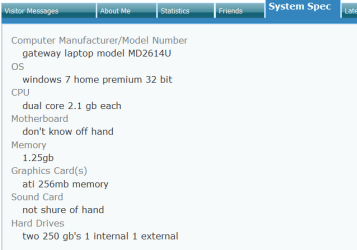
Doing a Google search for your computer shows it as originally having Windows Vista 64-bit installed.

Do you know your Laptops history? Did you buy it used or upgraded it yourself?

What method are you using to reinstall your OS, from a HDD partition, OEM software from your System Builder, or?

Here's a screen shot of your present "System Specs."
 

Attachments

  • specs.PNG
    specs.PNG
    8.9 KB · Views: 20
Last edited:

My Computers My Computers

  • At a glance

    Win7, Win10, Win11
    Computer type
    PC/Desktop
    Computer Manufacturer/Model Number
    HP Pavilion 6751c
    OS
    Win7, Win10, Win11
    Internet Speed
    100 Mbps
    Antivirus
    Norton 360
    Browser
    IE 11
  • At a glance

    Win7, Win10, Win11
    Computer type
    PC/Desktop
    System Manufacturer/Model Number
    HP ENVY 750-514 & Dell XPS 8960
    OS
    Win7, Win10, Win11
    Antivirus
    Norton 360
Please, download the free version of Speccy and post a screenshot of the results.
https://www.piriform.com/speccy
http://www.sevenforums.com/tutorials/9733-screenshots-files-upload-post-seven-forums.html

Here's what I found for your Computers original specs.
Gateway MD2614u Specs - CNET

It appears your Computer is under powered. If your running OEM software, it would be full of Bloatware, causing a load on your systems limited resources.

After you reinstalled the OS, what programs have you added back?

What Antivirus and Firewall do you use?

John
 

My Computers My Computers

  • At a glance

    Win7, Win10, Win11
    Computer type
    PC/Desktop
    Computer Manufacturer/Model Number
    HP Pavilion 6751c
    OS
    Win7, Win10, Win11
    Internet Speed
    100 Mbps
    Antivirus
    Norton 360
    Browser
    IE 11
  • At a glance

    Win7, Win10, Win11
    Computer type
    PC/Desktop
    System Manufacturer/Model Number
    HP ENVY 750-514 & Dell XPS 8960
    OS
    Win7, Win10, Win11
    Antivirus
    Norton 360
AmericanPharaoh, check the very 1st line in the original post on this thread. The Gateway MD6214u died in Jan of this year. Bad main voltage regular on the motherboard It got scraped. I now have HP Compaq Presario C700 laptop.

Doing a Google search for your computer shows it as originally having Windows Vista 64-bit installed.

Do you know your Laptops history? Did you buy it used or upgraded it yourself?

What method are you using to reinstall your OS, from a HDD partition, OEM software from your System Builder, or?

Here's a screen shot of your present "System Specs."
 

My Computer My Computer

At a glance

windows 7 home 32 bit, I just changed back fr...amc a6-6310, radon r4 graphics 1800mhz with 4...6.8gbnot sure off hand
Computer type
Laptop
Computer Manufacturer/Model Number
Dell Inspiron 3541
OS
windows 7 home 32 bit, I just changed back from 64 to 32bit
CPU
amc a6-6310, radon r4 graphics 1800mhz with 4 cores
Memory
6.8gb
Graphics Card(s)
not sure off hand
Sound Card
not shure off hand
Monitor(s) Displays
built in lcd
Screen Resolution
1366 x 768
Hard Drives
1 500gb sata internal HDD and 1 250 gb's sata HDD in a USB external USB case.
Keyboard
Wifi with attached wifi mouse
Internet Speed
don't know
Antivirus
Zone Alarm
Browser
Firefox
Other Info
The gateway laptop model MD2614U died because a voltage regulator on the motherboard went poof. The Gateway laptop has been scraped.
I spend a lot of time helping in multiple threads and three other websites. When I came back to your thread, I looked a your last comments; you said, you had reinstalled the OS, but the overheating problem was still there... just not as much. I then referred to the System Specs you had in your profile.

Please, download Speccy as requested earlier, use this utility to update your System Specs. Then upload a Screenshoot of Speccy results here, we can go from there.

http://www.sevenforums.com/tutorials/9733-screenshots-files-upload-post-seven-forums.html

John
 

My Computers My Computers

  • At a glance

    Win7, Win10, Win11
    Computer type
    PC/Desktop
    Computer Manufacturer/Model Number
    HP Pavilion 6751c
    OS
    Win7, Win10, Win11
    Internet Speed
    100 Mbps
    Antivirus
    Norton 360
    Browser
    IE 11
  • At a glance

    Win7, Win10, Win11
    Computer type
    PC/Desktop
    System Manufacturer/Model Number
    HP ENVY 750-514 & Dell XPS 8960
    OS
    Win7, Win10, Win11
    Antivirus
    Norton 360
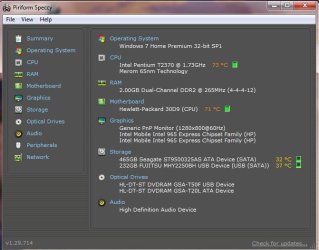
Here is the Speccy screen capture of this HP Compaq Presaio C700 laptop.

I spend a lot of time helping in multiple threads and three other websites. When I came back to your thread, I looked a your last comments; you said, you had reinstalled the OS, but the overheating problem was still there... just not as much. I then referred to the System Specs you had in your profile.

Please, download Speccy as requested earlier, use this utility to update your System Specs. Then upload a Screenshoot of Speccy results here, we can go from there.

http://www.sevenforums.com/tutorials/9733-screenshots-files-upload-post-seven-forums.html

John
 

Attachments

  • speccy.jpg
    speccy.jpg
    45.4 KB · Views: 11

My Computer My Computer

At a glance

windows 7 home 32 bit, I just changed back fr...amc a6-6310, radon r4 graphics 1800mhz with 4...6.8gbnot sure off hand
Computer type
Laptop
Computer Manufacturer/Model Number
Dell Inspiron 3541
OS
windows 7 home 32 bit, I just changed back from 64 to 32bit
CPU
amc a6-6310, radon r4 graphics 1800mhz with 4 cores
Memory
6.8gb
Graphics Card(s)
not sure off hand
Sound Card
not shure off hand
Monitor(s) Displays
built in lcd
Screen Resolution
1366 x 768
Hard Drives
1 500gb sata internal HDD and 1 250 gb's sata HDD in a USB external USB case.
Keyboard
Wifi with attached wifi mouse
Internet Speed
don't know
Antivirus
Zone Alarm
Browser
Firefox
Other Info
The gateway laptop model MD2614U died because a voltage regulator on the motherboard went poof. The Gateway laptop has been scraped.
Hello Reble,

Sorry, for the delay.

Thanks, for posting the Speccy results.

In reviewing this thread, I see you have not addressed many of my questions. For me/us to properly diagnose the issues your having with your Presario C700 Laptop, I/we need you to answer my/our questions or we go nowhere with getting your issue resolved in a timely manner.

Speccy results show your Laptop is running very hot. The amount of memory installed is not adequate to property run Windows 7. A 32-bit system is only capable of running a maximum of 4GB of Ram. Windows 7 needs a minimum of 3GB of Ram to properly run. You have 2GB of Ram installed, not enough.

Zone Alarm is a resource hungry program, and should not be used on your system. You would be better off to use a light weight AV with Windows Firewall. This will help considerably with your limited amount of system resources.

Please, go to Crucial.com, download the memory scanner, then post the results here.
Welcome to Crucial USA

Questions:

1. Do you know your Laptops history? Did you buy it used or upgrade the operating system to Windows 7 yourself?

2. What method are you using to reinstall your OS, from a HDD partition, Installation OEM software from your System Builder, store purchased OEM software, or a Windows ISO installation?

3. After you reinstalled the OS, what programs have you added back? This is important.

We will need to look into Device Manager and MSCONFIG more later.

4. Do you use a Malware program?

5.Do you have any external USB devices attached to your Laptop?

To address your earlier question in regards to your CPU being overclocked. The answer is no, without going into the details, your Laptop is not capable of adjusting CPU speed.

Please, address each question to the best of your ability, thanks.

John
 

My Computers My Computers

  • At a glance

    Win7, Win10, Win11
    Computer type
    PC/Desktop
    Computer Manufacturer/Model Number
    HP Pavilion 6751c
    OS
    Win7, Win10, Win11
    Internet Speed
    100 Mbps
    Antivirus
    Norton 360
    Browser
    IE 11
  • At a glance

    Win7, Win10, Win11
    Computer type
    PC/Desktop
    System Manufacturer/Model Number
    HP ENVY 750-514 & Dell XPS 8960
    OS
    Win7, Win10, Win11
    Antivirus
    Norton 360
I'm curious as to what is running in the background. Check you CPU performance. You can use a windows gadget or Cont/Alt/Del, to open task manager. If you have no desktop pgms running, cpu usage should be at or near zero. IF it is running at 50-100%, then turn off automatic updates(or close the pgm that is hogging the cpu) and reboot. Also, 2GB of RAM is plenty for W7, 32bit, for normal office and browsing. I see W7, 32bit, computers all the time with 1 GB of RAM, in fact, quite a few of the cheapy laptops came OEM with only 1GB. Granted, they would perform better with at least 2GB
 

My Computer My Computer

At a glance

Windows 7 Home Premium 64 bitIntel I5-4440 3.104 GBAMD Radeon HD 6900
Computer type
PC/Desktop
Computer Manufacturer/Model Number
Custom
OS
Windows 7 Home Premium 64 bit
CPU
Intel I5-4440 3.10
Motherboard
Asus
Memory
4 GB
Graphics Card(s)
AMD Radeon HD 6900
Hard Drives
one, 500GB, 7200 RPM
Antivirus
MS Security Essentials
Browser
IE 11, Chrome
1st I went to Crucial.com I couldn't find a "memory scanner" prog. I found "Crucial Advisor tool" and "Crucial System Scanner" tool. I thank you for the link. Now I found a place that has memory for this laptop. I had found locally 2 matching sticks of memory 2gb each 2rx8 pc2-6400s-666-12-f0. I stuck those memory in and this laptop fummed, squawked and beeped like R.2.D.2. (from StarWars) strung out meth. :D
Questions,

1. I got the laptop from a pawn shop with a OEM version of Win7 home 32bit on it. There was a pile of useless prog's on it so I wiped the partition clean and installed my Win7 home 32bit.

2. I got my Win 7 Home 32 bit setup disks from Walmart.

3. I have a lot of games and prog's. But maby a hand full are ever installed in any given time.

4. Yes I have Malware program

5. I have a 250gb HDD in a external USB case, a optical cd/dvd drive in a USB case, and a b/w laser jet printer plugged into 1 powered USB hub going into one of the laptop's USB ports


Hello Reble,

Sorry, for the delay.

Thanks, for posting the Speccy results.

In reviewing this thread, I see you have not addressed many of my questions. For me/us to properly diagnose the issues your having with your Presario C700 Laptop, I/we need you to answer my/our questions or we go nowhere with getting your issue resolved in a timely manner.

Speccy results show your Laptop is running very hot. The amount of memory installed is not adequate to property run Windows 7. A 32-bit system is only capable of running a maximum of 4GB of Ram. Windows 7 needs a minimum of 3GB of Ram to properly run. You have 2GB of Ram installed, not enough.

Zone Alarm is a resource hungry program, and should not be used on your system. You would be better off to use a light weight AV with Windows Firewall. This will help considerably with your limited amount of system resources.

Please, go to Crucial.com, download the memory scanner, then post the results here.
Welcome to Crucial USA

Questions:

1. Do you know your Laptops history? Did you buy it used or upgrade the operating system to Windows 7 yourself?

2. What method are you using to reinstall your OS, from a HDD partition, Installation OEM software from your System Builder, store purchased OEM software, or a Windows ISO installation?

3. After you reinstalled the OS, what programs have you added back? This is important.

We will need to look into Device Manager and MSCONFIG more later.

4. Do you use a Malware program?

5.Do you have any external USB devices attached to your Laptop?

To address your earlier question in regards to your CPU being overclocked. The answer is no, without going into the details, your Laptop is not capable of adjusting CPU speed.

Please, address each question to the best of your ability, thanks.

John
 

My Computer My Computer

At a glance

windows 7 home 32 bit, I just changed back fr...amc a6-6310, radon r4 graphics 1800mhz with 4...6.8gbnot sure off hand
Computer type
Laptop
Computer Manufacturer/Model Number
Dell Inspiron 3541
OS
windows 7 home 32 bit, I just changed back from 64 to 32bit
CPU
amc a6-6310, radon r4 graphics 1800mhz with 4 cores
Memory
6.8gb
Graphics Card(s)
not sure off hand
Sound Card
not shure off hand
Monitor(s) Displays
built in lcd
Screen Resolution
1366 x 768
Hard Drives
1 500gb sata internal HDD and 1 250 gb's sata HDD in a USB external USB case.
Keyboard
Wifi with attached wifi mouse
Internet Speed
don't know
Antivirus
Zone Alarm
Browser
Firefox
Other Info
The gateway laptop model MD2614U died because a voltage regulator on the motherboard went poof. The Gateway laptop has been scraped.
It needs internal cleaning or there was no thermal compound on the processor.
 

My Computer My Computer

At a glance

Windows 7 Home Premium 64-BITAMD A8 7200P8GB 1600mhzRadeon R5 (APU) + Radeon R5 M230 2GB Dual Gra...
Computer type
PC/Desktop
Computer Manufacturer/Model Number
ASUS X550ZE
OS
Windows 7 Home Premium 64-BIT
CPU
AMD A8 7200P
Motherboard
N/A
Memory
8GB 1600mhz
Graphics Card(s)
Radeon R5 (APU) + Radeon R5 M230 2GB Dual Graphics
Sound Card
Realtek ALC269 with SonicMaster
Monitor(s) Displays
Laptop Display
Screen Resolution
1920 x 1080 @60hz
Hard Drives
WDC WD50 00LPVX-80V0TT0 (500GB)
PSU
Laptop Charger
Mouse
ARMAGGEDON TEXTRON SCORPION 7
Internet Speed
100 mbps DOWN / 50 mbps UP
Antivirus
Windows Defender
Browser
Mozzila FireFox, Valve Steam in-game internet browser
Hello,

Yeah, System Scanner... that's it, not Memory Scanner. LOL

So, the 2 sticks you picked up are working, or are you saying your getting beep codes after installing them? If so, return them, run the Crucial Scanner, and order the Ram sticks from them... their guaranteed. Once you have your new Ram up and running like a screaming banshee. Let us know if there is any noticeable improvement in speed.

The next step would be to uninstall Zone Alarm and replace it with MSE. Update it, and run a full system scan. Choose English and Windows 7 32-bit from the list.
https://support.microsoft.com/en-us/help/14210/security-essentials-download

Good point by Roasterman. When you opened the Laptop case earlier to clean out the fan vent; did you use canned air to blow everything out? Did you apply new thermal paste?

Install a utility to monitor CPU fan speed. This way you can see if fan speed is increasing to cool down CPU when it starts getting hot. You should also be able to hear the fan speed up as it attempts to cool the CPU.

Another, good point by Holmes177 to check Task Manager for programs causing high CPU usage.

John
 
Last edited:

My Computers My Computers

  • At a glance

    Win7, Win10, Win11
    Computer type
    PC/Desktop
    Computer Manufacturer/Model Number
    HP Pavilion 6751c
    OS
    Win7, Win10, Win11
    Internet Speed
    100 Mbps
    Antivirus
    Norton 360
    Browser
    IE 11
  • At a glance

    Win7, Win10, Win11
    Computer type
    PC/Desktop
    System Manufacturer/Model Number
    HP ENVY 750-514 & Dell XPS 8960
    OS
    Win7, Win10, Win11
    Antivirus
    Norton 360
I am getting beep codes but the beeps don't conform to any known pattern and Windows is lock up in a boot loop. Windows get to the screen just before the Windows password is asked for. and turns around and boots from the start again when that match set of memory is in.

I downloaded the "Crucial Scanner" and ran it. All I get is a brief flash of the DOS cmd screen and the following text pops up.
----------------
<html><head>
<!-- saved from url=(0014)about:internet -->
<script language='JavaScript'><!--
function postForm(){
frmMain.action= 'http://www.crucial.com/webapp/wcs/stores/servlet/ScannerProcessCmd';
frmMain.submit();}
function timedRefresh(timeoutPeriod) {
setTimeout("location.reload(true);",timeoutPeriod);
}
--></script></head>
<body onload='javascipt:timedRefresh(3000);'>
<form id='frmMain' name='frmMain' action='' method='POST'>
<div align='center'><img src='http://images.crucial.com/wcsstore/CrucialSAS/images/scanner-loading.jpg' class='boxborder'></div>
<input type='hidden' name='ScanData' value=''><input type='hidden' name='ScanType' value='E'><input type='hidden' name='ScanStatus' value='E'>
<input type='hidden' name='appName' value='CrucialScan.exe'>
<input type='hidden' name='ComputerType' value='PC'>
</form>
</body></html>
---------------
And that's it. I tried downloading 2 times. I had a bit of trouble del the Crucial Scanner the 1st time. I got a message saying I couldn't del the Crucial Scanner because it was still open and running. I went into task manager > processes to stop the prog from running. When I did that I got a blue screen crash. I wasn't able to capture the blue screen with the camera in my cell phone. Anyways Windows is back up and running at 110% :D . I found the problem. There was a problem with a few of the files for my HP Photosmart plus B209a inkjet printer. I had to del the whole shooting match for the inkjet printer and re-install the whole ball of wax, new, for the printer. Windows, prog's and Firefox are screaming along with no delays now.

Just for curiosity sake. I have this laptop a HP Compaq Presario C700 and a HP compaq Presario CQ56. Which laptop is better the C700 or the CQ56? The CQ56 has the Windows 7 sticker on it just bellow the keyboard on the right side. The C700 has the Vista product install number on the bottom. 1 of the 2 laptops is going to my 11 yr old nephew for Christmas. I just can't make up my mind as to which 1.

Hello,

Yeah, System Scanner... that's it, not Memory Scanner. LOL

So, the 2 sticks you picked up are working, or are you saying your getting beep codes after installing them? If so, return them, run the Crucial Scanner, and order the Ram sticks from them... their guaranteed. Once you have your new Ram up and running like a screaming banshee. Let us know if there is any noticeable improvement in speed.

The next step would be to uninstall Zone Alarm and replace it with MSE. Update it, and run a full system scan. Choose English and Windows 7 32-bit from the list.
https://support.microsoft.com/en-us/help/14210/security-essentials-download

Good point by Roasterman. When you opened the Laptop case earlier to clean out the fan vent; did you use canned air to blow everything out? Did you apply new thermal paste?

Install a utility to monitor CPU fan speed. This way you can see if fan speed is increasing to cool down CPU when it starts getting hot. You should also be able to hear the fan speed up as it attempts to cool the CPU.

Another, good point by Holmes177 to check Task Manager for programs causing high CPU usage.

John
 

My Computer My Computer

At a glance

windows 7 home 32 bit, I just changed back fr...amc a6-6310, radon r4 graphics 1800mhz with 4...6.8gbnot sure off hand
Computer type
Laptop
Computer Manufacturer/Model Number
Dell Inspiron 3541
OS
windows 7 home 32 bit, I just changed back from 64 to 32bit
CPU
amc a6-6310, radon r4 graphics 1800mhz with 4 cores
Memory
6.8gb
Graphics Card(s)
not sure off hand
Sound Card
not shure off hand
Monitor(s) Displays
built in lcd
Screen Resolution
1366 x 768
Hard Drives
1 500gb sata internal HDD and 1 250 gb's sata HDD in a USB external USB case.
Keyboard
Wifi with attached wifi mouse
Internet Speed
don't know
Antivirus
Zone Alarm
Browser
Firefox
Other Info
The gateway laptop model MD2614U died because a voltage regulator on the motherboard went poof. The Gateway laptop has been scraped.
Back
Top