A question about a Firefox popup

Nelson35

New member
Member
Local time
9:39 AM
Messages
91
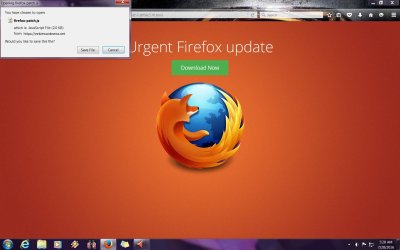
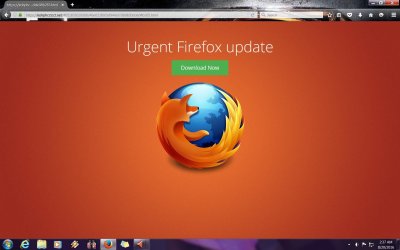
I keep getting this popup (see pic) when I'm at zynga dot Com playing Farmvile 2. I'll be in the middle of a game and it will just load up out of the blue. I already have the latest version of Firefox installed.
 

Attachments
  • ff popup.jpg
    ff popup.jpg
    126.4 KB · Views: 7
Last edited by a moderator:

My Computer My Computer

Computer type
PC/Desktop
Computer Manufacturer/Model Number
Puget Systems
OS
Windows 7 Home Premium 64bit
CPU
Intel core i5
Motherboard
ASUSTeK Computer INC. P8Z68-V PRO GEN3 (LGA1155)
Memory
8GB
Graphics Card(s)
AMD Radeo HD 7700 series
Sound Card
Realtek High Definition Audio
Monitor(s) Displays
Acer Al2002W
Screen Resolution
1680x1050
Hard Drives
500GB
298GB Western Digital WD 3200AAJ External
2794GB Western Digital WD My Book 1230
PSU
Antec TruePower New Series 650W
Case
Lancool C-K7B
Cooling
Cooler Master Hyper TX3
Antivirus
windows security essentials
Browser
IE10, Firefox

My Computer My Computer

Computer type
PC/Desktop
Computer Manufacturer/Model Number
Ignatz Special; 4 speed manual gearbox; factory air conditioning; one of one
OS
Windows 7 Home Premium SP1, 64-bit
CPU
Intel Skylake i5-6600K, not overclocked
Motherboard
AsRock Z170M Extreme 4, micro ATX
Memory
8 GB HyperX DDR4-2666 (2 x 4 GB)
Graphics Card(s)
none; graphics are integrated on CPU
Sound Card
onboard: Realtek ALC1150; external: USB Behringer UF0-202
Monitor(s) Displays
Dell S2340M 23 inch IPS
Screen Resolution
1600 x 900
Hard Drives
System: Crucial MX100 series SSD, 128 GB;
Data: Samsung Spinpoint 103SJ, 1 TB;
Backup: WD Caviar Green WD30EZRX-00D8PB0, 3 TB
PSU
Rosewill SilentNight 500 watt fanless, semi-modular
Case
Antec Solo II
Cooling
Noctua NH-U12S; Noctua F12 intake, Noctua S12A exhaust
Keyboard
Microsoft 200 6JH-00001 USB
Mouse
Dell or Microsoft optical wired; USB
Antivirus
Microsoft Security Essentials and Malwarebytes Premium
Browser
Pale Moon
Other Info
All fans PWM; speeds at idle: CPU circa 500 rpm; intake circa 600 rpm; exhaust circa 600 rpm; CPU temps 27 idle and 47 C load in a warm room (27 C/81 F) when running Intel Extreme Tuning Utility stress test.
Zinga dot Com is a known source for malware - if you visit you have to expect these problems This is not a Mozilla screen but a malware produced one following any links here is not something you want to do
 

My Computers My Computers

System One System Two

  • Computer type
    PC/Desktop
    Computer Manufacturer/Model Number
    ChillBlast - Custom to my design
    OS
    Windows 11 Pro x64 [Latest Release and Release Preview]
    CPU
    Ryzen 9 5950X, 3.8 - 5.2 MHz
    Motherboard
    Asus Prime X570-Pro
    Memory
    64GB [2 x 32GB] DDR4 3200MHz
    Graphics Card(s)
    4GB NVIDIA GEFORCE GTX 1650 Ti
    Sound Card
    On-board SPDIF to 5.1 System + HDMI [5.1 system]
    Monitor(s) Displays
    32" UHD 32 Bit HDR Monitor + 43" UHD 4K 32Bit HDR TV
    Screen Resolution
    2 x 3840 x 2160 @60Hz
    Hard Drives
    1TB M2 SSD OS, 500GB Fast Access SSD, 2 x 8TB Data + Various Externals from 1TB to 4TB, 10TB NAS
    PSU
    NZXT C750 80 PLUS Gold 750W Modular PSU
    Case
    Workstation Case [Matt Black]
    Cooling
    NZXT Kraken X63 280mm CPU Cooler +2x Quiet Case fans
    Keyboard
    Logitech Wireless MX Keys & K400 + others
    Mouse
    Logitech Wireless MX Master 3S
    Internet Speed
    920 MB Down 50 MB Up
    Antivirus
    BitDefender Total Security Pro
    Browser
    Chrome (always run latest Non-Beta)
    Other Info
    Also run ...
    Laptop - Quad 8GB - Windows 10 Pro x64
    Nexus 7 Android tablet x2
    Samsung 10.2" tablet
    Blackview TAB 8 4G Android Tablet c/w Keyboard
    Wacom Intuos Pro Medium Pen Pad
    Wacom Intuos Pro Small Pen Pad
    Wacom Expresskeys Remote
    Loopdeck+ Graphics Controller
    Shuttle Pro v2 Control
  • Computer type
    Laptop
    System Manufacturer/Model Number
    Dell XPS 17 10750H
    OS
    Windows 11 Pro x64 Latest RP
    CPU
    Intel I7 10750H 5.0GHz
    Motherboard
    Dell XPS
    Memory
    32GB [2x16GB] DDR4 2933 MHz
    Graphics Card(s)
    nVidia GTX1650Ti 4 GB GDDR6
    Sound Card
    Stock [Realtek] 4 Speaker
    Monitor(s) Displays
    17" IPS UHD+ Infinity Edge Touchscreen
    Screen Resolution
    3840 x 2400
    Hard Drives
    2TB M2 NVMe, 4TB External + various 500GB & 1TB External NVMe (also have access to spinner HDD from
    PSU
    Stock
    Case
    Stock XPS Aluminium & Carbon Fibre
    Cooling
    Stock - Active Fan Control
    Keyboard
    Backlit + Various Logitech
    Mouse
    Stock Track Pad + Logitech MX Trackball
    Internet Speed
    72 MB Down 18MB Up
    Browser
    Chrome
    Other Info
    Also run ...
    Laptop - Quad 8GB - Windows 10 Pro x64
    Nexus 7 Android tablet x2
    10.2" tablet
    Sony Z3 Android Smartphone
    Wacom Intuos Pro Medium Pen Pad
    Wacom Intuos Pro Small Pen Pad
    Wacom Expresskeys Remote
    Loopdeck+ Graphics Controller
    Shuttle Pro v2 Control Pad
    10TB NAS
Hi:

Yep.
I agree with @Barman58.

Whatever you do, do not click on any links.
If you have done so and/or to be extra careful, especially if you are seeing similar popups under other circumstances, you might want to get a bit of expert help checking the system for malware.
Gaming sites and other "P2P" services are a good way to get infected.
I don't know what you're running for real-time security.
So you may want to beef up your security defenses.

MM
 

My Computer My Computer

Computer type
PC/Desktop
Computer Manufacturer/Model Number
Dell Studio XPS 8500
OS
OEM Windows 7 Ult (x64) SP1
CPU
Intel Core-i7 3770 @ 3.4 GHz
Motherboard
"Dell" branded
Memory
16 GB DDR3 SDRAM @ 1333 MHz
Graphics Card(s)
NVidia GeForce GT620 1 GB
Sound Card
THX TruStudio PC
Monitor(s) Displays
Dell U2410 Full HD
Hard Drives
2.0 TB SATA2 @ 7200 RPM
PSU
350W
Keyboard
MS 4000 Ergon - Wired
Mouse
Logitech Anywhere MX
Internet Speed
Cable HSI w/Turbo (router)
Antivirus
KIS-MBAM Premium-MBAE Premium
Browser
Fx (current version); IE
Other Info
And a Win7/64 Pro laptop; And a Win10/64 Pro desktop.
Every now and then I get one of those popups using Firefox.
I just close them. I have never ticked to update because I know my Firefox is already updated.
I got those popups from the Windstream (my I.S.P) website for about a week. I presume they fixed it because it no longer pops up.
I have run all kinds of scans afterwards and found nothing; but I do recommend running security scans to make sure.

Jack
 

My Computer My Computer

Computer type
PC/Desktop
Computer Manufacturer/Model Number
Home made Desktop
OS
Windows 10 Pro. 64/ version 1709 Windows 7 Pro/64
CPU
Intel i7-6800K @ 4.3
Motherboard
ASUS X-99 Deluxe II
Memory
Corsair Platinum 16 gig @2400
Graphics Card(s)
EVGA GTX 1070 OC
Monitor(s) Displays
Asus 27" LED LCD/VE278Q
Screen Resolution
1920-1080 or 1280-720 HDMI
Hard Drives
INTEL SSD 730-240 Gb Sata 3.0/
PSU
EVGA Platium 1200W
Case
Phanteks Luxe Tempered Glass 8 fans/ one radiator
Cooling
XSPC/ Water Cooled CPU
Keyboard
Das 4 Professional
Mouse
Logitech M705/MX Anywhere 2-S
Internet Speed
100 mbits
Antivirus
Microsoft Security Essentials/ Malwarebytes Premium 3.0/ SAS
Browser
I.E. 11 default/Firefox/ ISP Time Warner Cable/Spectrum
Other Info
LG BluRay Burner/
Sound system-KLipsch-THX/
Icy Dock ssd Hot Swap bays.
Thanks everybody for the advice. I've never clicked on the link either cause I knew I was up to date and it just looked fishy. I actually e-mailed zynga twice and showed them the screen and they told me to either update my browser or try using Chrome.:rolleyes:
 

My Computer My Computer

Computer type
PC/Desktop
Computer Manufacturer/Model Number
Puget Systems
OS
Windows 7 Home Premium 64bit
CPU
Intel core i5
Motherboard
ASUSTeK Computer INC. P8Z68-V PRO GEN3 (LGA1155)
Memory
8GB
Graphics Card(s)
AMD Radeo HD 7700 series
Sound Card
Realtek High Definition Audio
Monitor(s) Displays
Acer Al2002W
Screen Resolution
1680x1050
Hard Drives
500GB
298GB Western Digital WD 3200AAJ External
2794GB Western Digital WD My Book 1230
PSU
Antec TruePower New Series 650W
Case
Lancool C-K7B
Cooling
Cooler Master Hyper TX3
Antivirus
windows security essentials
Browser
IE10, Firefox
The domain shown in your screenshot doesn't seem to exist. Personally I would never click those download buttons but instead copy the URL into a text document to see what it is. Additionally use "Inspect Element" to get the link.

Test pop-up blocker here:

Test your pop-up blocker here.
 

My Computer My Computer

Computer type
Laptop
Computer Manufacturer/Model Number
ASUS
OS
Microsoft Windows 7 Home Premium 64-bit 7601 Multiprocessor Free Service Pack 1
CPU
AMD C-60 APU with Radeon(tm) HD Graphics
Motherboard
ASUSTeK COMPUTER INC. X501U
Memory
4.00 GB
Graphics Card(s)
AMD Radeon HD 6290 Graphics
Sound Card
(1) AMD High Definition Audio Device (2) Realtek High Defi
Screen Resolution
1366 x 768 x 32 bits (4294967296 colors) @ 60 Hz
Hard Drives
Hitachi HTS545050A7E380 SATA Disk Device
Antivirus
Comodo CIS & FW, SecureAplus App Whitelisting, Threatfire
Browser
Cyberfox 64bit, Opera 64bit, Airfox
Other Info
Spy-The-Spy, HitmanPro.Alert, Norton Connect Safe, MJRegWatcher, BitDefender TrafficLight, Voodoo Shield, Zemana AntiMalware
Thanks for that link, Callender.

I'm using Pale Moon, a fork of Firefox. It passed about 25 of the 27 tests at your link. I'm wondering if any browser will pass all 27?
 

My Computer My Computer

Computer type
PC/Desktop
Computer Manufacturer/Model Number
Ignatz Special; 4 speed manual gearbox; factory air conditioning; one of one
OS
Windows 7 Home Premium SP1, 64-bit
CPU
Intel Skylake i5-6600K, not overclocked
Motherboard
AsRock Z170M Extreme 4, micro ATX
Memory
8 GB HyperX DDR4-2666 (2 x 4 GB)
Graphics Card(s)
none; graphics are integrated on CPU
Sound Card
onboard: Realtek ALC1150; external: USB Behringer UF0-202
Monitor(s) Displays
Dell S2340M 23 inch IPS
Screen Resolution
1600 x 900
Hard Drives
System: Crucial MX100 series SSD, 128 GB;
Data: Samsung Spinpoint 103SJ, 1 TB;
Backup: WD Caviar Green WD30EZRX-00D8PB0, 3 TB
PSU
Rosewill SilentNight 500 watt fanless, semi-modular
Case
Antec Solo II
Cooling
Noctua NH-U12S; Noctua F12 intake, Noctua S12A exhaust
Keyboard
Microsoft 200 6JH-00001 USB
Mouse
Dell or Microsoft optical wired; USB
Antivirus
Microsoft Security Essentials and Malwarebytes Premium
Browser
Pale Moon
Other Info
All fans PWM; speeds at idle: CPU circa 500 rpm; intake circa 600 rpm; exhaust circa 600 rpm; CPU temps 27 idle and 47 C load in a warm room (27 C/81 F) when running Intel Extreme Tuning Utility stress test.
The domain shown in your screenshot doesn't seem to exist.
Which begs the question of how the website was displayed.

Most of the ".net" URLs, in these recent threads did not exist on the day that the post was made:

https://support.mozilla.org/en-US/questions/1129758

https://community.norton.com/en/forums/fake-urgent-update-page-appears-daily-firefox-despite-nis

Some crawler seems to have harvested the URLs and registered some of the domains within a day or two.
 

My Computer My Computer

Computer type
Laptop
Computer Manufacturer/Model Number
Employer provided Dell Latitude
OS
W7 Pro SP1 64bit
CPU
i7
Memory
8GB
Graphics Card(s)
Intel HD Graphics
Hard Drives
crappy SSD
Antivirus
Employer mandated Symantec Endpoint Protection
Browser
Pale Moon 64bit, IE11 64bit & Chrome 64bit
Thanks for that link, Callender.

I'm using Pale Moon, a fork of Firefox. It passed about 25 of the 27 tests at your link. I'm wondering if any browser will pass all 27?

Actually none of my browser pass 7 and 8 but using Cyberfox tweaked quite a bit and with Noscript security suite and another cross browser program (can't mention the program as forum rules don't allow discussion of such software) - it does indeed pass all tests.

If you like try installing the Noscript Security Suite and enable/ disable on an as and whenn needed basis. In other words there's mostly no need to worry when browsing trusted sites unless they've been compromised by malicious adverts/ flash banners.

https://addons.mozilla.org/en-US/firefox/addon/noscript/

Can simply allow scripts for trusted domains to make things a little easier.
 

My Computer My Computer

Computer type
Laptop
Computer Manufacturer/Model Number
ASUS
OS
Microsoft Windows 7 Home Premium 64-bit 7601 Multiprocessor Free Service Pack 1
CPU
AMD C-60 APU with Radeon(tm) HD Graphics
Motherboard
ASUSTeK COMPUTER INC. X501U
Memory
4.00 GB
Graphics Card(s)
AMD Radeon HD 6290 Graphics
Sound Card
(1) AMD High Definition Audio Device (2) Realtek High Defi
Screen Resolution
1366 x 768 x 32 bits (4294967296 colors) @ 60 Hz
Hard Drives
Hitachi HTS545050A7E380 SATA Disk Device
Antivirus
Comodo CIS & FW, SecureAplus App Whitelisting, Threatfire
Browser
Cyberfox 64bit, Opera 64bit, Airfox
Other Info
Spy-The-Spy, HitmanPro.Alert, Norton Connect Safe, MJRegWatcher, BitDefender TrafficLight, Voodoo Shield, Zemana AntiMalware
Can simply allow scripts for trusted domains to make things a little easier.

I have No Script installed, but I'm not sure I have it configured correctly.

How can I get it to "allow scripts for trusted domains"?

Any other config tips appreciated.

I'm not sure I'm using it right. I constantly find myself poking the red S to "temporarily allow all this page" when I want to view something it's blocking. I don't make it a practice to whitelist individual sites.

As an aside---with the default config on No Script, the only tests I fail are 12 and 22. Not sure why I pass 7 and 8 and you don't.
 

My Computer My Computer

Computer type
PC/Desktop
Computer Manufacturer/Model Number
Ignatz Special; 4 speed manual gearbox; factory air conditioning; one of one
OS
Windows 7 Home Premium SP1, 64-bit
CPU
Intel Skylake i5-6600K, not overclocked
Motherboard
AsRock Z170M Extreme 4, micro ATX
Memory
8 GB HyperX DDR4-2666 (2 x 4 GB)
Graphics Card(s)
none; graphics are integrated on CPU
Sound Card
onboard: Realtek ALC1150; external: USB Behringer UF0-202
Monitor(s) Displays
Dell S2340M 23 inch IPS
Screen Resolution
1600 x 900
Hard Drives
System: Crucial MX100 series SSD, 128 GB;
Data: Samsung Spinpoint 103SJ, 1 TB;
Backup: WD Caviar Green WD30EZRX-00D8PB0, 3 TB
PSU
Rosewill SilentNight 500 watt fanless, semi-modular
Case
Antec Solo II
Cooling
Noctua NH-U12S; Noctua F12 intake, Noctua S12A exhaust
Keyboard
Microsoft 200 6JH-00001 USB
Mouse
Dell or Microsoft optical wired; USB
Antivirus
Microsoft Security Essentials and Malwarebytes Premium
Browser
Pale Moon
Other Info
All fans PWM; speeds at idle: CPU circa 500 rpm; intake circa 600 rpm; exhaust circa 600 rpm; CPU temps 27 idle and 47 C load in a warm room (27 C/81 F) when running Intel Extreme Tuning Utility stress test.
The domain shown in your screenshot doesn't seem to exist. Personally I would never click those download buttons but instead copy the URL into a text document to see what it is. Additionally use "Inspect Element" to get the link.

Test pop-up blocker here:

Test your pop-up blocker here.

Hey thanks for that link. Mine passed all but a couple.
 

My Computer My Computer

Computer type
PC/Desktop
Computer Manufacturer/Model Number
Puget Systems
OS
Windows 7 Home Premium 64bit
CPU
Intel core i5
Motherboard
ASUSTeK Computer INC. P8Z68-V PRO GEN3 (LGA1155)
Memory
8GB
Graphics Card(s)
AMD Radeo HD 7700 series
Sound Card
Realtek High Definition Audio
Monitor(s) Displays
Acer Al2002W
Screen Resolution
1680x1050
Hard Drives
500GB
298GB Western Digital WD 3200AAJ External
2794GB Western Digital WD My Book 1230
PSU
Antec TruePower New Series 650W
Case
Lancool C-K7B
Cooling
Cooler Master Hyper TX3
Antivirus
windows security essentials
Browser
IE10, Firefox
The domain shown in your screenshot doesn't seem to exist.
Which begs the question of how the website was displayed.

Most of the ".net" URLs, in these recent threads did not exist on the day that the post was made:

https://support.mozilla.org/en-US/questions/1129758

https://community.norton.com/en/forums/fake-urgent-update-page-appears-daily-firefox-despite-nis

Some crawler seems to have harvested the URLs and registered some of the domains within a day or two.

That is a good question. I don't have to do anything either, the game can just be sitting there and a new page will load up like the one I posted. There is also another little pop up window that opens with something about java script in it which I didn't catch in this pic. Here it is (I thought I had deleted it, but it was still in my junk folder).
 

Attachments

  • fv popup.jpg
    fv popup.jpg
    129.4 KB · Views: 3

My Computer My Computer

Computer type
PC/Desktop
Computer Manufacturer/Model Number
Puget Systems
OS
Windows 7 Home Premium 64bit
CPU
Intel core i5
Motherboard
ASUSTeK Computer INC. P8Z68-V PRO GEN3 (LGA1155)
Memory
8GB
Graphics Card(s)
AMD Radeo HD 7700 series
Sound Card
Realtek High Definition Audio
Monitor(s) Displays
Acer Al2002W
Screen Resolution
1680x1050
Hard Drives
500GB
298GB Western Digital WD 3200AAJ External
2794GB Western Digital WD My Book 1230
PSU
Antec TruePower New Series 650W
Case
Lancool C-K7B
Cooling
Cooler Master Hyper TX3
Antivirus
windows security essentials
Browser
IE10, Firefox
Can simply allow scripts for trusted domains to make things a little easier.
I have No Script installed, but I'm not sure I have it configured correctly. How can I get it to "allow scripts for trusted domains"?

Well you have to define trusted domains on a site by site basis. Once trusted they're added to the whitelist but can also be removed from it. However if you don't wan't to whitelist sites then that's no use.

I'm not sure I'm using it right. I constantly find myself poking the red S to "temporarily allow all this page" when I want to view something it's blocking. I don't make it a practice to whitelist individual sites. As an aside---with the default config on No Script, the only tests I fail are 12 and 22. Not sure why I pass 7 and 8 and you don't.

I meant that I don't pass 7 & 8 with Noscript disabled.

Any other config tips appreciated.

Check out the user.js that can be downloaded here:

A comprehensive list of Firefox privacy and security settings - gHacks Tech News

You can inspect the contents using your text editor and choose what to apply.

Then there's ConfigFox (works with non default profiles/ firefox variants)

Note changes made to profile via user.js will be written to prefs.js unless configured not to via ConfigFox > View > Preferences.

Obviously user.js and prefs.js need to be backed up before messing about or ideally create a full profile backup.
 

My Computer My Computer

Computer type
Laptop
Computer Manufacturer/Model Number
ASUS
OS
Microsoft Windows 7 Home Premium 64-bit 7601 Multiprocessor Free Service Pack 1
CPU
AMD C-60 APU with Radeon(tm) HD Graphics
Motherboard
ASUSTeK COMPUTER INC. X501U
Memory
4.00 GB
Graphics Card(s)
AMD Radeon HD 6290 Graphics
Sound Card
(1) AMD High Definition Audio Device (2) Realtek High Defi
Screen Resolution
1366 x 768 x 32 bits (4294967296 colors) @ 60 Hz
Hard Drives
Hitachi HTS545050A7E380 SATA Disk Device
Antivirus
Comodo CIS & FW, SecureAplus App Whitelisting, Threatfire
Browser
Cyberfox 64bit, Opera 64bit, Airfox
Other Info
Spy-The-Spy, HitmanPro.Alert, Norton Connect Safe, MJRegWatcher, BitDefender TrafficLight, Voodoo Shield, Zemana AntiMalware
The domain shown in your screenshot doesn't seem to exist.
Which begs the question of how the website was displayed.

Most of the ".net" URLs, in these recent threads did not exist on the day that the post was made:

https://support.mozilla.org/en-US/questions/1129758

https://community.norton.com/en/forums/fake-urgent-update-page-appears-daily-firefox-despite-nis

Some crawler seems to have harvested the URLs and registered some of the domains within a day or two.

That is a good question. I don't have to do anything either, the game can just be sitting there and a new page will load up like the one I posted. There is also another little pop up window that opens with something about java script in it which I didn't catch in this pic. Here it is (I thought I had deleted it, but it was still in my junk folder).
That same JS file is mentioned in one of the threads that I linked to.
I would not be too happy that this website can be displayed. The website could do damage to your computer - even if you don't click on any links.
 

My Computer My Computer

Computer type
Laptop
Computer Manufacturer/Model Number
Employer provided Dell Latitude
OS
W7 Pro SP1 64bit
CPU
i7
Memory
8GB
Graphics Card(s)
Intel HD Graphics
Hard Drives
crappy SSD
Antivirus
Employer mandated Symantec Endpoint Protection
Browser
Pale Moon 64bit, IE11 64bit & Chrome 64bit
Back
Top