COM1 unavailable (HP true RS-232 )

rihtt

New member
Member
Local time
5:25 AM
Messages
35
I am disappointed .
I bought the HP ProBook laptops thats still to date are delivered with windows 7 professional & a real physical COM port.


I need it for serial-interface communication instead of fooling around with usb-adapters.


But to my surprise,the com port seems to fail on me! And the virtual-usb adapters works better.
Very often the com1 just goes unavailable:


cmd
Code:
mode com1


-unavailable for the moment


Also when listing com ports within pshell it appears, but when check mode comX you should se
all of its settings, like baudrate etc :


Code:
PS C:\Users\rihtt> [System.IO.Ports.SerialPort]::getportnames()
COM1

When connecting my external usb-adapter it appears as COM10 and works fine. I do believe that it has to do with the so called XP MODE


I Run the virtual XP MODE PC on this windows7, and they share hardware. The com1 is also listed within the virtual machine but it doesnt work.


Is there anything to do at all, or is this hardware issue thats the manufactor H P should do?
 

My Computer My Computer

At a glance

windows 7 Professional x64
Computer type
Laptop
Computer Manufacturer/Model Number
HP
OS
windows 7 Professional x64
If it works OK in Windows 7 (shows as working in the Device Manager) but not in XP Mode, I would suspect an issue with XP mode and not a hardware or HP problem.
 

My Computer My Computer

At a glance

Windows 10 64 bitIntel i7 6700K16GB Corsair DominatorIntel CPU Graphics
Computer type
PC/Desktop
Computer Manufacturer/Model Number
My Own Build
OS
Windows 10 64 bit
CPU
Intel i7 6700K
Motherboard
ASUS ROG Maximus VIII Hero
Memory
16GB Corsair Dominator
Graphics Card(s)
Intel CPU Graphics
Sound Card
RealTek
Monitor(s) Displays
27" Dell S2719dgf
Screen Resolution
2560X1440
Hard Drives
1 TB Samsung 850 EVO SSD for Win 10 Pro
500GB Samsung 850 EVO SSD for Win 10 Insider
2 TB drive for backup
PSU
EVGA Supernova 750G2
Case
BeQuiet Silent Base 600
Cooling
Deepcool Captain 120EX
Keyboard
Microsoft Wireless 2000
Mouse
Microsoft wireless
Internet Speed
100 MB/sec (Cable)
Antivirus
Microsoft Defender and Malwarebytes
Browser
Edge/Firefox
Other Info
Cakewalk (Sonar) by BandLab and Studio One 4.1 Pro recording studio software. MOTU 896Mk3 Hybrid recording interface, Frontier Tranzport wireless control unit, Behringer X-Touch Control Surface.
Five USB connected optical drives for CD Audio production using Nero BurningROM
I am afraid its not that simple.


1 ) The COM1 port shows up in the devmanager.
status "working"

as administrator I could also change its number, and the properties like baudrate.


But my applications both in windows7 (host) & XP Mode (virtual guest) finds the COM1.
But they CANT USE IT.

And when accessing it from cmd - mode com1 = its unavailable.


I can not update the driver with windows update,it tells me its already is the latest.

And the manufactor (HP) diagnostic, utilitys etc dont do shit.
 

My Computer My Computer

At a glance

windows 7 Professional x64
Computer type
Laptop
Computer Manufacturer/Model Number
HP
OS
windows 7 Professional x64
COM ports used to be very sensitive to IRQ. What IRQ is your COM using? Is it sharing it with another device?
 

My Computers My Computers

  • At a glance

    Windows 7 HP 64i5 6600K - 800MHz to 4200MHz4+4G GSkill DDR4 3000IG - Intel 530
    Computer type
    PC/Desktop
    Computer Manufacturer/Model Number
    custom build
    OS
    Windows 7 HP 64
    CPU
    i5 6600K - 800MHz to 4200MHz
    Motherboard
    GA-Z170-HD3P
    Memory
    4+4G GSkill DDR4 3000
    Graphics Card(s)
    IG - Intel 530
    Monitor(s) Displays
    Samsung 226BW
    Screen Resolution
    1680x1050
    Hard Drives
    (1) -1 SM951 – 128GB M.2 AHCI PCIe SSD drive for Windows 7 and Lubuntu
    (2) -1 WD SATA 3 - 1T for Data
    (3) -1 WD SATA 3 - 1T for backup
    PSU
    Thermaltake 450W TR2 gold
    Keyboard
    Old and good Chicony mechanical keyboard
    Mouse
    Logitech mX performance - 9 buttons (had to disable some)
    Internet Speed
    500Mb/s
    Browser
    Firefox 64
    Other Info
    TinyWall firewall
  • At a glance

    Windows 7 Proi7-4500U 800MHz to 3.0GHz(4+4)G DDR3 1600IG intel 4400 + NVIDIA GeForce GT 745M
    Computer type
    Laptop
    System Manufacturer/Model Number
    Asus Q550LF
    OS
    Windows 7 Pro
    CPU
    i7-4500U 800MHz to 3.0GHz
    Motherboard
    Asus Q550LF
    Memory
    (4+4)G DDR3 1600
    Graphics Card(s)
    IG intel 4400 + NVIDIA GeForce GT 745M
    Sound Card
    Realtek
    Monitor(s) Displays
    LG Display LP156WF4-SPH1
    Screen Resolution
    1920 x 1080
    Hard Drives
    BX500 120G SSD for Windows and programs +
    1T HDD for data
    Internet Speed
    500 Mb/s
    Browser
    Firefox
    Other Info
    TinyWall firewall
COM ports used to be very sensitive to IRQ. What IRQ is your COM using? Is it sharing it with another device?


Look, Maybe its something about windows 7 afterall...


HP_650_G1_COMport_error.jpg


win 7 pro (host) cmd to the right tells the port is unavailable

xp mode (guest) cmd inside virtual machine find port + properties


Conclusion:

The Win 7 (host) cant find the local serial port. i.e port unavailable
No matter if the virtual machine is running or not.


According to Windows7 (COM port 1 properties)

Code:
COM1  
extended IO  Bus


driver info - two files used -

HP_650_G1_COMport_error2.jpg


C:\WINDOWS\system32\drivers\serenum.sys
as shown above.


But take a look at the second file (driver)

HP_650_G1_COMport_error4.jpg


C:\WINDOWS\system32\drivers\serial.sys


this is wierd, how could a Brother file end up here? Most be something wrong, presumbly when installing a brother printer? When listing devices there is no such printer pointing to serial port. Then I thought if LPT1 or some other printer could do irq-conflict.


Code:
LPT 1
RESOURCE
 I/O     0378-037F
IRQ  0778-077A


Code:
COM 1
RESOURCE
 I/O    03F8-03FF
IRQ  0x00000004 (04)
 

My Computer My Computer

At a glance

windows 7 Professional x64
Computer type
Laptop
Computer Manufacturer/Model Number
HP
OS
windows 7 Professional x64
On Win 7, launch system Information (%windir%\system32\msinfo32.exe) and look IRQ under Hardware resources. Is the Com1 IRQ shared with another device? Open device manager and uninstall com1 drivers and reboot. My MB also has a com port that is disabled on BIOS. I'll enable it and see what drives it install under Win 7 and I will return to report.
 

My Computers My Computers

  • At a glance

    Windows 7 HP 64i5 6600K - 800MHz to 4200MHz4+4G GSkill DDR4 3000IG - Intel 530
    Computer type
    PC/Desktop
    Computer Manufacturer/Model Number
    custom build
    OS
    Windows 7 HP 64
    CPU
    i5 6600K - 800MHz to 4200MHz
    Motherboard
    GA-Z170-HD3P
    Memory
    4+4G GSkill DDR4 3000
    Graphics Card(s)
    IG - Intel 530
    Monitor(s) Displays
    Samsung 226BW
    Screen Resolution
    1680x1050
    Hard Drives
    (1) -1 SM951 – 128GB M.2 AHCI PCIe SSD drive for Windows 7 and Lubuntu
    (2) -1 WD SATA 3 - 1T for Data
    (3) -1 WD SATA 3 - 1T for backup
    PSU
    Thermaltake 450W TR2 gold
    Keyboard
    Old and good Chicony mechanical keyboard
    Mouse
    Logitech mX performance - 9 buttons (had to disable some)
    Internet Speed
    500Mb/s
    Browser
    Firefox 64
    Other Info
    TinyWall firewall
  • At a glance

    Windows 7 Proi7-4500U 800MHz to 3.0GHz(4+4)G DDR3 1600IG intel 4400 + NVIDIA GeForce GT 745M
    Computer type
    Laptop
    System Manufacturer/Model Number
    Asus Q550LF
    OS
    Windows 7 Pro
    CPU
    i7-4500U 800MHz to 3.0GHz
    Motherboard
    Asus Q550LF
    Memory
    (4+4)G DDR3 1600
    Graphics Card(s)
    IG intel 4400 + NVIDIA GeForce GT 745M
    Sound Card
    Realtek
    Monitor(s) Displays
    LG Display LP156WF4-SPH1
    Screen Resolution
    1920 x 1080
    Hard Drives
    BX500 120G SSD for Windows and programs +
    1T HDD for data
    Internet Speed
    500 Mb/s
    Browser
    Firefox
    Other Info
    TinyWall firewall
Solved

On Win 7, launch system Information (%windir%\system32\msinfo32.exe) and look IRQ under Hardware resources. Is the Com1 IRQ shared with another device? Open device manager and uninstall com1 drivers and reboot. My MB also has a com port that is disabled on BIOS. I'll enable it and see what drives it install under Win 7 and I will return to report.


Solved. Just before your post :D:party:

There was some conflict with a printer (!)

I logged in as administrator.
I checked all printers and their port-settings.
somehow 2 inactive printers was configured to port com1.
but none had brother driver (its still there as \serial.sys)

One of them had unfinished print jobs.
Que of documents.

So I canceled it all.
Then Restarting.
Then Uninstalling printers
Then Rebooting again


Now the COM 1 port works fine. Both from Windows7 applications and XP Mode.


I guess checking the IRQ-channel as you mentioned would find the same problem,
But I Couldnt obviously. I Failed to read out the msinfo32 anyway!

Because when reading the list of compontents , it only says the COM1 was OK and channel IRQ 4.


PS.
I hit
win - r
msinfo32
enter
 

My Computer My Computer

At a glance

windows 7 Professional x64
Computer type
Laptop
Computer Manufacturer/Model Number
HP
OS
windows 7 Professional x64
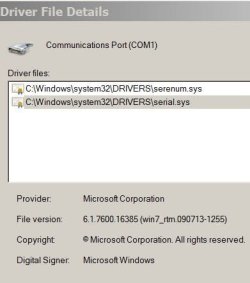
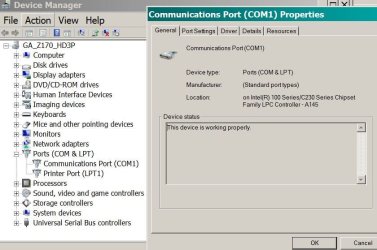
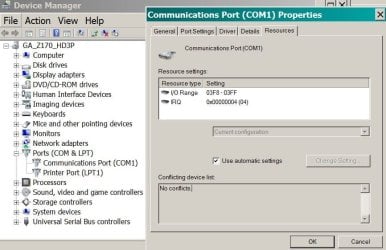
This is my MB Com1. I think it is built in the Z170 chipset
 

Attachments

  • Com_driver.JPG
    Com_driver.JPG
    24.7 KB · Views: 9
  • Com_general.JPG
    Com_general.JPG
    67.8 KB · Views: 0
  • Com_resources.JPG
    Com_resources.JPG
    69.5 KB · Views: 0

My Computers My Computers

  • At a glance

    Windows 7 HP 64i5 6600K - 800MHz to 4200MHz4+4G GSkill DDR4 3000IG - Intel 530
    Computer type
    PC/Desktop
    Computer Manufacturer/Model Number
    custom build
    OS
    Windows 7 HP 64
    CPU
    i5 6600K - 800MHz to 4200MHz
    Motherboard
    GA-Z170-HD3P
    Memory
    4+4G GSkill DDR4 3000
    Graphics Card(s)
    IG - Intel 530
    Monitor(s) Displays
    Samsung 226BW
    Screen Resolution
    1680x1050
    Hard Drives
    (1) -1 SM951 – 128GB M.2 AHCI PCIe SSD drive for Windows 7 and Lubuntu
    (2) -1 WD SATA 3 - 1T for Data
    (3) -1 WD SATA 3 - 1T for backup
    PSU
    Thermaltake 450W TR2 gold
    Keyboard
    Old and good Chicony mechanical keyboard
    Mouse
    Logitech mX performance - 9 buttons (had to disable some)
    Internet Speed
    500Mb/s
    Browser
    Firefox 64
    Other Info
    TinyWall firewall
  • At a glance

    Windows 7 Proi7-4500U 800MHz to 3.0GHz(4+4)G DDR3 1600IG intel 4400 + NVIDIA GeForce GT 745M
    Computer type
    Laptop
    System Manufacturer/Model Number
    Asus Q550LF
    OS
    Windows 7 Pro
    CPU
    i7-4500U 800MHz to 3.0GHz
    Motherboard
    Asus Q550LF
    Memory
    (4+4)G DDR3 1600
    Graphics Card(s)
    IG intel 4400 + NVIDIA GeForce GT 745M
    Sound Card
    Realtek
    Monitor(s) Displays
    LG Display LP156WF4-SPH1
    Screen Resolution
    1920 x 1080
    Hard Drives
    BX500 120G SSD for Windows and programs +
    1T HDD for data
    Internet Speed
    500 Mb/s
    Browser
    Firefox
    Other Info
    TinyWall firewall
Good news!!! I've told you on my fist post to see if IRQ was shared with other device.
 

My Computers My Computers

  • At a glance

    Windows 7 HP 64i5 6600K - 800MHz to 4200MHz4+4G GSkill DDR4 3000IG - Intel 530
    Computer type
    PC/Desktop
    Computer Manufacturer/Model Number
    custom build
    OS
    Windows 7 HP 64
    CPU
    i5 6600K - 800MHz to 4200MHz
    Motherboard
    GA-Z170-HD3P
    Memory
    4+4G GSkill DDR4 3000
    Graphics Card(s)
    IG - Intel 530
    Monitor(s) Displays
    Samsung 226BW
    Screen Resolution
    1680x1050
    Hard Drives
    (1) -1 SM951 – 128GB M.2 AHCI PCIe SSD drive for Windows 7 and Lubuntu
    (2) -1 WD SATA 3 - 1T for Data
    (3) -1 WD SATA 3 - 1T for backup
    PSU
    Thermaltake 450W TR2 gold
    Keyboard
    Old and good Chicony mechanical keyboard
    Mouse
    Logitech mX performance - 9 buttons (had to disable some)
    Internet Speed
    500Mb/s
    Browser
    Firefox 64
    Other Info
    TinyWall firewall
  • At a glance

    Windows 7 Proi7-4500U 800MHz to 3.0GHz(4+4)G DDR3 1600IG intel 4400 + NVIDIA GeForce GT 745M
    Computer type
    Laptop
    System Manufacturer/Model Number
    Asus Q550LF
    OS
    Windows 7 Pro
    CPU
    i7-4500U 800MHz to 3.0GHz
    Motherboard
    Asus Q550LF
    Memory
    (4+4)G DDR3 1600
    Graphics Card(s)
    IG intel 4400 + NVIDIA GeForce GT 745M
    Sound Card
    Realtek
    Monitor(s) Displays
    LG Display LP156WF4-SPH1
    Screen Resolution
    1920 x 1080
    Hard Drives
    BX500 120G SSD for Windows and programs +
    1T HDD for data
    Internet Speed
    500 Mb/s
    Browser
    Firefox
    Other Info
    TinyWall firewall
Back
Top