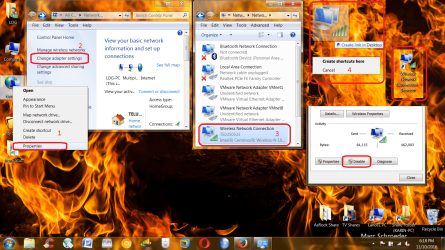
.
I have Win 7 Home Premium.
Is there an easy way to disable my wireless connection so that (a) it does not enable itself after a reboot, and (b) I don't need to implement the complete process to re-enable the wireless?
Under normal circumstances, the re-enable after a reboot is fine. I can disconnect WiFi from the system tray, and it reconnects after reboot.
But sometimes, I might want wireless to remain disabled after reboot. For example, if I'm doing a database restore, and the database starts synching after a reboot (such as Evernote), it could cause problems
At the moment, I simply switch off the router until the database restore is complete.
.
I have Win 7 Home Premium.
Is there an easy way to disable my wireless connection so that (a) it does not enable itself after a reboot, and (b) I don't need to implement the complete process to re-enable the wireless?
Under normal circumstances, the re-enable after a reboot is fine. I can disconnect WiFi from the system tray, and it reconnects after reboot.
But sometimes, I might want wireless to remain disabled after reboot. For example, if I'm doing a database restore, and the database starts synching after a reboot (such as Evernote), it could cause problems
At the moment, I simply switch off the router until the database restore is complete.
.
My Computer
At a glance
Win 7 64-bit Home Premium4 GB
- Computer type
- Laptop
- Computer Manufacturer/Model Number
- Dell Inspiron 17R
- OS
- Win 7 64-bit Home Premium
- Memory
- 4 GB