Yumi Multiboot USB Creator - Anybody try this?

cyberpine

New member
Local time
8:13 PM
Messages
25
Has anybody tested this before?

YUMI - Multiboot USB Creator (Windows) | USB Pen Drive Linux

It appears to promise a way to boot from USB to multi and select-able ISOs?

So the software would format the USB drive for me once, and I could then add ISOs for Windows 7 pro, Ghost and GParted?

If this works.. I would not need CD/DVDs devices or media on newer desktops..

too good to be true? Will it be deadly slow?
 

My Computer My Computer

At a glance

Windows 7
OS
Windows 7
I use Universal USB Installer with Win7 in dropdown menu to format the stick with all versions 32- and 64-bit, spilling the one I need at the time into the root. I can also add any other tools but not a tool which isn't booted by bootsect /nt60 formatting.
 
I use Universal USB Installer with Win7 in dropdown menu to format the stick with all versions 32- and 64-bit, spilling the one I need at the time into the root. I can also add any other tools but not a tool which isn't booted by bootsect /nt60 formatting.

Did you add these OS' in by just moving in an ISO? If so, I'm not clear on what "booted by" means unless you have to create boot volume and move that in somehow.

thanks.
 

My Computer My Computer

At a glance

Windows 7
OS
Windows 7
Yumi works very well. There are a list of bootable ISOs that it handles natively and when you run the program it presents that list and even offers to download ones you select. You can also load "other isos" which are not guaranteed to work but most do. A windows 7 installation ISO is supported but I don't think it offers a download.
 

My Computer My Computer

At a glance

Microsoft Windows 7 Home Premium 64-bit Servi...Intel(R) Core(TM) i3 CPU M 330 @ 2.13GHz8 GB DDR3Intel(R) HD Graphics
Computer type
Laptop
Computer Manufacturer/Model Number
Hewlett-Packard/G62-107SA Notebook
OS
Microsoft Windows 7 Home Premium 64-bit Service Pack 1
CPU
Intel(R) Core(TM) i3 CPU M 330 @ 2.13GHz
Motherboard
Hewlett-Packard 1425
Memory
8 GB DDR3
Graphics Card(s)
Intel(R) HD Graphics
Sound Card
Realtek High Definition Audio
Monitor(s) Displays
Builtin
Screen Resolution
1366 x 768 x 32 bits (4294967296 colors) @ 60 Hz
Hard Drives
250 GB SATA Hard Disk Drive 7200 rpm
2TB Seagate GoFlex USB 2 Drive
1TB Iomega Prestige USB 2 Drive
1.5TB Iomega Prestige USB 2 Drive (Samsung)
2TB WD MyBook Live NAS.
Mouse
Logitech Anywhere MX
Internet Speed
152 Mbs download 10 Mbs upload
Antivirus
Norton 360
Browser
Chrome
I use Universal USB Installer with Win7 in dropdown menu to format the stick with all versions 32- and 64-bit, spilling the one I need at the time into the root. I can also add any other tools but not a tool which isn't booted by bootsect /nt60 formatting.

Did you add these OS' in by just moving in an ISO? If so, I'm not clear on what "booted by" means unless you have to create boot volume and move that in somehow.

thanks.

Only the extracted files of the nt60 bootable installer need to be in the root once the ISO has already been written and stick formatted.

Start by loading the ISO and selecting OS in the Universal USB Installer dropdown menu, which will format the stick leave the seven Installer folders in root. Then you can add in any other tools or apps. If you want to boot another nt60 formatted bootable installer, replace with its files in the root.

I keep my Vistas or Win7 32bit all-versions in their folders when I'm using Win7 64 bit all-versions, and vice versa. When I want to switch I just sweep the files into their folder and spill the other's out into root.
 
hi. i create a multiboot usb using yumi, but when i try to install some SO like xp or widnows 8 it says error15 file not found press any key to continue...someone can help me? thank you
 

My Computer My Computer

At a glance

windows 8
Computer type
PC/Desktop
OS
windows 8
Hi fabionik2004 and welcome to Seven Forums.

Is this happening when you try to boot the OS? If so it could be because the file name for the ISO has a space in it. The search function in the YUMI menu system can't handle embedded spaces.
 

My Computer My Computer

At a glance

Microsoft Windows 7 Home Premium 64-bit Servi...Intel(R) Core(TM) i3 CPU M 330 @ 2.13GHz8 GB DDR3Intel(R) HD Graphics
Computer type
Laptop
Computer Manufacturer/Model Number
Hewlett-Packard/G62-107SA Notebook
OS
Microsoft Windows 7 Home Premium 64-bit Service Pack 1
CPU
Intel(R) Core(TM) i3 CPU M 330 @ 2.13GHz
Motherboard
Hewlett-Packard 1425
Memory
8 GB DDR3
Graphics Card(s)
Intel(R) HD Graphics
Sound Card
Realtek High Definition Audio
Monitor(s) Displays
Builtin
Screen Resolution
1366 x 768 x 32 bits (4294967296 colors) @ 60 Hz
Hard Drives
250 GB SATA Hard Disk Drive 7200 rpm
2TB Seagate GoFlex USB 2 Drive
1TB Iomega Prestige USB 2 Drive
1.5TB Iomega Prestige USB 2 Drive (Samsung)
2TB WD MyBook Live NAS.
Mouse
Logitech Anywhere MX
Internet Speed
152 Mbs download 10 Mbs upload
Antivirus
Norton 360
Browser
Chrome
kado897 thanx for your reply, yes when i try to boot from iso and i just see it have some spaces on the name, so i can just rename it on the folder in usb or i have to rename the iso and put again in the usb by Yumi?
 

My Computer My Computer

At a glance

windows 8
Computer type
PC/Desktop
OS
windows 8
There are a couple of changes you need to make.

1. rename the ISO in \multiboot\ISOS

screenshot249_2013-03-22.png

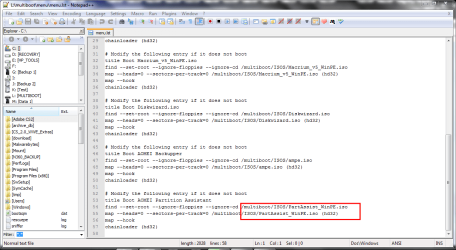
2. Open Menu.lst in \multiboot\Menus in a text editor.

screenshot250_2013-03-22.png

3. Navigate to the appropriate menu entry and modify the file names to match your new ISO name.

screenshot251_2013-03-22.png
 

My Computer My Computer

At a glance

Microsoft Windows 7 Home Premium 64-bit Servi...Intel(R) Core(TM) i3 CPU M 330 @ 2.13GHz8 GB DDR3Intel(R) HD Graphics
Computer type
Laptop
Computer Manufacturer/Model Number
Hewlett-Packard/G62-107SA Notebook
OS
Microsoft Windows 7 Home Premium 64-bit Service Pack 1
CPU
Intel(R) Core(TM) i3 CPU M 330 @ 2.13GHz
Motherboard
Hewlett-Packard 1425
Memory
8 GB DDR3
Graphics Card(s)
Intel(R) HD Graphics
Sound Card
Realtek High Definition Audio
Monitor(s) Displays
Builtin
Screen Resolution
1366 x 768 x 32 bits (4294967296 colors) @ 60 Hz
Hard Drives
250 GB SATA Hard Disk Drive 7200 rpm
2TB Seagate GoFlex USB 2 Drive
1TB Iomega Prestige USB 2 Drive
1.5TB Iomega Prestige USB 2 Drive (Samsung)
2TB WD MyBook Live NAS.
Mouse
Logitech Anywhere MX
Internet Speed
152 Mbs download 10 Mbs upload
Antivirus
Norton 360
Browser
Chrome
kado897 I did as you told me and now it works with windows xp or widows 7, but with 2 versions of windows 8 that i have got i get the following problems:
1 version it say: error13: invalid or unsupported executable format press any key to continue
2 version it say: error60: file for emulation must be in one contiguos disk area press any key to continue

I tried to put in usb acronis 10 too that should boot from RAM and i got this error msg: error 17: cannot mount selected partition press any key to continue (I think it try to load the iso on the HD but it should load it on the RAM as i selected in yumi)

My version of YUmi is 0.0.8.7
 

My Computer My Computer

At a glance

windows 8
Computer type
PC/Desktop
OS
windows 8
I don't know about your problem with Acronis, but the error60 message means that the ISO is fragmented. You can use Contig to defrag it. Contig, however it may be that Win 8 is incompatible (error 13).
 

My Computer My Computer

At a glance

Microsoft Windows 7 Home Premium 64-bit Servi...Intel(R) Core(TM) i3 CPU M 330 @ 2.13GHz8 GB DDR3Intel(R) HD Graphics
Computer type
Laptop
Computer Manufacturer/Model Number
Hewlett-Packard/G62-107SA Notebook
OS
Microsoft Windows 7 Home Premium 64-bit Service Pack 1
CPU
Intel(R) Core(TM) i3 CPU M 330 @ 2.13GHz
Motherboard
Hewlett-Packard 1425
Memory
8 GB DDR3
Graphics Card(s)
Intel(R) HD Graphics
Sound Card
Realtek High Definition Audio
Monitor(s) Displays
Builtin
Screen Resolution
1366 x 768 x 32 bits (4294967296 colors) @ 60 Hz
Hard Drives
250 GB SATA Hard Disk Drive 7200 rpm
2TB Seagate GoFlex USB 2 Drive
1TB Iomega Prestige USB 2 Drive
1.5TB Iomega Prestige USB 2 Drive (Samsung)
2TB WD MyBook Live NAS.
Mouse
Logitech Anywhere MX
Internet Speed
152 Mbs download 10 Mbs upload
Antivirus
Norton 360
Browser
Chrome
Now app is at its 2.0 release. I see how I can add distros but how I can remove or update them? Any clue?
 

My Computer My Computer

At a glance

Windows 7 Home Premium 32 bit
Computer type
PC/Desktop
OS
Windows 7 Home Premium 32 bit
Hi xcr and welcome to Seven Forums. The option is available on start up.

Image 11.png
 

My Computer My Computer

At a glance

Microsoft Windows 7 Home Premium 64-bit Servi...Intel(R) Core(TM) i3 CPU M 330 @ 2.13GHz8 GB DDR3Intel(R) HD Graphics
Computer type
Laptop
Computer Manufacturer/Model Number
Hewlett-Packard/G62-107SA Notebook
OS
Microsoft Windows 7 Home Premium 64-bit Service Pack 1
CPU
Intel(R) Core(TM) i3 CPU M 330 @ 2.13GHz
Motherboard
Hewlett-Packard 1425
Memory
8 GB DDR3
Graphics Card(s)
Intel(R) HD Graphics
Sound Card
Realtek High Definition Audio
Monitor(s) Displays
Builtin
Screen Resolution
1366 x 768 x 32 bits (4294967296 colors) @ 60 Hz
Hard Drives
250 GB SATA Hard Disk Drive 7200 rpm
2TB Seagate GoFlex USB 2 Drive
1TB Iomega Prestige USB 2 Drive
1.5TB Iomega Prestige USB 2 Drive (Samsung)
2TB WD MyBook Live NAS.
Mouse
Logitech Anywhere MX
Internet Speed
152 Mbs download 10 Mbs upload
Antivirus
Norton 360
Browser
Chrome
I know this is a old thread but I have a question regarding the use of YUMI.

I created a Macrium boot disc on a USB Drive. Using YUMI I want to create other boot discs on the same USB Drive. How do I create a custom boot menu using YUMI and store other boot discs on the same USB Drive ?
 

My Computer My Computer

At a glance

Windows 10 ProCore2Quad (2.6 Ghz)8 Gigs DDR2Geforce Titan Black
Computer type
PC/Desktop
Computer Manufacturer/Model Number
Custom Built
OS
Windows 10 Pro
CPU
Core2Quad (2.6 Ghz)
Motherboard
nVidia 775
Memory
8 Gigs DDR2
Graphics Card(s)
Geforce Titan Black
Sound Card
Motherboard Audio
Monitor(s) Displays
25" Asus LCD
Screen Resolution
1680x1050
Hard Drives
120 Gig SSD
60 Gig SSD
750 Gig HDD
PSU
850 Watts
Case
Mid-Size
Keyboard
Logitech
Mouse
Logitech - I love logitech mouses
Internet Speed
DSL 25Mbps - Although extremely expensive
Antivirus
Microsoft Anti-Virus
Browser
FireFox 36.x
I know this is a old thread but I have a question regarding the use of YUMI.

I created a Macrium boot disc on a USB Drive. Using YUMI I want to create other boot discs on the same USB Drive. How do I create a custom boot menu using YUMI and store other boot discs on the same USB Drive ?

I'm don't think you can do it that way around. I added a Macrium ISO as an unlisted ISO using GRUB after I had added other listed ISOs. It works very well.
 

My Computer My Computer

At a glance

Microsoft Windows 7 Home Premium 64-bit Servi...Intel(R) Core(TM) i3 CPU M 330 @ 2.13GHz8 GB DDR3Intel(R) HD Graphics
Computer type
Laptop
Computer Manufacturer/Model Number
Hewlett-Packard/G62-107SA Notebook
OS
Microsoft Windows 7 Home Premium 64-bit Service Pack 1
CPU
Intel(R) Core(TM) i3 CPU M 330 @ 2.13GHz
Motherboard
Hewlett-Packard 1425
Memory
8 GB DDR3
Graphics Card(s)
Intel(R) HD Graphics
Sound Card
Realtek High Definition Audio
Monitor(s) Displays
Builtin
Screen Resolution
1366 x 768 x 32 bits (4294967296 colors) @ 60 Hz
Hard Drives
250 GB SATA Hard Disk Drive 7200 rpm
2TB Seagate GoFlex USB 2 Drive
1TB Iomega Prestige USB 2 Drive
1.5TB Iomega Prestige USB 2 Drive (Samsung)
2TB WD MyBook Live NAS.
Mouse
Logitech Anywhere MX
Internet Speed
152 Mbs download 10 Mbs upload
Antivirus
Norton 360
Browser
Chrome
I know this is a old thread but I have a question regarding the use of YUMI.

I created a Macrium boot disc on a USB Drive. Using YUMI I want to create other boot discs on the same USB Drive. How do I create a custom boot menu using YUMI and store other boot discs on the same USB Drive ?

I'm don't think you can do it that way around. I added a Macrium ISO as an unlisted ISO using GRUB after I had added other listed ISOs. It works very well.

I went into Grub for Windows to Manage boot menu. How do you add an unlisted ISO ?
The USB Key already has one Macrium boot disc, can you not create a boot menu from that boot disc then add additional boot menus using Grub for Windows, if so, how ?
 

My Computer My Computer

At a glance

Windows 10 ProCore2Quad (2.6 Ghz)8 Gigs DDR2Geforce Titan Black
Computer type
PC/Desktop
Computer Manufacturer/Model Number
Custom Built
OS
Windows 10 Pro
CPU
Core2Quad (2.6 Ghz)
Motherboard
nVidia 775
Memory
8 Gigs DDR2
Graphics Card(s)
Geforce Titan Black
Sound Card
Motherboard Audio
Monitor(s) Displays
25" Asus LCD
Screen Resolution
1680x1050
Hard Drives
120 Gig SSD
60 Gig SSD
750 Gig HDD
PSU
850 Watts
Case
Mid-Size
Keyboard
Logitech
Mouse
Logitech - I love logitech mouses
Internet Speed
DSL 25Mbps - Although extremely expensive
Antivirus
Microsoft Anti-Virus
Browser
FireFox 36.x
If you use YUMI it loads the ISOs and creates the menus for you
 

My Computer My Computer

At a glance

Microsoft Windows 7 Home Premium 64-bit Servi...Intel(R) Core(TM) i3 CPU M 330 @ 2.13GHz8 GB DDR3Intel(R) HD Graphics
Computer type
Laptop
Computer Manufacturer/Model Number
Hewlett-Packard/G62-107SA Notebook
OS
Microsoft Windows 7 Home Premium 64-bit Service Pack 1
CPU
Intel(R) Core(TM) i3 CPU M 330 @ 2.13GHz
Motherboard
Hewlett-Packard 1425
Memory
8 GB DDR3
Graphics Card(s)
Intel(R) HD Graphics
Sound Card
Realtek High Definition Audio
Monitor(s) Displays
Builtin
Screen Resolution
1366 x 768 x 32 bits (4294967296 colors) @ 60 Hz
Hard Drives
250 GB SATA Hard Disk Drive 7200 rpm
2TB Seagate GoFlex USB 2 Drive
1TB Iomega Prestige USB 2 Drive
1.5TB Iomega Prestige USB 2 Drive (Samsung)
2TB WD MyBook Live NAS.
Mouse
Logitech Anywhere MX
Internet Speed
152 Mbs download 10 Mbs upload
Antivirus
Norton 360
Browser
Chrome
If you use YUMI it loads the ISOs and creates the menus for you

I can use Grub to create my own menu, correct; if so how do I load an ISO into Grub then I assume I don't need YUMI ?
 

My Computer My Computer

At a glance

Windows 10 ProCore2Quad (2.6 Ghz)8 Gigs DDR2Geforce Titan Black
Computer type
PC/Desktop
Computer Manufacturer/Model Number
Custom Built
OS
Windows 10 Pro
CPU
Core2Quad (2.6 Ghz)
Motherboard
nVidia 775
Memory
8 Gigs DDR2
Graphics Card(s)
Geforce Titan Black
Sound Card
Motherboard Audio
Monitor(s) Displays
25" Asus LCD
Screen Resolution
1680x1050
Hard Drives
120 Gig SSD
60 Gig SSD
750 Gig HDD
PSU
850 Watts
Case
Mid-Size
Keyboard
Logitech
Mouse
Logitech - I love logitech mouses
Internet Speed
DSL 25Mbps - Although extremely expensive
Antivirus
Microsoft Anti-Virus
Browser
FireFox 36.x
Back
Top