More on Windows 7 and Windows 8.1 servicing changes

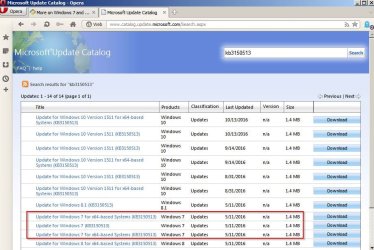
KB3150513 - it was reworked and re-released on 5th November 2016

It was? That's some crystal ball you have there :)!

Sorry - got day/ month mixed up!

Microsoft Update Catalog - KB3150513.jpg

It was KB952664 that was re-released on 10/10/2016 so if users installed it at that point it's likely the reason for KB3150513 showing up.
 

My Computer My Computer

At a glance

Microsoft Windows 7 Home Premium 64-bit 7601 ...AMD C-60 APU with Radeon(tm) HD Graphics4.00 GBAMD Radeon HD 6290 Graphics
Computer type
Laptop
Computer Manufacturer/Model Number
ASUS
OS
Microsoft Windows 7 Home Premium 64-bit 7601 Multiprocessor Free Service Pack 1
CPU
AMD C-60 APU with Radeon(tm) HD Graphics
Motherboard
ASUSTeK COMPUTER INC. X501U
Memory
4.00 GB
Graphics Card(s)
AMD Radeon HD 6290 Graphics
Sound Card
(1) AMD High Definition Audio Device (2) Realtek High Defi
Screen Resolution
1366 x 768 x 32 bits (4294967296 colors) @ 60 Hz
Hard Drives
Hitachi HTS545050A7E380 SATA Disk Device
Antivirus
Comodo CIS & FW, SecureAplus App Whitelisting, Threatfire
Browser
Cyberfox 64bit, Opera 64bit, Airfox
Other Info
Spy-The-Spy, HitmanPro.Alert, Norton Connect Safe, MJRegWatcher, BitDefender TrafficLight, Voodoo Shield, Zemana AntiMalware
And then after I'd posted that comment I noted the significance of the date, realised you were also from the UK and wondered how the heck that update had merited some wisecrack (which I'd missed) relating to Guy Fawkes night :)!
 

My Computer My Computer

At a glance

Windows 7 Home Premium 64AMD Phenom II X4 9558GB Corsair XMS3 DDR3Gigabyte Geforce GTX 960 2GB
Computer type
PC/Desktop
Computer Manufacturer/Model Number
Custom build by PC Specialist
OS
Windows 7 Home Premium 64
CPU
AMD Phenom II X4 955
Motherboard
Asus M4A78T-E
Memory
8GB Corsair XMS3 DDR3
Graphics Card(s)
Gigabyte Geforce GTX 960 2GB
Sound Card
SB Audigy
Monitor(s) Displays
BenQ 24"
Screen Resolution
1920 x 1080
Hard Drives
500GB Serial ATA
PSU
1010W Quiet Quad Rail
Case
Antec 900
Cooling
Fenrir
Keyboard
Corsair
Mouse
Logitech
Internet Speed
20mbps
Antivirus
MSE plus MBAM 2.x Free
Browser
Chrome
Other Info
Second desktop different spec but similar level.
Beware.

I installed KB3192391 and it reset my Windows Update settings. :eek:
 

My Computer My Computer

At a glance

W7 Ultimate SP1, LM19.2 MATE, W10 Home 1703, ...AMD Phenom II x6 1100T, 3.3 GHz12GB DDR3 1333 G-Skill (4GB x 2), G-Skill (2G...NVIDIA GeForce GTX 660
Computer type
PC/Desktop
Computer Manufacturer/Model Number
n/a
OS
W7 Ultimate SP1, LM19.2 MATE, W10 Home 1703, W10 Pro 1703 VM, #All 64 bit
CPU
AMD Phenom II x6 1100T, 3.3 GHz
Motherboard
ASUS M4A88T-M/USB3 (AM3)
Memory
12GB DDR3 1333 G-Skill (4GB x 2), G-Skill (2GB x 2)
Graphics Card(s)
NVIDIA GeForce GTX 660
Sound Card
Realtek?
Monitor(s) Displays
Samsung S23B350
Screen Resolution
1920x1080
Hard Drives
WD Green 2TB (SATA), WD Green 3TB (SATA), WD Blue 4TB (SATA), WD Blue 6TB (SATA)
PSU
Cooler Master
Case
Antec GX300 Tower
Cooling
3x Antec TRICOOL 120mm Fans
Mouse
Wired Optical
Internet Speed
DSL
Antivirus
Avast
Browser
Pale Moon (64 bit)
Other Info
2018-12-27 Upgraded HDDs
2015-12-10 Upgraded case, graphics card, storage
2015-08-15 Upgraded motherboard & RAM
2015-07-15 Upgraded LM17.1 to LM17.2
Beware.

I installed KB3192391 and it reset my Windows Update settings. :eek:

Thanks for the heads up Aussie, keeping my eyes open for that!

btw: KB2952664 is one that I looked into and simply downloaded/installed the 7/64 part on both our machines, via the Standalone installer.
This morning it came back to my wife's laptop. It will probably land on this desktop soon. Obviously Microsoft are still trying to get Win10 installed by the back door. A ferocious, hungry dingo with a meaty bone, could not be more persistently aggressive!
 

My Computer My Computer

At a glance

Windows 7/64 HPremium.AMD FX-6300.Corsair (2x4) GB DDR3 CMXGX3M2A1337CL9.NVidia/Gigabyte GT730 (2GB) GDDR5.
Computer type
PC/Desktop
Computer Manufacturer/Model Number
bertison
OS
Windows 7/64 HPremium.
CPU
AMD FX-6300.
Motherboard
Asus M5A78L-M LE/USB3.
Memory
Corsair (2x4) GB DDR3 CMXGX3M2A1337CL9.
Graphics Card(s)
NVidia/Gigabyte GT730 (2GB) GDDR5.
Sound Card
Onboard.
Monitor(s) Displays
Iiyama PLE2407HDS.
Screen Resolution
1920 x 1280
Hard Drives
Desktop: 1TB. WD10EZEX-00BN5A0.
Zyxel nsa310 NAS: 2TB Seagate Barracuda 7200.14.
Cache Drive: Sandisk SDSSDRC032G.
Laptop Lenovo B50/80 128 GB SSD.
PSU
Corsair 750M.
Case
Coolermaster N300.
Cooling
FRONT: (2X) 140mm. TOP: (1x) 120mm. REAR: (1x) 120mm.
Keyboard
Logitech K290
Mouse
Trust Optical Wired
Internet Speed
15 Mb Down, 0.55 Up.
Antivirus
Kaspersky Total Security 2017, Hitman Pro.
Browser
Firefox.
Other Info
NETWORK:
Sky "Q box" and router.
Desktop & NAS - 30 Metres Cat6 Ethernet wired, via TP-Link 4-port switch.
Lenovo B50/80 Laptop, 2x Wileyfox phones, Lenovo TAB3-8 tablet - all wireless.
Grandchildren, their parents and friends as bandwidth 'parasites' at various times!

My Computer My Computer

At a glance

Win-7-Pro64bit 7-H-Prem-64biti7-5930K 2nd i9-9940x both water blocked VRM'...Trident-z 3200C14 2nd Trident-z 3600C16EVGA 1080ti ftw3 2nd Titan Xp both water blocked
Computer type
PC/Desktop
Computer Manufacturer/Model Number
Custom assembled by me :}
OS
Win-7-Pro64bit 7-H-Prem-64bit
CPU
i7-5930K 2nd i9-9940x both water blocked VRM's too
Motherboard
ASUS SABERTOOTH X99 2nd ASUS x299 Apex
Memory
Trident-z 3200C14 2nd Trident-z 3600C16
Graphics Card(s)
EVGA 1080ti ftw3 2nd Titan Xp both water blocked
Sound Card
Built-in Realtek
Monitor(s) Displays
1-AOC G2460PG 24"G-Sync 144Hz/ 2nd 1-ASUS VG248QE 24" 144Hz
Screen Resolution
1920 x 1080 144Hz
Hard Drives
2-Samsung M.2 Evo & Evo Plus
2-Samsung 850 EVO 500GB SSD's/ 3-2.5 W.D. Black 1tb-&3-1tb/3-3.5 WD Black 1tb hdd's
PSU
EVGA SuperNOVA 1000-P2 2nd 1200-P2
Case
2-Corsair Obsidian Series 450D Black ATX Mid Tower
Cooling
Custom water loops
Keyboard
Logitech G710+/ 2nd Logitech G910
Mouse
2-RedDragon M901 Perdition 16400 dpi Gaming mouse = wired
Internet Speed
Comcast Ping 19ms 89.31mbps download speed 6.12mbps upload
Antivirus
Malwarebytes Pro/ Superantispyware Pro
Browser
FireFox & Pale moon
Other Info
2nd ASUS X299 Apex/Intel i9-9940x with Custom water loop/7H-Prem-x64/Corsair 450D case/Ram Trident-z 3600C16 4x8gb / Samsung970Evo plus 500gb SSD/Dual ssd EZ swap evo/PSU EVGA SuperNova 1200w-P2 80+Platinum/GPU Titan Xp /8-ML-140 on push-pull on 2-280GTX rads
Security Only Rollup

Beware.

I installed KB3192391 and it reset my Windows Update settings. :eek:
Hi,
Interesting that one I don't even show :/
KB3192391 is the Security Only rollup.
https://support.microsoft.com/en-us/help/22801/windows-7-and-windows-server-2008-r2-update-history
See Post #60:
More on Windows 7 and Windows 8.1 servicing changes

I think that Windows Update only shows the "Security + Extras" rollup (KB3185330).
 
Last edited:

My Computer My Computer

At a glance

W7 Ultimate SP1, LM19.2 MATE, W10 Home 1703, ...AMD Phenom II x6 1100T, 3.3 GHz12GB DDR3 1333 G-Skill (4GB x 2), G-Skill (2G...NVIDIA GeForce GTX 660
Computer type
PC/Desktop
Computer Manufacturer/Model Number
n/a
OS
W7 Ultimate SP1, LM19.2 MATE, W10 Home 1703, W10 Pro 1703 VM, #All 64 bit
CPU
AMD Phenom II x6 1100T, 3.3 GHz
Motherboard
ASUS M4A88T-M/USB3 (AM3)
Memory
12GB DDR3 1333 G-Skill (4GB x 2), G-Skill (2GB x 2)
Graphics Card(s)
NVIDIA GeForce GTX 660
Sound Card
Realtek?
Monitor(s) Displays
Samsung S23B350
Screen Resolution
1920x1080
Hard Drives
WD Green 2TB (SATA), WD Green 3TB (SATA), WD Blue 4TB (SATA), WD Blue 6TB (SATA)
PSU
Cooler Master
Case
Antec GX300 Tower
Cooling
3x Antec TRICOOL 120mm Fans
Mouse
Wired Optical
Internet Speed
DSL
Antivirus
Avast
Browser
Pale Moon (64 bit)
Other Info
2018-12-27 Upgraded HDDs
2015-12-10 Upgraded case, graphics card, storage
2015-08-15 Upgraded motherboard & RAM
2015-07-15 Upgraded LM17.1 to LM17.2
KB3192391 is the Security Only rollup.

For what it's worth:

I have KB3192391 and my Windows Update settings were not changed.

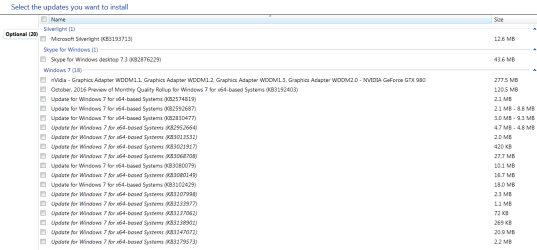
Now I see that I am offered KB3192403, "October 2016 Preview of Monthly Quality Rollup for Windows 7 SP1"----whatever the hell that is.

All I want is security stuff.
 

My Computer My Computer

At a glance

Windows 7 Home Premium SP1, 64-bitIntel Skylake i5-6600K, not overclocked8 GB HyperX DDR4-2666 (2 x 4 GB)none; graphics are integrated on CPU
Computer type
PC/Desktop
Computer Manufacturer/Model Number
Ignatz Special; 4 speed manual gearbox; factory air conditioning; one of one
OS
Windows 7 Home Premium SP1, 64-bit
CPU
Intel Skylake i5-6600K, not overclocked
Motherboard
AsRock Z170M Extreme 4, micro ATX
Memory
8 GB HyperX DDR4-2666 (2 x 4 GB)
Graphics Card(s)
none; graphics are integrated on CPU
Sound Card
onboard: Realtek ALC1150; external: USB Behringer UF0-202
Monitor(s) Displays
Dell S2340M 23 inch IPS
Screen Resolution
1600 x 900
Hard Drives
System: Crucial MX100 series SSD, 128 GB;
Data: Samsung Spinpoint 103SJ, 1 TB;
Backup: WD Caviar Green WD30EZRX-00D8PB0, 3 TB
PSU
Rosewill SilentNight 500 watt fanless, semi-modular
Case
Antec Solo II
Cooling
Noctua NH-U12S; Noctua F12 intake, Noctua S12A exhaust
Keyboard
Microsoft 200 6JH-00001 USB
Mouse
Dell or Microsoft optical wired; USB
Antivirus
Microsoft Security Essentials and Malwarebytes Premium
Browser
Pale Moon
Other Info
All fans PWM; speeds at idle: CPU circa 500 rpm; intake circa 600 rpm; exhaust circa 600 rpm; CPU temps 27 idle and 47 C load in a warm room (27 C/81 F) when running Intel Extreme Tuning Utility stress test.
KB3192391 is the Security Only rollup.

For what it's worth:

I have KB3192391 and my Windows Update settings were not changed.

Now I see that I am offered KB3192403, "October 2016 Preview of Monthly Quality Rollup for Windows 7 SP1"----whatever the hell that is.

All I want is security stuff.

This package updates the Diagnostic and Telemetry service to provide benefit for enterprises using Upgrade Analytics to plan and manage the Windows upgrade process. This update includes:
Support to enable upload of telemetry and download of settings in an authenticated proxy environment by impersonating the logged-on user
Support to configure a specific proxy to upload telemetry and download settings
The Diagnostic and Telemetry service collects usage and diagnostics information from Windows. You can learn more about the Customer Experience Improvement Program (CEIP) here.

This update uses SSL (TCP Port 443) to download manifests and upload telemetry to Microsoft that uses the following DNS endpoints:
vortex-win.data.microsoft.com
settings-win.data.microsoft.com
This update contains the following two manifests that are used by the service.
telemetry.ASM-WindowsDefault.json
utc.app.json
 

My Computer My Computer

At a glance

Windows 7 Ultimate x64, Linux Mint Cinnamon x64
Computer type
PC/Desktop
OS
Windows 7 Ultimate x64, Linux Mint Cinnamon x64
"Now I see that I am offered KB3192403, "October 2016 Preview of Monthly Quality Rollup for Windows 7 SP1"----whatever the hell that is."

I'm still not sure what is the purpose of "October 2016 Preview of Monthly Quality Rollup for Windows 7 SP1". If it will include patches in next months rollup what's the purpose of downloading and installing it now?

It seems a little redundant.

A preview of the security monthly quality rollup

  • An additional monthly rollup containing a preview of new non-security fixes that will be included in the next monthly rollup, as well as fixes from all previous monthly rollup. This can also be called the “preview rollup.”
  • This preview rollup will be released on the third Tuesday of the month (also referred to as the “C week”).
  • This will be published to WSUS using the “Updates” classification as an optional update. It will also be available via Windows Update (where all consumer PCs will install it) and on the Windows Update Catalog.
  • With WSUS, you can enable support for “express installation files” to ensure that client PCs only download the pieces of a particular monthly rollup that they haven’t already installed, to minimize the network impact.
  • Starting in early 2017 and continuing for several months, older fixes will also be added to the preview rollup, so it will eventually become fully cumulative; installing the latest monthly rollup will then get your PC completely up to date.
  • This (like all updates) will have a unique KB number.


Each month there will be separate updates released for a variety of reasons (e.g. DST time zone changes, out-of-band security fixes). Many of these will be rolled into the next monthly rollup, although some will remain separate- including Office, Flash and Silverlight updates.

Internet Explorer updates
 

My Computer My Computer

At a glance

Windows 7 Home 64-bit
Computer type
PC/Desktop
OS
Windows 7 Home 64-bit
I'm still not sure what is the purpose of "October 2016 Preview of Monthly Quality Rollup for Windows 7 SP1". If it will include patches in next months rollup what's the purpose of downloading and installing it now?

It seems a little redundant.

A preview of the security monthly quality rollup

  • An additional monthly rollup containing a preview of new non-security fixes that will be included in the next monthly rollup, as well as fixes from all previous monthly rollup. This can also be called the “preview rollup.”


  • If it contains "a preview of new non-security fixes", why is it called a "security monthly quality rollup"?

    And what's with the word "preview"?? Does it contain the fixes or doesn't it? It contains a "preview" of the "fixes" as opposed to the "fixes" themselves?

    Did these geniuses attend the Humpty Dumpty School Of Lexicography?

    Convince me this isn't deliberately designed to be confusing for some unspoken motive.
 

My Computer My Computer

At a glance

Windows 7 Home Premium SP1, 64-bitIntel Skylake i5-6600K, not overclocked8 GB HyperX DDR4-2666 (2 x 4 GB)none; graphics are integrated on CPU
Computer type
PC/Desktop
Computer Manufacturer/Model Number
Ignatz Special; 4 speed manual gearbox; factory air conditioning; one of one
OS
Windows 7 Home Premium SP1, 64-bit
CPU
Intel Skylake i5-6600K, not overclocked
Motherboard
AsRock Z170M Extreme 4, micro ATX
Memory
8 GB HyperX DDR4-2666 (2 x 4 GB)
Graphics Card(s)
none; graphics are integrated on CPU
Sound Card
onboard: Realtek ALC1150; external: USB Behringer UF0-202
Monitor(s) Displays
Dell S2340M 23 inch IPS
Screen Resolution
1600 x 900
Hard Drives
System: Crucial MX100 series SSD, 128 GB;
Data: Samsung Spinpoint 103SJ, 1 TB;
Backup: WD Caviar Green WD30EZRX-00D8PB0, 3 TB
PSU
Rosewill SilentNight 500 watt fanless, semi-modular
Case
Antec Solo II
Cooling
Noctua NH-U12S; Noctua F12 intake, Noctua S12A exhaust
Keyboard
Microsoft 200 6JH-00001 USB
Mouse
Dell or Microsoft optical wired; USB
Antivirus
Microsoft Security Essentials and Malwarebytes Premium
Browser
Pale Moon
Other Info
All fans PWM; speeds at idle: CPU circa 500 rpm; intake circa 600 rpm; exhaust circa 600 rpm; CPU temps 27 idle and 47 C load in a warm room (27 C/81 F) when running Intel Extreme Tuning Utility stress test.
I'm still not sure what is the purpose of "October 2016 Preview of Monthly Quality Rollup for Windows 7 SP1". If it will include patches in next months rollup what's the purpose of downloading and installing it now?

It seems a little redundant.

A preview of the security monthly quality rollup
  • An additional monthly rollup containing a preview of new non-security fixes that will be included in the next monthly rollup, as well as fixes from all previous monthly rollup. This can also be called the “preview rollup.”


  • If it contains "a preview of new non-security fixes", why is it called a "security monthly quality rollup"?

    And what's with the word "preview"?? Does it contain the fixes or doesn't it? It contains a "preview" of the "fixes" as opposed to the "fixes" themselves?

    Did these geniuses attend the Humpty Dumpty School Of Lexicography?

    Convince me this isn't deliberately designed to be confusing for some unspoken motive.


  • Yeah, I'm as confused as you are. I went ahead and hid it just to see if it disappears when next months PT rolls around.

    I suppose if you're a Microsoft programmer writing machine language 24/7, English tends to become a second language.
 

My Computer My Computer

At a glance

Windows 7 Home 64-bit
Computer type
PC/Desktop
OS
Windows 7 Home 64-bit
I'm ignoring these "Preview rollups". I'm not beta testing MS updates for them, just because they've been doing a crappy job of it themselves lately! :rolleyes:
 

My Computer My Computer

At a glance

Win 7 Ultimate, Win 8.1 Pro, Linux Mint 19 Ci...Intel i5 4690KCorsair Vengeance LP 32GB DDR3MSI GTX 1060 GAMING X 6GB
Computer type
PC/Desktop
Computer Manufacturer/Model Number
Custom Build
OS
Win 7 Ultimate, Win 8.1 Pro, Linux Mint 19 Cinnamon (All 64-Bit)
CPU
Intel i5 4690K
Motherboard
Gigabyte Z97X-UD3H
Memory
Corsair Vengeance LP 32GB DDR3
Graphics Card(s)
MSI GTX 1060 GAMING X 6GB
Sound Card
Onboard
Hard Drives
Samsung 850 EVO 250GB SSD (x2)
Samsung 860 EVO 1TB SSD (x2)
Crucial MX300 525GB SSD
WD Blue 2TB 5400rpm Intellipark Disabled (x2)
PSU
Corsair HX750i
Case
Phanteks Enthoo Pro
Cooling
CM Hyper 212 EVO on CPU, Noctua Redux NF-P14S 1500rpm (x6)
Keyboard
Corsair K70 RGB LUX
Mouse
Corsair Sabre RGB
Antivirus
Avast Free, MalwareBytes, SAS & CryptoPrevent
Browser
Chrome
Other Info
StarTech PEXESAT322I 2 Port PCI-E SATA Card
ASUS PCE-AC56 Dual-band AC1300 Wireless Card
Akasa FC.Six Manual Fan Controller
And a Partridge in a Pear Tree!
Yeah, I'm as confused as you are.

Sky Ranch:

What's your connection, if any, to the Reno Sky Ranch?

I'm old enough to remember it--grew up in Western NV.
 

My Computer My Computer

At a glance

Windows 7 Home Premium SP1, 64-bitIntel Skylake i5-6600K, not overclocked8 GB HyperX DDR4-2666 (2 x 4 GB)none; graphics are integrated on CPU
Computer type
PC/Desktop
Computer Manufacturer/Model Number
Ignatz Special; 4 speed manual gearbox; factory air conditioning; one of one
OS
Windows 7 Home Premium SP1, 64-bit
CPU
Intel Skylake i5-6600K, not overclocked
Motherboard
AsRock Z170M Extreme 4, micro ATX
Memory
8 GB HyperX DDR4-2666 (2 x 4 GB)
Graphics Card(s)
none; graphics are integrated on CPU
Sound Card
onboard: Realtek ALC1150; external: USB Behringer UF0-202
Monitor(s) Displays
Dell S2340M 23 inch IPS
Screen Resolution
1600 x 900
Hard Drives
System: Crucial MX100 series SSD, 128 GB;
Data: Samsung Spinpoint 103SJ, 1 TB;
Backup: WD Caviar Green WD30EZRX-00D8PB0, 3 TB
PSU
Rosewill SilentNight 500 watt fanless, semi-modular
Case
Antec Solo II
Cooling
Noctua NH-U12S; Noctua F12 intake, Noctua S12A exhaust
Keyboard
Microsoft 200 6JH-00001 USB
Mouse
Dell or Microsoft optical wired; USB
Antivirus
Microsoft Security Essentials and Malwarebytes Premium
Browser
Pale Moon
Other Info
All fans PWM; speeds at idle: CPU circa 500 rpm; intake circa 600 rpm; exhaust circa 600 rpm; CPU temps 27 idle and 47 C load in a warm room (27 C/81 F) when running Intel Extreme Tuning Utility stress test.

My Computer My Computer

At a glance

Microsoft Windows 7 Home Premium 64-bit 7601 ...AMD C-60 APU with Radeon(tm) HD Graphics4.00 GBAMD Radeon HD 6290 Graphics
Computer type
Laptop
Computer Manufacturer/Model Number
ASUS
OS
Microsoft Windows 7 Home Premium 64-bit 7601 Multiprocessor Free Service Pack 1
CPU
AMD C-60 APU with Radeon(tm) HD Graphics
Motherboard
ASUSTeK COMPUTER INC. X501U
Memory
4.00 GB
Graphics Card(s)
AMD Radeon HD 6290 Graphics
Sound Card
(1) AMD High Definition Audio Device (2) Realtek High Defi
Screen Resolution
1366 x 768 x 32 bits (4294967296 colors) @ 60 Hz
Hard Drives
Hitachi HTS545050A7E380 SATA Disk Device
Antivirus
Comodo CIS & FW, SecureAplus App Whitelisting, Threatfire
Browser
Cyberfox 64bit, Opera 64bit, Airfox
Other Info
Spy-The-Spy, HitmanPro.Alert, Norton Connect Safe, MJRegWatcher, BitDefender TrafficLight, Voodoo Shield, Zemana AntiMalware
I'm ignoring these "Preview rollups". I'm not beta testing MS updates for them, just because they've been doing a crappy job of it themselves lately! :rolleyes:

My experience: Tried installing them yesterday, "updates failed to install."

Tried today: "failure configuring updates." What garbage.

Addendum: Somehow things sorted themselves out. Computer restarted and I could see that updates installed. Miracles do happen.

Addendum 2: On checking Windows Update, I saw that everything succeeded except 3185330, the Security Quality Rollup. I tried 3 times but it wouldn't install. I then downloaded and installed the Security Only update from https://support.microsoft.com/en-us/kb/3092391. That did it.
 
Last edited:

My Computer My Computer

At a glance

Windows 7 x64 SP1AMD Athlon 64 X2 6000+ / 3.0 GHz6 GB
Computer type
PC/Desktop
Computer Manufacturer/Model Number
Gateway GT5656
OS
Windows 7 x64 SP1
CPU
AMD Athlon 64 X2 6000+ / 3.0 GHz
Motherboard
NVIDIA GeForce 6150 SE
Memory
6 GB
Monitor(s) Displays
Lenovo LED
Screen Resolution
1920 X 1080
Hard Drives
Windows on 500 GB spinner; Ubuntu 16 on Sandisk 250GB SSD; Bodhi5 on Samsung 250GB SSD; another old spinner for fooling around.
PSU
Original that came with computer
Keyboard
Logitech wireless
Mouse
Logitech wireless
Antivirus
Microsoft Sec Essentials
Browser
Vivaldi
Windows Update Glitches

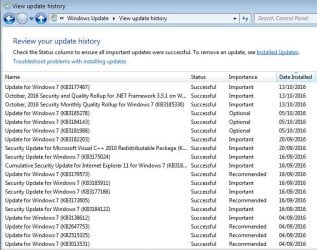
My PC has been experiencing weird Windows Update glitches since installing this update (KB3192391).
I originally suspected it was related to the KB3177467 update.

I first noticed it when I was about to install IE 11.
I selected it in the Optional Updates list and returned to the Windows Update "home" window.
I decided that I might as well risk installing some optional driver updates, so I returned to the Updates List window.

All of the updates (Important & Optional) had vanished except for KB3177467.
KB3177467 just appeared in my Windows Update update list.

It removed every other update that had been previously been shown (e.g. drivers, IE 11, GWX and telemetry stuff).

Is KB3177467 safe to install?

Additional
People seem to be having issues with this KB3177467 update.
KB3177467
After several reboots the updates reappeared and I installed IE 11. :confused:

Additional
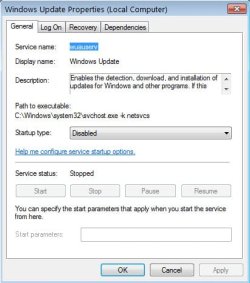
I just checked my Windows Update Service settings and discovered that they had changed from "Disabled" to "Automatic (Delayed Start)".

I'm certain that I set it to "Disabled" after complaining in my earlier post. :confused:

Additional
I just set Windows Update Service to "Disabled" and rebooted my PC.
When I checked Services, Windows Update Service was set to "Automatic (Delayed Start)".
 
Last edited:

My Computer My Computer

At a glance

W7 Ultimate SP1, LM19.2 MATE, W10 Home 1703, ...AMD Phenom II x6 1100T, 3.3 GHz12GB DDR3 1333 G-Skill (4GB x 2), G-Skill (2G...NVIDIA GeForce GTX 660
Computer type
PC/Desktop
Computer Manufacturer/Model Number
n/a
OS
W7 Ultimate SP1, LM19.2 MATE, W10 Home 1703, W10 Pro 1703 VM, #All 64 bit
CPU
AMD Phenom II x6 1100T, 3.3 GHz
Motherboard
ASUS M4A88T-M/USB3 (AM3)
Memory
12GB DDR3 1333 G-Skill (4GB x 2), G-Skill (2GB x 2)
Graphics Card(s)
NVIDIA GeForce GTX 660
Sound Card
Realtek?
Monitor(s) Displays
Samsung S23B350
Screen Resolution
1920x1080
Hard Drives
WD Green 2TB (SATA), WD Green 3TB (SATA), WD Blue 4TB (SATA), WD Blue 6TB (SATA)
PSU
Cooler Master
Case
Antec GX300 Tower
Cooling
3x Antec TRICOOL 120mm Fans
Mouse
Wired Optical
Internet Speed
DSL
Antivirus
Avast
Browser
Pale Moon (64 bit)
Other Info
2018-12-27 Upgraded HDDs
2015-12-10 Upgraded case, graphics card, storage
2015-08-15 Upgraded motherboard & RAM
2015-07-15 Upgraded LM17.1 to LM17.2
My PC has been experiencing weird Windows Update glitches since installing this update (KB3192391).
I originally suspected it was related to the KB3177467 update.

I first noticed it when I was about to install IE 11.
I selected it in the Optional Updates list and returned to the Windows Update "home" window.
I decided that I might as well risk installing some optional driver updates, so I returned to the Updates List window.

All of the updates (Important & Optional) had vanished except for KB3177467.
KB3177467 just appeared in my Windows Update update list.

It removed every other update that had been previously been shown (e.g. drivers, IE 11, GWX and telemetry stuff).

Is KB3177467 safe to install?

Additional
People seem to be having issues with this KB3177467 update.
KB3177467
After several reboots the updates reappeared and I installed IE 11. :confused:

Additional
I just checked my Windows Update Service settings and discovered that they had changed from "Disabled" to "Automatic (Delayed Start)".

I'm certain that I set it to "Disabled" after complaining in my earlier post. :confused:

Additional
I just set Windows Update Service to "Disabled" and rebooted my PC.
When I checked Services, Windows Update Service was set to "Automatic (Delayed Start)".

I've installed both the Security-only rollup and the Security Quality rollup and the newest Servicing Stack Update (KB3177467) in different VM's. Set Windows Update to disabled and it has stayed disabled even after reboots.

Capture-03.jpg

Capture-02.jpg

Are you using MSE? I read somewhere that this can be the cause of the Windows Update service going back to Default settings. I think it needs the service to be running to download the definition updates (don't quote me on that as I never use MSE, I use Avast).

I don't use MSE on any system or VM and none of my WU settings change unless I change them.

If you're not using MSE then I have no idea what is causing your WU service settings to keep defaulting. :confused:
 

My Computer My Computer

At a glance

Win 7 Ultimate, Win 8.1 Pro, Linux Mint 19 Ci...Intel i5 4690KCorsair Vengeance LP 32GB DDR3MSI GTX 1060 GAMING X 6GB
Computer type
PC/Desktop
Computer Manufacturer/Model Number
Custom Build
OS
Win 7 Ultimate, Win 8.1 Pro, Linux Mint 19 Cinnamon (All 64-Bit)
CPU
Intel i5 4690K
Motherboard
Gigabyte Z97X-UD3H
Memory
Corsair Vengeance LP 32GB DDR3
Graphics Card(s)
MSI GTX 1060 GAMING X 6GB
Sound Card
Onboard
Hard Drives
Samsung 850 EVO 250GB SSD (x2)
Samsung 860 EVO 1TB SSD (x2)
Crucial MX300 525GB SSD
WD Blue 2TB 5400rpm Intellipark Disabled (x2)
PSU
Corsair HX750i
Case
Phanteks Enthoo Pro
Cooling
CM Hyper 212 EVO on CPU, Noctua Redux NF-P14S 1500rpm (x6)
Keyboard
Corsair K70 RGB LUX
Mouse
Corsair Sabre RGB
Antivirus
Avast Free, MalwareBytes, SAS & CryptoPrevent
Browser
Chrome
Other Info
StarTech PEXESAT322I 2 Port PCI-E SATA Card
ASUS PCE-AC56 Dual-band AC1300 Wireless Card
Akasa FC.Six Manual Fan Controller
And a Partridge in a Pear Tree!
MES is running normally including getting definition updates while I have WU set to disabled. In fact it runs better that way as it doesn't suffer from the slowdown caused by WU constantly checking for updates each month from Patch Tuesday until such time as they are installed.

I still have GWX Control Panel installed, mainly because I don't trust MS any more but this is a timely reminder perhaps that an additional benefit of running it in monitor mode is that it will tell you if the WU settings are changed.
 

My Computer My Computer

At a glance

Windows 7 Home Premium 64AMD Phenom II X4 9558GB Corsair XMS3 DDR3Gigabyte Geforce GTX 960 2GB
Computer type
PC/Desktop
Computer Manufacturer/Model Number
Custom build by PC Specialist
OS
Windows 7 Home Premium 64
CPU
AMD Phenom II X4 955
Motherboard
Asus M4A78T-E
Memory
8GB Corsair XMS3 DDR3
Graphics Card(s)
Gigabyte Geforce GTX 960 2GB
Sound Card
SB Audigy
Monitor(s) Displays
BenQ 24"
Screen Resolution
1920 x 1080
Hard Drives
500GB Serial ATA
PSU
1010W Quiet Quad Rail
Case
Antec 900
Cooling
Fenrir
Keyboard
Corsair
Mouse
Logitech
Internet Speed
20mbps
Antivirus
MSE plus MBAM 2.x Free
Browser
Chrome
Other Info
Second desktop different spec but similar level.
Hmmm... Can't be MSE causing the issue then. Possibly a 3rd party program causing it?

All I know is I had WU service set to disabled for a few months on my main system, during the 10 upgrade fiasco (I only kept in Automatic in a couple of VM's), and not once did it ever change by itself. And its never happened to me in any VM I've tested over the years, or on any OS I've tested.

No idea what causes it to happen on some users systems. :confused:
 

My Computer My Computer

At a glance

Win 7 Ultimate, Win 8.1 Pro, Linux Mint 19 Ci...Intel i5 4690KCorsair Vengeance LP 32GB DDR3MSI GTX 1060 GAMING X 6GB
Computer type
PC/Desktop
Computer Manufacturer/Model Number
Custom Build
OS
Win 7 Ultimate, Win 8.1 Pro, Linux Mint 19 Cinnamon (All 64-Bit)
CPU
Intel i5 4690K
Motherboard
Gigabyte Z97X-UD3H
Memory
Corsair Vengeance LP 32GB DDR3
Graphics Card(s)
MSI GTX 1060 GAMING X 6GB
Sound Card
Onboard
Hard Drives
Samsung 850 EVO 250GB SSD (x2)
Samsung 860 EVO 1TB SSD (x2)
Crucial MX300 525GB SSD
WD Blue 2TB 5400rpm Intellipark Disabled (x2)
PSU
Corsair HX750i
Case
Phanteks Enthoo Pro
Cooling
CM Hyper 212 EVO on CPU, Noctua Redux NF-P14S 1500rpm (x6)
Keyboard
Corsair K70 RGB LUX
Mouse
Corsair Sabre RGB
Antivirus
Avast Free, MalwareBytes, SAS & CryptoPrevent
Browser
Chrome
Other Info
StarTech PEXESAT322I 2 Port PCI-E SATA Card
ASUS PCE-AC56 Dual-band AC1300 Wireless Card
Akasa FC.Six Manual Fan Controller
And a Partridge in a Pear Tree!
Are you using MSE? I read somewhere that this can be the cause of the Windows Update service going back to Default settings. I think it needs the service to be running to download the definition updates (don't quote me on that as I never use MSE, I use Avast).
I'm using Avast too.

Hmmm... Can't be MSE causing the issue then. Possibly a 3rd party program causing it?
Since the last time I updated W7, I've manually updated Notepad++, Flash and CCleaner.

I assume that Avast has been updating itself.
MBAM Free updates itself when I run it.

Since it only seems to be happening to me, it's probably not an update issue.
It's not critical as I will be rolling my W7 install back to my pre-AndroidStudio backup image, at the end of this semester.
I can't wait to get rid of Java (and get ~4GB of space back).

Maybe it will "fix" itself after some more reboots (like the Update List). :confused:
 

My Computer My Computer

At a glance

W7 Ultimate SP1, LM19.2 MATE, W10 Home 1703, ...AMD Phenom II x6 1100T, 3.3 GHz12GB DDR3 1333 G-Skill (4GB x 2), G-Skill (2G...NVIDIA GeForce GTX 660
Computer type
PC/Desktop
Computer Manufacturer/Model Number
n/a
OS
W7 Ultimate SP1, LM19.2 MATE, W10 Home 1703, W10 Pro 1703 VM, #All 64 bit
CPU
AMD Phenom II x6 1100T, 3.3 GHz
Motherboard
ASUS M4A88T-M/USB3 (AM3)
Memory
12GB DDR3 1333 G-Skill (4GB x 2), G-Skill (2GB x 2)
Graphics Card(s)
NVIDIA GeForce GTX 660
Sound Card
Realtek?
Monitor(s) Displays
Samsung S23B350
Screen Resolution
1920x1080
Hard Drives
WD Green 2TB (SATA), WD Green 3TB (SATA), WD Blue 4TB (SATA), WD Blue 6TB (SATA)
PSU
Cooler Master
Case
Antec GX300 Tower
Cooling
3x Antec TRICOOL 120mm Fans
Mouse
Wired Optical
Internet Speed
DSL
Antivirus
Avast
Browser
Pale Moon (64 bit)
Other Info
2018-12-27 Upgraded HDDs
2015-12-10 Upgraded case, graphics card, storage
2015-08-15 Upgraded motherboard & RAM
2015-07-15 Upgraded LM17.1 to LM17.2
Back
Top