Microsoft Security Bulletin Summary for November 8th 2016

Brink

Administrator
Staff member
Local time
11:17 PM
Messages
74,829
Location
Oklahoma
Release Date: November 08, 2016

Today we released security updates to provide additional protections against malicious attackers. As a best practice, we encourage customers to apply security updates as soon as they are released.

More information about this month’s security updates and advisories can be found in the Security TechNet Library.

The November security release consists of security updates for the following software:

  • Internet Explorer
  • Microsoft Edge
  • Microsoft Windows
  • Microsoft Office and Microsoft Office Services and Web Apps
  • SQL Server
  • Adobe Flash Player
Please note the following information regarding the security updates:

  • Beginning with the October 2016 release, Microsoft is changing the update servicing model for Windows 7, Windows Server 2008 R2, Windows 8.1, Windows Server 2012, and Windows Server 2012 R2. For more information, please see this Microsoft Technet article, Further simplifying servicing models forWindows 7 and Windows 8.1.
  • Windows 10 updates are cumulative. The monthly security release includes all security fixes for vulnerabilities that affect Windows 10, in addition to non-security updates. The updates are available via the Microsoft Update Catalog.
  • Vulnerabilities addressed in the November 2016 security release might also affect Windows Server 2016 Technical Preview 5. To be protected from these vulnerabilities, Microsoft recommends that customers running this operating system apply the current update, which is available from Windows Update.
  • Updates for Windows RT 8.1 and Microsoft Office RT software are only available via Windows Update.
  • In addition to security changes for the vulnerabilities, updates include defense-in-depth updates to help improve security-related features


Source:
 
Last edited:

My Computer My Computer

Computer type
PC/Desktop
Computer Manufacturer/Model Number
Self built custom
OS
64-bit Windows 11 Pro for Workstations
CPU
Intel i7-8700K OC'd to 5 GHz
Motherboard
ASUS ROG Maximus XI Formula Z390
Memory
64 GB (4x16GB) G.SKILL TridentZ RGB DDR4 3600 MHz
Graphics Card(s)
ASUS ROG-STRIX-GTX1080TI-O11G-GAMING
Sound Card
Integrated
Monitor(s) Displays
2 x Samsung Odyssey G7 27"
Screen Resolution
2560x1440
Hard Drives
1TB Samsung 990 PRO M.2,
4TB Samsung 990 PRO PRO M.2,
TerraMaster F8 SSD Plus NAS
PSU
Seasonic Prime Titanium 850W
Case
Thermaltake Core P3
Cooling
Corsair Hydro H115i
Keyboard
Logitech wireless K800
Mouse
Logitech MX Master 4
Internet Speed
2 Gb/s Download and 100 Mb/s Upload
Antivirus
Malwarebyte Anti-Malware Premium
Browser
Google Chrome
Other Info
Logitech Z625 speaker system,
Logitech BRIO 4K Pro webcam,
HP Color LaserJet Pro MFP M477fdn,
APC SMART-UPS RT 1000 XL - SURT1000XLI,
Galaxy S23 Plus phone
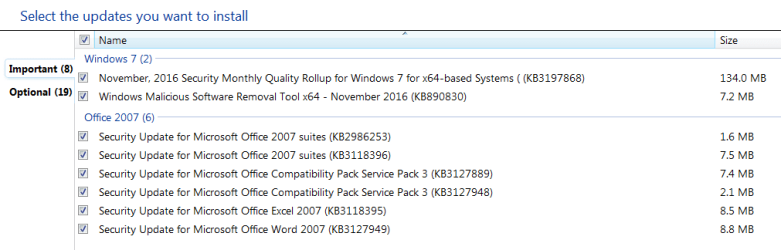
Thanks Brink. I have installed the November monthly Roll up KB 3197868, 130 mb plus Malicious Software Removal tool. All went well & one restart needed.
 

My Computer My Computer

Computer type
PC/Desktop
Computer Manufacturer/Model Number
Self built using existing case
OS
Windows 7 Home Premium 64 bit sp1
CPU
Intel i5 3570 3.4Ghz Ivy Bridge SKT 1155 quad core
Motherboard
Gigabyte Z77-HD3 SKT 1155 2xSata 3, 4x USB 3.0
Memory
G-Skill Rip Jaws 16Gb (8x2) DDR3 -1600 PC3 12800 CL 10 red
Graphics Card(s)
Gigabyte NVIDIA GT610 1Gb DDR3 810/1200 PCI-E 2.0 Silent
Sound Card
NVIDIA High Definition & Realtech High Definition Audio
Monitor(s) Displays
2 x Philips 226V4L 16:9 aspect ratio
Screen Resolution
1920 x 1080 HD
Hard Drives
Samsung 840 Pro 256gb SSD, SATA 3.
Hitachi Touro Portable 1tb, USB 3.0 HDD used for image b/ups.
PSU
Corsair VS450
Case
Codeng
Cooling
PSU fan & CPU fan
Keyboard
Logitech
Mouse
Logitech Wireless trackball M570
Internet Speed
Wireless 3G. 3mg down & 550kb up.
Antivirus
Bitdefender Internet Security 2020
Browser
Opera (Current Version) & Firefox
Other Info
MS Office 2013 Pro. Davis weather station software. MGE Nova 600 avr UPS.
I have hidden that Monthly Security Quality Rollup kb3192403 the time to look at the infos provided on the support page. It has also unhidden the October preview and deleted it.

Edit:
It has deleted October preview kb3192403 to the now kb3197868 that have added the "DataCollection" key in registry that is mentioned in kb3192403 but doesn't appear to be mentioned in the last November Rollup support page. You still have to deal with registry for certain editions. that are using "Upgrade Analytics".
 
Last edited:

My Computer My Computer

Computer type
PC/Desktop
Computer Manufacturer/Model Number
Custom Build
OS
Windows 7 Professional SP1 - x64 [Non-UEFI Boot]
CPU
Ivy Bridge Core i5 3570K (Delidded)
Motherboard
Asus P8Z77-V LE PLUS
Memory
G.Skill "Ares" DDR3 PC3-12800 - 1600MHz (16Gb)
Graphics Card(s)
Asus Dual-RX480-O4G
Sound Card
Creative Sound Blaster Z w/5.1 sound system
Monitor(s) Displays
Asus IPS 23"
Screen Resolution
16/9
Hard Drives
Internal:
500Go Sata 6Gb/s (x2)
500Go Sata 3Gb/s (x2)
SSD 60Go Sata 6Gb/s
PSU
In Win C 900W Series 80+ Platinum
Case
Thermaltake Chaser A71
Cooling
Custom Water Cooling Loop
Keyboard
Cooler Master QuickFire XTi
Mouse
Razer Imperator 2012 (4G)
Antivirus
MSE
Browser
IE 11.0.xxx Rtm
Other Info
"Raid0" with Intel Smart Response Technology (HDD/SSD)
Won't install anything until this weekend after a system image is created of course ;)
November round.PNG
 

My Computer My Computer

Computer type
PC/Desktop
Computer Manufacturer/Model Number
Custom assembled by me :}
OS
Win-7-Pro64bit 7-H-Prem-64bit
CPU
i7-5930K 2nd i9-9940x both water blocked VRM's too
Motherboard
ASUS SABERTOOTH X99 2nd ASUS x299 Apex
Memory
Trident-z 3200C14 2nd Trident-z 3600C16
Graphics Card(s)
EVGA 1080ti ftw3 2nd Titan Xp both water blocked
Sound Card
Built-in Realtek
Monitor(s) Displays
1-AOC G2460PG 24"G-Sync 144Hz/ 2nd 1-ASUS VG248QE 24" 144Hz
Screen Resolution
1920 x 1080 144Hz
Hard Drives
2-Samsung M.2 Evo & Evo Plus
2-Samsung 850 EVO 500GB SSD's/ 3-2.5 W.D. Black 1tb-&3-1tb/3-3.5 WD Black 1tb hdd's
PSU
EVGA SuperNOVA 1000-P2 2nd 1200-P2
Case
2-Corsair Obsidian Series 450D Black ATX Mid Tower
Cooling
Custom water loops
Keyboard
Logitech G710+/ 2nd Logitech G910
Mouse
2-RedDragon M901 Perdition 16400 dpi Gaming mouse = wired
Internet Speed
Comcast Ping 19ms 89.31mbps download speed 6.12mbps upload
Antivirus
Malwarebytes Pro/ Superantispyware Pro
Browser
FireFox & Pale moon
Other Info
2nd ASUS X299 Apex/Intel i9-9940x with Custom water loop/7H-Prem-x64/Corsair 450D case/Ram Trident-z 3600C16 4x8gb / Samsung970Evo plus 500gb SSD/Dual ssd EZ swap evo/PSU EVGA SuperNova 1200w-P2 80+Platinum/GPU Titan Xp /8-ML-140 on push-pull on 2-280GTX rads
https://support.microsoft.com/en-us/kb/3197868

which says:

"The security fixes that are listed in the "Summary" section are included in this this Security Monthly Quality Rollup 3197868 are are also included in the November 2016 Security Only Quality Update 3197867. Installing either update installs the security fixes that are listed here. This Security Monthly Quality Rollup also includes improvements and fixes from previous monthly rollups."

So, for those needing only security updates, get 3197867,

which is here:

https://support.microsoft.com/en-us/kb/3197867
 

My Computer My Computer

Computer type
PC/Desktop
Computer Manufacturer/Model Number
Ignatz Special; 4 speed manual gearbox; factory air conditioning; one of one
OS
Windows 7 Home Premium SP1, 64-bit
CPU
Intel Skylake i5-6600K, not overclocked
Motherboard
AsRock Z170M Extreme 4, micro ATX
Memory
8 GB HyperX DDR4-2666 (2 x 4 GB)
Graphics Card(s)
none; graphics are integrated on CPU
Sound Card
onboard: Realtek ALC1150; external: USB Behringer UF0-202
Monitor(s) Displays
Dell S2340M 23 inch IPS
Screen Resolution
1600 x 900
Hard Drives
System: Crucial MX100 series SSD, 128 GB;
Data: Samsung Spinpoint 103SJ, 1 TB;
Backup: WD Caviar Green WD30EZRX-00D8PB0, 3 TB
PSU
Rosewill SilentNight 500 watt fanless, semi-modular
Case
Antec Solo II
Cooling
Noctua NH-U12S; Noctua F12 intake, Noctua S12A exhaust
Keyboard
Microsoft 200 6JH-00001 USB
Mouse
Dell or Microsoft optical wired; USB
Antivirus
Microsoft Security Essentials and Malwarebytes Premium
Browser
Pale Moon
Other Info
All fans PWM; speeds at idle: CPU circa 500 rpm; intake circa 600 rpm; exhaust circa 600 rpm; CPU temps 27 idle and 47 C load in a warm room (27 C/81 F) when running Intel Extreme Tuning Utility stress test.
https://support.microsoft.com/en-us/kb/3197868

which says:

"The security fixes that are listed in the "Summary" section are included in this this Security Monthly Quality Rollup 3197868 are are also included in the November 2016 Security Only Quality Update 3197867. Installing either update installs the security fixes that are listed here. This Security Monthly Quality Rollup also includes improvements and fixes from previous monthly rollups."

So, for those needing only security updates, get 3197867,

which is here:

https://support.microsoft.com/en-us/kb/3197867
Which kb3197867 says:
Important


  • The security fixes that are listed in this Security Only Quality Update 3197867 are also included in the November 2016 Security Monthly Quality Rollup 3197868. Update rollup 3197868 also includes improvements and fixes from October monthly rollup 3185330 that was released on October 11, 2016. Installing either update 3197867 or 3197868 installs the security fixes that are listed here.
  • :confused: It's just about improvements & telemetry,so...we have to do it back from the first monthly rollup made to have the only security updates and not the improvements & fixes.
It means that the fixes that are not related to telemetry will never get installed too.
 

My Computer My Computer

Computer type
PC/Desktop
Computer Manufacturer/Model Number
Custom Build
OS
Windows 7 Professional SP1 - x64 [Non-UEFI Boot]
CPU
Ivy Bridge Core i5 3570K (Delidded)
Motherboard
Asus P8Z77-V LE PLUS
Memory
G.Skill "Ares" DDR3 PC3-12800 - 1600MHz (16Gb)
Graphics Card(s)
Asus Dual-RX480-O4G
Sound Card
Creative Sound Blaster Z w/5.1 sound system
Monitor(s) Displays
Asus IPS 23"
Screen Resolution
16/9
Hard Drives
Internal:
500Go Sata 6Gb/s (x2)
500Go Sata 3Gb/s (x2)
SSD 60Go Sata 6Gb/s
PSU
In Win C 900W Series 80+ Platinum
Case
Thermaltake Chaser A71
Cooling
Custom Water Cooling Loop
Keyboard
Cooler Master QuickFire XTi
Mouse
Razer Imperator 2012 (4G)
Antivirus
MSE
Browser
IE 11.0.xxx Rtm
Other Info
"Raid0" with Intel Smart Response Technology (HDD/SSD)
Brink, thanks for the above, most helpful.
 

My Computer My Computer

Computer type
PC/Desktop
Computer Manufacturer/Model Number
Dell Optiplex
OS
Windows 7 Pro 64 bit
CPU
Dual core
Motherboard
n/k
Memory
4 MB
Graphics Card(s)
n/k
Hard Drives
120 MB SSD
USB HDs for data
Antivirus
MSE
Browser
Firefox
Thank you all for giving me a hand!!

What I'm trying to get is Security Updates.
Once again sfc /scannow shows zero problems.
Maybe I have all the Security Updates and don't know it.
The RollUp get to about 95% install and stops.
I could do without the RollUp.

I will try 3197867 as ignatzatsonic has posted.

Jack
 

My Computer My Computer

Computer type
PC/Desktop
Computer Manufacturer/Model Number
Home made Desktop
OS
Windows 10 Pro. 64/ version 1709 Windows 7 Pro/64
CPU
Intel i7-6800K @ 4.3
Motherboard
ASUS X-99 Deluxe II
Memory
Corsair Platinum 16 gig @2400
Graphics Card(s)
EVGA GTX 1070 OC
Monitor(s) Displays
Asus 27" LED LCD/VE278Q
Screen Resolution
1920-1080 or 1280-720 HDMI
Hard Drives
INTEL SSD 730-240 Gb Sata 3.0/
PSU
EVGA Platium 1200W
Case
Phanteks Luxe Tempered Glass 8 fans/ one radiator
Cooling
XSPC/ Water Cooled CPU
Keyboard
Das 4 Professional
Mouse
Logitech M705/MX Anywhere 2-S
Internet Speed
100 mbits
Antivirus
Microsoft Security Essentials/ Malwarebytes Premium 3.0/ SAS
Browser
I.E. 11 default/Firefox/ ISP Time Warner Cable/Spectrum
Other Info
LG BluRay Burner/
Sound system-KLipsch-THX/
Icy Dock ssd Hot Swap bays.
Thank you all for giving me a hand!!

What I'm trying to get is Security Updates.
Once again sfc /scannow shows zero problems.
Maybe I have all the Security Updates and don't know it.
The RollUp get to about 95% install and stops.
I could do without the RollUp.

I will try 3197867 as ignatzatsonic has posted.

Jack

Jack;

You should be able to download an MSU file for 3197867. You'll be shown a list of several of them.

Be sure to pick the correct one for your particular version of Win 7.

Download it to a folder then just poke the MSU file to run the installer. It took maybe 90 seconds to complete on my PC a couple of days ago. No problems.

I have no idea how this will work out over the long term, but as of now all I want are Security Updates and this is the only way I know of to get them and them alone.

It's still convoluted but it's apparently what we are stuck with if we stay with 7.
 

My Computer My Computer

Computer type
PC/Desktop
Computer Manufacturer/Model Number
Ignatz Special; 4 speed manual gearbox; factory air conditioning; one of one
OS
Windows 7 Home Premium SP1, 64-bit
CPU
Intel Skylake i5-6600K, not overclocked
Motherboard
AsRock Z170M Extreme 4, micro ATX
Memory
8 GB HyperX DDR4-2666 (2 x 4 GB)
Graphics Card(s)
none; graphics are integrated on CPU
Sound Card
onboard: Realtek ALC1150; external: USB Behringer UF0-202
Monitor(s) Displays
Dell S2340M 23 inch IPS
Screen Resolution
1600 x 900
Hard Drives
System: Crucial MX100 series SSD, 128 GB;
Data: Samsung Spinpoint 103SJ, 1 TB;
Backup: WD Caviar Green WD30EZRX-00D8PB0, 3 TB
PSU
Rosewill SilentNight 500 watt fanless, semi-modular
Case
Antec Solo II
Cooling
Noctua NH-U12S; Noctua F12 intake, Noctua S12A exhaust
Keyboard
Microsoft 200 6JH-00001 USB
Mouse
Dell or Microsoft optical wired; USB
Antivirus
Microsoft Security Essentials and Malwarebytes Premium
Browser
Pale Moon
Other Info
All fans PWM; speeds at idle: CPU circa 500 rpm; intake circa 600 rpm; exhaust circa 600 rpm; CPU temps 27 idle and 47 C load in a warm room (27 C/81 F) when running Intel Extreme Tuning Utility stress test.
KB3197867 installed with ZERO problems.
Thank you ignatzatsonic!!
Thank you all for coming to my aid!!

Jack
 

My Computer My Computer

Computer type
PC/Desktop
Computer Manufacturer/Model Number
Home made Desktop
OS
Windows 10 Pro. 64/ version 1709 Windows 7 Pro/64
CPU
Intel i7-6800K @ 4.3
Motherboard
ASUS X-99 Deluxe II
Memory
Corsair Platinum 16 gig @2400
Graphics Card(s)
EVGA GTX 1070 OC
Monitor(s) Displays
Asus 27" LED LCD/VE278Q
Screen Resolution
1920-1080 or 1280-720 HDMI
Hard Drives
INTEL SSD 730-240 Gb Sata 3.0/
PSU
EVGA Platium 1200W
Case
Phanteks Luxe Tempered Glass 8 fans/ one radiator
Cooling
XSPC/ Water Cooled CPU
Keyboard
Das 4 Professional
Mouse
Logitech M705/MX Anywhere 2-S
Internet Speed
100 mbits
Antivirus
Microsoft Security Essentials/ Malwarebytes Premium 3.0/ SAS
Browser
I.E. 11 default/Firefox/ ISP Time Warner Cable/Spectrum
Other Info
LG BluRay Burner/
Sound system-KLipsch-THX/
Icy Dock ssd Hot Swap bays.

My Computers My Computers

System One System Two

  • Computer type
    Laptop
    Computer Manufacturer/Model Number
    Toshiba Satellite P750 series
    OS
    Windows 7 Home Premium 64 bit
  • Computer type
    Laptop
    System Manufacturer/Model Number
    Hewlett Packard 15-BW0XX
    OS
    Windows 10 Home
Hi,
Yes it's listed but there is no download links for separate versions of windows = 32 or 64 bit
To get those one has to go to the ms catalog for the stand alone installers,
Microsoft Update Catalog
 

My Computer My Computer

Computer type
PC/Desktop
Computer Manufacturer/Model Number
Custom assembled by me :}
OS
Win-7-Pro64bit 7-H-Prem-64bit
CPU
i7-5930K 2nd i9-9940x both water blocked VRM's too
Motherboard
ASUS SABERTOOTH X99 2nd ASUS x299 Apex
Memory
Trident-z 3200C14 2nd Trident-z 3600C16
Graphics Card(s)
EVGA 1080ti ftw3 2nd Titan Xp both water blocked
Sound Card
Built-in Realtek
Monitor(s) Displays
1-AOC G2460PG 24"G-Sync 144Hz/ 2nd 1-ASUS VG248QE 24" 144Hz
Screen Resolution
1920 x 1080 144Hz
Hard Drives
2-Samsung M.2 Evo & Evo Plus
2-Samsung 850 EVO 500GB SSD's/ 3-2.5 W.D. Black 1tb-&3-1tb/3-3.5 WD Black 1tb hdd's
PSU
EVGA SuperNOVA 1000-P2 2nd 1200-P2
Case
2-Corsair Obsidian Series 450D Black ATX Mid Tower
Cooling
Custom water loops
Keyboard
Logitech G710+/ 2nd Logitech G910
Mouse
2-RedDragon M901 Perdition 16400 dpi Gaming mouse = wired
Internet Speed
Comcast Ping 19ms 89.31mbps download speed 6.12mbps upload
Antivirus
Malwarebytes Pro/ Superantispyware Pro
Browser
FireFox & Pale moon
Other Info
2nd ASUS X299 Apex/Intel i9-9940x with Custom water loop/7H-Prem-x64/Corsair 450D case/Ram Trident-z 3600C16 4x8gb / Samsung970Evo plus 500gb SSD/Dual ssd EZ swap evo/PSU EVGA SuperNova 1200w-P2 80+Platinum/GPU Titan Xp /8-ML-140 on push-pull on 2-280GTX rads

My Computers My Computers

System One System Two

  • Computer type
    Laptop
    Computer Manufacturer/Model Number
    Toshiba Satellite P750 series
    OS
    Windows 7 Home Premium 64 bit
  • Computer type
    Laptop
    System Manufacturer/Model Number
    Hewlett Packard 15-BW0XX
    OS
    Windows 10 Home
Hi,
No problem :)

I loaded the 7-8 updates I posted earlier yesterday on my acer and all seems fine so far.
2 more machines to go but no time to do it yet I got an sos from mom yesterday so I'll be busy today :/
 

My Computer My Computer

Computer type
PC/Desktop
Computer Manufacturer/Model Number
Custom assembled by me :}
OS
Win-7-Pro64bit 7-H-Prem-64bit
CPU
i7-5930K 2nd i9-9940x both water blocked VRM's too
Motherboard
ASUS SABERTOOTH X99 2nd ASUS x299 Apex
Memory
Trident-z 3200C14 2nd Trident-z 3600C16
Graphics Card(s)
EVGA 1080ti ftw3 2nd Titan Xp both water blocked
Sound Card
Built-in Realtek
Monitor(s) Displays
1-AOC G2460PG 24"G-Sync 144Hz/ 2nd 1-ASUS VG248QE 24" 144Hz
Screen Resolution
1920 x 1080 144Hz
Hard Drives
2-Samsung M.2 Evo & Evo Plus
2-Samsung 850 EVO 500GB SSD's/ 3-2.5 W.D. Black 1tb-&3-1tb/3-3.5 WD Black 1tb hdd's
PSU
EVGA SuperNOVA 1000-P2 2nd 1200-P2
Case
2-Corsair Obsidian Series 450D Black ATX Mid Tower
Cooling
Custom water loops
Keyboard
Logitech G710+/ 2nd Logitech G910
Mouse
2-RedDragon M901 Perdition 16400 dpi Gaming mouse = wired
Internet Speed
Comcast Ping 19ms 89.31mbps download speed 6.12mbps upload
Antivirus
Malwarebytes Pro/ Superantispyware Pro
Browser
FireFox & Pale moon
Other Info
2nd ASUS X299 Apex/Intel i9-9940x with Custom water loop/7H-Prem-x64/Corsair 450D case/Ram Trident-z 3600C16 4x8gb / Samsung970Evo plus 500gb SSD/Dual ssd EZ swap evo/PSU EVGA SuperNova 1200w-P2 80+Platinum/GPU Titan Xp /8-ML-140 on push-pull on 2-280GTX rads
Yes, 3197867 is the "security only" update.
3197868 includes both the security patches and the "performance" bits from the Oct 2016 roll-up (3185330).

3197868 installed just fine on my W7 laptop (that already had 3185330).

On a whim, I installed the standalone version of 3197867 on my W7 desktop (that also already had 3185330). It went just fine.
So I was surprised when -- at the next update check -- WU offered me 3197868, even though both 3197867 and 3185330 were installed.
I have since hidden 3197868 on that box, as I'm leery of trying to install it on top of the other two, successfully installed patches, and as I already have the bits that 3197868 supposedly includes.

HTH,

MM
 

My Computer My Computer

Computer type
PC/Desktop
Computer Manufacturer/Model Number
Dell Studio XPS 8500
OS
OEM Windows 7 Ult (x64) SP1
CPU
Intel Core-i7 3770 @ 3.4 GHz
Motherboard
"Dell" branded
Memory
16 GB DDR3 SDRAM @ 1333 MHz
Graphics Card(s)
NVidia GeForce GT620 1 GB
Sound Card
THX TruStudio PC
Monitor(s) Displays
Dell U2410 Full HD
Hard Drives
2.0 TB SATA2 @ 7200 RPM
PSU
350W
Keyboard
MS 4000 Ergon - Wired
Mouse
Logitech Anywhere MX
Internet Speed
Cable HSI w/Turbo (router)
Antivirus
KIS-MBAM Premium-MBAE Premium
Browser
Fx (current version); IE
Other Info
And a Win7/64 Pro laptop; And a Win10/64 Pro desktop.
ok, after installing the aforementioned update, kb3197868, this one has now popped its headup:

Servicing stack update for Windows 7 SP1 and Windows Server 2008 R2 SP1: September 20, 2016

Update for Windows 7 for x64-based Systems (KB3177467)

Download size: 8.9 MB

You may need to restart your computer for this update to take effect.

Update type: Important

Install this update to resolve issues in Windows. For a complete listing of the issues that are included in this update, see the associated Microsoft Knowledge Base article for more information. After you install this item, you may have to restart your computer.

More information:
https://support.microsoft.com/en-au/kb/3177467
 

My Computers My Computers

System One System Two

  • Computer type
    Laptop
    Computer Manufacturer/Model Number
    Toshiba Satellite P750 series
    OS
    Windows 7 Home Premium 64 bit
  • Computer type
    Laptop
    System Manufacturer/Model Number
    Hewlett Packard 15-BW0XX
    OS
    Windows 10 Home
I have a doubt. This patch roll up includes one for Adobe Flash Player. Is the same patch installed when I update it on the adobe page ?
 

My Computer My Computer

Computer type
PC/Desktop
Computer Manufacturer/Model Number
Assembled PC
OS
64-bit Windows 7 Professional
CPU
Intel i5-3450 3.1 Ghz
Motherboard
ASUS P8H77-M PRO
Memory
8 GB (2x4) Corsair Vengeance Red DDR3 1600Mhz
Graphics Card(s)
ASUS HD 7770 DC 1.5GB
Sound Card
Realtek HD Audio / Headphones Asus Orion Pro
Monitor(s) Displays
20" Samsung S20B300N
Screen Resolution
1600x900
Hard Drives
500GB SEAGATE HDD SATA
PSU
Corsair GS600 80PLUS Bronze Gaming
Case
Cooler Master Storm Enforcer
Cooling
Cooler Master Hyper 212 EVO
Keyboard
Logitech K200 USB
Mouse
Logitech M100 USB / Logitech G500 Gaming Mouse
Antivirus
ESET
Browser
Internet Explorer
Other Info
All the hardware selected by myself. I never imagined upgrade my PC :)
Hi,
Restoring an image back to September on my asus and going just for kb3197867 security only forget these silly rollups I'll manually install the security only for now on :p
 

My Computer My Computer

Computer type
PC/Desktop
Computer Manufacturer/Model Number
Custom assembled by me :}
OS
Win-7-Pro64bit 7-H-Prem-64bit
CPU
i7-5930K 2nd i9-9940x both water blocked VRM's too
Motherboard
ASUS SABERTOOTH X99 2nd ASUS x299 Apex
Memory
Trident-z 3200C14 2nd Trident-z 3600C16
Graphics Card(s)
EVGA 1080ti ftw3 2nd Titan Xp both water blocked
Sound Card
Built-in Realtek
Monitor(s) Displays
1-AOC G2460PG 24"G-Sync 144Hz/ 2nd 1-ASUS VG248QE 24" 144Hz
Screen Resolution
1920 x 1080 144Hz
Hard Drives
2-Samsung M.2 Evo & Evo Plus
2-Samsung 850 EVO 500GB SSD's/ 3-2.5 W.D. Black 1tb-&3-1tb/3-3.5 WD Black 1tb hdd's
PSU
EVGA SuperNOVA 1000-P2 2nd 1200-P2
Case
2-Corsair Obsidian Series 450D Black ATX Mid Tower
Cooling
Custom water loops
Keyboard
Logitech G710+/ 2nd Logitech G910
Mouse
2-RedDragon M901 Perdition 16400 dpi Gaming mouse = wired
Internet Speed
Comcast Ping 19ms 89.31mbps download speed 6.12mbps upload
Antivirus
Malwarebytes Pro/ Superantispyware Pro
Browser
FireFox & Pale moon
Other Info
2nd ASUS X299 Apex/Intel i9-9940x with Custom water loop/7H-Prem-x64/Corsair 450D case/Ram Trident-z 3600C16 4x8gb / Samsung970Evo plus 500gb SSD/Dual ssd EZ swap evo/PSU EVGA SuperNova 1200w-P2 80+Platinum/GPU Titan Xp /8-ML-140 on push-pull on 2-280GTX rads
Agreed

Hi,
Restoring an image back to September on my asus and going just for kb3197867 security only forget these silly rollups I'll manually install the security only for now on :p
I've only been installing the Security Only rollups.
I've been saving them because they may be needed for new installs (just like driver/program installers).

In a couple of weeks I'll re-image my PC using my September image (to get rid of Android Studio and Java).
 

My Computer My Computer

Computer type
PC/Desktop
Computer Manufacturer/Model Number
n/a
OS
W7 Ultimate SP1, LM19.2 MATE, W10 Home 1703, W10 Pro 1703 VM, #All 64 bit
CPU
AMD Phenom II x6 1100T, 3.3 GHz
Motherboard
ASUS M4A88T-M/USB3 (AM3)
Memory
12GB DDR3 1333 G-Skill (4GB x 2), G-Skill (2GB x 2)
Graphics Card(s)
NVIDIA GeForce GTX 660
Sound Card
Realtek?
Monitor(s) Displays
Samsung S23B350
Screen Resolution
1920x1080
Hard Drives
WD Green 2TB (SATA), WD Green 3TB (SATA), WD Blue 4TB (SATA), WD Blue 6TB (SATA)
PSU
Cooler Master
Case
Antec GX300 Tower
Cooling
3x Antec TRICOOL 120mm Fans
Mouse
Wired Optical
Internet Speed
DSL
Antivirus
Avast
Browser
Pale Moon (64 bit)
Other Info
2018-12-27 Upgraded HDDs
2015-12-10 Upgraded case, graphics card, storage
2015-08-15 Upgraded motherboard & RAM
2015-07-15 Upgraded LM17.1 to LM17.2
I have a doubt. This patch roll up includes one for Adobe Flash Player. Is the same patch installed when I update it on the adobe page ?
It looks like it does, with a caveat; If there was an out of cycle update by adobe, you would probably get the update quicker if you monitored the flash player page then wait until it came down the pipe from windows updates as an out-of -cycle update. In either case and depending how you have updates set, you'll need to monitor each location. I'm thinking a one to two day delay if coming from windows updates.

Here's one road-map to your information:


  • Scroll down until you see the MS16-141Link in the left panel, click on that.


  • Scroll down about half way and you'll see a section called "File Information" go to the second sub-section also named File information; That's where the file information for adobe flash starts, under the file version column.

  • My version 23.0.0.207 matches whats listed on the KB3202790 page.
If you or anyone else has any shortcuts or knows of a different way, please post.


Related:
https://Adobe - Flash Player - Version Checker | www.adobe.com/
You can also find the latest version on your machine by going to Control Panel/All Items and if you have an Adobe Flash Player icon listed there, open that, and click on the Updates Tab. Clicking on the "Check Now" button takes you to the above link, in my case by way of Internet Explorer even though I'm using Firefox.

This one will only change the settings on your device:
http://Adobe - Flash Player : Settings Manager - Global Storage Settings Panel | www.macromedia.com/

If anyone needs to download the newest version from the adobe downloads center look over the middle "Optional Offers" column to see if you really need what's there.
 

My Computer My Computer

Computer type
PC/Desktop
Computer Manufacturer/Model Number
Gateway DX4831-01e (Mid-Tower Desktop)
OS
Originally Win 7 Hm Prem x64 Ver 6.1.7600 Build 7601-SP1 | Upgraded to Windows 10 December 14, 2019
CPU
Intel i3 530 2.93GHz, 2933MHz 2 Cores 4 Logical Processors
Motherboard
Gateway H57M01 133 megahertz
Memory
6GB of 1,333MHz DDR3 SDRAM
Graphics Card(s)
32MB Intel Graphics Media Accelerator HD IGChip
Sound Card
Realtek High Definition Audio
Monitor(s) Displays
Gateway HX2000 20inch TFT active matrix TN
Screen Resolution
1600 x 900 x 59 hertz
Hard Drives
WDC WD10EADS-00M2B0 [HDD] (1000.20 GB) -- drive 0,
HL-DT-ST DVDRAM GH41N [CD-ROM dr]
Four card readers, and Four USB 2.0
PSU
300watts.
Case
Mid-Tower Desktop
Cooling
Stock from Gateway
Keyboard
Natural Ergonomic Keyboard 4000, see Other Info
Mouse
Orig. Gateway wore out now using Insignia USB wired optical
Internet Speed
Vz FIOS 10ms png 57.64Mbps down 65.53Mbps up Speedtest.org
Antivirus
Zamana Anti-logger with Anti-malware, MSE, Windows Firewall,
Browser
IE11.0.9600.19399-Upd ver11.0.135, Firefox 68.0.1 x64
Other Info
System Specs by Belarc.

BIOS: American Megatrends Inc. P01-A0 11/17/2009

Replaced the MS 'Natural' Standard PS/2 Enhanced 101-102 Keyboard with a new Natural Ergonomic Keyboard 4000 on August 1st 2014.

Canon Pixma MG3222 Printer.

Updated to IE11 on 12102015 | Fios Quantum Router g1100

Additional AV: SpywareBlaster, manual Mbam, SAS
Back
Top