How to use my password protected sata hdd with data externally?

sumith

New member
Local time
4:50 AM
Messages
8
I was using Fujitsu A530 Lifebook (Intel Core i3 - 1st Gen). While I was using it, I set password for both BIOS settings and SATA HDD. Recently the machine will not power on.

So I tried to repair the problem but everybody asked to replace the mother board.

During this situation is going on, I tried to connect my SATA hard drive to another PC by way of both USB bridge connecting and internal booting using Toshiba Laptop. I think USB connecting not allow me to use it as external hard due to password I set (i.e. Hard drive is not initialized).

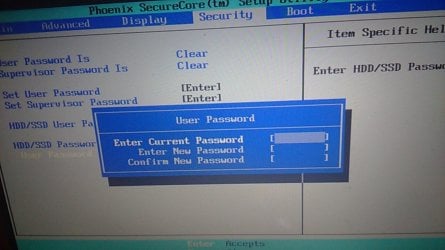
Since I know the SATA HDD Password, then I tried to connect it internally using Toshiba Laptop and to remove the password. But it will not allow me to change it saying Password Wrong and finally gave me system disable code of "23130". [[Additional: Security of Toshiba Laptop I tried is "Phoenix SecureCore(tm)] and unfortunatley I don't know the serurity system of origial machine i was used to set password i.e Fujitsu A530 lifebook.:cry:]

After that I tried to bypass the password using Hirens Boot CD by using the same toshiba laptop. But it was unable because instead of going to "boot menu" it always directed me to insert SATA Hard drive password display. I tried every thing to get boot menu but it will not directed me to boot menu. But if i tried to go to boot menu using the original sata hard drive of that toshiba laptop, then it allow me to go to boot menu and can load the hirens program without any problem. Unfortunately when I am trying it from my password protected sata hdd, it will not allow me to go to that boot menu.

Then I just connect my hdd to my android phone (Sony Xperia C3) using OTG and it asked me to reformat the external hard disk saying it is damaged (it give me format option). I never tried because I need to get some data in it.

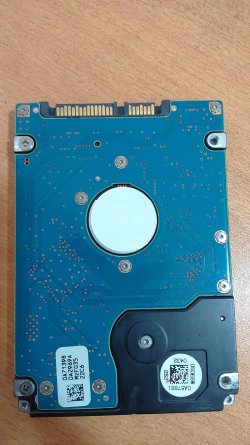
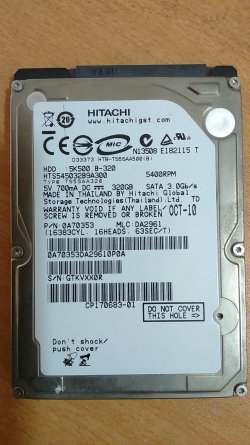
image of sata hard drive is inserted


I'll be very much thankful for any help from you to use this sata as external harddrive without losing data.
 

Attachments
  • DSC_0163.JPG
    DSC_0163.JPG
    531.4 KB · Views: 1
  • DSC_0164.JPG
    DSC_0164.JPG
    643.1 KB · Views: 1

My Computer My Computer

At a glance

Windows 8 32 bitCore i3 1st Generation2GB756MB
Computer type
Laptop
Computer Manufacturer/Model Number
Fujitsu A530
OS
Windows 8 32 bit
CPU
Core i3 1st Generation
Memory
2GB
Graphics Card(s)
756MB
Hard Drives
Hitachi SATA 2.5" Hard Drive
Antivirus
AVIRA
Browser
Google Chrome
Welcome to the forum.
When you said that you set a password to the HDD, did you mean that you installed a encryption program?
What program did you use? Did you create a rescue disk?
 
Last edited:

My Computers My Computers

  • At a glance

    Windows 7 HP 64i5 6600K - 800MHz to 4200MHz4+4G GSkill DDR4 3000IG - Intel 530
    Computer type
    PC/Desktop
    Computer Manufacturer/Model Number
    custom build
    OS
    Windows 7 HP 64
    CPU
    i5 6600K - 800MHz to 4200MHz
    Motherboard
    GA-Z170-HD3P
    Memory
    4+4G GSkill DDR4 3000
    Graphics Card(s)
    IG - Intel 530
    Monitor(s) Displays
    Samsung 226BW
    Screen Resolution
    1680x1050
    Hard Drives
    (1) -1 SM951 – 128GB M.2 AHCI PCIe SSD drive for Windows 7 and Lubuntu
    (2) -1 WD SATA 3 - 1T for Data
    (3) -1 WD SATA 3 - 1T for backup
    PSU
    Thermaltake 450W TR2 gold
    Keyboard
    Old and good Chicony mechanical keyboard
    Mouse
    Logitech mX performance - 9 buttons (had to disable some)
    Internet Speed
    500Mb/s
    Browser
    Firefox 64
    Other Info
    TinyWall firewall
  • At a glance

    Windows 7 Proi7-4500U 800MHz to 3.0GHz(4+4)G DDR3 1600IG intel 4400 + NVIDIA GeForce GT 745M
    Computer type
    Laptop
    System Manufacturer/Model Number
    Asus Q550LF
    OS
    Windows 7 Pro
    CPU
    i7-4500U 800MHz to 3.0GHz
    Motherboard
    Asus Q550LF
    Memory
    (4+4)G DDR3 1600
    Graphics Card(s)
    IG intel 4400 + NVIDIA GeForce GT 745M
    Sound Card
    Realtek
    Monitor(s) Displays
    LG Display LP156WF4-SPH1
    Screen Resolution
    1920 x 1080
    Hard Drives
    BX500 120G SSD for Windows and programs +
    1T HDD for data
    Internet Speed
    500 Mb/s
    Browser
    Firefox
    Other Info
    TinyWall firewall
Megahertz, my educated guess is that thread starter used the software already on the hard-drive to set up a HD password. I hope he did not write to the hard-drive with anything because if this Fujitsu A530 Lifebook is anything similar to WD Passport Ultra, it just might have on-board/circuit-level encryption, with or without a password set by user [i.e. similar to WD's Smartware], and just might have something similar to WD's DriveUnlock [which is the gateway, the bridge, between end-user and hard-drive]. If others correct - I will of course amend my post :)
 

My Computer My Computer

At a glance

Windows 7 Professional 64-bitDesktop i5; Acers i5 & i7desktop 16GB; 1 Acer 8GB & 1 Acer 16GB
Computer type
PC/Desktop
Computer Manufacturer/Model Number
Antec desktop; Acer Aspire laptops
OS
Windows 7 Professional 64-bit
CPU
Desktop i5; Acers i5 & i7
Memory
desktop 16GB; 1 Acer 8GB & 1 Acer 16GB
Hard Drives
1TB split into 2 equal partitions [OS and data] usable by RJS
Internet Speed
AT&T DSL
Browser
FF, GChrome, msIE
Other Info
Windows 7 Firewall, Emsisoft AM/AV, MSE [scan-only], SpywareBlaster, Ruiware/BillP combine
Welcome to the forum.
When you said that you set a password to the HDD, did you mean that you installed a encryption program?
What program did you use? Did you create a rescue disk?

Thank you very much for your response. No, there were no encryption program used by me. It was done by totally through bios settings. It enable to set password for sata hdd to boot. Before machine goes down following is the way machine normally starts.
1. Firstly it ask to enter bios settings password.
2. Then Sata hdd boot password display comes.
3. After that windows is starting normal way.

That means i need to give both passwords to start windows.
 

My Computer My Computer

At a glance

Windows 8 32 bitCore i3 1st Generation2GB756MB
Computer type
Laptop
Computer Manufacturer/Model Number
Fujitsu A530
OS
Windows 8 32 bit
CPU
Core i3 1st Generation
Memory
2GB
Graphics Card(s)
756MB
Hard Drives
Hitachi SATA 2.5" Hard Drive
Antivirus
AVIRA
Browser
Google Chrome
Megahertz, my educated guess is that thread starter used the software already on the hard-drive to set up a HD password. I hope he did not write to the hard-drive with anything because if this Fujitsu A530 Lifebook is anything similar to WD Passport Ultra, it just might have on-board/circuit-level encryption, with or without a password set by user [i.e. similar to WD's Smartware], and just might have something similar to WD's DriveUnlock [which is the gateway, the bridge, between end-user and hard-drive]. If others correct - I will of course amend my post :)

Thank you very much for your reply Roland. As I said, password setting was done through the bios settings. I insert the picture of toshiba which gives similar user interface where I set passwords in orginal machine (Fujitsu A530) but dunno about the security system of that original board.

Further in toshiba bios settings hdd/ssd user password section said word of registered i have no idea what is that about.
 

Attachments

  • DSC_0165.JPG
    DSC_0165.JPG
    104.4 KB · Views: 2

My Computer My Computer

At a glance

Windows 8 32 bitCore i3 1st Generation2GB756MB
Computer type
Laptop
Computer Manufacturer/Model Number
Fujitsu A530
OS
Windows 8 32 bit
CPU
Core i3 1st Generation
Memory
2GB
Graphics Card(s)
756MB
Hard Drives
Hitachi SATA 2.5" Hard Drive
Antivirus
AVIRA
Browser
Google Chrome
I believe the only way to resolve this is to talk to the manufacturer, as they are the only people that are likely to have the ability to circumvent the password lock on the drive. You will likely need to provide the full details of the system and also proof of purchase/ownership. The password system is there to protect the data on the hard Drive so it is normal to be asked to prove that it is your data.

Saying all this i actually think that due to the various methods you have used yourself the data may already be unrecoverable
 

My Computers My Computers

  • At a glance

    Windows 11 Pro x64 [Latest Release and Releas...Ryzen 9 5950X, 3.8 - 5.2 MHz64GB [2 x 32GB] DDR4 3200MHz4GB NVIDIA GEFORCE GTX 1650 Ti
    Computer type
    PC/Desktop
    Computer Manufacturer/Model Number
    ChillBlast - Custom to my design
    OS
    Windows 11 Pro x64 [Latest Release and Release Preview]
    CPU
    Ryzen 9 5950X, 3.8 - 5.2 MHz
    Motherboard
    Asus Prime X570-Pro
    Memory
    64GB [2 x 32GB] DDR4 3200MHz
    Graphics Card(s)
    4GB NVIDIA GEFORCE GTX 1650 Ti
    Sound Card
    On-board SPDIF to 5.1 System + HDMI [5.1 system]
    Monitor(s) Displays
    32" UHD 32 Bit HDR Monitor + 43" UHD 4K 32Bit HDR TV
    Screen Resolution
    2 x 3840 x 2160 @60Hz
    Hard Drives
    1TB M2 SSD OS, 500GB Fast Access SSD, 2 x 8TB Data + Various Externals from 1TB to 4TB, 10TB NAS
    PSU
    NZXT C750 80 PLUS Gold 750W Modular PSU
    Case
    Workstation Case [Matt Black]
    Cooling
    NZXT Kraken X63 280mm CPU Cooler +2x Quiet Case fans
    Keyboard
    Logitech Wireless MX Keys & K400 + others
    Mouse
    Logitech Wireless MX Master 3S
    Internet Speed
    920 MB Down 50 MB Up
    Antivirus
    BitDefender Total Security Pro
    Browser
    Chrome (always run latest Non-Beta)
    Other Info
    Also run ...
    Laptop - Quad 8GB - Windows 10 Pro x64
    Nexus 7 Android tablet x2
    Samsung 10.2" tablet
    Blackview TAB 8 4G Android Tablet c/w Keyboard
    Wacom Intuos Pro Medium Pen Pad
    Wacom Intuos Pro Small Pen Pad
    Wacom Expresskeys Remote
    Loopdeck+ Graphics Controller
    Shuttle Pro v2 Control
  • At a glance

    Windows 11 Pro x64 Latest RPIntel I7 10750H 5.0GHz32GB [2x16GB] DDR4 2933 MHznVidia GTX1650Ti 4 GB GDDR6
    Computer type
    Laptop
    System Manufacturer/Model Number
    Dell XPS 17 10750H
    OS
    Windows 11 Pro x64 Latest RP
    CPU
    Intel I7 10750H 5.0GHz
    Motherboard
    Dell XPS
    Memory
    32GB [2x16GB] DDR4 2933 MHz
    Graphics Card(s)
    nVidia GTX1650Ti 4 GB GDDR6
    Sound Card
    Stock [Realtek] 4 Speaker
    Monitor(s) Displays
    17" IPS UHD+ Infinity Edge Touchscreen
    Screen Resolution
    3840 x 2400
    Hard Drives
    2TB M2 NVMe, 4TB External + various 500GB & 1TB External NVMe (also have access to spinner HDD from
    PSU
    Stock
    Case
    Stock XPS Aluminium & Carbon Fibre
    Cooling
    Stock - Active Fan Control
    Keyboard
    Backlit + Various Logitech
    Mouse
    Stock Track Pad + Logitech MX Trackball
    Internet Speed
    72 MB Down 18MB Up
    Browser
    Chrome
    Other Info
    Also run ...
    Laptop - Quad 8GB - Windows 10 Pro x64
    Nexus 7 Android tablet x2
    10.2" tablet
    Sony Z3 Android Smartphone
    Wacom Intuos Pro Medium Pen Pad
    Wacom Intuos Pro Small Pen Pad
    Wacom Expresskeys Remote
    Loopdeck+ Graphics Controller
    Shuttle Pro v2 Control Pad
    10TB NAS
I believe the only way to resolve this is to talk to the manufacturer, as they are the only people that are likely to have the ability to circumvent the password lock on the drive. You will likely need to provide the full details of the system and also proof of purchase/ownership. The password system is there to protect the data on the hard Drive so it is normal to be asked to prove that it is your data.

Saying all this i actually think that due to the various methods you have used yourself the data may already be unrecoverable

Thank you very much for your response barman58.

But what you mean by data may already be unrecoverable? And what manufacture do i need to contact? Hdd manufacture or laptop manufacture? The only proof i had is purchase invoices of laptop from distributor in our country.
 

My Computer My Computer

At a glance

Windows 8 32 bitCore i3 1st Generation2GB756MB
Computer type
Laptop
Computer Manufacturer/Model Number
Fujitsu A530
OS
Windows 8 32 bit
CPU
Core i3 1st Generation
Memory
2GB
Graphics Card(s)
756MB
Hard Drives
Hitachi SATA 2.5" Hard Drive
Antivirus
AVIRA
Browser
Google Chrome
A Bios password has nothing to do with a hard drive password.

You should be able to connect that drive to any system and explore it, no password needed.
 

My Computer My Computer

At a glance

Windows 10 Pro x64Intel Core i7 6700KGSkill TridentZ RGB 16GB 3600 16-16-16-36EVGA GTX 980 Ti SC x2
Computer type
PC/Desktop
Computer Manufacturer/Model Number
Skylake Special #666
OS
Windows 10 Pro x64
CPU
Intel Core i7 6700K
Motherboard
Asus Sabertooth Z170 Mark 1
Memory
GSkill TridentZ RGB 16GB 3600 16-16-16-36
Graphics Card(s)
EVGA GTX 980 Ti SC x2
Sound Card
Realtek High Definition
Monitor(s) Displays
AOC G2460PG
Screen Resolution
1920 x 1080 144Hz
Hard Drives
Samsung 860 Pro 256GB, Seagate Barracuda 4TB x2
PSU
EVGA 1000 P2, EVGA White Custom Braided Cables
Case
Corsair Vengeance C70 Gunmetal Black
Cooling
Corsair H100i v2, Corsair ML120 x2, Thermal Grizzly Kryonaut
Keyboard
Logitech G910 Orion Spectrum
Mouse
Logitech G700s
Internet Speed
Verizon Fios Quantum Gateway 75/75
Antivirus
Windows Defender, Malwarebytes Free 3.8.3
Browser
Chrome
Other Info
Corsair SP120 x4, LG Blu-ray Drive, Durabrand HT-395 100 Watt Dolby Digital Amp, Corsair H2100 Wireless 7.1 Headset
A Bios password has nothing to do with a hard drive password.

Thank you very much for your response AddRAM.
Do i need to find the same kind of motherboard system to remove the hdd password. If not why in this situation it will not allow me to change password saying wrong password.
 

My Computer My Computer

At a glance

Windows 8 32 bitCore i3 1st Generation2GB756MB
Computer type
Laptop
Computer Manufacturer/Model Number
Fujitsu A530
OS
Windows 8 32 bit
CPU
Core i3 1st Generation
Memory
2GB
Graphics Card(s)
756MB
Hard Drives
Hitachi SATA 2.5" Hard Drive
Antivirus
AVIRA
Browser
Google Chrome
What AddRam said is that your disk isn't lock by any password. You should have access to it when you connect it to a desktop.

Explain how did the failure happened.
Did the Fujitsu A530 fall (like on the floor) when you're where using it?
 

My Computers My Computers

  • At a glance

    Windows 7 HP 64i5 6600K - 800MHz to 4200MHz4+4G GSkill DDR4 3000IG - Intel 530
    Computer type
    PC/Desktop
    Computer Manufacturer/Model Number
    custom build
    OS
    Windows 7 HP 64
    CPU
    i5 6600K - 800MHz to 4200MHz
    Motherboard
    GA-Z170-HD3P
    Memory
    4+4G GSkill DDR4 3000
    Graphics Card(s)
    IG - Intel 530
    Monitor(s) Displays
    Samsung 226BW
    Screen Resolution
    1680x1050
    Hard Drives
    (1) -1 SM951 – 128GB M.2 AHCI PCIe SSD drive for Windows 7 and Lubuntu
    (2) -1 WD SATA 3 - 1T for Data
    (3) -1 WD SATA 3 - 1T for backup
    PSU
    Thermaltake 450W TR2 gold
    Keyboard
    Old and good Chicony mechanical keyboard
    Mouse
    Logitech mX performance - 9 buttons (had to disable some)
    Internet Speed
    500Mb/s
    Browser
    Firefox 64
    Other Info
    TinyWall firewall
  • At a glance

    Windows 7 Proi7-4500U 800MHz to 3.0GHz(4+4)G DDR3 1600IG intel 4400 + NVIDIA GeForce GT 745M
    Computer type
    Laptop
    System Manufacturer/Model Number
    Asus Q550LF
    OS
    Windows 7 Pro
    CPU
    i7-4500U 800MHz to 3.0GHz
    Motherboard
    Asus Q550LF
    Memory
    (4+4)G DDR3 1600
    Graphics Card(s)
    IG intel 4400 + NVIDIA GeForce GT 745M
    Sound Card
    Realtek
    Monitor(s) Displays
    LG Display LP156WF4-SPH1
    Screen Resolution
    1920 x 1080
    Hard Drives
    BX500 120G SSD for Windows and programs +
    1T HDD for data
    Internet Speed
    500 Mb/s
    Browser
    Firefox
    Other Info
    TinyWall firewall
1) No

2) You must be entering the wrong password


What do you mean "HDD Password" ????

Are you talking about your Windows password ??

Please explain.......

Hard drives do not have passwords on them unless you encrypt them, and you said you didn`t, so what hard drive password are you talking about ???


Why won`t the original PC power on anymore, did the power supply go bad ? Did you destroy the motherboard ?
 

My Computer My Computer

At a glance

Windows 10 Pro x64Intel Core i7 6700KGSkill TridentZ RGB 16GB 3600 16-16-16-36EVGA GTX 980 Ti SC x2
Computer type
PC/Desktop
Computer Manufacturer/Model Number
Skylake Special #666
OS
Windows 10 Pro x64
CPU
Intel Core i7 6700K
Motherboard
Asus Sabertooth Z170 Mark 1
Memory
GSkill TridentZ RGB 16GB 3600 16-16-16-36
Graphics Card(s)
EVGA GTX 980 Ti SC x2
Sound Card
Realtek High Definition
Monitor(s) Displays
AOC G2460PG
Screen Resolution
1920 x 1080 144Hz
Hard Drives
Samsung 860 Pro 256GB, Seagate Barracuda 4TB x2
PSU
EVGA 1000 P2, EVGA White Custom Braided Cables
Case
Corsair Vengeance C70 Gunmetal Black
Cooling
Corsair H100i v2, Corsair ML120 x2, Thermal Grizzly Kryonaut
Keyboard
Logitech G910 Orion Spectrum
Mouse
Logitech G700s
Internet Speed
Verizon Fios Quantum Gateway 75/75
Antivirus
Windows Defender, Malwarebytes Free 3.8.3
Browser
Chrome
Other Info
Corsair SP120 x4, LG Blu-ray Drive, Durabrand HT-395 100 Watt Dolby Digital Amp, Corsair H2100 Wireless 7.1 Headset
Looking at the image posted above ^^^ there appears to be the normal user and supervisor BIOS password setting entry points but also one for the HDD which is why I suggested that a call or email to Fujitsu if the A530 also uses this system (as on the Toshiba used for example).

If the normal Bios Lock was the only lock in place then I agree that the Dive should be readable in another system or external caddy - The mention of Double Password requirement when logging in would suggest that a non standard system is involved.
sumith The reason that i said the data could be unrecoverable is that changes made by the various options you've tried could actually make things worse
 

My Computers My Computers

  • At a glance

    Windows 11 Pro x64 [Latest Release and Releas...Ryzen 9 5950X, 3.8 - 5.2 MHz64GB [2 x 32GB] DDR4 3200MHz4GB NVIDIA GEFORCE GTX 1650 Ti
    Computer type
    PC/Desktop
    Computer Manufacturer/Model Number
    ChillBlast - Custom to my design
    OS
    Windows 11 Pro x64 [Latest Release and Release Preview]
    CPU
    Ryzen 9 5950X, 3.8 - 5.2 MHz
    Motherboard
    Asus Prime X570-Pro
    Memory
    64GB [2 x 32GB] DDR4 3200MHz
    Graphics Card(s)
    4GB NVIDIA GEFORCE GTX 1650 Ti
    Sound Card
    On-board SPDIF to 5.1 System + HDMI [5.1 system]
    Monitor(s) Displays
    32" UHD 32 Bit HDR Monitor + 43" UHD 4K 32Bit HDR TV
    Screen Resolution
    2 x 3840 x 2160 @60Hz
    Hard Drives
    1TB M2 SSD OS, 500GB Fast Access SSD, 2 x 8TB Data + Various Externals from 1TB to 4TB, 10TB NAS
    PSU
    NZXT C750 80 PLUS Gold 750W Modular PSU
    Case
    Workstation Case [Matt Black]
    Cooling
    NZXT Kraken X63 280mm CPU Cooler +2x Quiet Case fans
    Keyboard
    Logitech Wireless MX Keys & K400 + others
    Mouse
    Logitech Wireless MX Master 3S
    Internet Speed
    920 MB Down 50 MB Up
    Antivirus
    BitDefender Total Security Pro
    Browser
    Chrome (always run latest Non-Beta)
    Other Info
    Also run ...
    Laptop - Quad 8GB - Windows 10 Pro x64
    Nexus 7 Android tablet x2
    Samsung 10.2" tablet
    Blackview TAB 8 4G Android Tablet c/w Keyboard
    Wacom Intuos Pro Medium Pen Pad
    Wacom Intuos Pro Small Pen Pad
    Wacom Expresskeys Remote
    Loopdeck+ Graphics Controller
    Shuttle Pro v2 Control
  • At a glance

    Windows 11 Pro x64 Latest RPIntel I7 10750H 5.0GHz32GB [2x16GB] DDR4 2933 MHznVidia GTX1650Ti 4 GB GDDR6
    Computer type
    Laptop
    System Manufacturer/Model Number
    Dell XPS 17 10750H
    OS
    Windows 11 Pro x64 Latest RP
    CPU
    Intel I7 10750H 5.0GHz
    Motherboard
    Dell XPS
    Memory
    32GB [2x16GB] DDR4 2933 MHz
    Graphics Card(s)
    nVidia GTX1650Ti 4 GB GDDR6
    Sound Card
    Stock [Realtek] 4 Speaker
    Monitor(s) Displays
    17" IPS UHD+ Infinity Edge Touchscreen
    Screen Resolution
    3840 x 2400
    Hard Drives
    2TB M2 NVMe, 4TB External + various 500GB & 1TB External NVMe (also have access to spinner HDD from
    PSU
    Stock
    Case
    Stock XPS Aluminium & Carbon Fibre
    Cooling
    Stock - Active Fan Control
    Keyboard
    Backlit + Various Logitech
    Mouse
    Stock Track Pad + Logitech MX Trackball
    Internet Speed
    72 MB Down 18MB Up
    Browser
    Chrome
    Other Info
    Also run ...
    Laptop - Quad 8GB - Windows 10 Pro x64
    Nexus 7 Android tablet x2
    10.2" tablet
    Sony Z3 Android Smartphone
    Wacom Intuos Pro Medium Pen Pad
    Wacom Intuos Pro Small Pen Pad
    Wacom Expresskeys Remote
    Loopdeck+ Graphics Controller
    Shuttle Pro v2 Control Pad
    10TB NAS
What AddRam said is that your disk isn't lock by any password. You should have access to it when you connect it to a desktop.

Explain how did the failure happened.
Did the Fujitsu A530 fall (like on the floor) when you're where using it?

The laptop was 5 old to this december 2016. Aftrr one year of the purchase batry goes down. Therefore i then totally used the laptop using direct power. Batry is removed. Without any single matter laptop worked. Even it didnot slow it performace speed at any second. The orginal speed remains till this power issue raised. Last year after normal shutdown of windows laptop did not powered on. It take the power and released at glance. That meana power is not holding. I gave this laptop to distributor to check the issue and they said to replace board. But i came back home just give one more try and it started without no matter. After that i used it few months no matter. Again the same power issue arised and within few mins the machine will again can power on. During this period i set the both passwords. After i set the password, i used the machine for more than three months. Then again power issue of laptop came and it did not turned in like that way. After that i remove the hdd saftly and try to connect it using adapter. Then it will not initialize and under disk management it will not allow to initalized. Further when m using hdd it had two partitions "C" and "D". 56gb for windows system i.e. "C" and other partion for personal data i.e."D". In disk management only shows "D partion" i think as unallocated space. I.e around 250 gb.
After that i tried to connect it internally.
 

My Computer My Computer

At a glance

Windows 8 32 bitCore i3 1st Generation2GB756MB
Computer type
Laptop
Computer Manufacturer/Model Number
Fujitsu A530
OS
Windows 8 32 bit
CPU
Core i3 1st Generation
Memory
2GB
Graphics Card(s)
756MB
Hard Drives
Hitachi SATA 2.5" Hard Drive
Antivirus
AVIRA
Browser
Google Chrome
1) No

2) You must be entering the wrong password


What do you mean "HDD Password" ????

Are you talking about your Windows password ??

Please explain.......

Hard drives do not have passwords on them unless you encrypt them, and you said you didn`t, so what hard drive password are you talking about ???


Why won`t the original PC power on anymore, did the power supply go bad ? Did you destroy the motherboard ?

No i know the both bios settings and "SATA hard drive password" i set because i backed up all my password in my very much perosnal email account. Further for windows password i just set 1234 as password because of the two password gates need to crossed before windows.

The power issue i think it arise because of not using batry for long time. After dead of the batry i used the laptop using direct power.

No i didnt do anything motherboard
 

My Computer My Computer

At a glance

Windows 8 32 bitCore i3 1st Generation2GB756MB
Computer type
Laptop
Computer Manufacturer/Model Number
Fujitsu A530
OS
Windows 8 32 bit
CPU
Core i3 1st Generation
Memory
2GB
Graphics Card(s)
756MB
Hard Drives
Hitachi SATA 2.5" Hard Drive
Antivirus
AVIRA
Browser
Google Chrome
Additionally when i gave this laptop to repair the service company took 2 months to give unreparired machine back to me. In that period hard drive is idle coz i was hoping they will repair the machine. So it saftly stored in my locker during this period.
 

My Computer My Computer

At a glance

Windows 8 32 bitCore i3 1st Generation2GB756MB
Computer type
Laptop
Computer Manufacturer/Model Number
Fujitsu A530
OS
Windows 8 32 bit
CPU
Core i3 1st Generation
Memory
2GB
Graphics Card(s)
756MB
Hard Drives
Hitachi SATA 2.5" Hard Drive
Antivirus
AVIRA
Browser
Google Chrome
Well, it sounds like you waited and waited and pushed the issue, instead of fixing what needed to be fixed.

Now it looks like you`ll be paying someone to get the data off.

2 Months :what::doh:

We are just a humble group of people trying to help people with their Windows 7 problems, what you are asking is out of our control.
 

My Computer My Computer

At a glance

Windows 10 Pro x64Intel Core i7 6700KGSkill TridentZ RGB 16GB 3600 16-16-16-36EVGA GTX 980 Ti SC x2
Computer type
PC/Desktop
Computer Manufacturer/Model Number
Skylake Special #666
OS
Windows 10 Pro x64
CPU
Intel Core i7 6700K
Motherboard
Asus Sabertooth Z170 Mark 1
Memory
GSkill TridentZ RGB 16GB 3600 16-16-16-36
Graphics Card(s)
EVGA GTX 980 Ti SC x2
Sound Card
Realtek High Definition
Monitor(s) Displays
AOC G2460PG
Screen Resolution
1920 x 1080 144Hz
Hard Drives
Samsung 860 Pro 256GB, Seagate Barracuda 4TB x2
PSU
EVGA 1000 P2, EVGA White Custom Braided Cables
Case
Corsair Vengeance C70 Gunmetal Black
Cooling
Corsair H100i v2, Corsair ML120 x2, Thermal Grizzly Kryonaut
Keyboard
Logitech G910 Orion Spectrum
Mouse
Logitech G700s
Internet Speed
Verizon Fios Quantum Gateway 75/75
Antivirus
Windows Defender, Malwarebytes Free 3.8.3
Browser
Chrome
Other Info
Corsair SP120 x4, LG Blu-ray Drive, Durabrand HT-395 100 Watt Dolby Digital Amp, Corsair H2100 Wireless 7.1 Headset
I can be wrong, but as I wrote before, I think your disk doesn't have any access password. What had a password was the Fujitsu A530 as it was blocking access via BIOS.
My suggestion is to place the HDD into a desktop SATA port, boot the desktop, launch a command prompt and type chkdsk <x:> /r.
Replace <x:> by the HDD letter. If it gives you bad blocks or bad clusters, your disk is dead.
 

My Computers My Computers

  • At a glance

    Windows 7 HP 64i5 6600K - 800MHz to 4200MHz4+4G GSkill DDR4 3000IG - Intel 530
    Computer type
    PC/Desktop
    Computer Manufacturer/Model Number
    custom build
    OS
    Windows 7 HP 64
    CPU
    i5 6600K - 800MHz to 4200MHz
    Motherboard
    GA-Z170-HD3P
    Memory
    4+4G GSkill DDR4 3000
    Graphics Card(s)
    IG - Intel 530
    Monitor(s) Displays
    Samsung 226BW
    Screen Resolution
    1680x1050
    Hard Drives
    (1) -1 SM951 – 128GB M.2 AHCI PCIe SSD drive for Windows 7 and Lubuntu
    (2) -1 WD SATA 3 - 1T for Data
    (3) -1 WD SATA 3 - 1T for backup
    PSU
    Thermaltake 450W TR2 gold
    Keyboard
    Old and good Chicony mechanical keyboard
    Mouse
    Logitech mX performance - 9 buttons (had to disable some)
    Internet Speed
    500Mb/s
    Browser
    Firefox 64
    Other Info
    TinyWall firewall
  • At a glance

    Windows 7 Proi7-4500U 800MHz to 3.0GHz(4+4)G DDR3 1600IG intel 4400 + NVIDIA GeForce GT 745M
    Computer type
    Laptop
    System Manufacturer/Model Number
    Asus Q550LF
    OS
    Windows 7 Pro
    CPU
    i7-4500U 800MHz to 3.0GHz
    Motherboard
    Asus Q550LF
    Memory
    (4+4)G DDR3 1600
    Graphics Card(s)
    IG intel 4400 + NVIDIA GeForce GT 745M
    Sound Card
    Realtek
    Monitor(s) Displays
    LG Display LP156WF4-SPH1
    Screen Resolution
    1920 x 1080
    Hard Drives
    BX500 120G SSD for Windows and programs +
    1T HDD for data
    Internet Speed
    500 Mb/s
    Browser
    Firefox
    Other Info
    TinyWall firewall
Folks, my desktop has three possible passwords: administrator [setup], user [boot/startup], and HD [once started, it must be entered or no access]; three passwords. What I do not know: if the HD password "travels" with the HD or "remains" with the desktop.
 

My Computer My Computer

At a glance

Windows 7 Professional 64-bitDesktop i5; Acers i5 & i7desktop 16GB; 1 Acer 8GB & 1 Acer 16GB
Computer type
PC/Desktop
Computer Manufacturer/Model Number
Antec desktop; Acer Aspire laptops
OS
Windows 7 Professional 64-bit
CPU
Desktop i5; Acers i5 & i7
Memory
desktop 16GB; 1 Acer 8GB & 1 Acer 16GB
Hard Drives
1TB split into 2 equal partitions [OS and data] usable by RJS
Internet Speed
AT&T DSL
Browser
FF, GChrome, msIE
Other Info
Windows 7 Firewall, Emsisoft AM/AV, MSE [scan-only], SpywareBlaster, Ruiware/BillP combine
BIOS is the first software loaded and it defines how hardware will work, regardless of the OS.
It also has some security features to prevent unauthorized use of the computer.
I've never seen a HDD locked by BIOS. I can be wrong, but I think that all passwords (administrator [setup], user [boot/startup], and HD [once started, it must be entered or no access]) are computer protection.
My opinion is that HDD password isn't set on it, doesn't "travels" with the HDD.
 

My Computers My Computers

  • At a glance

    Windows 7 HP 64i5 6600K - 800MHz to 4200MHz4+4G GSkill DDR4 3000IG - Intel 530
    Computer type
    PC/Desktop
    Computer Manufacturer/Model Number
    custom build
    OS
    Windows 7 HP 64
    CPU
    i5 6600K - 800MHz to 4200MHz
    Motherboard
    GA-Z170-HD3P
    Memory
    4+4G GSkill DDR4 3000
    Graphics Card(s)
    IG - Intel 530
    Monitor(s) Displays
    Samsung 226BW
    Screen Resolution
    1680x1050
    Hard Drives
    (1) -1 SM951 – 128GB M.2 AHCI PCIe SSD drive for Windows 7 and Lubuntu
    (2) -1 WD SATA 3 - 1T for Data
    (3) -1 WD SATA 3 - 1T for backup
    PSU
    Thermaltake 450W TR2 gold
    Keyboard
    Old and good Chicony mechanical keyboard
    Mouse
    Logitech mX performance - 9 buttons (had to disable some)
    Internet Speed
    500Mb/s
    Browser
    Firefox 64
    Other Info
    TinyWall firewall
  • At a glance

    Windows 7 Proi7-4500U 800MHz to 3.0GHz(4+4)G DDR3 1600IG intel 4400 + NVIDIA GeForce GT 745M
    Computer type
    Laptop
    System Manufacturer/Model Number
    Asus Q550LF
    OS
    Windows 7 Pro
    CPU
    i7-4500U 800MHz to 3.0GHz
    Motherboard
    Asus Q550LF
    Memory
    (4+4)G DDR3 1600
    Graphics Card(s)
    IG intel 4400 + NVIDIA GeForce GT 745M
    Sound Card
    Realtek
    Monitor(s) Displays
    LG Display LP156WF4-SPH1
    Screen Resolution
    1920 x 1080
    Hard Drives
    BX500 120G SSD for Windows and programs +
    1T HDD for data
    Internet Speed
    500 Mb/s
    Browser
    Firefox
    Other Info
    TinyWall firewall
Back
Top