Solved Why use "Libraries" when you dont know where the files are located ?

DonM123

New member
Member
VIP
Local time
11:47 AM
Messages
140
Why use "Libraries" when you dont know where the files are located ?

I really have been avoided using These Libraries’ because when I go to Dos or windows explorer I can’t find the files that are in them. This is a bane to my existence. It crowds my mind with ideas that the world has become totally taken over by narcissistic sociopaths !
I have this file that is in my library called pictures and in its properties it says Its located in under "Users\usernamesetup\pictures.
THERE IS NOT A FOLDER called pictures when I browse to that location. Someplace within the OS the OS must know where this file IS REALLY located.
If this was not a laptop I would simply use a second ssd drive and stay far away from those libraries. But that is probably a mistake.
Yes I set my username to USERNAMESETUP so I would know for sure where that came from and how it influences my computer.
Maybe there is a rational reason for these Libraries not being rational. But so far its looking grim.
 

My Computer My Computer

At a glance

win7proi716GTX 980 TI
Computer type
PC/Desktop
Computer Manufacturer/Model Number
Gigibyte Custom build
OS
win7pro
CPU
i7
Memory
16
Graphics Card(s)
GTX 980 TI
Hard Drives
ssd 4t 750gig
Antivirus
norton pain
Hello Don, :)

Use the %UserProfile%\Pictures path to see if that may open the current account's Pictures folder with the files in it.
 

My Computer My Computer

At a glance

64-bit Windows 11 Pro for WorkstationsIntel i7-8700K OC'd to 5 GHz64 GB (4x16GB) G.SKILL TridentZ RGB DDR4 3600...ASUS ROG-STRIX-GTX1080TI-O11G-GAMING
Computer type
PC/Desktop
Computer Manufacturer/Model Number
Self built custom
OS
64-bit Windows 11 Pro for Workstations
CPU
Intel i7-8700K OC'd to 5 GHz
Motherboard
ASUS ROG Maximus XI Formula Z390
Memory
64 GB (4x16GB) G.SKILL TridentZ RGB DDR4 3600 MHz
Graphics Card(s)
ASUS ROG-STRIX-GTX1080TI-O11G-GAMING
Sound Card
Integrated
Monitor(s) Displays
2 x Samsung Odyssey G7 27"
Screen Resolution
2560x1440
Hard Drives
1TB Samsung 990 PRO M.2,
4TB Samsung 990 PRO PRO M.2,
TerraMaster F8 SSD Plus NAS
PSU
Seasonic Prime Titanium 850W
Case
Thermaltake Core P3
Cooling
Corsair Hydro H115i
Keyboard
Logitech wireless K800
Mouse
Logitech MX Master 4
Internet Speed
2 Gb/s Download and 100 Mb/s Upload
Antivirus
Malwarebyte Anti-Malware Premium
Browser
Google Chrome
Other Info
Logitech Z625 speaker system,
Logitech BRIO 4K Pro webcam,
HP Color LaserJet Pro MFP M477fdn,
APC SMART-UPS RT 1000 XL - SURT1000XLI,
Galaxy S23 Plus phone
THERE IS NOT A FOLDER called pictures when I browse to that location. Someplace within the OS the OS must know where this file IS REALLY located.

Maybe there is a rational reason for these Libraries not being rational.

See box with heading "information" here:

Junction Points - Restore to Default in Windows

In Windows 7:

My Documents=Documents

and

Documents\My Pictures=Pictures

pictures.gif

Pictures.jpg

So like Brink said you can open %USERPROFILE%\Pictures

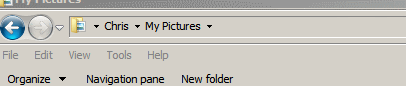
Which is the same as C:\Users\Username\Pictures although if you look for the folder it will be named "My Pictures"
 

My Computer My Computer

At a glance

Microsoft Windows 7 Home Premium 64-bit 7601 ...AMD C-60 APU with Radeon(tm) HD Graphics4.00 GBAMD Radeon HD 6290 Graphics
Computer type
Laptop
Computer Manufacturer/Model Number
ASUS
OS
Microsoft Windows 7 Home Premium 64-bit 7601 Multiprocessor Free Service Pack 1
CPU
AMD C-60 APU with Radeon(tm) HD Graphics
Motherboard
ASUSTeK COMPUTER INC. X501U
Memory
4.00 GB
Graphics Card(s)
AMD Radeon HD 6290 Graphics
Sound Card
(1) AMD High Definition Audio Device (2) Realtek High Defi
Screen Resolution
1366 x 768 x 32 bits (4294967296 colors) @ 60 Hz
Hard Drives
Hitachi HTS545050A7E380 SATA Disk Device
Antivirus
Comodo CIS & FW, SecureAplus App Whitelisting, Threatfire
Browser
Cyberfox 64bit, Opera 64bit, Airfox
Other Info
Spy-The-Spy, HitmanPro.Alert, Norton Connect Safe, MJRegWatcher, BitDefender TrafficLight, Voodoo Shield, Zemana AntiMalware
Blessing to you for sharing the cool links ! And Also for exposing this situation with our reparse point

So I have windows 7 64 it appears that the bat files in RepairJunction_DocumentsAndSettings_win7-win8.zip
But from what I was reading it appears there are hidden folders that are really the folders for documents and settings and that they put up a false front to make explorer and apps "think" they exist with old names ..
So basicly the batch files will make real folders that are in actual existstance. ?

Many thanks you for sharing this information.
 
Last edited:

My Computer My Computer

At a glance

win7proi716GTX 980 TI
Computer type
PC/Desktop
Computer Manufacturer/Model Number
Gigibyte Custom build
OS
win7pro
CPU
i7
Memory
16
Graphics Card(s)
GTX 980 TI
Hard Drives
ssd 4t 750gig
Antivirus
norton pain
The link wae posted to explain the use of junction points and symbolic links in Windows 7 along with backwards compatibility for older programs. It was not intended that you should run any sort of repair. Anyway if repaired it would result in the defaults being used:

The defaults are:

Code:
Documents and Settings=@

[\ProgramData]
Application Data=\ProgramData
Desktop=@\Public\Desktop
Documents=@\Public\Documents
Favorites=@\Public\Favorites
Start Menu=Microsoft\Windows\Start Menu
Templates=Microsoft\Windows\Templates

[@]
Default User=Default

[All Users]
Application Data=\ProgramData
Desktop=@\Public\Desktop
Documents=@\Public\Documents
Favorites=@\Public\Favorites
Start Menu=\ProgramData\Microsoft\Windows\Start Menu
Templates=\ProgramData\Microsoft\Windows\Templates

[Public]
Documents\My Music=Music
Documents\My Pictures=Pictures
Documents\My Videos=Videos

[Default]
Application Data=AppData\Roaming
Cookies=AppData\Roaming\Microsoft\Windows\Cookies
Local Settings=AppData\Local
My Documents=Documents
NetHood=AppData\Roaming\Microsoft\Windows\Network Shortcuts
PrintHood=AppData\Roaming\Microsoft\Windows\Printer Shortcuts
Recent=AppData\Roaming\Microsoft\Windows\Recent
SendTo=AppData\Roaming\Microsoft\Windows\SendTo
Start Menu=AppData\Roaming\Microsoft\Windows\Start Menu
Templates=AppData\Roaming\Microsoft\Windows\Templates
AppData\Local\Application Data=AppData\Local
AppData\Local\History=AppData\Local\Microsoft\Windows\History
AppData\Local\Temporary Internet Files=AppData\Local\Microsoft\Windows\Temporary Internet Files
Documents\My Music=Music
Documents\My Pictures=Pictures
Documents\My Videos=Videos

So when you see C:\Users\Username\Pictures in the address bar it's actually linking to C:\Users\Username\My Pictures which is the same thing.

If you type this into Start> Run dialog box:

shell:UsersFilesFolder

In the window that opens you will see your "My Pictures" folder. If you right click on that folder and choose "Properties" then go to the "Location" tab you will see where it links to. There is no actual folder named "My Pictures" and that is how it should be by design.

Windows 7 uses virtual folders and symbolic links called junction points to assist legacy software that, for example, expects to find a folder called My Pictures.

However, the default location in Windows 7 is C:/Users/User Name/Pictures so a junction point is used to to tell the software written for say, Windows XP, you won't find a My Pictures folder, but if you use this junction it will show you where Pictures is in Windows 7.
 

My Computer My Computer

At a glance

Microsoft Windows 7 Home Premium 64-bit 7601 ...AMD C-60 APU with Radeon(tm) HD Graphics4.00 GBAMD Radeon HD 6290 Graphics
Computer type
Laptop
Computer Manufacturer/Model Number
ASUS
OS
Microsoft Windows 7 Home Premium 64-bit 7601 Multiprocessor Free Service Pack 1
CPU
AMD C-60 APU with Radeon(tm) HD Graphics
Motherboard
ASUSTeK COMPUTER INC. X501U
Memory
4.00 GB
Graphics Card(s)
AMD Radeon HD 6290 Graphics
Sound Card
(1) AMD High Definition Audio Device (2) Realtek High Defi
Screen Resolution
1366 x 768 x 32 bits (4294967296 colors) @ 60 Hz
Hard Drives
Hitachi HTS545050A7E380 SATA Disk Device
Antivirus
Comodo CIS & FW, SecureAplus App Whitelisting, Threatfire
Browser
Cyberfox 64bit, Opera 64bit, Airfox
Other Info
Spy-The-Spy, HitmanPro.Alert, Norton Connect Safe, MJRegWatcher, BitDefender TrafficLight, Voodoo Shield, Zemana AntiMalware
Hi,
Libraries just gives a straighter shot to the files beit a shortcut or link it is a lot faster than digging down through c/ users for them :)
What can be the most confusing is the Public listing but one does not have to use that area unless one wants to share files with other users on the same machine otherwise the public area can be completely ignored.
 

My Computer My Computer

At a glance

Win-7-Pro64bit 7-H-Prem-64biti7-5930K 2nd i9-9940x both water blocked VRM'...Trident-z 3200C14 2nd Trident-z 3600C16EVGA 1080ti ftw3 2nd Titan Xp both water blocked
Computer type
PC/Desktop
Computer Manufacturer/Model Number
Custom assembled by me :}
OS
Win-7-Pro64bit 7-H-Prem-64bit
CPU
i7-5930K 2nd i9-9940x both water blocked VRM's too
Motherboard
ASUS SABERTOOTH X99 2nd ASUS x299 Apex
Memory
Trident-z 3200C14 2nd Trident-z 3600C16
Graphics Card(s)
EVGA 1080ti ftw3 2nd Titan Xp both water blocked
Sound Card
Built-in Realtek
Monitor(s) Displays
1-AOC G2460PG 24"G-Sync 144Hz/ 2nd 1-ASUS VG248QE 24" 144Hz
Screen Resolution
1920 x 1080 144Hz
Hard Drives
2-Samsung M.2 Evo & Evo Plus
2-Samsung 850 EVO 500GB SSD's/ 3-2.5 W.D. Black 1tb-&3-1tb/3-3.5 WD Black 1tb hdd's
PSU
EVGA SuperNOVA 1000-P2 2nd 1200-P2
Case
2-Corsair Obsidian Series 450D Black ATX Mid Tower
Cooling
Custom water loops
Keyboard
Logitech G710+/ 2nd Logitech G910
Mouse
2-RedDragon M901 Perdition 16400 dpi Gaming mouse = wired
Internet Speed
Comcast Ping 19ms 89.31mbps download speed 6.12mbps upload
Antivirus
Malwarebytes Pro/ Superantispyware Pro
Browser
FireFox & Pale moon
Other Info
2nd ASUS X299 Apex/Intel i9-9940x with Custom water loop/7H-Prem-x64/Corsair 450D case/Ram Trident-z 3600C16 4x8gb / Samsung970Evo plus 500gb SSD/Dual ssd EZ swap evo/PSU EVGA SuperNova 1200w-P2 80+Platinum/GPU Titan Xp /8-ML-140 on push-pull on 2-280GTX rads
A ‘desktop.ini’ file is a customisation file that stores configuration settings for the folder in which it resides. Along with the ability of providing a personalised folder icon, they can also be used to configure a folder’s display name, masking the true name. Windows Explorer makes predominate use of these.

This explains why one would see their Pictures folder displayed as ‘My Pictures’ when viewed from Explorer but as ‘Pictures’—its underlying name—when viewed from a program that doesn’t make use of ‘desktop.ini’, such as the Command Prompt.

This has nothing to do with junctions, nor does the operation of Libraries as far as I’m aware.
 

My Computer My Computer

At a glance

Windows 10, Windows 8.1 Pro, Windows 7 Profes...
Computer type
PC/Desktop
OS
Windows 10, Windows 8.1 Pro, Windows 7 Professional, OS X El Capitan
Ok these facts are awesome to know. For the last few operating systems I have just been shaking my head and using a external drive or second drive and avoiding all this mess. But this conflicts with the intigration of some programs. The confusion lies when I go to back up files on a computer that IS using the libraries and such and I am like OK what folder shoud I REALLY Back up. ? I copy the desktop and copy the LIbraries. But then I just make a copy of USERS just in case and that is probably not the right way. redundant. It does get the Intiut public folder ...
Eventually I will figure out what is what for sure.
To me the my documents libraries are earthquake zones. But when I go to save a file from out look that I can easily retreave I am finding that PICTURES is handy. I make shortcuts in favorites and also I have shortcuts that I locate by right clicking the explerer folder on the taskbar. I have been with these MS operating systems from the time that IBM AT XT machines were taken over by the clones. To give you an idea of my frustration I have this folder called "An Accesable Folder not buried 10 folders down in users" HA ! But I think I need to come out of the Dark ages here and take the time to understand why they really did what they did. Thank you all for your help!
 

My Computer My Computer

At a glance

win7proi716GTX 980 TI
Computer type
PC/Desktop
Computer Manufacturer/Model Number
Gigibyte Custom build
OS
win7pro
CPU
i7
Memory
16
Graphics Card(s)
GTX 980 TI
Hard Drives
ssd 4t 750gig
Antivirus
norton pain
I created a folder & made a shortcut to it on desktop.
All these various 'locations' windows seems to bury, I created shortcuts to (other locations etc also) & moved shortcuts to (original folder) <- shortcut key brings it up on top of everything. (solitaire & freecell included!)
 

My Computer My Computer

At a glance

Windows 7 Home Premium bitamd?4 gig
Computer type
Laptop
Computer Manufacturer/Model Number
toshiba 505
OS
Windows 7 Home Premium bit
CPU
amd?
Motherboard
?
Memory
4 gig
Monitor(s) Displays
Samsung S27D360 &S24D300 - Acer K222HQL - Eizo 21" (4x3)
Screen Resolution
1280 x 720 -1600x900 - (eizo 1024x768
Hard Drives
240 ssd
PSU
amd (?)
Mouse
logitech tackball
Antivirus
360 total security
Browser
firefox portable 29.0.1
A ‘desktop.ini’ file is a customisation file that stores configuration settings for the folder in which it resides. Along with the ability of providing a personalised folder icon, they can also be used to configure a folder’s display name, masking the true name. Windows Explorer makes predominate use of these.

This explains why one would see their Pictures folder displayed as ‘My Pictures’ when viewed from Explorer but as ‘Pictures’—its underlying name—when viewed from a program that doesn’t make use of ‘desktop.ini’, such as the Command Prompt.

This has nothing to do with junctions, nor does the operation of Libraries as far as I’m aware.

Okay - cheers. Well I suppose that it is easy to assume that junction points have something to do with it!

Junction Links.jpg
 

My Computer My Computer

At a glance

Microsoft Windows 7 Home Premium 64-bit 7601 ...AMD C-60 APU with Radeon(tm) HD Graphics4.00 GBAMD Radeon HD 6290 Graphics
Computer type
Laptop
Computer Manufacturer/Model Number
ASUS
OS
Microsoft Windows 7 Home Premium 64-bit 7601 Multiprocessor Free Service Pack 1
CPU
AMD C-60 APU with Radeon(tm) HD Graphics
Motherboard
ASUSTeK COMPUTER INC. X501U
Memory
4.00 GB
Graphics Card(s)
AMD Radeon HD 6290 Graphics
Sound Card
(1) AMD High Definition Audio Device (2) Realtek High Defi
Screen Resolution
1366 x 768 x 32 bits (4294967296 colors) @ 60 Hz
Hard Drives
Hitachi HTS545050A7E380 SATA Disk Device
Antivirus
Comodo CIS & FW, SecureAplus App Whitelisting, Threatfire
Browser
Cyberfox 64bit, Opera 64bit, Airfox
Other Info
Spy-The-Spy, HitmanPro.Alert, Norton Connect Safe, MJRegWatcher, BitDefender TrafficLight, Voodoo Shield, Zemana AntiMalware
Hi,
Some programs do insert some folders in the public area which to is pretty annoying
For me CorelDraw 6 & Chasy's Draw and even NVidia does for some odd reason :mad2:
 

My Computer My Computer

At a glance

Win-7-Pro64bit 7-H-Prem-64biti7-5930K 2nd i9-9940x both water blocked VRM'...Trident-z 3200C14 2nd Trident-z 3600C16EVGA 1080ti ftw3 2nd Titan Xp both water blocked
Computer type
PC/Desktop
Computer Manufacturer/Model Number
Custom assembled by me :}
OS
Win-7-Pro64bit 7-H-Prem-64bit
CPU
i7-5930K 2nd i9-9940x both water blocked VRM's too
Motherboard
ASUS SABERTOOTH X99 2nd ASUS x299 Apex
Memory
Trident-z 3200C14 2nd Trident-z 3600C16
Graphics Card(s)
EVGA 1080ti ftw3 2nd Titan Xp both water blocked
Sound Card
Built-in Realtek
Monitor(s) Displays
1-AOC G2460PG 24"G-Sync 144Hz/ 2nd 1-ASUS VG248QE 24" 144Hz
Screen Resolution
1920 x 1080 144Hz
Hard Drives
2-Samsung M.2 Evo & Evo Plus
2-Samsung 850 EVO 500GB SSD's/ 3-2.5 W.D. Black 1tb-&3-1tb/3-3.5 WD Black 1tb hdd's
PSU
EVGA SuperNOVA 1000-P2 2nd 1200-P2
Case
2-Corsair Obsidian Series 450D Black ATX Mid Tower
Cooling
Custom water loops
Keyboard
Logitech G710+/ 2nd Logitech G910
Mouse
2-RedDragon M901 Perdition 16400 dpi Gaming mouse = wired
Internet Speed
Comcast Ping 19ms 89.31mbps download speed 6.12mbps upload
Antivirus
Malwarebytes Pro/ Superantispyware Pro
Browser
FireFox & Pale moon
Other Info
2nd ASUS X299 Apex/Intel i9-9940x with Custom water loop/7H-Prem-x64/Corsair 450D case/Ram Trident-z 3600C16 4x8gb / Samsung970Evo plus 500gb SSD/Dual ssd EZ swap evo/PSU EVGA SuperNova 1200w-P2 80+Platinum/GPU Titan Xp /8-ML-140 on push-pull on 2-280GTX rads
You have to delete the public folders, I do.
 

My Computer My Computer

At a glance

Windows 10 Pro x64Intel Core i7 6700KGSkill TridentZ RGB 16GB 3600 16-16-16-36EVGA GTX 980 Ti SC x2
Computer type
PC/Desktop
Computer Manufacturer/Model Number
Skylake Special #666
OS
Windows 10 Pro x64
CPU
Intel Core i7 6700K
Motherboard
Asus Sabertooth Z170 Mark 1
Memory
GSkill TridentZ RGB 16GB 3600 16-16-16-36
Graphics Card(s)
EVGA GTX 980 Ti SC x2
Sound Card
Realtek High Definition
Monitor(s) Displays
AOC G2460PG
Screen Resolution
1920 x 1080 144Hz
Hard Drives
Samsung 860 Pro 256GB, Seagate Barracuda 4TB x2
PSU
EVGA 1000 P2, EVGA White Custom Braided Cables
Case
Corsair Vengeance C70 Gunmetal Black
Cooling
Corsair H100i v2, Corsair ML120 x2, Thermal Grizzly Kryonaut
Keyboard
Logitech G910 Orion Spectrum
Mouse
Logitech G700s
Internet Speed
Verizon Fios Quantum Gateway 75/75
Antivirus
Windows Defender, Malwarebytes Free 3.8.3
Browser
Chrome
Other Info
Corsair SP120 x4, LG Blu-ray Drive, Durabrand HT-395 100 Watt Dolby Digital Amp, Corsair H2100 Wireless 7.1 Headset
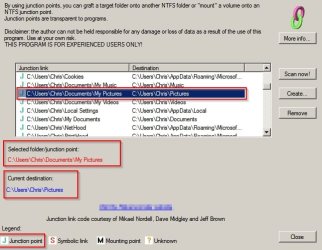
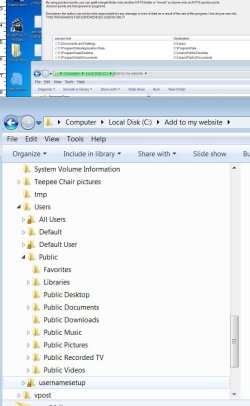
Im trying to understand what a junction is for sure. I guess im not understanding. In the program JLM I see a junction link and a destination It would seam I should be able to find the destination The users\public\ exists but no documents foler exists there. see "confusion one.jpg"
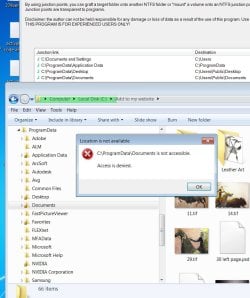
Then I tried to browes to the junction link users programdata\documents and we have the famouse pesky lock NOT accessible. access is denied. see photo "confusion2.jpg"
So it must be the actual existing folder is the junction link and the destination is ? or I dont get it
 

Attachments

  • CONFUSION ONE .jpg
    CONFUSION ONE .jpg
    69.1 KB · Views: 1
  • CONFUSION2.jpg
    CONFUSION2.jpg
    114.1 KB · Views: 1
Last edited:

My Computer My Computer

At a glance

win7proi716GTX 980 TI
Computer type
PC/Desktop
Computer Manufacturer/Model Number
Gigibyte Custom build
OS
win7pro
CPU
i7
Memory
16
Graphics Card(s)
GTX 980 TI
Hard Drives
ssd 4t 750gig
Antivirus
norton pain
So I installed that little program JLM to see, I made print screens of the results.
I see that I am locked out of the junction link and I can not find the destination. See Confusion 2.jpg
and then confusionone.jpg shows that I dont find a destination.

Why is there a lock on the junction folder ??
What folders actually exist and what folders actually are just faux folders. ?

See explanation here:

To whom it may concern:

If you understand Junctions, Hard Links, and Symbolic Links, please disregard.

If you do not understand these, I would highly recommend leaving them alone. You also need to understand the Security permissions for them and the reason Microsoft used them.

(Windows 7 x86 or 64-bit)

Junctions, Hard Links, and Symbolic Links are pointers to other objects, and these objects include Junctions, Hard Links, and Symbolic Links. In Windows Explorer (file manager), there is no indication if a folder is actually a folder or a Junction. A Junction can point to an actual folder, and that folder can include a Junction that points to another folder. (I think a Junction can point to another Junction, but I may be wrong.) Deleting a Junction will only delete the pointer, but copying a Junction will paste a copy of the actual folder. Hard Links and Symbolic Links work differently. One or both will delete the actual folder when it is deleted. If you want more information, Google Hard Links and/or Symbolic Links.

Junctions, Hard Links, and Symbolic Links are quite useful, but you need to understand how they work. I believe that the Windows "Libraries" use these, or something similar. For example, you could create your own Library as a folder on your Desktop. These are functionally equivalent to the actual folders, and an application will not know that it is not using the actual folder. Some applications store data in their "C:\Program Files\" directory, but using a Junction you could change where it stores its data.

One problem that can arise is creating a folder st the actual location. A Junction for "C:\Program Files\Some Game\Saved Games\" could point to "D:\All Games\Some Game\Saves\". If for some reason an actual folder was created in the original folder, it can cause problems. If an actual folder is created in the "C:\Program Files\Some Game\Saved Games\" directory, strange things can happen. You could have a Junction for "C:\Program Files\Some Game\Saved Games\" and a folder "C:\Program Files\Some Game\Saved Games\New Folder". If I am not mistaken, these will be presented as the same location. This is similar to the Windows Start Menu.

With Windows 7, Microsoft decided to cleanup some of the older locations for certain folders. Among these is "My Documents". Some Applications have hard-coded the path based upon older Windows versions. Using Junctions allows these Applications to think they are writing and reading from the original location. Some Applications will "walk the tree" to determine the location, and they can inadvertently create a folder in the original location. In order to keep this from occurring, Microsoft set certain Security permissions on these Junctions ("List folder" and "Traverse folder"). The "Trusted Installer" is the Owner, and taking Ownership from this user is difficult but not impossible. This was done to keep Users from "breaking" the file structure. Windows Explorer is an Application, and therefore, it cannot "List folder" to display the contents.

The multiple folders arise because a Junction may point to folder that has a Junction(s) that eventually points back to the original folder. Also, an actual folder may have been created in the location the first Junction is re-mapping. The result is that they regress on themselves. This is similar to two mirrors pointing at each other or a TV camera showing a TV set with the picture from the camera.

To my knowledge, Microsoft has not documented this in one place. In order to learn this, I had to do a lot of Googling and reading. Some of these things are in the Developer documentation and other things are "Tribal Knowledge". I was trying to move my "Users" folder from the "C:\Users\" to "D:\UserFiles\", and I was determined to do it. Contrary to the usual answer, it IS possible, but it is NOT easy. I did it, and it worked. I reverted back because I missed something somewhere, and folders were being created in the re-mapped locations.

(I also replaced the HAL which is impossible according to Microsoft. It is doable but not pleasant.)

I did not go into this detail in my original reply because you really should plan to reinstall or restore a disk image. I do not know if System Restore will replace the original file structure (Junctions and permissions), but restoring from a backup will not. Somewhere down the road, you are going to have stranger things happening, and you will reinstall Windows. At this point, you should image your disk because you may not have gotten all your data, and this will allow you to find it.

Finally, you should do some research before using a utility like JunctionBox. There are a lot of ramifications to making these changes. The "Take Ownership" utility is another one to be used with caution. The above is not a definitive explanation. That would take more time than I am willing to expend.

This is not a flame - just an observation. If you cannot find a System utility like JunctionBox by Googling it, you really should not be using it.

---

I did not intend for you to download that software and somehow managed to leave the name of the software in the screenshot.
 

My Computer My Computer

At a glance

Microsoft Windows 7 Home Premium 64-bit 7601 ...AMD C-60 APU with Radeon(tm) HD Graphics4.00 GBAMD Radeon HD 6290 Graphics
Computer type
Laptop
Computer Manufacturer/Model Number
ASUS
OS
Microsoft Windows 7 Home Premium 64-bit 7601 Multiprocessor Free Service Pack 1
CPU
AMD C-60 APU with Radeon(tm) HD Graphics
Motherboard
ASUSTeK COMPUTER INC. X501U
Memory
4.00 GB
Graphics Card(s)
AMD Radeon HD 6290 Graphics
Sound Card
(1) AMD High Definition Audio Device (2) Realtek High Defi
Screen Resolution
1366 x 768 x 32 bits (4294967296 colors) @ 60 Hz
Hard Drives
Hitachi HTS545050A7E380 SATA Disk Device
Antivirus
Comodo CIS & FW, SecureAplus App Whitelisting, Threatfire
Browser
Cyberfox 64bit, Opera 64bit, Airfox
Other Info
Spy-The-Spy, HitmanPro.Alert, Norton Connect Safe, MJRegWatcher, BitDefender TrafficLight, Voodoo Shield, Zemana AntiMalware
It’s unfortunate that you’ve been introduced to two very different, unrelated concepts at once such that it all seems interlinked into one unified plane of ideas. If you wish to gain a firm understanding of the concepts of ‘desktop.ini’ files and junctions you must consider their function and roles separately. We have explained quite a bit for you already, now you must combine the pieces. Unfortunately, some of the most valuable information has probably become buried in a haze of information.

So it must be the actual existing folder is the junction link and the destination is ? or I dont get it
What folders actually exist and what folders actually are just faux folders. ?
Here I would go on to explain how you could identify these “faux folders” as it is something of a conjecture we’ve seemingly raised specifically for you to take for granted at the moment, but I’m not convinced you’ve absorbed everything that has been said given the way you have phased this question. Namely, it appears your understanding of desktop.ini files are more the concern.

From before,
Along with the ability of providing a personalised folder icon, [desktop.ini files] can also be used to configure a folder’s display name, masking the true name. Windows Explorer makes predominate use of these.
Let us recap that some folder names as seen in Windows Explorer can put on a facade and lie about their display name. This is due to the effect of a configuration file in the folder, ‘desktop.ini’. They’re typically hidden, so type the path of the file into the address bar if you’re curious about their contents.

Junction points, they’re nothing more than linking mechanisms. I don’t want to have to say any more than I have already; all you need to know about junctions is detailed here. I’ve made some adjustments to the info text so things should be clearer.

Why is there a lock on the junction folder ??
I recently explained their purpose in another thread... namely, your previous thread. Btw, I’m I going to get a reply?


[B][COLOR="#483D8B"]Callender[/COLOR][/B] That’s excessive. Here’s the original post in context. [B][COLOR="#999999"]Whocares[/COLOR][/B] was quite knowledgeable and is for the most part accurate, though he did deviate from practicality at times.

That thread was an absolute mess.
 

My Computer My Computer

At a glance

Windows 10, Windows 8.1 Pro, Windows 7 Profes...
Computer type
PC/Desktop
OS
Windows 10, Windows 8.1 Pro, Windows 7 Professional, OS X El Capitan
I have read everything all the links and such.
I understand that Desktop ini can redifine identify of a folder making it out to be named in a way that is compatible with old programs.
I need to pin down one fact so I can build apon it. Just so I can tell my brain that this one fact is true for sure. A fact I can build on. I think the JLM program will help me learn. I am thinking I can use it to get to know my computer better. I may not use it to change anything but it will help me identify what is what and then I can use that knowlege to further unravle some of this.
Just so I know for sure for a actual fact The program has two columbs one is JUNCTION LINK the other is Destination
I would assume that the folders under the columb junction link are not the real names of the folders. And in the Destination columb the folders in that columb are the real names of the folders. Am I correct about this. ?
 

My Computer My Computer

At a glance

win7proi716GTX 980 TI
Computer type
PC/Desktop
Computer Manufacturer/Model Number
Gigibyte Custom build
OS
win7pro
CPU
i7
Memory
16
Graphics Card(s)
GTX 980 TI
Hard Drives
ssd 4t 750gig
Antivirus
norton pain
You still appear to be confusing the use of Desktop.ini and the use of Junctions. These are to totally unrelated things

The desktop.ini file changes the properties of a folder, it's name presented in File explorer, it's icon etc - there is only ever one folder involved, the one that contains the hidden / system file "desktop.ini"

--------------------

Symbolic links, (junctions) are a special type of shortcut. used in many operating systems. a symbolic link is used to provide a transparent link from one location to another. This is mostly used in windows to "fool" old programs which were incorrectly coded to use a specific location and not use a system variable which is the correct way - For Example - the Junction is used to enable a program written for XP to find the new location for "Documents & settings" which is now in a different location.

As the junction is a transparent normal file and folder functions do not work so although the junction is working and the program gives no error, an attempt to check the folder gives an error. opening a junction actually opens the target folder

There are always two locations involved with a junction The phantom folder that is the actual junction and the target folder that contains the files
 
Last edited:

My Computers My Computers

  • At a glance

    Windows 11 Pro x64 [Latest Release and Releas...Ryzen 9 5950X, 3.8 - 5.2 MHz64GB [2 x 32GB] DDR4 3200MHz4GB NVIDIA GEFORCE GTX 1650 Ti
    Computer type
    PC/Desktop
    Computer Manufacturer/Model Number
    ChillBlast - Custom to my design
    OS
    Windows 11 Pro x64 [Latest Release and Release Preview]
    CPU
    Ryzen 9 5950X, 3.8 - 5.2 MHz
    Motherboard
    Asus Prime X570-Pro
    Memory
    64GB [2 x 32GB] DDR4 3200MHz
    Graphics Card(s)
    4GB NVIDIA GEFORCE GTX 1650 Ti
    Sound Card
    On-board SPDIF to 5.1 System + HDMI [5.1 system]
    Monitor(s) Displays
    32" UHD 32 Bit HDR Monitor + 43" UHD 4K 32Bit HDR TV
    Screen Resolution
    2 x 3840 x 2160 @60Hz
    Hard Drives
    1TB M2 SSD OS, 500GB Fast Access SSD, 2 x 8TB Data + Various Externals from 1TB to 4TB, 10TB NAS
    PSU
    NZXT C750 80 PLUS Gold 750W Modular PSU
    Case
    Workstation Case [Matt Black]
    Cooling
    NZXT Kraken X63 280mm CPU Cooler +2x Quiet Case fans
    Keyboard
    Logitech Wireless MX Keys & K400 + others
    Mouse
    Logitech Wireless MX Master 3S
    Internet Speed
    920 MB Down 50 MB Up
    Antivirus
    BitDefender Total Security Pro
    Browser
    Chrome (always run latest Non-Beta)
    Other Info
    Also run ...
    Laptop - Quad 8GB - Windows 10 Pro x64
    Nexus 7 Android tablet x2
    Samsung 10.2" tablet
    Blackview TAB 8 4G Android Tablet c/w Keyboard
    Wacom Intuos Pro Medium Pen Pad
    Wacom Intuos Pro Small Pen Pad
    Wacom Expresskeys Remote
    Loopdeck+ Graphics Controller
    Shuttle Pro v2 Control
  • At a glance

    Windows 11 Pro x64 Latest RPIntel I7 10750H 5.0GHz32GB [2x16GB] DDR4 2933 MHznVidia GTX1650Ti 4 GB GDDR6
    Computer type
    Laptop
    System Manufacturer/Model Number
    Dell XPS 17 10750H
    OS
    Windows 11 Pro x64 Latest RP
    CPU
    Intel I7 10750H 5.0GHz
    Motherboard
    Dell XPS
    Memory
    32GB [2x16GB] DDR4 2933 MHz
    Graphics Card(s)
    nVidia GTX1650Ti 4 GB GDDR6
    Sound Card
    Stock [Realtek] 4 Speaker
    Monitor(s) Displays
    17" IPS UHD+ Infinity Edge Touchscreen
    Screen Resolution
    3840 x 2400
    Hard Drives
    2TB M2 NVMe, 4TB External + various 500GB & 1TB External NVMe (also have access to spinner HDD from
    PSU
    Stock
    Case
    Stock XPS Aluminium & Carbon Fibre
    Cooling
    Stock - Active Fan Control
    Keyboard
    Backlit + Various Logitech
    Mouse
    Stock Track Pad + Logitech MX Trackball
    Internet Speed
    72 MB Down 18MB Up
    Browser
    Chrome
    Other Info
    Also run ...
    Laptop - Quad 8GB - Windows 10 Pro x64
    Nexus 7 Android tablet x2
    10.2" tablet
    Sony Z3 Android Smartphone
    Wacom Intuos Pro Medium Pen Pad
    Wacom Intuos Pro Small Pen Pad
    Wacom Expresskeys Remote
    Loopdeck+ Graphics Controller
    Shuttle Pro v2 Control Pad
    10TB NAS
Im trying to understand what a junction is for sure. I guess im not understanding. In the program JLM I see a junction link and a destination It would seam I should be able to find the destination The users\public\ exists but no documents foler exists there.

Then I tried to browes to the junction link users programdata\documents and we have the famouse pesky lock NOT accessible. access is denied.

Okay to put it in a simple way - you should not have access to those locked folders and that is the way it should be by design.

If you want to know what is in C:\ProgramData\Documents - it actually points to C:\Users\Public\Documents so that is where you should look.
 
Last edited:

My Computer My Computer

At a glance

Microsoft Windows 7 Home Premium 64-bit 7601 ...AMD C-60 APU with Radeon(tm) HD Graphics4.00 GBAMD Radeon HD 6290 Graphics
Computer type
Laptop
Computer Manufacturer/Model Number
ASUS
OS
Microsoft Windows 7 Home Premium 64-bit 7601 Multiprocessor Free Service Pack 1
CPU
AMD C-60 APU with Radeon(tm) HD Graphics
Motherboard
ASUSTeK COMPUTER INC. X501U
Memory
4.00 GB
Graphics Card(s)
AMD Radeon HD 6290 Graphics
Sound Card
(1) AMD High Definition Audio Device (2) Realtek High Defi
Screen Resolution
1366 x 768 x 32 bits (4294967296 colors) @ 60 Hz
Hard Drives
Hitachi HTS545050A7E380 SATA Disk Device
Antivirus
Comodo CIS & FW, SecureAplus App Whitelisting, Threatfire
Browser
Cyberfox 64bit, Opera 64bit, Airfox
Other Info
Spy-The-Spy, HitmanPro.Alert, Norton Connect Safe, MJRegWatcher, BitDefender TrafficLight, Voodoo Shield, Zemana AntiMalware
Hi,
Most of the lock symbols I've noticed are actually the win-7 default administrator account not my administrator account so possibly that is what is throwing you off ?
 

My Computer My Computer

At a glance

Win-7-Pro64bit 7-H-Prem-64biti7-5930K 2nd i9-9940x both water blocked VRM'...Trident-z 3200C14 2nd Trident-z 3600C16EVGA 1080ti ftw3 2nd Titan Xp both water blocked
Computer type
PC/Desktop
Computer Manufacturer/Model Number
Custom assembled by me :}
OS
Win-7-Pro64bit 7-H-Prem-64bit
CPU
i7-5930K 2nd i9-9940x both water blocked VRM's too
Motherboard
ASUS SABERTOOTH X99 2nd ASUS x299 Apex
Memory
Trident-z 3200C14 2nd Trident-z 3600C16
Graphics Card(s)
EVGA 1080ti ftw3 2nd Titan Xp both water blocked
Sound Card
Built-in Realtek
Monitor(s) Displays
1-AOC G2460PG 24"G-Sync 144Hz/ 2nd 1-ASUS VG248QE 24" 144Hz
Screen Resolution
1920 x 1080 144Hz
Hard Drives
2-Samsung M.2 Evo & Evo Plus
2-Samsung 850 EVO 500GB SSD's/ 3-2.5 W.D. Black 1tb-&3-1tb/3-3.5 WD Black 1tb hdd's
PSU
EVGA SuperNOVA 1000-P2 2nd 1200-P2
Case
2-Corsair Obsidian Series 450D Black ATX Mid Tower
Cooling
Custom water loops
Keyboard
Logitech G710+/ 2nd Logitech G910
Mouse
2-RedDragon M901 Perdition 16400 dpi Gaming mouse = wired
Internet Speed
Comcast Ping 19ms 89.31mbps download speed 6.12mbps upload
Antivirus
Malwarebytes Pro/ Superantispyware Pro
Browser
FireFox & Pale moon
Other Info
2nd ASUS X299 Apex/Intel i9-9940x with Custom water loop/7H-Prem-x64/Corsair 450D case/Ram Trident-z 3600C16 4x8gb / Samsung970Evo plus 500gb SSD/Dual ssd EZ swap evo/PSU EVGA SuperNova 1200w-P2 80+Platinum/GPU Titan Xp /8-ML-140 on push-pull on 2-280GTX rads
Simple solution: don't use them.
We got these beginning with Windows 7 (or maybe Vista?):
- My Documents
- My Music
- My Pictures
- My Shapes
- My Videos
I never use them. I don't organize things the way Microsoft wants me to. So I just ignore those folders. If they contain anything at all it's because an app put them there. Which is fine if such app knows and cares.

But my stuff lies elsewhere, so the OP's problem never exists for me. Simple.
 

My Computer My Computer

At a glance

Windows 10 x64i7-7700K16 GB 2400 MHzGTX 1060
Computer type
PC/Desktop
Computer Manufacturer/Model Number
Dell
OS
Windows 10 x64
CPU
i7-7700K
Memory
16 GB 2400 MHz
Graphics Card(s)
GTX 1060
Sound Card
Integrated, plus external Presonus Audiobox USB
Monitor(s) Displays
2x AOC 27"
Screen Resolution
1920x1080
Hard Drives
512 GB M.2 SSD
2 TB 7200 RPM disk
Internet Speed
110 Mbps
Browser
Firefox
Back
Top