
Can't Save As PDF in Office 2007

gzt7d8

New member
Power User
VIP
Local time
12:14 PM
Messages
146
Location
Michigan
I downloaded the addon tool to save files in Office 2007 as PDF formats. I have successfully done this in Vista but can not perform this task in Win 7.

I'm not sure if this is a compatibility issue between Win 7 and this feature or it is specific to Office 2007, regardless of the OS. I'll yield to your wisdom.

Here are screen shots of 2 error messages, one from Word and the other from Powerpoint that I captured.

Thank you for your comments and suggestions.


Greg
 

Attachments
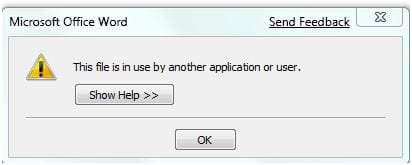
  • O2007 Error.JPG
    O2007 Error.JPG
    14.8 KB · Views: 51
  • O2007 Error in PPT.JPG
    O2007 Error in PPT.JPG
    19.2 KB · Views: 77

My Computer My Computer

Computer Manufacturer/Model Number
Alienware Aurora
OS
Windows 7 Professional (64bit)
CPU
Core i7 Extreme 975 @ 3.33GHz overclocked to 3.6 GHz
Motherboard
Alienware 0H869M
Memory
12 GB DDR3 1333MHz
Graphics Card(s)
NVIDIA GeForce GTX 295 1.8 GB RAM
Sound Card
Creative SB X-Fi Titanium
Monitor(s) Displays
Dell 2407WFP
Screen Resolution
1920 x 1200
Hard Drives
OCZ Vertex 2 100GB SSD - Primary Drive, Western Digital 300GB SATA-II 3GB/X, 10,000 RPM, 16MB Cache - Secondary Drive
PSU
875 Watt
Case
Cosmic Black
Cooling
Alienware High-Performance Liquid Cooling
Keyboard
Logitech
Mouse
Logitech
Internet Speed
60/3MB Service
Other Info
Logitech Z-5500 THX-Certified 505-Watt 5.1 Digital Surround Sound Speaker System
Wow, that is weird..I always look over the forums to see what problems other people are having, and i try them out to see if i have the same problem. I too have the "save as PDF/XPS" file, and Office 2007, but i don't have the problem you do. Mine come out just fine. It may be something on your system causing this error.


Just a thought.....
 

My Computer My Computer

OS
Windows 7
I downloaded the addon tool to save files in Office 2007 as PDF formats. I have successfully done this in Vista but can not perform this task in Win 7.
Greg

where do you get this tool ?
 

My Computer My Computer

Computer Manufacturer/Model Number
built my own
OS
win7 ultimate / virtual box
CPU
Intel Core i7 3770K,1155, Ivy Bridge
Motherboard
MSI Z77A-G43
Memory
GSkill Ripjaws Z Series 1600 CL 9.0 16GB
Graphics Card(s)
KFA2 GeForce GTX 670 EX OC 2048MB GDDR5 PCI-E gfx card
Sound Card
onboard Nvidia HDMI audio
Monitor(s) Displays
ASUS VK222H 22" widescreen LCD monitor
Screen Resolution
1680x1050
Hard Drives
Kingston 128gb SSD
OCZ Vertex 90gb SSD
500GB WDCaviar 16mb 5000KS
320GB WDCaviar 16mb 3200AAKS sata 2
1TB Samsung 16mb HD103SJ sata 2
PSU
Corsair HX 750W ATX2.2 Modular
Cooling
Antec 25 Kuhler H2O 620
Keyboard
logitech
Mouse
logitech MX518
Internet Speed
7mb adsl

My Computer My Computer

Computer Manufacturer/Model Number
Acer Aspire 1692
OS
XP pro, Win7 Ultimate x86
CPU
Pentium M 1.73GHz
Memory
2GB Samsung DDR2 667
Graphics Card(s)
ATI Mobility Radeon X700 64MB
Sound Card
Conexant AC-Link Audio
Screen Resolution
1280x800

My Computer My Computer

Computer Manufacturer/Model Number
built my own
OS
win7 ultimate / virtual box
CPU
Intel Core i7 3770K,1155, Ivy Bridge
Motherboard
MSI Z77A-G43
Memory
GSkill Ripjaws Z Series 1600 CL 9.0 16GB
Graphics Card(s)
KFA2 GeForce GTX 670 EX OC 2048MB GDDR5 PCI-E gfx card
Sound Card
onboard Nvidia HDMI audio
Monitor(s) Displays
ASUS VK222H 22" widescreen LCD monitor
Screen Resolution
1680x1050
Hard Drives
Kingston 128gb SSD
OCZ Vertex 90gb SSD
500GB WDCaviar 16mb 5000KS
320GB WDCaviar 16mb 3200AAKS sata 2
1TB Samsung 16mb HD103SJ sata 2
PSU
Corsair HX 750W ATX2.2 Modular
Cooling
Antec 25 Kuhler H2O 620
Keyboard
logitech
Mouse
logitech MX518
Internet Speed
7mb adsl
Thanks for the response, I wish I could pin point the problem. But you've confirmed it is not a multiple user problem but somewhat isolated to me. It works fine in Vista, but just can't get it in Win 7.

So, I'll try Microsoft and see if they have an answer.
 

My Computer My Computer

Computer Manufacturer/Model Number
Alienware Aurora
OS
Windows 7 Professional (64bit)
CPU
Core i7 Extreme 975 @ 3.33GHz overclocked to 3.6 GHz
Motherboard
Alienware 0H869M
Memory
12 GB DDR3 1333MHz
Graphics Card(s)
NVIDIA GeForce GTX 295 1.8 GB RAM
Sound Card
Creative SB X-Fi Titanium
Monitor(s) Displays
Dell 2407WFP
Screen Resolution
1920 x 1200
Hard Drives
OCZ Vertex 2 100GB SSD - Primary Drive, Western Digital 300GB SATA-II 3GB/X, 10,000 RPM, 16MB Cache - Secondary Drive
PSU
875 Watt
Case
Cosmic Black
Cooling
Alienware High-Performance Liquid Cooling
Keyboard
Logitech
Mouse
Logitech
Internet Speed
60/3MB Service
Other Info
Logitech Z-5500 THX-Certified 505-Watt 5.1 Digital Surround Sound Speaker System
On your screenshots it appears you are saving to the standard user directory.
Did you try saving to different folders as well?
Since I took ownership of users because of problems with other apps, some rights / privileges issue would be the only thing I can think of atm. And well, in that case I wouldn't get your error of course...
 

My Computer My Computer

Computer Manufacturer/Model Number
Acer Aspire 1692
OS
XP pro, Win7 Ultimate x86
CPU
Pentium M 1.73GHz
Memory
2GB Samsung DDR2 667
Graphics Card(s)
ATI Mobility Radeon X700 64MB
Sound Card
Conexant AC-Link Audio
Screen Resolution
1280x800
On your screenshots it appears you are saving to the standard user directory.
Did you try saving to different folders as well?

Killercat, I tried saving it to the desktop and to the Public directory and still got the same message.

So do you think it has something to do with the Win 7 privileges?

Greg
 

My Computer My Computer

Computer Manufacturer/Model Number
Alienware Aurora
OS
Windows 7 Professional (64bit)
CPU
Core i7 Extreme 975 @ 3.33GHz overclocked to 3.6 GHz
Motherboard
Alienware 0H869M
Memory
12 GB DDR3 1333MHz
Graphics Card(s)
NVIDIA GeForce GTX 295 1.8 GB RAM
Sound Card
Creative SB X-Fi Titanium
Monitor(s) Displays
Dell 2407WFP
Screen Resolution
1920 x 1200
Hard Drives
OCZ Vertex 2 100GB SSD - Primary Drive, Western Digital 300GB SATA-II 3GB/X, 10,000 RPM, 16MB Cache - Secondary Drive
PSU
875 Watt
Case
Cosmic Black
Cooling
Alienware High-Performance Liquid Cooling
Keyboard
Logitech
Mouse
Logitech
Internet Speed
60/3MB Service
Other Info
Logitech Z-5500 THX-Certified 505-Watt 5.1 Digital Surround Sound Speaker System
Do you have any other PDF printers in your system? Check the Start Menu - Devices and Printers.
 

My Computer My Computer

Computer Manufacturer/Model Number
Homebuilt
OS
Windows 7 x64
CPU
i7-2600K
Motherboard
Asus P8Z77-v Pro
Memory
8 G
Graphics Card(s)
GTX 480
Sound Card
Onboard
Monitor(s) Displays
LG W2753V
Screen Resolution
1920x1080
Hard Drives
Crucial M4 128 G SSD
Do you have any other PDF printers in your system? Check the Start Menu - Devices and Printers.

The only printers shown in that option are Fax, HP PSC 1310 Series (my default printer) and MS XPS Document Writer.

Greg
 

My Computer My Computer

Computer Manufacturer/Model Number
Alienware Aurora
OS
Windows 7 Professional (64bit)
CPU
Core i7 Extreme 975 @ 3.33GHz overclocked to 3.6 GHz
Motherboard
Alienware 0H869M
Memory
12 GB DDR3 1333MHz
Graphics Card(s)
NVIDIA GeForce GTX 295 1.8 GB RAM
Sound Card
Creative SB X-Fi Titanium
Monitor(s) Displays
Dell 2407WFP
Screen Resolution
1920 x 1200
Hard Drives
OCZ Vertex 2 100GB SSD - Primary Drive, Western Digital 300GB SATA-II 3GB/X, 10,000 RPM, 16MB Cache - Secondary Drive
PSU
875 Watt
Case
Cosmic Black
Cooling
Alienware High-Performance Liquid Cooling
Keyboard
Logitech
Mouse
Logitech
Internet Speed
60/3MB Service
Other Info
Logitech Z-5500 THX-Certified 505-Watt 5.1 Digital Surround Sound Speaker System
I just downloaded the trial version of Office 2007 and the PDF publisher. I installed both as admin, of course. All seems to be normal.

From your error messages, it seems the file is tied to another application or another user is accessing it. Does it have any OLE or any embeded information from another application? Are you the originator of the file? Did it come from another computer?

So we understand, you get these messages on every word document you try to publish, even if it is just nonsense you typed on a page?
 

My Computer My Computer

Computer Manufacturer/Model Number
Homebuilt
OS
Windows 7 x64
CPU
i7-2600K
Motherboard
Asus P8Z77-v Pro
Memory
8 G
Graphics Card(s)
GTX 480
Sound Card
Onboard
Monitor(s) Displays
LG W2753V
Screen Resolution
1920x1080
Hard Drives
Crucial M4 128 G SSD
From your error messages, it seems the file is tied to another application or another user is accessing it. Does it have any OLE or any embeded information from another application? Are you the originator of the file? Did it come from another computer?

So we understand, you get these messages on every word document you try to publish, even if it is just nonsense you typed on a page?

Saltgrass, the files that I was trying to save do not have any embedded objects. The Word documents was just text only. And yes, I am the originator of the documents.

Your other point there got me thinking; whether the files came from another computer. They came from the Vista partition but I tried creating a new test document in Word and got the same results.

I thought of uninstalling the update, and reinstall using the Troubleshoot Compatibility mode. What do you think? Will it help?

Greg
 

My Computer My Computer

Computer Manufacturer/Model Number
Alienware Aurora
OS
Windows 7 Professional (64bit)
CPU
Core i7 Extreme 975 @ 3.33GHz overclocked to 3.6 GHz
Motherboard
Alienware 0H869M
Memory
12 GB DDR3 1333MHz
Graphics Card(s)
NVIDIA GeForce GTX 295 1.8 GB RAM
Sound Card
Creative SB X-Fi Titanium
Monitor(s) Displays
Dell 2407WFP
Screen Resolution
1920 x 1200
Hard Drives
OCZ Vertex 2 100GB SSD - Primary Drive, Western Digital 300GB SATA-II 3GB/X, 10,000 RPM, 16MB Cache - Secondary Drive
PSU
875 Watt
Case
Cosmic Black
Cooling
Alienware High-Performance Liquid Cooling
Keyboard
Logitech
Mouse
Logitech
Internet Speed
60/3MB Service
Other Info
Logitech Z-5500 THX-Certified 505-Watt 5.1 Digital Surround Sound Speaker System
I don't remember if you did this, but you might try running Word as admin first. Right click on the shortcut in the Start Menu, properties-compatibility tab, run as admin at the bottom. If this makes any difference, you may want to reinstall or at least repair as admin to see if that will get it going. You should not have to run Word as Admin, so if that works, other steps may be necessary, such as what you suggest.

You may not have to uninstall the update, just right click and install again as Admin. If that doesn't help, then do the uninstall/reinstall. Do you remember if you installed Word as Admin? I think there should be very large warnings about always installing as Admin, because folks that used XP think the user/admin in W7/Vista is the same but it isn't.

Did you ever change the default saving folder?
 

My Computer My Computer

Computer Manufacturer/Model Number
Homebuilt
OS
Windows 7 x64
CPU
i7-2600K
Motherboard
Asus P8Z77-v Pro
Memory
8 G
Graphics Card(s)
GTX 480
Sound Card
Onboard
Monitor(s) Displays
LG W2753V
Screen Resolution
1920x1080
Hard Drives
Crucial M4 128 G SSD
Saltgrass, I appreciate you interest in my problem. See my answer in bold text, below.

I don't remember if you did this, but you might try running Word as admin first. Right click on the shortcut in the Start Menu, properties-compatibility tab, run as admin at the bottom. [Tried running Word, as you suggested Admin, but I still got the same message "The file in use by another computer or user."]

Do you remember if you installed Word as Admin? [No I didn't install Office 2007 as Admin. Let's say I didn't knowingly run it as Admin.] I think there should be very large warnings about always installing as Admin, because folks that used XP think the user/admin in W7/Vista is the same but it isn't.

Did you ever change the default saving folder? [Yes, but there was no change.]

Greg
 

My Computer My Computer

Computer Manufacturer/Model Number
Alienware Aurora
OS
Windows 7 Professional (64bit)
CPU
Core i7 Extreme 975 @ 3.33GHz overclocked to 3.6 GHz
Motherboard
Alienware 0H869M
Memory
12 GB DDR3 1333MHz
Graphics Card(s)
NVIDIA GeForce GTX 295 1.8 GB RAM
Sound Card
Creative SB X-Fi Titanium
Monitor(s) Displays
Dell 2407WFP
Screen Resolution
1920 x 1200
Hard Drives
OCZ Vertex 2 100GB SSD - Primary Drive, Western Digital 300GB SATA-II 3GB/X, 10,000 RPM, 16MB Cache - Secondary Drive
PSU
875 Watt
Case
Cosmic Black
Cooling
Alienware High-Performance Liquid Cooling
Keyboard
Logitech
Mouse
Logitech
Internet Speed
60/3MB Service
Other Info
Logitech Z-5500 THX-Certified 505-Watt 5.1 Digital Surround Sound Speaker System
Hmm…that's really a tricky one.
Maybe something really IS accessing/locking the file?
You might want to give Process Monitor v2.03 a try. There you should see if something is locking the file.

I monitored the creation of some PDFs on the Desktop, and the only processes accessing the file during creation were the office apps themselves and explorer.exe.

If you need assistance using Process Monitor, let me know :)
 

My Computer My Computer

Computer Manufacturer/Model Number
Acer Aspire 1692
OS
XP pro, Win7 Ultimate x86
CPU
Pentium M 1.73GHz
Memory
2GB Samsung DDR2 667
Graphics Card(s)
ATI Mobility Radeon X700 64MB
Sound Card
Conexant AC-Link Audio
Screen Resolution
1280x800
Thanks Killercat, I'll check out the tool and post my results.

Greg
 

My Computer My Computer

Computer Manufacturer/Model Number
Alienware Aurora
OS
Windows 7 Professional (64bit)
CPU
Core i7 Extreme 975 @ 3.33GHz overclocked to 3.6 GHz
Motherboard
Alienware 0H869M
Memory
12 GB DDR3 1333MHz
Graphics Card(s)
NVIDIA GeForce GTX 295 1.8 GB RAM
Sound Card
Creative SB X-Fi Titanium
Monitor(s) Displays
Dell 2407WFP
Screen Resolution
1920 x 1200
Hard Drives
OCZ Vertex 2 100GB SSD - Primary Drive, Western Digital 300GB SATA-II 3GB/X, 10,000 RPM, 16MB Cache - Secondary Drive
PSU
875 Watt
Case
Cosmic Black
Cooling
Alienware High-Performance Liquid Cooling
Keyboard
Logitech
Mouse
Logitech
Internet Speed
60/3MB Service
Other Info
Logitech Z-5500 THX-Certified 505-Watt 5.1 Digital Surround Sound Speaker System
I keep getting a flood of information, possibly irrelevant, but here are some things I have seen.

Adobe states when running their software, you have to install with run as admin, but you also have to run the program the first time as admin for it to work correctly. If you end up reinstalling Word, you might do that .

Also, check the folder below to see if anything looks pertinent. Maybe something is hiding in this area.

C:\Users\Youruser\AppData\Local\VirtualStore
 

My Computer My Computer

Computer Manufacturer/Model Number
Homebuilt
OS
Windows 7 x64
CPU
i7-2600K
Motherboard
Asus P8Z77-v Pro
Memory
8 G
Graphics Card(s)
GTX 480
Sound Card
Onboard
Monitor(s) Displays
LG W2753V
Screen Resolution
1920x1080
Hard Drives
Crucial M4 128 G SSD
Adobe states when running their software, you have to install with run as admin, but you also have to run the program the first time as admin for it to work correctly. If you end up reinstalling Word, you might do that .

Okay, now you lost me. :o
What makes you think this add-on was developed by Adobe? Also, to which documentation/guidelines are you referring to?
 

My Computer My Computer

Computer Manufacturer/Model Number
Acer Aspire 1692
OS
XP pro, Win7 Ultimate x86
CPU
Pentium M 1.73GHz
Memory
2GB Samsung DDR2 667
Graphics Card(s)
ATI Mobility Radeon X700 64MB
Sound Card
Conexant AC-Link Audio
Screen Resolution
1280x800
You misunderstand. I am just relating what Adobe says in case it might be relevant to Word. I had never seen a requirement to run a program the first time as admin. If it works for Adobe, maybe it is relevant to all programs installed in W7 or Vista.
 

My Computer My Computer

Computer Manufacturer/Model Number
Homebuilt
OS
Windows 7 x64
CPU
i7-2600K
Motherboard
Asus P8Z77-v Pro
Memory
8 G
Graphics Card(s)
GTX 480
Sound Card
Onboard
Monitor(s) Displays
LG W2753V
Screen Resolution
1920x1080
Hard Drives
Crucial M4 128 G SSD
I see. Thanks for clarifying.
Since I had no problems installing Office without admin rights or comp. mode, I didn't think of it that way. Especially since MS Office is the one thing, I simply expected to work... :p
 

My Computer My Computer

Computer Manufacturer/Model Number
Acer Aspire 1692
OS
XP pro, Win7 Ultimate x86
CPU
Pentium M 1.73GHz
Memory
2GB Samsung DDR2 667
Graphics Card(s)
ATI Mobility Radeon X700 64MB
Sound Card
Conexant AC-Link Audio
Screen Resolution
1280x800
Back
Top
