Solved 4GB ram installed but only 1 gb usable ???

guitarfiend

Banned
VIP
Local time
7:30 AM
Messages
114
Win & "Ultimate" I had 2 gb of ram installed.Comp was very slow to respond.So,I installed 4GB.PC seems faster now but,when I look at system properties,it says there is only 1 gb "usable" !!! I noticed that my system is running on 32 bits when my understanding is that this is supposed to be a 64 it system !!!.This is dell latitude D 630 that I bought refurbished.Oh...and before I installed the new ram,I was using in the low 90% of all my ram.Now,I'm using in the upper 80's !!
 

My Computer My Computer

At a glance

windows 7 home premium 64 64 bit
Computer type
Laptop
Computer Manufacturer/Model Number
Hewlet Packard Compaq Presario cq 57-229wm
OS
windows 7 home premium 64 64 bit
Antivirus
avast
Browser
Firefox,Internet Explorer,Google Chrome,Palemoon
Hello mate how did you find out it was 32bit? and what makes you think it is supposed to be 64bit? because if the seller told you it was 64bit and in fact it is 32bit then I would be getting my money back.

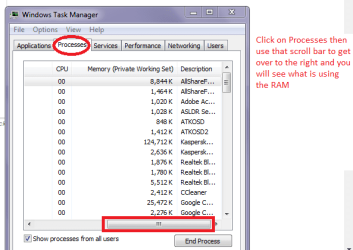
Personally I have doubts about refurbished gear because I often think it is so often easy for people to be ripped off. Go into the Control Panel > System and the first window should tell you what it is. Plus because of the problems the RAM usage is a worry and I am wondering what processes are running to chew it up like that. To see that see pic
 

Attachments

  • MEM USE.PNG
    MEM USE.PNG
    15 KB · Views: 46

My Computer My Computer

At a glance

Desk1 7 Home Prem / Desk2 10 Pro / Main lap A...Desk1 i5 3750K / Laptop i7 GTX 860M / Desk2 i...Desk1 8GB (1866) / Desk2 16GB (1333) / Laptop...Desk 1& 2NVidia GTX 650 & Laptops on board Intel
Computer type
PC/Desktop
Computer Manufacturer/Model Number
Own build (new) Desk1 / Asus ROG Win 7 / Desk2 1st build
OS
Desk1 7 Home Prem / Desk2 10 Pro / Main lap Asus ROG 10 Pro 2 laptop Toshiba 7 Pro Asus P2520 7 & 10
CPU
Desk1 i5 3750K / Laptop i7 GTX 860M / Desk2 i5 2500
Motherboard
Desk1 Asus P877-V / Desk2 Gigabyte H67 UD3H / Laptop ?
Memory
Desk1 8GB (1866) / Desk2 16GB (1333) / Laptop 8Gb DDR3
Graphics Card(s)
Desk 1& 2NVidia GTX 650 & Laptops on board Intel
Sound Card
Desk 1 & 2 -XONAR DG Realtek High Def audio Laptop
Monitor(s) Displays
Desk 1 Benq HD 2450 / Desk2 Philips 24" / Laptop 17.5"
Screen Resolution
1920x1080 D1 & D2 & Laptop 1
Hard Drives
Desk1 Samsung 120GB 830 SSD
Asus ROG 256GB 850 Pro SSD
Desk2 Samsung 840 256 SSD
Toshiba 120GB EVO
PSU
Desk 1 Corsair HX 1050/ Laptop ? / Desk 2 Corsair HX 650
Case
Desk 1 Cooler HAF XM ? Toshiba laptop / Desk2 Coolermaster
Cooling
Fans on all Desk1 -2 Desk2 - all Coolermasters 5 Laptop ?
Keyboard
Desk 1 MS Sidewinder X6 Desk 2 MS Sidewinder X 4
Mouse
Desk 1&2 - Gigabyte MS 900 gamer - laptop - Logitec wireless
Internet Speed
ADSL2+
Other Info
One other Desktop (tester) and spare Toshba laptop both with SSD's
Running Kaspersky 2016 ISS on all machines config'd identically
Logitec audio stereo systems on each machine (x3)
Canon MG5250MFC
Router/modem TP-Link running WPA2SK
You do not have to have 64 bit installed to use 4 GB. But windows will only use from about 3.25 to 3.75 GB`s on a 32 bit system.

My belief, If your cpu is 64 bit capable, then always install 64 bit. No matter what amount of memory you have in it at the time. You can always install more memory later.

Please post a shot of Resource Monitor showing the memory tab. Use the snipping tool then in your reply choose Go Advanced and click the small paperclip icon to attach the snip.

That will explain everything.

To open Resource Monitor.... Right click the taskbar>click Task manager>Performance>Resource Monitor>Memory
 

My Computer My Computer

At a glance

Windows 10 Pro x64Intel Core i7 6700KGSkill TridentZ RGB 16GB 3600 16-16-16-36EVGA GTX 980 Ti SC x2
Computer type
PC/Desktop
Computer Manufacturer/Model Number
Skylake Special #666
OS
Windows 10 Pro x64
CPU
Intel Core i7 6700K
Motherboard
Asus Sabertooth Z170 Mark 1
Memory
GSkill TridentZ RGB 16GB 3600 16-16-16-36
Graphics Card(s)
EVGA GTX 980 Ti SC x2
Sound Card
Realtek High Definition
Monitor(s) Displays
AOC G2460PG
Screen Resolution
1920 x 1080 144Hz
Hard Drives
Samsung 860 Pro 256GB, Seagate Barracuda 4TB x2
PSU
EVGA 1000 P2, EVGA White Custom Braided Cables
Case
Corsair Vengeance C70 Gunmetal Black
Cooling
Corsair H100i v2, Corsair ML120 x2, Thermal Grizzly Kryonaut
Keyboard
Logitech G910 Orion Spectrum
Mouse
Logitech G700s
Internet Speed
Verizon Fios Quantum Gateway 75/75
Antivirus
Windows Defender, Malwarebytes Free 3.8.3
Browser
Chrome
Other Info
Corsair SP120 x4, LG Blu-ray Drive, Durabrand HT-395 100 Watt Dolby Digital Amp, Corsair H2100 Wireless 7.1 Headset
Have you consider the RAM is not slotted in properly, hence may not able to read the other 4GB RAM.

Do open the back cover to check the RAM 4GB is slotted and fitted nicely, not loose or easily removed.


Eric.
 

My Computer My Computer

At a glance

Windows 7 x64
Computer type
Laptop
Computer Manufacturer/Model Number
Toshiba L630 and L735
OS
Windows 7 x64
Hard Drives
240 GB SSD
Hello mate how did you find out it was 32bit? and what makes you think it is supposed to be 64bit? because if the seller told you it was 64bit and in fact it is 32bit then I would be getting my money back.

Personally I have doubts about refurbished gear because I often think it is so often easy for people to be ripped off. Go into the Control Panel > System and the first window should tell you what it is. Plus because of the problems the RAM usage is a worry and I am wondering what processes are running to chew it up like that. To see that see pic

Icit2lol-I found out it was 32 bit through the control panel.And,I think at one time I tried to DL something & I couldn't because I had to have a 64 bit OS.I somehow got it into my head that Win7 was a 64 bit OS.
 

My Computer My Computer

At a glance

windows 7 home premium 64 64 bit
Computer type
Laptop
Computer Manufacturer/Model Number
Hewlet Packard Compaq Presario cq 57-229wm
OS
windows 7 home premium 64 64 bit
Antivirus
avast
Browser
Firefox,Internet Explorer,Google Chrome,Palemoon
You do not have to have 64 bit installed to use 4 GB. But windows will only use from about 3.25 to 3.75 GB`s on a 32 bit system.

My belief, If your cpu is 64 bit capable, then always install 64 bit. No matter what amount of memory you have in it at the time. You can always install more memory later.

Please post a shot of Resource Monitor showing the memory tab. Use the snipping tool then in your reply choose Go Advanced and click the small paperclip icon to attach the snip.

That will explain everything.

To open Resource Monitor.... Right click the taskbar>click Task manager>Performance>Resource Monitor>Memory
Addram-I cannot seem to post a snip of this.I am basically being told that the file is to big.And,I cannot find the "Go Advanced" icon :( Let's see if this works.... Capture.PNG
 

My Computer My Computer

At a glance

windows 7 home premium 64 64 bit
Computer type
Laptop
Computer Manufacturer/Model Number
Hewlet Packard Compaq Presario cq 57-229wm
OS
windows 7 home premium 64 64 bit
Antivirus
avast
Browser
Firefox,Internet Explorer,Google Chrome,Palemoon
Have you consider the RAM is not slotted in properly, hence may not able to read the other 4GB RAM.

Do open the back cover to check the RAM 4GB is slotted and fitted nicely, not loose or easily removed.


Eriic-the ram should be seated properly & snugly.My system is reading both 2gb sticks.
 

My Computer My Computer

At a glance

windows 7 home premium 64 64 bit
Computer type
Laptop
Computer Manufacturer/Model Number
Hewlet Packard Compaq Presario cq 57-229wm
OS
windows 7 home premium 64 64 bit
Antivirus
avast
Browser
Firefox,Internet Explorer,Google Chrome,Palemoon
Under BIOS, does it show 4G?
Did you replaced the 2G memory by a 4G or did you add another stick?
Is the new memory "new" or used?
Is it the same type and speed?
 
Last edited:

My Computers My Computers

  • At a glance

    Windows 7 HP 64i5 6600K - 800MHz to 4200MHz4+4G GSkill DDR4 3000IG - Intel 530
    Computer type
    PC/Desktop
    Computer Manufacturer/Model Number
    custom build
    OS
    Windows 7 HP 64
    CPU
    i5 6600K - 800MHz to 4200MHz
    Motherboard
    GA-Z170-HD3P
    Memory
    4+4G GSkill DDR4 3000
    Graphics Card(s)
    IG - Intel 530
    Monitor(s) Displays
    Samsung 226BW
    Screen Resolution
    1680x1050
    Hard Drives
    (1) -1 SM951 – 128GB M.2 AHCI PCIe SSD drive for Windows 7 and Lubuntu
    (2) -1 WD SATA 3 - 1T for Data
    (3) -1 WD SATA 3 - 1T for backup
    PSU
    Thermaltake 450W TR2 gold
    Keyboard
    Old and good Chicony mechanical keyboard
    Mouse
    Logitech mX performance - 9 buttons (had to disable some)
    Internet Speed
    500Mb/s
    Browser
    Firefox 64
    Other Info
    TinyWall firewall
  • At a glance

    Windows 7 Proi7-4500U 800MHz to 3.0GHz(4+4)G DDR3 1600IG intel 4400 + NVIDIA GeForce GT 745M
    Computer type
    Laptop
    System Manufacturer/Model Number
    Asus Q550LF
    OS
    Windows 7 Pro
    CPU
    i7-4500U 800MHz to 3.0GHz
    Motherboard
    Asus Q550LF
    Memory
    (4+4)G DDR3 1600
    Graphics Card(s)
    IG intel 4400 + NVIDIA GeForce GT 745M
    Sound Card
    Realtek
    Monitor(s) Displays
    LG Display LP156WF4-SPH1
    Screen Resolution
    1920 x 1080
    Hard Drives
    BX500 120G SSD for Windows and programs +
    1T HDD for data
    Internet Speed
    500 Mb/s
    Browser
    Firefox
    Other Info
    TinyWall firewall
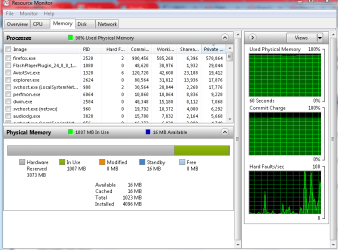
The problem seems to be in Hardware Reserved as it's showing 3073 MB.
 

My Computer My Computer

At a glance

Windows 7 Home Premium 64 bit sp1Intel i5 3570 3.4Ghz Ivy Bridge SKT 1155 quad...G-Skill Rip Jaws 16Gb (8x2) DDR3 -1600 PC3 12...Gigabyte NVIDIA GT610 1Gb DDR3 810/1200 PCI-E...
Computer type
PC/Desktop
Computer Manufacturer/Model Number
Self built using existing case
OS
Windows 7 Home Premium 64 bit sp1
CPU
Intel i5 3570 3.4Ghz Ivy Bridge SKT 1155 quad core
Motherboard
Gigabyte Z77-HD3 SKT 1155 2xSata 3, 4x USB 3.0
Memory
G-Skill Rip Jaws 16Gb (8x2) DDR3 -1600 PC3 12800 CL 10 red
Graphics Card(s)
Gigabyte NVIDIA GT610 1Gb DDR3 810/1200 PCI-E 2.0 Silent
Sound Card
NVIDIA High Definition & Realtech High Definition Audio
Monitor(s) Displays
2 x Philips 226V4L 16:9 aspect ratio
Screen Resolution
1920 x 1080 HD
Hard Drives
Samsung 840 Pro 256gb SSD, SATA 3.
Hitachi Touro Portable 1tb, USB 3.0 HDD used for image b/ups.
PSU
Corsair VS450
Case
Codeng
Cooling
PSU fan & CPU fan
Keyboard
Logitech
Mouse
Logitech Wireless trackball M570
Internet Speed
Wireless 3G. 3mg down & 550kb up.
Antivirus
Bitdefender Internet Security 2020
Browser
Opera (Current Version) & Firefox
Other Info
MS Office 2013 Pro. Davis weather station software. MGE Nova 600 avr UPS.

My Computer My Computer

At a glance

W7 home premium 32bit/W7HP 64bit/w10 tp insid...E5300 dual core3gbNvidia Geforce 7100 Nforce 630i
Computer type
PC/Desktop
Computer Manufacturer/Model Number
medionl/Aspire 6930G/acer x55a
OS
W7 home premium 32bit/W7HP 64bit/w10 tp insider ring
CPU
E5300 dual core
Motherboard
medion MS7366
Memory
3gb
Graphics Card(s)
Nvidia Geforce 7100 Nforce 630i
Monitor(s) Displays
avixc
Internet Speed
n (isp resticted to 72)
Antivirus
mse/pands
Browser
palemoon
Other Info
Belkin Fd7050 n USB using Railink RT2870 drivers, more upto date
Mmm now the Dell has DDR2 and I am just wondering too that it might be better to have 1x4GB stick instead of the two?

Now the chipset in the machine is suppsedly able to run 64bit http://www.intel.com/Assets/PDF/datasheet/316273.pdf the CPU https://ark.intel.com/products/31728/Intel-Core2-Duo-Processor-T7250-2M-Cache-2_00-GHz-800-MHz-FSB also can support 64bit so I am guessing someone has installed a 32bit system on it as I find it hard to believe that the maker would have set it up with a 32bit system:confused:

Now do you have a sticker on the bottom of that machine with the OS on it? because it might be a 64bit on it and if you can still read the code then you could reinstall it with a 64bit system using a 64bit ISO.
 

My Computer My Computer

At a glance

Desk1 7 Home Prem / Desk2 10 Pro / Main lap A...Desk1 i5 3750K / Laptop i7 GTX 860M / Desk2 i...Desk1 8GB (1866) / Desk2 16GB (1333) / Laptop...Desk 1& 2NVidia GTX 650 & Laptops on board Intel
Computer type
PC/Desktop
Computer Manufacturer/Model Number
Own build (new) Desk1 / Asus ROG Win 7 / Desk2 1st build
OS
Desk1 7 Home Prem / Desk2 10 Pro / Main lap Asus ROG 10 Pro 2 laptop Toshiba 7 Pro Asus P2520 7 & 10
CPU
Desk1 i5 3750K / Laptop i7 GTX 860M / Desk2 i5 2500
Motherboard
Desk1 Asus P877-V / Desk2 Gigabyte H67 UD3H / Laptop ?
Memory
Desk1 8GB (1866) / Desk2 16GB (1333) / Laptop 8Gb DDR3
Graphics Card(s)
Desk 1& 2NVidia GTX 650 & Laptops on board Intel
Sound Card
Desk 1 & 2 -XONAR DG Realtek High Def audio Laptop
Monitor(s) Displays
Desk 1 Benq HD 2450 / Desk2 Philips 24" / Laptop 17.5"
Screen Resolution
1920x1080 D1 & D2 & Laptop 1
Hard Drives
Desk1 Samsung 120GB 830 SSD
Asus ROG 256GB 850 Pro SSD
Desk2 Samsung 840 256 SSD
Toshiba 120GB EVO
PSU
Desk 1 Corsair HX 1050/ Laptop ? / Desk 2 Corsair HX 650
Case
Desk 1 Cooler HAF XM ? Toshiba laptop / Desk2 Coolermaster
Cooling
Fans on all Desk1 -2 Desk2 - all Coolermasters 5 Laptop ?
Keyboard
Desk 1 MS Sidewinder X6 Desk 2 MS Sidewinder X 4
Mouse
Desk 1&2 - Gigabyte MS 900 gamer - laptop - Logitec wireless
Internet Speed
ADSL2+
Other Info
One other Desktop (tester) and spare Toshba laptop both with SSD's
Running Kaspersky 2016 ISS on all machines config'd identically
Logitec audio stereo systems on each machine (x3)
Canon MG5250MFC
Router/modem TP-Link running WPA2SK
As stated 3 GB is hardware reserved, to your graphics.

You posted the snip just fine.

Go Advanced is not an icon, it`s right next to "Post Quick Reply". With Post Quick Reply there`s no paperclip icon to attach a pic, so just use the Go Advanced from now on :)
 

Attachments

  • Capture.JPG
    Capture.JPG
    8.9 KB · Views: 24

My Computer My Computer

At a glance

Windows 10 Pro x64Intel Core i7 6700KGSkill TridentZ RGB 16GB 3600 16-16-16-36EVGA GTX 980 Ti SC x2
Computer type
PC/Desktop
Computer Manufacturer/Model Number
Skylake Special #666
OS
Windows 10 Pro x64
CPU
Intel Core i7 6700K
Motherboard
Asus Sabertooth Z170 Mark 1
Memory
GSkill TridentZ RGB 16GB 3600 16-16-16-36
Graphics Card(s)
EVGA GTX 980 Ti SC x2
Sound Card
Realtek High Definition
Monitor(s) Displays
AOC G2460PG
Screen Resolution
1920 x 1080 144Hz
Hard Drives
Samsung 860 Pro 256GB, Seagate Barracuda 4TB x2
PSU
EVGA 1000 P2, EVGA White Custom Braided Cables
Case
Corsair Vengeance C70 Gunmetal Black
Cooling
Corsair H100i v2, Corsair ML120 x2, Thermal Grizzly Kryonaut
Keyboard
Logitech G910 Orion Spectrum
Mouse
Logitech G700s
Internet Speed
Verizon Fios Quantum Gateway 75/75
Antivirus
Windows Defender, Malwarebytes Free 3.8.3
Browser
Chrome
Other Info
Corsair SP120 x4, LG Blu-ray Drive, Durabrand HT-395 100 Watt Dolby Digital Amp, Corsair H2100 Wireless 7.1 Headset
Mate I think things have got a bit confused as I think the OP is referring to the refurbished Dell that I linked some stuff to we shall have to wait to hear from him which it is because that Dell unless I am terribly mistaken (or confused) only supports 4GB RAM and DDR2 at that:confused:
 

My Computer My Computer

At a glance

Desk1 7 Home Prem / Desk2 10 Pro / Main lap A...Desk1 i5 3750K / Laptop i7 GTX 860M / Desk2 i...Desk1 8GB (1866) / Desk2 16GB (1333) / Laptop...Desk 1& 2NVidia GTX 650 & Laptops on board Intel
Computer type
PC/Desktop
Computer Manufacturer/Model Number
Own build (new) Desk1 / Asus ROG Win 7 / Desk2 1st build
OS
Desk1 7 Home Prem / Desk2 10 Pro / Main lap Asus ROG 10 Pro 2 laptop Toshiba 7 Pro Asus P2520 7 & 10
CPU
Desk1 i5 3750K / Laptop i7 GTX 860M / Desk2 i5 2500
Motherboard
Desk1 Asus P877-V / Desk2 Gigabyte H67 UD3H / Laptop ?
Memory
Desk1 8GB (1866) / Desk2 16GB (1333) / Laptop 8Gb DDR3
Graphics Card(s)
Desk 1& 2NVidia GTX 650 & Laptops on board Intel
Sound Card
Desk 1 & 2 -XONAR DG Realtek High Def audio Laptop
Monitor(s) Displays
Desk 1 Benq HD 2450 / Desk2 Philips 24" / Laptop 17.5"
Screen Resolution
1920x1080 D1 & D2 & Laptop 1
Hard Drives
Desk1 Samsung 120GB 830 SSD
Asus ROG 256GB 850 Pro SSD
Desk2 Samsung 840 256 SSD
Toshiba 120GB EVO
PSU
Desk 1 Corsair HX 1050/ Laptop ? / Desk 2 Corsair HX 650
Case
Desk 1 Cooler HAF XM ? Toshiba laptop / Desk2 Coolermaster
Cooling
Fans on all Desk1 -2 Desk2 - all Coolermasters 5 Laptop ?
Keyboard
Desk 1 MS Sidewinder X6 Desk 2 MS Sidewinder X 4
Mouse
Desk 1&2 - Gigabyte MS 900 gamer - laptop - Logitec wireless
Internet Speed
ADSL2+
Other Info
One other Desktop (tester) and spare Toshba laptop both with SSD's
Running Kaspersky 2016 ISS on all machines config'd identically
Logitec audio stereo systems on each machine (x3)
Canon MG5250MFC
Router/modem TP-Link running WPA2SK
OK, then maybe this is it, and if so then you`re right at 4 GB max

Dell Latitude D630 Specs - CNET

http://www.dell.com/downloads/ap/products/latit/LAT_D630c_SA_0108.pdf


According to the Dell article it is a Vista or XP machne and has a 2.0 GHz cpu, I wouldn't waste any time with it.

The OP will have to confirm the cpu. (Please do this for us)

From the Dell article

Intel® Core™
2 Duo processors 800 MHz Front Side Bus & 2MB Smart L2 Cache: T7250 (2.0GHz) and
Intel® Core™
2 Duo processors 800 MHz Front Side Bus & 4MB Smart L2 Cache T7500 (2.2GHz), T7700 (2.4GHz), T7800 (2.6GHz)


The best thing he could do is install a Samsung 850 Evo 120/250 GB SSD and Windows 7 Home Premium 32 bit, get rid of Ultimate, you don`t need it.

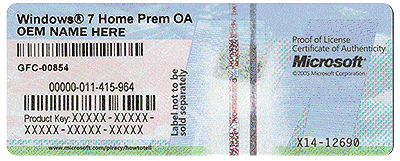
The COA will tell you which Operating System came installed on the PC.

And if the refurbisher installed Ultimate, they had better put a COA with an Ultimate Activation key on it.
 

Attachments

  • HardwareCOA.gif
    HardwareCOA.gif
    707.8 KB · Views: 22
Last edited:

My Computer My Computer

At a glance

Windows 10 Pro x64Intel Core i7 6700KGSkill TridentZ RGB 16GB 3600 16-16-16-36EVGA GTX 980 Ti SC x2
Computer type
PC/Desktop
Computer Manufacturer/Model Number
Skylake Special #666
OS
Windows 10 Pro x64
CPU
Intel Core i7 6700K
Motherboard
Asus Sabertooth Z170 Mark 1
Memory
GSkill TridentZ RGB 16GB 3600 16-16-16-36
Graphics Card(s)
EVGA GTX 980 Ti SC x2
Sound Card
Realtek High Definition
Monitor(s) Displays
AOC G2460PG
Screen Resolution
1920 x 1080 144Hz
Hard Drives
Samsung 860 Pro 256GB, Seagate Barracuda 4TB x2
PSU
EVGA 1000 P2, EVGA White Custom Braided Cables
Case
Corsair Vengeance C70 Gunmetal Black
Cooling
Corsair H100i v2, Corsair ML120 x2, Thermal Grizzly Kryonaut
Keyboard
Logitech G910 Orion Spectrum
Mouse
Logitech G700s
Internet Speed
Verizon Fios Quantum Gateway 75/75
Antivirus
Windows Defender, Malwarebytes Free 3.8.3
Browser
Chrome
Other Info
Corsair SP120 x4, LG Blu-ray Drive, Durabrand HT-395 100 Watt Dolby Digital Amp, Corsair H2100 Wireless 7.1 Headset
Home Basic is probably the best edition for your computer.
 

My Computer My Computer

At a glance

Windows 7 Home Premium 64-BITAMD A8 7200P8GB 1600mhzRadeon R5 (APU) + Radeon R5 M230 2GB Dual Gra...
Computer type
PC/Desktop
Computer Manufacturer/Model Number
ASUS X550ZE
OS
Windows 7 Home Premium 64-BIT
CPU
AMD A8 7200P
Motherboard
N/A
Memory
8GB 1600mhz
Graphics Card(s)
Radeon R5 (APU) + Radeon R5 M230 2GB Dual Graphics
Sound Card
Realtek ALC269 with SonicMaster
Monitor(s) Displays
Laptop Display
Screen Resolution
1920 x 1080 @60hz
Hard Drives
WDC WD50 00LPVX-80V0TT0 (500GB)
PSU
Laptop Charger
Mouse
ARMAGGEDON TEXTRON SCORPION 7
Internet Speed
100 mbps DOWN / 50 mbps UP
Antivirus
Windows Defender
Browser
Mozzila FireFox, Valve Steam in-game internet browser
If the OP,
posts the details from Hwinfo, we'll know for sure.

Roy
 

My Computer My Computer

At a glance

W7 home premium 32bit/W7HP 64bit/w10 tp insid...E5300 dual core3gbNvidia Geforce 7100 Nforce 630i
Computer type
PC/Desktop
Computer Manufacturer/Model Number
medionl/Aspire 6930G/acer x55a
OS
W7 home premium 32bit/W7HP 64bit/w10 tp insider ring
CPU
E5300 dual core
Motherboard
medion MS7366
Memory
3gb
Graphics Card(s)
Nvidia Geforce 7100 Nforce 630i
Monitor(s) Displays
avixc
Internet Speed
n (isp resticted to 72)
Antivirus
mse/pands
Browser
palemoon
Other Info
Belkin Fd7050 n USB using Railink RT2870 drivers, more upto date
It's your friendly simple Lay Back bear again.

1. As asked before; we need the exact specs of the computer to give proper guidance.

2. 3073mb of Hardware Reserve is way to high.
That is normally cause by a ram problem of some kind.

Example:
A. Wrong ram
B. Mismatched ram
3. Ram not installed correctly. Recommend using the methods of installing ram in the motherboard manual.
4. Possibly bad ram module slots on motherboard. This is seldom the problem but can be.

Note:
The system in my specs has Hardware Reserve of 61mb.

Jack
 

My Computer My Computer

At a glance

Windows 10 Pro. 64/ version 1709 Windows 7 Pr...Intel i7-6800K @ 4.3Corsair Platinum 16 gig @2400EVGA GTX 1070 OC
Computer type
PC/Desktop
Computer Manufacturer/Model Number
Home made Desktop
OS
Windows 10 Pro. 64/ version 1709 Windows 7 Pro/64
CPU
Intel i7-6800K @ 4.3
Motherboard
ASUS X-99 Deluxe II
Memory
Corsair Platinum 16 gig @2400
Graphics Card(s)
EVGA GTX 1070 OC
Monitor(s) Displays
Asus 27" LED LCD/VE278Q
Screen Resolution
1920-1080 or 1280-720 HDMI
Hard Drives
INTEL SSD 730-240 Gb Sata 3.0/
PSU
EVGA Platium 1200W
Case
Phanteks Luxe Tempered Glass 8 fans/ one radiator
Cooling
XSPC/ Water Cooled CPU
Keyboard
Das 4 Professional
Mouse
Logitech M705/MX Anywhere 2-S
Internet Speed
100 mbits
Antivirus
Microsoft Security Essentials/ Malwarebytes Premium 3.0/ SAS
Browser
I.E. 11 default/Firefox/ ISP Time Warner Cable/Spectrum
Other Info
LG BluRay Burner/
Sound system-KLipsch-THX/
Icy Dock ssd Hot Swap bays.
Under BIOS, does it show 4G?
Did you replaced the 2G memory by a 4G or did you add another stick?
Is the new memory "new" or used?
Is it the same type and speed?

Mega-I replaced (2) 1GB sticks with (2) 2 GB sticks.And,the memory is new.Same type and speed.As far as the bios goes,I didn't check that.But,I did go into the control panels properties and it is indeed recognizing 4GB of ram.BUT ! PROBLEM SOLVED !!!

I found this article on the microsoft support site... https://support.microsoft.com/en-us/kb/978610

Apparently,all I had to do was the following....
Check the system configuration settings

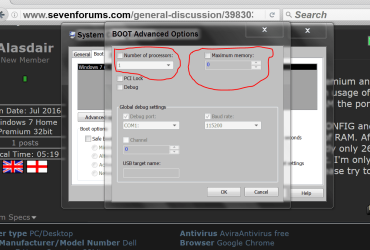
This problem may occur because the Maximum memory option is selected incorrectly. To fix this, follow these steps:
  1. Click Start
    vistastartbutton.jpg
    , type msconfig in the Search programs and files box, and then click msconfig in the Programs list.
  2. In the System Configuration window, click Advanced options on the Boot tab.
  3. Click to clear the Maximum memory check box, and then click OK.
  4. Restart the computer.
PC is MUCH faster now ! Thank you all very,very much !!
(Duckduckgo is your best friend) !! Heh,heh.
 

My Computer My Computer

At a glance

windows 7 home premium 64 64 bit
Computer type
Laptop
Computer Manufacturer/Model Number
Hewlet Packard Compaq Presario cq 57-229wm
OS
windows 7 home premium 64 64 bit
Antivirus
avast
Browser
Firefox,Internet Explorer,Google Chrome,Palemoon
I presume you have things set as this picture from my computer. Is that correct?

msconfig Boot advanced options.PNG

Jack
 

My Computer My Computer

At a glance

Windows 10 Pro. 64/ version 1709 Windows 7 Pr...Intel i7-6800K @ 4.3Corsair Platinum 16 gig @2400EVGA GTX 1070 OC
Computer type
PC/Desktop
Computer Manufacturer/Model Number
Home made Desktop
OS
Windows 10 Pro. 64/ version 1709 Windows 7 Pro/64
CPU
Intel i7-6800K @ 4.3
Motherboard
ASUS X-99 Deluxe II
Memory
Corsair Platinum 16 gig @2400
Graphics Card(s)
EVGA GTX 1070 OC
Monitor(s) Displays
Asus 27" LED LCD/VE278Q
Screen Resolution
1920-1080 or 1280-720 HDMI
Hard Drives
INTEL SSD 730-240 Gb Sata 3.0/
PSU
EVGA Platium 1200W
Case
Phanteks Luxe Tempered Glass 8 fans/ one radiator
Cooling
XSPC/ Water Cooled CPU
Keyboard
Das 4 Professional
Mouse
Logitech M705/MX Anywhere 2-S
Internet Speed
100 mbits
Antivirus
Microsoft Security Essentials/ Malwarebytes Premium 3.0/ SAS
Browser
I.E. 11 default/Firefox/ ISP Time Warner Cable/Spectrum
Other Info
LG BluRay Burner/
Sound system-KLipsch-THX/
Icy Dock ssd Hot Swap bays.
And,folks,I would like to add,I was drinking when I performed this procedure ;) I forgot that when I opened up the first port,there was nothing there ! I've been searching my house for a second memory stick for the last 2-3 days and then realized that ! So,I was originally working with only 1 GB of ram !!! (Grumble,grumble) !!!
 

My Computer My Computer

At a glance

windows 7 home premium 64 64 bit
Computer type
Laptop
Computer Manufacturer/Model Number
Hewlet Packard Compaq Presario cq 57-229wm
OS
windows 7 home premium 64 64 bit
Antivirus
avast
Browser
Firefox,Internet Explorer,Google Chrome,Palemoon
Back
Top