
Hello there,
I was playing a game (which I've played many times in the past with no issues) and suddenly my PC shutdown, it automatically restarted but upon loading into windows the resolution had changed to 800 x 600.
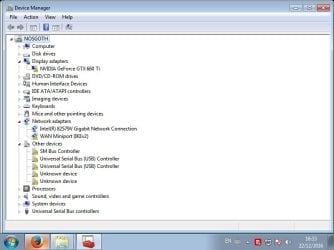
I tried to change the resolution but it's no longer possible to choose anything other than 800 x 600 as it's grayed out. So I checked Device Manager and saw there is a triangle with the "!" on several devices, including the graphics card and everything under "Other Devices"
Upon checking the properties for the graphics card it states "Windows has stopped this device because it has reported problems. (Code 43)", I looked into this and tried the common fix of uninstalling the driver and scanning for hardware changes so the driver would be re-installed but upon system restart the same issue appeared again.
After this failed I went through several others posts and restarted the PC again, upon doing so windows repair said there was an issue. Once it was done it said there was a problem it couldn't correct and in the description (most of which I didn't understand) it said that some files were corrupt.
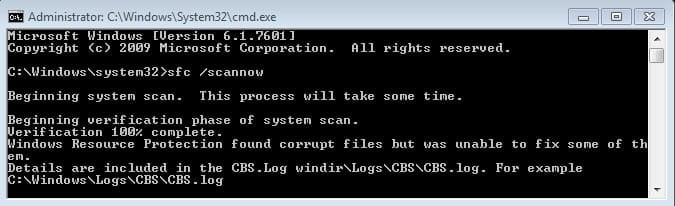
I found a post showing how to scan for (and fix) corrupt system files using the command prompt "sfc /scannow" and followed the steps.
It stated it found corrupt files but was unable to fix some of them and that the deatils are included in the CBS.log file (also attached)View attachment 394686
Unfortunately my knowledge is limited and I don't know how to proceed from here so any help or advice would be much appreciated indeed!
Thank you.
I was playing a game (which I've played many times in the past with no issues) and suddenly my PC shutdown, it automatically restarted but upon loading into windows the resolution had changed to 800 x 600.
I tried to change the resolution but it's no longer possible to choose anything other than 800 x 600 as it's grayed out. So I checked Device Manager and saw there is a triangle with the "!" on several devices, including the graphics card and everything under "Other Devices"
Upon checking the properties for the graphics card it states "Windows has stopped this device because it has reported problems. (Code 43)", I looked into this and tried the common fix of uninstalling the driver and scanning for hardware changes so the driver would be re-installed but upon system restart the same issue appeared again.
After this failed I went through several others posts and restarted the PC again, upon doing so windows repair said there was an issue. Once it was done it said there was a problem it couldn't correct and in the description (most of which I didn't understand) it said that some files were corrupt.
I found a post showing how to scan for (and fix) corrupt system files using the command prompt "sfc /scannow" and followed the steps.
It stated it found corrupt files but was unable to fix some of them and that the deatils are included in the CBS.log file (also attached)View attachment 394686
Unfortunately my knowledge is limited and I don't know how to proceed from here so any help or advice would be much appreciated indeed!
Thank you.
My Computer
At a glance
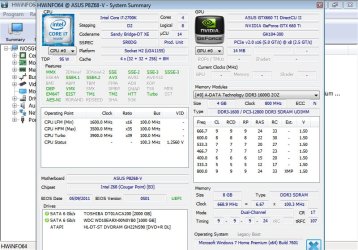
Windows 7 Home premium 64-bitIntel Core i7 2700K CPU @ 3.50GHz8GB - DDR3Nvidia Geforce GTX 660 Ti
- Computer type
- PC/Desktop
- Computer Manufacturer/Model Number
- Custom build
- OS
- Windows 7 Home premium 64-bit
- CPU
- Intel Core i7 2700K CPU @ 3.50GHz
- Motherboard
- ASUS P8Z68-V
- Memory
- 8GB - DDR3
- Graphics Card(s)
- Nvidia Geforce GTX 660 Ti
- Monitor(s) Displays
- Asus 24inch Wide Screen
- Hard Drives
- Toshiba DT01ACA200 (200 GB)
WDC WD10EARX-00N0YB0 (100 GB)
- Cooling
- Fan cooled
- Keyboard
- Cosair Raptor K30
- Mouse
- Razer Naga
- Internet Speed
- 50MB DSL
- Antivirus
- Bitdefender Total Secruity 2016
- Browser
- Firefox (latest version)




 .
.