
How remove user prompt (pop up) window about security confirmation ?

TreeHole

New member
Local time
11:50 AM
Messages
17
I have UAC turned off, but still if I want run some .exe file, I see this:
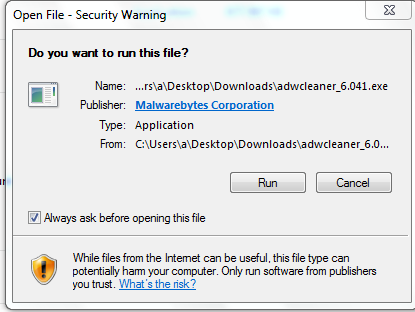
344M1Ju.png


I used this tutorial to fix it(http://www.sevenforums.com/tutorials/182353-open-file-security-warning-enable-disable.html):
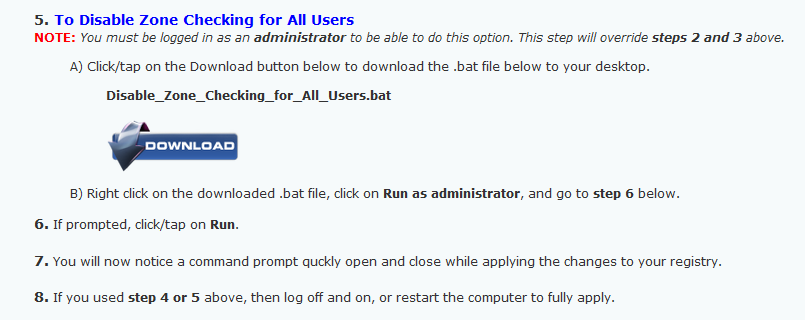
cosxfjC.png


But it didn't work.

Any other tip please?
 

My Computer My Computer

Computer type
PC/Desktop
OS
Windows 7 Ultimate 32 bit
Hi, TreeHole:

UAC is a safety feature -- it's there to help protect your computer.

While Malwarebytes AdwCleaner is certainly not malicious (assuming the file you have is legit and from the official source), other *.exe files you try to run might be.

What's the big deal with clicking to "Run" and approve the UAC?

Just curious...

MM
 

My Computer My Computer

Computer type
PC/Desktop
Computer Manufacturer/Model Number
Dell Studio XPS 8500
OS
OEM Windows 7 Ult (x64) SP1
CPU
Intel Core-i7 3770 @ 3.4 GHz
Motherboard
"Dell" branded
Memory
16 GB DDR3 SDRAM @ 1333 MHz
Graphics Card(s)
NVidia GeForce GT620 1 GB
Sound Card
THX TruStudio PC
Monitor(s) Displays
Dell U2410 Full HD
Hard Drives
2.0 TB SATA2 @ 7200 RPM
PSU
350W
Keyboard
MS 4000 Ergon - Wired
Mouse
Logitech Anywhere MX
Internet Speed
Cable HSI w/Turbo (router)
Antivirus
KIS-MBAM Premium-MBAE Premium
Browser
Fx (current version); IE
Other Info
And a Win7/64 Pro laptop; And a Win10/64 Pro desktop.
Please don't argument against my settings, rather help me with my goal. I'm not teenager clicker user, I know what I'm doing, when I disabled UAC.

Thanks for your understanding
 

My Computer My Computer

Computer type
PC/Desktop
OS
Windows 7 Ultimate 32 bit
Hi:

My reply was not an argument.
It was a friendly suggestion in the interest of your computer's security and safety.
Feel free to disregard the suggestion.
Brink's tutorials are typically 100% fool-proof. So, if the tutorial did not work for you, there may be something amiss on your system.
Perhaps someone else will have some ideas for you.

Cheers,
MM
 

My Computer My Computer

Computer type
PC/Desktop
Computer Manufacturer/Model Number
Dell Studio XPS 8500
OS
OEM Windows 7 Ult (x64) SP1
CPU
Intel Core-i7 3770 @ 3.4 GHz
Motherboard
"Dell" branded
Memory
16 GB DDR3 SDRAM @ 1333 MHz
Graphics Card(s)
NVidia GeForce GT620 1 GB
Sound Card
THX TruStudio PC
Monitor(s) Displays
Dell U2410 Full HD
Hard Drives
2.0 TB SATA2 @ 7200 RPM
PSU
350W
Keyboard
MS 4000 Ergon - Wired
Mouse
Logitech Anywhere MX
Internet Speed
Cable HSI w/Turbo (router)
Antivirus
KIS-MBAM Premium-MBAE Premium
Browser
Fx (current version); IE
Other Info
And a Win7/64 Pro laptop; And a Win10/64 Pro desktop.
If you uncheck Always ask before opening this file will it work the way you want from then on ?
 

My Computer My Computer

Computer type
PC/Desktop
Computer Manufacturer/Model Number
home built
OS
Multi-Boot W7_Pro_x64 W8.1_Pro_x64 W10_Pro_x64 +Linux_VMs +Chromium_VM
CPU
AMD Athlon II x4 620
Motherboard
Gigabyte GA-MA785G-UD3H
Memory
6GB GSkill DDR2 800
Graphics Card(s)
AMD 4670 GPU + AMD 4200 IGP
Sound Card
on board Realtek ALC889A
Monitor(s) Displays
RCA 40" LCD TV, Insignia 32" LCD TV, HP 15" LCD monitor
Screen Resolution
1680 x 1050
Hard Drives
OCZ Vertex 3 120GB,
Samsung F3 1TB (3),
Several others - WD, Seagate, Hitachi, ...
PSU
Corsair 500 W
Case
Rosewill mid tower
Cooling
CM 90mm rifle
Keyboard
Gyration wireless, Logitech wireless, Dell USB wired
Mouse
Gyration wireless, Logitech wireless, V7 USB wired
Internet Speed
Spectrum - 100Mbps D / 10Mbps U
Antivirus
Avast, MBAM3, EMET, WinPatrol
Browser
Pale Moon, Firefox, IE
Other Info
2 multi-boot PC's
Mainly HTPC/Office/Gen purpose (no gaming).
Trendnet USB KVM.
LG DVD burner/Blue Ray Player.
Tray system for removable SATA backup drives.

Not currently OCd, under-volted.
I use Hybrid sleep, rarely re-boot or shutdown.

Hauppauge HD-PVR, Avermedia PCIe TV Tuner, Hauppauge PCI TV Tuner.
If you uncheck Always ask before opening this file will it work the way you want from then on ?

It did work just on that one particular .exe file.
Not for other .exe files.
 

My Computer My Computer

Computer type
PC/Desktop
OS
Windows 7 Ultimate 32 bit
Can you reply Brink please ?
I made separate topics like you told me.
Thanks
 

My Computer My Computer

Computer type
PC/Desktop
OS
Windows 7 Ultimate 32 bit

My Computer My Computer

Computer type
PC/Desktop
Computer Manufacturer/Model Number
medionl/Aspire 6930G/acer x55a
OS
W7 home premium 32bit/W7HP 64bit/w10 tp insider ring
CPU
E5300 dual core
Motherboard
medion MS7366
Memory
3gb
Graphics Card(s)
Nvidia Geforce 7100 Nforce 630i
Monitor(s) Displays
avixc
Internet Speed
n (isp resticted to 72)
Antivirus
mse/pands
Browser
palemoon
Other Info
Belkin Fd7050 n USB using Railink RT2870 drivers, more upto date
Hi:

My reply was not an argument.
It was a friendly suggestion in the interest of your computer's security and safety.
Feel free to disregard the suggestion.
Brink's tutorials are typically 100% fool-proof. So, if the tutorial did not work for you, there may be something amiss on your system.
Perhaps someone else will have some ideas for you.

Cheers,
MM
I Agree, since Brink's tutorials are typically fool-proof, it may be your computer. Run a virus scan and malware scan, see if anything comes up. I did it on an old computer that had UAC off and I was surprised to find 11 malware and 14 viruses.
 

My Computer My Computer

Computer type
PC/Desktop
OS
Windows 10 Pro x64 + macOS 10.15 Catalina
CPU
AMD Ryzen 7 2700
Motherboard
ASUS PRIME B450-PLUS
Memory
32gb Corsair Vengance LPX 4x 8gb 3000MHz
Graphics Card(s)
MSI Reference Radeon RX 5700
Sound Card
Build in
Monitor(s) Displays
Viewsonic XG2705-2K 27in 1440p 144hz + Samsung C24F390 24in
Screen Resolution
2560x1440 + 1920x1080
Hard Drives
Transcend 500gb NVME
Seagate 2tb drive
2x Western Digital 1tb drives
Crucial 250gb SATA SSD
PSU
Cooler Master 600w
Case
Corsair iCUE 4000x
Cooling
AMD Stock Cooler
Keyboard
Razer Blackwidow X Chroma
Mouse
Logitech G502 Proteus Spectrum
Internet Speed
Zen Internet 70mbps
Browser
Google Chrome
Josbeph:
I have installed Malwarebyte's anti malware and Eset's Nod 32 antivirus. I think I'm ok

torchwood:
Your link is for reg key to disable UAC. I have it disabled, I just need to turn off those opening .exe files secutity warning confirmations.

Thank you all
 

My Computer My Computer

Computer type
PC/Desktop
OS
Windows 7 Ultimate 32 bit
Hi

Steps

1. Open Window Control Panel and then click System and Security

2. Click Action Center

3. In the left panel, click Change User Account Control Settings

4. Slide the vertical bar to your prefer setting

5. Click OK.


Eric.
 

My Computer My Computer

Computer type
Laptop
Computer Manufacturer/Model Number
Toshiba L630 and L735
OS
Windows 7 x64
Hard Drives
240 GB SSD
Eric, he`s already done that.

You`ll still get the window when you run an exe for the 1st time, it`s normal.
 

My Computer My Computer

Computer type
PC/Desktop
Computer Manufacturer/Model Number
Skylake Special #666
OS
Windows 10 Pro x64
CPU
Intel Core i7 6700K
Motherboard
Asus Sabertooth Z170 Mark 1
Memory
GSkill TridentZ RGB 16GB 3600 16-16-16-36
Graphics Card(s)
EVGA GTX 980 Ti SC x2
Sound Card
Realtek High Definition
Monitor(s) Displays
AOC G2460PG
Screen Resolution
1920 x 1080 144Hz
Hard Drives
Samsung 860 Pro 256GB, Seagate Barracuda 4TB x2
PSU
EVGA 1000 P2, EVGA White Custom Braided Cables
Case
Corsair Vengeance C70 Gunmetal Black
Cooling
Corsair H100i v2, Corsair ML120 x2, Thermal Grizzly Kryonaut
Keyboard
Logitech G910 Orion Spectrum
Mouse
Logitech G700s
Internet Speed
Verizon Fios Quantum Gateway 75/75
Antivirus
Windows Defender, Malwarebytes Free 3.8.3
Browser
Chrome
Other Info
Corsair SP120 x4, LG Blu-ray Drive, Durabrand HT-395 100 Watt Dolby Digital Amp, Corsair H2100 Wireless 7.1 Headset
Back
Top