Is there a fast way of getting needed drivers when doing a reinstall?

leegold

New member
Local time
9:14 AM
Messages
5
Hi,

Is there a fast way to get all the drivers for a a PC or laptop that I'm doing an OEM Win7 reinstall on? Like is there a subscription service or some resource to speed up the install of drivers not on the generic MS Windows 7 install disk.

For example say I reinstall on a Sony or Fujitsu laptop. These are great machines but they need many drivers not on the generic install disk and the original manufacturers disk might be lost. So I go through the process of fetching what drivers I need from the manufacturer's website - which takes time.

Is there a faster way? Is there a "trick" or service or library available with most of these more proprietary drivers that can let me do it in one or two "swoops"?

Thanks
 

My Computer My Computer

At a glance

7 Pro 64
Computer type
PC/Desktop
OS
7 Pro 64
Welcome to Seven Forums :)


There`s no faster way. No trick or library.

And any driver programs are nothing but garbage.

Windows update does a lot better job finding drivers today then it ever has in the past.
 

My Computer My Computer

At a glance

Windows 10 Pro x64Intel Core i7 6700KGSkill TridentZ RGB 16GB 3600 16-16-16-36EVGA GTX 980 Ti SC x2
Computer type
PC/Desktop
Computer Manufacturer/Model Number
Skylake Special #666
OS
Windows 10 Pro x64
CPU
Intel Core i7 6700K
Motherboard
Asus Sabertooth Z170 Mark 1
Memory
GSkill TridentZ RGB 16GB 3600 16-16-16-36
Graphics Card(s)
EVGA GTX 980 Ti SC x2
Sound Card
Realtek High Definition
Monitor(s) Displays
AOC G2460PG
Screen Resolution
1920 x 1080 144Hz
Hard Drives
Samsung 860 Pro 256GB, Seagate Barracuda 4TB x2
PSU
EVGA 1000 P2, EVGA White Custom Braided Cables
Case
Corsair Vengeance C70 Gunmetal Black
Cooling
Corsair H100i v2, Corsair ML120 x2, Thermal Grizzly Kryonaut
Keyboard
Logitech G910 Orion Spectrum
Mouse
Logitech G700s
Internet Speed
Verizon Fios Quantum Gateway 75/75
Antivirus
Windows Defender, Malwarebytes Free 3.8.3
Browser
Chrome
Other Info
Corsair SP120 x4, LG Blu-ray Drive, Durabrand HT-395 100 Watt Dolby Digital Amp, Corsair H2100 Wireless 7.1 Headset
Hi,
Every machine I've ever seen has a snid #
Use that snid to search on the manufactures website it is a lot faster than going through the model.... menu list :)
 

My Computer My Computer

At a glance

Win-7-Pro64bit 7-H-Prem-64biti7-5930K 2nd i9-9940x both water blocked VRM'...Trident-z 3200C14 2nd Trident-z 3600C16EVGA 1080ti ftw3 2nd Titan Xp both water blocked
Computer type
PC/Desktop
Computer Manufacturer/Model Number
Custom assembled by me :}
OS
Win-7-Pro64bit 7-H-Prem-64bit
CPU
i7-5930K 2nd i9-9940x both water blocked VRM's too
Motherboard
ASUS SABERTOOTH X99 2nd ASUS x299 Apex
Memory
Trident-z 3200C14 2nd Trident-z 3600C16
Graphics Card(s)
EVGA 1080ti ftw3 2nd Titan Xp both water blocked
Sound Card
Built-in Realtek
Monitor(s) Displays
1-AOC G2460PG 24"G-Sync 144Hz/ 2nd 1-ASUS VG248QE 24" 144Hz
Screen Resolution
1920 x 1080 144Hz
Hard Drives
2-Samsung M.2 Evo & Evo Plus
2-Samsung 850 EVO 500GB SSD's/ 3-2.5 W.D. Black 1tb-&3-1tb/3-3.5 WD Black 1tb hdd's
PSU
EVGA SuperNOVA 1000-P2 2nd 1200-P2
Case
2-Corsair Obsidian Series 450D Black ATX Mid Tower
Cooling
Custom water loops
Keyboard
Logitech G710+/ 2nd Logitech G910
Mouse
2-RedDragon M901 Perdition 16400 dpi Gaming mouse = wired
Internet Speed
Comcast Ping 19ms 89.31mbps download speed 6.12mbps upload
Antivirus
Malwarebytes Pro/ Superantispyware Pro
Browser
FireFox & Pale moon
Other Info
2nd ASUS X299 Apex/Intel i9-9940x with Custom water loop/7H-Prem-x64/Corsair 450D case/Ram Trident-z 3600C16 4x8gb / Samsung970Evo plus 500gb SSD/Dual ssd EZ swap evo/PSU EVGA SuperNova 1200w-P2 80+Platinum/GPU Titan Xp /8-ML-140 on push-pull on 2-280GTX rads
If I'm doing a install/reinstall I save all the drivers I need to a thumb drive. I get them from the manufacturers (Sony, Toshiba, etc.) website.
The trick is to not delete them when you are done. I save them to a folder on my computer when I'm done with the install/reinstall should I need them again. I then remove them from the thumb drive.
 

My Computer My Computer

At a glance

Windows 7 Professional 64bitIntel i7-5960X64GB Corsair Dominator 2400MHz3 EVGA GTX980's
Computer type
PC/Desktop
Computer Manufacturer/Model Number
custom build
OS
Windows 7 Professional 64bit
CPU
Intel i7-5960X
Motherboard
EVGA X99 Classified
Memory
64GB Corsair Dominator 2400MHz
Graphics Card(s)
3 EVGA GTX980's
Sound Card
on board
Monitor(s) Displays
3 Dell E2715H 27"
Screen Resolution
1920x1080 (5760x1080)
Hard Drives
Samsung 950 Pro 1TB M.2 SSD,
Western Digital Black 2TB HDD's x5
Western Digital Black 1TB HDD's x3
PSU
Corsair AX1200i
Case
Corsair 750D
Cooling
Corsair H110i GT
Keyboard
Corsair K70
Mouse
Corsair M45
Internet Speed
250 down/10 up
Antivirus
Microsoft Security Essentials
Browser
IE 11, Google Chrome
SDI. Snappy Driver Installer download | SourceForge.net


Script for keeping SDI.exe updated with the latest drivers and version of SDI_Rnnn.exe

ECHO OFF
::***********************************************************************************
::
:: Keep SDI.exe updated with the latest drivers and version of SDI_Rnnn.exe
::
:: NOTE: Put this batch file in the SDI_UPDATE directory with the SDI_Rnnn.exe file
::***********************************************************************************
::
::SET SDIPath to location of batch file which should be with SDI_Rnnn.exe
SET SDIPath=%~dp0
PUSHD %SDIPath%
::Get the newest SDI_Rnnn.exe file
FOR /F "delims=|" %%I IN ('DIR "SDI_R*.exe" /B /O:D') DO SET NewestSDI=%%I
:: Run SDI update
CALL %NewestSDI% /autoupdate /autoclose
::Make sure we still have most current executable in case one was just downloaded
FOR /F "delims=|" %%I IN ('DIR "SDI_R*.exe" /B /O:D') DO SET NewestSDI=%%I
::Copy current version to SDI.exe
COPY %NewestSDI% SDI.exe /Y
POPD
 

My Computers My Computers

  • At a glance

    7 X64i5 84002x8gb 3200mhz
    Computer type
    PC/Desktop
    OS
    7 X64
    CPU
    i5 8400
    Motherboard
    gigabyte b365m ds3h
    Memory
    2x8gb 3200mhz
    Hard Drives
    various
    PSU
    pure power 11 400w cm
    Case
    Coolermaster
    Cooling
    cryorig m9i
  • At a glance

    7x64g54008gb ddr4 2400
    Computer type
    PC/Desktop
    OS
    7x64
    CPU
    g5400
    Motherboard
    ga b365m ds3h
    Memory
    8gb ddr4 2400
    PSU
    xfx pro 450w
Hi

To use OEM to re-install, there is something you need to take note.

Remove any hardwares that you had install after OEM.

OEM recovery disc is for to re-install as it come with, as it include all the drivers.

Also use the OEM first, and later then do the update the drivers.

Windows updates cannot be short-cut as some updates have to be done before others.

I did it this way when i do OEM re-install, without any issue.

Eric.
 

My Computer My Computer

At a glance

Windows 7 x64
Computer type
Laptop
Computer Manufacturer/Model Number
Toshiba L630 and L735
OS
Windows 7 x64
Hard Drives
240 GB SSD
I've never used it myself, but Double Driver looks interesting. It supposedly backs up drivers from a working system in preparation for a clean reinstall. If you try it, maybe you could report back and let us know how well it does.
 

My Computer My Computer

At a glance

Windows 7/8.1/10 multibootIntel Core i7-770048GB (2x16GB Crucial DDR4-3200 + 2x8GB Hynix ...Intel HD630 + AMD Radeon R7 450 PCIe
Computer type
PC/Desktop
Computer Manufacturer/Model Number
Dell Optiplex 7050
OS
Windows 7/8.1/10 multiboot
CPU
Intel Core i7-7700
Motherboard
Dell, Intel Q270 chipset
Memory
48GB (2x16GB Crucial DDR4-3200 + 2x8GB Hynix DDR4-2400)
Graphics Card(s)
Intel HD630 + AMD Radeon R7 450 PCIe
Monitor(s) Displays
Asus VC279 (27")
Screen Resolution
1920x1080
Hard Drives
Toshiba M.2 NVMe (256GB),
Samsung 960 Evo (500GB),
WD Red Plus 80EFBX (8TB)
Hi,

Is there a fast way to get all the drivers for a a PC or laptop that I'm doing an OEM Win7 reinstall on? Like is there a subscription service or some resource to speed up the install of drivers not on the generic MS Windows 7 install disk.

For example say I reinstall on a Sony or Fujitsu laptop. These are great machines but they need many drivers not on the generic install disk and the original manufacturers disk might be lost. So I go through the process of fetching what drivers I need from the manufacturer's website - which takes time.

Is there a faster way? Is there a "trick" or service or library available with most of these more proprietary drivers that can let me do it in one or two "swoops"?

Thanks

I keep latest drivers on a usb stick, you only have to go get them once, then if you update the drivers on a working install, save the updated file on your USB. That way you always have the latest drivers ready.
I have also saved drivers i know to be stable on a DVD , including all the extra's
 

My Computer My Computer

At a glance

Windows 7 Home prem x64Intel Core i7 4790 s1150 Ret16 GB VengPro DDR3 21332GB Nv GTX760 SC +ACX Cooling
Computer type
PC/Desktop
Computer Manufacturer/Model Number
SCAN Gamer 20i
OS
Windows 7 Home prem x64
CPU
Intel Core i7 4790 s1150 Ret
Motherboard
ASUS Z97-K MOTHERBOARD
Memory
16 GB VengPro DDR3 2133
Graphics Card(s)
2GB Nv GTX760 SC +ACX Cooling
Sound Card
Integrated
Monitor(s) Displays
BenQ GL2450
Screen Resolution
1920 x 1080
Hard Drives
1 x 1TB Internal
1 x 1TB External
1 x 1TB External backup
PSU
Corsair CX600M BRONZE CP-9020060UK
Case
Corsair 230T Solid Grey
Cooling
HR-02 Macho
Keyboard
Logitech K330 (mouse & Keyboard set)
Mouse
Logitech K330 (mouse & Keyboard set)
Internet Speed
Infinity2 (approx 75mbs/16mbs)
Browser
Firefox
Windows update does a lot better job finding drivers today then it ever has in the past.

Windows Update is known to fetch outdated and even broken drivers for hardware. This is specially problematic on Windows 10 where updates aren't easy to disable and tends to break working systems with little chance of user intervention. Better? Maybe. Good, reliable? Far from it. It's difficult to propose it as a serious option. In addition, it relies entirely on internet access and offers zero backup value.


I've never used it myself, but Double Driver looks interesting. It supposedly backs up drivers from a working system in preparation for a clean reinstall. If you try it, maybe you could report back and let us know how well it does.

Software like this often claims way more that they actually can do. It's simply not possible to extract drivers from a working system without knowing how the driver was installed exactly. They aren't sure to work when this "backup" is then restored.
 

My Computer My Computer

At a glance

Windows 7 Ultimate x64Intel Core i7-740QM8 GB DDR3NVIDIA GeForce 330GT
Computer type
Laptop
Computer Manufacturer/Model Number
Toshiba Sattelite A665-S6092
OS
Windows 7 Ultimate x64
CPU
Intel Core i7-740QM
Memory
8 GB DDR3
Graphics Card(s)
NVIDIA GeForce 330GT
Screen Resolution
1366x768
Hard Drives
Samsung 840 SSD 500GB
1TB USB3 external HD
Cooling
Coolermaster Notepal U3 notebook cooling pad
Internet Speed
3mbps ASDL
Antivirus
ClamWin 0.98.7
Browser
Opera 12.17 x86 (main), Firefox 38 (sec), IE11 (last resort)
Software like this often claims way more that they actually can do. It's simply not possible to extract drivers from a working system without knowing how the driver was installed exactly.

Wow. Why would you make such a gross over-generalization and present it as fact?

You can look at each device in Device Manager and it will tell you not only what driver files it's using, but where they are on the disk. For many of those devices you should be able to copy those files and reinstall them when Windows is clean installed. Driver installation isn't a mystery, Microsoft standardized the usual method long ago. Sure, some devices may have originally used fancy installers to make it more user-friendly or to bundle in additional junkware or monitors or control panels, but those aren't the drivers, per se.

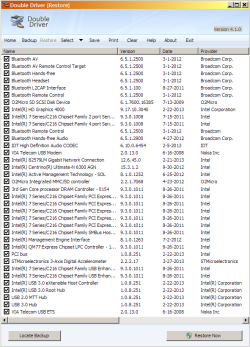
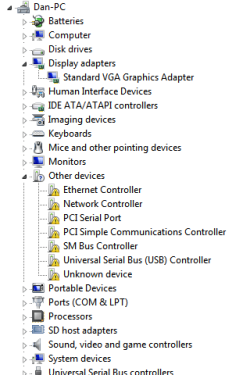
I had a spare hard disk laying around, so I tested Double Driver for myself. I had DD backup drivers from my existing installation, swapped in the blank hard disk, and installed Win7 from DVD. It left me with several devices with missing drivers and Microsoft's generic VGA graphics driver. I then restored from the DD backup.

So I'll answer my own question, "How well did it do?" Quite well, actually.

DD restored every missing driver except one, and even identified exactly which one it couldn't install: the "STMicroelectronics 3-Axis Digital Accelerometer". That kind of precise identification would make it a whole lot easier if I had to go search for that one remaining driver.

So it wasn't perfect, but it did remarkably well, and disproved your assertion that it's "simply not possible to extract drivers from a working system."

These snapshots show the drivers DD had backed up from the old installation, and Device Manager after the clean install, both before and after DD restored the drivers.
 

Attachments

  • identified-drivers.png
    identified-drivers.png
    29.4 KB · Views: 1
  • devmgr-before.png
    devmgr-before.png
    9.9 KB · Views: 36
  • devmgr-after.png
    devmgr-after.png
    10.3 KB · Views: 36

My Computer My Computer

At a glance

Windows 7/8.1/10 multibootIntel Core i7-770048GB (2x16GB Crucial DDR4-3200 + 2x8GB Hynix ...Intel HD630 + AMD Radeon R7 450 PCIe
Computer type
PC/Desktop
Computer Manufacturer/Model Number
Dell Optiplex 7050
OS
Windows 7/8.1/10 multiboot
CPU
Intel Core i7-7700
Motherboard
Dell, Intel Q270 chipset
Memory
48GB (2x16GB Crucial DDR4-3200 + 2x8GB Hynix DDR4-2400)
Graphics Card(s)
Intel HD630 + AMD Radeon R7 450 PCIe
Monitor(s) Displays
Asus VC279 (27")
Screen Resolution
1920x1080
Hard Drives
Toshiba M.2 NVMe (256GB),
Samsung 960 Evo (500GB),
WD Red Plus 80EFBX (8TB)
My point was, with OS`s like XP you had to find even the simplest driver, Windows 7 and windows update does a much better job, that`s all I meant.

If you plug in a printer, I think Windows 7 does a great job of getting what you need to use it, you can always go to the website and get better software.
 

My Computer My Computer

At a glance

Windows 10 Pro x64Intel Core i7 6700KGSkill TridentZ RGB 16GB 3600 16-16-16-36EVGA GTX 980 Ti SC x2
Computer type
PC/Desktop
Computer Manufacturer/Model Number
Skylake Special #666
OS
Windows 10 Pro x64
CPU
Intel Core i7 6700K
Motherboard
Asus Sabertooth Z170 Mark 1
Memory
GSkill TridentZ RGB 16GB 3600 16-16-16-36
Graphics Card(s)
EVGA GTX 980 Ti SC x2
Sound Card
Realtek High Definition
Monitor(s) Displays
AOC G2460PG
Screen Resolution
1920 x 1080 144Hz
Hard Drives
Samsung 860 Pro 256GB, Seagate Barracuda 4TB x2
PSU
EVGA 1000 P2, EVGA White Custom Braided Cables
Case
Corsair Vengeance C70 Gunmetal Black
Cooling
Corsair H100i v2, Corsair ML120 x2, Thermal Grizzly Kryonaut
Keyboard
Logitech G910 Orion Spectrum
Mouse
Logitech G700s
Internet Speed
Verizon Fios Quantum Gateway 75/75
Antivirus
Windows Defender, Malwarebytes Free 3.8.3
Browser
Chrome
Other Info
Corsair SP120 x4, LG Blu-ray Drive, Durabrand HT-395 100 Watt Dolby Digital Amp, Corsair H2100 Wireless 7.1 Headset
Almost forgot. When your done with the install make an image of the HDD, and save that to the same folder as the drivers you saved. Why both? Because HDD's are cheap and capacity is plentiful.
 
Last edited:

My Computer My Computer

At a glance

Windows 7 Professional 64bitIntel i7-5960X64GB Corsair Dominator 2400MHz3 EVGA GTX980's
Computer type
PC/Desktop
Computer Manufacturer/Model Number
custom build
OS
Windows 7 Professional 64bit
CPU
Intel i7-5960X
Motherboard
EVGA X99 Classified
Memory
64GB Corsair Dominator 2400MHz
Graphics Card(s)
3 EVGA GTX980's
Sound Card
on board
Monitor(s) Displays
3 Dell E2715H 27"
Screen Resolution
1920x1080 (5760x1080)
Hard Drives
Samsung 950 Pro 1TB M.2 SSD,
Western Digital Black 2TB HDD's x5
Western Digital Black 1TB HDD's x3
PSU
Corsair AX1200i
Case
Corsair 750D
Cooling
Corsair H110i GT
Keyboard
Corsair K70
Mouse
Corsair M45
Internet Speed
250 down/10 up
Antivirus
Microsoft Security Essentials
Browser
IE 11, Google Chrome
By doing Image &or Clone, this is much faster and better, should the system retired by itself.

Many users are doing it this way on regular period.
There are 2 types of doing backup
One is for System, the other is for data.

Getting drivers, windows update, etc; is only a portion.
Don't forget that some 'bought' software may failed to re-install.
Also some games required to original CD/DVD to re-install, provided you have all the CD/DVD(s) which cannot be clone &or image.
This may include Windows, as if you made some changes in Hardware, this may be a bit complicated.
 

My Computer My Computer

At a glance

Windows 7 x64
Computer type
Laptop
Computer Manufacturer/Model Number
Toshiba L630 and L735
OS
Windows 7 x64
Hard Drives
240 GB SSD
Back
Top