Solved WD reads uninitialized and unallocated

Electrickn

New member
Local time
5:41 AM
Messages
12
WD reads Not Initialized and Unallocated

Hello all

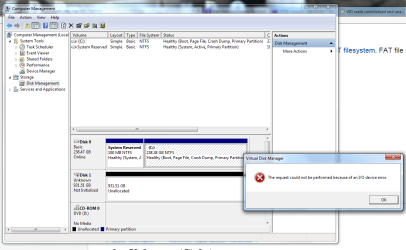
My secondary internal drive, a 1Tb Western Digital Western Digital Black WD1002FAEX 1TB 7200 RPM 64MB Cache SATA 6.0Gb/s 3.5" Internal Hard Drive Bare Drive - Newegg.com reads not initialized and unallocated, but windows device manager sees the drive and says its working properly. disk management won't allow me to allocate a drive letter to it...and the partition wizard in mini tools reads bad disk. I've read through some old threads on here, and downloaded some software (namely mini tools.) but also ddrescue and photorec (which seem complicated,) but I'll learn if need be.
My primary concern is recovering the data. I don't care if the drive is saved. I have some of this data backed up, but not all of it. The irony here is this drive WAS my backup drive. I've purchased another 1tb replacement internal disk and a 2tb elements external hard drive already to aid in this process. Do you have any advice as to the best possible way to proceed? Thanks so much for any help you guys have to offer.
 

Attachments
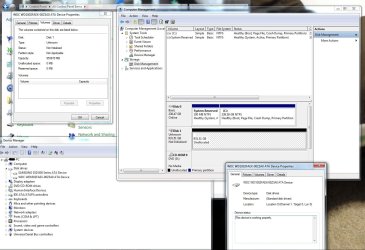
  • WD issue.jpg
    WD issue.jpg
    158.7 KB · Views: 10
Last edited:

My Computer My Computer

Computer type
PC/Desktop
Computer Manufacturer/Model Number
Custom Build
OS
Windows 7 64 bit
Welcome to the forum. You need to try specific partition recovery software to get partition back then files will be there don't use file recovery there are lots of free recovery tools on Google if one doesn't work try another
 

My Computer My Computer

Computer type
PC/Desktop
OS
win 8 32 bit
I read that it was better to clone the drive, before recovery should be attempted. Is that so? Though that is an issue too because Macrium doesn't recognize the drive.
I can just run Partition Wizard and see what happens if that is the consensus recommendation. I just don't want to further damage the data, if that is a possibility.

Thanks
 

My Computer My Computer

Computer type
PC/Desktop
Computer Manufacturer/Model Number
Custom Build
OS
Windows 7 64 bit
Hi , Electrickn,

When I am awake you will be asleep and vice versa. Doesn't matter.

When you wake up and see this, just do this.

In Windows Disk Management, Right click on the Disk 1( Unknown, Not Initialised) icon with the red arrow and click on Initialise Disk. In the next dialog box that pops up, choose MBR > OK.

If the Disk gets initialised, it will change to Basic, Online. Stop with Initialisation and do not proceed further.( Do not create a new volume. Do not format it.)

If the disk does not get initialised, it will give out an error message. ( hmmmm... too bad) Take a screenshot and post.

Let me know what exactly happened.
 

My Computer My Computer

OS
Windows 7 Home Premium 32 bit
Thanks Samuria

I downloaded test disk.

Hi Jumanji

I appreciate your help
 

Attachments

  • pc issue screenshots2.png
    pc issue screenshots2.png
    54.7 KB · Views: 6
Last edited:

My Computer My Computer

Computer type
PC/Desktop
Computer Manufacturer/Model Number
Custom Build
OS
Windows 7 64 bit
Last edited:

My Computer My Computer

OS
Windows 7 Home Premium 32 bit
Did you manage to solve your issue with WD drive Electrickn?
 

My Computer My Computer

Computer type
Laptop
Computer Manufacturer/Model Number
ASUS
OS
windows 7 Pro x64 / Windows 10 Pro x64
Did you manage to solve your issue with WD drive Electrickn?

Hey Micah...not yet. I've been working all week. I'm going to get back on it again over the weekend. I really need time and focus to make sure I don't lose my files (providing they're recoverable.)
 

My Computer My Computer

Computer type
PC/Desktop
Computer Manufacturer/Model Number
Custom Build
OS
Windows 7 64 bit
I made a thread myself as I had a very similar issue. My WD was encrypted on top of that. What I did, I took it out of the enclosure, put it in a USB to SATA bridge and then WD Data Lifeguard Diagnostic was seeing it. I run QUICK scan it came back OK, then I run long scan (it took about 18-20hrs) an it came back with information that there are bad sectors. It asked me if I wanted to repair them, I clicked OK. I had nothing to lose I couldn't get to my data anyway. Once it repaired bad sectors, I put it back in its enclosure and my Windows was finally seeing it and reading it. I am currently copying all data to a different HDD. Of course I don't know if this would work for you but it's worth a try. If the enclosure is not at fault, then you have a chance.
 

My Computer My Computer

Computer type
Laptop
Computer Manufacturer/Model Number
ASUS
OS
windows 7 Pro x64 / Windows 10 Pro x64
Hi guys

No luck with WD data lifeguard, it didn't recognize the drive (as an internal drive or when I took it out and used a SATA adapter.)
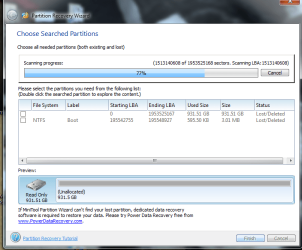
I ran partition recovery wizard twice, it sees the drive (as does device manager). I didn't get a screen capture the first time at 100%, but I took one at 77% the second time when I called it quits. It looked the same. I'm looking for a better software idea ....any suggestions?

Thanks
 

Attachments

  • partion recovery results.png
    partion recovery results.png
    35.9 KB · Views: 3

My Computer My Computer

Computer type
PC/Desktop
Computer Manufacturer/Model Number
Custom Build
OS
Windows 7 64 bit
Hi Electrickn,

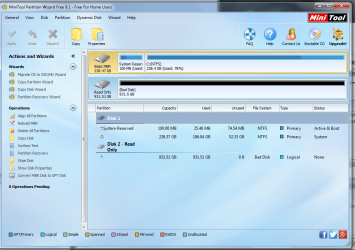
There is absolutely no point in switching the drive from Internal to external and viceversa. That can only confuse the issue. I am already confused :). First you said PW showed the drive as Bad Disk. ( Of course there was no picture) Now it shows Read Only. Either way not a good prognosis.
Now please stick to one and that as an internal drive as it usually was.. Keep your SATA to USB adapter/enclosure under the wrap.

Tell what Datalifeguard Diagnostic for Windows says. If it does not recognise its own drive, I shall say that is the end of the story and you may have to seek professional data recovery.

Still miracles can happen in Data Recovery. Try your luck.

1. Download GetDataback Simple and scan your drive if it shows up. Data Recovery Software Products - Runtime Software Products

2. Run TestDisk for Windows and check whether it can recognise the drive to start with.

If both do not recognise the drive. my attempt is over and I will throw up my hands.
 

My Computer My Computer

OS
Windows 7 Home Premium 32 bit
Hi Electrickn,

There is absolutely no point in switching the drive from Internal to external and viceversa. That can only confuse the issue. I am already confused :). First you said PW showed the drive as Bad Disk. ( Of course there was no picture) Now it shows Read Only. Either way not a good prognosis.

Now please stick to one and that as an internal drive as it usually was.. Keep your SATA to USB adapter/enclosure under the wrap.
.

I apologize if I confused you Jumanji. I assumed you had read Micah's post previous to mine. I wanted to see if her solution would work for my drive too. PW did read bad disk from the initial startup screen. See image below. Bad disk...read only. I just got home from work, so I'll start trying your other ideas and report back..thanks
 

Attachments

  • Bad Disk read only.png
    Bad Disk read only.png
    187.9 KB · Views: 3
Last edited:

My Computer My Computer

Computer type
PC/Desktop
Computer Manufacturer/Model Number
Custom Build
OS
Windows 7 64 bit
Hi Jumanji...it appears testdisk that you and Samuria recommended sees the drive.
FYI..It's the 1000 GB drive not the highlighted 256 GB drive.
 

Attachments

  • Testdisk.png
    Testdisk.png
    21.6 KB · Views: 3

My Computer My Computer

Computer type
PC/Desktop
Computer Manufacturer/Model Number
Custom Build
OS
Windows 7 64 bit
I did read micah2's posts. In his case it was an encrypted external drive, He ran Datalifeguard Diagnostic for Windows. Long Test did find bad sectors which got repaired. I knew that he will do that and that is why I didn't want to enter his thread.

I recommended that you run Datalifeguard Dignostic for Windows in my post #7 just to check whether it recognises it and if yes whether it shows any bad sectors that can be repaired. That was even before micah2 entered this thread with his success story. In your case unfortunately DataLifeGuard did not recognise the drive in the first instance.

it is good that TestDisk sees the drive. Let me think about it and formulate my strategy and I shall comeback on it after you post the results of GetDataback scan on your drive (as an internal drive). If it shows your files it can act as a booster dose to go ahead with TestDisk. Even otherwise we shall try and see what is in store.

After trying Getdataback and posting the results, you do this also and report. Conor M's post#6 Hard drive locked as Read-Only
 

My Computer My Computer

OS
Windows 7 Home Premium 32 bit
I did read micah2's posts. In his case it was an encrypted external drive, He ran Datalifeguard Diagnostic for Windows. Long Test did find bad sectors which got repaired. I knew that he will do that and that is why I didn't want to enter his thread.

I recommended that you run Datalifeguard Dignostic for Windows in my post #7 just to check whether it recognises it and if yes whether it shows any bad sectors that can be repaired. That was even before micah2 entered this thread with his success story. In your case unfortunately DataLifeGuard did not recognise the drive in the first instance.

it is good that TestDisk sees the drive. Let me think about it and formulate my strategy and I shall comeback on it after you post the results of GetDataback scan on your drive (as an internal drive). If it shows your files it can act as a booster dose to go ahead with TestDisk. Even otherwise we shall try and see what is in store.

After trying Getdataback and posting the results, you do this also and report. Conor M's post#6 Hard drive locked as Read-Only

Just a small note, I am a SHE not HE :D

I hope Electrickn can get his data back. For me, opening the enclosure and using USB to SATA was the only way Datalifeguard was seeing the HDD. Even when all other software saw it and reported blank results Datalifeguard didn't see it until I used the bridge.
Keep trying and keep us updated Electrickn.
 

My Computer My Computer

Computer type
Laptop
Computer Manufacturer/Model Number
ASUS
OS
windows 7 Pro x64 / Windows 10 Pro x64
Just a small note, I am a SHE not HE :D

I hope Electrickn can get his data back. For me, opening the enclosure and using USB to SATA was the only way Datalifeguard was seeing the HDD. Even when all other software saw it and reported blank results Datalifeguard didn't see it until I used the bridge.
Keep trying and keep us updated Electrickn.

Welcome to the club, honey. I get called "he" a lot on various forums despite the "Lady" in my username.

I ran into a similar experience when a brand new (not to mention expensive) SSd kept dropping out on me and sometimes I couldn't get it back unless I connected it with a USB 3.0 cable bridge. When the problems went away after I replaced it with another new one I had planned on using elsewhere, I returned the troublesome little bugger to the vendor for replacement.
 

My Computer My Computer

Computer type
PC/Desktop
Computer Manufacturer/Model Number
Custom Build
OS
Win 7 Ultimate 64 bit
CPU
Intel i7-3930K
Motherboard
ASUS P9X79 WS
Memory
Kingston HyperX Genesis 32GB Kit (8x4GB Modules) 1600MHz DDR
Graphics Card(s)
MSI R7850 Twin Frozr 2GD5/OC Radeon HD 7850 2GB 256-bit GDDR
Sound Card
Asus Xonar Essence STX
Monitor(s) Displays
3x Asus VG248QE 24", Vizio 32" TV
Screen Resolution
1920 x 1080, ?
Hard Drives
Samsung 128GB 840 Pro SSD (1),
Samsung 4TB 850 EVO SSDs (4)
Samsung 4TB 850 EVO SSDs (16) external backup drives used in 2.5" hot swap bays in the computer.
PSU
Corsair HX750w
Case
Antec Two Hundred v2 (modified)
Cooling
Cooler Master GeminII S524 120mm (fan replaced with a 140mm)
Keyboard
Logitech G510s
Mouse
Logitech M525 (two in use)
Internet Speed
=< 32Mbps down, 8Mbps up
Antivirus
AVAST!, MBAM, SAS, Spybot S&D (all but MBAM free) Glary Util
Browser
IE11
Other Info
LSI 9211-8i HBA card (8 SATA III ports), 2.5" & 3.5" Hot Swap Bays, HooToo HT-CR001 PCI-E to USB 3.0 Internal Hub + 6 Slot Card Reader, and LG Model CH12LS28 BD-ROM Optical Drive. Also, ScanSnap S1500 ADF duplexing scanner, Canon 9000F flat bed scanner, Corsair SP2500 2.1 speakers, Samsung CLP 415nw laser color printer, Cyberpower PP2200SW UPS
Apologies Micah :o Corrected!
 

My Computer My Computer

Computer type
PC/Desktop
Computer Manufacturer/Model Number
Custom Build
OS
Windows 7 64 bit
Just a small note, I am a SHE not HE :D...........

Oh my dear, I had never imagined that that HE could be a SHE. Never mind, a rose by any name would still be a rose ;). Thanks for the update, lady.
 

My Computer My Computer

OS
Windows 7 Home Premium 32 bit
Hello All


Hi Jumanji, Looks like getdataback simple found a bunch of my files. So on to testdisk from here?
 
Last edited:

My Computer My Computer

Computer type
PC/Desktop
Computer Manufacturer/Model Number
Custom Build
OS
Windows 7 64 bit
Back
Top