
ESET : attempted communication with an untrusted certificate. What is?

3Colors

New member
Member
VIP
Local time
2:13 AM
Messages
352
Location
Lima
Hello everyone, I do not know anyone could explain to me that it is the message, which appeared seconds after opening Internet Explorer (to play by battlelog).
Yesterday I did the same but I did not get any message and it was only to play for a while and then turn off the computer.
Seeing the information in "more detail" seems to be something of Windows itself. So it is a bug and click on Allow or Block?

For some information I have Windows without the patches of November and December so now that I'm free I plan to do it.

Regards.
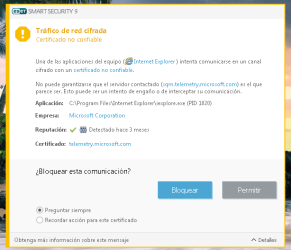
screenshot_2.png
 

My Computer My Computer

At a glance

64-bit Windows 7 ProfessionalIntel i5-3450 3.1 Ghz8 GB (2x4) Corsair Vengeance Red DDR3 1600MhzASUS HD 7770 DC 1.5GB
Computer type
PC/Desktop
Computer Manufacturer/Model Number
Assembled PC
OS
64-bit Windows 7 Professional
CPU
Intel i5-3450 3.1 Ghz
Motherboard
ASUS P8H77-M PRO
Memory
8 GB (2x4) Corsair Vengeance Red DDR3 1600Mhz
Graphics Card(s)
ASUS HD 7770 DC 1.5GB
Sound Card
Realtek HD Audio / Headphones Asus Orion Pro
Monitor(s) Displays
20" Samsung S20B300N
Screen Resolution
1600x900
Hard Drives
500GB SEAGATE HDD SATA
PSU
Corsair GS600 80PLUS Bronze Gaming
Case
Cooler Master Storm Enforcer
Cooling
Cooler Master Hyper 212 EVO
Keyboard
Logitech K200 USB
Mouse
Logitech M100 USB / Logitech G500 Gaming Mouse
Antivirus
ESET
Browser
Internet Explorer
Other Info
All the hardware selected by myself. I never imagined upgrade my PC :)
That message seems to have come from your Eset anti virus program. While I cannot read in your language it would seem that a dangerous website might have been accessed & it is issuing you with a warning & it's up to you whether you allow or block access.

If you are really worried by it contact the Eset forum if they have one & discuss it there.
 

My Computer My Computer

At a glance

Windows 7 Home Premium 64 bit sp1Intel i5 3570 3.4Ghz Ivy Bridge SKT 1155 quad...G-Skill Rip Jaws 16Gb (8x2) DDR3 -1600 PC3 12...Gigabyte NVIDIA GT610 1Gb DDR3 810/1200 PCI-E...
Computer type
PC/Desktop
Computer Manufacturer/Model Number
Self built using existing case
OS
Windows 7 Home Premium 64 bit sp1
CPU
Intel i5 3570 3.4Ghz Ivy Bridge SKT 1155 quad core
Motherboard
Gigabyte Z77-HD3 SKT 1155 2xSata 3, 4x USB 3.0
Memory
G-Skill Rip Jaws 16Gb (8x2) DDR3 -1600 PC3 12800 CL 10 red
Graphics Card(s)
Gigabyte NVIDIA GT610 1Gb DDR3 810/1200 PCI-E 2.0 Silent
Sound Card
NVIDIA High Definition & Realtech High Definition Audio
Monitor(s) Displays
2 x Philips 226V4L 16:9 aspect ratio
Screen Resolution
1920 x 1080 HD
Hard Drives
Samsung 840 Pro 256gb SSD, SATA 3.
Hitachi Touro Portable 1tb, USB 3.0 HDD used for image b/ups.
PSU
Corsair VS450
Case
Codeng
Cooling
PSU fan & CPU fan
Keyboard
Logitech
Mouse
Logitech Wireless trackball M570
Internet Speed
Wireless 3G. 3mg down & 550kb up.
Antivirus
Bitdefender Internet Security 2020
Browser
Opera (Current Version) & Firefox
Other Info
MS Office 2013 Pro. Davis weather station software. MGE Nova 600 avr UPS.
It's worth checking your date and time on your PC if that's wrong the certificate will appear to be wrong
 

My Computer My Computer

At a glance

win 8 32 bit
Computer type
PC/Desktop
OS
win 8 32 bit
Thanks for the replys but forget to mention that last week I updated the Eset to version 9. Maybe that's why since with the previus version did not see any of that. Looking for some information I do not know if this could help. Maybe when doing the update via AV, the certificates were not imported correctly :

http://support.eset.com/kb3126/? locale=en_US Doing that step is maybe a solution? To turn it off and turn it on.

It only appeared today after entering Origin and then to the battlelog. Something that I did the same last weekend and did not appear anything.
 
Last edited:

My Computer My Computer

At a glance

64-bit Windows 7 ProfessionalIntel i5-3450 3.1 Ghz8 GB (2x4) Corsair Vengeance Red DDR3 1600MhzASUS HD 7770 DC 1.5GB
Computer type
PC/Desktop
Computer Manufacturer/Model Number
Assembled PC
OS
64-bit Windows 7 Professional
CPU
Intel i5-3450 3.1 Ghz
Motherboard
ASUS P8H77-M PRO
Memory
8 GB (2x4) Corsair Vengeance Red DDR3 1600Mhz
Graphics Card(s)
ASUS HD 7770 DC 1.5GB
Sound Card
Realtek HD Audio / Headphones Asus Orion Pro
Monitor(s) Displays
20" Samsung S20B300N
Screen Resolution
1600x900
Hard Drives
500GB SEAGATE HDD SATA
PSU
Corsair GS600 80PLUS Bronze Gaming
Case
Cooler Master Storm Enforcer
Cooling
Cooler Master Hyper 212 EVO
Keyboard
Logitech K200 USB
Mouse
Logitech M100 USB / Logitech G500 Gaming Mouse
Antivirus
ESET
Browser
Internet Explorer
Other Info
All the hardware selected by myself. I never imagined upgrade my PC :)
whats the link so we can see if its the website
 

My Computer My Computer

At a glance

win 8 32 bit
Computer type
PC/Desktop
OS
win 8 32 bit

My Computer My Computer

At a glance

Microsoft Windows 7 Home Premium 64-bit 7601 ...AMD C-60 APU with Radeon(tm) HD Graphics4.00 GBAMD Radeon HD 6290 Graphics
Computer type
Laptop
Computer Manufacturer/Model Number
ASUS
OS
Microsoft Windows 7 Home Premium 64-bit 7601 Multiprocessor Free Service Pack 1
CPU
AMD C-60 APU with Radeon(tm) HD Graphics
Motherboard
ASUSTeK COMPUTER INC. X501U
Memory
4.00 GB
Graphics Card(s)
AMD Radeon HD 6290 Graphics
Sound Card
(1) AMD High Definition Audio Device (2) Realtek High Defi
Screen Resolution
1366 x 768 x 32 bits (4294967296 colors) @ 60 Hz
Hard Drives
Hitachi HTS545050A7E380 SATA Disk Device
Antivirus
Comodo CIS & FW, SecureAplus App Whitelisting, Threatfire
Browser
Cyberfox 64bit, Opera 64bit, Airfox
Other Info
Spy-The-Spy, HitmanPro.Alert, Norton Connect Safe, MJRegWatcher, BitDefender TrafficLight, Voodoo Shield, Zemana AntiMalware
first thoughts Eset doesn't allow re-directs, change/add to its Whitelist.

Roy
 

My Computer My Computer

At a glance

W7 home premium 32bit/W7HP 64bit/w10 tp insid...E5300 dual core3gbNvidia Geforce 7100 Nforce 630i
Computer type
PC/Desktop
Computer Manufacturer/Model Number
medionl/Aspire 6930G/acer x55a
OS
W7 home premium 32bit/W7HP 64bit/w10 tp insider ring
CPU
E5300 dual core
Motherboard
medion MS7366
Memory
3gb
Graphics Card(s)
Nvidia Geforce 7100 Nforce 630i
Monitor(s) Displays
avixc
Internet Speed
n (isp resticted to 72)
Antivirus
mse/pands
Browser
palemoon
Other Info
Belkin Fd7050 n USB using Railink RT2870 drivers, more upto date
Also have a read:

Customer Experience Improvement Program - Join or Unjoin

Try resetting SSL scanning feature in ESET.

Open ESET product main window by clicking on its icon in system tray.
Press F5 to launch the Advanced Setup window.
Click on Web and Email link in left pane and then in right pane click on SSL/TLS to expand.
Turn off "Enable SSL/TLS protocol filtering" option. Click on the slider near the option and it'll set it to 'x' mark which means the option has been disabled.
After turning off the option click on OK button to apply changes.

Again press F5 to launch the Advanced Setup window. Again click on Web and Email link in left pane and expand SSL/TLS in right pane.

Turn on "Enable SSL/TLS protocol filtering" option. Click on the slider near the option again and it'll immediately re=enable the feature.

That will allow ESET to reimport missing root certificates properly.

EDIT: Sorry I missed your earlier post:

Thanks for the replys but forget to mention that last week I updated the Eset to version 9. Maybe that's why since with the previus version did not see any of that. Looking for some information I do not know if this could help. Maybe when doing the update via AV, the certificates were not imported correctly :

http://support.eset.com/kb3126/? locale=en_US Doing that step is maybe a solution? To turn it off and turn it on.

It's been stated that ugrading to a newer version can cause certificate issues - so yes you should rest SSL scanning.
 

My Computer My Computer

At a glance

Microsoft Windows 7 Home Premium 64-bit 7601 ...AMD C-60 APU with Radeon(tm) HD Graphics4.00 GBAMD Radeon HD 6290 Graphics
Computer type
Laptop
Computer Manufacturer/Model Number
ASUS
OS
Microsoft Windows 7 Home Premium 64-bit 7601 Multiprocessor Free Service Pack 1
CPU
AMD C-60 APU with Radeon(tm) HD Graphics
Motherboard
ASUSTeK COMPUTER INC. X501U
Memory
4.00 GB
Graphics Card(s)
AMD Radeon HD 6290 Graphics
Sound Card
(1) AMD High Definition Audio Device (2) Realtek High Defi
Screen Resolution
1366 x 768 x 32 bits (4294967296 colors) @ 60 Hz
Hard Drives
Hitachi HTS545050A7E380 SATA Disk Device
Antivirus
Comodo CIS & FW, SecureAplus App Whitelisting, Threatfire
Browser
Cyberfox 64bit, Opera 64bit, Airfox
Other Info
Spy-The-Spy, HitmanPro.Alert, Norton Connect Safe, MJRegWatcher, BitDefender TrafficLight, Voodoo Shield, Zemana AntiMalware
whats the link so we can see if its the website
It's not a page. When I click on play in Battlefield through Origin, automatically opens Internet Explorer to play. I did that last weekend with ESET 9 and I did not see that message. Just today.

Also have a read:

Customer Experience Improvement Program - Join or Unjoin

Try resetting SSL scanning feature in ESET.

Open ESET product main window by clicking on its icon in system tray.
Press F5 to launch the Advanced Setup window.
Click on Web and Email link in left pane and then in right pane click on SSL/TLS to expand.
Turn off "Enable SSL/TLS protocol filtering" option. Click on the slider near the option and it'll set it to 'x' mark which means the option has been disabled.
After turning off the option click on OK button to apply changes.

Again press F5 to launch the Advanced Setup window. Again click on Web and Email link in left pane and expand SSL/TLS in right pane.

Turn on "Enable SSL/TLS protocol filtering" option. Click on the slider near the option again and it'll immediately re=enable the feature.

That will allow ESET to reimport missing root certificates properly.

EDIT: Sorry I missed your earlier post:


It's been stated that ugrading to a newer version can cause certificate issues - so yes you should rest SSL scanning.

That will do and restart the pc as a final step. To that message I opt for the option "block". It will have some negative effect or something ?
 

My Computer My Computer

At a glance

64-bit Windows 7 ProfessionalIntel i5-3450 3.1 Ghz8 GB (2x4) Corsair Vengeance Red DDR3 1600MhzASUS HD 7770 DC 1.5GB
Computer type
PC/Desktop
Computer Manufacturer/Model Number
Assembled PC
OS
64-bit Windows 7 Professional
CPU
Intel i5-3450 3.1 Ghz
Motherboard
ASUS P8H77-M PRO
Memory
8 GB (2x4) Corsair Vengeance Red DDR3 1600Mhz
Graphics Card(s)
ASUS HD 7770 DC 1.5GB
Sound Card
Realtek HD Audio / Headphones Asus Orion Pro
Monitor(s) Displays
20" Samsung S20B300N
Screen Resolution
1600x900
Hard Drives
500GB SEAGATE HDD SATA
PSU
Corsair GS600 80PLUS Bronze Gaming
Case
Cooler Master Storm Enforcer
Cooling
Cooler Master Hyper 212 EVO
Keyboard
Logitech K200 USB
Mouse
Logitech M100 USB / Logitech G500 Gaming Mouse
Antivirus
ESET
Browser
Internet Explorer
Other Info
All the hardware selected by myself. I never imagined upgrade my PC :)
To that message I opt for the option "block". It will have some negative effect or something ?

Which message? Option to "Block" what exactly. I'm not sure what you are looking at.

EDIT: If you mean ESET SSL scanning - just toggle it off and apply the setting then toggle it back on.
 

My Computer My Computer

At a glance

Microsoft Windows 7 Home Premium 64-bit 7601 ...AMD C-60 APU with Radeon(tm) HD Graphics4.00 GBAMD Radeon HD 6290 Graphics
Computer type
Laptop
Computer Manufacturer/Model Number
ASUS
OS
Microsoft Windows 7 Home Premium 64-bit 7601 Multiprocessor Free Service Pack 1
CPU
AMD C-60 APU with Radeon(tm) HD Graphics
Motherboard
ASUSTeK COMPUTER INC. X501U
Memory
4.00 GB
Graphics Card(s)
AMD Radeon HD 6290 Graphics
Sound Card
(1) AMD High Definition Audio Device (2) Realtek High Defi
Screen Resolution
1366 x 768 x 32 bits (4294967296 colors) @ 60 Hz
Hard Drives
Hitachi HTS545050A7E380 SATA Disk Device
Antivirus
Comodo CIS & FW, SecureAplus App Whitelisting, Threatfire
Browser
Cyberfox 64bit, Opera 64bit, Airfox
Other Info
Spy-The-Spy, HitmanPro.Alert, Norton Connect Safe, MJRegWatcher, BitDefender TrafficLight, Voodoo Shield, Zemana AntiMalware
I think they are referring to the screen shot in Post #1, where the word Bloquear means Block in Peruvian.
 

My Computer My Computer

At a glance

Windows 7 Home Premium 64 bit sp1Intel i5 3570 3.4Ghz Ivy Bridge SKT 1155 quad...G-Skill Rip Jaws 16Gb (8x2) DDR3 -1600 PC3 12...Gigabyte NVIDIA GT610 1Gb DDR3 810/1200 PCI-E...
Computer type
PC/Desktop
Computer Manufacturer/Model Number
Self built using existing case
OS
Windows 7 Home Premium 64 bit sp1
CPU
Intel i5 3570 3.4Ghz Ivy Bridge SKT 1155 quad core
Motherboard
Gigabyte Z77-HD3 SKT 1155 2xSata 3, 4x USB 3.0
Memory
G-Skill Rip Jaws 16Gb (8x2) DDR3 -1600 PC3 12800 CL 10 red
Graphics Card(s)
Gigabyte NVIDIA GT610 1Gb DDR3 810/1200 PCI-E 2.0 Silent
Sound Card
NVIDIA High Definition & Realtech High Definition Audio
Monitor(s) Displays
2 x Philips 226V4L 16:9 aspect ratio
Screen Resolution
1920 x 1080 HD
Hard Drives
Samsung 840 Pro 256gb SSD, SATA 3.
Hitachi Touro Portable 1tb, USB 3.0 HDD used for image b/ups.
PSU
Corsair VS450
Case
Codeng
Cooling
PSU fan & CPU fan
Keyboard
Logitech
Mouse
Logitech Wireless trackball M570
Internet Speed
Wireless 3G. 3mg down & 550kb up.
Antivirus
Bitdefender Internet Security 2020
Browser
Opera (Current Version) & Firefox
Other Info
MS Office 2013 Pro. Davis weather station software. MGE Nova 600 avr UPS.
Which message? Option to "Block" what exactly. I'm not sure what you are looking at.

EDIT: If you mean ESET SSL scanning - just toggle it off and apply the setting then toggle it back on.
From the ESET popup window, from the image asking what action to take. Block or Allow. Seeing that it comes from Windows I decided to Block it just in case to know something about it. Was it wrong to do that ?

I think they are referring to the screen shot in Post #1, where the word Bloquear means Block in Peruvian.
Yes. "Block" in spanish is Bloquear :)

Right now I'm at work, but I already turned it off and turned it on.
 

My Computer My Computer

At a glance

64-bit Windows 7 ProfessionalIntel i5-3450 3.1 Ghz8 GB (2x4) Corsair Vengeance Red DDR3 1600MhzASUS HD 7770 DC 1.5GB
Computer type
PC/Desktop
Computer Manufacturer/Model Number
Assembled PC
OS
64-bit Windows 7 Professional
CPU
Intel i5-3450 3.1 Ghz
Motherboard
ASUS P8H77-M PRO
Memory
8 GB (2x4) Corsair Vengeance Red DDR3 1600Mhz
Graphics Card(s)
ASUS HD 7770 DC 1.5GB
Sound Card
Realtek HD Audio / Headphones Asus Orion Pro
Monitor(s) Displays
20" Samsung S20B300N
Screen Resolution
1600x900
Hard Drives
500GB SEAGATE HDD SATA
PSU
Corsair GS600 80PLUS Bronze Gaming
Case
Cooler Master Storm Enforcer
Cooling
Cooler Master Hyper 212 EVO
Keyboard
Logitech K200 USB
Mouse
Logitech M100 USB / Logitech G500 Gaming Mouse
Antivirus
ESET
Browser
Internet Explorer
Other Info
All the hardware selected by myself. I never imagined upgrade my PC :)
Block or allow. It makes no difference. You still need to reset SSL scanning in ESET as it doesn't like the certificate so certificates are not up to date.

If you choose block then it won't connect. That shouldn't affect anything but be aware that your are opted into CEIP.
 

My Computer My Computer

At a glance

Microsoft Windows 7 Home Premium 64-bit 7601 ...AMD C-60 APU with Radeon(tm) HD Graphics4.00 GBAMD Radeon HD 6290 Graphics
Computer type
Laptop
Computer Manufacturer/Model Number
ASUS
OS
Microsoft Windows 7 Home Premium 64-bit 7601 Multiprocessor Free Service Pack 1
CPU
AMD C-60 APU with Radeon(tm) HD Graphics
Motherboard
ASUSTeK COMPUTER INC. X501U
Memory
4.00 GB
Graphics Card(s)
AMD Radeon HD 6290 Graphics
Sound Card
(1) AMD High Definition Audio Device (2) Realtek High Defi
Screen Resolution
1366 x 768 x 32 bits (4294967296 colors) @ 60 Hz
Hard Drives
Hitachi HTS545050A7E380 SATA Disk Device
Antivirus
Comodo CIS & FW, SecureAplus App Whitelisting, Threatfire
Browser
Cyberfox 64bit, Opera 64bit, Airfox
Other Info
Spy-The-Spy, HitmanPro.Alert, Norton Connect Safe, MJRegWatcher, BitDefender TrafficLight, Voodoo Shield, Zemana AntiMalware
About CEIP that was no always enabled right ? I think since I installed IE 11 is enable : Internet Explorer 11 privacy statement

Other Thing. Choosing the "block" option will not connect for that moment as you say. But it will connect normally after that if the SSL Scanning is fixed.
 

My Computer My Computer

At a glance

64-bit Windows 7 ProfessionalIntel i5-3450 3.1 Ghz8 GB (2x4) Corsair Vengeance Red DDR3 1600MhzASUS HD 7770 DC 1.5GB
Computer type
PC/Desktop
Computer Manufacturer/Model Number
Assembled PC
OS
64-bit Windows 7 Professional
CPU
Intel i5-3450 3.1 Ghz
Motherboard
ASUS P8H77-M PRO
Memory
8 GB (2x4) Corsair Vengeance Red DDR3 1600Mhz
Graphics Card(s)
ASUS HD 7770 DC 1.5GB
Sound Card
Realtek HD Audio / Headphones Asus Orion Pro
Monitor(s) Displays
20" Samsung S20B300N
Screen Resolution
1600x900
Hard Drives
500GB SEAGATE HDD SATA
PSU
Corsair GS600 80PLUS Bronze Gaming
Case
Cooler Master Storm Enforcer
Cooling
Cooler Master Hyper 212 EVO
Keyboard
Logitech K200 USB
Mouse
Logitech M100 USB / Logitech G500 Gaming Mouse
Antivirus
ESET
Browser
Internet Explorer
Other Info
All the hardware selected by myself. I never imagined upgrade my PC :)
I've not seen CEIP manage to enable itself on my machine. On yours I guess it was always enabled.

RE: Block certificate via ESET. I'm not sure if ESET blocks permanently. I'm not an ESET user. I know that on my machine I can either block cerificates detected as invalid, allow for session or add exception permanently.
 

My Computer My Computer

At a glance

Microsoft Windows 7 Home Premium 64-bit 7601 ...AMD C-60 APU with Radeon(tm) HD Graphics4.00 GBAMD Radeon HD 6290 Graphics
Computer type
Laptop
Computer Manufacturer/Model Number
ASUS
OS
Microsoft Windows 7 Home Premium 64-bit 7601 Multiprocessor Free Service Pack 1
CPU
AMD C-60 APU with Radeon(tm) HD Graphics
Motherboard
ASUSTeK COMPUTER INC. X501U
Memory
4.00 GB
Graphics Card(s)
AMD Radeon HD 6290 Graphics
Sound Card
(1) AMD High Definition Audio Device (2) Realtek High Defi
Screen Resolution
1366 x 768 x 32 bits (4294967296 colors) @ 60 Hz
Hard Drives
Hitachi HTS545050A7E380 SATA Disk Device
Antivirus
Comodo CIS & FW, SecureAplus App Whitelisting, Threatfire
Browser
Cyberfox 64bit, Opera 64bit, Airfox
Other Info
Spy-The-Spy, HitmanPro.Alert, Norton Connect Safe, MJRegWatcher, BitDefender TrafficLight, Voodoo Shield, Zemana AntiMalware
At the moment I have not used the PC since I did the SSL restart. The funny thing is that yesterday at work on one of the laptops when I opened Internet Explorer if I am not mistaken the same message appeared.

And if the block is permanent, there will be no problem as you say. Since that CEIP is an extra feature of the browser to enhance the experience as to send error information stuff like that.
 

My Computer My Computer

At a glance

64-bit Windows 7 ProfessionalIntel i5-3450 3.1 Ghz8 GB (2x4) Corsair Vengeance Red DDR3 1600MhzASUS HD 7770 DC 1.5GB
Computer type
PC/Desktop
Computer Manufacturer/Model Number
Assembled PC
OS
64-bit Windows 7 Professional
CPU
Intel i5-3450 3.1 Ghz
Motherboard
ASUS P8H77-M PRO
Memory
8 GB (2x4) Corsair Vengeance Red DDR3 1600Mhz
Graphics Card(s)
ASUS HD 7770 DC 1.5GB
Sound Card
Realtek HD Audio / Headphones Asus Orion Pro
Monitor(s) Displays
20" Samsung S20B300N
Screen Resolution
1600x900
Hard Drives
500GB SEAGATE HDD SATA
PSU
Corsair GS600 80PLUS Bronze Gaming
Case
Cooler Master Storm Enforcer
Cooling
Cooler Master Hyper 212 EVO
Keyboard
Logitech K200 USB
Mouse
Logitech M100 USB / Logitech G500 Gaming Mouse
Antivirus
ESET
Browser
Internet Explorer
Other Info
All the hardware selected by myself. I never imagined upgrade my PC :)
Back
Top