Paragon Partition Manager

satsave

New member
Local time
9:07 PM
Messages
5
Installed Partition Manager 2010 on Windows 7 RTM, but cannot open. Can somebody confirm please?
 

My Computer My Computer

Computer Manufacturer/Model Number
Build system myself
OS
Windows 7 Ultimate,RTM7600.16385 32bit
CPU
Intel 2.67G
Motherboard
Asus
Memory
2 G
Graphics Card(s)
GForse 128m
Sound Card
Sound Max Enbeded
Monitor(s) Displays
19" LCD
Screen Resolution
1440x900
Hard Drives
Active HD 80G
Logical HD 150G
PSU
350W
Case
Mid Case
Cooling
Normal fan
What vesion of Windows are you using... I installed the 32bit version yesterday and its running perfectly .. Some of Paragons programs have issues with 64bit ...
 

My Computer My Computer

Computer type
PC/Desktop
Computer Manufacturer/Model Number
LENOVO K450 @3.0GHZ
OS
64-bit Windows 8.1 Pro
CPU
Core(TM) i5 CPU 4330 Haswell @ 3.20GHz
Motherboard
LENOVO
Memory
12.00 GB
Graphics Card(s)
Intel(R) HD Graphics
Sound Card
Intel HD integtrated
Monitor(s) Displays
HP 25' ISP Monitor
Screen Resolution
1900/1020
Hard Drives
(1) ST1000DM003-1CH162 (2) Generic STORAGE DEVICE USB Device (3) Generic STORAGE DEVICE USB Device
Internet Speed
100mb down/10mb up
I'm running the partition manager 9.5 on Win7 X64 without issues so it should be compatible
 

My Computers My Computers

System One System Two

  • Computer type
    PC/Desktop
    Computer Manufacturer/Model Number
    ChillBlast - Custom to my design
    OS
    Windows 11 Pro x64 [Latest Release and Release Preview]
    CPU
    Ryzen 9 5950X, 3.8 - 5.2 MHz
    Motherboard
    Asus Prime X570-Pro
    Memory
    64GB [2 x 32GB] DDR4 3200MHz
    Graphics Card(s)
    4GB NVIDIA GEFORCE GTX 1650 Ti
    Sound Card
    On-board SPDIF to 5.1 System + HDMI [5.1 system]
    Monitor(s) Displays
    32" UHD 32 Bit HDR Monitor + 43" UHD 4K 32Bit HDR TV
    Screen Resolution
    2 x 3840 x 2160 @60Hz
    Hard Drives
    1TB M2 SSD OS, 500GB Fast Access SSD, 2 x 8TB Data + Various Externals from 1TB to 4TB, 10TB NAS
    PSU
    NZXT C750 80 PLUS Gold 750W Modular PSU
    Case
    Workstation Case [Matt Black]
    Cooling
    NZXT Kraken X63 280mm CPU Cooler +2x Quiet Case fans
    Keyboard
    Logitech Wireless MX Keys & K400 + others
    Mouse
    Logitech Wireless MX Master 3S
    Internet Speed
    920 MB Down 50 MB Up
    Antivirus
    BitDefender Total Security Pro
    Browser
    Chrome (always run latest Non-Beta)
    Other Info
    Also run ...
    Laptop - Quad 8GB - Windows 10 Pro x64
    Nexus 7 Android tablet x2
    Samsung 10.2" tablet
    Blackview TAB 8 4G Android Tablet c/w Keyboard
    Wacom Intuos Pro Medium Pen Pad
    Wacom Intuos Pro Small Pen Pad
    Wacom Expresskeys Remote
    Loopdeck+ Graphics Controller
    Shuttle Pro v2 Control
  • Computer type
    Laptop
    System Manufacturer/Model Number
    Dell XPS 17 10750H
    OS
    Windows 11 Pro x64 Latest RP
    CPU
    Intel I7 10750H 5.0GHz
    Motherboard
    Dell XPS
    Memory
    32GB [2x16GB] DDR4 2933 MHz
    Graphics Card(s)
    nVidia GTX1650Ti 4 GB GDDR6
    Sound Card
    Stock [Realtek] 4 Speaker
    Monitor(s) Displays
    17" IPS UHD+ Infinity Edge Touchscreen
    Screen Resolution
    3840 x 2400
    Hard Drives
    2TB M2 NVMe, 4TB External + various 500GB & 1TB External NVMe (also have access to spinner HDD from
    PSU
    Stock
    Case
    Stock XPS Aluminium & Carbon Fibre
    Cooling
    Stock - Active Fan Control
    Keyboard
    Backlit + Various Logitech
    Mouse
    Stock Track Pad + Logitech MX Trackball
    Internet Speed
    72 MB Down 18MB Up
    Browser
    Chrome
    Other Info
    Also run ...
    Laptop - Quad 8GB - Windows 10 Pro x64
    Nexus 7 Android tablet x2
    10.2" tablet
    Sony Z3 Android Smartphone
    Wacom Intuos Pro Medium Pen Pad
    Wacom Intuos Pro Small Pen Pad
    Wacom Expresskeys Remote
    Loopdeck+ Graphics Controller
    Shuttle Pro v2 Control Pad
    10TB NAS
Hmm curiouser and curiouser...
 

My Computer My Computer

Computer type
PC/Desktop
Computer Manufacturer/Model Number
LENOVO K450 @3.0GHZ
OS
64-bit Windows 8.1 Pro
CPU
Core(TM) i5 CPU 4330 Haswell @ 3.20GHz
Motherboard
LENOVO
Memory
12.00 GB
Graphics Card(s)
Intel(R) HD Graphics
Sound Card
Intel HD integtrated
Monitor(s) Displays
HP 25' ISP Monitor
Screen Resolution
1900/1020
Hard Drives
(1) ST1000DM003-1CH162 (2) Generic STORAGE DEVICE USB Device (3) Generic STORAGE DEVICE USB Device
Internet Speed
100mb down/10mb up
As an update I've just checked and I'm actually running the Hard Disk manager 9.5. which actually comes as both native x86 and x64 with a choice on what to install on the installer screen.

If this application follows he same install method then you may get issues if you choose the wrong version to install as it loads special drivers which of course must match the OS x86 or x64
 

My Computers My Computers

System One System Two

  • Computer type
    PC/Desktop
    Computer Manufacturer/Model Number
    ChillBlast - Custom to my design
    OS
    Windows 11 Pro x64 [Latest Release and Release Preview]
    CPU
    Ryzen 9 5950X, 3.8 - 5.2 MHz
    Motherboard
    Asus Prime X570-Pro
    Memory
    64GB [2 x 32GB] DDR4 3200MHz
    Graphics Card(s)
    4GB NVIDIA GEFORCE GTX 1650 Ti
    Sound Card
    On-board SPDIF to 5.1 System + HDMI [5.1 system]
    Monitor(s) Displays
    32" UHD 32 Bit HDR Monitor + 43" UHD 4K 32Bit HDR TV
    Screen Resolution
    2 x 3840 x 2160 @60Hz
    Hard Drives
    1TB M2 SSD OS, 500GB Fast Access SSD, 2 x 8TB Data + Various Externals from 1TB to 4TB, 10TB NAS
    PSU
    NZXT C750 80 PLUS Gold 750W Modular PSU
    Case
    Workstation Case [Matt Black]
    Cooling
    NZXT Kraken X63 280mm CPU Cooler +2x Quiet Case fans
    Keyboard
    Logitech Wireless MX Keys & K400 + others
    Mouse
    Logitech Wireless MX Master 3S
    Internet Speed
    920 MB Down 50 MB Up
    Antivirus
    BitDefender Total Security Pro
    Browser
    Chrome (always run latest Non-Beta)
    Other Info
    Also run ...
    Laptop - Quad 8GB - Windows 10 Pro x64
    Nexus 7 Android tablet x2
    Samsung 10.2" tablet
    Blackview TAB 8 4G Android Tablet c/w Keyboard
    Wacom Intuos Pro Medium Pen Pad
    Wacom Intuos Pro Small Pen Pad
    Wacom Expresskeys Remote
    Loopdeck+ Graphics Controller
    Shuttle Pro v2 Control
  • Computer type
    Laptop
    System Manufacturer/Model Number
    Dell XPS 17 10750H
    OS
    Windows 11 Pro x64 Latest RP
    CPU
    Intel I7 10750H 5.0GHz
    Motherboard
    Dell XPS
    Memory
    32GB [2x16GB] DDR4 2933 MHz
    Graphics Card(s)
    nVidia GTX1650Ti 4 GB GDDR6
    Sound Card
    Stock [Realtek] 4 Speaker
    Monitor(s) Displays
    17" IPS UHD+ Infinity Edge Touchscreen
    Screen Resolution
    3840 x 2400
    Hard Drives
    2TB M2 NVMe, 4TB External + various 500GB & 1TB External NVMe (also have access to spinner HDD from
    PSU
    Stock
    Case
    Stock XPS Aluminium & Carbon Fibre
    Cooling
    Stock - Active Fan Control
    Keyboard
    Backlit + Various Logitech
    Mouse
    Stock Track Pad + Logitech MX Trackball
    Internet Speed
    72 MB Down 18MB Up
    Browser
    Chrome
    Other Info
    Also run ...
    Laptop - Quad 8GB - Windows 10 Pro x64
    Nexus 7 Android tablet x2
    10.2" tablet
    Sony Z3 Android Smartphone
    Wacom Intuos Pro Medium Pen Pad
    Wacom Intuos Pro Small Pen Pad
    Wacom Expresskeys Remote
    Loopdeck+ Graphics Controller
    Shuttle Pro v2 Control Pad
    10TB NAS
Hi,

As Barman58 says, it comes in separate 32 and 64 bit versions. If you downloaded the wrong one - you can't install it.

So you must have the right version.

Did you rt click and run as admin to install it ?

Look in the programs folder and rt click and run as admin on the launcher.exe.

View attachment 26603

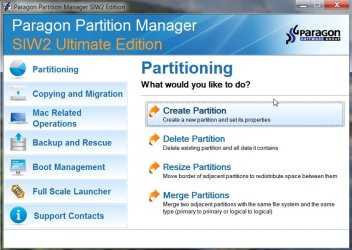
The main window should open:

PARAGONMAIN2009-09-05_124203.jpg

If you wish, you can click the Express icon (top left) you switch to the Express Launcher:

PARAGONSIWEXPLAUNCHER2009-09-05_123450.jpg
 

My Computers My Computers

System One System Two

  • Computer type
    PC/Desktop
    OS
    7 X64
    CPU
    i5 8400
    Motherboard
    gigabyte b365m ds3h
    Memory
    2x8gb 3200mhz
    Hard Drives
    various
    PSU
    pure power 11 400w cm
    Case
    Coolermaster
    Cooling
    cryorig m9i
  • Computer type
    PC/Desktop
    OS
    7x64
    CPU
    g5400
    Motherboard
    ga b365m ds3h
    Memory
    8gb ddr4 2400
    PSU
    xfx pro 450w
I`m running an 86x (32bit) computer and I`installed the (32bit) versions.I installed without problems both Paragon partition manager 2010 & Disk manager 2010 but cannot open them even with administration rights, saying that there are compatibility issues with windows.
I`m with Windows 7 84x RTM 7600-16385.
 
Last edited:

My Computer My Computer

Computer Manufacturer/Model Number
Build system myself
OS
Windows 7 Ultimate,RTM7600.16385 32bit
CPU
Intel 2.67G
Motherboard
Asus
Memory
2 G
Graphics Card(s)
GForse 128m
Sound Card
Sound Max Enbeded
Monitor(s) Displays
19" LCD
Screen Resolution
1440x900
Hard Drives
Active HD 80G
Logical HD 150G
PSU
350W
Case
Mid Case
Cooling
Normal fan
I installed Partition Manager 9.5 Pro but the same problem accord.
 

My Computer My Computer

Computer Manufacturer/Model Number
Build system myself
OS
Windows 7 Ultimate,RTM7600.16385 32bit
CPU
Intel 2.67G
Motherboard
Asus
Memory
2 G
Graphics Card(s)
GForse 128m
Sound Card
Sound Max Enbeded
Monitor(s) Displays
19" LCD
Screen Resolution
1440x900
Hard Drives
Active HD 80G
Logical HD 150G
PSU
350W
Case
Mid Case
Cooling
Normal fan
Very strange. What is the exact error message?

Do you mean x86 or x64.

I am not aware there is such a thing as Paragon partition manager 2010 & Disk manager 2010.

However, there is a pm9.5 pro.

If you purchased the other products - there is free support from Paragon.
 

My Computers My Computers

System One System Two

  • Computer type
    PC/Desktop
    OS
    7 X64
    CPU
    i5 8400
    Motherboard
    gigabyte b365m ds3h
    Memory
    2x8gb 3200mhz
    Hard Drives
    various
    PSU
    pure power 11 400w cm
    Case
    Coolermaster
    Cooling
    cryorig m9i
  • Computer type
    PC/Desktop
    OS
    7x64
    CPU
    g5400
    Motherboard
    ga b365m ds3h
    Memory
    8gb ddr4 2400
    PSU
    xfx pro 450w
Now I tried Paragon Partition Manager 8.5 and worked like a charm.
Strange, but no luck with versions 9 - 9.5 -& 10.
 

My Computer My Computer

Computer Manufacturer/Model Number
Build system myself
OS
Windows 7 Ultimate,RTM7600.16385 32bit
CPU
Intel 2.67G
Motherboard
Asus
Memory
2 G
Graphics Card(s)
GForse 128m
Sound Card
Sound Max Enbeded
Monitor(s) Displays
19" LCD
Screen Resolution
1440x900
Hard Drives
Active HD 80G
Logical HD 150G
PSU
350W
Case
Mid Case
Cooling
Normal fan
That's odd - glad one of them is working for you.:D

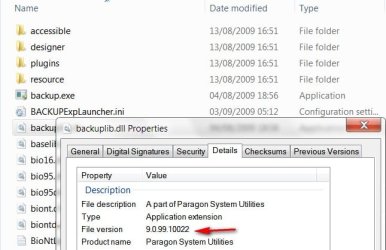
Can you post the file version number you have for PM10, rt click one of the programs files, select Properties>Details like this:

PARAGONPM9.5FILEVERSION2009-09-06_141651.jpg
 

My Computers My Computers

System One System Two

  • Computer type
    PC/Desktop
    OS
    7 X64
    CPU
    i5 8400
    Motherboard
    gigabyte b365m ds3h
    Memory
    2x8gb 3200mhz
    Hard Drives
    various
    PSU
    pure power 11 400w cm
    Case
    Coolermaster
    Cooling
    cryorig m9i
  • Computer type
    PC/Desktop
    OS
    7x64
    CPU
    g5400
    Motherboard
    ga b365m ds3h
    Memory
    8gb ddr4 2400
    PSU
    xfx pro 450w
That's odd - glad one of them is working for you.:D

Can you post the file version number you have for PM10, rt click one of the programs files, select Properties>Details like this:

View attachment 26747
I uninstalled software but I can tell you I`ve downloaded software from there website (the latest version )
 

My Computer My Computer

Computer Manufacturer/Model Number
Build system myself
OS
Windows 7 Ultimate,RTM7600.16385 32bit
CPU
Intel 2.67G
Motherboard
Asus
Memory
2 G
Graphics Card(s)
GForse 128m
Sound Card
Sound Max Enbeded
Monitor(s) Displays
19" LCD
Screen Resolution
1440x900
Hard Drives
Active HD 80G
Logical HD 150G
PSU
350W
Case
Mid Case
Cooling
Normal fan
after i create a new partition and restart my pc, is freezes at the "uninstalling resource...." screen. I keep having to turn it off. I tried to let it run for a while to see if gets anywhere, but it freezes after 5 bars of progress. I am also unable to move my mouse.

Before it starts, i see a message saying something is installed to the PS2 Mouse driver.
 

My Computer My Computer

OS
Windows 7 x64 bit
CPU
Intel Core i7 920
Motherboard
ASUSTeK Computer INC. P6T (LGA1366)
Memory
12.0GB Triple-Channel DDR3 @ 535MHz 8-8-8-20
Graphics Card(s)
ATI Radeon HD 5700 Series
Monitor(s) Displays
DELL S2409W
Screen Resolution
1920x1080
Hard Drives
1.5tb Buffalo
1tb Lacie
1tb Cavalry
500gb WD
1tb Internal
2 x 500gb Internal
40gb Internal
PSU
Corsair TX750W 750-Watt Power Supply
Case
NZXT Tempest ATX Mid-Tower Case
Keyboard
Pro Media Keyboard
Mouse
Logitech Track Marble
Internet Speed
28.97mb/s
Are you using the boot disc?

If not, boot the PM cd and continue with that.
 

My Computers My Computers

System One System Two

  • Computer type
    PC/Desktop
    OS
    7 X64
    CPU
    i5 8400
    Motherboard
    gigabyte b365m ds3h
    Memory
    2x8gb 3200mhz
    Hard Drives
    various
    PSU
    pure power 11 400w cm
    Case
    Coolermaster
    Cooling
    cryorig m9i
  • Computer type
    PC/Desktop
    OS
    7x64
    CPU
    g5400
    Motherboard
    ga b365m ds3h
    Memory
    8gb ddr4 2400
    PSU
    xfx pro 450w
Are you using the boot disc?

If not, boot the PM cd and continue with that.

not sure what you mean by that? after i create the new partition, and it asks to restart, i restart the pc and then it boots and tries to finish the process. at what point do i use the boot cd?
 

My Computer My Computer

OS
Windows 7 x64 bit
CPU
Intel Core i7 920
Motherboard
ASUSTeK Computer INC. P6T (LGA1366)
Memory
12.0GB Triple-Channel DDR3 @ 535MHz 8-8-8-20
Graphics Card(s)
ATI Radeon HD 5700 Series
Monitor(s) Displays
DELL S2409W
Screen Resolution
1920x1080
Hard Drives
1.5tb Buffalo
1tb Lacie
1tb Cavalry
500gb WD
1tb Internal
2 x 500gb Internal
40gb Internal
PSU
Corsair TX750W 750-Watt Power Supply
Case
NZXT Tempest ATX Mid-Tower Case
Keyboard
Pro Media Keyboard
Mouse
Logitech Track Marble
Internet Speed
28.97mb/s
You did run off the boot cd I take it?

start your pc - select the pop up boot menu offered during POST - Arrow down to cdrom derive - put the PM boot cd in press Enter .

It will ask to confirm "press any key to boot from cdrom " - press enter again.


Exactly the same way you boot the windows 7 dvd to install from .
 

My Computers My Computers

System One System Two

  • Computer type
    PC/Desktop
    OS
    7 X64
    CPU
    i5 8400
    Motherboard
    gigabyte b365m ds3h
    Memory
    2x8gb 3200mhz
    Hard Drives
    various
    PSU
    pure power 11 400w cm
    Case
    Coolermaster
    Cooling
    cryorig m9i
  • Computer type
    PC/Desktop
    OS
    7x64
    CPU
    g5400
    Motherboard
    ga b365m ds3h
    Memory
    8gb ddr4 2400
    PSU
    xfx pro 450w
You did run off the boot cd I take it?

start your pc - select the pop up boot menu offered during POST - Arrow down to cdrom derive - put the PM boot cd in press Enter .

It will ask to confirm "press any key to boot from cdrom " - press enter again.


Exactly the same way you boot the windows 7 dvd to install from .

yes i do have a bootable cd. but i have created partitions before with vista and never had to have to cd in to finish the process. I will try this and see what happens.
 

My Computer My Computer

OS
Windows 7 x64 bit
CPU
Intel Core i7 920
Motherboard
ASUSTeK Computer INC. P6T (LGA1366)
Memory
12.0GB Triple-Channel DDR3 @ 535MHz 8-8-8-20
Graphics Card(s)
ATI Radeon HD 5700 Series
Monitor(s) Displays
DELL S2409W
Screen Resolution
1920x1080
Hard Drives
1.5tb Buffalo
1tb Lacie
1tb Cavalry
500gb WD
1tb Internal
2 x 500gb Internal
40gb Internal
PSU
Corsair TX750W 750-Watt Power Supply
Case
NZXT Tempest ATX Mid-Tower Case
Keyboard
Pro Media Keyboard
Mouse
Logitech Track Marble
Internet Speed
28.97mb/s
That's because Vista only lets you shrink free space from the higher addresses - that's the easy bit.

For Paragon to put itself into "boot time " mode means you are either moving data, or the start sector on the system or boot partitions.
 

My Computers My Computers

System One System Two

  • Computer type
    PC/Desktop
    OS
    7 X64
    CPU
    i5 8400
    Motherboard
    gigabyte b365m ds3h
    Memory
    2x8gb 3200mhz
    Hard Drives
    various
    PSU
    pure power 11 400w cm
    Case
    Coolermaster
    Cooling
    cryorig m9i
  • Computer type
    PC/Desktop
    OS
    7x64
    CPU
    g5400
    Motherboard
    ga b365m ds3h
    Memory
    8gb ddr4 2400
    PSU
    xfx pro 450w
That's because Vista only lets you shrink free space from the higher addresses - that's the easy bit.

understood, but your suggestion didnt work. i boot from the cd and see several booting options. but none of them give me an option for what i want to do.
 

My Computer My Computer

OS
Windows 7 x64 bit
CPU
Intel Core i7 920
Motherboard
ASUSTeK Computer INC. P6T (LGA1366)
Memory
12.0GB Triple-Channel DDR3 @ 535MHz 8-8-8-20
Graphics Card(s)
ATI Radeon HD 5700 Series
Monitor(s) Displays
DELL S2409W
Screen Resolution
1920x1080
Hard Drives
1.5tb Buffalo
1tb Lacie
1tb Cavalry
500gb WD
1tb Internal
2 x 500gb Internal
40gb Internal
PSU
Corsair TX750W 750-Watt Power Supply
Case
NZXT Tempest ATX Mid-Tower Case
Keyboard
Pro Media Keyboard
Mouse
Logitech Track Marble
Internet Speed
28.97mb/s
What do you want to do?

On the first screen select Normal Mode,

on the Next Menu select Paragon Partition manager .

You will get a window with all the functions of the program . Take it from there.

If it all looks completed, to remove the recovery menu, rt click the DISK ( not a partition) and select Update MBR.
 

My Computers My Computers

System One System Two

  • Computer type
    PC/Desktop
    OS
    7 X64
    CPU
    i5 8400
    Motherboard
    gigabyte b365m ds3h
    Memory
    2x8gb 3200mhz
    Hard Drives
    various
    PSU
    pure power 11 400w cm
    Case
    Coolermaster
    Cooling
    cryorig m9i
  • Computer type
    PC/Desktop
    OS
    7x64
    CPU
    g5400
    Motherboard
    ga b365m ds3h
    Memory
    8gb ddr4 2400
    PSU
    xfx pro 450w
Back
Top