Characters are invisible when typing in login window

skunky62

New member
Member
Local time
12:29 AM
Messages
31
I've tried searching this symptom using Google but it leads me to other non-related issues. Can I insert a photo image of the problem I'm going through? I'm asking permission.:o

forgot to add: Windows 7 Ultimate 32-bit
 

My Computer My Computer

At a glance

Windows XP 32-bit
OS
Windows XP 32-bit
Are they invisible or ****?

To post an image on a post, Go Advanced (below button) - Manage Attachments - Browse - Upload
 

My Computers My Computers

  • At a glance

    Windows 7 HP 64i5 6600K - 800MHz to 4200MHz4+4G GSkill DDR4 3000IG - Intel 530
    Computer type
    PC/Desktop
    Computer Manufacturer/Model Number
    custom build
    OS
    Windows 7 HP 64
    CPU
    i5 6600K - 800MHz to 4200MHz
    Motherboard
    GA-Z170-HD3P
    Memory
    4+4G GSkill DDR4 3000
    Graphics Card(s)
    IG - Intel 530
    Monitor(s) Displays
    Samsung 226BW
    Screen Resolution
    1680x1050
    Hard Drives
    (1) -1 SM951 – 128GB M.2 AHCI PCIe SSD drive for Windows 7 and Lubuntu
    (2) -1 WD SATA 3 - 1T for Data
    (3) -1 WD SATA 3 - 1T for backup
    PSU
    Thermaltake 450W TR2 gold
    Keyboard
    Old and good Chicony mechanical keyboard
    Mouse
    Logitech mX performance - 9 buttons (had to disable some)
    Internet Speed
    500Mb/s
    Browser
    Firefox 64
    Other Info
    TinyWall firewall
  • At a glance

    Windows 7 Proi7-4500U 800MHz to 3.0GHz(4+4)G DDR3 1600IG intel 4400 + NVIDIA GeForce GT 745M
    Computer type
    Laptop
    System Manufacturer/Model Number
    Asus Q550LF
    OS
    Windows 7 Pro
    CPU
    i7-4500U 800MHz to 3.0GHz
    Motherboard
    Asus Q550LF
    Memory
    (4+4)G DDR3 1600
    Graphics Card(s)
    IG intel 4400 + NVIDIA GeForce GT 745M
    Sound Card
    Realtek
    Monitor(s) Displays
    LG Display LP156WF4-SPH1
    Screen Resolution
    1920 x 1080
    Hard Drives
    BX500 120G SSD for Windows and programs +
    1T HDD for data
    Internet Speed
    500 Mb/s
    Browser
    Firefox
    Other Info
    TinyWall firewall
Are they invisible or ****?

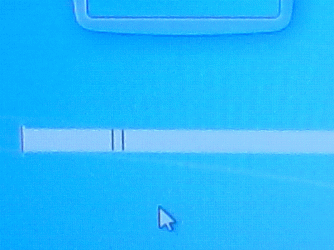
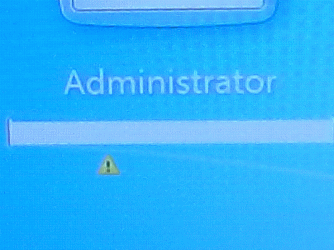
Thanks for the reply, here are the pictures...

On both "w7u.GIF" and "w7u.GIF", you can see the yellow triangle with the exclamation point, warning you that you are using Caps Lock. There's no warning there to read. And when you finish typing the password, nothing happens, even if you hit return five to ten times. Not even ALT-CTRL-DELETE works.

Suggestions are most welcome.
 

Attachments

  • w7u3.GIF
    w7u3.GIF
    197.4 KB · Views: 0
  • w7u2.GIF
    w7u2.GIF
    222.8 KB · Views: 0
  • w7u.GIF
    w7u.GIF
    269.4 KB · Views: 0

My Computer My Computer

At a glance

Windows XP 32-bit
OS
Windows XP 32-bit
The picture was taken so close to the screen that I can't see the hole screen.

Normally passwords aren't visible while you type. They are replaced by **** or dots. It's done this way to avoid other people to see what you type.
 

My Computers My Computers

  • At a glance

    Windows 7 HP 64i5 6600K - 800MHz to 4200MHz4+4G GSkill DDR4 3000IG - Intel 530
    Computer type
    PC/Desktop
    Computer Manufacturer/Model Number
    custom build
    OS
    Windows 7 HP 64
    CPU
    i5 6600K - 800MHz to 4200MHz
    Motherboard
    GA-Z170-HD3P
    Memory
    4+4G GSkill DDR4 3000
    Graphics Card(s)
    IG - Intel 530
    Monitor(s) Displays
    Samsung 226BW
    Screen Resolution
    1680x1050
    Hard Drives
    (1) -1 SM951 – 128GB M.2 AHCI PCIe SSD drive for Windows 7 and Lubuntu
    (2) -1 WD SATA 3 - 1T for Data
    (3) -1 WD SATA 3 - 1T for backup
    PSU
    Thermaltake 450W TR2 gold
    Keyboard
    Old and good Chicony mechanical keyboard
    Mouse
    Logitech mX performance - 9 buttons (had to disable some)
    Internet Speed
    500Mb/s
    Browser
    Firefox 64
    Other Info
    TinyWall firewall
  • At a glance

    Windows 7 Proi7-4500U 800MHz to 3.0GHz(4+4)G DDR3 1600IG intel 4400 + NVIDIA GeForce GT 745M
    Computer type
    Laptop
    System Manufacturer/Model Number
    Asus Q550LF
    OS
    Windows 7 Pro
    CPU
    i7-4500U 800MHz to 3.0GHz
    Motherboard
    Asus Q550LF
    Memory
    (4+4)G DDR3 1600
    Graphics Card(s)
    IG intel 4400 + NVIDIA GeForce GT 745M
    Sound Card
    Realtek
    Monitor(s) Displays
    LG Display LP156WF4-SPH1
    Screen Resolution
    1920 x 1080
    Hard Drives
    BX500 120G SSD for Windows and programs +
    1T HDD for data
    Internet Speed
    500 Mb/s
    Browser
    Firefox
    Other Info
    TinyWall firewall
I think the OP is saying that the login is hung at that point. Hitting Enter does nothing. No error message about incorrect password etc..

I cannot remember running into this on Windows. I seem to remember something similar happening on Linux and if I remember rightly I got around it by using a different window manager and logging in. This workaround is not available on Windows though.
 

My Computer My Computer

At a glance

Windows 7 32 bitAMD 5200+ dual core2 GBNVidia GeForce 6150SE 128 MB
Computer Manufacturer/Model Number
HP Media Center
OS
Windows 7 32 bit
CPU
AMD 5200+ dual core
Memory
2 GB
Graphics Card(s)
NVidia GeForce 6150SE 128 MB
Monitor(s) Displays
CRT
Screen Resolution
1280x1024
Hard Drives
500 GB Sata internal :

SIIG USB 3.0 docking stations w/WD Caviar Black 6 Gb/s drives
Keyboard
PS/2
Mouse
PS/2 Wheel Mouse
Other Info
SIIG USB 3.0 PCIexpress card.
Exactly, no nothing. I thought it was some kind of malware or joke virus but I've scanned it with multiple AVs. Either the Profile is corrupt or the whole OS is.
 

My Computer My Computer

At a glance

Windows XP 32-bit
OS
Windows XP 32-bit
I think the OP is saying that the login is hung at that point. Hitting Enter does nothing. No error message about incorrect password etc..

I cannot remember running into this on Windows. I seem to remember something similar happening on Linux and if I remember rightly I got around it by using a different window manager and logging in. This workaround is not available on Windows though.

And thanks MilesAhead.
 

My Computer My Computer

At a glance

Windows XP 32-bit
OS
Windows XP 32-bit
The picture was taken so close to the screen that I can't see the hole screen.

Normally passwords aren't visible while you type. They are replaced by **** or dots. It's done this way to avoid other people to see what you type.

I apologize if my post was little bit iffy. I know passwords are not visible (shouldn't be), I was talking about the Caps Lock warning after the exclamation mark inside the yellow triangle. You can't see/read "Caps Lock is..." and nothing happens after you type the password. You cannot even do a Ctrl-Alt-Del, you have to do a hard reset (push power button).
 

My Computer My Computer

At a glance

Windows XP 32-bit
OS
Windows XP 32-bit
You could try a Start Up Repair to see if that will fix your problem. This Forum tutorial will explain how to do that.

Startup Repair
 

My Computer My Computer

At a glance

Windows 7 Home Premium 64 bit sp1Intel i5 3570 3.4Ghz Ivy Bridge SKT 1155 quad...G-Skill Rip Jaws 16Gb (8x2) DDR3 -1600 PC3 12...Gigabyte NVIDIA GT610 1Gb DDR3 810/1200 PCI-E...
Computer type
PC/Desktop
Computer Manufacturer/Model Number
Self built using existing case
OS
Windows 7 Home Premium 64 bit sp1
CPU
Intel i5 3570 3.4Ghz Ivy Bridge SKT 1155 quad core
Motherboard
Gigabyte Z77-HD3 SKT 1155 2xSata 3, 4x USB 3.0
Memory
G-Skill Rip Jaws 16Gb (8x2) DDR3 -1600 PC3 12800 CL 10 red
Graphics Card(s)
Gigabyte NVIDIA GT610 1Gb DDR3 810/1200 PCI-E 2.0 Silent
Sound Card
NVIDIA High Definition & Realtech High Definition Audio
Monitor(s) Displays
2 x Philips 226V4L 16:9 aspect ratio
Screen Resolution
1920 x 1080 HD
Hard Drives
Samsung 840 Pro 256gb SSD, SATA 3.
Hitachi Touro Portable 1tb, USB 3.0 HDD used for image b/ups.
PSU
Corsair VS450
Case
Codeng
Cooling
PSU fan & CPU fan
Keyboard
Logitech
Mouse
Logitech Wireless trackball M570
Internet Speed
Wireless 3G. 3mg down & 550kb up.
Antivirus
Bitdefender Internet Security 2020
Browser
Opera (Current Version) & Firefox
Other Info
MS Office 2013 Pro. Davis weather station software. MGE Nova 600 avr UPS.
You could also try running a System File Checker scan from an elevated command prompt. (Open the Start Menu, click on All Programs > Accessories, right click on Command Prompt, and click on Run as administrator.) The scan will check for incorrect, corrupted, changed/modified, or damaged system files and attempt to replace them with the correct versions if possible. Also note there is a space between sfc and /scannow. See Option Two this tutorial:

SFC /SCANNOW Command - System File Checker
 

My Computer My Computer

At a glance

Win 7 Pro 64-bitIntel i5 2.4 Ghz8GB DDR3Intel HD 3000
Computer type
Laptop
Computer Manufacturer/Model Number
Sony Vaio VPCEB47GM Laptop
OS
Win 7 Pro 64-bit
CPU
Intel i5 2.4 Ghz
Memory
8GB DDR3
Graphics Card(s)
Intel HD 3000
Sound Card
IDT High Definition
Monitor(s) Displays
15.6 WGXA Anti-Glare LED
Screen Resolution
1280x800
Hard Drives
640Gb 7200rpm
Antivirus
MSE
Browser
Opera (primary) with IE9 backup
Maybe the text is there but it's the same color as the background? Can you get to Personalize and use a standard Windows theme?
 

My Computer My Computer

At a glance

Windows 7 Professional 64bitIntel i7-5960X64GB Corsair Dominator 2400MHz3 EVGA GTX980's
Computer type
PC/Desktop
Computer Manufacturer/Model Number
custom build
OS
Windows 7 Professional 64bit
CPU
Intel i7-5960X
Motherboard
EVGA X99 Classified
Memory
64GB Corsair Dominator 2400MHz
Graphics Card(s)
3 EVGA GTX980's
Sound Card
on board
Monitor(s) Displays
3 Dell E2715H 27"
Screen Resolution
1920x1080 (5760x1080)
Hard Drives
Samsung 950 Pro 1TB M.2 SSD,
Western Digital Black 2TB HDD's x5
Western Digital Black 1TB HDD's x3
PSU
Corsair AX1200i
Case
Corsair 750D
Cooling
Corsair H110i GT
Keyboard
Corsair K70
Mouse
Corsair M45
Internet Speed
250 down/10 up
Antivirus
Microsoft Security Essentials
Browser
IE 11, Google Chrome
You could also try running a System File Checker scan from an elevated command prompt. (Open the Start Menu, click on All Programs > Accessories, right click on Command Prompt, and click on Run as administrator.) The scan will check for incorrect, corrupted, changed/modified, or damaged system files and attempt to replace them with the correct versions if possible. Also note there is a space between sfc and /scannow.[/URL]

I did that five times and later left the machine defragmenting the HD. I'll check today to see what happened.
 

My Computer My Computer

At a glance

Windows XP 32-bit
OS
Windows XP 32-bit
You could try a Start Up Repair to see if that will fix your problem. This Forum tutorial will explain how to do that.

Startup Repair

No one can find the Windows 7 Installation DVD, I believe the PC did not come with one and no one created a Repair Disc for the PC. Can I use a Windows 10 32-bit installation disc and instead of installing it, try the Repair option? I do have lots of Repair Discs created on machines with Win 7 64-bit Home Premium. Does it make any difference if it's Win Ultimate vs Home Premium, 64-bit vs 32-bit and so on?
 

My Computer My Computer

At a glance

Windows XP 32-bit
OS
Windows XP 32-bit
Maybe the text is there but it's the same color as the background? Can you get to Personalize and use a standard Windows theme?

But nothing happens after I type the password. Either the characters (black dots) disappear or it freezes to the point you need to do a hard reset.
 

My Computer My Computer

At a glance

Windows XP 32-bit
OS
Windows XP 32-bit
This image seems to be from Microsoft. Please check it out carefully before booting it though:
Microsoft services


Also if you have an external USB drive it may be a good idea to make a back up image of what you have now so you don't lose ground during fix attempts. There are plenty of free system image making softwares out there for download. Macrium Reflect makes a good one. But you can find others if you search the large freeware download sites. Also there is a list of free ones here:
Free Hard Disk Backup and Restore, Hard Disk Image and Cloning Utilities (thefreecountry.com)
 

My Computer My Computer

At a glance

Windows 7 32 bitAMD 5200+ dual core2 GBNVidia GeForce 6150SE 128 MB
Computer Manufacturer/Model Number
HP Media Center
OS
Windows 7 32 bit
CPU
AMD 5200+ dual core
Memory
2 GB
Graphics Card(s)
NVidia GeForce 6150SE 128 MB
Monitor(s) Displays
CRT
Screen Resolution
1280x1024
Hard Drives
500 GB Sata internal :

SIIG USB 3.0 docking stations w/WD Caviar Black 6 Gb/s drives
Keyboard
PS/2
Mouse
PS/2 Wheel Mouse
Other Info
SIIG USB 3.0 PCIexpress card.
This image seems to be from Microsoft. Please check it out carefully before booting it though:
Microsoft services


Also if you have an external USB drive it may be a good idea to make a back up image of what you have now so you don't lose ground during fix attempts. There are plenty of free system image making softwares out there for download. Macrium Reflect makes a good one. But you can find others if you search the large freeware download sites. Also there is a list of free ones here:
Free Hard Disk Backup and Restore, Hard Disk Image and Cloning Utilities (thefreecountry.com)

Thanks for that link (thefreecountry), MilesAhead. Right now I'm downloading the ISO and let's see what happens. Didn't know there was a Windows version for dd. I use dd a lot when cloning HDs through Linux Mint (Cinnamon Serena).

Thanks...
 

My Computer My Computer

At a glance

Windows XP 32-bit
OS
Windows XP 32-bit
Thanks for that link (thefreecountry), MilesAhead. Right now I'm downloading the ISO and let's see what happens. Didn't know there was a Windows version for dd. I use dd a lot when cloning HDs through Linux Mint (Cinnamon Serena).

Thanks...

You are welcome. I did Linux back in the day. I did a few versions of Slackware. Tried RedHat and a couple of others. The one I liked best was Mandrake 9.1. Last time I checked it was renamed Mandriva. Next time I get a couple of desktop PCs I am going to get back into Linux. Right now I have bootable USBs with Mint and Puppy just in case I need them. :)
 

My Computer My Computer

At a glance

Windows 7 32 bitAMD 5200+ dual core2 GBNVidia GeForce 6150SE 128 MB
Computer Manufacturer/Model Number
HP Media Center
OS
Windows 7 32 bit
CPU
AMD 5200+ dual core
Memory
2 GB
Graphics Card(s)
NVidia GeForce 6150SE 128 MB
Monitor(s) Displays
CRT
Screen Resolution
1280x1024
Hard Drives
500 GB Sata internal :

SIIG USB 3.0 docking stations w/WD Caviar Black 6 Gb/s drives
Keyboard
PS/2
Mouse
PS/2 Wheel Mouse
Other Info
SIIG USB 3.0 PCIexpress card.
Back
Top