Soldering an Adapter on a Mini PCI-E Slot - Laptop Mod

NoN

New member
Guru
Gold Member
VIP
Local time
3:45 AM
Messages
4,101
Location
LostInSpace, Vol15 - Cool It
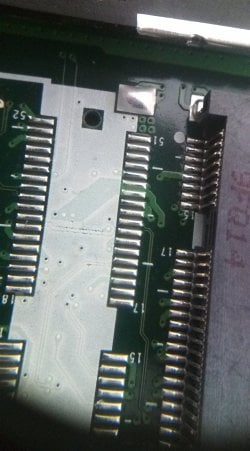
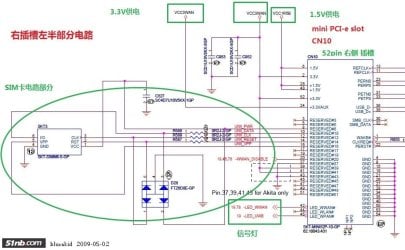
Here the Scheme and Table to solder an Adapter to an empty Mini Pci-E Slot in intend to put a 3G card...or another kind of Mini Pci-E card:

-Mini Pci-e to Intel Turbo Memory Card (robson),
-Mini Pci-e to Crystal HD Decoder Card,
-Mini Pci-e to SSD Compact Flash Card,
-Mini Pci-e to SSD Card,
-Mini Pci-e to Tv Tuner FM Card,
-Mini Pci-e to 3G (WWAN) Card,
-Mini Pci-e to Wifi (WLAN) Card,
-Mini Pci-e to Wifi & Bluetooth Combo Card,
-Mini pci-e to mini GPS Card.
-Mini pci-e to HD Video Blu-Ray Card

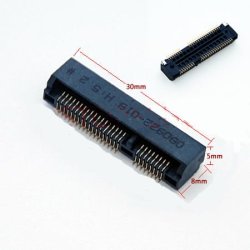
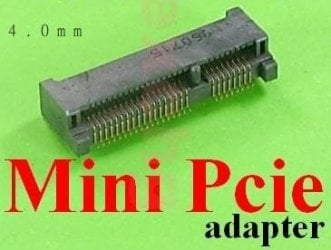
That's the job i gave myself to do soon on a spare slot. First, to grab that spare slot. Bought today in HK for 2,00$ each adapter (took 2 in case!)
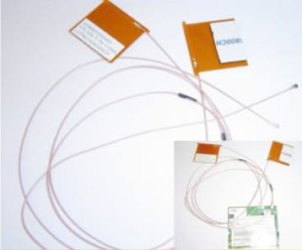
And the flat (x2) Tyco Antenna 60cm cables for 6,50$ near me home.

As you see, many solutions are offered to you.

---------------------------------------------------------------------
The Mini-PCI Express 52-pin connector pin out is listed below.
Verify the pin out table for errors.

MiniCard Pinout

Pin # Signal Name Pin # Signal Name
51 Reserved 52 +3.3V
49 Reserved 50 GND
47 Reserved 48 +1.5V
45 Reserved 46 LED_WPAN#
43 Reserved 44 LED_WLAN#
41 Reserved 42 LED_WWAN#
39 Reserved 40 GND
37 Reserved 38 USB_D+
35 GND 36 USB_D-
33 PETp0 34 GND
31 PETn0 32 SMB_DATA
29 GND 30 SMB_CLK
27 GND 28 +1.5V
25 PERp0 26 GND
23 PERn0 24 +3.3Vaux
21 GND 22 PERST#
19 Reserved (UIM_C4) 20 Reserved
17 Reserved (UIM_C8) 18 GND

Mechanical Key

15 GND 16 UIM_VPP
13 REFCLK+ 14 UIM_RESET
11 REFCLK- 12 UIM_CLK
9 GND 10 UIM_DATA
7 CLKREQ# 8 UIM_PWR
5 Reserved 6 1.5V
3 Reserved 4 GND
1 WAKE# 2 3.3V.
---------------------------------------------------------------------
Check before the Mini pci-E Adapter to be either 40mm or 30 mm, 52 pins.

Some info here:
http://wapedia.mobi/en/PCI_express
 

Attachments
  • Scheme-Mini-Pci-E.jpg
    Scheme-Mini-Pci-E.jpg
    74.6 KB · Views: 991
  • vlyPB.jpg
    vlyPB.jpg
    184.6 KB · Views: 341
  • TycoAntenna.jpg
    TycoAntenna.jpg
    9.6 KB · Views: 328
  • minicardslot.jpg
    minicardslot.jpg
    16.8 KB · Views: 252
  • 306570043_o.jpg
    306570043_o.jpg
    16.1 KB · Views: 226
Last edited:

My Computer My Computer

At a glance

Windows 7 Professional SP1 - x64 [Non-UEFI Boot]Ivy Bridge Core i5 3570K (Delidded)G.Skill "Ares" DDR3 PC3-12800 - 1600MHz (16Gb)Asus Dual-RX480-O4G
Computer type
PC/Desktop
Computer Manufacturer/Model Number
Custom Build
OS
Windows 7 Professional SP1 - x64 [Non-UEFI Boot]
CPU
Ivy Bridge Core i5 3570K (Delidded)
Motherboard
Asus P8Z77-V LE PLUS
Memory
G.Skill "Ares" DDR3 PC3-12800 - 1600MHz (16Gb)
Graphics Card(s)
Asus Dual-RX480-O4G
Sound Card
Creative Sound Blaster Z w/5.1 sound system
Monitor(s) Displays
Asus IPS 23"
Screen Resolution
16/9
Hard Drives
Internal:
500Go Sata 6Gb/s (x2)
500Go Sata 3Gb/s (x2)
SSD 60Go Sata 6Gb/s
PSU
In Win C 900W Series 80+ Platinum
Case
Thermaltake Chaser A71
Cooling
Custom Water Cooling Loop
Keyboard
Cooler Master QuickFire XTi
Mouse
Razer Imperator 2012 (4G)
Antivirus
MSE
Browser
IE 11.0.xxx Rtm
Other Info
"Raid0" with Intel Smart Response Technology (HDD/SSD)
Soldering a SSD1 Slot - Laptop Mod

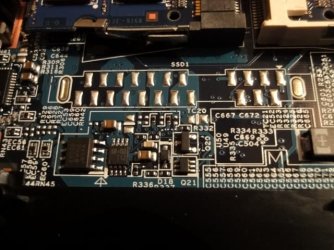
Again i gave myself another job to do...Why not use that second spare slot for extra storage or another matter using the SSD Technology.
At the moment, looking for the Table & Scheme for the mini slot SSD1, 22 pins Adapter.

Maybe this will help some:

http://www.integralmemory.com/downloads/infosheet/Integral%20SSD%20SATA%20&%20USB%20datasheet.pdf

http://www.sandisk.com/media/490530/sandisk_g3_ssd_product_manual.pdf


But still looking for that mini SSD1 connector Table & Scheme for a 3,3v 1,8" SSD1 slot....

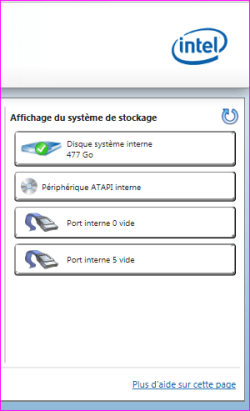
How do you know you have spare slots? :

Install the "Intel Rapid Storage Technology" v9.6.0.1014 driver (for those on intel) and open the Application (see screenshot).
 

Attachments

  • DSC00010.JPG
    DSC00010.JPG
    69.8 KB · Views: 240
  • Capture.PNG
    Capture.PNG
    8.5 KB · Views: 279
Last edited:

My Computer My Computer

At a glance

Windows 7 Professional SP1 - x64 [Non-UEFI Boot]Ivy Bridge Core i5 3570K (Delidded)G.Skill "Ares" DDR3 PC3-12800 - 1600MHz (16Gb)Asus Dual-RX480-O4G
Computer type
PC/Desktop
Computer Manufacturer/Model Number
Custom Build
OS
Windows 7 Professional SP1 - x64 [Non-UEFI Boot]
CPU
Ivy Bridge Core i5 3570K (Delidded)
Motherboard
Asus P8Z77-V LE PLUS
Memory
G.Skill "Ares" DDR3 PC3-12800 - 1600MHz (16Gb)
Graphics Card(s)
Asus Dual-RX480-O4G
Sound Card
Creative Sound Blaster Z w/5.1 sound system
Monitor(s) Displays
Asus IPS 23"
Screen Resolution
16/9
Hard Drives
Internal:
500Go Sata 6Gb/s (x2)
500Go Sata 3Gb/s (x2)
SSD 60Go Sata 6Gb/s
PSU
In Win C 900W Series 80+ Platinum
Case
Thermaltake Chaser A71
Cooling
Custom Water Cooling Loop
Keyboard
Cooler Master QuickFire XTi
Mouse
Razer Imperator 2012 (4G)
Antivirus
MSE
Browser
IE 11.0.xxx Rtm
Other Info
"Raid0" with Intel Smart Response Technology (HDD/SSD)
Soldering Tools & Other

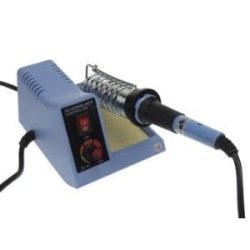
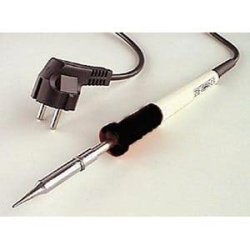
I've found that a Max of 40W Ac/230v (450°C) Soldering Crayola Pen, is far enough for the motherboard to handle solder parts...! Better a 15-30W/230v one (250°C - 300°C) as i bought.

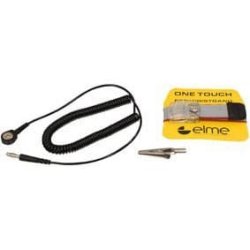
Grab aswell an Anti-Statics Bracelet for very cheap around....
 

Attachments

  • 01.jpg
    01.jpg
    6.5 KB · Views: 5,696
  • 02.jpg
    02.jpg
    8.4 KB · Views: 5,727
  • Anti-Statics.jpg
    Anti-Statics.jpg
    5.8 KB · Views: 5,719
Last edited:

My Computer My Computer

At a glance

Windows 7 Professional SP1 - x64 [Non-UEFI Boot]Ivy Bridge Core i5 3570K (Delidded)G.Skill "Ares" DDR3 PC3-12800 - 1600MHz (16Gb)Asus Dual-RX480-O4G
Computer type
PC/Desktop
Computer Manufacturer/Model Number
Custom Build
OS
Windows 7 Professional SP1 - x64 [Non-UEFI Boot]
CPU
Ivy Bridge Core i5 3570K (Delidded)
Motherboard
Asus P8Z77-V LE PLUS
Memory
G.Skill "Ares" DDR3 PC3-12800 - 1600MHz (16Gb)
Graphics Card(s)
Asus Dual-RX480-O4G
Sound Card
Creative Sound Blaster Z w/5.1 sound system
Monitor(s) Displays
Asus IPS 23"
Screen Resolution
16/9
Hard Drives
Internal:
500Go Sata 6Gb/s (x2)
500Go Sata 3Gb/s (x2)
SSD 60Go Sata 6Gb/s
PSU
In Win C 900W Series 80+ Platinum
Case
Thermaltake Chaser A71
Cooling
Custom Water Cooling Loop
Keyboard
Cooler Master QuickFire XTi
Mouse
Razer Imperator 2012 (4G)
Antivirus
MSE
Browser
IE 11.0.xxx Rtm
Other Info
"Raid0" with Intel Smart Response Technology (HDD/SSD)
Apologies for digging up an old thread.

NoN, great post. I am looking to do the exact same thing as you. And searching for a source to purchase the mini pcie slot I came across your thread.

Where did you purchase the mini pcie slots to be soldered onto the motherboard?

Or does anyone have any links to where you can purchase them?

I've tried a bunch of sites including google, bing, buy and am still coming up empty.

Thanks!
 

My Computer My Computer

At a glance

7 starter 32 bit
OS
7 starter 32 bit
@divingduo & @wondering5670,

I bought from those seller: rexchg and justopeshop
s.gif
the first one is based in HK and the second in UK, took two pieces each in case as they're so cheap.

Take mention of the size of the mini Pci-E mounted on yours: 30mm, 40mm or 50mm long
Check before the Mini pci-E Adapter to be either 40mm or 30 mm, 52 pins.

The hardest part is not soldering...is unmounting the laptop properly without statics the parts you need to access.
Those have to be unmounted from each other to prevent damage on the others one when soldering.
Just lay a white blanket and put the pieces in order how you unmounted them.

Here some examples for Tool-kit for Laptops that can be found.

PS: Welcome both to Sevenforums!
 
Last edited:

My Computer My Computer

At a glance

Windows 7 Professional SP1 - x64 [Non-UEFI Boot]Ivy Bridge Core i5 3570K (Delidded)G.Skill "Ares" DDR3 PC3-12800 - 1600MHz (16Gb)Asus Dual-RX480-O4G
Computer type
PC/Desktop
Computer Manufacturer/Model Number
Custom Build
OS
Windows 7 Professional SP1 - x64 [Non-UEFI Boot]
CPU
Ivy Bridge Core i5 3570K (Delidded)
Motherboard
Asus P8Z77-V LE PLUS
Memory
G.Skill "Ares" DDR3 PC3-12800 - 1600MHz (16Gb)
Graphics Card(s)
Asus Dual-RX480-O4G
Sound Card
Creative Sound Blaster Z w/5.1 sound system
Monitor(s) Displays
Asus IPS 23"
Screen Resolution
16/9
Hard Drives
Internal:
500Go Sata 6Gb/s (x2)
500Go Sata 3Gb/s (x2)
SSD 60Go Sata 6Gb/s
PSU
In Win C 900W Series 80+ Platinum
Case
Thermaltake Chaser A71
Cooling
Custom Water Cooling Loop
Keyboard
Cooler Master QuickFire XTi
Mouse
Razer Imperator 2012 (4G)
Antivirus
MSE
Browser
IE 11.0.xxx Rtm
Other Info
"Raid0" with Intel Smart Response Technology (HDD/SSD)
I also found an ebay seller "pridopia" in the UK. I ordered 2 for cheap, and the seller also has cheap shipping. They arrived in the US quick, about 5 days. Great seller.

1. Is there any way to tell the actual schematic of a mini PCIe slot? I know some only have USB lines ran to them, and some have both USB and PCIe lines. So can you test a pin or ? to see what types of mini PCIe cards the socket can support?

2. After soldering on the mini PCIe socket, I put my netbook back together. Put a 802.11n mini PCIe card into the freshly soldered mini PCIe socket, booted the netbook and the O/S detected it, loaded the drivers and showed that it was installed and functioning correctly. But I could not find any wireless networks, not even from 5 feet away. It seemed like the socket wasn't getting enough power. Any ideas on this?

And here's some good reading:

Modding the Acer Aspire One – HSDPA « tnkgrl Mobile

Quote: "Solder the mini-PCIe connector. By default there’s no power to the connector until you install this jumper."
 

My Computer My Computer

At a glance

7 starter 32 bit
OS
7 starter 32 bit
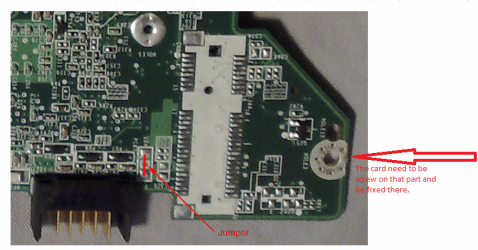
After having soldered the connector, have you also soldered that part to fix it, that need to touch the card to Ground.

maybe ask here
 

Attachments

  • Capture.PNG
    Capture.PNG
    188.7 KB · Views: 304
Last edited:

My Computer My Computer

At a glance

Windows 7 Professional SP1 - x64 [Non-UEFI Boot]Ivy Bridge Core i5 3570K (Delidded)G.Skill "Ares" DDR3 PC3-12800 - 1600MHz (16Gb)Asus Dual-RX480-O4G
Computer type
PC/Desktop
Computer Manufacturer/Model Number
Custom Build
OS
Windows 7 Professional SP1 - x64 [Non-UEFI Boot]
CPU
Ivy Bridge Core i5 3570K (Delidded)
Motherboard
Asus P8Z77-V LE PLUS
Memory
G.Skill "Ares" DDR3 PC3-12800 - 1600MHz (16Gb)
Graphics Card(s)
Asus Dual-RX480-O4G
Sound Card
Creative Sound Blaster Z w/5.1 sound system
Monitor(s) Displays
Asus IPS 23"
Screen Resolution
16/9
Hard Drives
Internal:
500Go Sata 6Gb/s (x2)
500Go Sata 3Gb/s (x2)
SSD 60Go Sata 6Gb/s
PSU
In Win C 900W Series 80+ Platinum
Case
Thermaltake Chaser A71
Cooling
Custom Water Cooling Loop
Keyboard
Cooler Master QuickFire XTi
Mouse
Razer Imperator 2012 (4G)
Antivirus
MSE
Browser
IE 11.0.xxx Rtm
Other Info
"Raid0" with Intel Smart Response Technology (HDD/SSD)
I see this thread is a little dated but...
I got the notion I wanted to add backlit keyboard option to my Toshiba a660, looks simple enough, but the spare mPCI-E blank solder location is directly next to the blank connection for backlit keyboard. Not I am less interested in the keyboard and thinking SSD or USB3 mPCI-E card upgrade.
I am hoping to find somebody who has some info on this, the old links on this page are long since dead..
 

My Computer My Computer

At a glance

Varied
Computer type
PC/Desktop
OS
Varied
I see this thread is a little dated but...
I got the notion I wanted to add backlit keyboard option to my Toshiba a660, looks simple enough, but the spare mPCI-E blank solder location is directly next to the blank connection for backlit keyboard. Not I am less interested in the keyboard and thinking SSD or USB3 mPCI-E card upgrade.
I am hoping to find somebody who has some info on this, the old links on this page are long since dead..
I was wondering the same thing for my HP Mini 110-3100ca.
 

My Computer My Computer

At a glance

Izmir
Computer type
Laptop
OS
Izmir
Browser
Chrome
Back
Top