Auto Add Recipient to Contacts when Replying? - Outlook 07

TDKMate

New member
Member
VIP
Local time
1:46 PM
Messages
335
I apologize if this is a dup post; I thought I posted it a few days ago but can't find it.

I could have sworn that my Outlook 07 use to automatically add people I sent an email to, or replied to, into the Contacts database. I recently needed to send an important email to a business I have replied to before. Normally the ‘To’ Line auto-complete would fill in the eddress but sometimes the auto-complete gets confused and doesn’t work right, even for friends I email several times a week. It didn’t work this time.

So I went into the Contacts database and couldn’t find it. Then, on checking, I noticed there are a lot of folks I’ve replied to not in Contacts!?

So I looked in Options and could not find a ‘switch’ to turn on/off Auto Add to Contacts like I thought I’d find. I Googled it and didn’t find any solution.

Any ideas on how to turn on Auto Add to Contacts?

Thanks
.
 

My Computer My Computer

At a glance

Win 7 Pro 64 SP1i7 6700K SkyLake32 GBnVidia GTX 970
Computer type
PC/Desktop
Computer Manufacturer/Model Number
home built
OS
Win 7 Pro 64 SP1
CPU
i7 6700K SkyLake
Motherboard
MSI Gaming M7
Memory
32 GB
Graphics Card(s)
nVidia GTX 970
Sound Card
onboard
Monitor(s) Displays
DELL U2711
Screen Resolution
2560x1440
Hard Drives
1 SSD OS, 2 WD Black Caviar data harddrives
PSU
EVGA Super Nova 850W G2 'Gold'
Case
Thermaltake Soprano Snow Edition
Cooling
Cooler Master Hyper 212 evo
Keyboard
Logitech K350
Mouse
Mad Kats RATT
Antivirus
Avast
Browser
Firefox
Have a look at this MS website. While it is advising how to stop adding contacts it does suggest checking Add Ins, which I thought was a reversal of what you want to do, so read down through it & see if there is anything to help you.

[Outlook 2007] Stop Auto-Adding Contacts to Address Book
 

My Computer My Computer

At a glance

Windows 7 Home Premium 64 bit sp1Intel i5 3570 3.4Ghz Ivy Bridge SKT 1155 quad...G-Skill Rip Jaws 16Gb (8x2) DDR3 -1600 PC3 12...Gigabyte NVIDIA GT610 1Gb DDR3 810/1200 PCI-E...
Computer type
PC/Desktop
Computer Manufacturer/Model Number
Self built using existing case
OS
Windows 7 Home Premium 64 bit sp1
CPU
Intel i5 3570 3.4Ghz Ivy Bridge SKT 1155 quad core
Motherboard
Gigabyte Z77-HD3 SKT 1155 2xSata 3, 4x USB 3.0
Memory
G-Skill Rip Jaws 16Gb (8x2) DDR3 -1600 PC3 12800 CL 10 red
Graphics Card(s)
Gigabyte NVIDIA GT610 1Gb DDR3 810/1200 PCI-E 2.0 Silent
Sound Card
NVIDIA High Definition & Realtech High Definition Audio
Monitor(s) Displays
2 x Philips 226V4L 16:9 aspect ratio
Screen Resolution
1920 x 1080 HD
Hard Drives
Samsung 840 Pro 256gb SSD, SATA 3.
Hitachi Touro Portable 1tb, USB 3.0 HDD used for image b/ups.
PSU
Corsair VS450
Case
Codeng
Cooling
PSU fan & CPU fan
Keyboard
Logitech
Mouse
Logitech Wireless trackball M570
Internet Speed
Wireless 3G. 3mg down & 550kb up.
Antivirus
Bitdefender Internet Security 2020
Browser
Opera (Current Version) & Firefox
Other Info
MS Office 2013 Pro. Davis weather station software. MGE Nova 600 avr UPS.
Have a look at this MS website. While it is advising how to stop adding contacts it does suggest checking Add Ins, which I thought was a reversal of what you want to do, so read down through it & see if there is anything to help you.

[Outlook 2007] Stop Auto-Adding Contacts to Address Book
Thanks for the interesting read, Ranger4. I have to admit some of it is over my head, like add-ins and active-certs and the like. My luck with such things usually ends in a negative result, making things worse.


As you mentioned, most of the thread is trying to find ways to stop Outlook from doing what I can’t get it to do. So I tried to reverse-engineer some of it. The last post, however, seemed to do what I want, if reversed. But I ran into the same problem I did when I Googled this before posting here: I don’t have the same menu options that are suggested.

The post said to:
Open outlook>file>options>contacts> uncheck "automatically create outlook contacts for recipients that do not belong to an outlook address book”

> check ok> close out of outlook and reopen

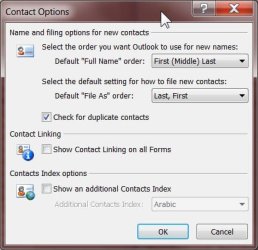
The above is exact what I’m looking for but can’t find. First, I don’t have an ‘Options’ under ‘File,’ but do have it under ‘Tools.’ Minor difference I suppose. I also do have a similar ‘Contact Options,’ but don’t have any ‘automatic’ type choices. See screenshot below.


Another example, from the same thread, of what I don’t have is in this option to stop auto-add; I don’t have the options in #3 and 4:
“…
1. Go to and Click: Tools>Send/Receive>Send/Receive Settings>Define Send/Receive Groups
2. In the 'Define Send/Receive Groups' window: Select Group name "All Accounts"... and click on "Edit"
3. Make sure "Download Offline Address book" is NOT selected (uncheck is needed)
4. Right below this, there are "Folder Options"... Here, UNCHECK (De-select) "Contacts" option.
…”

I’m still lost.

Any other possibilities?
.
 

Attachments

  • Outlook 07 Contact Options.jpg
    Outlook 07 Contact Options.jpg
    31.5 KB · Views: 10

My Computer My Computer

At a glance

Win 7 Pro 64 SP1i7 6700K SkyLake32 GBnVidia GTX 970
Computer type
PC/Desktop
Computer Manufacturer/Model Number
home built
OS
Win 7 Pro 64 SP1
CPU
i7 6700K SkyLake
Motherboard
MSI Gaming M7
Memory
32 GB
Graphics Card(s)
nVidia GTX 970
Sound Card
onboard
Monitor(s) Displays
DELL U2711
Screen Resolution
2560x1440
Hard Drives
1 SSD OS, 2 WD Black Caviar data harddrives
PSU
EVGA Super Nova 850W G2 'Gold'
Case
Thermaltake Soprano Snow Edition
Cooling
Cooler Master Hyper 212 evo
Keyboard
Logitech K350
Mouse
Mad Kats RATT
Antivirus
Avast
Browser
Firefox
I only use Outlook at work and via Office365 and it's not configured like a home based machine would be.

Anyway take a look at your auto-complete contacts list. Maybe it needs a tidy up?

Email addresses

You'd probably need N2K Editor rather than N2K Viewer
 

My Computer My Computer

At a glance

Microsoft Windows 7 Home Premium 64-bit 7601 ...AMD C-60 APU with Radeon(tm) HD Graphics4.00 GBAMD Radeon HD 6290 Graphics
Computer type
Laptop
Computer Manufacturer/Model Number
ASUS
OS
Microsoft Windows 7 Home Premium 64-bit 7601 Multiprocessor Free Service Pack 1
CPU
AMD C-60 APU with Radeon(tm) HD Graphics
Motherboard
ASUSTeK COMPUTER INC. X501U
Memory
4.00 GB
Graphics Card(s)
AMD Radeon HD 6290 Graphics
Sound Card
(1) AMD High Definition Audio Device (2) Realtek High Defi
Screen Resolution
1366 x 768 x 32 bits (4294967296 colors) @ 60 Hz
Hard Drives
Hitachi HTS545050A7E380 SATA Disk Device
Antivirus
Comodo CIS & FW, SecureAplus App Whitelisting, Threatfire
Browser
Cyberfox 64bit, Opera 64bit, Airfox
Other Info
Spy-The-Spy, HitmanPro.Alert, Norton Connect Safe, MJRegWatcher, BitDefender TrafficLight, Voodoo Shield, Zemana AntiMalware
Thanks again, Callender. You sure come up with some good 'stuff' :) Thanks.
 

My Computer My Computer

At a glance

Win 7 Pro 64 SP1i7 6700K SkyLake32 GBnVidia GTX 970
Computer type
PC/Desktop
Computer Manufacturer/Model Number
home built
OS
Win 7 Pro 64 SP1
CPU
i7 6700K SkyLake
Motherboard
MSI Gaming M7
Memory
32 GB
Graphics Card(s)
nVidia GTX 970
Sound Card
onboard
Monitor(s) Displays
DELL U2711
Screen Resolution
2560x1440
Hard Drives
1 SSD OS, 2 WD Black Caviar data harddrives
PSU
EVGA Super Nova 850W G2 'Gold'
Case
Thermaltake Soprano Snow Edition
Cooling
Cooler Master Hyper 212 evo
Keyboard
Logitech K350
Mouse
Mad Kats RATT
Antivirus
Avast
Browser
Firefox
Back
Top