- Local time
- 10:31 PM
- Messages
- 7,393
Hi RoWin7,
Just to clarify i stated the system is REPORTING not showing as non-genuine
NOT that it is, NOR do i believe it is.
Its in an inconsistant state, and should not have been passed to you as such.
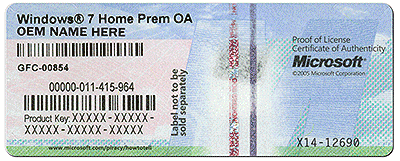
The product key in use on your computer is of the
OEM FACTORY built type, and its tied to the original motherboard ONLY.
I don't have a CD anyway. The puter was built by a member of my computer club and I won it in the Feb monthly raffle. I'm planning to ask him for a disc.
The statement above would require the club to purchase either a System Builder, Retail or VLK licences.
(VLK licences are used on ALL Windows versions)
However in this case i believe it was just serviced, and the above comment is irrelevant here.
An OEM_SLP machine never needs to be connected to the internet at all, unless validation is required by MS for the installation of certain updates/add-ons (Security updates are always validation-free (1)) .
The Key's self-activation is automatic, and entirely within the computer itself.
The problem arises if there is anything which disturbs one of the three legs of the process.
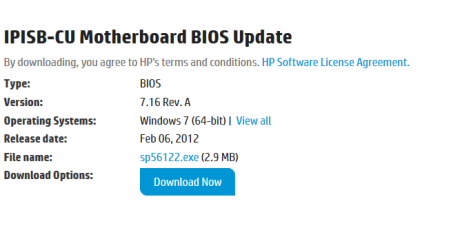
The SLIC table can be affected by a BIOS update(2)
The Certificates can be corrupted or removed
The Key can be corrupted in the registry, or manually changed.
(1)
Suspect these are the ONLY updates you are getting
(2)
This i believe is why your getting the error
The Bios date and version on your comp are not tying up
BIOS><Manufacturer>AMI</Manufacturer><Version>7.16</Version><SMBIOSVersion major="2" minor="6"/><Date>20111005000000.000000+000,
see screenshot,
and as i said in my original post i think it was caused by the use of a generic ISO, and as your expiriencing permissions and scripting errors its possibly corrupt.
KB971033 can in some cases correct this error, as it updates certain files.
Its part of the Activation process
Please run it there is a critical error showing in the MG report.
Is it illegal??,
NOT if you follow the EULA terms
basically boils down to key type
OEM computer, change the Motherboard NEW licence required
System builder tied to computer can be moved to another comp, but a very grey area.
Retail\VLK\MAK can be installed and moved, on and off to any computer.
ReArm
The command prompt
slmgr - rearm extends the activation period, 3 or 5 are the standard, re-arms last 30 days.
yours is 4 so somebody has run the above command once allready, or effected changes on the licencing scheme.
when it reaches 0 and validation fails for any reason the OS will show as non-genuine
32/64 bit.
Licence keys are valid for either.
Next time you talk/email to your fellow members just refer them to this thread.
Roy
Just to clarify i stated the system is REPORTING not showing as non-genuine
NOT that it is, NOR do i believe it is.
Its in an inconsistant state, and should not have been passed to you as such.
The product key in use on your computer is of the
OEM FACTORY built type, and its tied to the original motherboard ONLY.
I don't have a CD anyway. The puter was built by a member of my computer club and I won it in the Feb monthly raffle. I'm planning to ask him for a disc.
The statement above would require the club to purchase either a System Builder, Retail or VLK licences.
(VLK licences are used on ALL Windows versions)
However in this case i believe it was just serviced, and the above comment is irrelevant here.
An OEM_SLP machine never needs to be connected to the internet at all, unless validation is required by MS for the installation of certain updates/add-ons (Security updates are always validation-free (1)) .
The Key's self-activation is automatic, and entirely within the computer itself.
The problem arises if there is anything which disturbs one of the three legs of the process.
The SLIC table can be affected by a BIOS update(2)
The Certificates can be corrupted or removed
The Key can be corrupted in the registry, or manually changed.
(1)
Suspect these are the ONLY updates you are getting
(2)
This i believe is why your getting the error
The Bios date and version on your comp are not tying up
BIOS><Manufacturer>AMI</Manufacturer><Version>7.16</Version><SMBIOSVersion major="2" minor="6"/><Date>20111005000000.000000+000,
see screenshot,
and as i said in my original post i think it was caused by the use of a generic ISO, and as your expiriencing permissions and scripting errors its possibly corrupt.
KB971033 can in some cases correct this error, as it updates certain files.
Its part of the Activation process
Please run it there is a critical error showing in the MG report.
Is it illegal??,
NOT if you follow the EULA terms
basically boils down to key type
OEM computer, change the Motherboard NEW licence required
System builder tied to computer can be moved to another comp, but a very grey area.
Retail\VLK\MAK can be installed and moved, on and off to any computer.
ReArm
The command prompt
slmgr - rearm extends the activation period, 3 or 5 are the standard, re-arms last 30 days.
yours is 4 so somebody has run the above command once allready, or effected changes on the licencing scheme.
when it reaches 0 and validation fails for any reason the OS will show as non-genuine
32/64 bit.
Licence keys are valid for either.
Next time you talk/email to your fellow members just refer them to this thread.
Roy
Attachments
Last edited:
My Computer
At a glance
W7 home premium 32bit/W7HP 64bit/w10 tp insid...E5300 dual core3gbNvidia Geforce 7100 Nforce 630i
- Computer type
- PC/Desktop
- Computer Manufacturer/Model Number
- medionl/Aspire 6930G/acer x55a
- OS
- W7 home premium 32bit/W7HP 64bit/w10 tp insider ring
- CPU
- E5300 dual core
- Motherboard
- medion MS7366
- Memory
- 3gb
- Graphics Card(s)
- Nvidia Geforce 7100 Nforce 630i
- Monitor(s) Displays
- avixc
- Internet Speed
- n (isp resticted to 72)
- Antivirus
- mse/pands
- Browser
- palemoon
- Other Info
- Belkin Fd7050 n USB using Railink RT2870 drivers, more upto date