Clone one machines drive for use in another ???

BuckSkin

Member
Power User
VIP
Local time
12:54 AM
Messages
523
I wasn't quite sure just where to put this so here it is:

I have two completely identical Dell Win7Pro 64-bit machines.
One of these works perfectly; the other has a lot of quirks and is very troublesome.
The same programs and many plug-ins are on both machines.
My idea is to get a new hard-drive, make an identical copy of the drive that is in the good machine, and then install this --- programs, drivers, and all --- into the problem machine; thus, I would avoid the days long headache of rounding up and installing everything all over again.

Is this feasible ?

Will this "clone" drive need something to associate it with the license key of it's new residence ?

Thanks for reading.
 

My Computer My Computer

Computer type
PC/Desktop
Computer Manufacturer/Model Number
Dell Optiplex 780m "mini-tower"
OS
Windows 7 Pro x64
CPU
Intel Core Two Duo E8600 3.33 ghz
Motherboard
Whatever DELL put in it
Memory
8GB
Graphics Card(s)
Gigabyte Radeon R7 240
Monitor(s) Displays
HP 2159m
PSU
750 Watt Corsair CX750
Keyboard
Logitech Wireless
Mouse
Logitech Wireless
Browser
Chrome, Firefox, IE
While this might work, you will be in breach of the Windows license agreement, as it only allows for installation of each license on one computer at any one time. So as you will making a copy & using it in another computer you will actually be using the one license on two computers & this will be picked up during any Windows updates.
 

My Computer My Computer

Computer type
PC/Desktop
Computer Manufacturer/Model Number
Self built using existing case
OS
Windows 7 Home Premium 64 bit sp1
CPU
Intel i5 3570 3.4Ghz Ivy Bridge SKT 1155 quad core
Motherboard
Gigabyte Z77-HD3 SKT 1155 2xSata 3, 4x USB 3.0
Memory
G-Skill Rip Jaws 16Gb (8x2) DDR3 -1600 PC3 12800 CL 10 red
Graphics Card(s)
Gigabyte NVIDIA GT610 1Gb DDR3 810/1200 PCI-E 2.0 Silent
Sound Card
NVIDIA High Definition & Realtech High Definition Audio
Monitor(s) Displays
2 x Philips 226V4L 16:9 aspect ratio
Screen Resolution
1920 x 1080 HD
Hard Drives
Samsung 840 Pro 256gb SSD, SATA 3.
Hitachi Touro Portable 1tb, USB 3.0 HDD used for image b/ups.
PSU
Corsair VS450
Case
Codeng
Cooling
PSU fan & CPU fan
Keyboard
Logitech
Mouse
Logitech Wireless trackball M570
Internet Speed
Wireless 3G. 3mg down & 550kb up.
Antivirus
Bitdefender Internet Security 2020
Browser
Opera (Current Version) & Firefox
Other Info
MS Office 2013 Pro. Davis weather station software. MGE Nova 600 avr UPS.
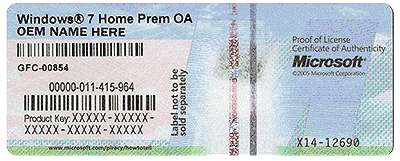
Does the troublesome PC have a readable COA ??
 

Attachments

  • HardwareCOA.gif
    HardwareCOA.gif
    707.8 KB · Views: 50

My Computer My Computer

Computer type
PC/Desktop
Computer Manufacturer/Model Number
Skylake Special #666
OS
Windows 10 Pro x64
CPU
Intel Core i7 6700K
Motherboard
Asus Sabertooth Z170 Mark 1
Memory
GSkill TridentZ RGB 16GB 3600 16-16-16-36
Graphics Card(s)
EVGA GTX 980 Ti SC x2
Sound Card
Realtek High Definition
Monitor(s) Displays
AOC G2460PG
Screen Resolution
1920 x 1080 144Hz
Hard Drives
Samsung 860 Pro 256GB, Seagate Barracuda 4TB x2
PSU
EVGA 1000 P2, EVGA White Custom Braided Cables
Case
Corsair Vengeance C70 Gunmetal Black
Cooling
Corsair H100i v2, Corsair ML120 x2, Thermal Grizzly Kryonaut
Keyboard
Logitech G910 Orion Spectrum
Mouse
Logitech G700s
Internet Speed
Verizon Fios Quantum Gateway 75/75
Antivirus
Windows Defender, Malwarebytes Free 3.8.3
Browser
Chrome
Other Info
Corsair SP120 x4, LG Blu-ray Drive, Durabrand HT-395 100 Watt Dolby Digital Amp, Corsair H2100 Wireless 7.1 Headset
AddRam has raised a very valid point & as he has suggested if the troublesome PC has a readable validation code & it is for the same version of Windows that you are planning on installing, then this should overcome the validation problem.

After you have made all the changes of cloning & changing the hard drive, you will need to change the Activation Code, to the one shown on the case of the troublesome computer.
 

My Computer My Computer

Computer type
PC/Desktop
Computer Manufacturer/Model Number
Self built using existing case
OS
Windows 7 Home Premium 64 bit sp1
CPU
Intel i5 3570 3.4Ghz Ivy Bridge SKT 1155 quad core
Motherboard
Gigabyte Z77-HD3 SKT 1155 2xSata 3, 4x USB 3.0
Memory
G-Skill Rip Jaws 16Gb (8x2) DDR3 -1600 PC3 12800 CL 10 red
Graphics Card(s)
Gigabyte NVIDIA GT610 1Gb DDR3 810/1200 PCI-E 2.0 Silent
Sound Card
NVIDIA High Definition & Realtech High Definition Audio
Monitor(s) Displays
2 x Philips 226V4L 16:9 aspect ratio
Screen Resolution
1920 x 1080 HD
Hard Drives
Samsung 840 Pro 256gb SSD, SATA 3.
Hitachi Touro Portable 1tb, USB 3.0 HDD used for image b/ups.
PSU
Corsair VS450
Case
Codeng
Cooling
PSU fan & CPU fan
Keyboard
Logitech
Mouse
Logitech Wireless trackball M570
Internet Speed
Wireless 3G. 3mg down & 550kb up.
Antivirus
Bitdefender Internet Security 2020
Browser
Opera (Current Version) & Firefox
Other Info
MS Office 2013 Pro. Davis weather station software. MGE Nova 600 avr UPS.
Thanks, everyone.
Yes; I have active and valid licenses on both machines and both machines are Win 7 Pro.
So, other than the license key situation, what I propose to do should be easier than starting from the beginning and having to round up and install a multitude of programs, plug-ins, updates, and drivers --- right ?
 

My Computer My Computer

Computer type
PC/Desktop
Computer Manufacturer/Model Number
Dell Optiplex 780m "mini-tower"
OS
Windows 7 Pro x64
CPU
Intel Core Two Duo E8600 3.33 ghz
Motherboard
Whatever DELL put in it
Memory
8GB
Graphics Card(s)
Gigabyte Radeon R7 240
Monitor(s) Displays
HP 2159m
PSU
750 Watt Corsair CX750
Keyboard
Logitech Wireless
Mouse
Logitech Wireless
Browser
Chrome, Firefox, IE
Totally agree that this is the way to go, you'll need not only to input the correct license info but also rename the new computer (start > run > sysdm.cpl > enter > change name) or else you'll end up with two systems on your network with the same name. No need to get a new drive either since you can just use/overwrite the one on the target system. Macrium Reflect free edition will do the clone in 10 minutes.
 

My Computer My Computer

Computer type
PC/Desktop
Computer Manufacturer/Model Number
diy
OS
Win7 pro x64
CPU
stock i7 7700k
Motherboard
Gigabyte Z270N-WIFI mini-ITX
Memory
Corsair Vengeance LPX 16GB (2x8GB) DDR4 @ 3200MHz
Graphics Card(s)
integrated Intel HD 630
Sound Card
onboard Realtek ALC1220
Monitor(s) Displays
two vertically mounted samsung 55" 4k un55mu8000
Screen Resolution
1920x1280
Hard Drives
256GB Samsung EVO 960 M.2 pci-e NVMe SSD
PSU
SilverStone Nightjar ST45NF 450Watt Fanless
Case
No case. Motherboard is mounted directly onto power supply
Cooling
Evercool low profile 815EP with Panaflow 12L fan at 7v
Keyboard
Ortek MCK-86 mini
Mouse
Belkin 5-button USB
Internet Speed
spectrum 400mbps
Totally agree that this is the way to go, you'll need not only to input the correct license info but also rename the new computer (start > run > sysdm.cpl > enter > change name) or else you'll end up with two systems on your network with the same name. No need to get a new drive either since you can just use/overwrite the one on the target system. Macrium Reflect free edition will do the clone in 10 minutes.

If I can remember to be so smart, I guess it would be best to leave the Ethernet kill-switch OFF until I get finished reconfiguring the computer name and license.

I have AOMEI BackUpper installed and a recent download of Macrium not-yet-installed; I guess this is just as good an excuse as any to go ahead and put the Macrium to use.


Both machines have identical 500GB drives, yet I have no notion as to brand-name and whether they are 7200- or 5400-rpm; is there some way I can identify them other than removing one from it's bay ?

I need more storage anyway and was kinda kicking around the idea of maybe a 2TB drive, but the ones in my price range are 5400-rpm; I had also thought about a small/quick SSD and then relegate the current drive to storage, but my ship is too far out at sea for such luxuries, plus it is crowding big rocks on the lee side.

I am too big a chicken to wipe the original drive until I have something else up and running.
 

My Computer My Computer

Computer type
PC/Desktop
Computer Manufacturer/Model Number
Dell Optiplex 780m "mini-tower"
OS
Windows 7 Pro x64
CPU
Intel Core Two Duo E8600 3.33 ghz
Motherboard
Whatever DELL put in it
Memory
8GB
Graphics Card(s)
Gigabyte Radeon R7 240
Monitor(s) Displays
HP 2159m
PSU
750 Watt Corsair CX750
Keyboard
Logitech Wireless
Mouse
Logitech Wireless
Browser
Chrome, Firefox, IE
belarc advisor reports your system in great detail without you having to open the case. You may have to do a google search on the hard drive brand/model that belarc shows in order to get rpm specs.

Products: Belarc Advisor

As far as not wanting to wipe the original drive until its safe to do so, here's an idea...

1) clean up the drive you're about to clone, see post #3 here

Deleting entire "program" folders to clear up disc space

2) then defrag that same drive

3) then copy over everything you might want from the crappy drive so its now on the good drive, the one you are about to clone.

4) at this point the crappy drive will have nothing on it of value that's not on your good drive, so the bad drive is now expendable. If you clone your good drive onto the crappy drive, AND the motherboards are the same, the cloned drive will boot no problem. I also have two identical systems and have done exactly what you plan to do many times using macrium. If you still have any doubts, just remove the good drive right now and put it in the other system and see if it boots. It will. Or run Belarc on each system and compare their summary reports in detail, to confirm that the systems are identical.
 

My Computer My Computer

Computer type
PC/Desktop
Computer Manufacturer/Model Number
diy
OS
Win7 pro x64
CPU
stock i7 7700k
Motherboard
Gigabyte Z270N-WIFI mini-ITX
Memory
Corsair Vengeance LPX 16GB (2x8GB) DDR4 @ 3200MHz
Graphics Card(s)
integrated Intel HD 630
Sound Card
onboard Realtek ALC1220
Monitor(s) Displays
two vertically mounted samsung 55" 4k un55mu8000
Screen Resolution
1920x1280
Hard Drives
256GB Samsung EVO 960 M.2 pci-e NVMe SSD
PSU
SilverStone Nightjar ST45NF 450Watt Fanless
Case
No case. Motherboard is mounted directly onto power supply
Cooling
Evercool low profile 815EP with Panaflow 12L fan at 7v
Keyboard
Ortek MCK-86 mini
Mouse
Belkin 5-button USB
Internet Speed
spectrum 400mbps
Thank you ! ; you have given me some ideas and the confidence to fly in on this.

This will be my project for the next free day I have.
 

My Computer My Computer

Computer type
PC/Desktop
Computer Manufacturer/Model Number
Dell Optiplex 780m "mini-tower"
OS
Windows 7 Pro x64
CPU
Intel Core Two Duo E8600 3.33 ghz
Motherboard
Whatever DELL put in it
Memory
8GB
Graphics Card(s)
Gigabyte Radeon R7 240
Monitor(s) Displays
HP 2159m
PSU
750 Watt Corsair CX750
Keyboard
Logitech Wireless
Mouse
Logitech Wireless
Browser
Chrome, Firefox, IE
I also have two identical systems and have done exactly what you plan to do many times using macrium.


I have a new 2TB drive on the way; I already have external drive enclosures and a Sabrent hard-drive adapter USB to SATA.

The good drive I will be cloning is 500-GB.

Considering the capacity difference, will I need do anything special such as sizing partitions; and, if so, do I do this during the cloning process or after I get it installed ?

What will the cloning process do with that extra 1500-GB ?

Will I need worry about this GPT and MBR business ?

Sorry for so many questions.
 

My Computer My Computer

Computer type
PC/Desktop
Computer Manufacturer/Model Number
Dell Optiplex 780m "mini-tower"
OS
Windows 7 Pro x64
CPU
Intel Core Two Duo E8600 3.33 ghz
Motherboard
Whatever DELL put in it
Memory
8GB
Graphics Card(s)
Gigabyte Radeon R7 240
Monitor(s) Displays
HP 2159m
PSU
750 Watt Corsair CX750
Keyboard
Logitech Wireless
Mouse
Logitech Wireless
Browser
Chrome, Firefox, IE
no problem having different size drives

gpt is an option if you want it, but at just 2TB I'm not sure its worth messing with, and your bios may or may not support it. Here's a write-up of cloning from an mbr drive onto a gpt drive if you wanted to..
How to Clone MBR to GPT Disk in Windows 10/8/7

there are many cloning tools but I prefer macrium.
Macrium Reflect Free | Macrium Software

its possible/likely that your new drive will come with software that will do everything you need. But since you mentioned a usb to sata adapter (and your specs are not specific in your profile) it might be best if you detailed exactly what is your hardware setup, specifically:

what is your exact hardware machine right now, dell machine model and hard drive brand/model.

what is your target machine and what will be its new hard drive brand/model

and is the usb>sata adapter just for cloning, or is it a permanent part of the new machine.
 

My Computer My Computer

Computer type
PC/Desktop
Computer Manufacturer/Model Number
diy
OS
Win7 pro x64
CPU
stock i7 7700k
Motherboard
Gigabyte Z270N-WIFI mini-ITX
Memory
Corsair Vengeance LPX 16GB (2x8GB) DDR4 @ 3200MHz
Graphics Card(s)
integrated Intel HD 630
Sound Card
onboard Realtek ALC1220
Monitor(s) Displays
two vertically mounted samsung 55" 4k un55mu8000
Screen Resolution
1920x1280
Hard Drives
256GB Samsung EVO 960 M.2 pci-e NVMe SSD
PSU
SilverStone Nightjar ST45NF 450Watt Fanless
Case
No case. Motherboard is mounted directly onto power supply
Cooling
Evercool low profile 815EP with Panaflow 12L fan at 7v
Keyboard
Ortek MCK-86 mini
Mouse
Belkin 5-button USB
Internet Speed
spectrum 400mbps
what is your exact hardware machine right now, dell machine model and hard drive brand/model.

Dell Optiplex 780m mini-tower, E8600 3.33ghz, 8GB RAM, 500-GB hard-drive (I haven't yet found time to identify the exact brand of the drive), Windows 7 Pro 64-bit

what is your target machine and what will be its new hard drive brand/model

Exactly identical in every aspect to the other machine.
The new drive that is coming is a WD "Blue" 5400-rpm 2-TB

and is the usb>sata adapter just for cloning, or is it a permanent part of the new machine.

This device is a handy tool that is never permanently connected to any one machine:

https://www.amazon.com/gp/product/B00CPGYNV4/ref=oh_aui_detailpage_o03_s01?ie=UTF8&psc=1

I got this hard-drive adapter a couple years ago and have used it to rescue pictures from numerous computers that various family members had relegated to the attic for one reason or another.

Although they always say "the hard-drive crashed", I haven't connected it to a drive yet that I wasn't able to access the folders and rescue the files.

I am assuming I will need it to connect the new drive to the source computer in order to do the cloning.

Thanks for the links and info.
 

My Computer My Computer

Computer type
PC/Desktop
Computer Manufacturer/Model Number
Dell Optiplex 780m "mini-tower"
OS
Windows 7 Pro x64
CPU
Intel Core Two Duo E8600 3.33 ghz
Motherboard
Whatever DELL put in it
Memory
8GB
Graphics Card(s)
Gigabyte Radeon R7 240
Monitor(s) Displays
HP 2159m
PSU
750 Watt Corsair CX750
Keyboard
Logitech Wireless
Mouse
Logitech Wireless
Browser
Chrome, Firefox, IE

My Computer My Computer

Computer type
PC/Desktop
Computer Manufacturer/Model Number
diy
OS
Win7 pro x64
CPU
stock i7 7700k
Motherboard
Gigabyte Z270N-WIFI mini-ITX
Memory
Corsair Vengeance LPX 16GB (2x8GB) DDR4 @ 3200MHz
Graphics Card(s)
integrated Intel HD 630
Sound Card
onboard Realtek ALC1220
Monitor(s) Displays
two vertically mounted samsung 55" 4k un55mu8000
Screen Resolution
1920x1280
Hard Drives
256GB Samsung EVO 960 M.2 pci-e NVMe SSD
PSU
SilverStone Nightjar ST45NF 450Watt Fanless
Case
No case. Motherboard is mounted directly onto power supply
Cooling
Evercool low profile 815EP with Panaflow 12L fan at 7v
Keyboard
Ortek MCK-86 mini
Mouse
Belkin 5-button USB
Internet Speed
spectrum 400mbps
you might as well use the WD-prescribed cloning method...

Software and Firmware Downloads | WD Support

Thanks; ... alas, I am not having any success in that particular download; it failed the first couple tries; and, when I finally did get a downloaded zip-file, Windows would not extract it; 7-zip did extract it and there was nothing in it except a portion of a pdf manual.

I got the drive in the mail today; I would already be flying in on this cloning business, except that there is a storm front coming through and it would be about my luck to get head-and-ears into this and the power suddenly go out.
 

My Computer My Computer

Computer type
PC/Desktop
Computer Manufacturer/Model Number
Dell Optiplex 780m "mini-tower"
OS
Windows 7 Pro x64
CPU
Intel Core Two Duo E8600 3.33 ghz
Motherboard
Whatever DELL put in it
Memory
8GB
Graphics Card(s)
Gigabyte Radeon R7 240
Monitor(s) Displays
HP 2159m
PSU
750 Watt Corsair CX750
Keyboard
Logitech Wireless
Mouse
Logitech Wireless
Browser
Chrome, Firefox, IE
I am not having any success in that particular download; it failed the first couple tries; and, when I finally did get a downloaded zip-file, Windows would not extract it; 7-zip did extract it and there was nothing in it except a portion of a pdf manual.

hm-m-m. I just tried it and it worked, after extracting to a folder I just clicked on the Acronis True Image exe file and it installed...
 

My Computer My Computer

Computer type
PC/Desktop
Computer Manufacturer/Model Number
diy
OS
Win7 pro x64
CPU
stock i7 7700k
Motherboard
Gigabyte Z270N-WIFI mini-ITX
Memory
Corsair Vengeance LPX 16GB (2x8GB) DDR4 @ 3200MHz
Graphics Card(s)
integrated Intel HD 630
Sound Card
onboard Realtek ALC1220
Monitor(s) Displays
two vertically mounted samsung 55" 4k un55mu8000
Screen Resolution
1920x1280
Hard Drives
256GB Samsung EVO 960 M.2 pci-e NVMe SSD
PSU
SilverStone Nightjar ST45NF 450Watt Fanless
Case
No case. Motherboard is mounted directly onto power supply
Cooling
Evercool low profile 815EP with Panaflow 12L fan at 7v
Keyboard
Ortek MCK-86 mini
Mouse
Belkin 5-button USB
Internet Speed
spectrum 400mbps
hm-m-m. I just tried it and it worked, after extracting to a folder I just clicked on the Acronis True Image exe file and it installed...


I will give it another go in the wee hours of the night; we have DISH internet service and I suspect that as being the reason for downloads not working so well some of the time.
 

My Computer My Computer

Computer type
PC/Desktop
Computer Manufacturer/Model Number
Dell Optiplex 780m "mini-tower"
OS
Windows 7 Pro x64
CPU
Intel Core Two Duo E8600 3.33 ghz
Motherboard
Whatever DELL put in it
Memory
8GB
Graphics Card(s)
Gigabyte Radeon R7 240
Monitor(s) Displays
HP 2159m
PSU
750 Watt Corsair CX750
Keyboard
Logitech Wireless
Mouse
Logitech Wireless
Browser
Chrome, Firefox, IE
Hi Buckskin,
Id just use macrium create the image from your good machine and install it on the new SSD.

I do NOT believe you will have a validation problem as
Machines are both Dell W7 pro
1) OEM licence - it will pre validate and activate against the current Dell bios slic table
(Internet connection is not relevant, can be on/off)
2)Retail licence - 2 different keys if so perform the install OFF-line, then change the product key

Roy
 

My Computer My Computer

Computer type
PC/Desktop
Computer Manufacturer/Model Number
medionl/Aspire 6930G/acer x55a
OS
W7 home premium 32bit/W7HP 64bit/w10 tp insider ring
CPU
E5300 dual core
Motherboard
medion MS7366
Memory
3gb
Graphics Card(s)
Nvidia Geforce 7100 Nforce 630i
Monitor(s) Displays
avixc
Internet Speed
n (isp resticted to 72)
Antivirus
mse/pands
Browser
palemoon
Other Info
Belkin Fd7050 n USB using Railink RT2870 drivers, more upto date
Totally agree that this is the way to go,

MISSION ACCOMPLISHED ! ! !

I really appreciate everyone's input and giving me the confidence to get this done.

As I already had it installed and the learning curve for cloning seemed to be a lot less steep, I used AOMEI BackUpper to perform the cloning operation; I figured if something went awry that I could just wipe it clean, install Macrium, and give it a go; thank goodness, AOMEI was pretty much idiot-proof and so far seems to have copied everything flawlessly.

I discovered that the 500-GB drive that got replaced was a WD-Green WD500AUDX, mfg-date 31-Jan-2014.

I did chkdsk (and repair) and defrag on the source drive just prior to the procedure.

Once I got the disc cloned and installed in the other machine, it immediately booted up (puzzlingly) in Safe Mode; maybe that is something AOMEI does for the first time boot; a restart put everything to rights and we were up and running.

I had a moments trouble getting the wireless Logitech MK270 mouse and keyboard to respond properly, but it seemed to fix itself without any interference from me; the wireless keyboard/mouse on the host machine is a Microsoft brand, hence the conflict.

I checked everything out and made sure we were good to go and then I used EaseUS Partition Master to customize the space on the new drive; I shrank the C: partition to 100-GB (it had 73-GB of contents); I made a partition A: and sized it to 900-GB to be just a shade under the 931-GB capacity of our 1TB external drives; and, I made the remaining 800-plus GB partition B:

I moved the wife's "Pictures" library from C: to A: and intend to synchronize it with one of our 1TB externals; the only files that will go in A: will be her meticulously organized photos; and odds and ends or temporary photos will go in B:, thus to not clutter up A:

I moved all the rest of the libraries to B:


So far, this operation seems to have cured the many ills that the machine was experiencing prior to this procedure.

I really don't know just what happened to corrupt things on that O/S, but it just steadily went from bad to worse; it finally got to where it would freeze up and the only thing that would regain control was a forced shut-down; in the mean time, many features had ceased to work and no matter what I did it would only have a single restore point from ages ago. Many times, I would have to resort to the repair disc to get it to boot.
It is the second of two identical machines that I bought from the same place a few weeks apart; the first one has been through combat and never flinches; and, the second one started having problems within a week of getting here.
I believe it is finally fixed now.

Thanks for reading and thanks everyone for your help.
 

My Computer My Computer

Computer type
PC/Desktop
Computer Manufacturer/Model Number
Dell Optiplex 780m "mini-tower"
OS
Windows 7 Pro x64
CPU
Intel Core Two Duo E8600 3.33 ghz
Motherboard
Whatever DELL put in it
Memory
8GB
Graphics Card(s)
Gigabyte Radeon R7 240
Monitor(s) Displays
HP 2159m
PSU
750 Watt Corsair CX750
Keyboard
Logitech Wireless
Mouse
Logitech Wireless
Browser
Chrome, Firefox, IE
Back
Top