Fixing Windows 7

Master Po

New member
Local time
8:20 AM
Messages
23
If you know please tell me does System Image Recovery Backup of Windows 7 do job better than installation of Windows 7?

0nfquS5.png


I have found out that I can create System Image Recovery so if operating system Windows 7 be damaged I can use System Image Recovery instead install again Windows 7 and again install all software.
 

My Computer My Computer

At a glance

Windows 7 Home Premium 64bit4GB
Computer type
PC/Desktop
OS
Windows 7 Home Premium 64bit
Memory
4GB
Keyboard
MS keyboard
Mouse
Logitech
Browser
Google Chrome
If You use SIR and make a backup on a problem PC , You will keep the problems . Better fresh install.
 

My Computer My Computer

At a glance

Win 7 Ult 64-bitAMD Athlon 455 3core6 Gb 1333MhzGForce 545 1,5Gb 192-bit
OS
Win 7 Ult 64-bit
CPU
AMD Athlon 455 3core
Memory
6 Gb 1333Mhz
Graphics Card(s)
GForce 545 1,5Gb 192-bit
Monitor(s) Displays
LG IPS234
Hard Drives
1tb
Case
Acer Predator
Thank you.

If I install fresh Windows 7 and after that install make System Image Recovery disk is it better to install fresh Windows 7 or use System Image Recovery?

Please help me because i want to deepen knowledge from Windows 7 operating system.
 

My Computer My Computer

At a glance

Windows 7 Home Premium 64bit4GB
Computer type
PC/Desktop
OS
Windows 7 Home Premium 64bit
Memory
4GB
Keyboard
MS keyboard
Mouse
Logitech
Browser
Google Chrome
Probably better off to use a Macrium image on an external drive, only used for that purpose and disconnected when not in use. Also re-imaged on the second Monday of every month.;)
Art.
 

My Computer My Computer

At a glance

Win7 sp1 Pro 64bit / XP sp2 Pro (games only)Intel Core 2 Duo E8400 @ 3.00GHz8.00 GB Dual-Channel DDR2 @ 400MHz (5-5-5-18)1024MB GeForce GTX 560
Computer type
PC/Desktop
Computer Manufacturer/Model Number
Home built
OS
Win7 sp1 Pro 64bit / XP sp2 Pro (games only)
CPU
Intel Core 2 Duo E8400 @ 3.00GHz
Motherboard
Intel Corporation DP35DP (CPU1)
Memory
8.00 GB Dual-Channel DDR2 @ 400MHz (5-5-5-18)
Graphics Card(s)
1024MB GeForce GTX 560
Sound Card
NVIDIA High Definition Audio
Monitor(s) Displays
SyncMaster (2048x1152@60Hz)
Hard Drives
240GB Sandisc Extreme Pro SSD
244GB Seagate ST3250410AS
488GB Seagate ST500DM002-1BD142
931GB Western Digital WDC WD1003FZEX
PSU
Corsair 720
Case
ATX
Keyboard
HID Keyboard Device Logitech
Mouse
HID-compliant mouse Microsoft
Other Info
TSSTcorp CDDVDW SH-S223L

HL-DT-ST BD-RE BH12LS35
Thank you for the reply.
 

My Computer My Computer

At a glance

Windows 7 Home Premium 64bit4GB
Computer type
PC/Desktop
OS
Windows 7 Home Premium 64bit
Memory
4GB
Keyboard
MS keyboard
Mouse
Logitech
Browser
Google Chrome
If you use windows system image. it creates an exact image of your drive. Your programs, settings and activation are included.

That is why it is different from a clean install.

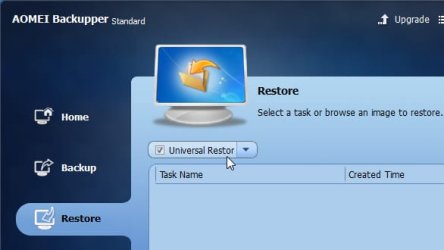
There are other imaging programs available. Aomei Backupper allows restoring to different hardware ( even in the free version ).

ab-universal restore.jpg


Paragon allows exclusions ( even in the free version).

There are several more, including Easeus,macrium, drive snapshot, etc.....

Use whichever suits you.
 

My Computers My Computers

  • At a glance

    7 X64i5 84002x8gb 3200mhz
    Computer type
    PC/Desktop
    OS
    7 X64
    CPU
    i5 8400
    Motherboard
    gigabyte b365m ds3h
    Memory
    2x8gb 3200mhz
    Hard Drives
    various
    PSU
    pure power 11 400w cm
    Case
    Coolermaster
    Cooling
    cryorig m9i
  • At a glance

    7x64g54008gb ddr4 2400
    Computer type
    PC/Desktop
    OS
    7x64
    CPU
    g5400
    Motherboard
    ga b365m ds3h
    Memory
    8gb ddr4 2400
    PSU
    xfx pro 450w
It's an interesting question as I would like to know too! I did a clean install, all updated then made a system image. Had an issue shortly afterwards and had to decide - do I clean install again? Or just put my system image of the clean install on? I put the system image on. So is this "as good" as clean installing again?
 

My Computer My Computer

At a glance

W7 HP 64 bitCore i3 1st gen8gbNvidia 330M
Computer type
Laptop
Computer Manufacturer/Model Number
Sony Vaio VPCCW2S1E
OS
W7 HP 64 bit
CPU
Core i3 1st gen
Memory
8gb
Graphics Card(s)
Nvidia 330M
Internet Speed
8 mbps
Browser
Firefox
Depends what kind of problem You have - hardware or software. It sounds more like to be connected with hardware issues .
 

My Computer My Computer

At a glance

Win 7 Ult 64-bitAMD Athlon 455 3core6 Gb 1333MhzGForce 545 1,5Gb 192-bit
OS
Win 7 Ult 64-bit
CPU
AMD Athlon 455 3core
Memory
6 Gb 1333Mhz
Graphics Card(s)
GForce 545 1,5Gb 192-bit
Monitor(s) Displays
LG IPS234
Hard Drives
1tb
Case
Acer Predator
Thank you all for recommendations.
I next period I am going to install Windows 7 again.

Please tell me is it better to make System Image Recovery before I install all software or to make System Image Recovery after I install all necessary software.
 

My Computer My Computer

At a glance

Windows 7 Home Premium 64bit4GB
Computer type
PC/Desktop
OS
Windows 7 Home Premium 64bit
Memory
4GB
Keyboard
MS keyboard
Mouse
Logitech
Browser
Google Chrome
It's an interesting question as I would like to know too! I did a clean install, all updated then made a system image. Had an issue shortly afterwards and had to decide - do I clean install again? Or just put my system image of the clean install on? I put the system image on. So is this "as good" as clean installing again?

You can choose to create an image of your current OS state or do it later. System Image is much more convinient if you don't want to download all your drivers, programs and want everything to be saved.
 

My Computer My Computer

At a glance

Windows 7 Home Premium 64-BITAMD A8 7200P8GB 1600mhzRadeon R5 (APU) + Radeon R5 M230 2GB Dual Gra...
Computer type
PC/Desktop
Computer Manufacturer/Model Number
ASUS X550ZE
OS
Windows 7 Home Premium 64-BIT
CPU
AMD A8 7200P
Motherboard
N/A
Memory
8GB 1600mhz
Graphics Card(s)
Radeon R5 (APU) + Radeon R5 M230 2GB Dual Graphics
Sound Card
Realtek ALC269 with SonicMaster
Monitor(s) Displays
Laptop Display
Screen Resolution
1920 x 1080 @60hz
Hard Drives
WDC WD50 00LPVX-80V0TT0 (500GB)
PSU
Laptop Charger
Mouse
ARMAGGEDON TEXTRON SCORPION 7
Internet Speed
100 mbps DOWN / 50 mbps UP
Antivirus
Windows Defender
Browser
Mozzila FireFox, Valve Steam in-game internet browser
Possibly both! I sometimes want to reinstall without programs (some change over time), but if it's not long since the image was made then reinstalling with the programs is good. Back-up files separately. Also don't forget to export your bookmarks to your documents folder before backing up files and reinstalling. It's the bit I tend to forget.
 

My Computer My Computer

At a glance

W7 HP 64 bitCore i3 1st gen8gbNvidia 330M
Computer type
Laptop
Computer Manufacturer/Model Number
Sony Vaio VPCCW2S1E
OS
W7 HP 64 bit
CPU
Core i3 1st gen
Memory
8gb
Graphics Card(s)
Nvidia 330M
Internet Speed
8 mbps
Browser
Firefox
Back
Top