
Search Warning Logged Event ID: 3036

Tweakit

New member
Power User
Local time
1:35 AM
Messages
75
I’ve been getting the below “warning” for a long time. It usually happens about once per day on average. I have no other known symptoms with the computer so it doesn't seem to be affecting anything. The computer is fully updated and I’ve run virus scans and SFC with no errors found. I rebuilt the index as described here: Change advanced indexing options but this did not help and the warning persists. I also turned off indexing of Offline Files and verified the C:\Windows\CSC folder was excluded from the index. None of this helped as I still get the error.
Should this be fixed? Does anyone have any suggestions?
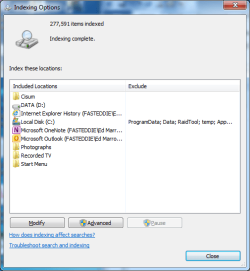
For completeness I’ve included the view of my indexing options and the Warning message in this post.

Log Name: Application
Source: Microsoft-Windows-Search
Date: 7/14/2013 5:18:20 PM
Event ID: 3036
Task Category: Gatherer
Level: Warning
Keywords: Classic
Description:
The content source <ONEINDEX14://{S-1-5-21-1061540108-1072972267-4140928508-1000}/> cannot be accessed.
Context: Application, SystemIndex Catalog
Details: (HRESULT : 0x80004005) (0x80004005)
 

Attachments
  • scs.png
    scs.png
    19.2 KB · Views: 67

My Computer My Computer

At a glance

Windows 7 professional 64 biti7-870G.Skill F3-10666CL9D-8GBRL; (8GB)Radeon HD4670
Computer type
PC/Desktop
Computer Manufacturer/Model Number
Custom Build
OS
Windows 7 professional 64 bit
CPU
i7-870
Motherboard
Gigabyte GA-P55-USB3 (rev 2)
Memory
G.Skill F3-10666CL9D-8GBRL; (8GB)
Graphics Card(s)
Radeon HD4670
Sound Card
on board
Monitor(s) Displays
Dell U2311H plus ASUS PB238
Screen Resolution
1080P (dual monitors)
Hard Drives
VelociRaptor WD1500HLHX 150GB (system)
2TB Samsung spinpoint (data)
596GB WD caviar blue (data)
PSU
FSP AS400 400W ATX2.31/EPS2.92
Case
Antec Sonata III 500
Cooling
CPU cooled by Rosewill HSF RCX-Z90-CP
Keyboard
Microsoft ergonomic PS-2
Mouse
Logitech M510
Internet Speed
very fast via cable
Antivirus
Microsoft Security Essentials
Browser
Chrome and IE10
Other Info
Also have hauppauge TV Card HVR-1600
CPU, case and GPU Fans are controlled by SpeedFan.
I think this may be related to the Recycling bin so try to clear it, run a chkdsk /f - I would do "the works" with CCCleaner as described in this article, including antivirus scans. It seems obvious that the Search is getting stuck in one file/folder that may be corrupted.
 

My Computer My Computer

At a glance

Windows 7 Home Premium 64-bit SP1Intel Core i7 2600 @ 3.40GHz10.0 GB Dual-Channel DDR3 @ 665MHz1023MB GeForce GTX 550 Ti
Computer type
PC/Desktop
Computer Manufacturer/Model Number
HP
OS
Windows 7 Home Premium 64-bit SP1
CPU
Intel Core i7 2600 @ 3.40GHz
Motherboard
PEGATRON CORPORATION 2AB5 (CPU 1)
Memory
10.0 GB Dual-Channel DDR3 @ 665MHz
Graphics Card(s)
1023MB GeForce GTX 550 Ti
Got a screen shot of the warning to post?

If you remove indexing, is the problem gone?

Right click the drive in windows explorer, and in properties uncheck the box at the bottom for indexing, then wait for the removal procedure to complete, you have so many files, I wouldn't use it.
 

My Computer My Computer

At a glance

Windows 7 Ultimate Retail Box (64-bit install...AMD FX-8350 CPU v1.15 (or 1.0F) BIOS was requ...8G CAS-7 G-Skill DDR3 @1333 (2 fours) [mobo n...Radeon HD 7950 [3 gigs of GDDR5] MSI Twin Fro...
Computer type
PC/Desktop
Computer Manufacturer/Model Number
Self Built Custom
OS
Windows 7 Ultimate Retail Box (64-bit installed) + Service Pack 1
CPU
AMD FX-8350 CPU v1.15 (or 1.0F) BIOS was required!
Motherboard
MSI 890FXA-GD70
Memory
8G CAS-7 G-Skill DDR3 @1333 (2 fours) [mobo nonOC max rec'd]
Graphics Card(s)
Radeon HD 7950 [3 gigs of GDDR5] MSI Twin Frozr model
Sound Card
Realtek High Definition Audio (onboard mobo, ALC-889 chip)
Monitor(s) Displays
2 WS LED Monitors: One LG One Viewsonic
Screen Resolution
1920 by 1080
Hard Drives
SSD for OS: Samsung 840 Pro
SSD for VM and utilities: Adata SX900
7200 RPM SATA HDs for the rest: Hitachi and Seagate
PSU
Corsair TX850 - 850W max, in service since August 2010.
Case
Thermaltake Armor A90
Cooling
Thermaltake Spin Q CPU Cooler, in service since August 2010
Keyboard
Logitech G11
Mouse
Logitech M310 Wireless
Internet Speed
100 Megabit broadband supposedly upgraded from 50 (Cable)
Antivirus
Bitdefender Internet Security 2014 suite
Browser
Pale Moon 64-bit main, also IceDragon, Opera, and Maxthon.
Other Info
CompTIA A+ certified (220-800 series) in July 2013.
I agree that indexing is hardly worth the trouble. Yet, there might be some corrupted files that should be fixed.
 

My Computer My Computer

At a glance

Windows 7 Home Premium 64-bit SP1Intel Core i7 2600 @ 3.40GHz10.0 GB Dual-Channel DDR3 @ 665MHz1023MB GeForce GTX 550 Ti
Computer type
PC/Desktop
Computer Manufacturer/Model Number
HP
OS
Windows 7 Home Premium 64-bit SP1
CPU
Intel Core i7 2600 @ 3.40GHz
Motherboard
PEGATRON CORPORATION 2AB5 (CPU 1)
Memory
10.0 GB Dual-Channel DDR3 @ 665MHz
Graphics Card(s)
1023MB GeForce GTX 550 Ti
Thanks AdiGri and Faladu for some good suggestions. From my travels on this issue I think the Warning is related to Microsoft OneNote. Since I don’t use OneNote I just removed it from the index (yes is sort of ‘cheating’ but its quick if it works!). I removed it from the index yesterday right after another occurrence of the Warning. It’s a little too soon to tell if the problem is fixed or not. If I don’t see the error in a few more days I’ll mark the thread as solved. If it comes back, I’ll start with the suggestions you made. I’ve included a screen shot of the Warning though it’s also printed out in the 1st post of this thread. Thanks again for the suggestions!
 

Attachments

  • rr.png
    rr.png
    15.9 KB · Views: 63

My Computer My Computer

At a glance

Windows 7 professional 64 biti7-870G.Skill F3-10666CL9D-8GBRL; (8GB)Radeon HD4670
Computer type
PC/Desktop
Computer Manufacturer/Model Number
Custom Build
OS
Windows 7 professional 64 bit
CPU
i7-870
Motherboard
Gigabyte GA-P55-USB3 (rev 2)
Memory
G.Skill F3-10666CL9D-8GBRL; (8GB)
Graphics Card(s)
Radeon HD4670
Sound Card
on board
Monitor(s) Displays
Dell U2311H plus ASUS PB238
Screen Resolution
1080P (dual monitors)
Hard Drives
VelociRaptor WD1500HLHX 150GB (system)
2TB Samsung spinpoint (data)
596GB WD caviar blue (data)
PSU
FSP AS400 400W ATX2.31/EPS2.92
Case
Antec Sonata III 500
Cooling
CPU cooled by Rosewill HSF RCX-Z90-CP
Keyboard
Microsoft ergonomic PS-2
Mouse
Logitech M510
Internet Speed
very fast via cable
Antivirus
Microsoft Security Essentials
Browser
Chrome and IE10
Other Info
Also have hauppauge TV Card HVR-1600
CPU, case and GPU Fans are controlled by SpeedFan.
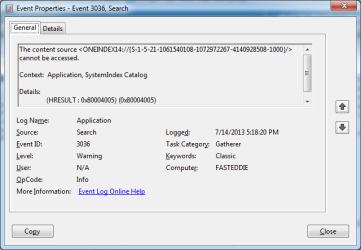
As I mentioned earlier I turned off indexing for Microsoft OneNote. This is all it took for the Warning to go away. However, when I open the OneNote application, indexing automatically turns on for OneNote and immediately the same error is logged! I’m not sure why indexing for OneNote is automatically turned on when the application launches but maybe OneNote somehow relies on indexing. OneNote appears to be working fine and there are no other problems with indexing. I wonder if this is a problem with OneNote that simply hasn’t been addressed yet MS. It seems if there was some corruption causing the warning then I’d expect to see indexing log some other events or OneNote would have some glitches of its own but this is not the case. I’ve rebuilt the index, run chkdsk /f, run virus/malware scans and cleaned my C drive and recycle bin but this Warning persists until I remove indexing for the OneNote location. Any ideas or explanations?
 

My Computer My Computer

At a glance

Windows 7 professional 64 biti7-870G.Skill F3-10666CL9D-8GBRL; (8GB)Radeon HD4670
Computer type
PC/Desktop
Computer Manufacturer/Model Number
Custom Build
OS
Windows 7 professional 64 bit
CPU
i7-870
Motherboard
Gigabyte GA-P55-USB3 (rev 2)
Memory
G.Skill F3-10666CL9D-8GBRL; (8GB)
Graphics Card(s)
Radeon HD4670
Sound Card
on board
Monitor(s) Displays
Dell U2311H plus ASUS PB238
Screen Resolution
1080P (dual monitors)
Hard Drives
VelociRaptor WD1500HLHX 150GB (system)
2TB Samsung spinpoint (data)
596GB WD caviar blue (data)
PSU
FSP AS400 400W ATX2.31/EPS2.92
Case
Antec Sonata III 500
Cooling
CPU cooled by Rosewill HSF RCX-Z90-CP
Keyboard
Microsoft ergonomic PS-2
Mouse
Logitech M510
Internet Speed
very fast via cable
Antivirus
Microsoft Security Essentials
Browser
Chrome and IE10
Other Info
Also have hauppauge TV Card HVR-1600
CPU, case and GPU Fans are controlled by SpeedFan.
Tweakit - this just started happening to me - four years after your post here. Did you ever find a permanent solution?
 

My Computer My Computer

At a glance

Dual boot - Win 10 Pro 64-bit (good) and Win ...Intel Core i5 3470 @ 3.2GHz16GB RAM DDR3 (Four x 4GB)Intel HD Graphics (on the CPU)
Computer type
PC/Desktop
Computer Manufacturer/Model Number
Dell Optiplex 7010 MT
OS
Dual boot - Win 10 Pro 64-bit (good) and Win 7 Pro 64-bit (won't boot on the NVMe)
CPU
Intel Core i5 3470 @ 3.2GHz
Motherboard
Dell 0GY6Y8 - what would the Intel number be? - Q77 chipset
Memory
16GB RAM DDR3 (Four x 4GB)
Graphics Card(s)
Intel HD Graphics (on the CPU)
Sound Card
Realtek High Definition Audio - and Intel Display Audio
Monitor(s) Displays
Dell E176FP - nothing fancy
Screen Resolution
1280 x 1024 @ 60 Hz
Hard Drives
Now a Samsung 970 EVO Plus SSD NVMe, which works for the Win 10 only

Used to be two 500GB WDC WD5000AAKX (SATA @ 6GB/sec)

- External WD My Book 1110 USB device
PSU
What means PSU? I'm at sea level
Cooling
Ice cubes
Keyboard
Noisy
Mouse
Micky
Internet Speed
Verizon FIOS 500 Mbps (was 1Gbps but I can't type that fast)
Antivirus
Win 10 Windows Defender - Win 7 Avast Free
Browser
Firefox only with lots of security drives my wife crazy
Other Info
Also I still have an old but important XP SP3 machine that can run - Optiplex 755 Desktop w 4GB RAM and Momentus XT hybrid HD-SSD 500 GB hard drive. Used the registry hack to get more updates through "XP Embedded" or "POS" so now the machine rings like a cash register and the CD drawer opens to give change.
Sorry Ginz, i never did any more work on this. I'm mostly using windows 10 now. Good luck with it!
 

My Computer My Computer

At a glance

Windows 7 professional 64 biti7-870G.Skill F3-10666CL9D-8GBRL; (8GB)Radeon HD4670
Computer type
PC/Desktop
Computer Manufacturer/Model Number
Custom Build
OS
Windows 7 professional 64 bit
CPU
i7-870
Motherboard
Gigabyte GA-P55-USB3 (rev 2)
Memory
G.Skill F3-10666CL9D-8GBRL; (8GB)
Graphics Card(s)
Radeon HD4670
Sound Card
on board
Monitor(s) Displays
Dell U2311H plus ASUS PB238
Screen Resolution
1080P (dual monitors)
Hard Drives
VelociRaptor WD1500HLHX 150GB (system)
2TB Samsung spinpoint (data)
596GB WD caviar blue (data)
PSU
FSP AS400 400W ATX2.31/EPS2.92
Case
Antec Sonata III 500
Cooling
CPU cooled by Rosewill HSF RCX-Z90-CP
Keyboard
Microsoft ergonomic PS-2
Mouse
Logitech M510
Internet Speed
very fast via cable
Antivirus
Microsoft Security Essentials
Browser
Chrome and IE10
Other Info
Also have hauppauge TV Card HVR-1600
CPU, case and GPU Fans are controlled by SpeedFan.

My Computer My Computer

At a glance

Windows 7 Home Premium 64 bit sp1Intel i5 3570 3.4Ghz Ivy Bridge SKT 1155 quad...G-Skill Rip Jaws 16Gb (8x2) DDR3 -1600 PC3 12...Gigabyte NVIDIA GT610 1Gb DDR3 810/1200 PCI-E...
Computer type
PC/Desktop
Computer Manufacturer/Model Number
Self built using existing case
OS
Windows 7 Home Premium 64 bit sp1
CPU
Intel i5 3570 3.4Ghz Ivy Bridge SKT 1155 quad core
Motherboard
Gigabyte Z77-HD3 SKT 1155 2xSata 3, 4x USB 3.0
Memory
G-Skill Rip Jaws 16Gb (8x2) DDR3 -1600 PC3 12800 CL 10 red
Graphics Card(s)
Gigabyte NVIDIA GT610 1Gb DDR3 810/1200 PCI-E 2.0 Silent
Sound Card
NVIDIA High Definition & Realtech High Definition Audio
Monitor(s) Displays
2 x Philips 226V4L 16:9 aspect ratio
Screen Resolution
1920 x 1080 HD
Hard Drives
Samsung 840 Pro 256gb SSD, SATA 3.
Hitachi Touro Portable 1tb, USB 3.0 HDD used for image b/ups.
PSU
Corsair VS450
Case
Codeng
Cooling
PSU fan & CPU fan
Keyboard
Logitech
Mouse
Logitech Wireless trackball M570
Internet Speed
Wireless 3G. 3mg down & 550kb up.
Antivirus
Bitdefender Internet Security 2020
Browser
Opera (Current Version) & Firefox
Other Info
MS Office 2013 Pro. Davis weather station software. MGE Nova 600 avr UPS.
Hi Glnz

I started to get exactly the same following this aprils updates. Office 2016 has already had a silent rollback. I think it's an issue we will have to wait for MS to fix. Mine is the same except it's oneindex16 as I'm using onenote 2016.

Tony
 

My Computer My Computer

At a glance

W7 x64
Computer type
PC/Desktop
OS
W7 x64
Tweakit - this just started happening to me - four years after your post here. Did you ever find a permanent solution?

Hi

Wonder if you got anywhere. Office was rolled back and it went away. Yesterday it went back to Ver 1703 and the issue returned.

Tony
 

My Computer My Computer

At a glance

W7 x64
Computer type
PC/Desktop
OS
W7 x64
Back
Top