
Solved DVI-D to HDMI problem (single monitor)

mylanox

New member
Local time
12:15 AM
Messages
11
Location
Indonesia

I need help.
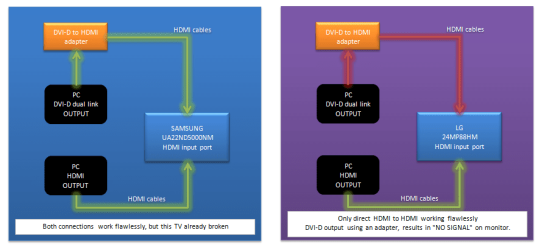
I attach a diagram to better understanding what my problem is.

I'm using only one display output here.
Previously I use samsung one, but this TV already broken (power supply/panel problem).
So I bought another monitor (not TV).

Motherboard I use : gigabyte ga h170 hd3 with
onboard Intel HD 530 graphics (has 3 output, 1xDVI-D, 1xHDMI and 1xVGA)

The problems only happen when I try to connect from DVI-D on PC coupled with DVI-D to HDMI adapter (cheap one) + HDMI to HDMI cable to my LG monitor.

All steps I've read from many source lead me to nowhere.

Any enlightments are appreciated.

Thank you.
 

Attachments
  • pic1.png
    pic1.png
    24.6 KB · Views: 3

My Computer My Computer

At a glance

Windows 7 Ultimate x64Intel Core i5 6400 (Skylake)2 x 8 GB DDR4 CORSAIRNone (onboard Intel HD 530)
Computer type
PC/Desktop
Computer Manufacturer/Model Number
Custom build
OS
Windows 7 Ultimate x64
CPU
Intel Core i5 6400 (Skylake)
Motherboard
Gigabyte GA H170 HD3
Memory
2 x 8 GB DDR4 CORSAIR
Graphics Card(s)
None (onboard Intel HD 530)
Sound Card
Onboard
Monitor(s) Displays
LG 24MP88HM (IPS)
Screen Resolution
1920x1080
Hard Drives
1 x 1 TB WDC BLACK SATA III
1 x 750 GB WDC SATA III
1 x 2 TB WDC SATA III
1 x 3 TB SEAGATE SATA III
PSU
Xigmatek NRP 650 WV
Case
Silverstone Precision Series PS-01
Cooling
Standard
Keyboard
Logitech Wireless MK270
Mouse
Logitech Wireless M325
Internet Speed
FASTNET by FIRST MEDIA 6-10mbps
Antivirus
None
Browser
Google Chrome auto update
Ok mat may I ask why you are using two machines to the one monitor and why are you using a DVI/HDMI adaptor from of the one machines as I am assuming that monitor has two HDMI ports?? or is it because one machine does not have a HDMI port.

The other mention is why no AV??
 

My Computer My Computer

At a glance

Desk1 7 Home Prem / Desk2 10 Pro / Main lap A...Desk1 i5 3750K / Laptop i7 GTX 860M / Desk2 i...Desk1 8GB (1866) / Desk2 16GB (1333) / Laptop...Desk 1& 2NVidia GTX 650 & Laptops on board Intel
Computer type
PC/Desktop
Computer Manufacturer/Model Number
Own build (new) Desk1 / Asus ROG Win 7 / Desk2 1st build
OS
Desk1 7 Home Prem / Desk2 10 Pro / Main lap Asus ROG 10 Pro 2 laptop Toshiba 7 Pro Asus P2520 7 & 10
CPU
Desk1 i5 3750K / Laptop i7 GTX 860M / Desk2 i5 2500
Motherboard
Desk1 Asus P877-V / Desk2 Gigabyte H67 UD3H / Laptop ?
Memory
Desk1 8GB (1866) / Desk2 16GB (1333) / Laptop 8Gb DDR3
Graphics Card(s)
Desk 1& 2NVidia GTX 650 & Laptops on board Intel
Sound Card
Desk 1 & 2 -XONAR DG Realtek High Def audio Laptop
Monitor(s) Displays
Desk 1 Benq HD 2450 / Desk2 Philips 24" / Laptop 17.5"
Screen Resolution
1920x1080 D1 & D2 & Laptop 1
Hard Drives
Desk1 Samsung 120GB 830 SSD
Asus ROG 256GB 850 Pro SSD
Desk2 Samsung 840 256 SSD
Toshiba 120GB EVO
PSU
Desk 1 Corsair HX 1050/ Laptop ? / Desk 2 Corsair HX 650
Case
Desk 1 Cooler HAF XM ? Toshiba laptop / Desk2 Coolermaster
Cooling
Fans on all Desk1 -2 Desk2 - all Coolermasters 5 Laptop ?
Keyboard
Desk 1 MS Sidewinder X6 Desk 2 MS Sidewinder X 4
Mouse
Desk 1&2 - Gigabyte MS 900 gamer - laptop - Logitec wireless
Internet Speed
ADSL2+
Other Info
One other Desktop (tester) and spare Toshba laptop both with SSD's
Running Kaspersky 2016 ISS on all machines config'd identically
Logitec audio stereo systems on each machine (x3)
Canon MG5250MFC
Router/modem TP-Link running WPA2SK
if the new monitor has higher resolution that the old monitor, the old monitor might work with a single-link adapter but with the new monitor you would need a dual link adapter
 

My Computer My Computer

At a glance

Win7 pro x64stock i7 7700kCorsair Vengeance LPX 16GB (2x8GB) DDR4 @ 320...integrated Intel HD 630
Computer type
PC/Desktop
Computer Manufacturer/Model Number
diy
OS
Win7 pro x64
CPU
stock i7 7700k
Motherboard
Gigabyte Z270N-WIFI mini-ITX
Memory
Corsair Vengeance LPX 16GB (2x8GB) DDR4 @ 3200MHz
Graphics Card(s)
integrated Intel HD 630
Sound Card
onboard Realtek ALC1220
Monitor(s) Displays
two vertically mounted samsung 55" 4k un55mu8000
Screen Resolution
1920x1280
Hard Drives
256GB Samsung EVO 960 M.2 pci-e NVMe SSD
PSU
SilverStone Nightjar ST45NF 450Watt Fanless
Case
No case. Motherboard is mounted directly onto power supply
Cooling
Evercool low profile 815EP with Panaflow 12L fan at 7v
Keyboard
Ortek MCK-86 mini
Mouse
Belkin 5-button USB
Internet Speed
spectrum 400mbps
Ok mat may I ask why you are using two machines to the one monitor and why are you using a DVI/HDMI adaptor from of the one machines as I am assuming that monitor has two HDMI ports?? or is it because one machine does not have a HDMI port.

The other mention is why no AV??

Sorry to mention, I have only one PC. But I am curious why using the same PC, same DVI-D port on my motherboard, same DVI-D to HDMI adapter, same HDMI cable, failed to display on LG monitor ?
Whereas previously successfully displayed on Samsung tv.

I have test this same PC, same DVI-D port (dual link), same DVI-D to HDMI adapter (dual link) and
same HDMI cable to another TV of mine, samsung 32 inch 3D TV (using its HDMI (DVI) input port),
and working.

So I think, perhaps, I need an active DVI-D to HDMI adapter ? Or there is no such thing as DVI-D to HDMI active adapter ? Since DVI-D dual link and HDMI, both bring digital signal.

And for AV, yes, my old broken samsung 22inch TV has an AV input port and coax input.

Thanks for the reply
 

My Computer My Computer

At a glance

Windows 7 Ultimate x64Intel Core i5 6400 (Skylake)2 x 8 GB DDR4 CORSAIRNone (onboard Intel HD 530)
Computer type
PC/Desktop
Computer Manufacturer/Model Number
Custom build
OS
Windows 7 Ultimate x64
CPU
Intel Core i5 6400 (Skylake)
Motherboard
Gigabyte GA H170 HD3
Memory
2 x 8 GB DDR4 CORSAIR
Graphics Card(s)
None (onboard Intel HD 530)
Sound Card
Onboard
Monitor(s) Displays
LG 24MP88HM (IPS)
Screen Resolution
1920x1080
Hard Drives
1 x 1 TB WDC BLACK SATA III
1 x 750 GB WDC SATA III
1 x 2 TB WDC SATA III
1 x 3 TB SEAGATE SATA III
PSU
Xigmatek NRP 650 WV
Case
Silverstone Precision Series PS-01
Cooling
Standard
Keyboard
Logitech Wireless MK270
Mouse
Logitech Wireless M325
Internet Speed
FASTNET by FIRST MEDIA 6-10mbps
Antivirus
None
Browser
Google Chrome auto update
if the new monitor has higher resolution that the old monitor, the old monitor might work with a single-link adapter but with the new monitor you would need a dual link adapter

thanks for the reply.
it's dual link DVI-D port and dual link DVI-D to HDMI adapter.
my samsung TV doesn't have DVI-D port.
my LG monitor also doesn't have DVI-D port.

thank you.
 

My Computer My Computer

At a glance

Windows 7 Ultimate x64Intel Core i5 6400 (Skylake)2 x 8 GB DDR4 CORSAIRNone (onboard Intel HD 530)
Computer type
PC/Desktop
Computer Manufacturer/Model Number
Custom build
OS
Windows 7 Ultimate x64
CPU
Intel Core i5 6400 (Skylake)
Motherboard
Gigabyte GA H170 HD3
Memory
2 x 8 GB DDR4 CORSAIR
Graphics Card(s)
None (onboard Intel HD 530)
Sound Card
Onboard
Monitor(s) Displays
LG 24MP88HM (IPS)
Screen Resolution
1920x1080
Hard Drives
1 x 1 TB WDC BLACK SATA III
1 x 750 GB WDC SATA III
1 x 2 TB WDC SATA III
1 x 3 TB SEAGATE SATA III
PSU
Xigmatek NRP 650 WV
Case
Silverstone Precision Series PS-01
Cooling
Standard
Keyboard
Logitech Wireless MK270
Mouse
Logitech Wireless M325
Internet Speed
FASTNET by FIRST MEDIA 6-10mbps
Antivirus
None
Browser
Google Chrome auto update
you may already be aware of this but in the manual on page 14
LG Support - 24MP88HM-S LED LCD Monitors | LG India

it warns you against using anything other than a high-speed hdmi certified with hdmi logo type cable, so maybe your previous monitor was more able to work with any hdmi cable but your new monitor is picky

you do have 2 hdmi ports so make sure you are not plugged into port #2 yet trying to watch port #1

you could always just go with dvi-to-vga if you can't get dvi-to-hdmi working
 

My Computer My Computer

At a glance

Win7 pro x64stock i7 7700kCorsair Vengeance LPX 16GB (2x8GB) DDR4 @ 320...integrated Intel HD 630
Computer type
PC/Desktop
Computer Manufacturer/Model Number
diy
OS
Win7 pro x64
CPU
stock i7 7700k
Motherboard
Gigabyte Z270N-WIFI mini-ITX
Memory
Corsair Vengeance LPX 16GB (2x8GB) DDR4 @ 3200MHz
Graphics Card(s)
integrated Intel HD 630
Sound Card
onboard Realtek ALC1220
Monitor(s) Displays
two vertically mounted samsung 55" 4k un55mu8000
Screen Resolution
1920x1280
Hard Drives
256GB Samsung EVO 960 M.2 pci-e NVMe SSD
PSU
SilverStone Nightjar ST45NF 450Watt Fanless
Case
No case. Motherboard is mounted directly onto power supply
Cooling
Evercool low profile 815EP with Panaflow 12L fan at 7v
Keyboard
Ortek MCK-86 mini
Mouse
Belkin 5-button USB
Internet Speed
spectrum 400mbps
Go with John mate .
 

My Computer My Computer

At a glance

Desk1 7 Home Prem / Desk2 10 Pro / Main lap A...Desk1 i5 3750K / Laptop i7 GTX 860M / Desk2 i...Desk1 8GB (1866) / Desk2 16GB (1333) / Laptop...Desk 1& 2NVidia GTX 650 & Laptops on board Intel
Computer type
PC/Desktop
Computer Manufacturer/Model Number
Own build (new) Desk1 / Asus ROG Win 7 / Desk2 1st build
OS
Desk1 7 Home Prem / Desk2 10 Pro / Main lap Asus ROG 10 Pro 2 laptop Toshiba 7 Pro Asus P2520 7 & 10
CPU
Desk1 i5 3750K / Laptop i7 GTX 860M / Desk2 i5 2500
Motherboard
Desk1 Asus P877-V / Desk2 Gigabyte H67 UD3H / Laptop ?
Memory
Desk1 8GB (1866) / Desk2 16GB (1333) / Laptop 8Gb DDR3
Graphics Card(s)
Desk 1& 2NVidia GTX 650 & Laptops on board Intel
Sound Card
Desk 1 & 2 -XONAR DG Realtek High Def audio Laptop
Monitor(s) Displays
Desk 1 Benq HD 2450 / Desk2 Philips 24" / Laptop 17.5"
Screen Resolution
1920x1080 D1 & D2 & Laptop 1
Hard Drives
Desk1 Samsung 120GB 830 SSD
Asus ROG 256GB 850 Pro SSD
Desk2 Samsung 840 256 SSD
Toshiba 120GB EVO
PSU
Desk 1 Corsair HX 1050/ Laptop ? / Desk 2 Corsair HX 650
Case
Desk 1 Cooler HAF XM ? Toshiba laptop / Desk2 Coolermaster
Cooling
Fans on all Desk1 -2 Desk2 - all Coolermasters 5 Laptop ?
Keyboard
Desk 1 MS Sidewinder X6 Desk 2 MS Sidewinder X 4
Mouse
Desk 1&2 - Gigabyte MS 900 gamer - laptop - Logitec wireless
Internet Speed
ADSL2+
Other Info
One other Desktop (tester) and spare Toshba laptop both with SSD's
Running Kaspersky 2016 ISS on all machines config'd identically
Logitec audio stereo systems on each machine (x3)
Canon MG5250MFC
Router/modem TP-Link running WPA2SK
you may already be aware of this but in the manual on page 14
LG Support - 24MP88HM-S LED LCD Monitors | LG India

it warns you against using anything other than a high-speed hdmi certified with hdmi logo type cable, so maybe your previous monitor was more able to work with any hdmi cable but your new monitor is picky

you do have 2 hdmi ports so make sure you are not plugged into port #2 yet trying to watch port #1

you could always just go with dvi-to-vga if you can't get dvi-to-hdmi working

I'm aware of that. Perhaps it's the cable (not certified). Thank you for your advice.
 

My Computer My Computer

At a glance

Windows 7 Ultimate x64Intel Core i5 6400 (Skylake)2 x 8 GB DDR4 CORSAIRNone (onboard Intel HD 530)
Computer type
PC/Desktop
Computer Manufacturer/Model Number
Custom build
OS
Windows 7 Ultimate x64
CPU
Intel Core i5 6400 (Skylake)
Motherboard
Gigabyte GA H170 HD3
Memory
2 x 8 GB DDR4 CORSAIR
Graphics Card(s)
None (onboard Intel HD 530)
Sound Card
Onboard
Monitor(s) Displays
LG 24MP88HM (IPS)
Screen Resolution
1920x1080
Hard Drives
1 x 1 TB WDC BLACK SATA III
1 x 750 GB WDC SATA III
1 x 2 TB WDC SATA III
1 x 3 TB SEAGATE SATA III
PSU
Xigmatek NRP 650 WV
Case
Silverstone Precision Series PS-01
Cooling
Standard
Keyboard
Logitech Wireless MK270
Mouse
Logitech Wireless M325
Internet Speed
FASTNET by FIRST MEDIA 6-10mbps
Antivirus
None
Browser
Google Chrome auto update

My Computer My Computer

At a glance

Windows 7 Ultimate x64Intel Core i5 6400 (Skylake)2 x 8 GB DDR4 CORSAIRNone (onboard Intel HD 530)
Computer type
PC/Desktop
Computer Manufacturer/Model Number
Custom build
OS
Windows 7 Ultimate x64
CPU
Intel Core i5 6400 (Skylake)
Motherboard
Gigabyte GA H170 HD3
Memory
2 x 8 GB DDR4 CORSAIR
Graphics Card(s)
None (onboard Intel HD 530)
Sound Card
Onboard
Monitor(s) Displays
LG 24MP88HM (IPS)
Screen Resolution
1920x1080
Hard Drives
1 x 1 TB WDC BLACK SATA III
1 x 750 GB WDC SATA III
1 x 2 TB WDC SATA III
1 x 3 TB SEAGATE SATA III
PSU
Xigmatek NRP 650 WV
Case
Silverstone Precision Series PS-01
Cooling
Standard
Keyboard
Logitech Wireless MK270
Mouse
Logitech Wireless M325
Internet Speed
FASTNET by FIRST MEDIA 6-10mbps
Antivirus
None
Browser
Google Chrome auto update
Back
Top