Why are some Labels prefixed with "[Gmail]/" and others not?

JohnDohe

Banned
Local time
12:48 PM
Messages
60
Why are some Labels prefixed with "[Gmail]/" and others not?

Screen Shot 2017-05-21 at 12.05.32 PM   Sunday  5-21-17.jpg

Screen Shot 2017-05-21 at 12.08.51 PM   Sunday  5-21-17.jpg

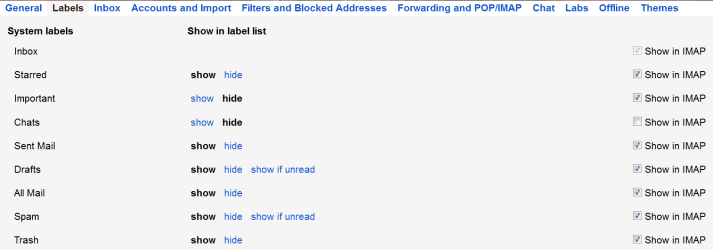
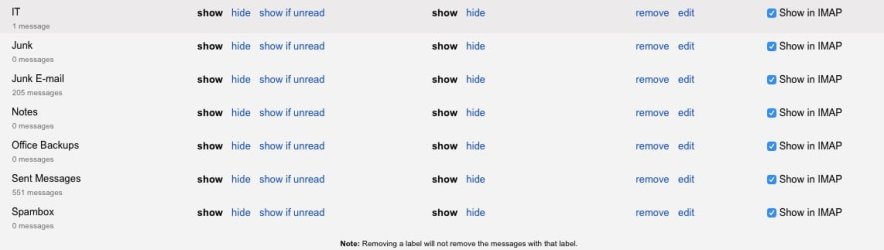
In my screenshots above, there are many Labels in my Gmail account prefixed by "[Gmail]/" .

But others are not.

Why?

Why are some Labels prefixed with "[Gmail]/" and others not?

Is this absolutely necessary?

If not, how may I get rid of the "[Gmail]/" prefix?

Thanks!
 

My Computer My Computer

At a glance

Windows 7 Pro 64 bit
Computer type
PC/Desktop
Computer Manufacturer/Model Number
Acer
OS
Windows 7 Pro 64 bit
The way that Gmail works these are not folders but labels that act as folders

In basic terms consider them as if they are just sub folders of the gmail folder, you could create new folders move the contents from the sub folders to the new folders and then delete or hide the gmail folder tree,

I'm not certain if the Gmail Tree would be rebuilt and new items added to the folders as the system expects the structure, but it does not look like and none of the ones I've removed have returned, but I run IMAP not old POP3 so may work differently .
 

My Computers My Computers

  • At a glance

    Windows 11 Pro x64 [Latest Release and Releas...Ryzen 9 5950X, 3.8 - 5.2 MHz64GB [2 x 32GB] DDR4 3200MHz4GB NVIDIA GEFORCE GTX 1650 Ti
    Computer type
    PC/Desktop
    Computer Manufacturer/Model Number
    ChillBlast - Custom to my design
    OS
    Windows 11 Pro x64 [Latest Release and Release Preview]
    CPU
    Ryzen 9 5950X, 3.8 - 5.2 MHz
    Motherboard
    Asus Prime X570-Pro
    Memory
    64GB [2 x 32GB] DDR4 3200MHz
    Graphics Card(s)
    4GB NVIDIA GEFORCE GTX 1650 Ti
    Sound Card
    On-board SPDIF to 5.1 System + HDMI [5.1 system]
    Monitor(s) Displays
    32" UHD 32 Bit HDR Monitor + 43" UHD 4K 32Bit HDR TV
    Screen Resolution
    2 x 3840 x 2160 @60Hz
    Hard Drives
    1TB M2 SSD OS, 500GB Fast Access SSD, 2 x 8TB Data + Various Externals from 1TB to 4TB, 10TB NAS
    PSU
    NZXT C750 80 PLUS Gold 750W Modular PSU
    Case
    Workstation Case [Matt Black]
    Cooling
    NZXT Kraken X63 280mm CPU Cooler +2x Quiet Case fans
    Keyboard
    Logitech Wireless MX Keys & K400 + others
    Mouse
    Logitech Wireless MX Master 3S
    Internet Speed
    920 MB Down 50 MB Up
    Antivirus
    BitDefender Total Security Pro
    Browser
    Chrome (always run latest Non-Beta)
    Other Info
    Also run ...
    Laptop - Quad 8GB - Windows 10 Pro x64
    Nexus 7 Android tablet x2
    Samsung 10.2" tablet
    Blackview TAB 8 4G Android Tablet c/w Keyboard
    Wacom Intuos Pro Medium Pen Pad
    Wacom Intuos Pro Small Pen Pad
    Wacom Expresskeys Remote
    Loopdeck+ Graphics Controller
    Shuttle Pro v2 Control
  • At a glance

    Windows 11 Pro x64 Latest RPIntel I7 10750H 5.0GHz32GB [2x16GB] DDR4 2933 MHznVidia GTX1650Ti 4 GB GDDR6
    Computer type
    Laptop
    System Manufacturer/Model Number
    Dell XPS 17 10750H
    OS
    Windows 11 Pro x64 Latest RP
    CPU
    Intel I7 10750H 5.0GHz
    Motherboard
    Dell XPS
    Memory
    32GB [2x16GB] DDR4 2933 MHz
    Graphics Card(s)
    nVidia GTX1650Ti 4 GB GDDR6
    Sound Card
    Stock [Realtek] 4 Speaker
    Monitor(s) Displays
    17" IPS UHD+ Infinity Edge Touchscreen
    Screen Resolution
    3840 x 2400
    Hard Drives
    2TB M2 NVMe, 4TB External + various 500GB & 1TB External NVMe (also have access to spinner HDD from
    PSU
    Stock
    Case
    Stock XPS Aluminium & Carbon Fibre
    Cooling
    Stock - Active Fan Control
    Keyboard
    Backlit + Various Logitech
    Mouse
    Stock Track Pad + Logitech MX Trackball
    Internet Speed
    72 MB Down 18MB Up
    Browser
    Chrome
    Other Info
    Also run ...
    Laptop - Quad 8GB - Windows 10 Pro x64
    Nexus 7 Android tablet x2
    10.2" tablet
    Sony Z3 Android Smartphone
    Wacom Intuos Pro Medium Pen Pad
    Wacom Intuos Pro Small Pen Pad
    Wacom Expresskeys Remote
    Loopdeck+ Graphics Controller
    Shuttle Pro v2 Control Pad
    10TB NAS
Hi,
Not sure but labels are nothing but folders you have created or at least in my case folders that I created and put emails in them to easily find.

There are of course some default folders
If you don't want to see them use hide or remove and use your own labels to organize
default lables.PNG
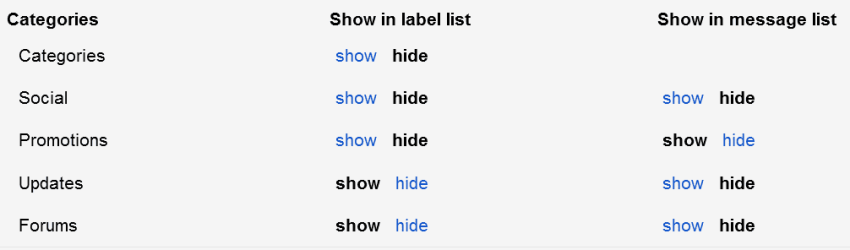
default categories.PNG
 

My Computer My Computer

At a glance

Win-7-Pro64bit 7-H-Prem-64biti7-5930K 2nd i9-9940x both water blocked VRM'...Trident-z 3200C14 2nd Trident-z 3600C16EVGA 1080ti ftw3 2nd Titan Xp both water blocked
Computer type
PC/Desktop
Computer Manufacturer/Model Number
Custom assembled by me :}
OS
Win-7-Pro64bit 7-H-Prem-64bit
CPU
i7-5930K 2nd i9-9940x both water blocked VRM's too
Motherboard
ASUS SABERTOOTH X99 2nd ASUS x299 Apex
Memory
Trident-z 3200C14 2nd Trident-z 3600C16
Graphics Card(s)
EVGA 1080ti ftw3 2nd Titan Xp both water blocked
Sound Card
Built-in Realtek
Monitor(s) Displays
1-AOC G2460PG 24"G-Sync 144Hz/ 2nd 1-ASUS VG248QE 24" 144Hz
Screen Resolution
1920 x 1080 144Hz
Hard Drives
2-Samsung M.2 Evo & Evo Plus
2-Samsung 850 EVO 500GB SSD's/ 3-2.5 W.D. Black 1tb-&3-1tb/3-3.5 WD Black 1tb hdd's
PSU
EVGA SuperNOVA 1000-P2 2nd 1200-P2
Case
2-Corsair Obsidian Series 450D Black ATX Mid Tower
Cooling
Custom water loops
Keyboard
Logitech G710+/ 2nd Logitech G910
Mouse
2-RedDragon M901 Perdition 16400 dpi Gaming mouse = wired
Internet Speed
Comcast Ping 19ms 89.31mbps download speed 6.12mbps upload
Antivirus
Malwarebytes Pro/ Superantispyware Pro
Browser
FireFox & Pale moon
Other Info
2nd ASUS X299 Apex/Intel i9-9940x with Custom water loop/7H-Prem-x64/Corsair 450D case/Ram Trident-z 3600C16 4x8gb / Samsung970Evo plus 500gb SSD/Dual ssd EZ swap evo/PSU EVGA SuperNova 1200w-P2 80+Platinum/GPU Titan Xp /8-ML-140 on push-pull on 2-280GTX rads
In Settings under Actions click Edit and remove it if it's bothersome.
 

My Computer My Computer

At a glance

Windows 10 Pro 64 bitAMD FX 9590 8 Core Black EditionCorsair Vengeance 16GB DDR3AMD Radeon (TM) R9 380 Gaming Series
Computer type
PC/Desktop
Computer Manufacturer/Model Number
Custom Built By Me.
OS
Windows 10 Pro 64 bit
CPU
AMD FX 9590 8 Core Black Edition
Motherboard
MSI 990FXA GAMING (MS-7893)
Memory
Corsair Vengeance 16GB DDR3
Graphics Card(s)
AMD Radeon (TM) R9 380 Gaming Series
Sound Card
AMD High Definition
Monitor(s) Displays
Samsung 32" 60Hz 4ms Curved PLS LED
Screen Resolution
1920 X 1080
Hard Drives
C: 223 GB SSD = E: 465 GB HDD = F: 931 GB HDD = G: 149 GB HDD = H: 931 GB HDD
PSU
EVGA Supernova NEX750B 750W ATX EPS12V 80PLUS Bronze
Case
Cool Master
Cooling
Noctua NH-D15 Premium Cooler with 2x NF-A15 PWM 140mm Fan
Internet Speed
Fiber Optic: Download 332.7 Mbps / Upload 331.5 Mbps
Antivirus
Windows Defender
Browser
Slimjet (64bit)
@ Lance1

I'm using Gmail through a browser; no email client.

That interface has "Settings" but not "Action" so what are you referring to?

Thanks!
 

My Computer My Computer

At a glance

Windows 7 Pro 64 bit
Computer type
PC/Desktop
Computer Manufacturer/Model Number
Acer
OS
Windows 7 Pro 64 bit
ThrashZone

Yes, I understand the concept of a Gmail "Label" vs an email client-app's "Folder".

I assign one or more label(s) to an email, which makes it easy to search for that email:
no need to copy the "Master" email and put a copy or copies into the one (or more) folder(s)
the particular email applies to.

I also know about hiding default folders.

But hiding a default folder is not what I'm talking about.

In my original post you'll see pic's of what I've got.

There are several folders prefixed with [Gmail]/
and I didn't create those labels that way.

So how did [Gmail]/ get added to my label?

:huh:
 

My Computer My Computer

At a glance

Windows 7 Pro 64 bit
Computer type
PC/Desktop
Computer Manufacturer/Model Number
Acer
OS
Windows 7 Pro 64 bit
@ Lance1

I'm using Gmail through a browser; no email client.

That interface has "Settings" but not "Action" so what are you referring to?

Thanks!

Refer to your #1 post. Look under Action.
 

My Computer My Computer

At a glance

Windows 10 Pro 64 bitAMD FX 9590 8 Core Black EditionCorsair Vengeance 16GB DDR3AMD Radeon (TM) R9 380 Gaming Series
Computer type
PC/Desktop
Computer Manufacturer/Model Number
Custom Built By Me.
OS
Windows 10 Pro 64 bit
CPU
AMD FX 9590 8 Core Black Edition
Motherboard
MSI 990FXA GAMING (MS-7893)
Memory
Corsair Vengeance 16GB DDR3
Graphics Card(s)
AMD Radeon (TM) R9 380 Gaming Series
Sound Card
AMD High Definition
Monitor(s) Displays
Samsung 32" 60Hz 4ms Curved PLS LED
Screen Resolution
1920 X 1080
Hard Drives
C: 223 GB SSD = E: 465 GB HDD = F: 931 GB HDD = G: 149 GB HDD = H: 931 GB HDD
PSU
EVGA Supernova NEX750B 750W ATX EPS12V 80PLUS Bronze
Case
Cool Master
Cooling
Noctua NH-D15 Premium Cooler with 2x NF-A15 PWM 140mm Fan
Internet Speed
Fiber Optic: Download 332.7 Mbps / Upload 331.5 Mbps
Antivirus
Windows Defender
Browser
Slimjet (64bit)
@ Lance1

Ah, yes, right, right!

However, "Actions" does not answer my dilemma.

There are several folders prefixed with [Gmail]/
and I didn't create those labels that way.

So how did [Gmail]/ get added to my label?
 

My Computer My Computer

At a glance

Windows 7 Pro 64 bit
Computer type
PC/Desktop
Computer Manufacturer/Model Number
Acer
OS
Windows 7 Pro 64 bit
I've got rid of mine a long time ago but I seem to recall when I first set-up the Gmail account everything was under the label Gmail except for some general items such as sent, bin etc Adding new labels did so as a sub label of the Gmail one

It may have been due to my using a local IMAP email Client, (outlook or Thunderbird, I've used both extensively ), and was checking more than one account (others were non Gmail), I think there were other top level Id's assigned to the other accounts so it may not be a Gmail thing but related to use of a 3rd party desktop mail client to check multiple Imap accounts with the desktop client assigning them and IMAP duplicating them in gmail

once I had the labels in place I then followed the set-up wherever I added a new label - I did this for many years until a few years ago when I re-organised my email from account based to subject based (I now collect all accounts through the gmail account and rarely use a desktop client)

Not sure if this applies in your case
 

My Computers My Computers

  • At a glance

    Windows 11 Pro x64 [Latest Release and Releas...Ryzen 9 5950X, 3.8 - 5.2 MHz64GB [2 x 32GB] DDR4 3200MHz4GB NVIDIA GEFORCE GTX 1650 Ti
    Computer type
    PC/Desktop
    Computer Manufacturer/Model Number
    ChillBlast - Custom to my design
    OS
    Windows 11 Pro x64 [Latest Release and Release Preview]
    CPU
    Ryzen 9 5950X, 3.8 - 5.2 MHz
    Motherboard
    Asus Prime X570-Pro
    Memory
    64GB [2 x 32GB] DDR4 3200MHz
    Graphics Card(s)
    4GB NVIDIA GEFORCE GTX 1650 Ti
    Sound Card
    On-board SPDIF to 5.1 System + HDMI [5.1 system]
    Monitor(s) Displays
    32" UHD 32 Bit HDR Monitor + 43" UHD 4K 32Bit HDR TV
    Screen Resolution
    2 x 3840 x 2160 @60Hz
    Hard Drives
    1TB M2 SSD OS, 500GB Fast Access SSD, 2 x 8TB Data + Various Externals from 1TB to 4TB, 10TB NAS
    PSU
    NZXT C750 80 PLUS Gold 750W Modular PSU
    Case
    Workstation Case [Matt Black]
    Cooling
    NZXT Kraken X63 280mm CPU Cooler +2x Quiet Case fans
    Keyboard
    Logitech Wireless MX Keys & K400 + others
    Mouse
    Logitech Wireless MX Master 3S
    Internet Speed
    920 MB Down 50 MB Up
    Antivirus
    BitDefender Total Security Pro
    Browser
    Chrome (always run latest Non-Beta)
    Other Info
    Also run ...
    Laptop - Quad 8GB - Windows 10 Pro x64
    Nexus 7 Android tablet x2
    Samsung 10.2" tablet
    Blackview TAB 8 4G Android Tablet c/w Keyboard
    Wacom Intuos Pro Medium Pen Pad
    Wacom Intuos Pro Small Pen Pad
    Wacom Expresskeys Remote
    Loopdeck+ Graphics Controller
    Shuttle Pro v2 Control
  • At a glance

    Windows 11 Pro x64 Latest RPIntel I7 10750H 5.0GHz32GB [2x16GB] DDR4 2933 MHznVidia GTX1650Ti 4 GB GDDR6
    Computer type
    Laptop
    System Manufacturer/Model Number
    Dell XPS 17 10750H
    OS
    Windows 11 Pro x64 Latest RP
    CPU
    Intel I7 10750H 5.0GHz
    Motherboard
    Dell XPS
    Memory
    32GB [2x16GB] DDR4 2933 MHz
    Graphics Card(s)
    nVidia GTX1650Ti 4 GB GDDR6
    Sound Card
    Stock [Realtek] 4 Speaker
    Monitor(s) Displays
    17" IPS UHD+ Infinity Edge Touchscreen
    Screen Resolution
    3840 x 2400
    Hard Drives
    2TB M2 NVMe, 4TB External + various 500GB & 1TB External NVMe (also have access to spinner HDD from
    PSU
    Stock
    Case
    Stock XPS Aluminium & Carbon Fibre
    Cooling
    Stock - Active Fan Control
    Keyboard
    Backlit + Various Logitech
    Mouse
    Stock Track Pad + Logitech MX Trackball
    Internet Speed
    72 MB Down 18MB Up
    Browser
    Chrome
    Other Info
    Also run ...
    Laptop - Quad 8GB - Windows 10 Pro x64
    Nexus 7 Android tablet x2
    10.2" tablet
    Sony Z3 Android Smartphone
    Wacom Intuos Pro Medium Pen Pad
    Wacom Intuos Pro Small Pen Pad
    Wacom Expresskeys Remote
    Loopdeck+ Graphics Controller
    Shuttle Pro v2 Control Pad
    10TB NAS
@ Lance1

Ah, yes, right, right!

However, "Actions" does not answer my dilemma.

There are several folders prefixed with [Gmail]/
and I didn't create those labels that way.

So how did [Gmail]/ get added to my label?

I think your looking at the code end of Gmail. If you want to get that deep start here---> List all Gmail labels
 

My Computer My Computer

At a glance

Windows 10 Pro 64 bitAMD FX 9590 8 Core Black EditionCorsair Vengeance 16GB DDR3AMD Radeon (TM) R9 380 Gaming Series
Computer type
PC/Desktop
Computer Manufacturer/Model Number
Custom Built By Me.
OS
Windows 10 Pro 64 bit
CPU
AMD FX 9590 8 Core Black Edition
Motherboard
MSI 990FXA GAMING (MS-7893)
Memory
Corsair Vengeance 16GB DDR3
Graphics Card(s)
AMD Radeon (TM) R9 380 Gaming Series
Sound Card
AMD High Definition
Monitor(s) Displays
Samsung 32" 60Hz 4ms Curved PLS LED
Screen Resolution
1920 X 1080
Hard Drives
C: 223 GB SSD = E: 465 GB HDD = F: 931 GB HDD = G: 149 GB HDD = H: 931 GB HDD
PSU
EVGA Supernova NEX750B 750W ATX EPS12V 80PLUS Bronze
Case
Cool Master
Cooling
Noctua NH-D15 Premium Cooler with 2x NF-A15 PWM 140mm Fan
Internet Speed
Fiber Optic: Download 332.7 Mbps / Upload 331.5 Mbps
Antivirus
Windows Defender
Browser
Slimjet (64bit)
@ Barman58

You sound like you've got it right.

I was using Outlook Express, Mac Mail and MS Outlook 2010 years ago.

Each of them had their limitations so I just stopped using them and went
100% with the Gmail web interface.

So I suppose you've got it right that it was those email clients that caused
the [Gmail]/ to be prefixed to various labels.

But ... why weren't ALL labels prefixed the same way?

Only some.

Hmmm :confused: :banghead:
 

My Computer My Computer

At a glance

Windows 7 Pro 64 bit
Computer type
PC/Desktop
Computer Manufacturer/Model Number
Acer
OS
Windows 7 Pro 64 bit
@ Lance1

Thats an interesting link; thanks.

However, I'm not a coder and have absolutely NO idea of what that link is talking about :o

From the link I got that,
"System labels, which are labels created by Gmail, are reserved and prefixed by “[Gmail]” or “[GoogleMail]” in the list of labels."

Ok ... I can understand that the [Gmail]/ prefix will be added as a prefix to (Gmail's) System labels.

But riddle me this Batman!

Have a look at a more complete listing of my labels, which I recently edited
to remove
the [Gmail]/ prefix from as many of my labels as Gmail would allow:

[Gmail] - 3.PNG

[Gmail] - 4.PNG

[Gmail] - 5.PNG

As you can see, its not just System Labels that have
the [Gmail]/ prefix.

Some labels that I created have
the [Gmail]/ prefix ... others don't.

Other labels that I created have an
[IMAP]/ prefix ... others don't.

Another thing: under System labels I've got one "Drafts" label.

But I've also got:
[Gmail]Drafts,
[Imap]/Drafts,
All Mail/Drafts

In total, four (4) "Drafts" labels.

For "Trash" I've got the one System label.

But I've also got:
[Imap]/Trash,
Inbox/Trash,
Trash/Sent Mail

Four (4) "Drafts" labels.

Similarly I've got one "Sent Mail" label under System labels.

But I've also got:
[Imap]/Sent,
All Mail/Sent Mail,
Inbox/Sent,
Sent Messages,
Trash/Sent Mail

A total of six (6) "Sent" labels variously named.

How come?

I can't change their labels either.

If they've got a prefix, I can't change or delete the prefix.

I have the option to "remove" a label, but how did all these different
labels that, on the surface seem to serve the same purpose, get
created in addition to Gmail's System label having the basic name?

Any thoughts on why?

Thanks!
 

My Computer My Computer

At a glance

Windows 7 Pro 64 bit
Computer type
PC/Desktop
Computer Manufacturer/Model Number
Acer
OS
Windows 7 Pro 64 bit
Back
Top