Solved Cannot Take Ownership or Delete Certain Registry Keys Win7 64

BarryBGB

New member
Member
Local time
5:31 AM
Messages
45
Location
Virginia
I have several monitors and one of them had had a corrupted digital EDID. I have succesfully re-written the EDID to the monitors eprom however windows still will not store this corrected key. It continues to use the original VGA keys or corrupted digital keys.
The monitor is a Viewsonic and the main key is here:

HKEY_LOCAL_MACHINE\SYSTEM\CurrentControlSet\Enum\DISPLAY\VSC0F1F
Under that key, there are 9 subkeys. 3 for the VGA and 6 for the corrupted Digital.
When I connect only the Viewsonic monitor, it never creates another key with the corrected EDID. Even when I use a program to view the edid's, it shows up as the analog one.

I have tried several guides both here and elswhere on taking control of the keys but always it fails with
"Registry Editor could not set owner on the key currently selected, or some of its subkeys."

I tried working my way up from the lowest subkey and the same thing occurs.

What I would really like to do is completely delete the Viewsonic key and have Windows create a new key on boot up.
 
Last edited:

My Computer My Computer

At a glance

Microsoft Windows 7 Professional & Ultimate 6...Intel(R) Core(TM) i7-3930K-C2 CPU @ 3.20GHz O...32.00 GB - GSkill 32Gig Kit(1) NVIDIA GeForce GTX 680 (2) NVIDIA GeForce...
Computer type
PC/Desktop
Computer Manufacturer/Model Number
My New Build
OS
Microsoft Windows 7 Professional & Ultimate 64-bit 7601 Multiprocessor Free Service Pack 1
CPU
Intel(R) Core(TM) i7-3930K-C2 CPU @ 3.20GHz O.C. 4.50GHz
Motherboard
ASUSTeK COMPUTER INC. SABERTOOTH X79
Memory
32.00 GB - GSkill 32Gig Kit
Graphics Card(s)
(1) NVIDIA GeForce GTX 680 (2) NVIDIA GeForce GTX 680
Sound Card
(1) Realtek High Definition Audio (2) NVIDIA High Definiti
Monitor(s) Displays
Viewsonic 28", Samsung 40", Viewsonic 28"
Screen Resolution
(1) 1600 x 1024 x 32 bits (4294967296 colors) @ 60 Hz (2)
Hard Drives
(1) 2-Vertex 4 256G in Raid0 (2) Crusial C300-CTFDDAC256M SCSI Disk Device (3) WDC WD1002FAEX-007BA0 ATA Device (4) WDC WD1002FAEX-007BA0 ATA Device (5) 2 Vertex 3 240G
PSU
Seasonic 80+ Platinum 860W
Case
Thermaltake Level 10 GT Snow Edition
Cooling
Phantek PH-TC14PE_RD
Internet Speed
25M
I have several monitors and one of them had had a corrupted digital EDID. I have succesfully re-written the EDID to the monitors eprom however windows still will not store this corrected key. It continues to use the original VGA keys or corrupted digital keys.
The monitor is a Viewsonic and the main key is here:

HKEY_LOCAL_MACHINE\SYSTEM\CurrentControlSet\Enum\DISPLAY\VSC0F1F
Under that key, there are 9 subkeys. 3 for the VGA and 6 for the corrupted Digital.
When I connect only the Viewsonic monitor, it never creates another key with the corrected EDID. Even when I use a program to view the edid's, it shows up as the analog one.

I have tried several guides both here and elswhere on taking control of the keys but always it fails with
"Registry Editor could not set owner on the key currently selected, or some of its subkeys."

I tried working my way up from the lowest subkey and the same thing occurs.

What I would really like to do is completely delete the Viewsonic key and have Windows create a new key on boot up.

Have you tried this?

Vista\Seven "The Registry Editor could not set security in the key currently selected, or some of its subkeys" error fix - Smartest Computing

HTH
 

My Computer My Computer

At a glance

Windows 7 Professional x64Intel i5 quad processor16 GBRadeon HD 5770
Computer type
PC/Desktop
Computer Manufacturer/Model Number
Custom Built
OS
Windows 7 Professional x64
CPU
Intel i5 quad processor
Motherboard
DP67BG
Memory
16 GB
Graphics Card(s)
Radeon HD 5770
Sound Card
Realtek High Definition Audio
Monitor(s) Displays
Samsung SyncMaster
Screen Resolution
1920X1080
Hard Drives
WD 2TB (SATA Internal)
WD 1TB (USB External)
PSU
Corsair GS800
Case
Tower (Generic)
Cooling
3 Internal Fans
Keyboard
MS Wireless
Mouse
MS Optical Wired
Internet Speed
54 mbps
Antivirus
Emsisoft
Browser
IE-Version 9, Palemoon-Version 24.2.0

You know, I have been looking for a fix for 2 days and finally this morning found an article about that program PSExec which is part of Windows Sysinternals PsTools.
PsExec

This is a very powerful program that allows you to edit the registry from the System Account which is way above the Admiinistrator.
It can also be very dangerous as well.

Many, many times in the past I have struggled with difficult registry keys and spent hours trying to find ways to edit or delete them.

I will keep this program on the top of my list whenever I have to delve into registry problems in the future.
I just wished I had found this years ago.

Once I ran it from the elevated cmd prompt, It never even balked when I deleted the bad keys.

Your link was right on target however I used one less switch: psexec -s -i regedit.
 

My Computer My Computer

At a glance

Microsoft Windows 7 Professional & Ultimate 6...Intel(R) Core(TM) i7-3930K-C2 CPU @ 3.20GHz O...32.00 GB - GSkill 32Gig Kit(1) NVIDIA GeForce GTX 680 (2) NVIDIA GeForce...
Computer type
PC/Desktop
Computer Manufacturer/Model Number
My New Build
OS
Microsoft Windows 7 Professional & Ultimate 64-bit 7601 Multiprocessor Free Service Pack 1
CPU
Intel(R) Core(TM) i7-3930K-C2 CPU @ 3.20GHz O.C. 4.50GHz
Motherboard
ASUSTeK COMPUTER INC. SABERTOOTH X79
Memory
32.00 GB - GSkill 32Gig Kit
Graphics Card(s)
(1) NVIDIA GeForce GTX 680 (2) NVIDIA GeForce GTX 680
Sound Card
(1) Realtek High Definition Audio (2) NVIDIA High Definiti
Monitor(s) Displays
Viewsonic 28", Samsung 40", Viewsonic 28"
Screen Resolution
(1) 1600 x 1024 x 32 bits (4294967296 colors) @ 60 Hz (2)
Hard Drives
(1) 2-Vertex 4 256G in Raid0 (2) Crusial C300-CTFDDAC256M SCSI Disk Device (3) WDC WD1002FAEX-007BA0 ATA Device (4) WDC WD1002FAEX-007BA0 ATA Device (5) 2 Vertex 3 240G
PSU
Seasonic 80+ Platinum 860W
Case
Thermaltake Level 10 GT Snow Edition
Cooling
Phantek PH-TC14PE_RD
Internet Speed
25M

You know, I have been looking for a fix for 2 days and finally this morning found an article about that program PSExec which is part of Windows Sysinternals PsTools.
PsExec

This is a very powerful program that allows you to edit the registry from the System Account which is way above the Admiinistrator.
It can also be very dangerous as well.

Many, many times in the past I have struggled with difficult registry keys and spent hours trying to find ways to edit or delete them.

I will keep this program on the top of my list whenever I have to delve into registry problems in the future.
I just wished I had found this years ago.

Once I ran it from the elevated cmd prompt, It never even balked when I deleted the bad keys.

Your link was right on target however I used one less switch: psexec -s -i regedit.

I use most of the Systinternals utilities and find them to be very helpful. Mark Russinovich, the founder of Sysinternals, has moved over to Microsoft, but you can check out all of the utilities at the following site;

Sysinternals Suite

One of my favorites is "Process Explorer" which is a comprehensive replacement for MS's "Task Manager".

Glad my suggestion was beneficial.:D
 

My Computer My Computer

At a glance

Windows 7 Professional x64Intel i5 quad processor16 GBRadeon HD 5770
Computer type
PC/Desktop
Computer Manufacturer/Model Number
Custom Built
OS
Windows 7 Professional x64
CPU
Intel i5 quad processor
Motherboard
DP67BG
Memory
16 GB
Graphics Card(s)
Radeon HD 5770
Sound Card
Realtek High Definition Audio
Monitor(s) Displays
Samsung SyncMaster
Screen Resolution
1920X1080
Hard Drives
WD 2TB (SATA Internal)
WD 1TB (USB External)
PSU
Corsair GS800
Case
Tower (Generic)
Cooling
3 Internal Fans
Keyboard
MS Wireless
Mouse
MS Optical Wired
Internet Speed
54 mbps
Antivirus
Emsisoft
Browser
IE-Version 9, Palemoon-Version 24.2.0
I use most of the Systinternals utilities and find them to be very helpful. Mark Russinovich, the founder of Sysinternals, has moved over to Microsoft, but you can check out all of the utilities at the following site;

Sysinternals Suite

One of my favorites is "Process Explorer" which is a comprehensive replacement for MS's "Task Manager".

Glad my suggestion was beneficial.:D


I'll have to give them a try.

Thanks
 

My Computer My Computer

At a glance

Microsoft Windows 7 Professional & Ultimate 6...Intel(R) Core(TM) i7-3930K-C2 CPU @ 3.20GHz O...32.00 GB - GSkill 32Gig Kit(1) NVIDIA GeForce GTX 680 (2) NVIDIA GeForce...
Computer type
PC/Desktop
Computer Manufacturer/Model Number
My New Build
OS
Microsoft Windows 7 Professional & Ultimate 64-bit 7601 Multiprocessor Free Service Pack 1
CPU
Intel(R) Core(TM) i7-3930K-C2 CPU @ 3.20GHz O.C. 4.50GHz
Motherboard
ASUSTeK COMPUTER INC. SABERTOOTH X79
Memory
32.00 GB - GSkill 32Gig Kit
Graphics Card(s)
(1) NVIDIA GeForce GTX 680 (2) NVIDIA GeForce GTX 680
Sound Card
(1) Realtek High Definition Audio (2) NVIDIA High Definiti
Monitor(s) Displays
Viewsonic 28", Samsung 40", Viewsonic 28"
Screen Resolution
(1) 1600 x 1024 x 32 bits (4294967296 colors) @ 60 Hz (2)
Hard Drives
(1) 2-Vertex 4 256G in Raid0 (2) Crusial C300-CTFDDAC256M SCSI Disk Device (3) WDC WD1002FAEX-007BA0 ATA Device (4) WDC WD1002FAEX-007BA0 ATA Device (5) 2 Vertex 3 240G
PSU
Seasonic 80+ Platinum 860W
Case
Thermaltake Level 10 GT Snow Edition
Cooling
Phantek PH-TC14PE_RD
Internet Speed
25M
I know this thread is old but I just wanted to add that this utility still works fine on Windows 10 (Surface Pro 4). Used the same modified command string. Spend hours on this problem messing with permissions until this. Many thanks.


You know, I have been looking for a fix for 2 days and finally this morning found an article about that program PSExec which is part of Windows Sysinternals PsTools.
PsExec

This is a very powerful program that allows you to edit the registry from the System Account which is way above the Admiinistrator.
It can also be very dangerous as well.

Many, many times in the past I have struggled with difficult registry keys and spent hours trying to find ways to edit or delete them.

I will keep this program on the top of my list whenever I have to delve into registry problems in the future.
I just wished I had found this years ago.

Once I ran it from the elevated cmd prompt, It never even balked when I deleted the bad keys.

Your link was right on target however I used one less switch: psexec -s -i regedit.
 

My Computer My Computer

At a glance

W7 64
OS
W7 64
PSExec.exe is not working for me! I still get the error message! I even ran a program called RunAsSystem and still won't let me and is still giving me the error message!

I am trying to fix a broken AVG installation that the AVG Removal Tool cannot even remove!
 

My Computer My Computer

At a glance

Windows 7 Ultimate 64-bit SP1Intel Core 2 Duo E8400 @ 3.00GHz8.00GB Single-Channel DDR3 @ 531MHz (7-7-7-20)Intel Q45/Q43 Express Chipset (Dell)
Computer type
PC/Desktop
Computer Manufacturer/Model Number
Dell Optiplex 780
OS
Windows 7 Ultimate 64-bit SP1
CPU
Intel Core 2 Duo E8400 @ 3.00GHz
Motherboard
Dell Inc. 03NVJ6 (CPU)
Memory
8.00GB Single-Channel DDR3 @ 531MHz (7-7-7-20)
Graphics Card(s)
Intel Q45/Q43 Express Chipset (Dell)
Sound Card
SoundMAX Integrated Digital High Definition Audio
Monitor(s) Displays
Viore
Screen Resolution
1920x1080
Hard Drives
149GB Seagate ST3160318AS (SATA)
Keyboard
Dell
Mouse
Dell
Internet Speed
up to 7 Mbps (average 3.2 Mbps)
Antivirus
AVG IS
Browser
Firefox, Chrome
PSExec.exe is not working for me! I still get the error message! I even ran a program called RunAsSystem and still won't let me and is still giving me the error message!

I am trying to fix a broken AVG installation that the AVG Removal Tool cannot even remove!

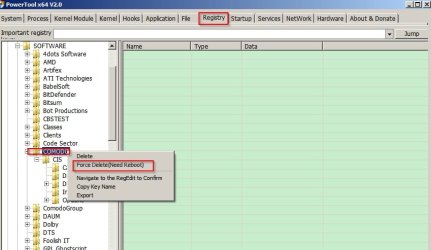
At your own risk you can try PowerTool 4.8 x86 / 2.0 x64

More programs by ithurricane

You'd need to run the x64 version.

PowerTool x64 V2.0.jpg

The thing is if you start deleting stuff it could lead to a non booting machine.

Check that nothing AVG is running or set to run on boot:

Autoruns for Windows
 

My Computer My Computer

At a glance

Microsoft Windows 7 Home Premium 64-bit 7601 ...AMD C-60 APU with Radeon(tm) HD Graphics4.00 GBAMD Radeon HD 6290 Graphics
Computer type
Laptop
Computer Manufacturer/Model Number
ASUS
OS
Microsoft Windows 7 Home Premium 64-bit 7601 Multiprocessor Free Service Pack 1
CPU
AMD C-60 APU with Radeon(tm) HD Graphics
Motherboard
ASUSTeK COMPUTER INC. X501U
Memory
4.00 GB
Graphics Card(s)
AMD Radeon HD 6290 Graphics
Sound Card
(1) AMD High Definition Audio Device (2) Realtek High Defi
Screen Resolution
1366 x 768 x 32 bits (4294967296 colors) @ 60 Hz
Hard Drives
Hitachi HTS545050A7E380 SATA Disk Device
Antivirus
Comodo CIS & FW, SecureAplus App Whitelisting, Threatfire
Browser
Cyberfox 64bit, Opera 64bit, Airfox
Other Info
Spy-The-Spy, HitmanPro.Alert, Norton Connect Safe, MJRegWatcher, BitDefender TrafficLight, Voodoo Shield, Zemana AntiMalware
Back
Top