Solved Damaged laptop HD trouble with MiniTool Partition Wizard

jayrdi

New member
Local time
8:49 AM
Messages
10
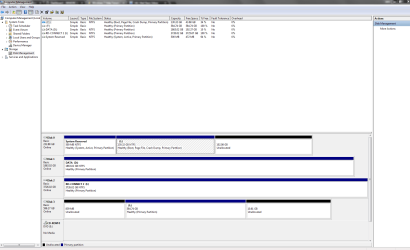
My laptop was recently dropped and the hard drive damaged so I removed the HD and connected it to my PC with a HD Dock. I then followed the instructions kindly provided by jumanji here.

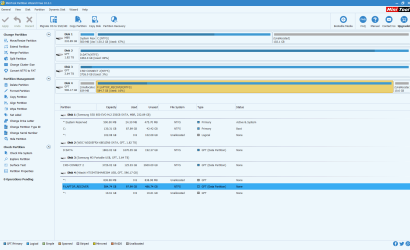
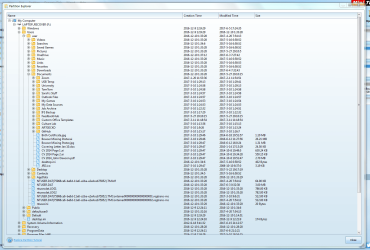
I completed the steps and the drive (Disk 4 in the attachment) has an allocated letter but I cannot access it in Explorer. I can see the files that I'm trying to retrieve (and have no backup of :(!) when I look in Partition Explorer, but don't seem to be able to copy or access them.

Any help is greatly appreciated, thanks!
 

Attachments
  • Capture.PNG
    Capture.PNG
    47.2 KB · Views: 5

My Computer My Computer

At a glance

Windows 7 Enterprise 64-bitIntel Core i7-6700 CPU @ 3.41 GHz8GB
Computer type
PC/Desktop
Computer Manufacturer/Model Number
Dell
OS
Windows 7 Enterprise 64-bit
CPU
Intel Core i7-6700 CPU @ 3.41 GHz
Memory
8GB
Welcome to the forum. If it's been dropped it's possible it's damaged beyond repair. If it's got a drive letter run chkdsk on it but don't repair see what it reports
 

My Computer My Computer

At a glance

win 8 32 bit
Computer type
PC/Desktop
OS
win 8 32 bit
There is something amiss here. How come your 600GB+ drive is a GPT drive?

When you run Partition Recovery Wizard - whether Quick Scan or Full Scan - and when it finds the partitions, you should select the partitions that will - if you had selected the correct partitions - show the Preview Map at the bottom as it ( the hdd ) was before, without any unallocated space. Here I see two unallocated spaces.

And when you mention dock, I get jittery :) . Those have uncanny ways of corrupting the HDD. I would at all times advise a direct connection in a desktop - not even an external third party enclosure - to keep things straight from any unwanted additions/influence to an already problematic drive.
In Partition Recovery Wizard 10.2.1 Partition Recovery is not free. How did you manage to recover the partitions? (Eversince the advent of version 10, I have been advising OPs to download and use the old version 9.1 from
http://www.filehorse.com/download-partition-wizard-home/old-versions/ if they want to do partition Recovery)

Notwithstanding,

1. Tell us what exactly happens when you try to access the folders/files in F: in Windows Explorer. (Do you get any error message?) It will also help to see how Windows Disk Management sees the drive. Post a screenshot.

2. Explore the partition F: Laptop Recover in Partition Wizard and show me the folders/files seen ( screenshot)

3. Next let us see what Getdatabck Simple shows. Please download from https://www.runtime.org/data-recovery-software.htm and run it to scan your problem drive. ( Partition F: ) Does it show all your folders and files? If it shows, rightclick on the file and check the integrity of the file. ( For example if it is an MP3 file it should open and play in the associated player. If it is a .doc, it should open in Word etc.,)
 

My Computer My Computer

At a glance

Windows 7 Home Premium 32 bit
OS
Windows 7 Home Premium 32 bit
Great, thanks for your help, both of you.

I am running a `chkdsk` now from the command prompt so will get back to you once that has completed.

After I ran Quick Scan in PRZ there were a few partitions. I knew which was the correct one because, as you suggested, I double clicked it and it listed all the files that I was trying to recover. I then only selected that partition and clicked 'Finish'; the resulting contents of Disk 4 from the previous screenshot are what happened so I'm not sure where the 'Unallocated Space' came from! Also, not sure how I managed to 'Apply' when it was version 10. I saw elsewhere in your previous messages about 9.1 being free and have since downloaded that one instead. It still shows the same setup for Disk 4 from the previous scan though.

I will answer your 3 questions in the next message - thanks
 

My Computer My Computer

At a glance

Windows 7 Enterprise 64-bitIntel Core i7-6700 CPU @ 3.41 GHz8GB
Computer type
PC/Desktop
Computer Manufacturer/Model Number
Dell
OS
Windows 7 Enterprise 64-bit
CPU
Intel Core i7-6700 CPU @ 3.41 GHz
Memory
8GB
CHKDSK log

In terms of chkdsk it seems to have locked up at 38%, but I'll show you the log anyway:
 

Attachments

  • Capture2.PNG
    Capture2.PNG
    21.5 KB · Views: 1

My Computer My Computer

At a glance

Windows 7 Enterprise 64-bitIntel Core i7-6700 CPU @ 3.41 GHz8GB
Computer type
PC/Desktop
Computer Manufacturer/Model Number
Dell
OS
Windows 7 Enterprise 64-bit
CPU
Intel Core i7-6700 CPU @ 3.41 GHz
Memory
8GB
1. Tell us what exactly happens when you try to access the folders/files in F: in Windows Explorer. (Do you get any error message?) It will also help to see how Windows Disk Management sees the drive. Post a screenshot.

2. Explore the partition F: Laptop Recover in Partition Wizard and show me the folders/files seen ( screenshot)

3. Next let us see what Getdatabck Simple shows. Please download from https://www.runtime.org/data-recovery-software.htm and run it to scan your problem drive. ( Partition F: ) Does it show all your folders and files? If it shows, rightclick on the file and check the integrity of the file. ( For example if it is an MP3 file it should open and play in the associated player. If it is a .doc, it should open in Word etc.,)

1. I get an "F:\ is not accessible. The parameter is incorrect.". See Capture3.PNG for Windows Disk Management (Disk 3 is the one in question here).

2. See Capture4.PNG

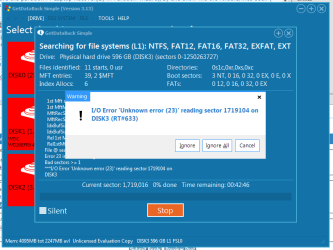
3. Running scan on Getdatabck now but looks like it might take a while. Already ran into error shown in Capture5.PNG. Will post full results of this when it's finished.

Thanks.
 

Attachments

  • Capture3.PNG
    Capture3.PNG
    41.1 KB · Views: 4
  • Capture4.PNG
    Capture4.PNG
    108.5 KB · Views: 2
  • Capture5.PNG
    Capture5.PNG
    21 KB · Views: 2

My Computer My Computer

At a glance

Windows 7 Enterprise 64-bitIntel Core i7-6700 CPU @ 3.41 GHz8GB
Computer type
PC/Desktop
Computer Manufacturer/Model Number
Dell
OS
Windows 7 Enterprise 64-bit
CPU
Intel Core i7-6700 CPU @ 3.41 GHz
Memory
8GB
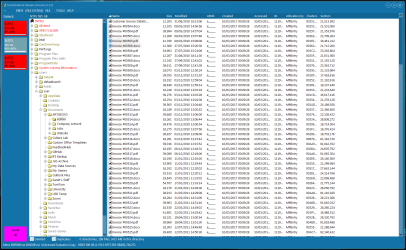
Sorry for bombardment of posts! Final one is the results of Getdatabck. As you can see in Capture6.PNG, I can view all the files. The folder I'm mainly concerned with is Users/user/Documents and I was able to open the two files, Invoice #00505.pdf and Invoice #00506.docx successfully in Adobe Acrobat and Microsoft Word respectively.
 

Attachments

  • Capture6.PNG
    Capture6.PNG
    107.3 KB · Views: 3

My Computer My Computer

At a glance

Windows 7 Enterprise 64-bitIntel Core i7-6700 CPU @ 3.41 GHz8GB
Computer type
PC/Desktop
Computer Manufacturer/Model Number
Dell
OS
Windows 7 Enterprise 64-bit
CPU
Intel Core i7-6700 CPU @ 3.41 GHz
Memory
8GB
Now I am in a dilemma :D

Whether to advise you to buy GetdatabackSimple and get done with it. Copy all files you need. Penalty USD 80

Take a chance. Run check disk from command prompt.

Open Command prompt. Start > All programs > Accessories > Command Prompt

Type
CHKDSK K: /f /v /r /x Press enter. Note: Replace K: with the actual drive letter of the external drive

Allow check disk to complete. ( Do not interrupt checkdisk for any reason even if it takes a day. Do not use the PC for any other task while checkdisk runs. We have no control if it aborts itself.)

If it aborts itself, I do not know whether you can go back to Getdataback Simple and get the files intact.

Take your pick.

( My post#16 here External hard drive visible in Partition Magic but not explorer which was successful, but I can't guarantee the same in the case of your HDD which had a drop.)

EDIT: If data is absolutely important to me, I would buy Getdataback Simple.
 
Last edited:

My Computer My Computer

At a glance

Windows 7 Home Premium 32 bit
OS
Windows 7 Home Premium 32 bit
Okay, thanks for all your help. Very tempted to try the CHKDSK but I'm not really a gambler so will probably just pay the USD 80 to get my data back. My wife can pay seeing as she dropped the laptop!

Thanks again for your help.
 

My Computer My Computer

At a glance

Windows 7 Enterprise 64-bitIntel Core i7-6700 CPU @ 3.41 GHz8GB
Computer type
PC/Desktop
Computer Manufacturer/Model Number
Dell
OS
Windows 7 Enterprise 64-bit
CPU
Intel Core i7-6700 CPU @ 3.41 GHz
Memory
8GB
Check the integrity of all the data you want to recover with Getdataback Simple before you buy.

After copying all data try checkdisk as advised. Your experience can help others.

An alternate to Getdataback simple is active@ file recovery as advised by SIW2. It costs USD30. You can try that too as the user who used it also says in that also you can preview and check the data integrity before buying.
 
Last edited:

My Computer My Computer

At a glance

Windows 7 Home Premium 32 bit
OS
Windows 7 Home Premium 32 bit
Okay, thanks. Once I get data back I'll do the CHKDSK and post results on here then mark as 'solved'

Thanks!
 

My Computer My Computer

At a glance

Windows 7 Enterprise 64-bitIntel Core i7-6700 CPU @ 3.41 GHz8GB
Computer type
PC/Desktop
Computer Manufacturer/Model Number
Dell
OS
Windows 7 Enterprise 64-bit
CPU
Intel Core i7-6700 CPU @ 3.41 GHz
Memory
8GB

My Computer My Computer

At a glance

Windows 10 Pro. 64/ version 1709 Windows 7 Pr...Intel i7-6800K @ 4.3Corsair Platinum 16 gig @2400EVGA GTX 1070 OC
Computer type
PC/Desktop
Computer Manufacturer/Model Number
Home made Desktop
OS
Windows 10 Pro. 64/ version 1709 Windows 7 Pro/64
CPU
Intel i7-6800K @ 4.3
Motherboard
ASUS X-99 Deluxe II
Memory
Corsair Platinum 16 gig @2400
Graphics Card(s)
EVGA GTX 1070 OC
Monitor(s) Displays
Asus 27" LED LCD/VE278Q
Screen Resolution
1920-1080 or 1280-720 HDMI
Hard Drives
INTEL SSD 730-240 Gb Sata 3.0/
PSU
EVGA Platium 1200W
Case
Phanteks Luxe Tempered Glass 8 fans/ one radiator
Cooling
XSPC/ Water Cooled CPU
Keyboard
Das 4 Professional
Mouse
Logitech M705/MX Anywhere 2-S
Internet Speed
100 mbits
Antivirus
Microsoft Security Essentials/ Malwarebytes Premium 3.0/ SAS
Browser
I.E. 11 default/Firefox/ ISP Time Warner Cable/Spectrum
Other Info
LG BluRay Burner/
Sound system-KLipsch-THX/
Icy Dock ssd Hot Swap bays.
I will definitely be backing up my data from now on, although will probably use a Cloud service.

I am recovering my data now with the program, Active@ File Recovery, which I can recommend. It managed to find all my data where other software failed and was also one of the cheapest options.

Once this has finished I will run the CHKDSK function and report back the results.

Thanks, everyone, for your help.
 

My Computer My Computer

At a glance

Windows 7 Enterprise 64-bitIntel Core i7-6700 CPU @ 3.41 GHz8GB
Computer type
PC/Desktop
Computer Manufacturer/Model Number
Dell
OS
Windows 7 Enterprise 64-bit
CPU
Intel Core i7-6700 CPU @ 3.41 GHz
Memory
8GB
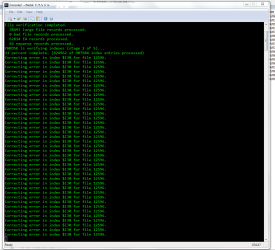
I think that CHKDSK may be stuck (see attached). Can't get past that index for that file. I'll leave it running for a bit and see if it manages to get any further. Makes me glad I chose the other option to retrieve my data though!
 

Attachments

  • Capture.PNG
    Capture.PNG
    24.9 KB · Views: 1

My Computer My Computer

At a glance

Windows 7 Enterprise 64-bitIntel Core i7-6700 CPU @ 3.41 GHz8GB
Computer type
PC/Desktop
Computer Manufacturer/Model Number
Dell
OS
Windows 7 Enterprise 64-bit
CPU
Intel Core i7-6700 CPU @ 3.41 GHz
Memory
8GB
Yep, your not taking any chance saved you :). :party:

Now we know for certain that there is no point in running checkdisk in the case of suspected physical damage on a drop down to earth. Straightaway check with the commercial software Getdataback Simple or active file recovery and if you see the data grab it even if you have to spend some bucks on it.

Thanks for running the experiment.
 

My Computer My Computer

At a glance

Windows 7 Home Premium 32 bit
OS
Windows 7 Home Premium 32 bit
Yes, it fails with an error of CHKDSK loop. I'll mark this as solved from using data retrieval software, Active@ File Recover, with thanks to everyone who advised.
 

My Computer My Computer

At a glance

Windows 7 Enterprise 64-bitIntel Core i7-6700 CPU @ 3.41 GHz8GB
Computer type
PC/Desktop
Computer Manufacturer/Model Number
Dell
OS
Windows 7 Enterprise 64-bit
CPU
Intel Core i7-6700 CPU @ 3.41 GHz
Memory
8GB
Back
Top