Numerous attempts to install Win7 64

Adrian, thanks for jumping in!

I have done that! I made sure that ANY drivers that i personally installed were done from the C drive and "run as administrator". The exact same thing happens...

what is curious tho is that if i watch the chipset installer package for ASUS 64bit for the board (and yes i made tripply sure that i downloaded the correct file) I see the process with a *32 beside it... not sure what this means exactly in a 64 bit OS but one might assume that this means its a 32 bit installer or application.

So as stated when running the ASUS 64 chipset dirver installer, there is no "progress" as one would expect to see and as one sees when doing other ASUS driver packages - it just goes from the start button directly to the Success splash which leads to the win prompt.

It would almost say this is irrelevant to my problems tho because i get the same flakky issues even if i dont intsall the vendor DL driver set vs. the win7 selected dirvers.

Keg mentiones that Asus is being a problem child with win7x64. how solid is this thought?
 

My Computer My Computer

At a glance

Windows 7 64bitCore 2 duo E84004gigNvidia GeForce 880 GT 512meg
Computer Manufacturer/Model Number
Personally bilt
OS
Windows 7 64bit
CPU
Core 2 duo E8400
Motherboard
Asus P5Q trubo
Memory
4gig
Graphics Card(s)
Nvidia GeForce 880 GT 512meg
Sound Card
Onboard audio (VIA)
Monitor(s) Displays
Samsung 21
Screen Resolution
1680X1050 x 59hz
Hard Drives
WDC WD2500KS-00MJB0
Keyboard
Apple slim key
Mouse
Logitech G5
Enoch, some questions if I may?
  1. Are you installing directly from the dvd?
  2. Is your flat panel connected via dvi? Or HDMI?
  3. You have prior issues installing the chipset updates from Assus?
  4. Is your hard drive connected via SATA?
  5. Does your bios read the hard drive as SATA?
Your issue suggests problems with your video card.
Check these points out and let us know.

Adrian

I posted before seeing this latest post from ya so we may get ahead of ourselves... :D

Answers:
1. installing directly from DVD
2. flat pannel is connected by DVI-D
3. no prior issues with ASUS drivers. Other than an intel board, I wont use anything else but ASUS given my good history with them.
4&5. HD is physically connected as SATA, but i have the bios set up for RAID to support 2 other drives i have in a mirrored array. These other 2 are not plugged in durring the install process tho to ensure their integrity.

I agree that several of my crashes would point toward video card, but some of the crashes start out as "win Explorer stopped working" that fails the system and in my novice perspective i dont think this is a video issue.
 

My Computer My Computer

At a glance

Windows 7 64bitCore 2 duo E84004gigNvidia GeForce 880 GT 512meg
Computer Manufacturer/Model Number
Personally bilt
OS
Windows 7 64bit
CPU
Core 2 duo E8400
Motherboard
Asus P5Q trubo
Memory
4gig
Graphics Card(s)
Nvidia GeForce 880 GT 512meg
Sound Card
Onboard audio (VIA)
Monitor(s) Displays
Samsung 21
Screen Resolution
1680X1050 x 59hz
Hard Drives
WDC WD2500KS-00MJB0
Keyboard
Apple slim key
Mouse
Logitech G5
Socket

Enoch, what Intel Socket is used for your Mother Board?
 

My Computer My Computer

At a glance

Windows 7 7600 1 X64AMD PHENOM II X 550 PROCESSOR 3.1 ghzCorsair 4 gig ddr 3ati radeon 3300
Computer Manufacturer/Model Number
Custom Build
OS
Windows 7 7600 1 X64
CPU
AMD PHENOM II X 550 PROCESSOR 3.1 ghz
Motherboard
ASUS M4A78-TE
Memory
Corsair 4 gig ddr 3
Graphics Card(s)
ati radeon 3300
Sound Card
ati hd
Monitor(s) Displays
syncmaster 2033sw
Screen Resolution
1600X900 60 hz refresh
Hard Drives
twin_seagates SATA's 1 TB & 500 Gig, hitachi_slimline 160 gig
PSU
antec_550 watt
Case
cooler master GLite
Cooling
stock_heat sink
Internet Speed
20mbs up/ 1.5mbs down
Other Info
favorite child "stewie"
favorite dog "brian"
Enoch, some questions if I may?
  1. Are you installing directly from the dvd?
  2. Is your flat panel connected via dvi? Or HDMI?
  3. You have prior issues installing the chipset updates from Assus?
  4. Is your hard drive connected via SATA?
  5. Does your bios read the hard drive as SATA?
Your issue suggests problems with your video card.
Check these points out and let us know.

Adrian

I posted before seeing this latest post from ya so we may get ahead of ourselves... :D

Answers:
1. installing directly from DVD
2. flat pannel is connected by DVI-D
3. no prior issues with ASUS drivers. Other than an intel board, I wont use anything else but ASUS given my good history with them.
4&5. HD is physically connected as SATA, but i have the bios set up for RAID to support 2 other drives i have in a mirrored array. These other 2 are not plugged in durring the install process tho to ensure their integrity.

I agree that several of my crashes would point toward video card, but some of the crashes start out as "win Explorer stopped working" that fails the system and in my novice perspective i dont think this is a video issue.
The issue is not your mother board, its your redundant set up. AKA RAID.
This was not seen in your system specs.
I suggest you change your bios setting from RAID to AHCI.
AHCI auto sets to RAID Array.
1 Caveat, we have seen numerous issues with intel chipsets and AHCI!!!
Intel has not updated drivers for AHCI in OS 7 this is a known issue.
 

My Computer My Computer

At a glance

Windows 7 7600 1 X64AMD PHENOM II X 550 PROCESSOR 3.1 ghzCorsair 4 gig ddr 3ati radeon 3300
Computer Manufacturer/Model Number
Custom Build
OS
Windows 7 7600 1 X64
CPU
AMD PHENOM II X 550 PROCESSOR 3.1 ghz
Motherboard
ASUS M4A78-TE
Memory
Corsair 4 gig ddr 3
Graphics Card(s)
ati radeon 3300
Sound Card
ati hd
Monitor(s) Displays
syncmaster 2033sw
Screen Resolution
1600X900 60 hz refresh
Hard Drives
twin_seagates SATA's 1 TB & 500 Gig, hitachi_slimline 160 gig
PSU
antec_550 watt
Case
cooler master GLite
Cooling
stock_heat sink
Internet Speed
20mbs up/ 1.5mbs down
Other Info
favorite child "stewie"
favorite dog "brian"
Enoch, what Intel Socket is used for your Mother Board?

Mobo is Asus P5Q turbo
  • LGA775 socket for Intel Core 2 Extreme/Core 2 Quad/Core 2 Duo.....
  • Chipset is P45/ICH10R with intel FMA
 

My Computer My Computer

At a glance

Windows 7 64bitCore 2 duo E84004gigNvidia GeForce 880 GT 512meg
Computer Manufacturer/Model Number
Personally bilt
OS
Windows 7 64bit
CPU
Core 2 duo E8400
Motherboard
Asus P5Q trubo
Memory
4gig
Graphics Card(s)
Nvidia GeForce 880 GT 512meg
Sound Card
Onboard audio (VIA)
Monitor(s) Displays
Samsung 21
Screen Resolution
1680X1050 x 59hz
Hard Drives
WDC WD2500KS-00MJB0
Keyboard
Apple slim key
Mouse
Logitech G5
Enoch, what Intel Socket is used for your Mother Board?


Mobo is Asus P5Q turbo
  • LGA775 socket for Intel Core 2 Extreme/Core 2 Quad/Core 2 Duo.....
  • Chipset is P45/ICH10R with intel FMA
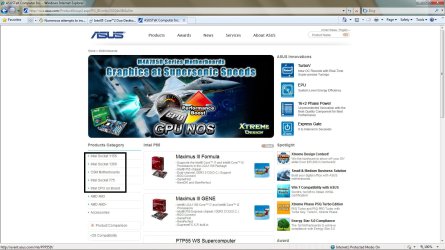
Enoch, review the screen shot, I want to direct you to the correct update. I am an AMD user so that would be useless to you.
P.S. My mobos have been ASSUS for the last 8 years!:geek:
 

Attachments

  • socket.jpg
    socket.jpg
    152.2 KB · Views: 30

My Computer My Computer

At a glance

Windows 7 7600 1 X64AMD PHENOM II X 550 PROCESSOR 3.1 ghzCorsair 4 gig ddr 3ati radeon 3300
Computer Manufacturer/Model Number
Custom Build
OS
Windows 7 7600 1 X64
CPU
AMD PHENOM II X 550 PROCESSOR 3.1 ghz
Motherboard
ASUS M4A78-TE
Memory
Corsair 4 gig ddr 3
Graphics Card(s)
ati radeon 3300
Sound Card
ati hd
Monitor(s) Displays
syncmaster 2033sw
Screen Resolution
1600X900 60 hz refresh
Hard Drives
twin_seagates SATA's 1 TB & 500 Gig, hitachi_slimline 160 gig
PSU
antec_550 watt
Case
cooler master GLite
Cooling
stock_heat sink
Internet Speed
20mbs up/ 1.5mbs down
Other Info
favorite child "stewie"
favorite dog "brian"
Adrian, your a god if this works!

I have to ask tho because im a bit of a noob at RAID/AHCI...

I will change the board to AHCI, but will this allow me to plug in the 2 ADDITIONAL drives in a mirrored format?

They are not plugged in because I currently have home/personal data on them and my only experience is with RAID setups.
 

My Computer My Computer

At a glance

Windows 7 64bitCore 2 duo E84004gigNvidia GeForce 880 GT 512meg
Computer Manufacturer/Model Number
Personally bilt
OS
Windows 7 64bit
CPU
Core 2 duo E8400
Motherboard
Asus P5Q trubo
Memory
4gig
Graphics Card(s)
Nvidia GeForce 880 GT 512meg
Sound Card
Onboard audio (VIA)
Monitor(s) Displays
Samsung 21
Screen Resolution
1680X1050 x 59hz
Hard Drives
WDC WD2500KS-00MJB0
Keyboard
Apple slim key
Mouse
Logitech G5
I will change the board to AHCI, but will this allow me to plug in the 2 ADDITIONAL drives in a mirrored format?

They are not plugged in because I currently have home/personal data on them and my only experience is with RAID setups.

Enoch, change bios setting for AHCI for right now. Do not plug any additional hardware in for the moment. We can go back and review once we get a stable system running.
I'm curious as to when you performed the chipset update, you said you attempted to install a 32 bit update?
If you can give me your intel socket I will direct you to the correct update.
 

My Computer My Computer

At a glance

Windows 7 7600 1 X64AMD PHENOM II X 550 PROCESSOR 3.1 ghzCorsair 4 gig ddr 3ati radeon 3300
Computer Manufacturer/Model Number
Custom Build
OS
Windows 7 7600 1 X64
CPU
AMD PHENOM II X 550 PROCESSOR 3.1 ghz
Motherboard
ASUS M4A78-TE
Memory
Corsair 4 gig ddr 3
Graphics Card(s)
ati radeon 3300
Sound Card
ati hd
Monitor(s) Displays
syncmaster 2033sw
Screen Resolution
1600X900 60 hz refresh
Hard Drives
twin_seagates SATA's 1 TB & 500 Gig, hitachi_slimline 160 gig
PSU
antec_550 watt
Case
cooler master GLite
Cooling
stock_heat sink
Internet Speed
20mbs up/ 1.5mbs down
Other Info
favorite child "stewie"
favorite dog "brian"
I will change the board to AHCI, but will this allow me to plug in the 2 ADDITIONAL drives in a mirrored format?

They are not plugged in because I currently have home/personal data on them and my only experience is with RAID setups.

Enoch, change bios setting for AHCI for right now. Do not plug any additional hardware in for the moment. We can go back and review once we get a stable system running.
I'm curious as to when you performed the chipset update, you said you attempted to install a 32 bit update?
If you can give me your intel socket I will direct you to the correct update.


i am doing an install under AHCI as requested as i type this... and the additonal drives are not plugged in.

I did not try to install a 32 bit driver, rather, i went to the ASUS site the other day, selected the win7x64 when prompted and was lead to a page with the following chipset package "Intel(R) Chipset Software Installation Utility V9.1.1.1019 for Windows 32/64bit XP & 32/64bit Vista & 32/64bit Windows 7.(WHQL)" which i D/L and tried to install.. Win then says it "MAY" have not installed properly, so when i selected "reinstall with the recomended cofiguration" option the process seems to hand and task manager shows the process with a *32 beside it.

I too thought that perhaps i had the wrong installer so i have D/Ld the package 3 times in my journey with win7 and always the same situation.
 

My Computer My Computer

At a glance

Windows 7 64bitCore 2 duo E84004gigNvidia GeForce 880 GT 512meg
Computer Manufacturer/Model Number
Personally bilt
OS
Windows 7 64bit
CPU
Core 2 duo E8400
Motherboard
Asus P5Q trubo
Memory
4gig
Graphics Card(s)
Nvidia GeForce 880 GT 512meg
Sound Card
Onboard audio (VIA)
Monitor(s) Displays
Samsung 21
Screen Resolution
1680X1050 x 59hz
Hard Drives
WDC WD2500KS-00MJB0
Keyboard
Apple slim key
Mouse
Logitech G5
Whats your point of origin?
 

My Computer My Computer

At a glance

Windows 7 7600 1 X64AMD PHENOM II X 550 PROCESSOR 3.1 ghzCorsair 4 gig ddr 3ati radeon 3300
Computer Manufacturer/Model Number
Custom Build
OS
Windows 7 7600 1 X64
CPU
AMD PHENOM II X 550 PROCESSOR 3.1 ghz
Motherboard
ASUS M4A78-TE
Memory
Corsair 4 gig ddr 3
Graphics Card(s)
ati radeon 3300
Sound Card
ati hd
Monitor(s) Displays
syncmaster 2033sw
Screen Resolution
1600X900 60 hz refresh
Hard Drives
twin_seagates SATA's 1 TB & 500 Gig, hitachi_slimline 160 gig
PSU
antec_550 watt
Case
cooler master GLite
Cooling
stock_heat sink
Internet Speed
20mbs up/ 1.5mbs down
Other Info
favorite child "stewie"
favorite dog "brian"
Take a Rep.

Enoch, take a rep.
Squirell Marines Salute!

P.S. Its 23:00 Hours here in Florida and its sleepy time soon for me.
 

Attachments

  • 633502079247460928-squirrel-marines.jpg
    633502079247460928-squirrel-marines.jpg
    57.1 KB · Views: 637

My Computer My Computer

At a glance

Windows 7 7600 1 X64AMD PHENOM II X 550 PROCESSOR 3.1 ghzCorsair 4 gig ddr 3ati radeon 3300
Computer Manufacturer/Model Number
Custom Build
OS
Windows 7 7600 1 X64
CPU
AMD PHENOM II X 550 PROCESSOR 3.1 ghz
Motherboard
ASUS M4A78-TE
Memory
Corsair 4 gig ddr 3
Graphics Card(s)
ati radeon 3300
Sound Card
ati hd
Monitor(s) Displays
syncmaster 2033sw
Screen Resolution
1600X900 60 hz refresh
Hard Drives
twin_seagates SATA's 1 TB & 500 Gig, hitachi_slimline 160 gig
PSU
antec_550 watt
Case
cooler master GLite
Cooling
stock_heat sink
Internet Speed
20mbs up/ 1.5mbs down
Other Info
favorite child "stewie"
favorite dog "brian"
Point of origin is Canada. I select the Global d/l option.

Well the install just completed and no joy. it installs as expected, but after the final reboot done by the sytem, i see the Starting Windows spash but not the flying colours and the sytem is non-responsive. After a few minutes it reboots itself again and then i get the same old screens to attempt a recover, which fails and then around in a circle from that point.

So i dont think its a storage configuration issue - but what do i konw :p

Adrian sorry to bail on you but i need to get some sleep, will continue wiht this tomorow durring the day. I sincerely appreciate the assistance.

Cheers.
 

My Computer My Computer

At a glance

Windows 7 64bitCore 2 duo E84004gigNvidia GeForce 880 GT 512meg
Computer Manufacturer/Model Number
Personally bilt
OS
Windows 7 64bit
CPU
Core 2 duo E8400
Motherboard
Asus P5Q trubo
Memory
4gig
Graphics Card(s)
Nvidia GeForce 880 GT 512meg
Sound Card
Onboard audio (VIA)
Monitor(s) Displays
Samsung 21
Screen Resolution
1680X1050 x 59hz
Hard Drives
WDC WD2500KS-00MJB0
Keyboard
Apple slim key
Mouse
Logitech G5
Just a suggestion, I saw in another thread, a guy with an Asus board turned off "Cool n' Quiet" and "Low and behold the system installed".

Crashing during install? Turn off Cool 'n Quiet! - His CPU is AMD, but turning off ASUS Fan Xpert Cool n' Quiet is worth a try.

We have seen some strange things with Win7 x64, and with Asus MOBOs.

Win7 x64 seems to be touchy with RAM, try running memtest so that can be ruled out.

Kind of a long thread, I did read through it but don't remember seeing the question asked about overclocking, if it's been asked already you can disregard, Any Over Clocking of the RAM, CPU or GPU? Reset all to defaults.

Do you have onboard graphics? Try the install without the graphics card and/or with a VGA cable, if you can.

There have been a lot of issues with burning the DVD, did you burn at low speed? x2 seems to give the best results.
Try putting it on a USB memory stick, it's usually faster installing, How to Create a Windows 7 Installation USB Key, and doesn't take long to put it on the USB key.

Didn't see an answer for the 32bit Win7 question, it's on a separate DVD.

These are most of the issues we've seen so far, just want to give you some more options.

Let us know your progress.
 
Last edited:

My Computer My Computer

At a glance

Windows 7 Ult x64 - SP1/ Windows 8 Pro x64Intel Core i5-3570K 4.6GHz8GB (2X4GB) DDR3 1600 Corsair Vengeance CL8 1.5vSapphire HD 7770 Vapor-X OC 1GB DDR5
Computer type
PC/Desktop
Computer Manufacturer/Model Number
76~2.0
OS
Windows 7 Ult x64 - SP1/ Windows 8 Pro x64
CPU
Intel Core i5-3570K 4.6GHz
Motherboard
Gigabyte GA-Z77X UD3H, f18
Memory
8GB (2X4GB) DDR3 1600 Corsair Vengeance CL8 1.5v
Graphics Card(s)
Sapphire HD 7770 Vapor-X OC 1GB DDR5
Sound Card
Onboard VIA VT2021
Monitor(s) Displays
22" LCD Dell
Screen Resolution
1680x1050
Hard Drives
Samsung 840Pro 128GB SSD,
Seagate Barracuda 500GB SATA2 7200rpm 32MB cache, Seagate Barracuda 1TB SATA2 7200rpm 32MB cache,
PSU
Corsair HX650W
Case
Cooler Master Storm Scout
Cooling
Corsair H80 2x12cm Noctua NF P12 , 2x14cm case fans
Keyboard
Logitech Wave
Mouse
CM Sentinel
Internet Speed
Dismal
Antivirus
Avast
Browser
Opera Next
Other Info
Haswell laptop: HP Envy 17t-j, i7-4700MQ, GeForce 740M 2GB DDR3, 17.3" Full HD 1920x1080, 16GB RAM, Samsung 840 Pro 128GB, 1TB Hitachi 7200 HDD,
Desktop: eSATA ports,
External eSATA Seagate 500GB SATA2 7200rpm,
External WD USB 500GB
Cool and Quiet

Dave, I remeber that thread also, I run the M4A78T-E and I never bothered with all the crap that was on the install disk maybe thats why I had an easier time during the install.
 

My Computer My Computer

At a glance

Windows 7 7600 1 X64AMD PHENOM II X 550 PROCESSOR 3.1 ghzCorsair 4 gig ddr 3ati radeon 3300
Computer Manufacturer/Model Number
Custom Build
OS
Windows 7 7600 1 X64
CPU
AMD PHENOM II X 550 PROCESSOR 3.1 ghz
Motherboard
ASUS M4A78-TE
Memory
Corsair 4 gig ddr 3
Graphics Card(s)
ati radeon 3300
Sound Card
ati hd
Monitor(s) Displays
syncmaster 2033sw
Screen Resolution
1600X900 60 hz refresh
Hard Drives
twin_seagates SATA's 1 TB & 500 Gig, hitachi_slimline 160 gig
PSU
antec_550 watt
Case
cooler master GLite
Cooling
stock_heat sink
Internet Speed
20mbs up/ 1.5mbs down
Other Info
favorite child "stewie"
favorite dog "brian"
Ok, so i seem to have solved the matter...

If your having trouble sleeping, read the whole long thread, but the relevant point is that i have probably been through about 20+ installs on this rig and no luck at any time - crash, fail to install, you name it...

On the last attempt i got a new error that was not there before - at boot, i got a SATA error on one of the devices. So as an experiment i took one of my unused WD 640 SATA2 black drives that was handy and replaced the WD 250G caviar drive that i was previously attempting to install on (recall that this drive ran perfect for both XP and Win7RCx32..).

Voilla! it works. The next install went smoothly, all the updates and drivers went in without a hitch and i have rebooted the PC about 10 times now to see if it fails. It was the HD in the end!!!

Now i dont know why it would make it through soooooo many installs and probably 100+ reboots through the whole process and never give me any indication that the HD was not well, but at this point im just happy to have the rig back again.

I want to personally thank all the folks who so quickly jumped in and offered assistance - in contrast the MS forum moderators did not read my full post and assumed i was some chump attempting to upgrade with a full install and gave a one line response that was worth jack squat. This crew here is the best! Adrian, Dave76 and Keg, thats you!

PS. Ill not add any new vendor drivers for few months unitl they iron out any bugs, ill stick with what Win7x64 has selected... "if it aint boke, dont fix it"

Enoch!

[EDIT] I even tried to do a chkdsk /f from the command prompt on a dvd boot, to see if i could salvage the disk, but it could not comply as the "NTFS was not fixed"....
 

My Computer My Computer

At a glance

Windows 7 64bitCore 2 duo E84004gigNvidia GeForce 880 GT 512meg
Computer Manufacturer/Model Number
Personally bilt
OS
Windows 7 64bit
CPU
Core 2 duo E8400
Motherboard
Asus P5Q trubo
Memory
4gig
Graphics Card(s)
Nvidia GeForce 880 GT 512meg
Sound Card
Onboard audio (VIA)
Monitor(s) Displays
Samsung 21
Screen Resolution
1680X1050 x 59hz
Hard Drives
WDC WD2500KS-00MJB0
Keyboard
Apple slim key
Mouse
Logitech G5
Enoch, so as of now you are using the Western Dig hard drive?
Are you planning to configure a redundant config?
If so install another hard drive either a usb or an internal and make a back up image. In the case of the RAID/AHCI issue you will have a working system ready to go.

All the best! It was a pleasure assisting you.

We are: "SQUIRELL MARINES":geek:
Escuse this poster's feeble attempt at humour, ehh!
 

Attachments

  • 633502079247460928-squirrel-marines.jpg
    633502079247460928-squirrel-marines.jpg
    57.1 KB · Views: 25

My Computer My Computer

At a glance

Windows 7 7600 1 X64AMD PHENOM II X 550 PROCESSOR 3.1 ghzCorsair 4 gig ddr 3ati radeon 3300
Computer Manufacturer/Model Number
Custom Build
OS
Windows 7 7600 1 X64
CPU
AMD PHENOM II X 550 PROCESSOR 3.1 ghz
Motherboard
ASUS M4A78-TE
Memory
Corsair 4 gig ddr 3
Graphics Card(s)
ati radeon 3300
Sound Card
ati hd
Monitor(s) Displays
syncmaster 2033sw
Screen Resolution
1600X900 60 hz refresh
Hard Drives
twin_seagates SATA's 1 TB & 500 Gig, hitachi_slimline 160 gig
PSU
antec_550 watt
Case
cooler master GLite
Cooling
stock_heat sink
Internet Speed
20mbs up/ 1.5mbs down
Other Info
favorite child "stewie"
favorite dog "brian"
enochthered,

Glad to hear that you got it in the end.

Thank you for the compliment.

You are very persistent, and it paid off. Good work.

Adrian as well.

Most of us have had to deal with an issue of our own and know that input from others along the way will help to keep your sanity.

Let us know if you have any other questions.
 

My Computer My Computer

At a glance

Windows 7 Ult x64 - SP1/ Windows 8 Pro x64Intel Core i5-3570K 4.6GHz8GB (2X4GB) DDR3 1600 Corsair Vengeance CL8 1.5vSapphire HD 7770 Vapor-X OC 1GB DDR5
Computer type
PC/Desktop
Computer Manufacturer/Model Number
76~2.0
OS
Windows 7 Ult x64 - SP1/ Windows 8 Pro x64
CPU
Intel Core i5-3570K 4.6GHz
Motherboard
Gigabyte GA-Z77X UD3H, f18
Memory
8GB (2X4GB) DDR3 1600 Corsair Vengeance CL8 1.5v
Graphics Card(s)
Sapphire HD 7770 Vapor-X OC 1GB DDR5
Sound Card
Onboard VIA VT2021
Monitor(s) Displays
22" LCD Dell
Screen Resolution
1680x1050
Hard Drives
Samsung 840Pro 128GB SSD,
Seagate Barracuda 500GB SATA2 7200rpm 32MB cache, Seagate Barracuda 1TB SATA2 7200rpm 32MB cache,
PSU
Corsair HX650W
Case
Cooler Master Storm Scout
Cooling
Corsair H80 2x12cm Noctua NF P12 , 2x14cm case fans
Keyboard
Logitech Wave
Mouse
CM Sentinel
Internet Speed
Dismal
Antivirus
Avast
Browser
Opera Next
Other Info
Haswell laptop: HP Envy 17t-j, i7-4700MQ, GeForce 740M 2GB DDR3, 17.3" Full HD 1920x1080, 16GB RAM, Samsung 840 Pro 128GB, 1TB Hitachi 7200 HDD,
Desktop: eSATA ports,
External eSATA Seagate 500GB SATA2 7200rpm,
External WD USB 500GB
Back
Top