Doing a Clean Install with a Upgrade Windows 7 Version

OK, so I took a few days off from here because my Windows 7 STILL has not arrived. (Fist pumping to Best Buy!!!)

Here are my remaining questions:

gregrocker said:
That recovery partition will be disabled (if it is factory installed) when you install Windows 7 so you can delete it, but you might want to make your recovery disk set if you haven't yet since those disks are generated from that partition. You would only need them if you wanted to restore the computer to factory condition so you can sell it, but want to migrate your WIndows 7 to your next computer.

THen delete them both after booting from the installer, create one big partition (that's what it's called even if it's one) and format it.
Because I have the DELL, I have the recovery disks. But I don't really care about that anyway - I never want to go back to Windows Vista (I am assuming).

When I load Windows 7 from boot, before I delete the Recovery partition - does it *already* recognize that I have Vista on the computer? Meaning - does deleting that partition do anything to hurt the "upgrade" in recognizing that I had Vista on my system before I reformat and install 7 on the new full partition?

zrtom said:
If your system is a Dell, installing Windows 7 does not disable your recovery partition. And Dells do not have a "create recovery disk set" process. The recovery is all contained in the D:\RECOVERY\Dell\Factory.wim file which is run through the F8 Windows Recovery enviroment by the files in the D:\RECOVERY\Tools folder. Again, that is if your system is a Dell.

Additionally, early reports indicate the mere existence of the D:\RECOVERY partition (which contains a Windows Preinstallation Environment besides the Factory.wim file and the Tools folder) obviates the need for tweaks or hacks to get an upgrade version of Windows 7 to clean install and activate on the first try.
Tom
I DO have DELL, actually. I understand that does not disable the Recovery partition - but would I have any use for it after installing Windows 7? Would Windows 7 utilize it? Otherwise, I think it would be obsolete for me? (Pointing to the second paragraph) would deleting said partition make doing the clean install/activate more difficult? Sorry, not very knowledgeable about partitions and their uses.


Not at all, just boot from your Win7 install disk, choose Custom and delete all the partitions, create new ones you want, then format and install Win7 to the first one.

Recovery partition has no bearing on the new OS, just wastes space and won't work anyway in most cases after new OS is installed.

Plenty of reports in this thread that clean installs were done from boot without any traces of previous O.S., so it can be done, and if necessary the workarounds to get activated.are right here.
 
I would really prefer NOT to use a workaround. I just want it to work how it is supposed to. :) Just want to make sure that deleting the partition won't affect it working.

Also, I keep seeing how I should NOT register it at first but do it later. Why is that? I mean, I am 100% legit about it - so what is the danger? I almost feel like I would prefer to register it during installation rather than after. I need a good reason (or two) not to.
 

My Computer My Computer

At a glance

Windows 7 Home Premium 64-Bit4 GB
Computer Manufacturer/Model Number
DELL m1530
OS
Windows 7 Home Premium 64-Bit
Memory
4 GB
Screen Resolution
1440x900
Hard Drives
250GB, 500GB (external)
I put my key in when it first asked and it took it, then I installed from boot to a formatted drive and it activated as soon as I got online. So there should be no problem giving your key because it is able to somehow detect the previous O.S. even after formatting.

However I just tried to zero the drive which wipes all traces from it, and that would not activate without doing the second Upgrade (repair) install over the installation.

So I've confirmed here I believe that it is somehow reading a previous OS before installing from boot.

But if it won't take your key and you want, you can restart and run the installer from your XP/Vista desktop and still get a clean install (just not format) which will immediately detect your qualifying OS. A shortcut to do this is a registry edit here: http://www.winsupersite.com/win7/cle...rade_media.asp
 
Last edited:
Dell Factory Image Restoration

Before this gets out of hand with speculation as to whether the Dell Factory Image Restoration process works or does not work after installing Windows 7, I thought I'd drop in to say it works; it's no longer "automated" but it works. The file Factory.wim is a windows image file. If you know anything about windows imaging you'll know that just that one file is all you need to restore the computer the way it shipped from Dell.

I'm working on a tutorial for Dell owners but for the time being, here is how to restore a Dell to factory-shipped conditions when the option is no longer present in the F8 "Repair your computer" Windows Recovery Environment. This is for Vista Operating Systems.

1. Boot Vista DVD that was shipped with computer. 2. Work your way to the command prompt. 3. Navigate to D:\Tools. 4. Type PCRestore.exe. 5. Authorize reformatting, sit back and 10-15 minutes later you'll be at the OOBE like the first time the computer was turned on.

If for some reason the above doesn't work....
1. Boot Vista disk. 2. From command prompt navigate to d:\Tools. 3. Type the following:
imagex /apply D:\Dell\Image\Factory.wim 1 C:\

There you have it. Back to factory shipped conditions in about 10 minutes. The key thing about "factory shipped" conditions is not so much to actually use Vista but for troubleshooting those real tough problems. The computer worked when it left the factory and if it doesn't work after restoring the factory image, it is almost definately a hardware problem.

By the way, Dells generally don't ship with trialware or bloatware. I think the only thing you might find besides the Operating System itself is Dell Support Center and maybe Windows Live Essentials. I don't think they even put Google Desktop on anymore; at least not on my Mini 10 from May.

Lastly, the redeployed factory image makes an excellent base with which to do an inplace upgrade to Windows 7. I generally advocate clean installs only. However there is a time and a place for everything. Before everyone gets on my case, think about it. It is a clean install of Vista with all the drivers that work; it's not an upgrade of a system that has been botched and hacked for two years; there's no data nor user (sometimes incorrectly) installed software.
The upgrade goes very quickly and frankly, I've tried upgrade from Vista (fresh factory image) vs. fresh install on two high-end Dell Laptops side-by-side. I cannot see any difference at all with both subjective observations and objective benchmarks.

What I have been doing on a couple of client's Dell computers is run the Factory Image Restoration process, upgrade it to W7 and dual boot that with a fresh W7 installation. The client has 30 days (more with rearming the software licensing manager) to decide which one they like better. Once they've decided, pick one, get rid of the other and activate. Why dual boot this way? Some W7 drivers aren't quite ready and Vista with good drivers upgraded to W7 is smoother than W7 with "green" drivers. That should all change in the upcoming months as more and more W7 drivers are refined.
Tom
 

My Computer My Computer

At a glance

W8 Pro, W7 Ultimate, XP Pro x64, Vista x64, U...Q6600, Q6700, T7500, T7500, N270, N2708GB, 8GB, 4GB, 4GB, 2GB, 2GBATI, nVidia, nVidia, nVidia, Intel, Intel
Computer type
PC/Desktop
Computer Manufacturer/Model Number
Dell: XPS 420 (2), XPS M1330 (several), XPS 14z, Mini 9, Mini 10v
OS
W8 Pro, W7 Ultimate, XP Pro x64, Vista x64, Ubuntu
CPU
Q6600, Q6700, T7500, T7500, N270, N270
Motherboard
Dell
Memory
8GB, 8GB, 4GB, 4GB, 2GB, 2GB
Graphics Card(s)
ATI, nVidia, nVidia, nVidia, Intel, Intel
Monitor(s) Displays
Dell 2408WFP
Hard Drives
A drawer full. OCZ Vertex's in RAID 0. Vertex 3's, Vertex 4, Samsung 830's, Samsung 840's, Intel 330. Don't use dino drives any more except for servers.
Keyboard
Logitech Wave
Internet Speed
29 Mbps DL / .95 Mbps UL
Other Info
New project(2013)...Another low power server. Zotac H67ITX, i3-2100T, Windows Server 2012 Essentials on Samsung SSD.
Previous project...Low power (38-40 watts using Kill-a-Watt) Windows Home Server. Zotac ION (Atom 330, GeForce9400), 4GB RAM, 2x2TB WD Green, IN WIM miniITX Case. Fits on a shelf in laundry closet, practically silent.
+ Rep

Thanks for the info zrtom,

I think everyone with a Dell (any OEM) should keep the recovery partition.

If for some reason you can't keep it on your HD then keep a backup image of it or burn it to DVD.
Your reasons for keeping it are valid.

Looking forward to reading the tutorial.
Can you extract the WIM file and run it?
Would you need the WAIK file (6001.18000...kb3aikl_en.iso) to do that?

Dell has a clause in the Hardware Warranty that you may have to install the original OS for hardware warranty issues.
Even if you dual boot just for the warranty issue, having them replace hardware would make the recovery partition worth keeping.
 
Last edited:

My Computer My Computer

At a glance

Windows 7 Ult x64 - SP1/ Windows 8 Pro x64Intel Core i5-3570K 4.6GHz8GB (2X4GB) DDR3 1600 Corsair Vengeance CL8 1.5vSapphire HD 7770 Vapor-X OC 1GB DDR5
Computer type
PC/Desktop
Computer Manufacturer/Model Number
76~2.0
OS
Windows 7 Ult x64 - SP1/ Windows 8 Pro x64
CPU
Intel Core i5-3570K 4.6GHz
Motherboard
Gigabyte GA-Z77X UD3H, f18
Memory
8GB (2X4GB) DDR3 1600 Corsair Vengeance CL8 1.5v
Graphics Card(s)
Sapphire HD 7770 Vapor-X OC 1GB DDR5
Sound Card
Onboard VIA VT2021
Monitor(s) Displays
22" LCD Dell
Screen Resolution
1680x1050
Hard Drives
Samsung 840Pro 128GB SSD,
Seagate Barracuda 500GB SATA2 7200rpm 32MB cache, Seagate Barracuda 1TB SATA2 7200rpm 32MB cache,
PSU
Corsair HX650W
Case
Cooler Master Storm Scout
Cooling
Corsair H80 2x12cm Noctua NF P12 , 2x14cm case fans
Keyboard
Logitech Wave
Mouse
CM Sentinel
Internet Speed
Dismal
Antivirus
Avast
Browser
Opera Next
Other Info
Haswell laptop: HP Envy 17t-j, i7-4700MQ, GeForce 740M 2GB DDR3, 17.3" Full HD 1920x1080, 16GB RAM, Samsung 840 Pro 128GB, 1TB Hitachi 7200 HDD,
Desktop: eSATA ports,
External eSATA Seagate 500GB SATA2 7200rpm,
External WD USB 500GB
However I just tried to zero the drive which wipes all traces from it, and that would not activate without doing the second Upgrade (repair) install over the installation.

So I've confirmed here I believe that it is somehow reading code revealing a previous OS from formatted drive when installing from boot.

SWEET! So the old Vista (Install twice) trick still works also! Cool!
 

My Computer My Computer

At a glance

Windows 7 Ultimate 64 bit Steve Ballmer Signa...Intel Core 2 Quad - Q9550 - 2.83GHz stock - O...4GB DDR2 800MHz (PC6400) OCZ ReaperNvidia GE Force 8800 GTS
Computer Manufacturer/Model Number
Homebrew PC - "Alpha_Dawg"
OS
Windows 7 Ultimate 64 bit Steve Ballmer Signature Edition
CPU
Intel Core 2 Quad - Q9550 - 2.83GHz stock - OC'd to 3.6GHz
Motherboard
Gigabyte EP45-UD3P
Memory
4GB DDR2 800MHz (PC6400) OCZ Reaper
Graphics Card(s)
Nvidia GE Force 8800 GTS
Sound Card
Asus Xonar DX
Monitor(s) Displays
Samsung SyncMaster 2333HD
Screen Resolution
1920 x 1080
Hard Drives
WD Caviar Black 750GB - 7200RPM - 32MB cache
WD Caviar Green 1.5TB - 5400RPM - 64MB cache
WD Caviar Green 2.0TB - 5400RPM - 64MB cache
PSU
PC Power & Cooling Silencer 750
Case
Gigabyte 3D Aurora
Cooling
Case is Air - 5ea. 120mm fans (mix of Arctic and Xigmatec)
Keyboard
MS Natural Wireless KB
Mouse
MS Wireless Mouse
Internet Speed
50 mbps down/5 mbps up
Other Info
AVerMedia - AVerTVHD G2 Dual Tuner Card
Sweet. My OEM Upgrade DVD Worked! It activated and is running great!!

OEM software, gotta love it. dirt cheap.
 

My Computer My Computer

At a glance

Windows 7 Ultimate x64 Steve Ballmer EditionCore i7 920 @ 3.6GHz6Gb Kingston DDR3 1066MHzMSI GTX460 1GB Cyclone
OS
Windows 7 Ultimate x64 Steve Ballmer Edition
CPU
Core i7 920 @ 3.6GHz
Motherboard
EVGA X58 SLI Micro
Memory
6Gb Kingston DDR3 1066MHz
Graphics Card(s)
MSI GTX460 1GB Cyclone
Monitor(s) Displays
LG W2361V
Screen Resolution
1920 x 1080p
Hard Drives
64GB Microcenter SSD (Adata S599)
1TB SeaGate Barracuda 7200
PSU
Corsair HX750
Case
Antec 1200
Cooling
Corsair H50
Mouse
Logitech M/X Revolution
Internet Speed
2mb/s
Other Info
SSD Boot drive with MS Office
Thanks for the info zrtom,

I think everyone with a Dell (any OEM) should keep the recovery partition.

If for some reason you can't keep it on your HD then keep a backup image of it or burn it to DVD.
Your reasons for keeping it are valid.

Looking forward to reading the tutorial.
Can you extract the WIM file and run it?
Would you need the WAIK file (6001.18000...kb3aikl_en.iso) to do that?

Dell has a clause in the Hardware Warranty that you may have to install the original OS for hardware warranty issues.
Even if you dual boot just for the warranty issue, having them replace hardware would make the recovery partition worth keeping.

Thanks Dave,
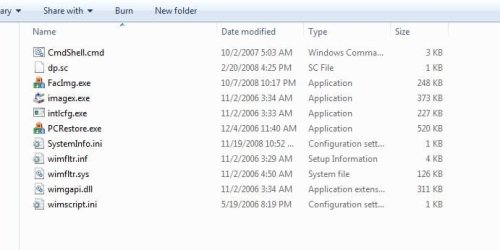
The Tools folder in Dell recovery partitions has everything you need, including imagex, to mount the factory image. None of this is "disabled" by installing Windows 7, only the WinRE option to run PCRestore.exe (that's why it has to be done manually).
Dell Tools Folder.JPG

I've even gone as far as doing this:
  • Custom (clean) install the Operating System (Vista, W7, it doesn't matter).
  • Add tweaks
  • Add software (whatever... Adobe PS, Office, AV, Sling Player, etc., etc.)
  • Use the tool FacImg.exe to capture the new system and replace the file Factory.wim in the D:\RECOVERY\Image\ folder with my custom image. (The Dell tool FacImg.exe isn't part of the regular Tools folder..... I "obtained" it)
I did that more before I switched to Vista Ultimate and, now, W7 Ultimate with it's own imaging. What I don't have and need to get my hands on is a copy of the Tools folder from someone who has Vista (or now W7) x64 'cause I only have 32-bit tools and I no longer use 32-bit OS's. I can still do this process, only not with FacImg.exe; I have to use imagex x64 from the WAIK.

So, anyway, I should be writing a tutorial and not this....LOL
Tom
 

My Computer My Computer

At a glance

W8 Pro, W7 Ultimate, XP Pro x64, Vista x64, U...Q6600, Q6700, T7500, T7500, N270, N2708GB, 8GB, 4GB, 4GB, 2GB, 2GBATI, nVidia, nVidia, nVidia, Intel, Intel
Computer type
PC/Desktop
Computer Manufacturer/Model Number
Dell: XPS 420 (2), XPS M1330 (several), XPS 14z, Mini 9, Mini 10v
OS
W8 Pro, W7 Ultimate, XP Pro x64, Vista x64, Ubuntu
CPU
Q6600, Q6700, T7500, T7500, N270, N270
Motherboard
Dell
Memory
8GB, 8GB, 4GB, 4GB, 2GB, 2GB
Graphics Card(s)
ATI, nVidia, nVidia, nVidia, Intel, Intel
Monitor(s) Displays
Dell 2408WFP
Hard Drives
A drawer full. OCZ Vertex's in RAID 0. Vertex 3's, Vertex 4, Samsung 830's, Samsung 840's, Intel 330. Don't use dino drives any more except for servers.
Keyboard
Logitech Wave
Internet Speed
29 Mbps DL / .95 Mbps UL
Other Info
New project(2013)...Another low power server. Zotac H67ITX, i3-2100T, Windows Server 2012 Essentials on Samsung SSD.
Previous project...Low power (38-40 watts using Kill-a-Watt) Windows Home Server. Zotac ION (Atom 330, GeForce9400), 4GB RAM, 2x2TB WD Green, IN WIM miniITX Case. Fits on a shelf in laundry closet, practically silent.
I have not read that here. Most advice I've read here is to make your recovery disks and then delete the partition since it is disabled anyway if/when Vista is deleted. It was also pointed out recently that Dell's recovery partition is different and should likely be kept since it has important tools and can still later recover the Vista if Vista is wiped. But I have not verified this.

I will be creating a dual boot Vista/Win 7 system, so I dare not delete the recovery partition, and certainly not before the warranty expires.

In any case, I would restore from most recent image backup, not from recovery disks.

Smart approach. Imaging ends reinstalls if saved externally in case of HDD failure.

Since you are concerned about preserving your recovery partition, which will most likely be disabled by Win7 install, be sure to make the recovery disks from it (or order them) to have as backup. These disks normally restore eveything including the recovery partition to factory condition.

But they also contain the bloatware, which is a good reason to dual boot with a fresh install of Win7, then copy your files between partitions via Explorer, even find drivers by browsing to the Vista partition's Windows>System32>Driverstore>File Repository.

A Win 7 install has no business deleting/disabling a recovery partition.

And I would not copy ANY OS files from Vista to Win 7.

If Win 7 needs drivers for the notebook, and I doubt that, they are likely available at HP's web site.
 

My Computer My Computer

At a glance

Vista
OS
Vista
I'm confused with all the "upgrade" discs available. There's Full, Upgrade and Upgrade from XXXX.

I'm on Build 7100 right now and want to upgrade. According to this thread, you can do a full clean install using an upgrade disc. Does that mean I can purchase an "upgrade from Home" Ultimate disc and successfully do a clean full install of W7 Ultimate?
 

My Computer My Computer

At a glance

Windows 7 UltimateP4 3.4Ghz4GBX800XT
Computer Manufacturer/Model Number
Dell XPS Gen 3
OS
Windows 7 Ultimate
CPU
P4 3.4Ghz
Memory
4GB
Graphics Card(s)
X800XT
Sound Card
Audigy 2
Monitor(s) Displays
40" Samsung LCD
Screen Resolution
1920x1080

My Computer My Computer

At a glance

64-bit Windows 11 Pro for WorkstationsIntel i7-8700K OC'd to 5 GHz64 GB (4x16GB) G.SKILL TridentZ RGB DDR4 3600...ASUS ROG-STRIX-GTX1080TI-O11G-GAMING
Computer type
PC/Desktop
Computer Manufacturer/Model Number
Self built custom
OS
64-bit Windows 11 Pro for Workstations
CPU
Intel i7-8700K OC'd to 5 GHz
Motherboard
ASUS ROG Maximus XI Formula Z390
Memory
64 GB (4x16GB) G.SKILL TridentZ RGB DDR4 3600 MHz
Graphics Card(s)
ASUS ROG-STRIX-GTX1080TI-O11G-GAMING
Sound Card
Integrated
Monitor(s) Displays
2 x Samsung Odyssey G7 27"
Screen Resolution
2560x1440
Hard Drives
1TB Samsung 990 PRO M.2,
4TB Samsung 990 PRO PRO M.2,
TerraMaster F8 SSD Plus NAS
PSU
Seasonic Prime Titanium 850W
Case
Thermaltake Core P3
Cooling
Corsair Hydro H115i
Keyboard
Logitech wireless K800
Mouse
Logitech MX Master 4
Internet Speed
2 Gb/s Download and 100 Mb/s Upload
Antivirus
Malwarebyte Anti-Malware Premium
Browser
Google Chrome
Other Info
Logitech Z625 speaker system,
Logitech BRIO 4K Pro webcam,
HP Color LaserJet Pro MFP M477fdn,
APC SMART-UPS RT 1000 XL - SURT1000XLI,
Galaxy S23 Plus phone
Student upgrade (download) from Ubuntu

hello from a non-windows user. i am a student, and have been running ubuntu as my os for a few years now. generally i am very satisfied, but am very curious to check out windows 7 on my laptop. when i heard about the 30 dollar download deal, i rushed to sign up. i (quickly) read the info, and saw it said that you could do a custom install from other os. so far i have not had much success figuring out what to do here - i scanned through the others posts, but didnt see anyone in a similar position. am i just out 30 bucks? or is there some way get this done? thanks for any help

eta: would like to do this as a dual boot and not eradicate ubuntu.
 
Last edited:

My Computer My Computer

At a glance

Ubuntu
OS
Ubuntu
OK so I thought I had everything all figured out now and I am confused again. I think my Windows 7 is at my door so when I get home, I want to install it.

But before I do, I want clarification on the DELL RECOVERY partition.

I read the last few posts but still don't understand - why exactly should I keep it? I REALLY want to do a complete format of my hard drive with one partition and do not plan to go back to Vista. I have my back-up discs that came with the laptop and have all of my data backed up.

What good reason is there to keep the Recovery partition? Please answer soon if anyone can.

And if anyone has any additional tips on installing Windows 7 that have not been covered - I would appreciate that!
 

My Computer My Computer

At a glance

Windows 7 Home Premium 64-Bit4 GB
Computer Manufacturer/Model Number
DELL m1530
OS
Windows 7 Home Premium 64-Bit
Memory
4 GB
Screen Resolution
1440x900
Hard Drives
250GB, 500GB (external)
From all I have read including zrtom's comprehensive Dell research reports, there is no reason to save ANY recovery partition if you have no intention of returning to Vista.

If you should ever have to restore to factory condition, it would be because the manufacturer wanted it back on to replace certain hardware under warranty, and if you didn't make the disks first they would provide them. Any copy of Vista could otherwise be used with your Vista license key to put just the OS back on.

That license key sticker on your machine is all you need to prove previous OS to MS if future reinstalls would ever call Upgrade qualification into question.

Just be sure to save externally a Win7 backup image so reinstall won't ever be needed again, just reimage the drive in 15 minutes from the Win7 installer Repair Console.
 
OK so I thought I had everything all figured out now and I am confused again. I think my Windows 7 is at my door so when I get home, I want to install it.

But before I do, I want clarification on the DELL RECOVERY partition.

I read the last few posts but still don't understand - why exactly should I keep it? I REALLY want to do a complete format of my hard drive with one partition and do not plan to go back to Vista. I have my back-up discs that came with the laptop and have all of my data backed up.

What good reason is there to keep the Recovery partition? Please answer soon if anyone can.

And if anyone has any additional tips on installing Windows 7 that have not been covered - I would appreciate that!

You have read two different views on the OEM recovery partition. It's always good to have a discussion on your options.
Now you can decide, if you have the re-installation DVD you can use that if required.
If you have the space on your backup drive you can make a backup image of the recovery partition. The important thing is to leave your options open.

I kept my Dell Recovery partition, but that may not be your decision, that's what makes this world such a great place.

If you "REALLY want to do a complete format of my hard drive with one partition" then do it. If you decide to sell the laptop or Dell requests, you can put vista back on with the DVD. Most OEMs will send you the re-installations DVD for free or shipping charges during the first 6 months to a year after you purchase it, depending on the OEM.

For additional tips on your Win7 installation check this sticky thread Tutorial quick reference list for Installing Windows 7

Take a look at Windows Easy Transfer, it will transfer your user settings, you will still need to install your programs.

Always backup your HD before any installation, as you've already done, with Win7 backup or one of the great free backup programs.

Let us know how it goes.
 

My Computer My Computer

At a glance

Windows 7 Ult x64 - SP1/ Windows 8 Pro x64Intel Core i5-3570K 4.6GHz8GB (2X4GB) DDR3 1600 Corsair Vengeance CL8 1.5vSapphire HD 7770 Vapor-X OC 1GB DDR5
Computer type
PC/Desktop
Computer Manufacturer/Model Number
76~2.0
OS
Windows 7 Ult x64 - SP1/ Windows 8 Pro x64
CPU
Intel Core i5-3570K 4.6GHz
Motherboard
Gigabyte GA-Z77X UD3H, f18
Memory
8GB (2X4GB) DDR3 1600 Corsair Vengeance CL8 1.5v
Graphics Card(s)
Sapphire HD 7770 Vapor-X OC 1GB DDR5
Sound Card
Onboard VIA VT2021
Monitor(s) Displays
22" LCD Dell
Screen Resolution
1680x1050
Hard Drives
Samsung 840Pro 128GB SSD,
Seagate Barracuda 500GB SATA2 7200rpm 32MB cache, Seagate Barracuda 1TB SATA2 7200rpm 32MB cache,
PSU
Corsair HX650W
Case
Cooler Master Storm Scout
Cooling
Corsair H80 2x12cm Noctua NF P12 , 2x14cm case fans
Keyboard
Logitech Wave
Mouse
CM Sentinel
Internet Speed
Dismal
Antivirus
Avast
Browser
Opera Next
Other Info
Haswell laptop: HP Envy 17t-j, i7-4700MQ, GeForce 740M 2GB DDR3, 17.3" Full HD 1920x1080, 16GB RAM, Samsung 840 Pro 128GB, 1TB Hitachi 7200 HDD,
Desktop: eSATA ports,
External eSATA Seagate 500GB SATA2 7200rpm,
External WD USB 500GB
Small clarification on performance with an upgrade copy of Win7.

Is there really a performance difference between a Clean Install and Custom Install (when in OS already)? Don't both spit out a Windows.old folder?
 

My Computer My Computer

At a glance

Windows 7 Home Premium x86Duo Core 6600E 2.4ghz4gbNvidia GT630 2GB DDR3
Computer type
PC/Desktop
Computer Manufacturer/Model Number
Dell Dimension 9200
OS
Windows 7 Home Premium x86
CPU
Duo Core 6600E 2.4ghz
Memory
4gb
Graphics Card(s)
Nvidia GT630 2GB DDR3
Monitor(s) Displays
Samsung Syncmaster 932BF (4:3)
Screen Resolution
1280x1024
Hard Drives
500gb
PSU
375w
Keyboard
Microsoft Digital Media Pro
Mouse
Logitech LX8 Cordless Laser Mouse
Small clarification on performance with an upgrade copy of Win7.

Is there really a performance difference between a Clean Install and Custom Install (when in OS already)? Don't both spit out a Windows.old folder?
If you do a Custom install you have the option to wipe out all partitions and create new ones, thus, you will not have any remnants of your old Windows when Win7 starts.

-HM
 

My Computer My Computer

At a glance

Windows 7 Professional 64-BitIntel Core 2 Duo E6600 320 MB4 GB Crucial BallistixNVIDIA GeForce 8800 GTS
Computer Manufacturer/Model Number
Shuttle SD39P2 SFF XPC
OS
Windows 7 Professional 64-Bit
CPU
Intel Core 2 Duo E6600 320 MB
Motherboard
Intel 975X + ICH7R
Memory
4 GB Crucial Ballistix
Graphics Card(s)
NVIDIA GeForce 8800 GTS
Sound Card
Realtek ALC888
Monitor(s) Displays
Sumsung 22" LCD
Screen Resolution
1680x1050
Hard Drives
Maxtor 320 GB SATA II (7200 RPM, 16MB cache, AHCI mode)
PSU
400W
Case
Shuttle XPC
Cooling
I.C.E. Technology CPU heat-pipe
Keyboard
IBM Model M
Mouse
Razer DeathAdder
Internet Speed
DSL
Small clarification on performance with an upgrade copy of Win7.

Is there really a performance difference between a Clean Install and Custom Install (when in OS already)? Don't both spit out a Windows.old folder?
If you do a Custom install you have the option to wipe out all partitions and create new ones, thus, you will not have any remnants of your old Windows when Win7 starts.

-HM

Hello Hollow Man,

Thus the difference between a Clean Install and a Custom Install. ;)
 

My Computer My Computer

At a glance

64-bit Windows 11 Pro for WorkstationsIntel i7-8700K OC'd to 5 GHz64 GB (4x16GB) G.SKILL TridentZ RGB DDR4 3600...ASUS ROG-STRIX-GTX1080TI-O11G-GAMING
Computer type
PC/Desktop
Computer Manufacturer/Model Number
Self built custom
OS
64-bit Windows 11 Pro for Workstations
CPU
Intel i7-8700K OC'd to 5 GHz
Motherboard
ASUS ROG Maximus XI Formula Z390
Memory
64 GB (4x16GB) G.SKILL TridentZ RGB DDR4 3600 MHz
Graphics Card(s)
ASUS ROG-STRIX-GTX1080TI-O11G-GAMING
Sound Card
Integrated
Monitor(s) Displays
2 x Samsung Odyssey G7 27"
Screen Resolution
2560x1440
Hard Drives
1TB Samsung 990 PRO M.2,
4TB Samsung 990 PRO PRO M.2,
TerraMaster F8 SSD Plus NAS
PSU
Seasonic Prime Titanium 850W
Case
Thermaltake Core P3
Cooling
Corsair Hydro H115i
Keyboard
Logitech wireless K800
Mouse
Logitech MX Master 4
Internet Speed
2 Gb/s Download and 100 Mb/s Upload
Antivirus
Malwarebyte Anti-Malware Premium
Browser
Google Chrome
Other Info
Logitech Z625 speaker system,
Logitech BRIO 4K Pro webcam,
HP Color LaserJet Pro MFP M477fdn,
APC SMART-UPS RT 1000 XL - SURT1000XLI,
Galaxy S23 Plus phone
Small clarification on performance with an upgrade copy of Win7.

Is there really a performance difference between a Clean Install and Custom Install (when in OS already)? Don't both spit out a Windows.old folder?
If you do a Custom install you have the option to wipe out all partitions and create new ones, thus, you will not have any remnants of your old Windows when Win7 starts.

-HM

Hello Hollow Man,

Thus the difference between a Clean Install and a Custom Install. ;)
I would personally argue that a clean install is a subset of a custom install, but what's really important is what the user wants to accomplish, not necessarily the nomenclature people use (which varies on who's doing the talking).

-HM
 

My Computer My Computer

At a glance

Windows 7 Professional 64-BitIntel Core 2 Duo E6600 320 MB4 GB Crucial BallistixNVIDIA GeForce 8800 GTS
Computer Manufacturer/Model Number
Shuttle SD39P2 SFF XPC
OS
Windows 7 Professional 64-Bit
CPU
Intel Core 2 Duo E6600 320 MB
Motherboard
Intel 975X + ICH7R
Memory
4 GB Crucial Ballistix
Graphics Card(s)
NVIDIA GeForce 8800 GTS
Sound Card
Realtek ALC888
Monitor(s) Displays
Sumsung 22" LCD
Screen Resolution
1680x1050
Hard Drives
Maxtor 320 GB SATA II (7200 RPM, 16MB cache, AHCI mode)
PSU
400W
Case
Shuttle XPC
Cooling
I.C.E. Technology CPU heat-pipe
Keyboard
IBM Model M
Mouse
Razer DeathAdder
Internet Speed
DSL
Hi Guys,
I go on and on (and on and on) about the Dell recovery partition/process only because over the last two years I've spent considerable time studying it, dissecting it and tweaking it (using the files in the Tools folder to create my own custom recovery images). If you don't intend to go back to Vista then delete it. The existence of the recovery partition has no affect on installing Windows 7. Dell's recovery process is unlike most of the others; it is more sophisticated than burning your own recovery disks (not an option on a Dell) and I daresay that in no small way contributes to the fact that (some) Dell computers cost more than others.

My main concern is that there are literally millions of Dell owners out there who know absolutely nothing about computers (think of all the new netbook users) and now they are thinking of installing Windows 7. If something goes wrong, the Dell Factory Image Restoration process can get them back to a functioning Operating System in 10-15 minutes. And then there is the warranty issue.

Hard drives (good hard drives) are a dime a dozen. For $50US you can get a really good 500GB hard drive and just install Windows 7 on that. Put the factory hard drive away in a drawer somewhere.

And one final thought. I'll spill a little secret. If you only have one hard drive, delete the recovery partition, install Windows 7 then need Vista back for some reason (I, personally, can't think of any) there is one final alternative. Call Dell Tech. support, ask for the SRCDs for your service tag (you may need to be still under warranty). System Restoration CDs (or DVDs). They'll deny they exist. Mention they are part # 59221. They'll deny again. Keep at it (it may take more than one call). Eventually a manager will come on and say "Oh SRCDs! why didn't you say so?" Then they will overnight the SRCDs.

What are SRCDs (or DVDs for Vista computers)? They are not the backup disks you can request here: https://support.dell.com/support/topics/global.aspx/support/dellcare/en/backupcd_form

They are a set of DVDs burned specifically to your Service Tag. You boot the first one (of 3 or 4 DVDs for Vista, 2 or 3 CDs for XP) and they start a process (using Norton Ghost) to load all of the DVDs, completely format the hard drive, install the OS the way it was shipped (including software originally purchased, drivers, etc.), create the recovery partition and recovery/restoration tools, create a recovery image to put in the recovery partition and then boot into the OOBE like the computer just arrived. Dells of the past couple years have very little bloatware (and no trialware except sometimes an AV) and the SRCDs have even less.

So that's it. If you don't want the recovery partition hanging around, delete it.
Tom
 

My Computer My Computer

At a glance

W8 Pro, W7 Ultimate, XP Pro x64, Vista x64, U...Q6600, Q6700, T7500, T7500, N270, N2708GB, 8GB, 4GB, 4GB, 2GB, 2GBATI, nVidia, nVidia, nVidia, Intel, Intel
Computer type
PC/Desktop
Computer Manufacturer/Model Number
Dell: XPS 420 (2), XPS M1330 (several), XPS 14z, Mini 9, Mini 10v
OS
W8 Pro, W7 Ultimate, XP Pro x64, Vista x64, Ubuntu
CPU
Q6600, Q6700, T7500, T7500, N270, N270
Motherboard
Dell
Memory
8GB, 8GB, 4GB, 4GB, 2GB, 2GB
Graphics Card(s)
ATI, nVidia, nVidia, nVidia, Intel, Intel
Monitor(s) Displays
Dell 2408WFP
Hard Drives
A drawer full. OCZ Vertex's in RAID 0. Vertex 3's, Vertex 4, Samsung 830's, Samsung 840's, Intel 330. Don't use dino drives any more except for servers.
Keyboard
Logitech Wave
Internet Speed
29 Mbps DL / .95 Mbps UL
Other Info
New project(2013)...Another low power server. Zotac H67ITX, i3-2100T, Windows Server 2012 Essentials on Samsung SSD.
Previous project...Low power (38-40 watts using Kill-a-Watt) Windows Home Server. Zotac ION (Atom 330, GeForce9400), 4GB RAM, 2x2TB WD Green, IN WIM miniITX Case. Fits on a shelf in laundry closet, practically silent.
Back
Top