Change laptop's HDD with a faster one

askic

New member
Member
Local time
10:38 PM
Messages
62
Hello guys,

I have a laptop that is approximately two years old. It contains 1 TB Samsung HDD ST1000LM024, 8 MB, 5400 rpm. The OS is windows 10. Now I have recently got a new WD 500 GB WD5000LPCX laptop drive with 16 MB Cache.
Now I winder if it is maybe a good idea to replace the HDD in my laptop and to put WD inside because it has a bigger cache memory and to put Samsung drive in a case and to use it as external HDD.
I wonder of the performance would be noticeable better with newer WD HDD.

WD HDD is a bit tinner (7 mm) but that is OK since I'd put a bit or rubber in the HDD's case in the laptop.

Before I do this (make image of a system partition and similar) I wonder whether it's worth it.

Thank you.
 

My Computer My Computer

At a glance

Windows 7 64 vir
Computer type
PC/Desktop
Computer Manufacturer/Model Number
Dell T5500
OS
Windows 7 64 vir
I doubt you would notice any speed difference although it might test faster. If you really want to see a performance difference, swap out that 1TB spinner for a 250 or 500GB SSD. An SSD costs more but will be significantly faster.

If you wish to stick with a spinner, I would look for a 7200rpm drive instead of another 5400rpm.
 

My Computer My Computer

At a glance

W10 Pro desktop, W11 laptop, W11 Pro tablet (...3.7Ghz 8700K i7, i7-11800H, i7-1065G716G desktop, 16G laptop, 4G tabletAMD Radeon RX580, RTX 3060, Intel Iris Plus
Computer type
PC/Desktop
Computer Manufacturer/Model Number
Home Built desktop, Dell G15 5511 Gaming laptop,MS Surface Pro 7 tablet
OS
W10 Pro desktop, W11 laptop, W11 Pro tablet (all 64-bit)
CPU
3.7Ghz 8700K i7, i7-11800H, i7-1065G7
Motherboard
ASUS TUF Z370-Pro Gaming in desktop
Memory
16G desktop, 16G laptop, 4G tablet
Graphics Card(s)
AMD Radeon RX580, RTX 3060, Intel Iris Plus
Sound Card
High Definition Audio (Built-in to mobo)
Monitor(s) Displays
Samsung U32J59 32" (2x), 15.6", 12"
Screen Resolution
3840x2160, 3840x2160, 1920x1080, 2160x1440
Hard Drives
500G SSD for OS; 2T, 10T & 15T HDDs for Data on Desktop, 1TB SSD laptop, 128G SSD tablet.
PSU
Corsair CX 750M
Case
Antec 100
Cooling
CM 212+
Keyboard
IBM Model M - used continuously since 1986
Mouse
Microsoft Pro IntelliMouse
Internet Speed
400M down 8M up
Antivirus
Windows Defender
Browser
FireFox
Other Info
Built my first computer (8Mhz 8088cpu, 640K RAM, 20MB HDD, 2 360K floppy drives) in 1985 and have been building them for myself, relatives and friends ever since.
Hello strollin,

I also doubt that I would notice big difference. That is why I asked the question here. Some benchmark test program would probably show few numbers of a higher performance, but this wouldn't be noticeable when working on the laptop.

In the future I'll probably invest in SSD drive.
 

My Computer My Computer

At a glance

Windows 7 64 vir
Computer type
PC/Desktop
Computer Manufacturer/Model Number
Dell T5500
OS
Windows 7 64 vir
You don't need a big SSD. You can use a 120G SSD for Windows and programs and a HDD for data. To install the HDD into the laptop, replace the CD/DVD drive by a HDD holder. Search Newegg and Amazon for it.
 

My Computers My Computers

  • At a glance

    Windows 7 HP 64i5 6600K - 800MHz to 4200MHz4+4G GSkill DDR4 3000IG - Intel 530
    Computer type
    PC/Desktop
    Computer Manufacturer/Model Number
    custom build
    OS
    Windows 7 HP 64
    CPU
    i5 6600K - 800MHz to 4200MHz
    Motherboard
    GA-Z170-HD3P
    Memory
    4+4G GSkill DDR4 3000
    Graphics Card(s)
    IG - Intel 530
    Monitor(s) Displays
    Samsung 226BW
    Screen Resolution
    1680x1050
    Hard Drives
    (1) -1 SM951 – 128GB M.2 AHCI PCIe SSD drive for Windows 7 and Lubuntu
    (2) -1 WD SATA 3 - 1T for Data
    (3) -1 WD SATA 3 - 1T for backup
    PSU
    Thermaltake 450W TR2 gold
    Keyboard
    Old and good Chicony mechanical keyboard
    Mouse
    Logitech mX performance - 9 buttons (had to disable some)
    Internet Speed
    500Mb/s
    Browser
    Firefox 64
    Other Info
    TinyWall firewall
  • At a glance

    Windows 7 Proi7-4500U 800MHz to 3.0GHz(4+4)G DDR3 1600IG intel 4400 + NVIDIA GeForce GT 745M
    Computer type
    Laptop
    System Manufacturer/Model Number
    Asus Q550LF
    OS
    Windows 7 Pro
    CPU
    i7-4500U 800MHz to 3.0GHz
    Motherboard
    Asus Q550LF
    Memory
    (4+4)G DDR3 1600
    Graphics Card(s)
    IG intel 4400 + NVIDIA GeForce GT 745M
    Sound Card
    Realtek
    Monitor(s) Displays
    LG Display LP156WF4-SPH1
    Screen Resolution
    1920 x 1080
    Hard Drives
    BX500 120G SSD for Windows and programs +
    1T HDD for data
    Internet Speed
    500 Mb/s
    Browser
    Firefox
    Other Info
    TinyWall firewall
Thank you for that suggestion. I also consider putting ssd drive in addition to hdd. I have found the examples where people used macrium free software to migrate OS to new Ssd drive. One thing that I was not able to find is whether it is possible to migrate recovery partition also. My current lapop has recovery partition and I wonder if it also possible to migrate to new ssd drive.
 

My Computer My Computer

At a glance

Windows 7 64 vir
Computer type
PC/Desktop
Computer Manufacturer/Model Number
Dell T5500
OS
Windows 7 64 vir
The reason a 5400 rpm hard drive is use in a laptop, is because they produce less heat than a 7200 hard drive. Laptops are very poor at dissipating heat.

A ssd would solve the heat problem and the speed problem.

If you would use Macrium Reflect you can image/clone all partition from your hard drive to your ssd.

You can use the paid for or free edition.
Their are many online videos explaining how to use Macrium Reflect.

Macrium Software | Your image is everything


Jack
 

My Computer My Computer

At a glance

Windows 10 Pro. 64/ version 1709 Windows 7 Pr...Intel i7-6800K @ 4.3Corsair Platinum 16 gig @2400EVGA GTX 1070 OC
Computer type
PC/Desktop
Computer Manufacturer/Model Number
Home made Desktop
OS
Windows 10 Pro. 64/ version 1709 Windows 7 Pro/64
CPU
Intel i7-6800K @ 4.3
Motherboard
ASUS X-99 Deluxe II
Memory
Corsair Platinum 16 gig @2400
Graphics Card(s)
EVGA GTX 1070 OC
Monitor(s) Displays
Asus 27" LED LCD/VE278Q
Screen Resolution
1920-1080 or 1280-720 HDMI
Hard Drives
INTEL SSD 730-240 Gb Sata 3.0/
PSU
EVGA Platium 1200W
Case
Phanteks Luxe Tempered Glass 8 fans/ one radiator
Cooling
XSPC/ Water Cooled CPU
Keyboard
Das 4 Professional
Mouse
Logitech M705/MX Anywhere 2-S
Internet Speed
100 mbits
Antivirus
Microsoft Security Essentials/ Malwarebytes Premium 3.0/ SAS
Browser
I.E. 11 default/Firefox/ ISP Time Warner Cable/Spectrum
Other Info
LG BluRay Burner/
Sound system-KLipsch-THX/
Icy Dock ssd Hot Swap bays.
Hello Layback Bear,
I'm afraid but it is not possible to image/clone all partition because HDD is much bigger in capacity than SSD. That is why I want to clone only system and recovery partition
 

My Computer My Computer

At a glance

Windows 7 64 vir
Computer type
PC/Desktop
Computer Manufacturer/Model Number
Dell T5500
OS
Windows 7 64 vir
Thank you for that suggestion. I also consider putting ssd drive in addition to hdd. I have found the examples where people used macrium free software to migrate OS to new Ssd drive. One thing that I was not able to find is whether it is possible to migrate recovery partition also. My current lapop has recovery partition and I wonder if it also possible to migrate to new ssd drive.

I have used Macrium Reflect to migrate the recovery partition in both of the notebooks I have in service.
 

My Computer My Computer

At a glance

Win 7 Ultimate 64 bitIntel i7-3930KKingston HyperX Genesis 32GB Kit (8x4GB Modul...MSI R7850 Twin Frozr 2GD5/OC Radeon HD 7850 2...
Computer type
PC/Desktop
Computer Manufacturer/Model Number
Custom Build
OS
Win 7 Ultimate 64 bit
CPU
Intel i7-3930K
Motherboard
ASUS P9X79 WS
Memory
Kingston HyperX Genesis 32GB Kit (8x4GB Modules) 1600MHz DDR
Graphics Card(s)
MSI R7850 Twin Frozr 2GD5/OC Radeon HD 7850 2GB 256-bit GDDR
Sound Card
Asus Xonar Essence STX
Monitor(s) Displays
3x Asus VG248QE 24", Vizio 32" TV
Screen Resolution
1920 x 1080, ?
Hard Drives
Samsung 128GB 840 Pro SSD (1),
Samsung 4TB 850 EVO SSDs (4)
Samsung 4TB 850 EVO SSDs (16) external backup drives used in 2.5" hot swap bays in the computer.
PSU
Corsair HX750w
Case
Antec Two Hundred v2 (modified)
Cooling
Cooler Master GeminII S524 120mm (fan replaced with a 140mm)
Keyboard
Logitech G510s
Mouse
Logitech M525 (two in use)
Internet Speed
=< 32Mbps down, 8Mbps up
Antivirus
AVAST!, MBAM, SAS, Spybot S&D (all but MBAM free) Glary Util
Browser
IE11
Other Info
LSI 9211-8i HBA card (8 SATA III ports), 2.5" & 3.5" Hot Swap Bays, HooToo HT-CR001 PCI-E to USB 3.0 Internal Hub + 6 Slot Card Reader, and LG Model CH12LS28 BD-ROM Optical Drive. Also, ScanSnap S1500 ADF duplexing scanner, Canon 9000F flat bed scanner, Corsair SP2500 2.1 speakers, Samsung CLP 415nw laser color printer, Cyberpower PP2200SW UPS
Hello Layback Bear,
I'm afraid but it is not possible to image/clone all partition because HDD is much bigger in capacity than SSD. That is why I want to clone only system and recovery partition

You can select which partitions you want to clone when using Macrium Reflect as long as they will fit on the destination drive. Keep in mind that, when using the default settings, Macrium reflect will only clone the sectors that actually have something in them, sometimes making it possible to clone from a larger partition to a smaller one.
 

My Computer My Computer

At a glance

Win 7 Ultimate 64 bitIntel i7-3930KKingston HyperX Genesis 32GB Kit (8x4GB Modul...MSI R7850 Twin Frozr 2GD5/OC Radeon HD 7850 2...
Computer type
PC/Desktop
Computer Manufacturer/Model Number
Custom Build
OS
Win 7 Ultimate 64 bit
CPU
Intel i7-3930K
Motherboard
ASUS P9X79 WS
Memory
Kingston HyperX Genesis 32GB Kit (8x4GB Modules) 1600MHz DDR
Graphics Card(s)
MSI R7850 Twin Frozr 2GD5/OC Radeon HD 7850 2GB 256-bit GDDR
Sound Card
Asus Xonar Essence STX
Monitor(s) Displays
3x Asus VG248QE 24", Vizio 32" TV
Screen Resolution
1920 x 1080, ?
Hard Drives
Samsung 128GB 840 Pro SSD (1),
Samsung 4TB 850 EVO SSDs (4)
Samsung 4TB 850 EVO SSDs (16) external backup drives used in 2.5" hot swap bays in the computer.
PSU
Corsair HX750w
Case
Antec Two Hundred v2 (modified)
Cooling
Cooler Master GeminII S524 120mm (fan replaced with a 140mm)
Keyboard
Logitech G510s
Mouse
Logitech M525 (two in use)
Internet Speed
=< 32Mbps down, 8Mbps up
Antivirus
AVAST!, MBAM, SAS, Spybot S&D (all but MBAM free) Glary Util
Browser
IE11
Other Info
LSI 9211-8i HBA card (8 SATA III ports), 2.5" & 3.5" Hot Swap Bays, HooToo HT-CR001 PCI-E to USB 3.0 Internal Hub + 6 Slot Card Reader, and LG Model CH12LS28 BD-ROM Optical Drive. Also, ScanSnap S1500 ADF duplexing scanner, Canon 9000F flat bed scanner, Corsair SP2500 2.1 speakers, Samsung CLP 415nw laser color printer, Cyberpower PP2200SW UPS
As Lady has mentioned, using Macrium Reflect, you can resize the partition on the target disk.
What I have seen so far is that the recovery partition is useless on a disk (HDD or SSD) that is smaller than the original disk. The recovery program will format the C: drive and try to install the image on the formatted space. If the available space is smaller than the original, it will give you an error, regardless of data size on the image. This is also true if you make a Recovery disk and try to install it on a smaller drive.

Is your disk a UEFI -GPT or Legacy-MBR? Did it came with Win 10? Can you give us all the Laptop specs?
If you're able to install a second HDD on the laptop, this is what I would do.

- With the existing HDD, make a Factory Recover disk on a USB flash disk (16G?). Remember that you can always do a clean install on a computer that once had Win 10. You won't need a key.
- Clone the existing HDD (1T) to the new one (500G), without the Recovery partition and Tools partition, leaving on the UEFi and/or System partition and C:. Put the original HDD in a safe place.
- Boot from the new HDD. Delete all your data on it.
- Clone the HDD (without data) to the 120G SSD.
- Boot from the SSD and format the HDD drive and assign to it D:.
- Use Kari tutorial to move C:\Users (SSD) to D:\Users. User Profiles - Relocate to another Partition or Disk
- Put the original disk into a USB case and copy all your data to D:\Users"Name"
- Use the free space of the original disk on the USB case to make backups.

You will have:
- A 120G SSD with windows and programs (very fast and cheap).
- A 500G HDD for data.
- The original disk, totally functional, on the USB case to make backups.
- A Recover USB flash disk.

I have already done this procedure on a friend's laptop and can guide you if you decide to go with this option.
 
Last edited:

My Computers My Computers

  • At a glance

    Windows 7 HP 64i5 6600K - 800MHz to 4200MHz4+4G GSkill DDR4 3000IG - Intel 530
    Computer type
    PC/Desktop
    Computer Manufacturer/Model Number
    custom build
    OS
    Windows 7 HP 64
    CPU
    i5 6600K - 800MHz to 4200MHz
    Motherboard
    GA-Z170-HD3P
    Memory
    4+4G GSkill DDR4 3000
    Graphics Card(s)
    IG - Intel 530
    Monitor(s) Displays
    Samsung 226BW
    Screen Resolution
    1680x1050
    Hard Drives
    (1) -1 SM951 – 128GB M.2 AHCI PCIe SSD drive for Windows 7 and Lubuntu
    (2) -1 WD SATA 3 - 1T for Data
    (3) -1 WD SATA 3 - 1T for backup
    PSU
    Thermaltake 450W TR2 gold
    Keyboard
    Old and good Chicony mechanical keyboard
    Mouse
    Logitech mX performance - 9 buttons (had to disable some)
    Internet Speed
    500Mb/s
    Browser
    Firefox 64
    Other Info
    TinyWall firewall
  • At a glance

    Windows 7 Proi7-4500U 800MHz to 3.0GHz(4+4)G DDR3 1600IG intel 4400 + NVIDIA GeForce GT 745M
    Computer type
    Laptop
    System Manufacturer/Model Number
    Asus Q550LF
    OS
    Windows 7 Pro
    CPU
    i7-4500U 800MHz to 3.0GHz
    Motherboard
    Asus Q550LF
    Memory
    (4+4)G DDR3 1600
    Graphics Card(s)
    IG intel 4400 + NVIDIA GeForce GT 745M
    Sound Card
    Realtek
    Monitor(s) Displays
    LG Display LP156WF4-SPH1
    Screen Resolution
    1920 x 1080
    Hard Drives
    BX500 120G SSD for Windows and programs +
    1T HDD for data
    Internet Speed
    500 Mb/s
    Browser
    Firefox
    Other Info
    TinyWall firewall
Thank you all for your suggestions and especially thank you, Megahertz for your will to help me.
The laptop I want to make a bit faster is bought in Best Buy and it has the following spec:
Intel i3-5015 2.1 GHz, 6 GB RAM, 1 TB HDD, Win 10 64 bit Home
The HDD is ST1000LM024 HN-M101MBB and it scores low in PerfromanceTest.
The question about recovery is really important to me since I want to be able to revert back to original settings in case something goes wrong.
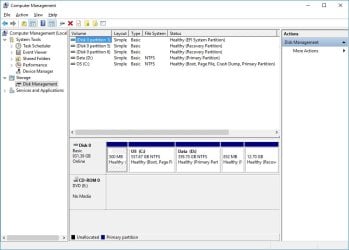
The laptop (Dell) came with preinstalled Win10 and the disk management is really strange:
Disk 0 Partition1, 500 MB, EFI System Partition
Disk 0 Partition 5, 852 MB, Recovery Partition
Disk 0 Partition 6, 12.7 GB, Recovery Partition
The rest was partition C with approx size around 900 GB which I was later divided to C 557 GB and D 359 GB.

The space occupied on C partition is approx 100 GB and the D is almost full of different data, movies, etc.
So, I was wondering how to migrate recovery partition also since the problem would probably arise only when I try to use this option since recovery is made for 1 TB drive. One more strange thing is that I actually have two recovery partitions and one system partition. I'm not sure what that means.
Right now I don't have a SSD drive, but will buy one in a future. I originally planned to migrate only system partition and C: to a new drive. Now I could use the following strategy:
- migrate only system partition and C: to SSD
- if satisfied with performance, I would make another image of SSD and that performed on a safe place in order to be able to restore when needed. Perhaps the recovery partition is not necessary since it can make some problems when recovery procedure is started.

What would you do if you were me? What can you suggest me? Since I don't have SSD right now I guess there is no need to guide me step by step. General steps would be just fine at the moment.

Thank again, I really appreciate it.

P.S: regarding the clean install of win 10, the computer came with already installed win 10 and there is no installation DVD (I guess this is called OEM). And since there is no installation disk, there is no win key etc, so the only option is to migrate already installed OS.

There is also one step that I didn't understand, and that is the necessity to copy to D:\user*name, since this step is already done because the complete c:\user folder is moved to the d drive (500gb)
 

My Computer My Computer

At a glance

Windows 7 64 vir
Computer type
PC/Desktop
Computer Manufacturer/Model Number
Dell T5500
OS
Windows 7 64 vir
The good news is that you have a UEFI BIOS. It makes it easy to clone partitions.

"P.S: regarding the clean install of win 10, the computer came with already installed win 10 and there is no installation DVD (I guess this is called OEM). And since there is no installation disk, there is no win key etc, so the only option is to migrate already installed OS."
- I'm not sure that the Laptop came with Win 10. It can be that it came with win 8.1 and then the fist owner installed Win 10 as the free upgrade. Look under the laptop and under the battery if there is a M$ COA sticker.
Anyway, you can always do a clean install on a computer that once had Win 10. You won't need a key. And you can download the installation disk from M$ for free. Download Windows 10

- It is also strange that \Users is on D: . This hasn't been done By Dell. Please give us the model of your Dell laptop.

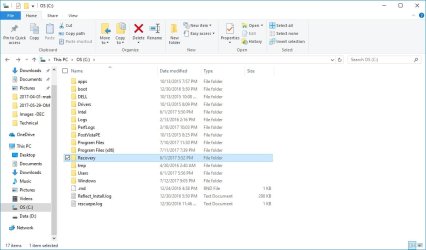
To understand your system a little more, could you please take a snapshot of Explorer showing C: and D: with the sub folders? Use the sniping tool and upload using the paper clip on the reply window.
Don't understand why you have so many partitions. Could you please also take a snapshot of disk manger?
 

My Computers My Computers

  • At a glance

    Windows 7 HP 64i5 6600K - 800MHz to 4200MHz4+4G GSkill DDR4 3000IG - Intel 530
    Computer type
    PC/Desktop
    Computer Manufacturer/Model Number
    custom build
    OS
    Windows 7 HP 64
    CPU
    i5 6600K - 800MHz to 4200MHz
    Motherboard
    GA-Z170-HD3P
    Memory
    4+4G GSkill DDR4 3000
    Graphics Card(s)
    IG - Intel 530
    Monitor(s) Displays
    Samsung 226BW
    Screen Resolution
    1680x1050
    Hard Drives
    (1) -1 SM951 – 128GB M.2 AHCI PCIe SSD drive for Windows 7 and Lubuntu
    (2) -1 WD SATA 3 - 1T for Data
    (3) -1 WD SATA 3 - 1T for backup
    PSU
    Thermaltake 450W TR2 gold
    Keyboard
    Old and good Chicony mechanical keyboard
    Mouse
    Logitech mX performance - 9 buttons (had to disable some)
    Internet Speed
    500Mb/s
    Browser
    Firefox 64
    Other Info
    TinyWall firewall
  • At a glance

    Windows 7 Proi7-4500U 800MHz to 3.0GHz(4+4)G DDR3 1600IG intel 4400 + NVIDIA GeForce GT 745M
    Computer type
    Laptop
    System Manufacturer/Model Number
    Asus Q550LF
    OS
    Windows 7 Pro
    CPU
    i7-4500U 800MHz to 3.0GHz
    Motherboard
    Asus Q550LF
    Memory
    (4+4)G DDR3 1600
    Graphics Card(s)
    IG intel 4400 + NVIDIA GeForce GT 745M
    Sound Card
    Realtek
    Monitor(s) Displays
    LG Display LP156WF4-SPH1
    Screen Resolution
    1920 x 1080
    Hard Drives
    BX500 120G SSD for Windows and programs +
    1T HDD for data
    Internet Speed
    500 Mb/s
    Browser
    Firefox
    Other Info
    TinyWall firewall
If you use imaging software such as Macrium Reflect, it pretty much negates the need for a recovery partition anyway. I personally never use the mfr's provided recovery partition since it will recover the machine back to the way it was when it left the factory. Using software like Macrium, you can save an image that will restore your machine back to the way it was the day you made the image which is far more useful.
 

My Computer My Computer

At a glance

W10 Pro desktop, W11 laptop, W11 Pro tablet (...3.7Ghz 8700K i7, i7-11800H, i7-1065G716G desktop, 16G laptop, 4G tabletAMD Radeon RX580, RTX 3060, Intel Iris Plus
Computer type
PC/Desktop
Computer Manufacturer/Model Number
Home Built desktop, Dell G15 5511 Gaming laptop,MS Surface Pro 7 tablet
OS
W10 Pro desktop, W11 laptop, W11 Pro tablet (all 64-bit)
CPU
3.7Ghz 8700K i7, i7-11800H, i7-1065G7
Motherboard
ASUS TUF Z370-Pro Gaming in desktop
Memory
16G desktop, 16G laptop, 4G tablet
Graphics Card(s)
AMD Radeon RX580, RTX 3060, Intel Iris Plus
Sound Card
High Definition Audio (Built-in to mobo)
Monitor(s) Displays
Samsung U32J59 32" (2x), 15.6", 12"
Screen Resolution
3840x2160, 3840x2160, 1920x1080, 2160x1440
Hard Drives
500G SSD for OS; 2T, 10T & 15T HDDs for Data on Desktop, 1TB SSD laptop, 128G SSD tablet.
PSU
Corsair CX 750M
Case
Antec 100
Cooling
CM 212+
Keyboard
IBM Model M - used continuously since 1986
Mouse
Microsoft Pro IntelliMouse
Internet Speed
400M down 8M up
Antivirus
Windows Defender
Browser
FireFox
Other Info
Built my first computer (8Mhz 8088cpu, 640K RAM, 20MB HDD, 2 360K floppy drives) in 1985 and have been building them for myself, relatives and friends ever since.
If you wish to stick with a spinner, I would look for a 7200rpm drive instead of another 5400rpm.

A 7200RPM drive can be sometimes slower than a 5400RPM drive.
 

My Computer My Computer

At a glance

Windows 7 Home Premium 64-BITAMD A8 7200P8GB 1600mhzRadeon R5 (APU) + Radeon R5 M230 2GB Dual Gra...
Computer type
PC/Desktop
Computer Manufacturer/Model Number
ASUS X550ZE
OS
Windows 7 Home Premium 64-BIT
CPU
AMD A8 7200P
Motherboard
N/A
Memory
8GB 1600mhz
Graphics Card(s)
Radeon R5 (APU) + Radeon R5 M230 2GB Dual Graphics
Sound Card
Realtek ALC269 with SonicMaster
Monitor(s) Displays
Laptop Display
Screen Resolution
1920 x 1080 @60hz
Hard Drives
WDC WD50 00LPVX-80V0TT0 (500GB)
PSU
Laptop Charger
Mouse
ARMAGGEDON TEXTRON SCORPION 7
Internet Speed
100 mbps DOWN / 50 mbps UP
Antivirus
Windows Defender
Browser
Mozzila FireFox, Valve Steam in-game internet browser
- I'm not sure that the Laptop came with Win 10. It can be that it came with win 8.1 and then the fist owner installed Win 10 as the free upgrade. Look under the laptop and under the battery if there is a M$ COA sticker.
Anyway, you can always do a clean install on a computer that once had Win 10. You won't need a key. And you can download the installation disk from M$ for free. Download Windows 10

- It is also strange that \Users is on D: . This hasn't been done By Dell. Please give us the model of your Dell laptop.

To understand your system a little more, could you please take a snapshot of Explorer showing C: and D: with the sub folders? Use the sniping tool and upload using the paper clip on the reply window.
Don't understand why you have so many partitions. Could you please also take a snapshot of disk manger?

Ok, the laptop came without any installation disk and without sticker. It was bought legally in Bestbuy store with installed win 10. It is very same like this one:

Regarding te partition D, I'm sorry because of the confusion I caused. I was commenting your steps:
- Use Kari tutorial to move C:\Users (SSD) to D:\Users. User Profiles - Relocate to another Partition or Disk
- Put the original disk into a USB case and copy all your data to D:\Users"Name"
- Use the free space of the original disk on the USB case to make backups.

The second step seemd unnecessary to me, couldn't understand why.

Regarding partitions of HDD please have a look in the attachment (the only difference from original setup is that I have created D: by splitting original C: drive)
Thanks!
 

Attachments

  • C partition.jpg
    C partition.jpg
    68.3 KB · Views: 2
  • HDD partitions.jpg
    HDD partitions.jpg
    63 KB · Views: 2

My Computer My Computer

At a glance

Windows 7 64 vir
Computer type
PC/Desktop
Computer Manufacturer/Model Number
Dell T5500
OS
Windows 7 64 vir
Hello Layback Bear,
I'm afraid but it is not possible to image/clone all partition because HDD is much bigger in capacity than SSD. That is why I want to clone only system and recovery partition


No you can clone from a bigger drive to a smaller one. You just need a program that can do it. One program that can do it and free is Clonezilla. A bit technical but there are a few tutorial online that show you how to do it.
 

My Computer My Computer

At a glance

Windows 7 Professional x64i7-2640m8 GB
Computer Manufacturer/Model Number
Lenovo Thinkpad T520
OS
Windows 7 Professional x64
CPU
i7-2640m
Memory
8 GB
No you can clone from a bigger drive to a smaller one. You just need a program that can do it. One program that can do it and free is Clonezilla. A bit technical but there are a few tutorial online that show you how to do it.

As I mentioned earlier, Macrium Reflect will also do the same. The only caveat is the destination partition has to be large enough to hold the content of the source partition and you have precreate the partitions, then clone one partition at a time.
 

My Computer My Computer

At a glance

Win 7 Ultimate 64 bitIntel i7-3930KKingston HyperX Genesis 32GB Kit (8x4GB Modul...MSI R7850 Twin Frozr 2GD5/OC Radeon HD 7850 2...
Computer type
PC/Desktop
Computer Manufacturer/Model Number
Custom Build
OS
Win 7 Ultimate 64 bit
CPU
Intel i7-3930K
Motherboard
ASUS P9X79 WS
Memory
Kingston HyperX Genesis 32GB Kit (8x4GB Modules) 1600MHz DDR
Graphics Card(s)
MSI R7850 Twin Frozr 2GD5/OC Radeon HD 7850 2GB 256-bit GDDR
Sound Card
Asus Xonar Essence STX
Monitor(s) Displays
3x Asus VG248QE 24", Vizio 32" TV
Screen Resolution
1920 x 1080, ?
Hard Drives
Samsung 128GB 840 Pro SSD (1),
Samsung 4TB 850 EVO SSDs (4)
Samsung 4TB 850 EVO SSDs (16) external backup drives used in 2.5" hot swap bays in the computer.
PSU
Corsair HX750w
Case
Antec Two Hundred v2 (modified)
Cooling
Cooler Master GeminII S524 120mm (fan replaced with a 140mm)
Keyboard
Logitech G510s
Mouse
Logitech M525 (two in use)
Internet Speed
=< 32Mbps down, 8Mbps up
Antivirus
AVAST!, MBAM, SAS, Spybot S&D (all but MBAM free) Glary Util
Browser
IE11
Other Info
LSI 9211-8i HBA card (8 SATA III ports), 2.5" & 3.5" Hot Swap Bays, HooToo HT-CR001 PCI-E to USB 3.0 Internal Hub + 6 Slot Card Reader, and LG Model CH12LS28 BD-ROM Optical Drive. Also, ScanSnap S1500 ADF duplexing scanner, Canon 9000F flat bed scanner, Corsair SP2500 2.1 speakers, Samsung CLP 415nw laser color printer, Cyberpower PP2200SW UPS
- Yes, your computer came with Win 10.
- Win 10 doesn't come with a COA sticker with a key. As I mentioned, you can always reinstall Win 10 (clean install or recover) and it will activate because it once had a Win 10 on it.

As you haven't decided if you're going to buy and install a SSD (that I highly recommend):
- Replace the original HDD (1T) with the new one (500G).
- Download Win 10 from M$. Download Windows 10
- Create a Win 10 installation DVD or USB flash disk.
- Boot it as UEFI and do a clean install. Skip entering the key.
- When done, create a new D: partition shrinking C: (C: should remain with 85G)
- Buy a USB case and install the original HDD. Use it to copy your data files to the new installation.
hdd case, Orico - Newegg.com
Use it to do backups.
 

My Computers My Computers

  • At a glance

    Windows 7 HP 64i5 6600K - 800MHz to 4200MHz4+4G GSkill DDR4 3000IG - Intel 530
    Computer type
    PC/Desktop
    Computer Manufacturer/Model Number
    custom build
    OS
    Windows 7 HP 64
    CPU
    i5 6600K - 800MHz to 4200MHz
    Motherboard
    GA-Z170-HD3P
    Memory
    4+4G GSkill DDR4 3000
    Graphics Card(s)
    IG - Intel 530
    Monitor(s) Displays
    Samsung 226BW
    Screen Resolution
    1680x1050
    Hard Drives
    (1) -1 SM951 – 128GB M.2 AHCI PCIe SSD drive for Windows 7 and Lubuntu
    (2) -1 WD SATA 3 - 1T for Data
    (3) -1 WD SATA 3 - 1T for backup
    PSU
    Thermaltake 450W TR2 gold
    Keyboard
    Old and good Chicony mechanical keyboard
    Mouse
    Logitech mX performance - 9 buttons (had to disable some)
    Internet Speed
    500Mb/s
    Browser
    Firefox 64
    Other Info
    TinyWall firewall
  • At a glance

    Windows 7 Proi7-4500U 800MHz to 3.0GHz(4+4)G DDR3 1600IG intel 4400 + NVIDIA GeForce GT 745M
    Computer type
    Laptop
    System Manufacturer/Model Number
    Asus Q550LF
    OS
    Windows 7 Pro
    CPU
    i7-4500U 800MHz to 3.0GHz
    Motherboard
    Asus Q550LF
    Memory
    (4+4)G DDR3 1600
    Graphics Card(s)
    IG intel 4400 + NVIDIA GeForce GT 745M
    Sound Card
    Realtek
    Monitor(s) Displays
    LG Display LP156WF4-SPH1
    Screen Resolution
    1920 x 1080
    Hard Drives
    BX500 120G SSD for Windows and programs +
    1T HDD for data
    Internet Speed
    500 Mb/s
    Browser
    Firefox
    Other Info
    TinyWall firewall
Thank you for your advices. Can you explain me one more thing? I do not understand how it is possible to activate win 10 on the same machine after it is formated? How win 10 knows that before it was installed on the same hardware? Where is this information stored? Really strange to learn that!
 

My Computer My Computer

At a glance

Windows 7 64 vir
Computer type
PC/Desktop
Computer Manufacturer/Model Number
Dell T5500
OS
Windows 7 64 vir
Microsoft maintains that info on their servers so you can re-install Win 10 at anytime. However, you need to install the same version that was on it originally. For instance, if the computer came with basic Win 10, you can't install Win 10 Pro.
 

My Computer My Computer

At a glance

W10 Pro desktop, W11 laptop, W11 Pro tablet (...3.7Ghz 8700K i7, i7-11800H, i7-1065G716G desktop, 16G laptop, 4G tabletAMD Radeon RX580, RTX 3060, Intel Iris Plus
Computer type
PC/Desktop
Computer Manufacturer/Model Number
Home Built desktop, Dell G15 5511 Gaming laptop,MS Surface Pro 7 tablet
OS
W10 Pro desktop, W11 laptop, W11 Pro tablet (all 64-bit)
CPU
3.7Ghz 8700K i7, i7-11800H, i7-1065G7
Motherboard
ASUS TUF Z370-Pro Gaming in desktop
Memory
16G desktop, 16G laptop, 4G tablet
Graphics Card(s)
AMD Radeon RX580, RTX 3060, Intel Iris Plus
Sound Card
High Definition Audio (Built-in to mobo)
Monitor(s) Displays
Samsung U32J59 32" (2x), 15.6", 12"
Screen Resolution
3840x2160, 3840x2160, 1920x1080, 2160x1440
Hard Drives
500G SSD for OS; 2T, 10T & 15T HDDs for Data on Desktop, 1TB SSD laptop, 128G SSD tablet.
PSU
Corsair CX 750M
Case
Antec 100
Cooling
CM 212+
Keyboard
IBM Model M - used continuously since 1986
Mouse
Microsoft Pro IntelliMouse
Internet Speed
400M down 8M up
Antivirus
Windows Defender
Browser
FireFox
Other Info
Built my first computer (8Mhz 8088cpu, 640K RAM, 20MB HDD, 2 360K floppy drives) in 1985 and have been building them for myself, relatives and friends ever since.
Back
Top