Sagestone42
New member
- Local time
- 2:10 AM
- Messages
- 2
Hi,
Here's more info on my current problem: So I have the original Win 7 Partition as C:/ and through the imagex tool provided and me booting into a second hard drive, I was able to create an image of that and uploaded to a network drive. Then I put that back on the C: partition and applied the image I've created it using imagex on a new and second partition called D:.
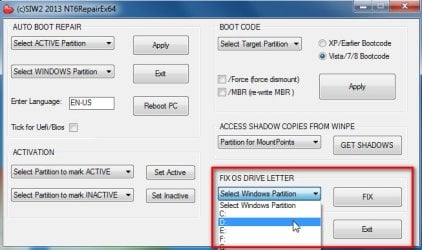
I went through bcd and edited so it points to the D:/ and it boots but the strange thing is that when it does boot, the D:/ partition does not become the Local Disk (C and I cannot uninstall programs in it.
Funny thing is that there is an older Win 7 image that can be applied does so correctly and it becomes the local disk when loaded. Now I wonder if anyone knows a way to make the D: into the local disk when I select at Windows Boot Manager.
Thanks,
Here's more info on my current problem: So I have the original Win 7 Partition as C:/ and through the imagex tool provided and me booting into a second hard drive, I was able to create an image of that and uploaded to a network drive. Then I put that back on the C: partition and applied the image I've created it using imagex on a new and second partition called D:.
I went through bcd and edited so it points to the D:/ and it boots but the strange thing is that when it does boot, the D:/ partition does not become the Local Disk (C
and I cannot uninstall programs in it. Funny thing is that there is an older Win 7 image that can be applied does so correctly and it becomes the local disk when loaded. Now I wonder if anyone knows a way to make the D: into the local disk when I select at Windows Boot Manager.
Thanks,
Last edited:
My Computer
At a glance
Windows 7 Pro x64 SP1
- Computer type
- PC/Desktop
- Computer Manufacturer/Model Number
- HP
- OS
- Windows 7 Pro x64 SP1