Clean Install Windows 7 with Upgrade Media

Barman58

Post no evil ;)
Guru
VIP
SF Team
Local time
3:23 PM
Messages
31,212
Location
Newport, South Wales, UK
Clean Install Windows 7 with Upgrade Media

It was the final unanswered question about Windows 7. But now, thanks to numerous reader reports and my own hands-on experience, I'm can now report that Microsoft is still making it difficult to clean install Windows 7 with Upgrade media. But fear not, there is some good news. While you can't simply use Upgrade media to do a clean install of Windows 7 on an unused PC with a blank hard drive, the workaround this time is easier than ever. Assuming you know the trick.

http://www.winsupersite.com/win7/clean_install_upgrade_media.asp
 

My Computers My Computers

System One System Two

  • Computer type
    PC/Desktop
    Computer Manufacturer/Model Number
    ChillBlast - Custom to my design
    OS
    Windows 11 Pro x64 [Latest Release and Release Preview]
    CPU
    Ryzen 9 5950X, 3.8 - 5.2 MHz
    Motherboard
    Asus Prime X570-Pro
    Memory
    64GB [2 x 32GB] DDR4 3200MHz
    Graphics Card(s)
    4GB NVIDIA GEFORCE GTX 1650 Ti
    Sound Card
    On-board SPDIF to 5.1 System + HDMI [5.1 system]
    Monitor(s) Displays
    32" UHD 32 Bit HDR Monitor + 43" UHD 4K 32Bit HDR TV
    Screen Resolution
    2 x 3840 x 2160 @60Hz
    Hard Drives
    1TB M2 SSD OS, 500GB Fast Access SSD, 2 x 8TB Data + Various Externals from 1TB to 4TB, 10TB NAS
    PSU
    NZXT C750 80 PLUS Gold 750W Modular PSU
    Case
    Workstation Case [Matt Black]
    Cooling
    NZXT Kraken X63 280mm CPU Cooler +2x Quiet Case fans
    Keyboard
    Logitech Wireless MX Keys & K400 + others
    Mouse
    Logitech Wireless MX Master 3S
    Internet Speed
    920 MB Down 50 MB Up
    Antivirus
    BitDefender Total Security Pro
    Browser
    Chrome (always run latest Non-Beta)
    Other Info
    Also run ...
    Laptop - Quad 8GB - Windows 10 Pro x64
    Nexus 7 Android tablet x2
    Samsung 10.2" tablet
    Blackview TAB 8 4G Android Tablet c/w Keyboard
    Wacom Intuos Pro Medium Pen Pad
    Wacom Intuos Pro Small Pen Pad
    Wacom Expresskeys Remote
    Loopdeck+ Graphics Controller
    Shuttle Pro v2 Control
  • Computer type
    Laptop
    System Manufacturer/Model Number
    Dell XPS 17 10750H
    OS
    Windows 11 Pro x64 Latest RP
    CPU
    Intel I7 10750H 5.0GHz
    Motherboard
    Dell XPS
    Memory
    32GB [2x16GB] DDR4 2933 MHz
    Graphics Card(s)
    nVidia GTX1650Ti 4 GB GDDR6
    Sound Card
    Stock [Realtek] 4 Speaker
    Monitor(s) Displays
    17" IPS UHD+ Infinity Edge Touchscreen
    Screen Resolution
    3840 x 2400
    Hard Drives
    2TB M2 NVMe, 4TB External + various 500GB & 1TB External NVMe (also have access to spinner HDD from
    PSU
    Stock
    Case
    Stock XPS Aluminium & Carbon Fibre
    Cooling
    Stock - Active Fan Control
    Keyboard
    Backlit + Various Logitech
    Mouse
    Stock Track Pad + Logitech MX Trackball
    Internet Speed
    72 MB Down 18MB Up
    Browser
    Chrome
    Other Info
    Also run ...
    Laptop - Quad 8GB - Windows 10 Pro x64
    Nexus 7 Android tablet x2
    10.2" tablet
    Sony Z3 Android Smartphone
    Wacom Intuos Pro Medium Pen Pad
    Wacom Intuos Pro Small Pen Pad
    Wacom Expresskeys Remote
    Loopdeck+ Graphics Controller
    Shuttle Pro v2 Control Pad
    10TB NAS
interesting rearm trick

this will please a lot of people.
 

My Computer My Computer

Computer Manufacturer/Model Number
mickey megabyte 1234
OS
ultimate 64 sp1
CPU
i5 2500K [email protected]
Motherboard
MSI P67A-GD53
Memory
8 gigs GSkill Ripjaws 1600
Graphics Card(s)
amd hd6950
Sound Card
creative x-fi gamer
Monitor(s) Displays
samsung 24"
Screen Resolution
1920x1080
Hard Drives
ocz vertex 2e 60 gig, samsung f3 1tb, buffalo 2tb ext
PSU
antec 550
Case
antec three hundred
Cooling
i'm a cooling fan
Keyboard
saitek eclipse ii
Mouse
logitech g3
Internet Speed
about 4 Mbps
Other Info
i love win7
Hmmm, I did a clean install with no problem. Formatted drive, installed 7 upgrade. Only "trick" I did was not register when it asked me to then after up and running I registered.
 

My Computer My Computer

OS
windows 7
Hi there
some people have reported that you can just do a clean install like the previous poster just pointed out without using the registry hack and slmgr command. (and Brink has also in another thread).

So this is doubly confusing now -- maybe there are TWO different types of update media out there now. :devil:

Anyway if the normal update doesn't work the slmgr trick looks good.

Cheers
jimbo
 

My Computer My Computer

Computer type
PC/Desktop
Computer Manufacturer/Model Number
Custom built, several laptops HP/ASUS
OS
Linux CENTOS 7 / various Windows OS'es and servers
CPU
Intel i7 Intel i5
Memory
8GB, 16GB
Graphics Card(s)
On Motherboard
Sound Card
Realtek HD audio
Monitor(s) Displays
Apple Cinema display, Samsung LCD
Screen Resolution
1920 X 1080
Hard Drives
4 X 1TB SATA
Mouse
Toshiba wireless laser
Internet Speed
> 20MB up
I have ultimate x86 and x64 with a product key of course. The upgrade version.

I just booted from the x64 disk and installed normaly. I just didnt enter the key when it asked for it. As a result ultimate installed by default.

After install was complete I opened system properties and clicked on the "change product key" link and entered my upgrade key.

Then I phone activated.

I was done.

It's worked twice so far. 8 more to go.
 

My Computer My Computer

Computer Manufacturer/Model Number
I trust nobody!
OS
Windows 7 Ultimate x64/x86 Windows 7 Pro x64/x86 Windows 7 Home Premium x64/x86
CPU
Intel C2Q 9650
Motherboard
Intel
Memory
8GB DDR2800 Corsair
Graphics Card(s)
NVIDIA 260 GTX
Sound Card
Onboard
Monitor(s) Displays
Dell 2409w
Screen Resolution
1920x1080
Hard Drives
10 of em!
PSU
600 Watt FSP Group
Case
Antec
Cooling
Fresh Air
Keyboard
Microsoft
Mouse
Razer
Internet Speed
Fast enough
Hacks can sometimes work but in this case we need to Activate successfully and then pass Validation with MGA. Time will tell if this all works down the road.
 

My Computer My Computer

OS
Win 7 32 bit , Win xp Sp3
Well I have already passed validation so it seems a rather short road for that subject.
 

My Computer My Computer

Computer Manufacturer/Model Number
I trust nobody!
OS
Windows 7 Ultimate x64/x86 Windows 7 Pro x64/x86 Windows 7 Home Premium x64/x86
CPU
Intel C2Q 9650
Motherboard
Intel
Memory
8GB DDR2800 Corsair
Graphics Card(s)
NVIDIA 260 GTX
Sound Card
Onboard
Monitor(s) Displays
Dell 2409w
Screen Resolution
1920x1080
Hard Drives
10 of em!
PSU
600 Watt FSP Group
Case
Antec
Cooling
Fresh Air
Keyboard
Microsoft
Mouse
Razer
Internet Speed
Fast enough
Hmmm, I did a clean install with no problem. Formatted drive, installed 7 upgrade. Only "trick" I did was not register when it asked me to then after up and running I registered.

This is what I did also. Worked great.:thumbsup:
 

My Computer My Computer

Computer Manufacturer/Model Number
Dell Studio 1737
OS
Windows 7
CPU
Intel Core 2 Duo T9550 2.66Ghz
Memory
8GB

My Computers My Computers

System One System Two

  • Computer type
    PC/Desktop
    Computer Manufacturer/Model Number
    ChillBlast - Custom to my design
    OS
    Windows 11 Pro x64 [Latest Release and Release Preview]
    CPU
    Ryzen 9 5950X, 3.8 - 5.2 MHz
    Motherboard
    Asus Prime X570-Pro
    Memory
    64GB [2 x 32GB] DDR4 3200MHz
    Graphics Card(s)
    4GB NVIDIA GEFORCE GTX 1650 Ti
    Sound Card
    On-board SPDIF to 5.1 System + HDMI [5.1 system]
    Monitor(s) Displays
    32" UHD 32 Bit HDR Monitor + 43" UHD 4K 32Bit HDR TV
    Screen Resolution
    2 x 3840 x 2160 @60Hz
    Hard Drives
    1TB M2 SSD OS, 500GB Fast Access SSD, 2 x 8TB Data + Various Externals from 1TB to 4TB, 10TB NAS
    PSU
    NZXT C750 80 PLUS Gold 750W Modular PSU
    Case
    Workstation Case [Matt Black]
    Cooling
    NZXT Kraken X63 280mm CPU Cooler +2x Quiet Case fans
    Keyboard
    Logitech Wireless MX Keys & K400 + others
    Mouse
    Logitech Wireless MX Master 3S
    Internet Speed
    920 MB Down 50 MB Up
    Antivirus
    BitDefender Total Security Pro
    Browser
    Chrome (always run latest Non-Beta)
    Other Info
    Also run ...
    Laptop - Quad 8GB - Windows 10 Pro x64
    Nexus 7 Android tablet x2
    Samsung 10.2" tablet
    Blackview TAB 8 4G Android Tablet c/w Keyboard
    Wacom Intuos Pro Medium Pen Pad
    Wacom Intuos Pro Small Pen Pad
    Wacom Expresskeys Remote
    Loopdeck+ Graphics Controller
    Shuttle Pro v2 Control
  • Computer type
    Laptop
    System Manufacturer/Model Number
    Dell XPS 17 10750H
    OS
    Windows 11 Pro x64 Latest RP
    CPU
    Intel I7 10750H 5.0GHz
    Motherboard
    Dell XPS
    Memory
    32GB [2x16GB] DDR4 2933 MHz
    Graphics Card(s)
    nVidia GTX1650Ti 4 GB GDDR6
    Sound Card
    Stock [Realtek] 4 Speaker
    Monitor(s) Displays
    17" IPS UHD+ Infinity Edge Touchscreen
    Screen Resolution
    3840 x 2400
    Hard Drives
    2TB M2 NVMe, 4TB External + various 500GB & 1TB External NVMe (also have access to spinner HDD from
    PSU
    Stock
    Case
    Stock XPS Aluminium & Carbon Fibre
    Cooling
    Stock - Active Fan Control
    Keyboard
    Backlit + Various Logitech
    Mouse
    Stock Track Pad + Logitech MX Trackball
    Internet Speed
    72 MB Down 18MB Up
    Browser
    Chrome
    Other Info
    Also run ...
    Laptop - Quad 8GB - Windows 10 Pro x64
    Nexus 7 Android tablet x2
    10.2" tablet
    Sony Z3 Android Smartphone
    Wacom Intuos Pro Medium Pen Pad
    Wacom Intuos Pro Small Pen Pad
    Wacom Expresskeys Remote
    Loopdeck+ Graphics Controller
    Shuttle Pro v2 Control Pad
    10TB NAS
I see he now has the reference to his previous Vista upgrade install article included. For those who will be reading this here they can also make use of the guide we already here as well that includes mention of the article. http://www.sevenforums.com/tutorials/31402-clean-install-upgrade-windows-7-version.html

Some have been reporting one clean install activates on the first attempt while others have had problems and are undecided on which will work. You can see why he added the double install method there.

(gosh? I already have that solved by simply buying a full version copy of Ultimate.)

I just came across another article which is more of a question and answer session on this.

October 25th, 2009

Finally, some answers to Windows 7 upgrade questions

Posted by Ed Bott @ 6:00 pm

Every day for the past few months, I have received at least one question from readers wanting to know how the Windows 7 upgrade process will work. And in every case, my answer was consistent. I didn’t know. Paul Thurrott and I asked Microsoft repeatedly (and I mean every single damn week) for upgrade media, and the answer was always a polite no. I could have taken some educated guesses and hit the Publish button here, but that isn’t what I learned in journalism school.


upgrade-boxes-small.png


My compatriots in the Windows blogosphere weren’t always so discriminating. I read a staggering number of rumors, many of them promulgated by people who should have known better.
So when I got home from the Windows 7 launch event and found four copies of Windows 7 upgrades waiting in my office (thanks, Amazon.com!), I got right to work. Here, at long last, are the answers you’ve been looking for.

More at: http://blogs.zdnet.com/Bott/?p=1477&tag=content;col1
 
Last edited:

My Computers My Computers

System One System Two

  • Computer type
    PC/Desktop
    Computer Manufacturer/Model Number
    Custom builds = 2
    OS
    W7 Ultimate x64/W10 Pro x64/W11 Pro Triple Boot - Main PC W7 Remote PC Micro ATX W7 Pro x64/W11 Pro
    CPU
    AMD Phenom II X4 975 Deneb 3.6ghz - 965 2nd remote pc
    Motherboard
    Gigabyte GA-790XTA-UD4-Gigabyte GA-880GM-D2H remote pc
    Memory
    Kingston Hyper X DDR3 1600 1.5v 16gb - Hyper X Fury 8gb 2nd
    Graphics Card(s)
    MSI HD Radeon 5750 1gb - MSI HD Radeon 6450 on mini tower
    Sound Card
    Creative Labs X-Fi Xtreme Audio P - Realtek onooard 2nd case
    Monitor(s) Displays
    ASUS VW199T-P 19" HP 2082a Main-HP 2082a 20" remote pc
    Screen Resolution
    Asus 1440x900 - HP 1600x900
    Hard Drives
    WD Black 1TB HD per OS W7, W10, and pending W11 presently on 500gb OS Drive - Pending Triple 1TB HDs for Spanned Storage/backup volume
    Single 2TB external USB enclosure, single 1TB System 7 Host/Boot drive, Pending 8TB external HD for system image b
    PSU
    Corsair 750TX - primary / Corsair CX600 - second
    Case
    Antec 900-2 - SSD compatible / NZXT Vulcan mini tower
    Cooling
    Zalman CNPS9900A
    Keyboard
    AZIO L70 Backlit Letters Gaming - ONN Cordless/USB
    Mouse
    MSI DS200 Programmable, Logitech Cordless
    Internet Speed
    30mbps upgrade - primary hard wired - mini tower usb WiFi
    Antivirus
    GFI VIPRE Internet Security 2014 on W7 2016 beta on W10,
    Browser
    Cyberfox, WaterFox 64bit FF variants, FireFox x64, Pale Moon
    Other Info
    Accomdata fan cooled usb 2.0 PIDE/Sata II, III external enclosure.
    Sambient usb/eSata PATA/Sata II, III external enclosure.
  • Computer type
    PC/Desktop
    System Manufacturer/Model Number
    CUSTOM ASSEMBLY
    OS
    W7 Pro x64/W11 Pro
    CPU
    AMD Deneb 3.6ghz - 965
    Motherboard
    Gigabyte GA-880GM-D2H remote pc
    Memory
    Kingston Hyper X Fury 8gb
    Graphics Card(s)
    MSI HD Radeon 6450 DVI Output
    Sound Card
    Realtek onooard Creative or Other separate PENDING
    Monitor(s) Displays
    VIZIO 32" LCD TV Separate LCD Pending
    Screen Resolution
    1600x1080
    Hard Drives
    WD 500GB OS Host/Boot WD Green 1TB Storage/Backup
    PSU
    Corsair 600W - THERMALTAKE 600W spare case
    Case
    NZXT Vulcan mini tower
    Cooling
    Twin 120mm Top Fans - 240mm Side Cover
    Keyboard
    ONN Cordless/USB Logitech Cordless
    Mouse
    ONN USB/Cordless - Logitech Cordless
    Internet Speed
    DSL 5G
    Browser
    MS Edge, FireFox, WaterFox x64, FireFox Nightly
    Other Info
    OS Testing-Remote Access to Main TeamViewer
Ed Bott has always struck me as pretty much...well...stupid.

His articles are always rather shallow and I have never gotten any useful information out of them.

If these people were so smart they would have figured this out long before I did.

So heres the answer.

You can do a clean install with upgrade media and upgrade key.

I have now performed this mind bogoling feat at least 20 times and never recive any of the errors ole Ed is produceing.

Prehaps Ed should let someone that "understands" computers do the work for him.
 

My Computer My Computer

Computer Manufacturer/Model Number
I trust nobody!
OS
Windows 7 Ultimate x64/x86 Windows 7 Pro x64/x86 Windows 7 Home Premium x64/x86
CPU
Intel C2Q 9650
Motherboard
Intel
Memory
8GB DDR2800 Corsair
Graphics Card(s)
NVIDIA 260 GTX
Sound Card
Onboard
Monitor(s) Displays
Dell 2409w
Screen Resolution
1920x1080
Hard Drives
10 of em!
PSU
600 Watt FSP Group
Case
Antec
Cooling
Fresh Air
Keyboard
Microsoft
Mouse
Razer
Internet Speed
Fast enough
Brink has covered all of this in his updated tutorial -=> Here
 

My Computer My Computer

Computer type
PC/Desktop
Computer Manufacturer/Model Number
LENOVO K450 @3.0GHZ
OS
64-bit Windows 8.1 Pro
CPU
Core(TM) i5 CPU 4330 Haswell @ 3.20GHz
Motherboard
LENOVO
Memory
12.00 GB
Graphics Card(s)
Intel(R) HD Graphics
Sound Card
Intel HD integtrated
Monitor(s) Displays
HP 25' ISP Monitor
Screen Resolution
1900/1020
Hard Drives
(1) ST1000DM003-1CH162 (2) Generic STORAGE DEVICE USB Device (3) Generic STORAGE DEVICE USB Device
Internet Speed
100mb down/10mb up
Well, I don't know if this qualifies as a "Clean install" but I had Windows 7 RC1 (32bit) installed on my PC. It had a second hard drive that was formatted, but blank. I booted from the upgrade ISO (Windows 7 Pro, 64bit) I created using the instructions from another thread. I chose custom installation and selected the blank hard drive as the destination. It installed fine, accepted the product key, and activated with no problems. I used msconfig to remove the boot information for the RC1 version and then formatted that drive. I don't know for sure if this worked, because the upgrade saw the RC1 installation or if it just "works".
 

My Computer My Computer

OS
W7RC1
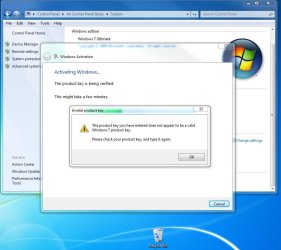
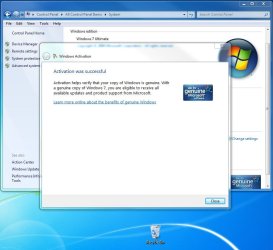
What I suspect may be half the problem to begin with is the new smaller text seen on the retail sticker for the product key. Being in more of a rush and without closer examination when entering the key one or two characters are simply mistaken for others!

It only takes one being seen as something else to end up seeing... (1st image) while activation was immediate here. (2nd image)
 

Attachments

  • Activation Problems.jpg
    Activation Problems.jpg
    74 KB · Views: 101
  • Activation Success.jpg
    Activation Success.jpg
    73.5 KB · Views: 84

My Computers My Computers

System One System Two

  • Computer type
    PC/Desktop
    Computer Manufacturer/Model Number
    Custom builds = 2
    OS
    W7 Ultimate x64/W10 Pro x64/W11 Pro Triple Boot - Main PC W7 Remote PC Micro ATX W7 Pro x64/W11 Pro
    CPU
    AMD Phenom II X4 975 Deneb 3.6ghz - 965 2nd remote pc
    Motherboard
    Gigabyte GA-790XTA-UD4-Gigabyte GA-880GM-D2H remote pc
    Memory
    Kingston Hyper X DDR3 1600 1.5v 16gb - Hyper X Fury 8gb 2nd
    Graphics Card(s)
    MSI HD Radeon 5750 1gb - MSI HD Radeon 6450 on mini tower
    Sound Card
    Creative Labs X-Fi Xtreme Audio P - Realtek onooard 2nd case
    Monitor(s) Displays
    ASUS VW199T-P 19" HP 2082a Main-HP 2082a 20" remote pc
    Screen Resolution
    Asus 1440x900 - HP 1600x900
    Hard Drives
    WD Black 1TB HD per OS W7, W10, and pending W11 presently on 500gb OS Drive - Pending Triple 1TB HDs for Spanned Storage/backup volume
    Single 2TB external USB enclosure, single 1TB System 7 Host/Boot drive, Pending 8TB external HD for system image b
    PSU
    Corsair 750TX - primary / Corsair CX600 - second
    Case
    Antec 900-2 - SSD compatible / NZXT Vulcan mini tower
    Cooling
    Zalman CNPS9900A
    Keyboard
    AZIO L70 Backlit Letters Gaming - ONN Cordless/USB
    Mouse
    MSI DS200 Programmable, Logitech Cordless
    Internet Speed
    30mbps upgrade - primary hard wired - mini tower usb WiFi
    Antivirus
    GFI VIPRE Internet Security 2014 on W7 2016 beta on W10,
    Browser
    Cyberfox, WaterFox 64bit FF variants, FireFox x64, Pale Moon
    Other Info
    Accomdata fan cooled usb 2.0 PIDE/Sata II, III external enclosure.
    Sambient usb/eSata PATA/Sata II, III external enclosure.
  • Computer type
    PC/Desktop
    System Manufacturer/Model Number
    CUSTOM ASSEMBLY
    OS
    W7 Pro x64/W11 Pro
    CPU
    AMD Deneb 3.6ghz - 965
    Motherboard
    Gigabyte GA-880GM-D2H remote pc
    Memory
    Kingston Hyper X Fury 8gb
    Graphics Card(s)
    MSI HD Radeon 6450 DVI Output
    Sound Card
    Realtek onooard Creative or Other separate PENDING
    Monitor(s) Displays
    VIZIO 32" LCD TV Separate LCD Pending
    Screen Resolution
    1600x1080
    Hard Drives
    WD 500GB OS Host/Boot WD Green 1TB Storage/Backup
    PSU
    Corsair 600W - THERMALTAKE 600W spare case
    Case
    NZXT Vulcan mini tower
    Cooling
    Twin 120mm Top Fans - 240mm Side Cover
    Keyboard
    ONN Cordless/USB Logitech Cordless
    Mouse
    ONN USB/Cordless - Logitech Cordless
    Internet Speed
    DSL 5G
    Browser
    MS Edge, FireFox, WaterFox x64, FireFox Nightly
    Other Info
    OS Testing-Remote Access to Main TeamViewer
If you are running a clean install of the available RTM do the following test first.
Use the activation code from the retail update and try to activate.
This worked on 2 of the 3 machines I have.
What I don't understand is why the 3rd machine wouldn't activate when the same RTM DVD was used to load it. The only difference is that third machine is a netbook
BTW, Machine #1 is X86 and #2 is X64. All 3 are laptops.
 

My Computer My Computer

Computer Manufacturer/Model Number
Dell XPS 7100
OS
Win 7 Home X86 on 2 machines X64 on 3 machines WHS V1 on 1 machine
CPU
AMD
Motherboard
Dell
Memory
6GB
Monitor(s) Displays
2 1=DVI 1=VGA
Hard Drives
320 GB for system. 1 TB drive for data.
Internet Speed
Cable 8Gb
Other Info
4 laptops of different flavors
1 Desktop with Windows Home Server. 3 500 GB drives on the server.
4 pre orders of Home Prem.
I still am not sure I have this 100%, but it seems to me that the installer will look around the computer and if it sees ANY evidence that the computer has had a prior OS installed it somehow flags the install so an 'UPGRADE' key will be accepted and Activation and Validation will take place.

If the computer has a new virgin drive that has never had an OS installed,
the win 7 installation will fail at point of 25 digit key being entered either at the beginning or end of install.

We are NOT talking about the Paul Thurrott workaround. We know that works, but will it only work for a few months and can MS at a later date tell if an install is legal by their definition? All interesting stuff.....

Now some people who swear they have upgrade keys are having these keys behave like full. Go figure....
 

My Computer My Computer

OS
Win 7 32 bit , Win xp Sp3
If you are running a clean install of the available RTM do the following test first.
Use the activation code from the retail update and try to activate.
This worked on 2 of the 3 machines I have.
What I don't understand is why the 3rd machine wouldn't activate when the same RTM DVD was used to load it. The only difference is that third machine is a netbook
BTW, Machine #1 is X86 and #2 is X64. All 3 are laptops.

The third machine is a netbook, correct? Can it run Ultimate, because that's what the RTM is. That may be the problem.
 

My Computer My Computer

Computer Manufacturer/Model Number
Gateway, Toshiba Laptop, and Home Brew
OS
Windows 7 x64 HP, Windows 7 HP, Windows 7 Ult
CPU
Intel I3, Cerelon, Pentium 4 @ 3Ghz
Motherboard
Intel, Intel, Asus
Memory
8G, 3G, 3G
Graphics Card(s)
On-board Intel, On-board nVidia, nVIDIA card
Sound Card
on-board, on-board, SoundBlaster
Monitor(s) Displays
Hannspree HF237, Toshiba, SyncMaster 931B
Screen Resolution
default (all)
Hard Drives
1T internal, 320G internal, 160G internal, 1T networked
PSU
300w, unk, 650w
Case
black, black, grey
Cooling
air (all)
Keyboard
standard wired (all)
Mouse
standard wired (all)
Internet Speed
6M down, 768K up
Other Info
Home LAN through Linksys hub to 4 port and wireless switch/router. Networked HP 2600n. Wife's computer running Windows 7, and spare laptop running Ubuntu "Karmic Kola" (9.10).
I still am not sure I have this 100%, but it seems to me that the installer will look around the computer and if it sees ANY evidence that the computer has had a prior OS installed it somehow flags the install so an 'UPGRADE' key will be accepted and Activation and Validation will take place.

If the computer has a new virgin drive that has never had an OS installed,
the win 7 installation will fail at point of 25 digit key being entered either at the beginning or end of install.

We are NOT talking about the Paul Thurrott workaround. We know that works, but will it only work for a few months and can MS at a later date tell if an install is legal by their definition? All interesting stuff.....

Now some people who swear they have upgrade keys are having these keys behave like full. Go figure....

The whole upgrade / Full question as been confused by at least one of the companies handling the special offers including the word UPGRADE on it's advertising materials, when in fact the media they supply is the full install.

I fully believe that Microsoft has left the Double install workaround intentionally as this will prevent a lot of problems in the future when people who legitimately upgrade now come to re-install either onto a new or the same hardware.

The fact that they still make no mention of it is understandable as this will allow users to "upgrade" when they are not entitled to.

The likelihood of Microsoft retrospectively removing the licences is I think also unlikely - the company needs this operating system to be successful and will not risk the bad publicity this would produce.
 

My Computers My Computers

System One System Two

  • Computer type
    PC/Desktop
    Computer Manufacturer/Model Number
    ChillBlast - Custom to my design
    OS
    Windows 11 Pro x64 [Latest Release and Release Preview]
    CPU
    Ryzen 9 5950X, 3.8 - 5.2 MHz
    Motherboard
    Asus Prime X570-Pro
    Memory
    64GB [2 x 32GB] DDR4 3200MHz
    Graphics Card(s)
    4GB NVIDIA GEFORCE GTX 1650 Ti
    Sound Card
    On-board SPDIF to 5.1 System + HDMI [5.1 system]
    Monitor(s) Displays
    32" UHD 32 Bit HDR Monitor + 43" UHD 4K 32Bit HDR TV
    Screen Resolution
    2 x 3840 x 2160 @60Hz
    Hard Drives
    1TB M2 SSD OS, 500GB Fast Access SSD, 2 x 8TB Data + Various Externals from 1TB to 4TB, 10TB NAS
    PSU
    NZXT C750 80 PLUS Gold 750W Modular PSU
    Case
    Workstation Case [Matt Black]
    Cooling
    NZXT Kraken X63 280mm CPU Cooler +2x Quiet Case fans
    Keyboard
    Logitech Wireless MX Keys & K400 + others
    Mouse
    Logitech Wireless MX Master 3S
    Internet Speed
    920 MB Down 50 MB Up
    Antivirus
    BitDefender Total Security Pro
    Browser
    Chrome (always run latest Non-Beta)
    Other Info
    Also run ...
    Laptop - Quad 8GB - Windows 10 Pro x64
    Nexus 7 Android tablet x2
    Samsung 10.2" tablet
    Blackview TAB 8 4G Android Tablet c/w Keyboard
    Wacom Intuos Pro Medium Pen Pad
    Wacom Intuos Pro Small Pen Pad
    Wacom Expresskeys Remote
    Loopdeck+ Graphics Controller
    Shuttle Pro v2 Control
  • Computer type
    Laptop
    System Manufacturer/Model Number
    Dell XPS 17 10750H
    OS
    Windows 11 Pro x64 Latest RP
    CPU
    Intel I7 10750H 5.0GHz
    Motherboard
    Dell XPS
    Memory
    32GB [2x16GB] DDR4 2933 MHz
    Graphics Card(s)
    nVidia GTX1650Ti 4 GB GDDR6
    Sound Card
    Stock [Realtek] 4 Speaker
    Monitor(s) Displays
    17" IPS UHD+ Infinity Edge Touchscreen
    Screen Resolution
    3840 x 2400
    Hard Drives
    2TB M2 NVMe, 4TB External + various 500GB & 1TB External NVMe (also have access to spinner HDD from
    PSU
    Stock
    Case
    Stock XPS Aluminium & Carbon Fibre
    Cooling
    Stock - Active Fan Control
    Keyboard
    Backlit + Various Logitech
    Mouse
    Stock Track Pad + Logitech MX Trackball
    Internet Speed
    72 MB Down 18MB Up
    Browser
    Chrome
    Other Info
    Also run ...
    Laptop - Quad 8GB - Windows 10 Pro x64
    Nexus 7 Android tablet x2
    10.2" tablet
    Sony Z3 Android Smartphone
    Wacom Intuos Pro Medium Pen Pad
    Wacom Intuos Pro Small Pen Pad
    Wacom Expresskeys Remote
    Loopdeck+ Graphics Controller
    Shuttle Pro v2 Control Pad
    10TB NAS
If you are running a clean install of the available RTM do the following test first.
Use the activation code from the retail update and try to activate.
This worked on 2 of the 3 machines I have.
What I don't understand is why the 3rd machine wouldn't activate when the same RTM DVD was used to load it. The only difference is that third machine is a netbook
BTW, Machine #1 is X86 and #2 is X64. All 3 are laptops.

The third machine is a netbook, correct? Can it run Ultimate, because that's what the RTM is. That may be the problem.

The RTM was modified to install Home Premium. It was used on 2 machines.
The first activated and the second wouldn't. Tried 3 times on the second machine.
 

My Computer My Computer

Computer Manufacturer/Model Number
Dell XPS 7100
OS
Win 7 Home X86 on 2 machines X64 on 3 machines WHS V1 on 1 machine
CPU
AMD
Motherboard
Dell
Memory
6GB
Monitor(s) Displays
2 1=DVI 1=VGA
Hard Drives
320 GB for system. 1 TB drive for data.
Internet Speed
Cable 8Gb
Other Info
4 laptops of different flavors
1 Desktop with Windows Home Server. 3 500 GB drives on the server.
4 pre orders of Home Prem.
I just installed a clean install from my Windows 7 upgrade DVD last night.

I just did a custom install and formatted the partition and installed as normal. When it asks you to enter your serial number, just skip by, and un-check the box to activate after the install.

Once booted into the OS, just create an empty folder on the root of your C:\ drive called "Windows.old" and then proceed to activate the OS. It will activate fine and you'll be good to go without having to install and activate your previous OS first.

This saved me quite a bit of time and hassle of having to first install Vista and then having to do an upgrade from there.

Nothing like a nice fresh 'clean' install of a new OS. :)
 

My Computer My Computer

Computer Manufacturer/Model Number
Custom Built
OS
Windows 7 Pro 64bit, Ubuntu 10.10 64bit
CPU
AMD Phenom II X4 955 Black Edition
Motherboard
Gigabyte GA-MA790X-UD4P
Memory
4GB
Graphics Card(s)
(2x) eVGA 9800GT in SLI
Sound Card
Creative X-Fi Platinum
Monitor(s) Displays
Samsung SyncMaster 205BW
Screen Resolution
1920x1200
Hard Drives
WD 80GB SATA, WD 500GB SATA
PSU
Corsair TX750
Case
Thermaltake Xaser4
Cooling
Zalman CNPS9500 LED
Keyboard
Logitech G15 Gaming Keyboard
Mouse
Logitech G5 Laser Mouse
Internet Speed
DSL 6mb/768k
Back
Top