JavaScript is disabled. For a better experience, please enable JavaScript in your browser before proceeding.
You are using an out of date browser. It may not display this or other websites correctly.
You should upgrade or use an
alternative browser .
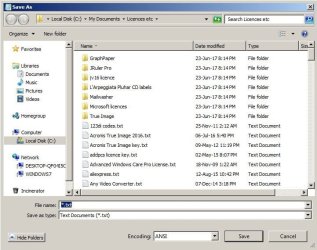
Solved "Save As" windows doesn't offer the Dekstop as a destination.
"Save As" windows doesn't offer the Dekstop as a destination.
save as.jpg
61.8 KB
· Views: 22
Windows 7 Home Premium 32bit Intel Core 2 Duo E8400 @ 3.00GHz 8.00GB Dual-Channel DDR2 @ 398MHz (6-6-6-18) Generic Non-PnP Monitor (1280x1024@60Hz) Inte... PC/Desktop HP Compaq Windows 7 Home Premium 32bit Intel Core 2 Duo E8400 @ 3.00GHz Hewlett-Packard 3033h (XU1 PROCESSOR) 8.00GB Dual-Channel DDR2 @ 398MHz (6-6-6-18) Generic Non-PnP Monitor (1280x1024@60Hz) Intel Q45/Q43 Expre SoundMAX Integrated Digital HD Audio Hitachi HTS723216L9A360 ATA Device External
Administrator
Staff member
64-bit Windows 11 Pro for Workstations Intel i7-8700K OC'd to 5 GHz 64 GB (4x16GB) G.SKILL TridentZ RGB DDR4 3600... ASUS ROG-STRIX-GTX1080TI-O11G-GAMING PC/Desktop Self built custom 64-bit Windows 11 Pro for Workstations Intel i7-8700K OC'd to 5 GHz ASUS ROG Maximus XI Formula Z390 64 GB (4x16GB) G.SKILL TridentZ RGB DDR4 3600 MHz ASUS ROG-STRIX-GTX1080TI-O11G-GAMING Integrated 2 x Samsung Odyssey G7 27" 2560x1440 1TB Samsung 990 PRO M.2, Seasonic Prime Titanium 850W Thermaltake Core P3 Corsair Hydro H115i Logitech wireless K800 Logitech MX Master 4 2 Gb/s Download and 100 Mb/s Upload Malwarebyte Anti-Malware Premium Google Chrome Logitech Z625 speaker system,
Thank you Brink. I will do that when I get back on the Windows 7 computer.
Windows 7 Home Premium 32bit Intel Core 2 Duo E8400 @ 3.00GHz 8.00GB Dual-Channel DDR2 @ 398MHz (6-6-6-18) Generic Non-PnP Monitor (1280x1024@60Hz) Inte... PC/Desktop HP Compaq Windows 7 Home Premium 32bit Intel Core 2 Duo E8400 @ 3.00GHz Hewlett-Packard 3033h (XU1 PROCESSOR) 8.00GB Dual-Channel DDR2 @ 398MHz (6-6-6-18) Generic Non-PnP Monitor (1280x1024@60Hz) Intel Q45/Q43 Expre SoundMAX Integrated Digital HD Audio Hitachi HTS723216L9A360 ATA Device External
Short of restoring to an earlier date there are two ways to get the desktop to show.
Windows 10 22H2 Pro Intel(R) Xeon W-10885M 2x 32 GB DDR4 ECC memory (128 GB max) Intel onboard GPU 1080p - Quadro RTX 5000 Max... Laptop Dell Precision 15 7550 Workstation Windows 10 22H2 Pro Intel(R) Xeon W-10885M Dell 2x 32 GB DDR4 ECC memory (128 GB max) Intel onboard GPU 1080p - Quadro RTX 5000 Max-Q GPU 4K 1TB Samsung 9100 Pro main M2 SSD Logitech MX-25 Bluetooth slow MS Pale Moon 34.x.x - x64 AVX2 build
Administrator
Staff member
Thank you Brink. I will do that when I get back on the Windows 7 computer.
You're most welcome.
64-bit Windows 11 Pro for Workstations Intel i7-8700K OC'd to 5 GHz 64 GB (4x16GB) G.SKILL TridentZ RGB DDR4 3600... ASUS ROG-STRIX-GTX1080TI-O11G-GAMING PC/Desktop Self built custom 64-bit Windows 11 Pro for Workstations Intel i7-8700K OC'd to 5 GHz ASUS ROG Maximus XI Formula Z390 64 GB (4x16GB) G.SKILL TridentZ RGB DDR4 3600 MHz ASUS ROG-STRIX-GTX1080TI-O11G-GAMING Integrated 2 x Samsung Odyssey G7 27" 2560x1440 1TB Samsung 990 PRO M.2, Seasonic Prime Titanium 850W Thermaltake Core P3 Corsair Hydro H115i Logitech wireless K800 Logitech MX Master 4 2 Gb/s Download and 100 Mb/s Upload Malwarebyte Anti-Malware Premium Google Chrome Logitech Z625 speaker system,
The advice in the linked article was helpful Brink , and I have the Desktop back in the Save As options. billmcct , but thank you anyway.
Windows 7 Home Premium 32bit Intel Core 2 Duo E8400 @ 3.00GHz 8.00GB Dual-Channel DDR2 @ 398MHz (6-6-6-18) Generic Non-PnP Monitor (1280x1024@60Hz) Inte... PC/Desktop HP Compaq Windows 7 Home Premium 32bit Intel Core 2 Duo E8400 @ 3.00GHz Hewlett-Packard 3033h (XU1 PROCESSOR) 8.00GB Dual-Channel DDR2 @ 398MHz (6-6-6-18) Generic Non-PnP Monitor (1280x1024@60Hz) Intel Q45/Q43 Expre SoundMAX Integrated Digital HD Audio Hitachi HTS723216L9A360 ATA Device External