Karenetson
New member
- Local time
- 11:24 PM
- Messages
- 5
I have a Lenovo laptop with a 128GB SSD disk. I ran out of memory so I bought a SAMsum 850 EVO 256 GB SSD. I used Acronis True Image to create an image and installed it on the new SSD. This resulted in an identical image but the extra size of the new SSD became unallocated space as shown in 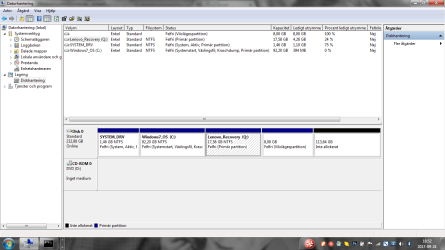 . How can I allocate this disk space of approx 113 GB to my system drive (C: in attachement)?
. How can I allocate this disk space of approx 113 GB to my system drive (C: in attachement)?My Computer
At a glance
Windows 7 Professional 32 bitIntel Core 2 Duo E6600 2,4 GHz LGA775Corsair Value S PC5300 DDR2 2048MbMSI GeForce 7600 GS 256 Mb DDR2
- Computer Manufacturer/Model Number
- Komplett
- OS
- Windows 7 Professional 32 bit
- CPU
- Intel Core 2 Duo E6600 2,4 GHz LGA775
- Motherboard
- Asus P5B P965 Socket-775 ATX GbLAN 6xSATAII PCI-Ex16
- Memory
- Corsair Value S PC5300 DDR2 2048Mb
- Graphics Card(s)
- MSI GeForce 7600 GS 256 Mb DDR2
- Sound Card
- Creative SB X-Fi
- Hard Drives
- Samsung SpinPoint T133 400 Gb
- PSU
- NorthQ 4775-400BULK ATX 400W
- Case
- Cooler Master Mystique