External HDD spins, no light, not recognizable by OS

bascaster

New member
Local time
4:15 AM
Messages
13
I've been using my 2TB Seagate external hard drive without problems so far. Today I connected it to the computer and it no longer worked. You can hear it spin, but the blue light doesn't work, and even though you can't use it, in device manager it is still recognized.
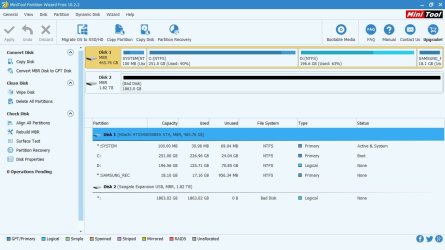
I used Partition Wizard and it shows a black bar stating "Bad disk". I tried several different things, then I disassembled it to use it as a SATA drive, same thing.
I'm now trying Seatools "Fix all", and it looks like it's stuck at 10%.
In Partition Wizard I tried to use the Partition recovery tool but it takes forever, literally. I left it running for an hour and it still said 0%.
I tried to use Power data recovery but it doesn't detect the drive.

I would really like to recover the information inside it. What else can I do?
 

My Computer My Computer

At a glance

Windows 10
Computer type
PC/Desktop
OS
Windows 10
Welcome to the Forum.

Seems to me that your drive is dead.
As it's connected to a SATA port, does BIOS recognize the drive?
 

My Computers My Computers

  • At a glance

    Windows 7 HP 64i5 6600K - 800MHz to 4200MHz4+4G GSkill DDR4 3000IG - Intel 530
    Computer type
    PC/Desktop
    Computer Manufacturer/Model Number
    custom build
    OS
    Windows 7 HP 64
    CPU
    i5 6600K - 800MHz to 4200MHz
    Motherboard
    GA-Z170-HD3P
    Memory
    4+4G GSkill DDR4 3000
    Graphics Card(s)
    IG - Intel 530
    Monitor(s) Displays
    Samsung 226BW
    Screen Resolution
    1680x1050
    Hard Drives
    (1) -1 SM951 – 128GB M.2 AHCI PCIe SSD drive for Windows 7 and Lubuntu
    (2) -1 WD SATA 3 - 1T for Data
    (3) -1 WD SATA 3 - 1T for backup
    PSU
    Thermaltake 450W TR2 gold
    Keyboard
    Old and good Chicony mechanical keyboard
    Mouse
    Logitech mX performance - 9 buttons (had to disable some)
    Internet Speed
    500Mb/s
    Browser
    Firefox 64
    Other Info
    TinyWall firewall
  • At a glance

    Windows 7 Proi7-4500U 800MHz to 3.0GHz(4+4)G DDR3 1600IG intel 4400 + NVIDIA GeForce GT 745M
    Computer type
    Laptop
    System Manufacturer/Model Number
    Asus Q550LF
    OS
    Windows 7 Pro
    CPU
    i7-4500U 800MHz to 3.0GHz
    Motherboard
    Asus Q550LF
    Memory
    (4+4)G DDR3 1600
    Graphics Card(s)
    IG intel 4400 + NVIDIA GeForce GT 745M
    Sound Card
    Realtek
    Monitor(s) Displays
    LG Display LP156WF4-SPH1
    Screen Resolution
    1920 x 1080
    Hard Drives
    BX500 120G SSD for Windows and programs +
    1T HDD for data
    Internet Speed
    500 Mb/s
    Browser
    Firefox
    Other Info
    TinyWall firewall
Yes, it does recognize it. That's the strangest thing. Even SeaTools recognizes it. Can it be that the information is OK but something in the circuit fried? If so, would replacing the circuit with a new one be a good bet?
 

My Computer My Computer

At a glance

Windows 10
Computer type
PC/Desktop
OS
Windows 10
There are two kinds of HDD problems that makes it unusable. Electronic and mechanical.
It doesn't seems to be electronic as it is recognized by BIOS and by programs.
Mechanical makes it unrecoverable.
Did it had an impact, even from falling from vertical to horizontal when running?
 

My Computers My Computers

  • At a glance

    Windows 7 HP 64i5 6600K - 800MHz to 4200MHz4+4G GSkill DDR4 3000IG - Intel 530
    Computer type
    PC/Desktop
    Computer Manufacturer/Model Number
    custom build
    OS
    Windows 7 HP 64
    CPU
    i5 6600K - 800MHz to 4200MHz
    Motherboard
    GA-Z170-HD3P
    Memory
    4+4G GSkill DDR4 3000
    Graphics Card(s)
    IG - Intel 530
    Monitor(s) Displays
    Samsung 226BW
    Screen Resolution
    1680x1050
    Hard Drives
    (1) -1 SM951 – 128GB M.2 AHCI PCIe SSD drive for Windows 7 and Lubuntu
    (2) -1 WD SATA 3 - 1T for Data
    (3) -1 WD SATA 3 - 1T for backup
    PSU
    Thermaltake 450W TR2 gold
    Keyboard
    Old and good Chicony mechanical keyboard
    Mouse
    Logitech mX performance - 9 buttons (had to disable some)
    Internet Speed
    500Mb/s
    Browser
    Firefox 64
    Other Info
    TinyWall firewall
  • At a glance

    Windows 7 Proi7-4500U 800MHz to 3.0GHz(4+4)G DDR3 1600IG intel 4400 + NVIDIA GeForce GT 745M
    Computer type
    Laptop
    System Manufacturer/Model Number
    Asus Q550LF
    OS
    Windows 7 Pro
    CPU
    i7-4500U 800MHz to 3.0GHz
    Motherboard
    Asus Q550LF
    Memory
    (4+4)G DDR3 1600
    Graphics Card(s)
    IG intel 4400 + NVIDIA GeForce GT 745M
    Sound Card
    Realtek
    Monitor(s) Displays
    LG Display LP156WF4-SPH1
    Screen Resolution
    1920 x 1080
    Hard Drives
    BX500 120G SSD for Windows and programs +
    1T HDD for data
    Internet Speed
    500 Mb/s
    Browser
    Firefox
    Other Info
    TinyWall firewall
Hi bascaster,

I don't think I can do any better than what Megahertz07 has done/said thus far. Nevertheless, I would like you to do/answer the following:

1. Are you on Windows 10? Then why didn't you post your prob in 10 Forum?( There are some very good and knowledgeable members there well-versed in Windows 10. I do enter there if I have time and am convinced that it is not a Windows 10 problem and me poking my nose in is appropriate :) . It is always better to post your problems with Windows 10 machine there)

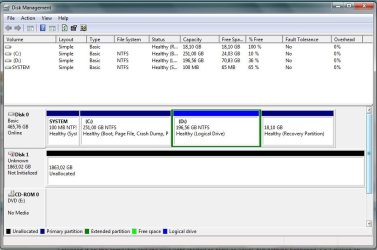
2. Now that you have it directly connected to your Motherboard, post a screenshot of Windows Disk Management.

3. Post a screenshot of how your drive appears in Partition Wizard. ( For your information you cannot run the Partition Recovery Wizard in the latest version of Partition Wizard Free. It is not free :D)
 

My Computer My Computer

At a glance

Windows 7 Home Premium 32 bit
OS
Windows 7 Home Premium 32 bit
Thanks for your replies! I'll elaborate a bit more. I've had this drive for let's say 3-4 months. It's been used just a few times, no more than 20 or so I would say.
I plugged it on the computer and the blue light started to blink as usual, but nothing happened. So I clicked on "Safely remove..." and it didn't do anything. I unplugged it the same and when I connected it back it didn't have any lights, but it's detected if I remember correctly as a "USB mass storage device" instead of the real name.
It hasn't fallen, it wasn't hit by anything, the only thing I can think of is removing it without it having responded to "safely remove...".

Reason why I'm stating Windows 10 is because I was able to put it on a Windows 10 computer with Partition Wizard (full version) to try that, but I removed it because it was kind of a favor and I didn't think it was going anywhere. Sadly I can't take screenshots of that because I don't have it on that computer anymore. Problem is the same with either Windows 10 or 7. So I tried in my laptop with EaseUS Partition Master and left it running for 40+ hours without success. And that was the "short" test.

Connecting it with the SATA or USB cable shows the same problems, so I will try to post screenshots of whatever I can from my laptop. Just to win some time in Device Manager it's shown as Seagate Expansion USB Device and it says it's working properly. In Partition Wizard it had a black bar stating "Bad Disk".
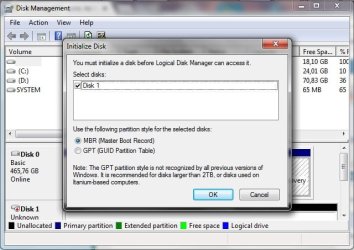
In Disk Management a popup shows stating "You must initialize a disk before Logical Disk Manager can access it". I read somewhere that would wipe all data, so I guess that would make any recovery even worse and I didn't do it. Should I?
 

My Computer My Computer

At a glance

Windows 10
Computer type
PC/Desktop
OS
Windows 10
Please delete this, I thought my message was deleted and I re-wrote it
 
Last edited:

My Computer My Computer

At a glance

Windows 10
Computer type
PC/Desktop
OS
Windows 10
1. Please put in your system specs ( complete) and not someone else's system. If you had tried it on someone else's system ( no bar on it), you can mention it so in your post.

2. Where is that HDD located now? Inside its original enclosure?

3. Take your own time to post the screenshots - no probs, and I may also take my own time :D , taking into consideration the different day/night cycle and circadian rhythms :) .

4. Explain clearly what happens when you open Windows Disk Management. Do you still get the message the disk needs to be initialised?

5. Partition Wizard: Download and install MiniTool Partition Wizard Free 9.1 Date released: 11 Aug 2015 (2 years ago) from MiniTool Partition Wizard Free 10.2.2 Download for Windows / Old Versions / FileHorse.com and post the first screen that appears as soon as you launch it.
 

My Computer My Computer

At a glance

Windows 7 Home Premium 32 bit
OS
Windows 7 Home Premium 32 bit
- Stop trying to fix it.
- Work on it on only one computer. If you're working now with a laptop, put the disk back to its own case.
- Jumanji is the disk guru. If there is any chance to have your disk working again, FOLLOW his instructions step by step.
- Open disk manager, expand the columns so we can read them and with the sniping tool take a FULL screen snapshot. Post the image here as an attachment. Use the paper clip - Browse to the file - upload
- Do the same with MiniTool Partition Wizard Free 9.1 fist screen.
 

My Computers My Computers

  • At a glance

    Windows 7 HP 64i5 6600K - 800MHz to 4200MHz4+4G GSkill DDR4 3000IG - Intel 530
    Computer type
    PC/Desktop
    Computer Manufacturer/Model Number
    custom build
    OS
    Windows 7 HP 64
    CPU
    i5 6600K - 800MHz to 4200MHz
    Motherboard
    GA-Z170-HD3P
    Memory
    4+4G GSkill DDR4 3000
    Graphics Card(s)
    IG - Intel 530
    Monitor(s) Displays
    Samsung 226BW
    Screen Resolution
    1680x1050
    Hard Drives
    (1) -1 SM951 – 128GB M.2 AHCI PCIe SSD drive for Windows 7 and Lubuntu
    (2) -1 WD SATA 3 - 1T for Data
    (3) -1 WD SATA 3 - 1T for backup
    PSU
    Thermaltake 450W TR2 gold
    Keyboard
    Old and good Chicony mechanical keyboard
    Mouse
    Logitech mX performance - 9 buttons (had to disable some)
    Internet Speed
    500Mb/s
    Browser
    Firefox 64
    Other Info
    TinyWall firewall
  • At a glance

    Windows 7 Proi7-4500U 800MHz to 3.0GHz(4+4)G DDR3 1600IG intel 4400 + NVIDIA GeForce GT 745M
    Computer type
    Laptop
    System Manufacturer/Model Number
    Asus Q550LF
    OS
    Windows 7 Pro
    CPU
    i7-4500U 800MHz to 3.0GHz
    Motherboard
    Asus Q550LF
    Memory
    (4+4)G DDR3 1600
    Graphics Card(s)
    IG intel 4400 + NVIDIA GeForce GT 745M
    Sound Card
    Realtek
    Monitor(s) Displays
    LG Display LP156WF4-SPH1
    Screen Resolution
    1920 x 1080
    Hard Drives
    BX500 120G SSD for Windows and programs +
    1T HDD for data
    Internet Speed
    500 Mb/s
    Browser
    Firefox
    Other Info
    TinyWall firewall
1) Okay, here are my specs:

- Samsung Laptop RF510
- CPU Intel Core i5 M460
- 4 GB RAM
- Windows 7 Home Premium Service Pack 1 64-bit
- 500 GB Toshiba HDD

2) The disk model is SEAGATE EXPANSION 2TB
The disk is now located on the outside, without the enclosure, with the "adapter" from SATA to USB that comes with it. Should I put it back in the enclosure? Perhaps for further testing I can put it in another Desktop Computer again.

3) I have them and here they are:

This is Disk management when it starts

attachment.php


Then after cancel

attachment.php


This is Device Manager, just in case

attachment.php


This is Partition Wizard

attachment.php


4 and 5) I think 3 covers it all. Please tell me if you need more information and thanks again for your time!
 

Attachments

  • diskmgmt0.jpg
    diskmgmt0.jpg
    47 KB · Views: 26
  • diskmgmt.jpg
    diskmgmt.jpg
    64.6 KB · Views: 25
  • devicmgr.jpg
    devicmgr.jpg
    35.3 KB · Views: 26
  • pwz.jpg
    pwz.jpg
    92.8 KB · Views: 26

My Computer My Computer

At a glance

Windows 10
Computer type
PC/Desktop
OS
Windows 10
Very well. Now wait for Jumanji. He is in India so it can take some time.
Again, don't try to fix it.
 

My Computers My Computers

  • At a glance

    Windows 7 HP 64i5 6600K - 800MHz to 4200MHz4+4G GSkill DDR4 3000IG - Intel 530
    Computer type
    PC/Desktop
    Computer Manufacturer/Model Number
    custom build
    OS
    Windows 7 HP 64
    CPU
    i5 6600K - 800MHz to 4200MHz
    Motherboard
    GA-Z170-HD3P
    Memory
    4+4G GSkill DDR4 3000
    Graphics Card(s)
    IG - Intel 530
    Monitor(s) Displays
    Samsung 226BW
    Screen Resolution
    1680x1050
    Hard Drives
    (1) -1 SM951 – 128GB M.2 AHCI PCIe SSD drive for Windows 7 and Lubuntu
    (2) -1 WD SATA 3 - 1T for Data
    (3) -1 WD SATA 3 - 1T for backup
    PSU
    Thermaltake 450W TR2 gold
    Keyboard
    Old and good Chicony mechanical keyboard
    Mouse
    Logitech mX performance - 9 buttons (had to disable some)
    Internet Speed
    500Mb/s
    Browser
    Firefox 64
    Other Info
    TinyWall firewall
  • At a glance

    Windows 7 Proi7-4500U 800MHz to 3.0GHz(4+4)G DDR3 1600IG intel 4400 + NVIDIA GeForce GT 745M
    Computer type
    Laptop
    System Manufacturer/Model Number
    Asus Q550LF
    OS
    Windows 7 Pro
    CPU
    i7-4500U 800MHz to 3.0GHz
    Motherboard
    Asus Q550LF
    Memory
    (4+4)G DDR3 1600
    Graphics Card(s)
    IG intel 4400 + NVIDIA GeForce GT 745M
    Sound Card
    Realtek
    Monitor(s) Displays
    LG Display LP156WF4-SPH1
    Screen Resolution
    1920 x 1080
    Hard Drives
    BX500 120G SSD for Windows and programs +
    1T HDD for data
    Internet Speed
    500 Mb/s
    Browser
    Firefox
    Other Info
    TinyWall firewall
Ok I will. Thanks!
 

My Computer My Computer

At a glance

Windows 10
Computer type
PC/Desktop
OS
Windows 10
1. OK, I have seen your screenshots. If your local time shown in your post is correct, then it is time to go to bed. You can go to sleep now. If the local time shown is not correct, please change your time zone in User CP to show the correct local time.This will help us coordinate.

2. Uninstall PW version 10.2.2 Free and install PW version 9.1 as told in para 5. in my post #8.

3. Run Partition Recovery Wizard in it and let me know what happens. ( You cannot run Partition Recovery Wizard in 10.2.2 Free. You need the paid version for it)

Note: PW shows your HDD as Bad disk. As told already the prognosis is not good but we shall try what we can and hope for the best... This diagnostic procedures may be elaborate and time consuming. Be patient. I shall be back after another 8 hours.
 
Last edited:

My Computer My Computer

At a glance

Windows 7 Home Premium 32 bit
OS
Windows 7 Home Premium 32 bit
Hi jumanji,

Thanks for your reply. My schedule is kind of complicated so nevermind the hours.
I will do it with Partition Wizard 9.1, but I also want to tell you that I did the same procedure with EaseUS Partition Master (sadly I didn't take any screenshots) and the "short" way found no partition.
Is it normal for it to take 40+ hours?
 

My Computer My Computer

At a glance

Windows 10
Computer type
PC/Desktop
OS
Windows 10
I also set it to "full scan", is that OK?
 

My Computer My Computer

At a glance

Windows 10
Computer type
PC/Desktop
OS
Windows 10
Whether Quick Scan or Full scan, once it passes Sector 2048 , it should have found the first partition at sector 2048 if all is well. If it does not find one then there is no point in continuing the scan. You can abort the scan.

Now do this quick test. Let us see whether Getdataback simple can scan and find your files. Download and install the Trial version of Getdataback Simple from Data Recovery Software Products - Runtime Software Products
and scan your drive if it is able to recognise the drive. You can read the documentation and also play around with it to familiarise yourself on working it. Does the scan find your files? Report what happens with screenshots.

If no results, then we shall physically examine the HDD sectors with bootice - again if bootice is able to see your drive. You may look at this post Lost partitions! Solved - Windows 7 Help Forums

Note: Do not modify the sectors in any way. Here bootice will be used just to examine the contents of Sector 0 and Sector 2048.
 

My Computer My Computer

At a glance

Windows 7 Home Premium 32 bit
OS
Windows 7 Home Premium 32 bit
Hi jumanji, this is what Partition Wizard showed after the scan

prw2.jpg

I downloaded Getdataback but it doesn't recognize the hard drive. I will try bootice now and get back as soon as I can
 

My Computer My Computer

At a glance

Windows 10
Computer type
PC/Desktop
OS
Windows 10
I downloaded bootice. As soon as I open it, a popup appears stating "Read file failed! Data error (cyclic redundancy check)
 

My Computer My Computer

At a glance

Windows 10
Computer type
PC/Desktop
OS
Windows 10
Yes, it does recognize it. That's the strangest thing. Even SeaTools recognizes it. Can it be that the information is OK but something in the circuit fried? If so, would replacing the circuit with a new one be a good bet?

Replacing the circuit board of a drive isn't as simple as it sounds. These boards aren't for sale so it would have to come from a donor drive. And a drive of the same model isn't good enough. Identical model drives may have been manufactured in different countries and have significant internal differences. The donor must be a close match to the original, exactly which numbers must match depending on the model. Even then there are complications. There is usually drive specific data on the original drive that must be transferred to the donor. This is all doable but far from simple. Also not likely to help in this case.

Do not attempt to open the drive. Even when done carefully amateur attempts fail in the large majority of cases and cause serious further damage to the drive. This should only be done in a special "cleanroom" using special tools and following specific procedures. For data recovery professionals only.

Follow jumanji's advice.
 

My Computer My Computer

At a glance

Windows 7 Pro 64 bitXeon W35208 GBNvidia Geforce 210
Computer type
PC/Desktop
Computer Manufacturer/Model Number
HP
OS
Windows 7 Pro 64 bit
CPU
Xeon W3520
Memory
8 GB
Graphics Card(s)
Nvidia Geforce 210
.........Follow jumanji's advice.

jumanji's advice:

Unfortunately, we now have enough information to declare the drive dead. The all important
Sector 0 that holds the MBR Code and Partition Table has gone bad. It can neither be read nor written into. It is a physical defect in the platter and no conventional data recovery software will be able to recover the data. So data recovery out of user's domain and also that of jumanji :)

As a final test, in Windows Disk Management go ahead and ask it to initialise the drive as an MBR drive. You will only get an error message indicating that it is unable to write the MBR code. ( Do not worry about the data in your drive. Initialisation only writes the MBR code in Sector 0 ( provided you stop with it and do not continue to create a new volume and format it). Your data beginning at Sector 2048 and beyond is not touched at all)

Note: If by chance initialisation goes through, stop with it and report. (Do not create a new volume. Do not format the drive.) Then I will have a job on hand :D .

Now what? Provided that it is only a singular defect of Sector 0 and not a catastrophic failure - sudden death - involving the whole disk ( many sectors having gone bad), a professional Data Recovery Agency with clean room facilities may be able to recover the data.

If you decide not to seek data recovery, then contact Seagate Tech Support for a warranty return - if still under warranty.
 
Last edited:

My Computer My Computer

At a glance

Windows 7 Home Premium 32 bit
OS
Windows 7 Home Premium 32 bit
Back
Top