

Unwanted software impacts the browsing experience of millions of web users every day. Effects of this harmful software are often quite subtle—search results are modified to redirect users to other pages or additional ads are injected in the pages that users visit. But in some cases, the changes are so severe that they can make the web unusable—people are redirected to unwanted sites full of ads, and it can be next to impossible to navigate away from these pages.
Chrome already has tools to help people avoid unwanted software. For example, Safe Browsing prevents many infections from taking place by warning millions of users. But sometimes harmful software slips through.
Recently, we rolled out three changes to help Chrome for Windows users recover from unwanted software infections.
Hijacked settings detection
Extensions can help make Chrome more useful—like by customizing tab management. But some extensions may change your settings without you even realizing it. Now, when Chrome detects that user settings have been changed without your consent, it will offer to restore the modified settings. In the past month, this feature has helped millions of people recover from unwanted settings.
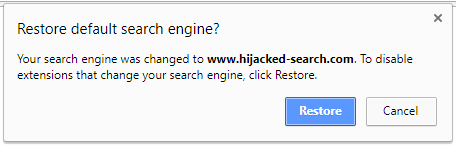
You can also reset your profile settings at any time by visiting chrome://settings/resetProfileSettings.
A simpler Chrome Cleanup
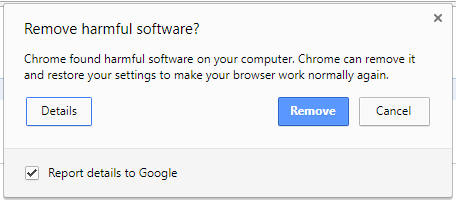
Sometimes when you download software or other content, it might bundle unwanted software as part of the installation process without you knowing. That’s why on Chrome for Windows, the Chrome Cleanup feature alerts people when it detects unwanted software and offers a quick way to remove the software and return Chrome to its default settings. We’ve recently completed a full redesign of Chrome Cleanup. The new interface is simpler and makes it easier to see what software will be removed.
A more powerful Cleanup engine
Under the hood, we upgraded the technology we use in Chrome Cleanup to detect and remove unwanted software. We worked with IT security company ESET to combine their detection engine with Chrome’s sandbox technology. We can now detect and remove more unwanted software than ever before, meaning more people can benefit from Chrome Cleanup. Note this new sandboxed engine is not a general-purpose antivirus—it only removes software that doesn’t comply with our unwanted software policy.
We’ve begun to roll this out to Chrome for Windows users now. Over the next few days, it will help tens of millions of Chrome users get back to a cleaner, safer web.
Source: A cleaner, safer web with Chrome Cleanup
See also: Latest Google Chrome Released for Windows
My Computer
- Computer type
- PC/Desktop
- Computer Manufacturer/Model Number
- Self built custom
- OS
- 64-bit Windows 11 Pro for Workstations
- CPU
- Intel i7-8700K OC'd to 5 GHz
- Motherboard
- ASUS ROG Maximus XI Formula Z390
- Memory
- 64 GB (4x16GB) G.SKILL TridentZ RGB DDR4 3600 MHz
- Graphics Card(s)
- ASUS ROG-STRIX-GTX1080TI-O11G-GAMING
- Sound Card
- Integrated
- Monitor(s) Displays
- 2 x Samsung Odyssey G7 27"
- Screen Resolution
- 2560x1440
- Hard Drives
- 1TB Samsung 990 PRO M.2,
4TB Samsung 990 PRO PRO M.2,
TerraMaster F8 SSD Plus NAS
- PSU
- Seasonic Prime Titanium 850W
- Case
- Thermaltake Core P3
- Cooling
- Corsair Hydro H115i
- Keyboard
- Logitech wireless K800
- Mouse
- Logitech MX Master 4
- Internet Speed
- 2 Gb/s Download and 100 Mb/s Upload
- Antivirus
- Malwarebyte Anti-Malware Premium
- Browser
- Google Chrome
- Other Info
- Logitech Z625 speaker system,
Logitech BRIO 4K Pro webcam,
HP Color LaserJet Pro MFP M477fdn,
APC SMART-UPS RT 1000 XL - SURT1000XLI,
Galaxy S23 Plus phone


