Computer Black Screens and Fans Go LOUD When Gaming

LiliumSnow

New member
Member
Local time
1:01 PM
Messages
67
Location
Winnipeg
(Apologies in advanced if I'm in the wrong topics section)

My computer is a custom-built gaming computer and was put together about a year ago, and about three or four months after I got it it built and running, I began experiencing this annoying issue that randomly sometimes occurs when I'm gaming.

Basically out of nowhere, the game will freeze for a second, there's a short buzz sound from the audio, then the screen will go to black with the "No Signal" sign, while the computer's fans go REALLY loud, and I have to force shut off the computer by holding down the power button (which I know isn't a good thing to do, but I don't know how else to stop it). And when I say "out of nowhere", I mean it can occur very randomly. Sometimes I can get 2 - 5 hours of gameplay, other times I only get 30 minutes - an hour in.

I did take it in to a computer repair shop a few months back to see what's up, but they found nothing. They examined the hardware, did a bunch of tests, and they could not recreate my problem or figure out the problem. The only two things they could suggest may be the cause it 1) the computer is getting bad circulation, and 2) it's because I'm using a wireless mouse and keyboard (though they said the latter was extremely unlikely). I have since then re-positioned the computer tower so it does have more air room, and I dust the inside once a month, and even bought an extra fan, but I still have the problem.

It doesn't happen on a regular basis fortunately, because since my visit with the repair guys, I've pretty much do very little gaming because of the issue, and when I do I basically only play my game for about an hour or two before quitting, then give the computer an hour long break before I start playing again. I'm just so tired of constantly worrying that my computer would do this again at any moment, and it really takes away from enjoying my games, which is the entire reason why I got this computer. I would really like to find a solution to my problem.

Don't know if this will help, but the issue occured with the following games:
  • The Sims 4
  • The Elder Scrolls: Oblivion
  • Dragon Age: Inquisition
 

My Computer My Computer

At a glance

Microsoft Windows 7 Professional 64-bit 7601 ...Intel(R) Core(TM) i7-6700 CPU @ 3.40GHz16.00 GBNVIDIA GeForce GTX 1080
Computer type
PC/Desktop
Computer Manufacturer/Model Number
Custom Build
OS
Microsoft Windows 7 Professional 64-bit 7601 Multiprocessor Free Service Pack 1
CPU
Intel(R) Core(TM) i7-6700 CPU @ 3.40GHz
Motherboard
Gigabyte Technology Co., Ltd. B150M-D3H-CF
Memory
16.00 GB
Graphics Card(s)
NVIDIA GeForce GTX 1080
Sound Card
(1) NVIDIA High Definition Audio(2) Realtek High Definition
Monitor(s) Displays
1
Screen Resolution
1920 x 1080 x 32 bits (4294967296 colors) @ 60 Hz
Hard Drives
(1) ADATA SP600 ATA Device (2) WDC WD20EZRZ-00Z5HB0 ATA Device
Case
NZXT H440 (Matte Black) ATX Mid Tower Case
Keyboard
Microsoft Sculpt Ergonomic Keyboard
Mouse
Microsoft Sculpt Ergonomic Mouse
Browser
Google Chrome

My Computer My Computer

At a glance

W7 home premium 32bit/W7HP 64bit/w10 tp insid...E5300 dual core3gbNvidia Geforce 7100 Nforce 630i
Computer type
PC/Desktop
Computer Manufacturer/Model Number
medionl/Aspire 6930G/acer x55a
OS
W7 home premium 32bit/W7HP 64bit/w10 tp insider ring
CPU
E5300 dual core
Motherboard
medion MS7366
Memory
3gb
Graphics Card(s)
Nvidia Geforce 7100 Nforce 630i
Monitor(s) Displays
avixc
Internet Speed
n (isp resticted to 72)
Antivirus
mse/pands
Browser
palemoon
Other Info
Belkin Fd7050 n USB using Railink RT2870 drivers, more upto date

Attachments

My Computer My Computer

At a glance

Microsoft Windows 7 Professional 64-bit 7601 ...Intel(R) Core(TM) i7-6700 CPU @ 3.40GHz16.00 GBNVIDIA GeForce GTX 1080
Computer type
PC/Desktop
Computer Manufacturer/Model Number
Custom Build
OS
Microsoft Windows 7 Professional 64-bit 7601 Multiprocessor Free Service Pack 1
CPU
Intel(R) Core(TM) i7-6700 CPU @ 3.40GHz
Motherboard
Gigabyte Technology Co., Ltd. B150M-D3H-CF
Memory
16.00 GB
Graphics Card(s)
NVIDIA GeForce GTX 1080
Sound Card
(1) NVIDIA High Definition Audio(2) Realtek High Definition
Monitor(s) Displays
1
Screen Resolution
1920 x 1080 x 32 bits (4294967296 colors) @ 60 Hz
Hard Drives
(1) ADATA SP600 ATA Device (2) WDC WD20EZRZ-00Z5HB0 ATA Device
Case
NZXT H440 (Matte Black) ATX Mid Tower Case
Keyboard
Microsoft Sculpt Ergonomic Keyboard
Mouse
Microsoft Sculpt Ergonomic Mouse
Browser
Google Chrome
It can be many things, but I would say that your CPU heat sink is sub dimension-ed or not well assembled.
- Go into BIOS and enable CPU alarm at 80ºC and MB at 70ºC.
- Set fan speeds to normal.
- If you don't have, install a MB small speaker (to hear the bips and alarms).
-Install a hardware monitor http://openhardwaremonitor.org/files/openhardwaremonitor-v0.8.0-beta.zip
expand it to C:\Program Files (x86)\HardwareMonitor and execute the OpenHardwareMonitor.exe. Go to options tab
- Start minimized
- Minimize to tray
- Minimize on close
- Run on windows startup
 

My Computers My Computers

  • At a glance

    Windows 7 HP 64i5 6600K - 800MHz to 4200MHz4+4G GSkill DDR4 3000IG - Intel 530
    Computer type
    PC/Desktop
    Computer Manufacturer/Model Number
    custom build
    OS
    Windows 7 HP 64
    CPU
    i5 6600K - 800MHz to 4200MHz
    Motherboard
    GA-Z170-HD3P
    Memory
    4+4G GSkill DDR4 3000
    Graphics Card(s)
    IG - Intel 530
    Monitor(s) Displays
    Samsung 226BW
    Screen Resolution
    1680x1050
    Hard Drives
    (1) -1 SM951 – 128GB M.2 AHCI PCIe SSD drive for Windows 7 and Lubuntu
    (2) -1 WD SATA 3 - 1T for Data
    (3) -1 WD SATA 3 - 1T for backup
    PSU
    Thermaltake 450W TR2 gold
    Keyboard
    Old and good Chicony mechanical keyboard
    Mouse
    Logitech mX performance - 9 buttons (had to disable some)
    Internet Speed
    500Mb/s
    Browser
    Firefox 64
    Other Info
    TinyWall firewall
  • At a glance

    Windows 7 Proi7-4500U 800MHz to 3.0GHz(4+4)G DDR3 1600IG intel 4400 + NVIDIA GeForce GT 745M
    Computer type
    Laptop
    System Manufacturer/Model Number
    Asus Q550LF
    OS
    Windows 7 Pro
    CPU
    i7-4500U 800MHz to 3.0GHz
    Motherboard
    Asus Q550LF
    Memory
    (4+4)G DDR3 1600
    Graphics Card(s)
    IG intel 4400 + NVIDIA GeForce GT 745M
    Sound Card
    Realtek
    Monitor(s) Displays
    LG Display LP156WF4-SPH1
    Screen Resolution
    1920 x 1080
    Hard Drives
    BX500 120G SSD for Windows and programs +
    1T HDD for data
    Internet Speed
    500 Mb/s
    Browser
    Firefox
    Other Info
    TinyWall firewall
It can be many things, but I would say that your CPU heat sink is sub dimension-ed or not well assembled.
- Go into BIOS and enable CPU alarm at 80ºC and MB at 70ºC.
- Set fan speeds to normal.
- If you don't have, install a MB small speaker (to hear the bips and alarms).
-Install a hardware monitor http://openhardwaremonitor.org/files/openhardwaremonitor-v0.8.0-beta.zip
expand it to C:\Program Files (x86)\HardwareMonitor and execute the OpenHardwareMonitor.exe.
Go to options tab
- Start minimized
- Minimize to tray
- Minimize on close
- Run on windows startup

I'm confused, what do you mean by "expand it to"?

Also I don't have speakers for my computer. I just use headphones.
 

My Computer My Computer

At a glance

Microsoft Windows 7 Professional 64-bit 7601 ...Intel(R) Core(TM) i7-6700 CPU @ 3.40GHz16.00 GBNVIDIA GeForce GTX 1080
Computer type
PC/Desktop
Computer Manufacturer/Model Number
Custom Build
OS
Microsoft Windows 7 Professional 64-bit 7601 Multiprocessor Free Service Pack 1
CPU
Intel(R) Core(TM) i7-6700 CPU @ 3.40GHz
Motherboard
Gigabyte Technology Co., Ltd. B150M-D3H-CF
Memory
16.00 GB
Graphics Card(s)
NVIDIA GeForce GTX 1080
Sound Card
(1) NVIDIA High Definition Audio(2) Realtek High Definition
Monitor(s) Displays
1
Screen Resolution
1920 x 1080 x 32 bits (4294967296 colors) @ 60 Hz
Hard Drives
(1) ADATA SP600 ATA Device (2) WDC WD20EZRZ-00Z5HB0 ATA Device
Case
NZXT H440 (Matte Black) ATX Mid Tower Case
Keyboard
Microsoft Sculpt Ergonomic Keyboard
Mouse
Microsoft Sculpt Ergonomic Mouse
Browser
Google Chrome
It can be many things, but I would say that your CPU heat sink is sub dimension-ed or not well assembled.
- Go into BIOS and enable CPU alarm at 80ºC and MB at 70ºC.
- Set fan speeds to normal.
- If you don't have, install a MB small speaker (to hear the bips and alarms).
-Install a hardware monitor http://openhardwaremonitor.org/files/openhardwaremonitor-v0.8.0-beta.zip
expand it to C:\Program Files (x86)\HardwareMonitor and execute the OpenHardwareMonitor.exe. Go to options tab
- Start minimized
- Minimize to tray
- Minimize on close
- Run on windows startup

Did the CPU alarm to 80% just now and fan speeds were already at normal, but I wasn't able to find this MB.
 

My Computer My Computer

At a glance

Microsoft Windows 7 Professional 64-bit 7601 ...Intel(R) Core(TM) i7-6700 CPU @ 3.40GHz16.00 GBNVIDIA GeForce GTX 1080
Computer type
PC/Desktop
Computer Manufacturer/Model Number
Custom Build
OS
Microsoft Windows 7 Professional 64-bit 7601 Multiprocessor Free Service Pack 1
CPU
Intel(R) Core(TM) i7-6700 CPU @ 3.40GHz
Motherboard
Gigabyte Technology Co., Ltd. B150M-D3H-CF
Memory
16.00 GB
Graphics Card(s)
NVIDIA GeForce GTX 1080
Sound Card
(1) NVIDIA High Definition Audio(2) Realtek High Definition
Monitor(s) Displays
1
Screen Resolution
1920 x 1080 x 32 bits (4294967296 colors) @ 60 Hz
Hard Drives
(1) ADATA SP600 ATA Device (2) WDC WD20EZRZ-00Z5HB0 ATA Device
Case
NZXT H440 (Matte Black) ATX Mid Tower Case
Keyboard
Microsoft Sculpt Ergonomic Keyboard
Mouse
Microsoft Sculpt Ergonomic Mouse
Browser
Google Chrome
You should buy a MB speaker https://www.amazon.com/PC-Internal-Mini-Onboard-Speaker/dp/B002W4M0DW. If you don't have a MB speaker you won't be able to hear the alarm.
When you download the open hardware monitor it comes as a zip file. Create a C:\Program Files (x86)\HardwareMonitor folder, expand the zip file to it and execute the OpenHardwareMonitor.exe.
Go to options tab
- Start minimized
- Minimize to tray
- Minimize on close
- Run on windows startup

You can configure to show the CPU case temperature near the clock.

On BIOS, MB temperature my be as System temp. Set alarm at 70ºC
 
Last edited:

My Computers My Computers

  • At a glance

    Windows 7 HP 64i5 6600K - 800MHz to 4200MHz4+4G GSkill DDR4 3000IG - Intel 530
    Computer type
    PC/Desktop
    Computer Manufacturer/Model Number
    custom build
    OS
    Windows 7 HP 64
    CPU
    i5 6600K - 800MHz to 4200MHz
    Motherboard
    GA-Z170-HD3P
    Memory
    4+4G GSkill DDR4 3000
    Graphics Card(s)
    IG - Intel 530
    Monitor(s) Displays
    Samsung 226BW
    Screen Resolution
    1680x1050
    Hard Drives
    (1) -1 SM951 – 128GB M.2 AHCI PCIe SSD drive for Windows 7 and Lubuntu
    (2) -1 WD SATA 3 - 1T for Data
    (3) -1 WD SATA 3 - 1T for backup
    PSU
    Thermaltake 450W TR2 gold
    Keyboard
    Old and good Chicony mechanical keyboard
    Mouse
    Logitech mX performance - 9 buttons (had to disable some)
    Internet Speed
    500Mb/s
    Browser
    Firefox 64
    Other Info
    TinyWall firewall
  • At a glance

    Windows 7 Proi7-4500U 800MHz to 3.0GHz(4+4)G DDR3 1600IG intel 4400 + NVIDIA GeForce GT 745M
    Computer type
    Laptop
    System Manufacturer/Model Number
    Asus Q550LF
    OS
    Windows 7 Pro
    CPU
    i7-4500U 800MHz to 3.0GHz
    Motherboard
    Asus Q550LF
    Memory
    (4+4)G DDR3 1600
    Graphics Card(s)
    IG intel 4400 + NVIDIA GeForce GT 745M
    Sound Card
    Realtek
    Monitor(s) Displays
    LG Display LP156WF4-SPH1
    Screen Resolution
    1920 x 1080
    Hard Drives
    BX500 120G SSD for Windows and programs +
    1T HDD for data
    Internet Speed
    500 Mb/s
    Browser
    Firefox
    Other Info
    TinyWall firewall
about three or four months after I got it it built and running, I began experiencing this annoying issue that randomly sometimes occurs when I'm gaming.
Has anything changed in 3 months since you started using the computer? Installed software, drivers, random/background updates, you moved to computer to a different place?
Also if you tell your built specification, than could help.

it's because I'm using a wireless mouse and keyboard
Don't waste your time with them anymore.

It doesn't happen on a regular basis fortunately
It can be many things, maybe faulty drivers, faulty video card, small PSU.
So have you changed anything since you started playing?
 

My Computer My Computer

At a glance

Windows 7 Ultimate x64Intel i5-6600K 3.50GHzCorsair DDR4 2x8GBMSI GeForce GTX1070 Gaming X
Computer type
PC/Desktop
Computer Manufacturer/Model Number
Custom build
OS
Windows 7 Ultimate x64
CPU
Intel i5-6600K 3.50GHz
Motherboard
Asus Pro Z170 Gaming
Memory
Corsair DDR4 2x8GB
Graphics Card(s)
MSI GeForce GTX1070 Gaming X
Sound Card
On board Realtek
Monitor(s) Displays
Dell SP2309W
Screen Resolution
1920x1080
Hard Drives
OS Samsung 850 EVO 500GB SATA III SSD
2x Hitachi Deskstar 1GB SATA data drives
1x Western Digital Caviar Black 1TB SATA data drive
PSU
Corsair HX650W
Case
CoolerMaster CM 690 III
Cooling
Coolermaster Hyper 212 EVO 1x200mm 1x140mm 2x120mm case fan
Keyboard
Logitech usb keyboard
Mouse
Logitech G500 $27 bargain :)
Internet Speed
ADSL2
Antivirus
Microsoft Security Essential, MalwareBytes
Browser
SRWare Iron, Internet Explorer
Other Info
Very happy with this buid.
I struggled a lot to find all compatible parts since I wanted an Intel 1151 based motherboard so to be able to install Windows 7.
I chose this case because it has amazing air flow, it's sturdy and looks good.
The case included 1x 200mm front and 1x 120mm back fans, I added 1x 200mm on the top and 1x120 bottom fans and modded the panels with black stockings for women s
Has anything changed in 3 months since you started using the computer? Installed software, drivers, random/background updates, you moved to computer to a different place?
Also if you tell your built specification, than could help.


Don't waste your time with them anymore.


It can be many things, maybe faulty drivers, faulty video card, small PSU.
So have you changed anything since you started playing?

Well I kind of have to use a wireless keyboard and mouse b/c due to the angle the computer tower from it, it wouldn't be close enough for wired devices.

As for any changes I made, I did have to install and update a lot of crap as soon as the computer was up and running. The only thing I added after the black screen + fan issues started popping up was buying two additional fans.
 

My Computer My Computer

At a glance

Microsoft Windows 7 Professional 64-bit 7601 ...Intel(R) Core(TM) i7-6700 CPU @ 3.40GHz16.00 GBNVIDIA GeForce GTX 1080
Computer type
PC/Desktop
Computer Manufacturer/Model Number
Custom Build
OS
Microsoft Windows 7 Professional 64-bit 7601 Multiprocessor Free Service Pack 1
CPU
Intel(R) Core(TM) i7-6700 CPU @ 3.40GHz
Motherboard
Gigabyte Technology Co., Ltd. B150M-D3H-CF
Memory
16.00 GB
Graphics Card(s)
NVIDIA GeForce GTX 1080
Sound Card
(1) NVIDIA High Definition Audio(2) Realtek High Definition
Monitor(s) Displays
1
Screen Resolution
1920 x 1080 x 32 bits (4294967296 colors) @ 60 Hz
Hard Drives
(1) ADATA SP600 ATA Device (2) WDC WD20EZRZ-00Z5HB0 ATA Device
Case
NZXT H440 (Matte Black) ATX Mid Tower Case
Keyboard
Microsoft Sculpt Ergonomic Keyboard
Mouse
Microsoft Sculpt Ergonomic Mouse
Browser
Google Chrome
I did have to install and update a lot of crap as soon as the computer was up and running.

I believe there is drivers' conflict and since it is not clear what drivers/software you updated, it's hard to find out which one is causing the problems.
I would start with "clean" unistall GPU's drivers and reinstall the right ones.

You talked about wireless keyboard and mouse, I guess their software install CDs have a lot of useless utilities, just stick to the basic software.

I suggest you install "RollBack RX", there is the free version that is full functioning.
This software will replace Windows' one which is crap, also do NOT install any defragmenter because they won't work since RollBack uses its own defragmenter: http://horizondatasys.com/rollback-rx-time-machine/rollback-rx-home

For the future, always rememeber that if it is working, DO NOT touch it.
Also check Windows' auto updates and disable it, only check it manually!
 
Last edited:

My Computer My Computer

At a glance

Windows 7 Ultimate x64Intel i5-6600K 3.50GHzCorsair DDR4 2x8GBMSI GeForce GTX1070 Gaming X
Computer type
PC/Desktop
Computer Manufacturer/Model Number
Custom build
OS
Windows 7 Ultimate x64
CPU
Intel i5-6600K 3.50GHz
Motherboard
Asus Pro Z170 Gaming
Memory
Corsair DDR4 2x8GB
Graphics Card(s)
MSI GeForce GTX1070 Gaming X
Sound Card
On board Realtek
Monitor(s) Displays
Dell SP2309W
Screen Resolution
1920x1080
Hard Drives
OS Samsung 850 EVO 500GB SATA III SSD
2x Hitachi Deskstar 1GB SATA data drives
1x Western Digital Caviar Black 1TB SATA data drive
PSU
Corsair HX650W
Case
CoolerMaster CM 690 III
Cooling
Coolermaster Hyper 212 EVO 1x200mm 1x140mm 2x120mm case fan
Keyboard
Logitech usb keyboard
Mouse
Logitech G500 $27 bargain :)
Internet Speed
ADSL2
Antivirus
Microsoft Security Essential, MalwareBytes
Browser
SRWare Iron, Internet Explorer
Other Info
Very happy with this buid.
I struggled a lot to find all compatible parts since I wanted an Intel 1151 based motherboard so to be able to install Windows 7.
I chose this case because it has amazing air flow, it's sturdy and looks good.
The case included 1x 200mm front and 1x 120mm back fans, I added 1x 200mm on the top and 1x120 bottom fans and modded the panels with black stockings for women s
I believe there is drivers' conflict and since it is not clear what drivers/software you updated, it's hard to find out which one is causing the problems.
I would start with "clean" unistall GPU's drivers and reinstall the right ones.

You talked about wireless keyboard and mouse, I guess their software install CDs have a lot of useless utilities, just stick to the basic software.

I suggest you install "RollBack RX", there is the free version that is full functioning.
This software will replace Windows' one which is crap, also do NOT install any defragmenter because they won't work since RollBack uses its own defragmenter: http://horizondatasys.com/rollback-rx-time-machine/rollback-rx-home

For the future, always rememeber that if it is working, DO NOT touch it.
Also check Windows' auto updates and disable it, only check it manually!

Took a look in the Device Manager and found the only conflicts were for the keyboard and mouse. I didn't realize there were some older keyboard/mouse stuff after I bought my new ones, so I've uninstalled those. Didn't find any other driver conflicts though, even after checking the "Show hidden devices" option.

Someone else suggested that it might be a voltage problem and that I should get a powerbar with surge protection. Just got one today, so maybe that'll help as well.
 

My Computer My Computer

At a glance

Microsoft Windows 7 Professional 64-bit 7601 ...Intel(R) Core(TM) i7-6700 CPU @ 3.40GHz16.00 GBNVIDIA GeForce GTX 1080
Computer type
PC/Desktop
Computer Manufacturer/Model Number
Custom Build
OS
Microsoft Windows 7 Professional 64-bit 7601 Multiprocessor Free Service Pack 1
CPU
Intel(R) Core(TM) i7-6700 CPU @ 3.40GHz
Motherboard
Gigabyte Technology Co., Ltd. B150M-D3H-CF
Memory
16.00 GB
Graphics Card(s)
NVIDIA GeForce GTX 1080
Sound Card
(1) NVIDIA High Definition Audio(2) Realtek High Definition
Monitor(s) Displays
1
Screen Resolution
1920 x 1080 x 32 bits (4294967296 colors) @ 60 Hz
Hard Drives
(1) ADATA SP600 ATA Device (2) WDC WD20EZRZ-00Z5HB0 ATA Device
Case
NZXT H440 (Matte Black) ATX Mid Tower Case
Keyboard
Microsoft Sculpt Ergonomic Keyboard
Mouse
Microsoft Sculpt Ergonomic Mouse
Browser
Google Chrome
I believe there is drivers' conflict and since it is not clear what drivers/software you updated, it's hard to find out which one is causing the problems.
I would start with "clean" unistall GPU's drivers and reinstall the right ones.

You talked about wireless keyboard and mouse, I guess their software install CDs have a lot of useless utilities, just stick to the basic software.

I suggest you install "RollBack RX", there is the free version that is full functioning.
This software will replace Windows' one which is crap, also do NOT install any defragmenter because they won't work since RollBack uses its own defragmenter: http://horizondatasys.com/rollback-rx-time-machine/rollback-rx-home

For the future, always rememeber that if it is working, DO NOT touch it.
Also check Windows' auto updates and disable it, only check it manually!

Also I was browsing through Programs and Features and noticed there was a NVIDIA Phyx and NVIDIA Phyx System Software. Are they both the same thing or are they two completely different stuff and I only need one of them?
 

My Computer My Computer

At a glance

Microsoft Windows 7 Professional 64-bit 7601 ...Intel(R) Core(TM) i7-6700 CPU @ 3.40GHz16.00 GBNVIDIA GeForce GTX 1080
Computer type
PC/Desktop
Computer Manufacturer/Model Number
Custom Build
OS
Microsoft Windows 7 Professional 64-bit 7601 Multiprocessor Free Service Pack 1
CPU
Intel(R) Core(TM) i7-6700 CPU @ 3.40GHz
Motherboard
Gigabyte Technology Co., Ltd. B150M-D3H-CF
Memory
16.00 GB
Graphics Card(s)
NVIDIA GeForce GTX 1080
Sound Card
(1) NVIDIA High Definition Audio(2) Realtek High Definition
Monitor(s) Displays
1
Screen Resolution
1920 x 1080 x 32 bits (4294967296 colors) @ 60 Hz
Hard Drives
(1) ADATA SP600 ATA Device (2) WDC WD20EZRZ-00Z5HB0 ATA Device
Case
NZXT H440 (Matte Black) ATX Mid Tower Case
Keyboard
Microsoft Sculpt Ergonomic Keyboard
Mouse
Microsoft Sculpt Ergonomic Mouse
Browser
Google Chrome
Also I was browsing through Programs and Features and noticed there was a NVIDIA Phyx and NVIDIA Phyx System Software. Are they both the same thing or are they two completely different stuff and I only need one of them?

In my system I've nVidia graphic drivers and nVidia physX software.
 

My Computer My Computer

At a glance

Windows 7 Ultimate x64Intel i5-6600K 3.50GHzCorsair DDR4 2x8GBMSI GeForce GTX1070 Gaming X
Computer type
PC/Desktop
Computer Manufacturer/Model Number
Custom build
OS
Windows 7 Ultimate x64
CPU
Intel i5-6600K 3.50GHz
Motherboard
Asus Pro Z170 Gaming
Memory
Corsair DDR4 2x8GB
Graphics Card(s)
MSI GeForce GTX1070 Gaming X
Sound Card
On board Realtek
Monitor(s) Displays
Dell SP2309W
Screen Resolution
1920x1080
Hard Drives
OS Samsung 850 EVO 500GB SATA III SSD
2x Hitachi Deskstar 1GB SATA data drives
1x Western Digital Caviar Black 1TB SATA data drive
PSU
Corsair HX650W
Case
CoolerMaster CM 690 III
Cooling
Coolermaster Hyper 212 EVO 1x200mm 1x140mm 2x120mm case fan
Keyboard
Logitech usb keyboard
Mouse
Logitech G500 $27 bargain :)
Internet Speed
ADSL2
Antivirus
Microsoft Security Essential, MalwareBytes
Browser
SRWare Iron, Internet Explorer
Other Info
Very happy with this buid.
I struggled a lot to find all compatible parts since I wanted an Intel 1151 based motherboard so to be able to install Windows 7.
I chose this case because it has amazing air flow, it's sturdy and looks good.
The case included 1x 200mm front and 1x 120mm back fans, I added 1x 200mm on the top and 1x120 bottom fans and modded the panels with black stockings for women s
In my system I've nVidia graphic drivers and nVidia physX software.


Well I have the Nvidia graphic drivers as well, but I didn't feel that was worth mentioning b/c I figured it would be obvious that I would have it. :P

But are PhysX and PhysX System Software the same thing or no?
 

My Computer My Computer

At a glance

Microsoft Windows 7 Professional 64-bit 7601 ...Intel(R) Core(TM) i7-6700 CPU @ 3.40GHz16.00 GBNVIDIA GeForce GTX 1080
Computer type
PC/Desktop
Computer Manufacturer/Model Number
Custom Build
OS
Microsoft Windows 7 Professional 64-bit 7601 Multiprocessor Free Service Pack 1
CPU
Intel(R) Core(TM) i7-6700 CPU @ 3.40GHz
Motherboard
Gigabyte Technology Co., Ltd. B150M-D3H-CF
Memory
16.00 GB
Graphics Card(s)
NVIDIA GeForce GTX 1080
Sound Card
(1) NVIDIA High Definition Audio(2) Realtek High Definition
Monitor(s) Displays
1
Screen Resolution
1920 x 1080 x 32 bits (4294967296 colors) @ 60 Hz
Hard Drives
(1) ADATA SP600 ATA Device (2) WDC WD20EZRZ-00Z5HB0 ATA Device
Case
NZXT H440 (Matte Black) ATX Mid Tower Case
Keyboard
Microsoft Sculpt Ergonomic Keyboard
Mouse
Microsoft Sculpt Ergonomic Mouse
Browser
Google Chrome

My Computer My Computer

At a glance

Windows 7 Ultimate x64Intel i5-6600K 3.50GHzCorsair DDR4 2x8GBMSI GeForce GTX1070 Gaming X
Computer type
PC/Desktop
Computer Manufacturer/Model Number
Custom build
OS
Windows 7 Ultimate x64
CPU
Intel i5-6600K 3.50GHz
Motherboard
Asus Pro Z170 Gaming
Memory
Corsair DDR4 2x8GB
Graphics Card(s)
MSI GeForce GTX1070 Gaming X
Sound Card
On board Realtek
Monitor(s) Displays
Dell SP2309W
Screen Resolution
1920x1080
Hard Drives
OS Samsung 850 EVO 500GB SATA III SSD
2x Hitachi Deskstar 1GB SATA data drives
1x Western Digital Caviar Black 1TB SATA data drive
PSU
Corsair HX650W
Case
CoolerMaster CM 690 III
Cooling
Coolermaster Hyper 212 EVO 1x200mm 1x140mm 2x120mm case fan
Keyboard
Logitech usb keyboard
Mouse
Logitech G500 $27 bargain :)
Internet Speed
ADSL2
Antivirus
Microsoft Security Essential, MalwareBytes
Browser
SRWare Iron, Internet Explorer
Other Info
Very happy with this buid.
I struggled a lot to find all compatible parts since I wanted an Intel 1151 based motherboard so to be able to install Windows 7.
I chose this case because it has amazing air flow, it's sturdy and looks good.
The case included 1x 200mm front and 1x 120mm back fans, I added 1x 200mm on the top and 1x120 bottom fans and modded the panels with black stockings for women s
I can't say but if you decide to "clean" install the video drivers (because we still don't know what is the problem), then check these instructions: NVIDIA Drivers - Avoid Problems

I've got a Nvidia Corporation folder in both my Program Files and Program Files (x86), which one do I go to do do the steps?
 

My Computer My Computer

At a glance

Microsoft Windows 7 Professional 64-bit 7601 ...Intel(R) Core(TM) i7-6700 CPU @ 3.40GHz16.00 GBNVIDIA GeForce GTX 1080
Computer type
PC/Desktop
Computer Manufacturer/Model Number
Custom Build
OS
Microsoft Windows 7 Professional 64-bit 7601 Multiprocessor Free Service Pack 1
CPU
Intel(R) Core(TM) i7-6700 CPU @ 3.40GHz
Motherboard
Gigabyte Technology Co., Ltd. B150M-D3H-CF
Memory
16.00 GB
Graphics Card(s)
NVIDIA GeForce GTX 1080
Sound Card
(1) NVIDIA High Definition Audio(2) Realtek High Definition
Monitor(s) Displays
1
Screen Resolution
1920 x 1080 x 32 bits (4294967296 colors) @ 60 Hz
Hard Drives
(1) ADATA SP600 ATA Device (2) WDC WD20EZRZ-00Z5HB0 ATA Device
Case
NZXT H440 (Matte Black) ATX Mid Tower Case
Keyboard
Microsoft Sculpt Ergonomic Keyboard
Mouse
Microsoft Sculpt Ergonomic Mouse
Browser
Google Chrome
I've got a Nvidia Corporation folder in both my Program Files and Program Files (x86), which one do I go to do do the steps?

I also have both, but you should never just delete the folders.
 

My Computer My Computer

At a glance

Windows 7 Ultimate x64Intel i5-6600K 3.50GHzCorsair DDR4 2x8GBMSI GeForce GTX1070 Gaming X
Computer type
PC/Desktop
Computer Manufacturer/Model Number
Custom build
OS
Windows 7 Ultimate x64
CPU
Intel i5-6600K 3.50GHz
Motherboard
Asus Pro Z170 Gaming
Memory
Corsair DDR4 2x8GB
Graphics Card(s)
MSI GeForce GTX1070 Gaming X
Sound Card
On board Realtek
Monitor(s) Displays
Dell SP2309W
Screen Resolution
1920x1080
Hard Drives
OS Samsung 850 EVO 500GB SATA III SSD
2x Hitachi Deskstar 1GB SATA data drives
1x Western Digital Caviar Black 1TB SATA data drive
PSU
Corsair HX650W
Case
CoolerMaster CM 690 III
Cooling
Coolermaster Hyper 212 EVO 1x200mm 1x140mm 2x120mm case fan
Keyboard
Logitech usb keyboard
Mouse
Logitech G500 $27 bargain :)
Internet Speed
ADSL2
Antivirus
Microsoft Security Essential, MalwareBytes
Browser
SRWare Iron, Internet Explorer
Other Info
Very happy with this buid.
I struggled a lot to find all compatible parts since I wanted an Intel 1151 based motherboard so to be able to install Windows 7.
I chose this case because it has amazing air flow, it's sturdy and looks good.
The case included 1x 200mm front and 1x 120mm back fans, I added 1x 200mm on the top and 1x120 bottom fans and modded the panels with black stockings for women s
I also have both, but you should never just delete the folders.

The steps say to go into the Nvidia folder in the C: folder and delete all the numbered folders within Display Drivers, but there is no Nvidia folder on my computer. There's just the Nvidia Corporations folders in both Programs and Programs (x86) and neither of them have a folder that says Display Drivers or any numbered folders.
 

My Computer My Computer

At a glance

Microsoft Windows 7 Professional 64-bit 7601 ...Intel(R) Core(TM) i7-6700 CPU @ 3.40GHz16.00 GBNVIDIA GeForce GTX 1080
Computer type
PC/Desktop
Computer Manufacturer/Model Number
Custom Build
OS
Microsoft Windows 7 Professional 64-bit 7601 Multiprocessor Free Service Pack 1
CPU
Intel(R) Core(TM) i7-6700 CPU @ 3.40GHz
Motherboard
Gigabyte Technology Co., Ltd. B150M-D3H-CF
Memory
16.00 GB
Graphics Card(s)
NVIDIA GeForce GTX 1080
Sound Card
(1) NVIDIA High Definition Audio(2) Realtek High Definition
Monitor(s) Displays
1
Screen Resolution
1920 x 1080 x 32 bits (4294967296 colors) @ 60 Hz
Hard Drives
(1) ADATA SP600 ATA Device (2) WDC WD20EZRZ-00Z5HB0 ATA Device
Case
NZXT H440 (Matte Black) ATX Mid Tower Case
Keyboard
Microsoft Sculpt Ergonomic Keyboard
Mouse
Microsoft Sculpt Ergonomic Mouse
Browser
Google Chrome
The steps say to go into the Nvidia folder in the C: folder and delete all the numbered folders within Display Drivers, but there is no Nvidia folder on my computer. There's just the Nvidia Corporations folders in both Programs and Programs (x86) and neither of them have a folder that says Display Drivers or any numbered folders.

You are going off track.
The only folder you can manually delete is the one in C:/NVIDIA and all its subfolders.
These are the nVidia drivers needed for the installation so it's not the installation folder.
When you download the drivers and start the installation process, the application expands the drivers in C:/NVIDIA so once the installation process has completed, you can delete the folder or just leave it.
If you want to uninstall the drivers, you can use Windows' Programs and Features or you can use another application like I'm using IObit Uninstaller free version.
However, uninstalling graphic drivers the right way require more steps like using specific utilities.
 

My Computer My Computer

At a glance

Windows 7 Ultimate x64Intel i5-6600K 3.50GHzCorsair DDR4 2x8GBMSI GeForce GTX1070 Gaming X
Computer type
PC/Desktop
Computer Manufacturer/Model Number
Custom build
OS
Windows 7 Ultimate x64
CPU
Intel i5-6600K 3.50GHz
Motherboard
Asus Pro Z170 Gaming
Memory
Corsair DDR4 2x8GB
Graphics Card(s)
MSI GeForce GTX1070 Gaming X
Sound Card
On board Realtek
Monitor(s) Displays
Dell SP2309W
Screen Resolution
1920x1080
Hard Drives
OS Samsung 850 EVO 500GB SATA III SSD
2x Hitachi Deskstar 1GB SATA data drives
1x Western Digital Caviar Black 1TB SATA data drive
PSU
Corsair HX650W
Case
CoolerMaster CM 690 III
Cooling
Coolermaster Hyper 212 EVO 1x200mm 1x140mm 2x120mm case fan
Keyboard
Logitech usb keyboard
Mouse
Logitech G500 $27 bargain :)
Internet Speed
ADSL2
Antivirus
Microsoft Security Essential, MalwareBytes
Browser
SRWare Iron, Internet Explorer
Other Info
Very happy with this buid.
I struggled a lot to find all compatible parts since I wanted an Intel 1151 based motherboard so to be able to install Windows 7.
I chose this case because it has amazing air flow, it's sturdy and looks good.
The case included 1x 200mm front and 1x 120mm back fans, I added 1x 200mm on the top and 1x120 bottom fans and modded the panels with black stockings for women s
You are going off track.
The only folder you can manually delete is the one in C:/NVIDIA and all its subfolders.
These are the nVidia drivers needed for the installation so it's not the installation folder.
When you download the drivers and start the installation process, the application expands the drivers in C:/NVIDIA so once the installation process has completed, you can delete the folder or just leave it.
If you want to uninstall the drivers, you can use Windows' Programs and Features or you can use another application like I'm using IObit Uninstaller free version.
However, uninstalling graphic drivers the right way require more steps like using specific utilities.

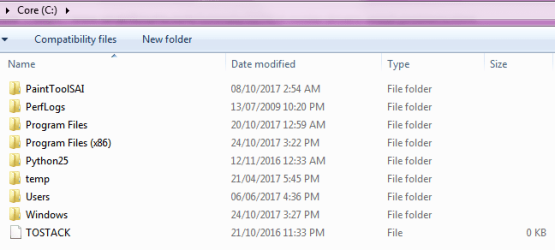
That's what I'm saying: there is no NVIDIA folder in the C: folder.
 

Attachments

  • CFolder01.png
    CFolder01.png
    9.3 KB · Views: 9

My Computer My Computer

At a glance

Microsoft Windows 7 Professional 64-bit 7601 ...Intel(R) Core(TM) i7-6700 CPU @ 3.40GHz16.00 GBNVIDIA GeForce GTX 1080
Computer type
PC/Desktop
Computer Manufacturer/Model Number
Custom Build
OS
Microsoft Windows 7 Professional 64-bit 7601 Multiprocessor Free Service Pack 1
CPU
Intel(R) Core(TM) i7-6700 CPU @ 3.40GHz
Motherboard
Gigabyte Technology Co., Ltd. B150M-D3H-CF
Memory
16.00 GB
Graphics Card(s)
NVIDIA GeForce GTX 1080
Sound Card
(1) NVIDIA High Definition Audio(2) Realtek High Definition
Monitor(s) Displays
1
Screen Resolution
1920 x 1080 x 32 bits (4294967296 colors) @ 60 Hz
Hard Drives
(1) ADATA SP600 ATA Device (2) WDC WD20EZRZ-00Z5HB0 ATA Device
Case
NZXT H440 (Matte Black) ATX Mid Tower Case
Keyboard
Microsoft Sculpt Ergonomic Keyboard
Mouse
Microsoft Sculpt Ergonomic Mouse
Browser
Google Chrome
Back
Top