
New HDD may be broken. Return window closes in a few days!

saywat

New member
Local time
3:59 AM
Messages
13
My old 1TB Seagate Barracuda ST31000528AS was giving me this error, "Windows detected a hard disk problem." I tried to fix it but was unable to so I purchased this Western Digital 2TB Black WD2003FZEX a few weeks ago. I cloned the old drive onto the new one using Acornis. It all went smoothly. I used WD’s Data LifeGuard Diagnostics (non-dos) software to run an extended test on the new drive and it passed.

Then, just a few days ago, my computer developed a problem and I started to get BSOD. For a few days now, I have only been able to use my computer on Safe Mode and there are always artifacts on the screen. I researched the BSOD and one thing mentioned was to check the hard drive with Seatools DOS. I used the same program to check my old Seatools drive but didn't think to use it on the WD HDD since it was a different manufacturer.

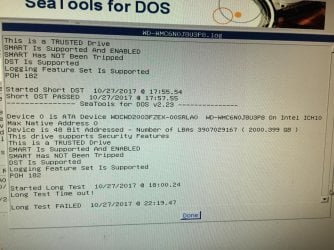
Anyway, I did a Short Test with Seatools and it passed. Then I ran the Long Test and it failed :( I attached the log.

Unfortunately, your Seagate hard drive has failed an important diagnostic test, possibly caused by problem sectors which are difficult to read. Now is a good time to make sure you have a current backup of your important data.

Seagate recommends that you consider repairing the problem sectors. SeaTools for DOS may be able to save you from the inconvenience and down time of exchanging the drive. For more information on this subject see our help topic ‘Bad Sector Found’.
Yesterday morning, I went into Safe Mode and to my surprise, there weren't any artifacts. I then opened command prompt as the admin and entered chkdsk /f c: I have attached the results. The computer rebooted and I was able to get on my desktop! After 20 minutes, artifacts and BSOD showed up. :(

I was curious and ran chkdsk /f c: again to see what it would say. Again, results attached.

Then I ran SeaTools again but it gave me the same message as above.

I found that WD Data Lifeguard Diagnostics also comes in DOS. I ran the Extended Test, got a No Errors Found msg. What?

Is this something wrong with the WD2003FZEX or not? I don't know how to interpret all these results.

Does cloning a broken drive, cause any damage to the new drive? I only have a few days left to return this drive for a refund.
 

Attachments
My Computer My Computer

At a glance

Windows 7 Home Premium 64-bitIntel Core i7 920 2.67 GHzGeForce GTX 550 Ti
Computer type
PC/Desktop
Computer Manufacturer/Model Number
Dell XPS 435T
OS
Windows 7 Home Premium 64-bit
CPU
Intel Core i7 920 2.67 GHz
Motherboard
Dell 0X501H
Graphics Card(s)
GeForce GTX 550 Ti
Hard Drives
2TB Black WD2003FZEX
PSU
Dell F217J 475W
Hi Saywat,

Not really my area im sure you'll get more comments
I can tell you
a clone copy takes the bad sectors across from old to new -- use an image if the bad drive can take it

Roy
 

My Computer My Computer

At a glance

W7 home premium 32bit/W7HP 64bit/w10 tp insid...E5300 dual core3gbNvidia Geforce 7100 Nforce 630i
Computer type
PC/Desktop
Computer Manufacturer/Model Number
medionl/Aspire 6930G/acer x55a
OS
W7 home premium 32bit/W7HP 64bit/w10 tp insider ring
CPU
E5300 dual core
Motherboard
medion MS7366
Memory
3gb
Graphics Card(s)
Nvidia Geforce 7100 Nforce 630i
Monitor(s) Displays
avixc
Internet Speed
n (isp resticted to 72)
Antivirus
mse/pands
Browser
palemoon
Other Info
Belkin Fd7050 n USB using Railink RT2870 drivers, more upto date
Hi Saywat,

Not really my area im sure you'll get more comments
I can tell you
a clone copy takes the bad sectors across from old to new -- use an image if the bad drive can take it

Roy

Good to know. Thanks, Roy. Yup, I hope I get some help because my return window ends in a couple days.
 

My Computer My Computer

At a glance

Windows 7 Home Premium 64-bitIntel Core i7 920 2.67 GHzGeForce GTX 550 Ti
Computer type
PC/Desktop
Computer Manufacturer/Model Number
Dell XPS 435T
OS
Windows 7 Home Premium 64-bit
CPU
Intel Core i7 920 2.67 GHz
Motherboard
Dell 0X501H
Graphics Card(s)
GeForce GTX 550 Ti
Hard Drives
2TB Black WD2003FZEX
PSU
Dell F217J 475W
In the world of computer repair, that I've lived in for well over 30 years, I'd have to say that you went from a very good and reliable brand of drive* to a brand That I won't let anywhere near my PC's.
*Even with the worlds best drives, an occasional failure does occur.

In one summer, I had to RMA a WD hard drive three times. The last one they sent me looked like it had been kicked across a concrete floor. (badly scratched) I just gave it away and it failed two months later.

So I said "Never Again" to WD and I've been real happy with Seagate, Samsung, and Toshiba drives ever since then.
Right now, I'm using two SanDisk SSD drives, with no problems.

Good Luck with that WD. :cry:

:cool:
 

My Computer My Computer

At a glance

Win 7 Pro, SP1, x86, Win-11/Pro/64AMD8GB CrucialVarious
Computer type
PC/Desktop
Computer Manufacturer/Model Number
Various
OS
Win 7 Pro, SP1, x86, Win-11/Pro/64
CPU
AMD
Motherboard
Various
Memory
8GB Crucial
Graphics Card(s)
Various
Sound Card
OnBoard
Monitor(s) Displays
Acer 21.5"
Hard Drives
Crucial SSD, 500 GB
PSU
OEM
Case
SFF Slim Line Case
Cooling
OEM
Keyboard
eMachines
Mouse
Logitech Wireless
Internet Speed
varies
Antivirus
Windows Defender/Super Anti-Spyware
Browser
Firefox
In the world of computer repair, that I've lived in for well over 30 years, I'd have to say that you went from a very good and reliable brand of drive* to a brand That I won't let anywhere near my PC's.
*Even with the worlds best drives, an occasional failure does occur.

Sigh, before I bought this new drive, I did some research and I came across of "Seagate drives are junk." So I went with WD. But I dunno if those people had 30 years of experience. So speaking of experience in computer repair, would you say that my new drive is damaged?
 

My Computer My Computer

At a glance

Windows 7 Home Premium 64-bitIntel Core i7 920 2.67 GHzGeForce GTX 550 Ti
Computer type
PC/Desktop
Computer Manufacturer/Model Number
Dell XPS 435T
OS
Windows 7 Home Premium 64-bit
CPU
Intel Core i7 920 2.67 GHz
Motherboard
Dell 0X501H
Graphics Card(s)
GeForce GTX 550 Ti
Hard Drives
2TB Black WD2003FZEX
PSU
Dell F217J 475W
In the world of computer repair, that I've lived in for well over 30 years, I'd have to say that you went from a very good and reliable brand of drive* to a brand That I won't let anywhere near my PC's.
*Even with the worlds best drives, an occasional failure does occur.

In one summer, I had to RMA a WD hard drive three times. The last one they sent me looked like it had been kicked across a concrete floor. (badly scratched) I just gave it away and it failed two months later.

So I said "Never Again" to WD and I've been real happy with Seagate, Samsung, and Toshiba drives ever since then.
Right now, I'm using two SanDisk SSD drives, with no problems.

Good Luck with that WD. :cry:

:cool:

I don't know what you are talking about but my 320GB WD drive is doing fine. I've had problems with Samsung. Hitachi's doing well too.
 

My Computer My Computer

At a glance

Windows 7 Home Premium 64-BITAMD A8 7200P8GB 1600mhzRadeon R5 (APU) + Radeon R5 M230 2GB Dual Gra...
Computer type
PC/Desktop
Computer Manufacturer/Model Number
ASUS X550ZE
OS
Windows 7 Home Premium 64-BIT
CPU
AMD A8 7200P
Motherboard
N/A
Memory
8GB 1600mhz
Graphics Card(s)
Radeon R5 (APU) + Radeon R5 M230 2GB Dual Graphics
Sound Card
Realtek ALC269 with SonicMaster
Monitor(s) Displays
Laptop Display
Screen Resolution
1920 x 1080 @60hz
Hard Drives
WDC WD50 00LPVX-80V0TT0 (500GB)
PSU
Laptop Charger
Mouse
ARMAGGEDON TEXTRON SCORPION 7
Internet Speed
100 mbps DOWN / 50 mbps UP
Antivirus
Windows Defender
Browser
Mozzila FireFox, Valve Steam in-game internet browser
Really hoping to get help on my questions:

From the information I have provided, does it look like me new drive is indeed damaged?

Could the Seatools test have resulted in a fail because I ran it on a non-Seagate drive?

If I cloned a drive that was giving me a "Windows detected a hard disk problem" error msg, and it somehow damaged the new drive, shouldn't I be getting the same error msg by now?
 

My Computer My Computer

At a glance

Windows 7 Home Premium 64-bitIntel Core i7 920 2.67 GHzGeForce GTX 550 Ti
Computer type
PC/Desktop
Computer Manufacturer/Model Number
Dell XPS 435T
OS
Windows 7 Home Premium 64-bit
CPU
Intel Core i7 920 2.67 GHz
Motherboard
Dell 0X501H
Graphics Card(s)
GeForce GTX 550 Ti
Hard Drives
2TB Black WD2003FZEX
PSU
Dell F217J 475W
I think that your new drive is healthy. As Roy mentioned, the problem my be that you cloned a failing drive.
Start from scratch. Do a clean install and then restore your data.

Why don't you buy a small SSD (128 G) for windows and programs and use the HDD for data?
You have no idea what a SSD can improve your computer.

Related to WD, I think that WD Black and Gold are the best desktop HDD's money can buy. (can't say the same for portables).
 

My Computers My Computers

  • At a glance

    Windows 7 HP 64i5 6600K - 800MHz to 4200MHz4+4G GSkill DDR4 3000IG - Intel 530
    Computer type
    PC/Desktop
    Computer Manufacturer/Model Number
    custom build
    OS
    Windows 7 HP 64
    CPU
    i5 6600K - 800MHz to 4200MHz
    Motherboard
    GA-Z170-HD3P
    Memory
    4+4G GSkill DDR4 3000
    Graphics Card(s)
    IG - Intel 530
    Monitor(s) Displays
    Samsung 226BW
    Screen Resolution
    1680x1050
    Hard Drives
    (1) -1 SM951 – 128GB M.2 AHCI PCIe SSD drive for Windows 7 and Lubuntu
    (2) -1 WD SATA 3 - 1T for Data
    (3) -1 WD SATA 3 - 1T for backup
    PSU
    Thermaltake 450W TR2 gold
    Keyboard
    Old and good Chicony mechanical keyboard
    Mouse
    Logitech mX performance - 9 buttons (had to disable some)
    Internet Speed
    500Mb/s
    Browser
    Firefox 64
    Other Info
    TinyWall firewall
  • At a glance

    Windows 7 Proi7-4500U 800MHz to 3.0GHz(4+4)G DDR3 1600IG intel 4400 + NVIDIA GeForce GT 745M
    Computer type
    Laptop
    System Manufacturer/Model Number
    Asus Q550LF
    OS
    Windows 7 Pro
    CPU
    i7-4500U 800MHz to 3.0GHz
    Motherboard
    Asus Q550LF
    Memory
    (4+4)G DDR3 1600
    Graphics Card(s)
    IG intel 4400 + NVIDIA GeForce GT 745M
    Sound Card
    Realtek
    Monitor(s) Displays
    LG Display LP156WF4-SPH1
    Screen Resolution
    1920 x 1080
    Hard Drives
    BX500 120G SSD for Windows and programs +
    1T HDD for data
    Internet Speed
    500 Mb/s
    Browser
    Firefox
    Other Info
    TinyWall firewall
I think that your new drive is healthy. As Roy mentioned, the problem my be that you cloned a failing drive.
Start from scratch. Do a clean install and then restore your data.

Thank you for your response. I was thinking that by cloning the failing drive, I damaged this new one forever. But what you're saying is that I can erase the damage I did by installing Win7 from scratch, correct?
 

My Computer My Computer

At a glance

Windows 7 Home Premium 64-bitIntel Core i7 920 2.67 GHzGeForce GTX 550 Ti
Computer type
PC/Desktop
Computer Manufacturer/Model Number
Dell XPS 435T
OS
Windows 7 Home Premium 64-bit
CPU
Intel Core i7 920 2.67 GHz
Motherboard
Dell 0X501H
Graphics Card(s)
GeForce GTX 550 Ti
Hard Drives
2TB Black WD2003FZEX
PSU
Dell F217J 475W
There is one way to find out. Try it and see.
 

My Computers My Computers

  • At a glance

    7 X64i5 84002x8gb 3200mhz
    Computer type
    PC/Desktop
    OS
    7 X64
    CPU
    i5 8400
    Motherboard
    gigabyte b365m ds3h
    Memory
    2x8gb 3200mhz
    Hard Drives
    various
    PSU
    pure power 11 400w cm
    Case
    Coolermaster
    Cooling
    cryorig m9i
  • At a glance

    7x64g54008gb ddr4 2400
    Computer type
    PC/Desktop
    OS
    7x64
    CPU
    g5400
    Motherboard
    ga b365m ds3h
    Memory
    8gb ddr4 2400
    PSU
    xfx pro 450w
Back
Top