New Windows 7 install but unable to enable Aero.

If anyone had other suggestions to give, I'm all ears.
 

My Computer My Computer

At a glance

Windows 7 ProfessionalGenuineIntel Intel(R) Core(TM) i7-3770K CPU @...16.0 GBNVIDIA GeForce GTX 1070
Computer type
PC/Desktop
Computer Manufacturer/Model Number
Custom Build
OS
Windows 7 Professional
CPU
GenuineIntel Intel(R) Core(TM) i7-3770K CPU @ 3.50GHz
Motherboard
ASRock, Z77 Extreme4
Memory
16.0 GB
Graphics Card(s)
NVIDIA GeForce GTX 1070
Monitor(s) Displays
Viewsonic VX2450WM-LED 24-Inch
Screen Resolution
1080
Hard Drives
1TB WD Black
250 GB 850 EVO
PSU
HX 650
Antivirus
MSE
Browser
Brave
I believe Win 10 is your best (possibly only) way to get it working properly. or you could buy or use a dedicated graphics card. Those would have win 7 driver available to them
 

My Computer My Computer

At a glance

Windows 7 Home Premium (64 bit)Intel I5 520m8 GBIntel integrated
Computer type
Laptop
Computer Manufacturer/Model Number
Dell Latitude E6410
OS
Windows 7 Home Premium (64 bit)
CPU
Intel I5 520m
Memory
8 GB
Graphics Card(s)
Intel integrated
Sound Card
IDT Digital Audio
Monitor(s) Displays
Dell ST2010
Screen Resolution
1600X900
Hard Drives
WD Scorpio Black 750GB
Keyboard
Microsoft Wireless Comfort Keyboard 5000
Mouse
Microsoft Wireless Mouse 5000
Internet Speed
350 mb/s down 12 mb/s up
Antivirus
NIS
Browser
Firefox
Other Info
Repaired trash lappy
I believe Win 10 is your best (possibly only) way to get it working properly. or you could buy or use a dedicated graphics card. Those would have win 7 driver available to them

So buying a graphics card would fix this?

Cause that would be a much better option for me than getting 10.
 

My Computer My Computer

At a glance

Windows 7 ProfessionalGenuineIntel Intel(R) Core(TM) i7-3770K CPU @...16.0 GBNVIDIA GeForce GTX 1070
Computer type
PC/Desktop
Computer Manufacturer/Model Number
Custom Build
OS
Windows 7 Professional
CPU
GenuineIntel Intel(R) Core(TM) i7-3770K CPU @ 3.50GHz
Motherboard
ASRock, Z77 Extreme4
Memory
16.0 GB
Graphics Card(s)
NVIDIA GeForce GTX 1070
Monitor(s) Displays
Viewsonic VX2450WM-LED 24-Inch
Screen Resolution
1080
Hard Drives
1TB WD Black
250 GB 850 EVO
PSU
HX 650
Antivirus
MSE
Browser
Brave

My Computer My Computer

At a glance

Windows 7 Ultimate x64
Computer type
PC/Desktop
Computer Manufacturer/Model Number
Dell
OS
Windows 7 Ultimate x64
Publish a Snapshot using Speccy, taking care to post the link of the snapshot in your next post.

Go to Piriform's website, and download the free version on the left. Click Download from Piriform.com (the FileHippo link requires an extra click). Or if you want to use a portable version of Speccy (which doesn't require installation), click the builds page link and download the portable version. You will now be asked where you want to save the file. The best place to put it is the Desktop, as it will be easy to find later.

After the file finishes downloading, you are ready to run Speccy. If you downloaded the installer, simply double-click on it and follow the prompts until installation is complete. If you downloaded the portable version, you will need to unzip it before use. Right-click the ZIP file and click Extract all. Click Next. Open up the extracted folder and double-click on Speccy.

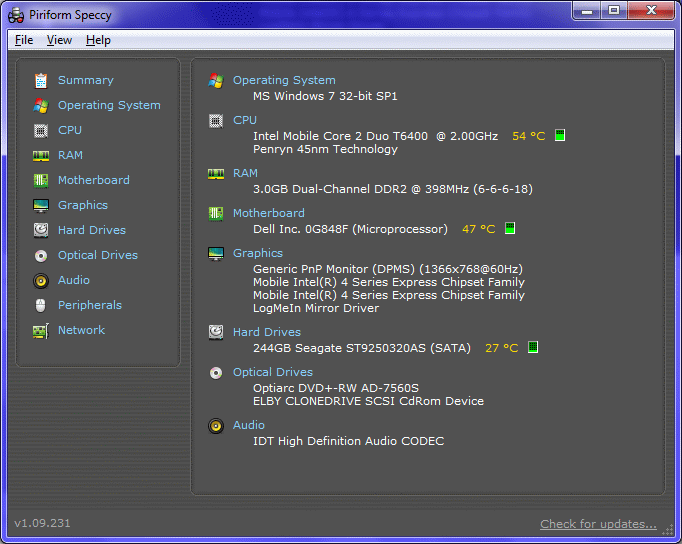
Once inside Speccy, it will look similar to this (with your computer's specifications, of course):

pHMDRrj.png


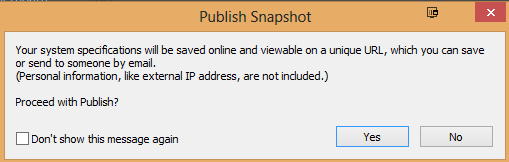
Now, at the top, click File > Publish Snapshot. You will see the following prompt:

0DHvihT.png


Click Yes > then Copy to Clipboard

AWEuUYi.png


Now, once you are back in the forum topic you are posting in, click the Add Reply button. Right-click in the empty space of the Reply box and click Paste. Then, click Send below the Reply box.
 

My Computer My Computer

At a glance

Windows 10 Pro x64Intel Core i5 6600Corsair Vengeance LPX 16GB 2666MHz DDR4AMD Radeon R9 380 Series
Computer type
PC/Desktop
Computer Manufacturer/Model Number
Custom Build
OS
Windows 10 Pro x64
CPU
Intel Core i5 6600
Motherboard
Gigabyte Technology Z170M-D3H-CF (U3E1)
Memory
Corsair Vengeance LPX 16GB 2666MHz DDR4
Graphics Card(s)
AMD Radeon R9 380 Series
Hard Drives
SSD
HDD
Antivirus
Eset Smart Security
Browser
Mozila Firefox
So buying a graphics card would fix this?

Cause that would be a much better option for me than getting 10.

If you don't want win 10, yes it would.....you would get new vid card, install drivers, and all SHOULD be well.

My roommate has a system based on a 7th gen intel processor, it will run win 7 as well........quick question, do ALL other parts of your system work properly?
 

My Computer My Computer

At a glance

Windows 7 Home Premium (64 bit)Intel I5 520m8 GBIntel integrated
Computer type
Laptop
Computer Manufacturer/Model Number
Dell Latitude E6410
OS
Windows 7 Home Premium (64 bit)
CPU
Intel I5 520m
Memory
8 GB
Graphics Card(s)
Intel integrated
Sound Card
IDT Digital Audio
Monitor(s) Displays
Dell ST2010
Screen Resolution
1600X900
Hard Drives
WD Scorpio Black 750GB
Keyboard
Microsoft Wireless Comfort Keyboard 5000
Mouse
Microsoft Wireless Mouse 5000
Internet Speed
350 mb/s down 12 mb/s up
Antivirus
NIS
Browser
Firefox
Other Info
Repaired trash lappy
If you don't want win 10, yes it would.....you would get new vid card, install drivers, and all SHOULD be well.

My roommate has a system based on a 7th gen intel processor, it will run win 7 as well........quick question, do ALL other parts of your system work properly?

Such as what?

Everything works as far as I can tell.
 

My Computer My Computer

At a glance

Windows 7 ProfessionalGenuineIntel Intel(R) Core(TM) i7-3770K CPU @...16.0 GBNVIDIA GeForce GTX 1070
Computer type
PC/Desktop
Computer Manufacturer/Model Number
Custom Build
OS
Windows 7 Professional
CPU
GenuineIntel Intel(R) Core(TM) i7-3770K CPU @ 3.50GHz
Motherboard
ASRock, Z77 Extreme4
Memory
16.0 GB
Graphics Card(s)
NVIDIA GeForce GTX 1070
Monitor(s) Displays
Viewsonic VX2450WM-LED 24-Inch
Screen Resolution
1080
Hard Drives
1TB WD Black
250 GB 850 EVO
PSU
HX 650
Antivirus
MSE
Browser
Brave
If ALL other parts work (like USB 3.0, nvme etc) then getting a vid card would solve your aero woes.:)
 

My Computer My Computer

At a glance

Windows 7 Home Premium (64 bit)Intel I5 520m8 GBIntel integrated
Computer type
Laptop
Computer Manufacturer/Model Number
Dell Latitude E6410
OS
Windows 7 Home Premium (64 bit)
CPU
Intel I5 520m
Memory
8 GB
Graphics Card(s)
Intel integrated
Sound Card
IDT Digital Audio
Monitor(s) Displays
Dell ST2010
Screen Resolution
1600X900
Hard Drives
WD Scorpio Black 750GB
Keyboard
Microsoft Wireless Comfort Keyboard 5000
Mouse
Microsoft Wireless Mouse 5000
Internet Speed
350 mb/s down 12 mb/s up
Antivirus
NIS
Browser
Firefox
Other Info
Repaired trash lappy
If anyone had other suggestions to give, I'm all ears.
Have you remembered to run "Windows Experience Index (WEI)" rating?

That is required for Win7 to recognize that your graphics hardware is capable of running Aero or not, and allow it to be activated if your machine has met minimal performance requirements. The Windows Experience rating includes several hardware measurements about CPU speed, memory speed, HDD/SSD speed, graphics capability and speed, etc., all combined to form a single calculated number.

Right-click on Computer, select Properties from popup context menu to get the System window.

In the middle of the System window in the section titled "System", is an active button that shows your Windows Experience rating. Or, if you've not run it, you should have something that says you must run Windows Experience for the first time. Or, maybe that your hardware has changed and you must re-run Windows Experience to catch everything up to date.

Another way to get to showing and requesting re-run of WEI is Start -> Control Panel -> System and Security -> "Check the Windows Experience in the "System" category.


Does this solve your problem? A computer with a base WEI score of 3.0 can run Aero and many of Windows's features at a basic level, but it might have issues running higher level functions, such as playing HDTV content or displaying themes at higher resolutions.

 

My Computer My Computer

At a glance

Windows 7 Pro x64 (1), Win7 Pro X64 (2)i5-3350p 3.1Ghz/6MB-cache (1); E8400 3.0Ghz/6...8GB PC3-12800 DDR3 (1); 4GB PC3-10600 DDR3 (2)ATI HD7750 (1), (see TV cards); ATI R7 250 (2)
Computer type
PC/Desktop
Computer Manufacturer/Model Number
Home-built, two systems (1) and (2)
OS
Windows 7 Pro x64 (1), Win7 Pro X64 (2)
CPU
i5-3350p 3.1Ghz/6MB-cache (1); E8400 3.0Ghz/6MB-cache (2)
Motherboard
ASUS P8Z77-V Pro (1); ASUS P5Q3 (2)
Memory
8GB PC3-12800 DDR3 (1); 4GB PC3-10600 DDR3 (2)
Graphics Card(s)
ATI HD7750 (1), (see TV cards); ATI R7 250 (2)
Sound Card
Realtek ALC892 HD Audio (1); Realtek ALC1200 HD Audio (2)
Monitor(s) Displays
Eizo HD2441W LCD, Eizo S2433W (1); Eizo 24" S2433W (2)
Screen Resolution
1920x1200, 1920x1200 (1); 1920x1200 (2)
Hard Drives
(1) 1TB SATA-II (7200RPM), 2x2TB SATA-III (7200RPM), 250GB SATA-III (10000RPM) for OS; 2x2TB external USB 3.0

(2) 320GB SATA-II (7200RPM), 750GB SATA-II (7200RPM), 150GB SATA-II (10000RPM) for OS; 2TB external USB 3.0
PSU
Nesteq ECS-6001 600W (1); Nesteq ECS-5001 500W (2)
Case
Acousti-Case 360 (1) and (2)
Cooling
Noctua NH-U12P SE2 for CPU, 2x120mm case fans (1) and (2)
Keyboard
IBM PS/2 (1) and (2)
Mouse
Logitech MX Revolution wireless (1); Microsoft wired (2)
Internet Speed
100mbps down / 10mbps up
Antivirus
Microsoft Security Essentials; Malwarebyte Anti-Malware Pro
Browser
Firefox
Other Info
Ceton InfiniTV 4-tuner cablecard-enabled TV card as well as Hauppauge HVR-2250 OTA/ATSC 2-tuner TV card in (1), running under Win7 WMC
I was pulling my hair out for days trying to fix a user's problem of her Aero peek not working on her laptop. It wasn't working on my laptop either.

After a lot of research, I determined that the problem was in a graphics driver.

Went to Device Manager...Display adapters. I had 3 listed. I use 2 monitors & so does my user. In addition to the 2 drivers for the 2 monitors, we both also had DameWare Development Mirror Driver listed. I disabled that...rebooted...it worked!

Hope you find a similar type thing & that it works for you.
 

My Computer My Computer

At a glance

Windows 7 Pro 64-bit
Computer type
Laptop
OS
Windows 7 Pro 64-bit
Back
Top