All USB storage devices CRASH windows

Smile

New member
Local time
7:03 AM
Messages
73
Location
Queensland Australia
The title is basically all you need to know. I have tried everying, but I am up for suggestions.
 

My Computer My Computer

OS
Windows 7 64-bit
CPU
Intel Pentium Dualcore E5200 @ 2.5GHz
Motherboard
Gigabyte EG31M-S2
Memory
4gb
Graphics Card(s)
Radeon HD4670
Sound Card
ATI HDMI Audio
Monitor(s) Displays
24" Benq G2411HD
Screen Resolution
1920x1080
Hard Drives
WDC WD5000AACS-00G8B1 ATA Device 500Gb
External WD 1TB
Case
CoolerMaster
Keyboard
Razer Lycosa
Mouse
Razer Deathadder
Internet Speed
8000k bits p/s
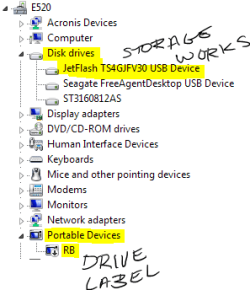
Can you insert a USB device without Windows crashing? Or is it durring boot/restart? I was getting a BSOD on bootup from a flash drive. I was able to insert the drive once Windows was up and running, then in device manager I expanded 'Portable Devices' and disabled the flash drive there.

This didnt disable the storage but the portable drivers Windows loads because it thinks my flash drive is a poratable/music device type.

Depending on your storage devices you may need a driver update. I was also getting errors (not crashes) and had to update the Intel Storage Manager. Some info on your system might help us to better determine the problem and solution.
 

Attachments

  • USB.PNG
    USB.PNG
    9.5 KB · Views: 261

My Computer My Computer

Computer Manufacturer/Model Number
Dell Dimension E520
OS
Windows 7 Ultimate (x86)
CPU
Intel 2.20 Dual Core
Memory
4 GB
Graphics Card(s)
nVidia 9400 GT (512 MB)
Sound Card
Sigmatel C Major HD
Monitor(s) Displays
22" Samsung 2232 bw
Screen Resolution
1680x1050
Mouse
Microsoft Arc
Other Info
Wacom Graphire 4 (6x8) Tablet
I would do a clean reinstall of Windows.
 

My Computer My Computer

Computer Manufacturer/Model Number
HP Compaq nx6325
OS
Windows 7 Ultimate x64
CPU
AMD Turion X2 TL-68
Memory
2 GB DDR2 Dual Channel 667 MHz
Graphics Card(s)
ATI Radeon Xpress Series
Hard Drives
250 GB S-ATA

My Computer My Computer

OS
Windows 7 64-bit
CPU
Intel Pentium Dualcore E5200 @ 2.5GHz
Motherboard
Gigabyte EG31M-S2
Memory
4gb
Graphics Card(s)
Radeon HD4670
Sound Card
ATI HDMI Audio
Monitor(s) Displays
24" Benq G2411HD
Screen Resolution
1920x1080
Hard Drives
WDC WD5000AACS-00G8B1 ATA Device 500Gb
External WD 1TB
Case
CoolerMaster
Keyboard
Razer Lycosa
Mouse
Razer Deathadder
Internet Speed
8000k bits p/s
OK, where did you get your Win 7? :zip:
And do you have the latest BIOS?
 

My Computer My Computer

Computer Manufacturer/Model Number
HP Compaq nx6325
OS
Windows 7 Ultimate x64
CPU
AMD Turion X2 TL-68
Memory
2 GB DDR2 Dual Channel 667 MHz
Graphics Card(s)
ATI Radeon Xpress Series
Hard Drives
250 GB S-ATA
Can you insert a USB device without Windows crashing? Or is it durring boot/restart? I was getting a BSOD on bootup from a flash drive. I was able to insert the drive once Windows was up and running, then in device manager I expanded 'Portable Devices' and disabled the flash drive there.

This didnt disable the storage but the portable drivers Windows loads because it thinks my flash drive is a poratable/music device type.

Depending on your storage devices you may need a driver update. I was also getting errors (not crashes) and had to update the Intel Storage Manager. Some info on your system might help us to better determine the problem and solution.

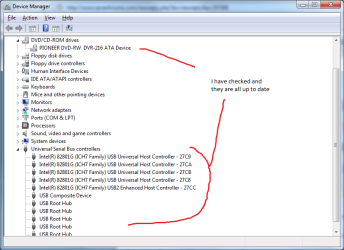
If I Insert my Guitar hero guitar/Mouse Keyboard they work fine, as soon as its my External HDD or a Flash Drive it instantly locks up (screen freezes, mouse and keyboard wont respond and time stops lol). Can not plug them in when the pc is on or starting up (when starting up it will freeze just after the loading screen and just before the login screen). Also the devices is WD elements and Toshiba 2gb...
 

Attachments

  • Device.png
    Device.png
    23.7 KB · Views: 276

My Computer My Computer

OS
Windows 7 64-bit
CPU
Intel Pentium Dualcore E5200 @ 2.5GHz
Motherboard
Gigabyte EG31M-S2
Memory
4gb
Graphics Card(s)
Radeon HD4670
Sound Card
ATI HDMI Audio
Monitor(s) Displays
24" Benq G2411HD
Screen Resolution
1920x1080
Hard Drives
WDC WD5000AACS-00G8B1 ATA Device 500Gb
External WD 1TB
Case
CoolerMaster
Keyboard
Razer Lycosa
Mouse
Razer Deathadder
Internet Speed
8000k bits p/s
OK, where did you get your Win 7? :zip:
And do you have the latest BIOS?

Windows 7 worked fine for at least a month before yesterday it froze then epic hours of repairs.
 

My Computer My Computer

OS
Windows 7 64-bit
CPU
Intel Pentium Dualcore E5200 @ 2.5GHz
Motherboard
Gigabyte EG31M-S2
Memory
4gb
Graphics Card(s)
Radeon HD4670
Sound Card
ATI HDMI Audio
Monitor(s) Displays
24" Benq G2411HD
Screen Resolution
1920x1080
Hard Drives
WDC WD5000AACS-00G8B1 ATA Device 500Gb
External WD 1TB
Case
CoolerMaster
Keyboard
Razer Lycosa
Mouse
Razer Deathadder
Internet Speed
8000k bits p/s
If everything was working up until recently, something must have changed. Like a Windows Update or setting for Auto play maybe?

Have you tried using system restore to go back to when you know everything was working?

Also have you tried inserting the drives while in safe mode?
 

My Computer My Computer

Computer Manufacturer/Model Number
Dell Dimension E520
OS
Windows 7 Ultimate (x86)
CPU
Intel 2.20 Dual Core
Memory
4 GB
Graphics Card(s)
nVidia 9400 GT (512 MB)
Sound Card
Sigmatel C Major HD
Monitor(s) Displays
22" Samsung 2232 bw
Screen Resolution
1680x1050
Mouse
Microsoft Arc
Other Info
Wacom Graphire 4 (6x8) Tablet
If everything was working up until recently, something must have changed. Like a Windows Update or setting for Auto play maybe?

Have you tried using system restore to go back to when you know everything was working?

Also have you tried inserting the drives while in safe mode?

I have completely reinstalled windows at least 4 times so it might be my hardware or my drivers, yes i have in safe mode and it still freezes up. and system restored to an earlier state before I reinstalled you can guess why I reinstalled...
 

My Computer My Computer

OS
Windows 7 64-bit
CPU
Intel Pentium Dualcore E5200 @ 2.5GHz
Motherboard
Gigabyte EG31M-S2
Memory
4gb
Graphics Card(s)
Radeon HD4670
Sound Card
ATI HDMI Audio
Monitor(s) Displays
24" Benq G2411HD
Screen Resolution
1920x1080
Hard Drives
WDC WD5000AACS-00G8B1 ATA Device 500Gb
External WD 1TB
Case
CoolerMaster
Keyboard
Razer Lycosa
Mouse
Razer Deathadder
Internet Speed
8000k bits p/s
Also you said something about a Intel Storage Manager? I'll see if this helps.
 

My Computer My Computer

OS
Windows 7 64-bit
CPU
Intel Pentium Dualcore E5200 @ 2.5GHz
Motherboard
Gigabyte EG31M-S2
Memory
4gb
Graphics Card(s)
Radeon HD4670
Sound Card
ATI HDMI Audio
Monitor(s) Displays
24" Benq G2411HD
Screen Resolution
1920x1080
Hard Drives
WDC WD5000AACS-00G8B1 ATA Device 500Gb
External WD 1TB
Case
CoolerMaster
Keyboard
Razer Lycosa
Mouse
Razer Deathadder
Internet Speed
8000k bits p/s
OK, where did you get your Win 7? :zip:
And do you have the latest BIOS?

Windows 7 worked fine for at least a month before yesterday it froze then epic hours of repairs.

Interesting information! Didn't you say that we have all info we need in your query?
 

My Computer My Computer

Computer Manufacturer/Model Number
HP Compaq nx6325
OS
Windows 7 Ultimate x64
CPU
AMD Turion X2 TL-68
Memory
2 GB DDR2 Dual Channel 667 MHz
Graphics Card(s)
ATI Radeon Xpress Series
Hard Drives
250 GB S-ATA
I'm a sad lonely 15 yr old that's angry, i had explained it too much i didn't feel like explaining anymore. Helpppppppppppp
 

My Computer My Computer

OS
Windows 7 64-bit
CPU
Intel Pentium Dualcore E5200 @ 2.5GHz
Motherboard
Gigabyte EG31M-S2
Memory
4gb
Graphics Card(s)
Radeon HD4670
Sound Card
ATI HDMI Audio
Monitor(s) Displays
24" Benq G2411HD
Screen Resolution
1920x1080
Hard Drives
WDC WD5000AACS-00G8B1 ATA Device 500Gb
External WD 1TB
Case
CoolerMaster
Keyboard
Razer Lycosa
Mouse
Razer Deathadder
Internet Speed
8000k bits p/s
USB flash drives are crashing my Windows 7 64 bit system as well. Have the latest drivers for everything. Using Foxxconn destroyer MB, Phenom II x4 0940, and 8GB ram. After using the flash drive for a bit in the system I get duplicate screens (dual monitors) and then a blue screen. Happens every time I use a USb flash drive.
 

My Computer My Computer

OS
Windows 7 Beta 64 Bit
CPU
AMD Phenom II X4 940 B.E. @ 3Ghz
Motherboard
Foxconn Destoyer
Memory
8GB Crucial Ballistics
Graphics Card(s)
Onboard Geforce 8000 series for now
Sound Card
Onboard Realtek HD Audio for now
Monitor(s) Displays
Samsung SyncMaster 220WM x2
Screen Resolution
1680x1050
Hard Drives
WD 1TB SATA II Caviar Black x2
PSU
OCZ GameXstream 600W
Case
Antec 900
Cooling
Stock
Keyboard
Logitech Cordless Media
Mouse
Cordless Mouseman Optical
Internet Speed
Comcast HSI
mass storage controller driver windows 7

When I tried to connect my HP LaserJet 1012 printer I found that HP didn't provide MS with the driver for Windows 7. Thru forum help I was able to connect by downloading the driver for 3055PCL5 (DOT4) and Printer Wizard did the rest. Worked great.

However yesterday the printer connected to the pc but would not print the data. I eventually found that the mass storage controller didn't have the appropriate driver. When I tried to "Update Drivers", I had no luck in finding the driver.

Bearing in mind that I am not as computer-savvy as the posters on this forum, can anyone help with this problem?

Thx in advance.
 

My Computer My Computer

OS
windows 7
Back
Top