Solved External Hard Disk, Unknown, Not Initialized ! No Unallocated Space.

Bhautik

New member
Local time
3:13 PM
Messages
9
Hi,

I'm new to this forum.

My external hard disk (Seagate) is detected in the task bar after connecting, but not visible in "My Computer".

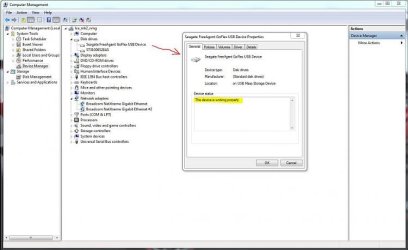
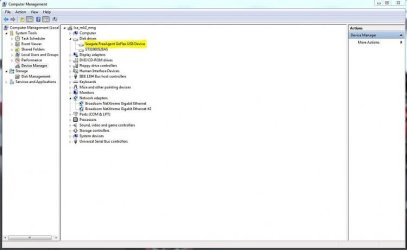
It is visible in Device manager under Disk Drives but not under USB.

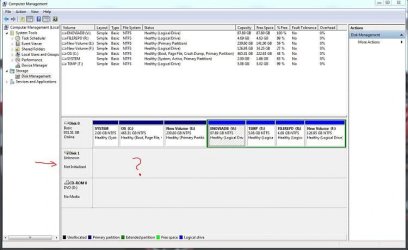
There are few threads in this forum which are similar to mine, except that their Drives are visible in the Disk Management as Unallocated Space, mine is not.

SEE ATTACHMENTS !!!!!!!!!

I've tried all tools, tried in Windows XP still no solution.

Is there any way to atleast recover the data !!!!!!!!!

Your reply is appreciated !!!!!!!!

SEE ATTACHMENTS !!!!!!!!!
 

Attachments
  • Task Bar.png
    Task Bar.png
    89.6 KB · Views: 29
  • Working Fine.JPG
    Working Fine.JPG
    33.9 KB · Views: 29
  • Device Manager.JPG
    Device Manager.JPG
    24.7 KB · Views: 28
  • Disk Management.JPG
    Disk Management.JPG
    41 KB · Views: 28

My Computer My Computer

Computer type
Laptop
Computer Manufacturer/Model Number
Dell
OS
Gujarat
Welcom to the Forum.

Did you try another USB port?
If it doesn't show on Disk management it's a bad sign.
I would try to take the disk out of its case and put on a desktop.
 

My Computers My Computers

System One System Two

  • Computer type
    PC/Desktop
    Computer Manufacturer/Model Number
    custom build
    OS
    Windows 7 HP 64
    CPU
    i5 6600K - 800MHz to 4200MHz
    Motherboard
    GA-Z170-HD3P
    Memory
    4+4G GSkill DDR4 3000
    Graphics Card(s)
    IG - Intel 530
    Monitor(s) Displays
    Samsung 226BW
    Screen Resolution
    1680x1050
    Hard Drives
    (1) -1 SM951 – 128GB M.2 AHCI PCIe SSD drive for Windows 7 and Lubuntu
    (2) -1 WD SATA 3 - 1T for Data
    (3) -1 WD SATA 3 - 1T for backup
    PSU
    Thermaltake 450W TR2 gold
    Keyboard
    Old and good Chicony mechanical keyboard
    Mouse
    Logitech mX performance - 9 buttons (had to disable some)
    Internet Speed
    500Mb/s
    Browser
    Firefox 64
    Other Info
    TinyWall firewall
  • Computer type
    Laptop
    System Manufacturer/Model Number
    Asus Q550LF
    OS
    Windows 7 Pro
    CPU
    i7-4500U 800MHz to 3.0GHz
    Motherboard
    Asus Q550LF
    Memory
    (4+4)G DDR3 1600
    Graphics Card(s)
    IG intel 4400 + NVIDIA GeForce GT 745M
    Sound Card
    Realtek
    Monitor(s) Displays
    LG Display LP156WF4-SPH1
    Screen Resolution
    1920 x 1080
    Hard Drives
    BX500 120G SSD for Windows and programs +
    1T HDD for data
    Internet Speed
    500 Mb/s
    Browser
    Firefox
    Other Info
    TinyWall firewall
Create a Linux Live DVD, then boot with that disk in the drive into Linux. Once you are in Linux, you should be able to see the drive and its contents, and transfer the contents to another drive.

Booting to Linux Live in this way will not make any changes to your hard drive.

To create a Linux Live DVD, go here: (https://linuxmint.com/download.php) and download any of the distros that are listed there (I suggest 32-bit xfce). Then, with a blank, writable DVD in the drive, double click on the ISO file that you downloaded, and it will walk you through creating the Linux Live DVD.

Now make sure that your computer can boot from a DVD, then boot to the DVD.
 

My Computer My Computer

Computer type
PC/Desktop
Computer Manufacturer/Model Number
Dell
OS
Linux Mint 18.2 xfce 64-bit (VMWare host) / Windows 8.1 Pro 32-bit (VMWare guest)
CPU
Haswell
Memory
4 GB
Monitor(s) Displays
Acer 23"
Screen Resolution
1920 x 1080
Hard Drives
Two hard drives, 1TB each: One for Linux, one for my data.
Keyboard
IBM Model M
Antivirus
Sophos (Linux), Trend Micro (Windows)
Browser
Firefox, Opera
Other Info
I use Samba to share my data drive with the other computers at my house and with my guest session in VMWare Workstation Player.
I try the all USB port bot doesn't show the hard drive

And when I tried to boot with Windows XP at startup boot ask hard drive password
And when I changed the order of boot and I make pendrive first but it doesn't boot first
 

My Computer My Computer

Computer type
Laptop
Computer Manufacturer/Model Number
Dell
OS
Gujarat
Is the drive encrypted?
 

My Computers My Computers

System One System Two

  • Computer type
    PC/Desktop
    Computer Manufacturer/Model Number
    custom build
    OS
    Windows 7 HP 64
    CPU
    i5 6600K - 800MHz to 4200MHz
    Motherboard
    GA-Z170-HD3P
    Memory
    4+4G GSkill DDR4 3000
    Graphics Card(s)
    IG - Intel 530
    Monitor(s) Displays
    Samsung 226BW
    Screen Resolution
    1680x1050
    Hard Drives
    (1) -1 SM951 – 128GB M.2 AHCI PCIe SSD drive for Windows 7 and Lubuntu
    (2) -1 WD SATA 3 - 1T for Data
    (3) -1 WD SATA 3 - 1T for backup
    PSU
    Thermaltake 450W TR2 gold
    Keyboard
    Old and good Chicony mechanical keyboard
    Mouse
    Logitech mX performance - 9 buttons (had to disable some)
    Internet Speed
    500Mb/s
    Browser
    Firefox 64
    Other Info
    TinyWall firewall
  • Computer type
    Laptop
    System Manufacturer/Model Number
    Asus Q550LF
    OS
    Windows 7 Pro
    CPU
    i7-4500U 800MHz to 3.0GHz
    Motherboard
    Asus Q550LF
    Memory
    (4+4)G DDR3 1600
    Graphics Card(s)
    IG intel 4400 + NVIDIA GeForce GT 745M
    Sound Card
    Realtek
    Monitor(s) Displays
    LG Display LP156WF4-SPH1
    Screen Resolution
    1920 x 1080
    Hard Drives
    BX500 120G SSD for Windows and programs +
    1T HDD for data
    Internet Speed
    500 Mb/s
    Browser
    Firefox
    Other Info
    TinyWall firewall
It may be that the drive itself has failed, but with an external drive I would initially test by replacement, all the USB hardware, Change the cable. use a different USB port, Try it on another computer. If any of these get the drive working then great, if not it could be the Controller hardware in the external case, you can purchase USB to SATA cables which would allow you to remove the actual HD from the case and check it that way.

If none of this works, or the previous software solutions suggested work then your only option for data recovery would be the very expensive professional recovery route
 

My Computers My Computers

System One System Two

  • Computer type
    PC/Desktop
    Computer Manufacturer/Model Number
    ChillBlast - Custom to my design
    OS
    Windows 11 Pro x64 [Latest Release and Release Preview]
    CPU
    Ryzen 9 5950X, 3.8 - 5.2 MHz
    Motherboard
    Asus Prime X570-Pro
    Memory
    64GB [2 x 32GB] DDR4 3200MHz
    Graphics Card(s)
    4GB NVIDIA GEFORCE GTX 1650 Ti
    Sound Card
    On-board SPDIF to 5.1 System + HDMI [5.1 system]
    Monitor(s) Displays
    32" UHD 32 Bit HDR Monitor + 43" UHD 4K 32Bit HDR TV
    Screen Resolution
    2 x 3840 x 2160 @60Hz
    Hard Drives
    1TB M2 SSD OS, 500GB Fast Access SSD, 2 x 8TB Data + Various Externals from 1TB to 4TB, 10TB NAS
    PSU
    NZXT C750 80 PLUS Gold 750W Modular PSU
    Case
    Workstation Case [Matt Black]
    Cooling
    NZXT Kraken X63 280mm CPU Cooler +2x Quiet Case fans
    Keyboard
    Logitech Wireless MX Keys & K400 + others
    Mouse
    Logitech Wireless MX Master 3S
    Internet Speed
    920 MB Down 50 MB Up
    Antivirus
    BitDefender Total Security Pro
    Browser
    Chrome (always run latest Non-Beta)
    Other Info
    Also run ...
    Laptop - Quad 8GB - Windows 10 Pro x64
    Nexus 7 Android tablet x2
    Samsung 10.2" tablet
    Blackview TAB 8 4G Android Tablet c/w Keyboard
    Wacom Intuos Pro Medium Pen Pad
    Wacom Intuos Pro Small Pen Pad
    Wacom Expresskeys Remote
    Loopdeck+ Graphics Controller
    Shuttle Pro v2 Control
  • Computer type
    Laptop
    System Manufacturer/Model Number
    Dell XPS 17 10750H
    OS
    Windows 11 Pro x64 Latest RP
    CPU
    Intel I7 10750H 5.0GHz
    Motherboard
    Dell XPS
    Memory
    32GB [2x16GB] DDR4 2933 MHz
    Graphics Card(s)
    nVidia GTX1650Ti 4 GB GDDR6
    Sound Card
    Stock [Realtek] 4 Speaker
    Monitor(s) Displays
    17" IPS UHD+ Infinity Edge Touchscreen
    Screen Resolution
    3840 x 2400
    Hard Drives
    2TB M2 NVMe, 4TB External + various 500GB & 1TB External NVMe (also have access to spinner HDD from
    PSU
    Stock
    Case
    Stock XPS Aluminium & Carbon Fibre
    Cooling
    Stock - Active Fan Control
    Keyboard
    Backlit + Various Logitech
    Mouse
    Stock Track Pad + Logitech MX Trackball
    Internet Speed
    72 MB Down 18MB Up
    Browser
    Chrome
    Other Info
    Also run ...
    Laptop - Quad 8GB - Windows 10 Pro x64
    Nexus 7 Android tablet x2
    10.2" tablet
    Sony Z3 Android Smartphone
    Wacom Intuos Pro Medium Pen Pad
    Wacom Intuos Pro Small Pen Pad
    Wacom Expresskeys Remote
    Loopdeck+ Graphics Controller
    Shuttle Pro v2 Control Pad
    10TB NAS
you can purchase USB to SATA cables which would allow you to remove the actual HD from the case and check it that way.

When you remove the external drive from its case and use a USB to SATA converter kit, be aware that the A/C adapters which come with some of these kits are bad. I have read some horror stories about some of these A/C adapters - sometimes the A/C adapter will fry the drive, because it puts out the wrong voltage/amperage/etc.

If you aren't absolutely sure about the quality of the A/C adapter, the only safe way to power up the drive is to get a desktop computer power supply and use it to power the external drive.

You shouldn't have any problem with the USB to SATA data connection; the above refers only to the SATA power connection.
 

My Computer My Computer

Computer type
PC/Desktop
Computer Manufacturer/Model Number
Dell
OS
Linux Mint 18.2 xfce 64-bit (VMWare host) / Windows 8.1 Pro 32-bit (VMWare guest)
CPU
Haswell
Memory
4 GB
Monitor(s) Displays
Acer 23"
Screen Resolution
1920 x 1080
Hard Drives
Two hard drives, 1TB each: One for Linux, one for my data.
Keyboard
IBM Model M
Antivirus
Sophos (Linux), Trend Micro (Windows)
Browser
Firefox, Opera
Other Info
I use Samba to share my data drive with the other computers at my house and with my guest session in VMWare Workstation Player.
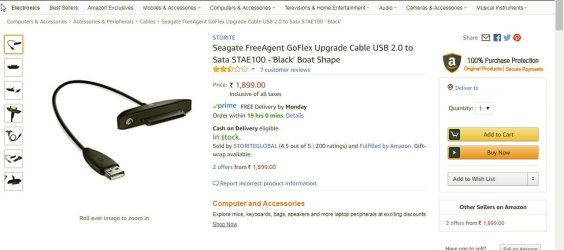
Your Seagate GoFlex drive has an adapter cable like the one below.

03-02-2018 00-29-53.jpg

The adapter portion houses the SATA to USB bridge circuit. The HDD itself is a standard 2.5" drive with the standard SATA connector just enclosed in a box/case. ( There is no electronics board in it.)

I would believe that the adapter cable - the SATA to USB bridge - has failed.

You may replace the adapter cable and check but it is difficult to get/costly. ( the original Seagate replacement adapter cable is no longer manufactured by Seagate.) . If any of your friends have the same GoFlex drive you may borrow one. ( I have one but you are in Gujarat and me in Karnataka)

Otherwise take the drive to a neighbourhood Computer Service guy. Since the other part is just a normal drive with the standard connector, he may be able to connect it directly to a desktop SATA port ( without taking it out of the box/case)and check whether the drive itself is OK. If it is, ask him to copy all data in it to another drive.
 
Last edited:

My Computer My Computer

OS
Windows 7 Home Premium 32 bit
This drive is an internal hard drive which one I use with encloser and I bought new HDD enclosure but same problem
 

My Computer My Computer

Computer type
Laptop
Computer Manufacturer/Model Number
Dell
OS
Gujarat
When I use Seagate seatools to test with long generatic test which failed and the option of fix all does not show in seatool
 

My Computer My Computer

Computer type
Laptop
Computer Manufacturer/Model Number
Dell
OS
Gujarat

My Computers My Computers

System One System Two

  • Computer type
    PC/Desktop
    Computer Manufacturer/Model Number
    custom build
    OS
    Windows 7 HP 64
    CPU
    i5 6600K - 800MHz to 4200MHz
    Motherboard
    GA-Z170-HD3P
    Memory
    4+4G GSkill DDR4 3000
    Graphics Card(s)
    IG - Intel 530
    Monitor(s) Displays
    Samsung 226BW
    Screen Resolution
    1680x1050
    Hard Drives
    (1) -1 SM951 – 128GB M.2 AHCI PCIe SSD drive for Windows 7 and Lubuntu
    (2) -1 WD SATA 3 - 1T for Data
    (3) -1 WD SATA 3 - 1T for backup
    PSU
    Thermaltake 450W TR2 gold
    Keyboard
    Old and good Chicony mechanical keyboard
    Mouse
    Logitech mX performance - 9 buttons (had to disable some)
    Internet Speed
    500Mb/s
    Browser
    Firefox 64
    Other Info
    TinyWall firewall
  • Computer type
    Laptop
    System Manufacturer/Model Number
    Asus Q550LF
    OS
    Windows 7 Pro
    CPU
    i7-4500U 800MHz to 3.0GHz
    Motherboard
    Asus Q550LF
    Memory
    (4+4)G DDR3 1600
    Graphics Card(s)
    IG intel 4400 + NVIDIA GeForce GT 745M
    Sound Card
    Realtek
    Monitor(s) Displays
    LG Display LP156WF4-SPH1
    Screen Resolution
    1920 x 1080
    Hard Drives
    BX500 120G SSD for Windows and programs +
    1T HDD for data
    Internet Speed
    500 Mb/s
    Browser
    Firefox
    Other Info
    TinyWall firewall
This drive is an internal hard drive which one I use with encloser and I bought new HDD enclosure but same problem

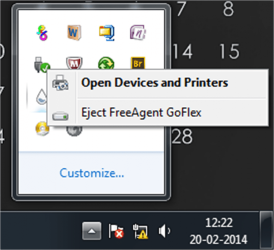
Your Device Manager screenshot in the first post shows the drive as "Seagate FreeAgent GoFlex USB device" which is a standard 2.5" drive in a box with an adapter cable.

Have you taken it out of its enclosure and connected it internally? I really do not understand what you are saying in the quoted post.
 

My Computer My Computer

OS
Windows 7 Home Premium 32 bit
no drive is not encrypted
 

My Computer My Computer

Computer type
Laptop
Computer Manufacturer/Model Number
Dell
OS
Gujarat
this drive is internal drive of my old laptop i use it as external drive with my new laptop
 

My Computer My Computer

Computer type
Laptop
Computer Manufacturer/Model Number
Dell
OS
Gujarat
i don't want my data i want drive is usable
 

My Computer My Computer

Computer type
Laptop
Computer Manufacturer/Model Number
Dell
OS
Gujarat
this drive is internal drive of my old laptop i use it as external drive with my new laptop

There is definitely something amiss here. How can your old laptop internal drive show as ""Seagate FreeAgent GoFlex USB device" ? !!!!!!!! I guess you are using the Seagate FreeAgent GoFlex adapter cable to connect your old laptop hdd. That is wrong. That adapter cable should only be used with Seagate FreeAgent GoFlex external HDD in its own enclosure/box/case ( by whichever name you call it.)..
 
Last edited:

My Computer My Computer

OS
Windows 7 Home Premium 32 bit
sorry sorry !!!! this screen short was my old hdd drive new screen shot i attach
 

Attachments

  • Sketch (3).png
    Sketch (3).png
    47.6 KB · Views: 0
  • Sketch (4).png
    Sketch (4).png
    33.8 KB · Views: 0
  • Sketch (5).png
    Sketch (5).png
    48.1 KB · Views: 0
  • Sketch (6).png
    Sketch (6).png
    14.6 KB · Views: 0

My Computer My Computer

Computer type
Laptop
Computer Manufacturer/Model Number
Dell
OS
Gujarat
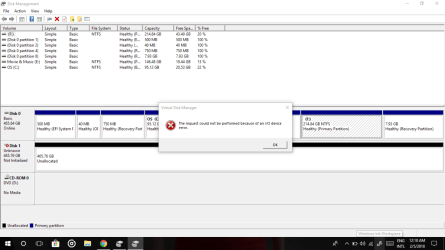
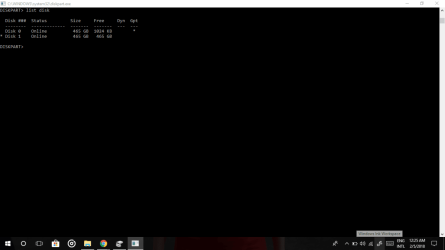
OK, you tried to initialize it and it said "can't because of I/O error". And you ran Seatools and it failed. Sorry, your HDD is dead. You can't bring a dead man alive. Can you?

And why was it removed from your old laptop?- which fact you revealed only later on. May be because it was dead. Say Good bye to that HDD and go to sleep. I am also going to.:)
 

My Computer My Computer

OS
Windows 7 Home Premium 32 bit
Thanks you all of you for informing and also good night jumanji
 

My Computer My Computer

Computer type
Laptop
Computer Manufacturer/Model Number
Dell
OS
Gujarat
Back
Top