Solved Screen blanks as Win7 starts up after POST then displays normally

loninappleton

New member
Member
VIP
Local time
4:23 PM
Messages
892
This is a hardware problem or a Windows problem. I am writing on the problem machine.

I had a screen freeze and so rebooted. My components are old and even a power outage may happen
briefly as they do from the power company. So Power Down-- and power back up.
A blank black screen appears after POST so I know it is not the screen (working now.)
Then after an extended period of minutes I get the desktop of Win7.

In between I did a lot of the panic things like resetting CMOS and swapping
components. Shutting down at the power supply etc. Then I leave, come back and it's on.

Is this a behavior of Windows 7 running a check disk at startup? The same behavior repeated again
so it's consistent. Is there a way to check admin services or something for the blackout?

CPU-Z recognizes everything but the VGA video is onboard this older MSI 880GM-E41 and has some quirks over many years.
 

My Computer My Computer

At a glance

Windows 7 x64 UltimateAMD Athlon II x3 4502 GB
Computer type
PC/Desktop
Computer Manufacturer/Model Number
custom
OS
Windows 7 x64 Ultimate
CPU
AMD Athlon II x3 450
Motherboard
MSI 880GM
Memory
2 GB
Hard Drives
various
Browser
Firefox, Opera
Hi loninappleton,

Does the Windows Logo appear before blank screen or after?

If it appears before, I had this problem, it's most likely BIOS corruption and had to flash BIOS to correct it.

After, may be a corrupt graphics driver. You can open device manager, and check your graphics driver, and others for :warn: or error symbol. System Restore or Re-imaging drive with backup (to point prior to your black screen starting) should correct it.

Nic
 

My Computer My Computer

At a glance

Win 10 x64, Linux Lite, Win 7 x64, BlackArch,...
Computer type
PC/Desktop
Computer Manufacturer/Model Number
HP Desktop & Compaq Laptop
OS
Win 10 x64, Linux Lite, Win 7 x64, BlackArch, & Kali
Hard Drives
Samsung 850 Pro 256Gb,
Hitachi HDD 1Tb,
Crucial MX SSD 250Gb
Segate 3Tb USB 3.0 Ext. Backup HDD
Internet Speed
150Mbps dn, 20Mbps up
Antivirus
Avast Free, Malwarebytes Anti-Exploit & Anti-Ransomware
Browser
Firefox, Chrome, Opera, & VPN
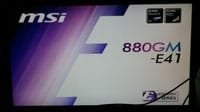
No Windows logo at all. The splash screen from POST is all that's visible

Restore is a good tip as well as the others. I'm just cautious right now about doing anything.

Resetting CMOS must have removed restore points. So much for that.

Will try chkdsk but that means a shut down. Might as well I know the video might be going on this
but that has been the case for a long time. Never had anything like black screen.
 

My Computer My Computer

At a glance

Windows 7 x64 UltimateAMD Athlon II x3 4502 GB
Computer type
PC/Desktop
Computer Manufacturer/Model Number
custom
OS
Windows 7 x64 Ultimate
CPU
AMD Athlon II x3 450
Motherboard
MSI 880GM
Memory
2 GB
Hard Drives
various
Browser
Firefox, Opera
Don't believe chkdsk or sfc /scannow will correct you problem, but can't hurt! The MSI splash screen (bitmap image) is incorporated in the BIOS, and high end board allow users to modify/change it.
I don't use or recommend using Windows System Restore or the backup program. Most every time I've needed it is failed. :(

I always backup my systems to external hard drives, not external SSD, larger capacity, more secure data storage on platters instead of flash memory, much cheaper. I have 3tb external drive and use AOMEI backupper, Macrium Reflect free is also recommended as do others on SevenForums, however, the GUI is a little more intimidating to navigate than AOMEIs.

What does the splash screen you're referring to say? MSI most likely as the BIOS chip is included with MSI MoBos.

rs8iq64h.jpg
 

My Computer My Computer

At a glance

Win 10 x64, Linux Lite, Win 7 x64, BlackArch,...
Computer type
PC/Desktop
Computer Manufacturer/Model Number
HP Desktop & Compaq Laptop
OS
Win 10 x64, Linux Lite, Win 7 x64, BlackArch, & Kali
Hard Drives
Samsung 850 Pro 256Gb,
Hitachi HDD 1Tb,
Crucial MX SSD 250Gb
Segate 3Tb USB 3.0 Ext. Backup HDD
Internet Speed
150Mbps dn, 20Mbps up
Antivirus
Avast Free, Malwarebytes Anti-Exploit & Anti-Ransomware
Browser
Firefox, Chrome, Opera, & VPN
Whelp, I am going to mark this one solved as a bad disk problem.
It's just beyond the warranty period at two years where other Seagates I have
are still going.

The disk showed in the blue (good and healthy) in Crystal Disk info a couple days
ago. Today Yellow (caution.) I pulled it off immediately, switched to the newer 2 TB
Seagate I have as the primary HD and no problems. Getting any new content since last backup is no great thing.

I'll have to start over with Macrium Reflect (in another thread here) but just a couple of
program updates are needed.

Two last things:

What is AOMEI?

And even though I use software from HDD Guru for low level, are there any hard drive restore
free softwares that I may not know about of recent vintage? The drive ran constant and had 12K hours on it-- just about two years. Used bargains I've gotten had 40,000.

I'll hold on the 'Solved" til tomorrow


Thanks for the help as always.
 

My Computer My Computer

At a glance

Windows 7 x64 UltimateAMD Athlon II x3 4502 GB
Computer type
PC/Desktop
Computer Manufacturer/Model Number
custom
OS
Windows 7 x64 Ultimate
CPU
AMD Athlon II x3 450
Motherboard
MSI 880GM
Memory
2 GB
Hard Drives
various
Browser
Firefox, Opera
Drive failure was a thought I had last night on your issue while getting ready to hit the hay.

Are you aware that Seagate is currently under class action suit for their drive failures? Here a link

Seagate slapped with a class action lawsuit over hard drive failure rates

Might want to give them a shout on the phone, they're being very, very generous with there warranties right now
PH
1 (405) 324-4700


My Computer My Computer

At a glance

Win 10 x64, Linux Lite, Win 7 x64, BlackArch,...
Computer type
PC/Desktop
Computer Manufacturer/Model Number
HP Desktop & Compaq Laptop
OS
Win 10 x64, Linux Lite, Win 7 x64, BlackArch, & Kali
Hard Drives
Samsung 850 Pro 256Gb,
Hitachi HDD 1Tb,
Crucial MX SSD 250Gb
Segate 3Tb USB 3.0 Ext. Backup HDD
Internet Speed
150Mbps dn, 20Mbps up
Antivirus
Avast Free, Malwarebytes Anti-Exploit & Anti-Ransomware
Browser
Firefox, Chrome, Opera, & VPN
This is bad news indeed. I've had WD for many HD's but they are way louder than the Seagates.
Silentpcreview forum may have some new suggestions. As to the noise, these HDs run
in a room where I sleep and so can hear every little thing.

Onward from that.

Last night I ran the full Low Level Format from HDD Guru.

Crystal Disk info today shows the drive back to the Blue- safe zone.

When the drive was acting up, A win7 error message I had never seen said
something about bad or broken files in the recycle bin.

I'm not familiar with this message. But would just emptying the recycle bin
solve the issue? I can't report it to Seagate if it isn't broken.

Is there a stress test for this HD recommended at Sevenforums? I know of some procedures that
are drive killers and so will depend on another suggestion.

Meanwhile I'll read your links.
 

My Computer My Computer

At a glance

Windows 7 x64 UltimateAMD Athlon II x3 4502 GB
Computer type
PC/Desktop
Computer Manufacturer/Model Number
custom
OS
Windows 7 x64 Ultimate
CPU
AMD Athlon II x3 450
Motherboard
MSI 880GM
Memory
2 GB
Hard Drives
various
Browser
Firefox, Opera
Drive failure was a thought I had last night on your issue while getting ready to hit the hay.

Are you aware that Seagate is currently under class action suit for their drive failures? Here a link

Seagate slapped with a class action lawsuit over hard drive failure rates

Might want to give them a shout on the phone, they're being very, very generous with there warranties right now
PH
1 (405) 324-4700


Details on this piece say the legal action is for 3Tb drives starting to be issued in 2012
and the piece from PC World is from 2016.

I'll see what else I can find out. I have had communication with the company personally via email on this
and they did not budge on any gimmies. I tried a few asking for a credit/rebate for future purchase etc.
;-)
 

My Computer My Computer

At a glance

Windows 7 x64 UltimateAMD Athlon II x3 4502 GB
Computer type
PC/Desktop
Computer Manufacturer/Model Number
custom
OS
Windows 7 x64 Ultimate
CPU
AMD Athlon II x3 450
Motherboard
MSI 880GM
Memory
2 GB
Hard Drives
various
Browser
Firefox, Opera
Hi loninappleton,

What is AOMEI?

AOMEI have two pieces of FREE software that are AOMEI Partition Assistant Standard and AOMEI Backupper. They obviously have more software available but I can only comment on what I have used!

AOMEI

The first is excellent for creating new partitions, merging partitions, extending partitions etc, and the the second is excellent for creating and restoring images.

I hope this helps!
 

My Computer My Computer

At a glance

Win 7 HP SP1 64-bit Vista HB SP2 32-bit Linux...Intel(R) Pentium(R) CPU P6200 @ 2.13GHz4.00 GBIntel(R) Graphics Media Accelerator HD
Computer type
Laptop
Computer Manufacturer/Model Number
Fujitsu LIFEBOOK
OS
Win 7 HP SP1 64-bit Vista HB SP2 32-bit Linux Mint 18.3
CPU
Intel(R) Pentium(R) CPU P6200 @ 2.13GHz
Motherboard
FUJITSU FJNBB06
Memory
4.00 GB
Graphics Card(s)
Intel(R) Graphics Media Accelerator HD
Sound Card
[1] Realtek High Definition Audio [2] Intel(R) Display Audio
Screen Resolution
1366 x 768 x 32 bits (4294967296 colors) @ 59 Hz
Hard Drives
TOSHIBA MK5076GSX
Antivirus
AVG FREE
Hi loninappleton,


AOMEI have two pieces of FREE software that are AOMEI Partition Assistant Standard and AOMEI Backupper. They obviously have more software available but I can only comment on what I have used!

AOMEI

The first is excellent for creating new partitions, merging partitions, extending partitions etc, and the the second is excellent for creating and restoring images.

I hope this helps!

I've quoted here to keep the sub topics straight. On the AOMEI, I never have but should become adept at partitions and usually just clone the drive. Also I never learned the MBR commands in Win7
after having XP actually being able to rewrite Windows. Can these tools you mention help with
any of that?

Then if I want to build a partition for the Win7 and a data partition, is there a good tutorial for that on
size of partition for Win7 and so on? My worry is that with partitions I will never keep
anything straight with drive letters and whatnot.
 

My Computer My Computer

At a glance

Windows 7 x64 UltimateAMD Athlon II x3 4502 GB
Computer type
PC/Desktop
Computer Manufacturer/Model Number
custom
OS
Windows 7 x64 Ultimate
CPU
AMD Athlon II x3 450
Motherboard
MSI 880GM
Memory
2 GB
Hard Drives
various
Browser
Firefox, Opera
Hi loninappleton,

Also I never learned the MBR commands in Win7 after having XP actually being able to rewrite Windows. Can these tools you mention help with any of that?

I must admit that I have never had reason to do this, but maybe someone else might be able to help you!

Then if I want to build a partition for the Win7 and a data partition, is there a good tutorial for that on size of partition for Win7 and so on? My worry is that with partitions I will never keep anything straight with drive letters and whatnot.

You obviously build the Windows partition on the installation.
If you want to create a new partition to use for your data/user folders you could use AOMEI Partition Assistant Standard. Then you could use one of the following tutorials:

User Profile - Change Default Location

How to Change the Default Location of User Folders in Windows 7
User Folders - Change Default Location

If you wanted to create a data partition during the installation and transfer the User Accounts then this tutorial will help:

How to Create User Accounts on another Partition or Disk During Windows 7 Installation

I hope this helps!
 

My Computer My Computer

At a glance

Win 7 HP SP1 64-bit Vista HB SP2 32-bit Linux...Intel(R) Pentium(R) CPU P6200 @ 2.13GHz4.00 GBIntel(R) Graphics Media Accelerator HD
Computer type
Laptop
Computer Manufacturer/Model Number
Fujitsu LIFEBOOK
OS
Win 7 HP SP1 64-bit Vista HB SP2 32-bit Linux Mint 18.3
CPU
Intel(R) Pentium(R) CPU P6200 @ 2.13GHz
Motherboard
FUJITSU FJNBB06
Memory
4.00 GB
Graphics Card(s)
Intel(R) Graphics Media Accelerator HD
Sound Card
[1] Realtek High Definition Audio [2] Intel(R) Display Audio
Screen Resolution
1366 x 768 x 32 bits (4294967296 colors) @ 59 Hz
Hard Drives
TOSHIBA MK5076GSX
Antivirus
AVG FREE
Paul Black

Ok I am pretty old in computer years and have seen a lot of problems come and go.
Win7 will have a guide on those MBR Fix commands. I was just wondering if any of
that was ever smoothed out beyond the command line.
 

My Computer My Computer

At a glance

Windows 7 x64 UltimateAMD Athlon II x3 4502 GB
Computer type
PC/Desktop
Computer Manufacturer/Model Number
custom
OS
Windows 7 x64 Ultimate
CPU
AMD Athlon II x3 450
Motherboard
MSI 880GM
Memory
2 GB
Hard Drives
various
Browser
Firefox, Opera
Yes, the Class Action Suit is regarding certain 3TB Seagate drives, however, as I stated, I've read a more than one tech forum that Seagate is being generous with warranties on all drives, and free data recovery on some.
You can run SeaTools for Windows, run SMART and Short, if they pass, you're good to go. There is a repair option for Seagate drives specifically.
Windows creates unmovable files, usually at the end of C drive, pagfile.sys, etc. If you use just any old partition manager, and resize the partition, you can trash your windows.
Here's a tutorial on AOMEI Partition Assistant. I use a different partition assistant to resize my laptop drive for dual boot, but, at the moment, I'm at a loss as to which one. Irregardless, the info in the link provides you info on it.

Shrink Volume with Unmovable Files at the End of the Volume
 

My Computer My Computer

At a glance

Win 10 x64, Linux Lite, Win 7 x64, BlackArch,...
Computer type
PC/Desktop
Computer Manufacturer/Model Number
HP Desktop & Compaq Laptop
OS
Win 10 x64, Linux Lite, Win 7 x64, BlackArch, & Kali
Hard Drives
Samsung 850 Pro 256Gb,
Hitachi HDD 1Tb,
Crucial MX SSD 250Gb
Segate 3Tb USB 3.0 Ext. Backup HDD
Internet Speed
150Mbps dn, 20Mbps up
Antivirus
Avast Free, Malwarebytes Anti-Exploit & Anti-Ransomware
Browser
Firefox, Chrome, Opera, & VPN
i'm still in the process of proving it bad. I did find that Victoria program at Sourceforge
and will install that where it's needed and make the screen shots. It look like two needed:
first one shows activation of SMART and then what it sees.

I'm skeptical about the SMART capabilities on these Seagates though.

No partitioning or formatting on the problem one. Can I ask at this time: Should I lay down
what Windows calls a Simple Volume before using Victoria?

thanks
 

My Computer My Computer

At a glance

Windows 7 x64 UltimateAMD Athlon II x3 4502 GB
Computer type
PC/Desktop
Computer Manufacturer/Model Number
custom
OS
Windows 7 x64 Ultimate
CPU
AMD Athlon II x3 450
Motherboard
MSI 880GM
Memory
2 GB
Hard Drives
various
Browser
Firefox, Opera
The Class Action Suit is for specific 3TB Seagate Drives. I've read on other Tech forums that Seagate is being generous with all drive issues in light of the law suit. I resized my C drive on one of my laptops for dual boot, Win and Linux. I used PerfectDisk trial & it worked flawlessly to resize partition. Installed it via Revo Uninstaller Install Program. When I was done I uninstalled it with advances mode checked which deletes everything installed, trial cookies included. (I tried partition wizard first and it trashed my drive because it didn't warn me that there were unmovable files at the end of the drive, it just resized it and trashed windows
AOMEI Partition Assistant tutorial on unmovable pagefile.sys, etc.
 

My Computer My Computer

At a glance

Win 10 x64, Linux Lite, Win 7 x64, BlackArch,...
Computer type
PC/Desktop
Computer Manufacturer/Model Number
HP Desktop & Compaq Laptop
OS
Win 10 x64, Linux Lite, Win 7 x64, BlackArch, & Kali
Hard Drives
Samsung 850 Pro 256Gb,
Hitachi HDD 1Tb,
Crucial MX SSD 250Gb
Segate 3Tb USB 3.0 Ext. Backup HDD
Internet Speed
150Mbps dn, 20Mbps up
Antivirus
Avast Free, Malwarebytes Anti-Exploit & Anti-Ransomware
Browser
Firefox, Chrome, Opera, & VPN
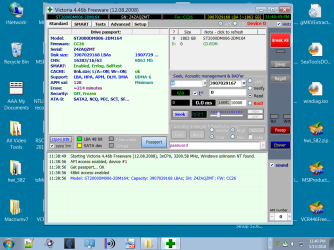
This attachment shows My newest Seagate 2Tb drive in Victoria mounted as an 'only.'
Smart seems to show activated. No idea of all the dashboards and buttons on the program but it looks functional.

Shortly I will post the Victoria from an older Biostar motherboard and problem HD.

Pretty late here. I'll do it tomorrow.
 

Attachments

  • victoria on a Seagate 2Tb.png
    victoria on a Seagate 2Tb.png
    59.7 KB · Views: 0

My Computer My Computer

At a glance

Windows 7 x64 UltimateAMD Athlon II x3 4502 GB
Computer type
PC/Desktop
Computer Manufacturer/Model Number
custom
OS
Windows 7 x64 Ultimate
CPU
AMD Athlon II x3 450
Motherboard
MSI 880GM
Memory
2 GB
Hard Drives
various
Browser
Firefox, Opera
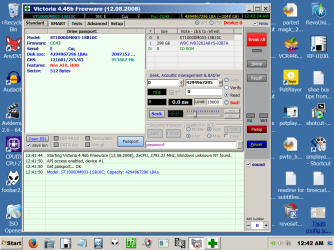
This image is from Victoria showing the problem drive which has been low level formatted only.
 

Attachments

  • victoria on Seagate 1 tb.png
    victoria on Seagate 1 tb.png
    66.7 KB · Views: 0

My Computer My Computer

At a glance

Windows 7 x64 UltimateAMD Athlon II x3 4502 GB
Computer type
PC/Desktop
Computer Manufacturer/Model Number
custom
OS
Windows 7 x64 Ultimate
CPU
AMD Athlon II x3 450
Motherboard
MSI 880GM
Memory
2 GB
Hard Drives
various
Browser
Firefox, Opera
When Victoria loads it shows a couple error messages but then displays.
I just didn't write down all of them since they did not specify anything to do or change.
 

My Computer My Computer

At a glance

Windows 7 x64 UltimateAMD Athlon II x3 4502 GB
Computer type
PC/Desktop
Computer Manufacturer/Model Number
custom
OS
Windows 7 x64 Ultimate
CPU
AMD Athlon II x3 450
Motherboard
MSI 880GM
Memory
2 GB
Hard Drives
various
Browser
Firefox, Opera
Here's a program by Seagate to check and repair their drives.
SeaTools for Windows | Seagate
It will also check other manufacturer's drives, but won't repair, don't use repair on non-seagate drives. start seatools, it will scan for drive, accept eula, click on check-box for drive you wish to scan. Basic test, run SMART, then Short, it the drive passes your good to go. If not, and it's a Seagate drive

Most drive manufactures have their own drive health scanning software. A little Googling will get you to their site.
Here's a tutorial on seatools, read it BEFORE you run the program on any of your drives.

How to use SeaTools for Windows


What is S.M.A.R.T.?
How Hard Disk S.M.A.R.T. Works? - Hard Disk Sentinel
 

My Computer My Computer

At a glance

Win 10 x64, Linux Lite, Win 7 x64, BlackArch,...
Computer type
PC/Desktop
Computer Manufacturer/Model Number
HP Desktop & Compaq Laptop
OS
Win 10 x64, Linux Lite, Win 7 x64, BlackArch, & Kali
Hard Drives
Samsung 850 Pro 256Gb,
Hitachi HDD 1Tb,
Crucial MX SSD 250Gb
Segate 3Tb USB 3.0 Ext. Backup HDD
Internet Speed
150Mbps dn, 20Mbps up
Antivirus
Avast Free, Malwarebytes Anti-Exploit & Anti-Ransomware
Browser
Firefox, Chrome, Opera, & VPN
No partitioning or formatting on the problem one. Can I ask at this time: Should I lay down
what Windows calls a Simple Volume before using Victoria?


No idea, never used Victoria. Have Dr. appt shortly. I'll check out Victoria when I return.
 

My Computer My Computer

At a glance

Win 10 x64, Linux Lite, Win 7 x64, BlackArch,...
Computer type
PC/Desktop
Computer Manufacturer/Model Number
HP Desktop & Compaq Laptop
OS
Win 10 x64, Linux Lite, Win 7 x64, BlackArch, & Kali
Hard Drives
Samsung 850 Pro 256Gb,
Hitachi HDD 1Tb,
Crucial MX SSD 250Gb
Segate 3Tb USB 3.0 Ext. Backup HDD
Internet Speed
150Mbps dn, 20Mbps up
Antivirus
Avast Free, Malwarebytes Anti-Exploit & Anti-Ransomware
Browser
Firefox, Chrome, Opera, & VPN
Back
Top