Recovery from Portable Device is not working!

jk22

New member
Member
VIP
Local time
2:30 PM
Messages
115
Hey guys, I have WesternDigital 120 GB Harddrive from past couple of years. I used to store data and accidently my data wiped. Now I am trying to recover it from Recuva and from EaseUS Data Recovery Wizard.
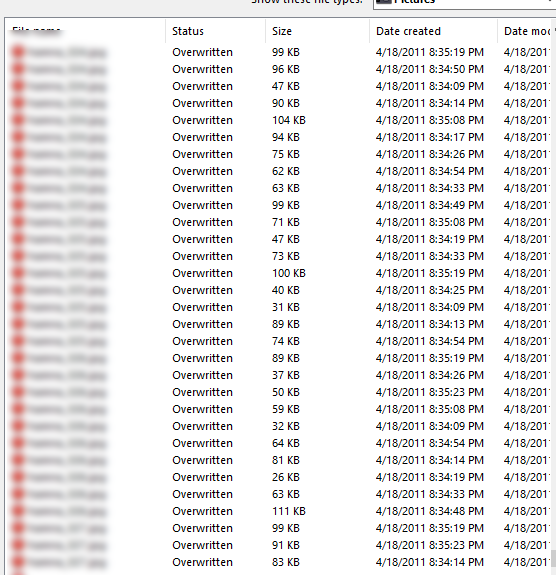
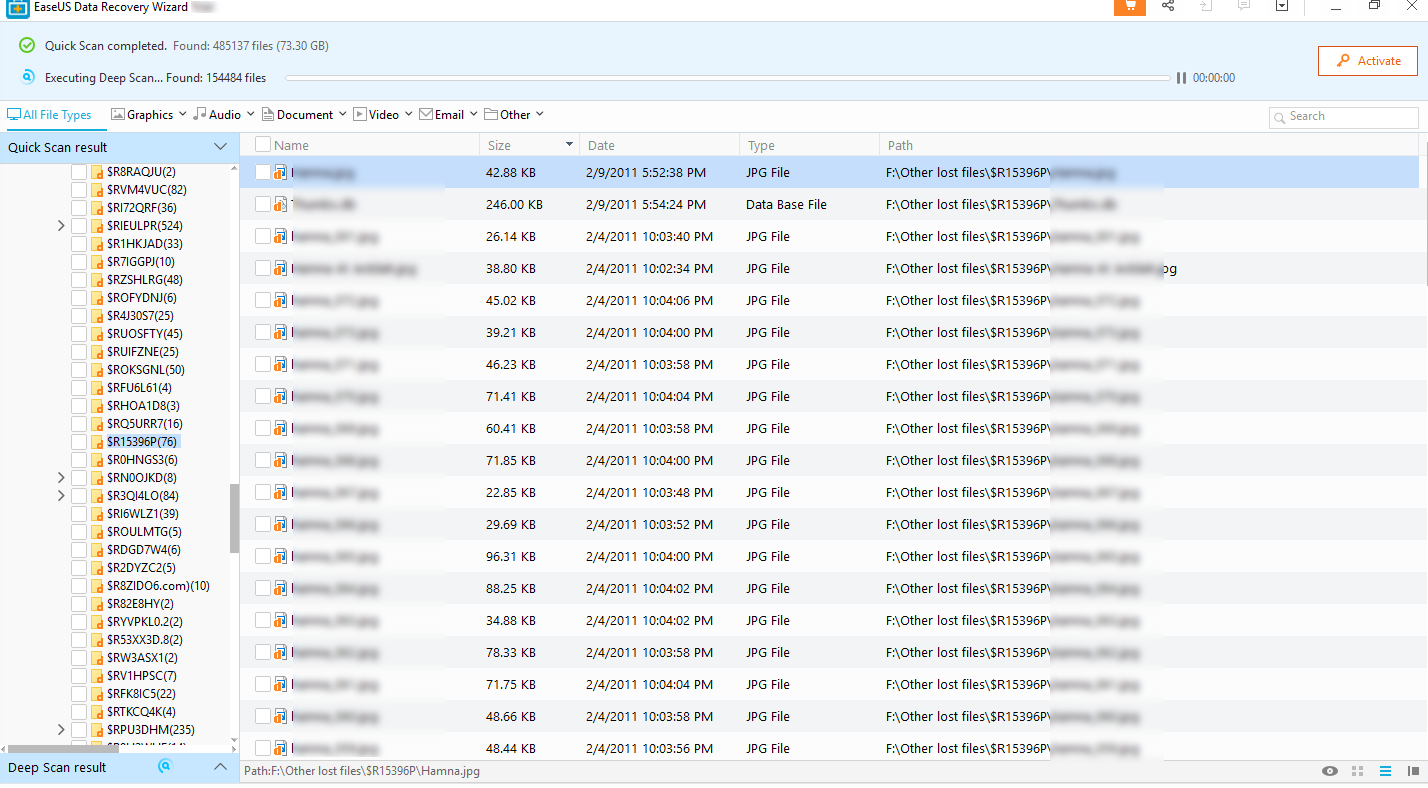
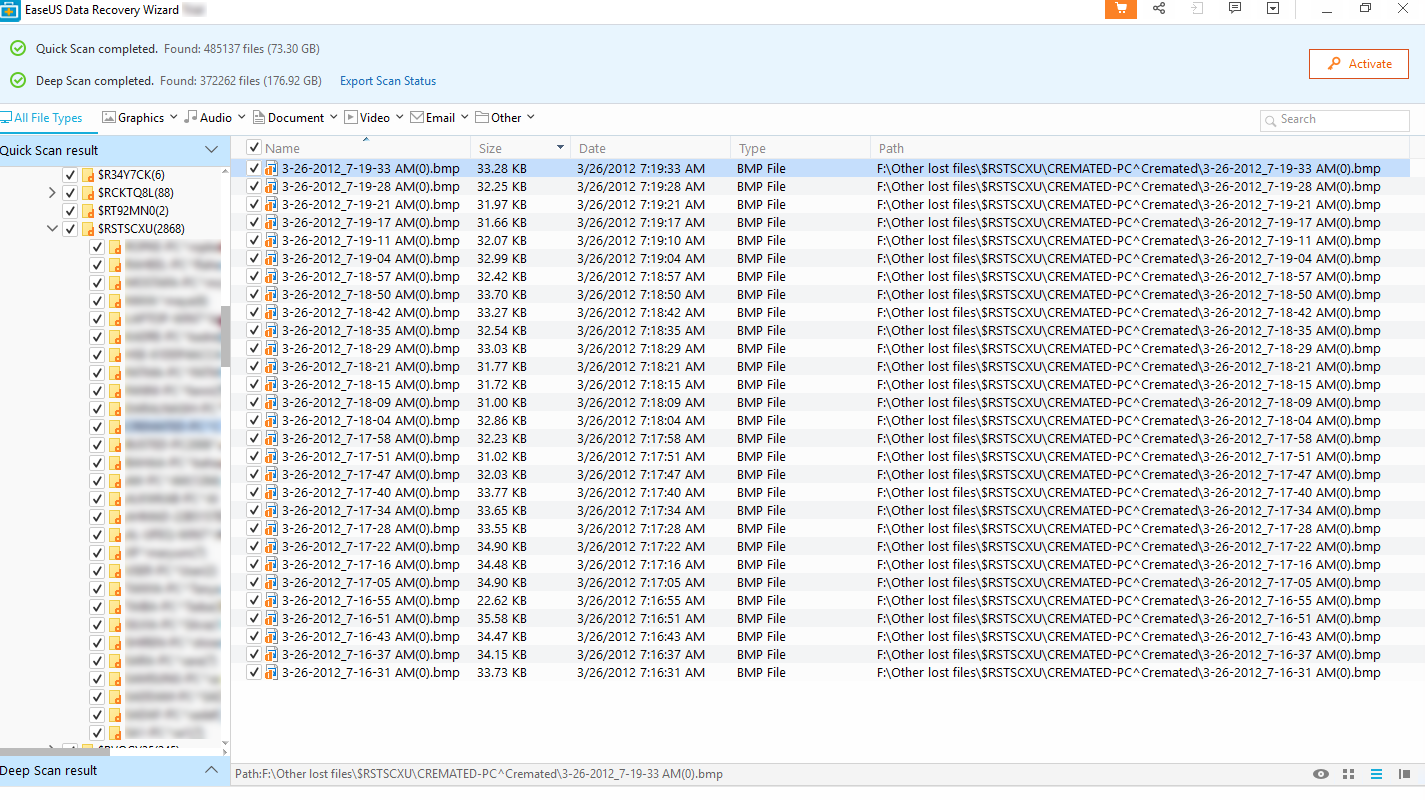
0iUR7sU.png


oX8YW2z.png


HuVGYyf.png


Its showing me Overwritten and this icon on the image files.

Let me know how to get those images and videos back with working!

Thanks!
 

My Computer My Computer

At a glance

Windows 10 Pro 64-bitIntel Core i7 5600U @ 2.60GHz Broadwell-U 14n...8.00GB Dual-Channel DDR3 @ 798MHz (11-11-11-28)Intel HD Graphics 5500
Computer type
Laptop
Computer Manufacturer/Model Number
Lenovo ThinkPad X1 Carbon
OS
Windows 10 Pro 64-bit
CPU
Intel Core i7 5600U @ 2.60GHz Broadwell-U 14nm Technology
Motherboard
LENOVO 20BTS0Y500 (U3E1)
Memory
8.00GB Dual-Channel DDR3 @ 798MHz (11-11-11-28)
Graphics Card(s)
Intel HD Graphics 5500
Sound Card
Speaker/HP (Realtek High Definition Audio)
Monitor(s) Displays
Generic PnP Monitor on Intel HD Graphics 5500
Screen Resolution
1920 x 1080 x 32 bits per pixel
Hard Drives
SAMSUNG MZHPV256HDGL-000L1 (256 GB SSD)
Keyboard
Standard PS/2 Keyboard
Mouse
Logitech G102 Prodigy Gaming Mouse
Internet Speed
10 Mbps
Antivirus
Comodo Firewall 11.0.0.6606
Browser
Google Chrome and Firefox
Hello.
I have used Recuva for many years and it have never failed me.
So i have to ask two ting first.
How long time ago is it since your data got wiped?
Have you used the hard drive after it's data was deleted?
 

My Computer My Computer

At a glance

Linux:Debian, Kali.. 2xWin8.1,2x,1x7Pro, Retr...cpu's intel 8088 up to intel i7 gen9.. dual x...oldest 1024KB newest 64GBmostly internals i don't game
Computer type
PC/Desktop
Computer Manufacturer/Model Number
AsusX53, Aspire E1-572. AsusUX32A, HP Pro3130mt+3010mt, HP Proliant ML150G3, 3xCustom, i3, i5, i7
OS
Linux:Debian, Kali.. 2xWin8.1,2x,1x7Pro, Retro:1x2003server.1xXPpro, 1xW2k,1x98SE,1x95,1x3.11
CPU
cpu's intel 8088 up to intel i7 gen9.. dual xenon on server
Motherboard
a lot of them :-)
Memory
oldest 1024KB newest 64GB
Graphics Card(s)
mostly internals i don't game
Sound Card
old retro=soundblaster.. newer ones internal
Monitor(s) Displays
smalest 12" largest 26"
Internet Speed
100/100
Antivirus
NortonInternetSecurity, MS, Avast, (not on the same computer
Browser
IE8, IE9. IE11, Firefox
Other Info
I can't fit all info on all my computers in these fields :-D
Is the data deleted or is it showing as raw meaning the parition has gone?
 

My Computer My Computer

At a glance

win 8 32 bit
Computer type
PC/Desktop
OS
win 8 32 bit
Hi jk22,

I have used Recuva for many years and it have never failed me.

I agree with Marie SWE, Recuva is a good choice to use to try and recover your data.
As Marie SWE has asked, have you used (copied data etc to it) the hard after the data was deleted?
This is important because if you have, then some of the deleted sectors, which hold your deleted data, will have been overwritten with new data!

Here is the Recuva link: Recuva

I hope this helps!
 
Last edited:

My Computer My Computer

At a glance

Win 7 HP SP1 64-bit Vista HB SP2 32-bit Linux...Intel(R) Pentium(R) CPU P6200 @ 2.13GHz4.00 GBIntel(R) Graphics Media Accelerator HD
Computer type
Laptop
Computer Manufacturer/Model Number
Fujitsu LIFEBOOK
OS
Win 7 HP SP1 64-bit Vista HB SP2 32-bit Linux Mint 18.3
CPU
Intel(R) Pentium(R) CPU P6200 @ 2.13GHz
Motherboard
FUJITSU FJNBB06
Memory
4.00 GB
Graphics Card(s)
Intel(R) Graphics Media Accelerator HD
Sound Card
[1] Realtek High Definition Audio [2] Intel(R) Display Audio
Screen Resolution
1366 x 768 x 32 bits (4294967296 colors) @ 59 Hz
Hard Drives
TOSHIBA MK5076GSX
Antivirus
AVG FREE
1. External HDD??? Internal HDD???

2. Define the accident that erased your HDD. " accidentally " is a general statement with which we can't get any information as to how it got wiped and to what extent..

3. Post a screenshot of Windows Disk Management and upload to Seven Forums.

Seven Forums.

Windows Disk Management : Disk Management - Post a Screen Capture Image - Windows 7 Help Forums

Screenshots: Screenshots and Files - Upload and Post in Seven Forums - Windows 7 Help Forums

Ten Forums:

Windows Disk Management : Disk Management - How to Post a Screenshot of | Windows 10 Tutorials

Screenshots: How to Upload and Post Screenshots and Files at Ten Forums | Windows 10 Tutorials
 
Last edited:

My Computer My Computer

At a glance

Windows 7 Home Premium 32 bit
OS
Windows 7 Home Premium 32 bit
Hello.
I have used Recuva for many years and it have never failed me.
So i have to ask two ting first.
How long time ago is it since your data got wiped?
Have you used the hard drive after it's data was deleted?

I used Recuva and posted the result.

Is the data deleted or is it showing as raw meaning the parition has gone?

Data is deleted.

Hi jk22,


I agree with Marie SWE, Recuva is a good choice to use to try and recover your data.
As Marie SWE has asked, have you used (copied data etc to it) the hard after the data was deleted?
This is important because if you have, then some of the deleted sectors, which hold your deleted data, will have been overwritten with new data!

Here is the Recuva link: Recuva

I hope this helps!

I used Recuva and posted the result.

1. External HDD??? Internal HDD???

2. Define the accident that erased your HDD. " accidentally " is a general statement with which we can't get any information as to how it got wiped and to what extent..

3. Post a screenshot of Windows Disk Management and upload to Seven Forums.

Seven Forums.

Windows Disk Management : Disk Management - Post a Screen Capture Image - Windows 7 Help Forums

Screenshots: Screenshots and Files - Upload and Post in Seven Forums - Windows 7 Help Forums

Ten Forums:

Windows Disk Management : Disk Management - How to Post a Screenshot of | Windows 10 Tutorials

Screenshots: How to Upload and Post Screenshots and Files at Ten Forums | Windows 10 Tutorials

External HDD in enclosure. There are other data also and its not in RAW format.
 

My Computer My Computer

At a glance

Windows 10 Pro 64-bitIntel Core i7 5600U @ 2.60GHz Broadwell-U 14n...8.00GB Dual-Channel DDR3 @ 798MHz (11-11-11-28)Intel HD Graphics 5500
Computer type
Laptop
Computer Manufacturer/Model Number
Lenovo ThinkPad X1 Carbon
OS
Windows 10 Pro 64-bit
CPU
Intel Core i7 5600U @ 2.60GHz Broadwell-U 14nm Technology
Motherboard
LENOVO 20BTS0Y500 (U3E1)
Memory
8.00GB Dual-Channel DDR3 @ 798MHz (11-11-11-28)
Graphics Card(s)
Intel HD Graphics 5500
Sound Card
Speaker/HP (Realtek High Definition Audio)
Monitor(s) Displays
Generic PnP Monitor on Intel HD Graphics 5500
Screen Resolution
1920 x 1080 x 32 bits per pixel
Hard Drives
SAMSUNG MZHPV256HDGL-000L1 (256 GB SSD)
Keyboard
Standard PS/2 Keyboard
Mouse
Logitech G102 Prodigy Gaming Mouse
Internet Speed
10 Mbps
Antivirus
Comodo Firewall 11.0.0.6606
Browser
Google Chrome and Firefox
I used to store data and accidently my data wiped.

Data is deleted.

Deleted or wiped?

If you used a wiper, then you probably can't recover it yourself. It is possible that a specialist data recovery company might be able to, but it is costly.

Did you have system restore switched on for that drive? If so, then depending what you did to the drive, see if the free shadowcopyview can find anything.
ShadowCopyView - Shadow copy viewer for Windows 10/8/7/Vista
 

My Computers My Computers

  • At a glance

    7 X64i5 84002x8gb 3200mhz
    Computer type
    PC/Desktop
    OS
    7 X64
    CPU
    i5 8400
    Motherboard
    gigabyte b365m ds3h
    Memory
    2x8gb 3200mhz
    Hard Drives
    various
    PSU
    pure power 11 400w cm
    Case
    Coolermaster
    Cooling
    cryorig m9i
  • At a glance

    7x64g54008gb ddr4 2400
    Computer type
    PC/Desktop
    OS
    7x64
    CPU
    g5400
    Motherboard
    ga b365m ds3h
    Memory
    8gb ddr4 2400
    PSU
    xfx pro 450w
Deleted or wiped?

If you used a wiper, then you probably can't recover it yourself. It is possible that a specialist data recovery company might be able to, but it is costly.

Did you have system restore switched on for that drive? If so, then depending what you did to the drive, see if the free shadowcopyview can find anything.
ShadowCopyView - Shadow copy viewer for Windows 10/8/7/Vista

Deleted. I am able to recover it but cant see those pictures or videos. As files have overwritten status.
 

My Computer My Computer

At a glance

Windows 10 Pro 64-bitIntel Core i7 5600U @ 2.60GHz Broadwell-U 14n...8.00GB Dual-Channel DDR3 @ 798MHz (11-11-11-28)Intel HD Graphics 5500
Computer type
Laptop
Computer Manufacturer/Model Number
Lenovo ThinkPad X1 Carbon
OS
Windows 10 Pro 64-bit
CPU
Intel Core i7 5600U @ 2.60GHz Broadwell-U 14nm Technology
Motherboard
LENOVO 20BTS0Y500 (U3E1)
Memory
8.00GB Dual-Channel DDR3 @ 798MHz (11-11-11-28)
Graphics Card(s)
Intel HD Graphics 5500
Sound Card
Speaker/HP (Realtek High Definition Audio)
Monitor(s) Displays
Generic PnP Monitor on Intel HD Graphics 5500
Screen Resolution
1920 x 1080 x 32 bits per pixel
Hard Drives
SAMSUNG MZHPV256HDGL-000L1 (256 GB SSD)
Keyboard
Standard PS/2 Keyboard
Mouse
Logitech G102 Prodigy Gaming Mouse
Internet Speed
10 Mbps
Antivirus
Comodo Firewall 11.0.0.6606
Browser
Google Chrome and Firefox
If you are looking for photos, you could try ZAR - You do not need a paid version of ZAR to do photo recovery. This set of functions is provided free of charge. Also try shadowcopyview ( if you have shadowcopies).
Digital image recovery - ZAR


Otherwise, you are SOL.
 

My Computers My Computers

  • At a glance

    7 X64i5 84002x8gb 3200mhz
    Computer type
    PC/Desktop
    OS
    7 X64
    CPU
    i5 8400
    Motherboard
    gigabyte b365m ds3h
    Memory
    2x8gb 3200mhz
    Hard Drives
    various
    PSU
    pure power 11 400w cm
    Case
    Coolermaster
    Cooling
    cryorig m9i
  • At a glance

    7x64g54008gb ddr4 2400
    Computer type
    PC/Desktop
    OS
    7x64
    CPU
    g5400
    Motherboard
    ga b365m ds3h
    Memory
    8gb ddr4 2400
    PSU
    xfx pro 450w
If you are looking for photos, you could try ZAR - You do not need a paid version of ZAR to do photo recovery. This set of functions is provided free of charge. Also try shadowcopyview ( if you have shadowcopies).
Digital image recovery - ZAR


Otherwise, you are SOL.

What about videos ?
 

My Computer My Computer

At a glance

Windows 10 Pro 64-bitIntel Core i7 5600U @ 2.60GHz Broadwell-U 14n...8.00GB Dual-Channel DDR3 @ 798MHz (11-11-11-28)Intel HD Graphics 5500
Computer type
Laptop
Computer Manufacturer/Model Number
Lenovo ThinkPad X1 Carbon
OS
Windows 10 Pro 64-bit
CPU
Intel Core i7 5600U @ 2.60GHz Broadwell-U 14nm Technology
Motherboard
LENOVO 20BTS0Y500 (U3E1)
Memory
8.00GB Dual-Channel DDR3 @ 798MHz (11-11-11-28)
Graphics Card(s)
Intel HD Graphics 5500
Sound Card
Speaker/HP (Realtek High Definition Audio)
Monitor(s) Displays
Generic PnP Monitor on Intel HD Graphics 5500
Screen Resolution
1920 x 1080 x 32 bits per pixel
Hard Drives
SAMSUNG MZHPV256HDGL-000L1 (256 GB SSD)
Keyboard
Standard PS/2 Keyboard
Mouse
Logitech G102 Prodigy Gaming Mouse
Internet Speed
10 Mbps
Antivirus
Comodo Firewall 11.0.0.6606
Browser
Google Chrome and Firefox
I need to know, how did you manage to delete the files? I'm not clear on what you said. Did the hard drive just suddenly came up blank?
 

My Computer My Computer

At a glance

Windows 7 Ultimate x64
Computer type
PC/Desktop
OS
Windows 7 Ultimate x64
I need to know, how did you manage to delete the files? I'm not clear on what you said. Did the hard drive just suddenly came up blank?

I have deleted all files as there was no space and now I want those all files back which is recoverable but cant work.
 

My Computer My Computer

At a glance

Windows 10 Pro 64-bitIntel Core i7 5600U @ 2.60GHz Broadwell-U 14n...8.00GB Dual-Channel DDR3 @ 798MHz (11-11-11-28)Intel HD Graphics 5500
Computer type
Laptop
Computer Manufacturer/Model Number
Lenovo ThinkPad X1 Carbon
OS
Windows 10 Pro 64-bit
CPU
Intel Core i7 5600U @ 2.60GHz Broadwell-U 14nm Technology
Motherboard
LENOVO 20BTS0Y500 (U3E1)
Memory
8.00GB Dual-Channel DDR3 @ 798MHz (11-11-11-28)
Graphics Card(s)
Intel HD Graphics 5500
Sound Card
Speaker/HP (Realtek High Definition Audio)
Monitor(s) Displays
Generic PnP Monitor on Intel HD Graphics 5500
Screen Resolution
1920 x 1080 x 32 bits per pixel
Hard Drives
SAMSUNG MZHPV256HDGL-000L1 (256 GB SSD)
Keyboard
Standard PS/2 Keyboard
Mouse
Logitech G102 Prodigy Gaming Mouse
Internet Speed
10 Mbps
Antivirus
Comodo Firewall 11.0.0.6606
Browser
Google Chrome and Firefox
If Recuva or other recovery software doesn't work, and all avenues have been sought, and the data is really important, then I'm afraid a HDD recovery specialist will have to be used.
 

My Computer My Computer

At a glance

Windows 7 Ultimate x64
Computer type
PC/Desktop
OS
Windows 7 Ultimate x64
Back
Top