Solved Hard drive partitions show as unformatted but Windows 7 works properly

tekxan

New member
Member
Local time
4:17 AM
Messages
37
Location
Cape Town
Good day folks,
Running Windows 7 Pro X64
My computer works just fine but I have run into a little problem for which the solution eludes me.
I had the hard drive partitioned into C and D but recently I noticed another small 40Gb partition with no drive letter so I assigned it one and have subsequently tried using Macorit disk partition and Aomei Partition assistant to merge this 40Gb partition with D.
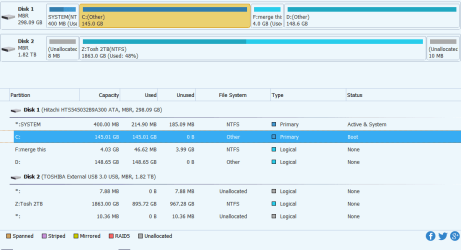
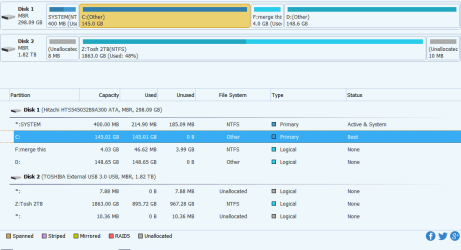
This has been unsuccessful as both my C and D drives in both programs show as unformatted which of course they are not and as a result of his wrongly reported data I cannot merge the 40Gb partition with D. Windows disk management shows they are formatted correctly as NTFS and Windows works perfectly well.
Clearly I won’t be reformatting either of the main partitions so I was wondering if anyone has a clue to how this can be solved please.
Kind regards

Tek:confused:
 

My Computer My Computer

At a glance

Windows 7 Professional 64 bitToo slow
Computer type
Laptop
Computer Manufacturer/Model Number
Toshiba Satellite C660
OS
Windows 7 Professional 64 bit
CPU
Too slow
Internet Speed
ha ha
Antivirus
Emsisoft Anti-Malware
Browser
Waterfox
Hi tekxan,

Could you post a screenshot of your Disk Management.

Click Start > in the search box type diskmgmt.msc > Enter.

I hope this helps!
 

My Computer My Computer

At a glance

Win 7 HP SP1 64-bit Vista HB SP2 32-bit Linux...Intel(R) Pentium(R) CPU P6200 @ 2.13GHz4.00 GBIntel(R) Graphics Media Accelerator HD
Computer type
Laptop
Computer Manufacturer/Model Number
Fujitsu LIFEBOOK
OS
Win 7 HP SP1 64-bit Vista HB SP2 32-bit Linux Mint 18.3
CPU
Intel(R) Pentium(R) CPU P6200 @ 2.13GHz
Motherboard
FUJITSU FJNBB06
Memory
4.00 GB
Graphics Card(s)
Intel(R) Graphics Media Accelerator HD
Sound Card
[1] Realtek High Definition Audio [2] Intel(R) Display Audio
Screen Resolution
1366 x 768 x 32 bits (4294967296 colors) @ 59 Hz
Hard Drives
TOSHIBA MK5076GSX
Antivirus
AVG FREE
Hi Paul and thanks for responding.
I've attached the requested screenshot and the one from Aomei showing the unformatted status
 

Attachments

  • dm-1.png
    dm-1.png
    8.5 KB · Views: 1
  • Aomei.png
    Aomei.png
    31.3 KB · Views: 4

My Computer My Computer

At a glance

Windows 7 Professional 64 bitToo slow
Computer type
Laptop
Computer Manufacturer/Model Number
Toshiba Satellite C660
OS
Windows 7 Professional 64 bit
CPU
Too slow
Internet Speed
ha ha
Antivirus
Emsisoft Anti-Malware
Browser
Waterfox
Hi tekxan,

I think it has something to do with the positionong of the drives with respect to being left or right.

Have you tried the FREE Partition Wizard: MiniTool Partition Wizard

This will resize whether (Primary) Unallocated or (Logical) Free Space.
Rightclick C to resize, slide right grey border all the way to the right, click OK, click Apply.

I hope this helps!
 

My Computer My Computer

At a glance

Win 7 HP SP1 64-bit Vista HB SP2 32-bit Linux...Intel(R) Pentium(R) CPU P6200 @ 2.13GHz4.00 GBIntel(R) Graphics Media Accelerator HD
Computer type
Laptop
Computer Manufacturer/Model Number
Fujitsu LIFEBOOK
OS
Win 7 HP SP1 64-bit Vista HB SP2 32-bit Linux Mint 18.3
CPU
Intel(R) Pentium(R) CPU P6200 @ 2.13GHz
Motherboard
FUJITSU FJNBB06
Memory
4.00 GB
Graphics Card(s)
Intel(R) Graphics Media Accelerator HD
Sound Card
[1] Realtek High Definition Audio [2] Intel(R) Display Audio
Screen Resolution
1366 x 768 x 32 bits (4294967296 colors) @ 59 Hz
Hard Drives
TOSHIBA MK5076GSX
Antivirus
AVG FREE
You need to delete the then move d to left then expand it to the right. Part of the problem is they are logical partitions not primary
 

My Computer My Computer

At a glance

win 8 32 bit
Computer type
PC/Desktop
OS
win 8 32 bit
You need to delete the then move d to left then expand it to the right. Part of the problem is they are logical partitions not primary
Thanks for clarifying that samuria, I couldn't find the right words to explain it! :doh:
 

My Computer My Computer

At a glance

Win 7 HP SP1 64-bit Vista HB SP2 32-bit Linux...Intel(R) Pentium(R) CPU P6200 @ 2.13GHz4.00 GBIntel(R) Graphics Media Accelerator HD
Computer type
Laptop
Computer Manufacturer/Model Number
Fujitsu LIFEBOOK
OS
Win 7 HP SP1 64-bit Vista HB SP2 32-bit Linux Mint 18.3
CPU
Intel(R) Pentium(R) CPU P6200 @ 2.13GHz
Motherboard
FUJITSU FJNBB06
Memory
4.00 GB
Graphics Card(s)
Intel(R) Graphics Media Accelerator HD
Sound Card
[1] Realtek High Definition Audio [2] Intel(R) Display Audio
Screen Resolution
1366 x 768 x 32 bits (4294967296 colors) @ 59 Hz
Hard Drives
TOSHIBA MK5076GSX
Antivirus
AVG FREE
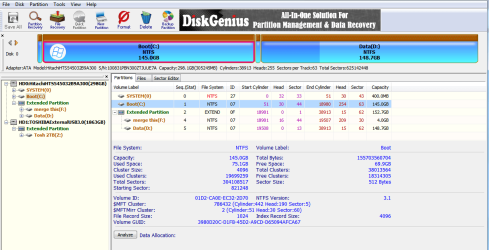
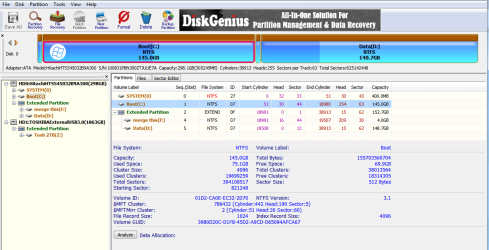
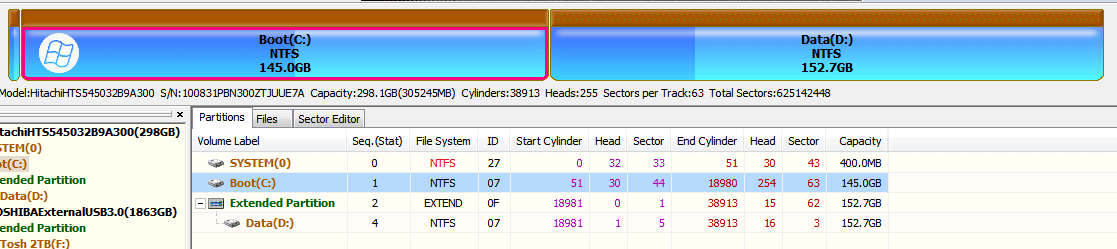
Hmmm same problem as with Macorit and Aomei. The only third party software that does show C and D correctly is Disk genius and I've just worked out how to merge the small 4gb partition but haven't done so yet. Still don't understand why the other software are reporting as unformatted or other for C and D.
Report back if successful with Disk Genius.
regards
Tek
 

Attachments

  • minitool.png
    minitool.png
    16.4 KB · Views: 0
  • disk genius.png
    disk genius.png
    47.1 KB · Views: 0

My Computer My Computer

At a glance

Windows 7 Professional 64 bitToo slow
Computer type
Laptop
Computer Manufacturer/Model Number
Toshiba Satellite C660
OS
Windows 7 Professional 64 bit
CPU
Too slow
Internet Speed
ha ha
Antivirus
Emsisoft Anti-Malware
Browser
Waterfox
Hmmm same problem as with Macorit and Aomei. The only third party software that does show C and D correctly is Disk genius and I've just worked out how to merge the small 4gb partition but haven't done so yet. Still don't understand why the other software are reporting as unformatted or other for C and D.
Report back if successful with Disk Genius.
regards
Tek
 

Attachments

  • minitool.png
    minitool.png
    16.4 KB · Views: 0
  • disk genius.png
    disk genius.png
    47.1 KB · Views: 1

My Computer My Computer

At a glance

Windows 7 Professional 64 bitToo slow
Computer type
Laptop
Computer Manufacturer/Model Number
Toshiba Satellite C660
OS
Windows 7 Professional 64 bit
CPU
Too slow
Internet Speed
ha ha
Antivirus
Emsisoft Anti-Malware
Browser
Waterfox
Well it seems like I've got this sorted now with the help of Disk genius. I did merge the F drive with D but it still left a tiny 52mb partition and then it hit me....doh! All I needed to do was to delete the remaining 52mb partition and re allocate the free space to D. Mind you this is what I should have done in the first instance with the original 4 Gb partition - delete and reallocate free space then problem solved.
Got too caught up as to why my C and D drives were showing up as unformatted in 3 of the third party programs and I'm still at a quandary as to why this happens. Macorit, Mini tool and Aoemi's offerings still show my C and D as unformatted so go figure.
Anyway many thanks to all who contributed in helping me address this issue.
I can always rely on this forum, Thanks folks.
 

Attachments

  • DG.png
    DG.png
    16.3 KB · Views: 0

My Computer My Computer

At a glance

Windows 7 Professional 64 bitToo slow
Computer type
Laptop
Computer Manufacturer/Model Number
Toshiba Satellite C660
OS
Windows 7 Professional 64 bit
CPU
Too slow
Internet Speed
ha ha
Antivirus
Emsisoft Anti-Malware
Browser
Waterfox
Hi tekxan,

Macorit, Mini tool and Aoemi's offerings still show my C and D as unformatted so go figure.

That is very strange.

I have used AOMEI and Mini Tool out of the three [AOMEI Partition Assistant Standard Edition mainly] and never had the results that you state. It is curious and would be nice to know what is causing this for future reference. You could email them describing your problem here: CONTACT US

Anyway many thanks to all who contributed in helping me address this issue.
I can always rely on this forum, Thanks folks.
You are most welcome and I am glad that you have got it sorted :thumbsup:.
 

My Computer My Computer

At a glance

Win 7 HP SP1 64-bit Vista HB SP2 32-bit Linux...Intel(R) Pentium(R) CPU P6200 @ 2.13GHz4.00 GBIntel(R) Graphics Media Accelerator HD
Computer type
Laptop
Computer Manufacturer/Model Number
Fujitsu LIFEBOOK
OS
Win 7 HP SP1 64-bit Vista HB SP2 32-bit Linux Mint 18.3
CPU
Intel(R) Pentium(R) CPU P6200 @ 2.13GHz
Motherboard
FUJITSU FJNBB06
Memory
4.00 GB
Graphics Card(s)
Intel(R) Graphics Media Accelerator HD
Sound Card
[1] Realtek High Definition Audio [2] Intel(R) Display Audio
Screen Resolution
1366 x 768 x 32 bits (4294967296 colors) @ 59 Hz
Hard Drives
TOSHIBA MK5076GSX
Antivirus
AVG FREE
Back
Top