
Make recovery disk windows7 upgrade from Vista

eezdva

New member
Local time
3:23 AM
Messages
16
I have a question about this.

Right now I will upgrade my Vista laptop to Windows 7 . I already did it before with the RC and worked great.

Anyways there are certain functions on my laptop I use . So that's why I didnt do a clean install. But if there is any problem and I need to reinstall windows. I will have to install Vista first . Till SP1 is the best I believe and then again Windows 7 :cry:.
A big hassle if you ask me?

Is there a way to make a bootable DVD or something of my laptop once I upgraded to windows 7 and I take kind of a snapshot of that moment.
or something else'

Like when i got my laptop I had to make 2 DVD's so I could reinstall windows. Was hoping I could do the same with Windows7 somehow.

Another thing is. I have an English Windows Vista on a machine but will get a Dutch windows 7 upgrade. I don't think I can upgrade from a English to Dutch right? Although the upgrade is Ultimate?

I also can install an English version of Ultimate and use the key from the Dutch ultimate? or is the key from the box really only for the DVD that's in the box ?

thank you for your answers.

Eezdva
 

My Computer My Computer

At a glance

Windows 7
OS
Windows 7
I have a question about this.

Right now I will upgrade my Vista laptop to Windows 7 . I already did it before with the RC and worked great.

Anyways there are certain functions on my laptop I use . So that's why I didnt do a clean install. But if there is any problem and I need to reinstall windows. I will have to install Vista first . Till SP1 is the best I believe and then again Windows 7 :cry:.
A big hassle if you ask me?

Is there a way to make a bootable DVD or something of my laptop once I upgraded to windows 7 and I take kind of a snapshot of that moment.
or something else'

Like when i got my laptop I had to make 2 DVD's so I could reinstall windows. Was hoping I could do the same with Windows7 somehow.

Another thing is. I have an English Windows Vista on a machine but will get a Dutch windows 7 upgrade. I don't think I can upgrade from a English to Dutch right? Although the upgrade is Ultimate?

I also can install an English version of Ultimate and use the key from the Dutch ultimate? or is the key from the box really only for the DVD that's in the box ?

thank you for your answers.

Eezdva
You choose your language upon installation,i did anyway.
And microsoft have language updates also.

I think as long as the key is for "ultimate" it will work.
 

My Computer My Computer

At a glance

Windows 7 Ultimate 64bitAMD Phenom II 555 Black Edition Quad Core OC'...G Skill RipJaw 1333MHz 4GBATI raideon 4250 HD/XFX ATI Radeon 1GB HD4650
Computer Manufacturer/Model Number
Blue Shards 1.0
OS
Windows 7 Ultimate 64bit
CPU
AMD Phenom II 555 Black Edition Quad Core OC'd to 4.0GHz
Motherboard
ASUS M4A88T-M
Memory
G Skill RipJaw 1333MHz 4GB
Graphics Card(s)
ATI raideon 4250 HD/XFX ATI Radeon 1GB HD4650
Sound Card
Realteck HD Audio
Monitor(s) Displays
2x 22" Widescreen HD Monitors
Hard Drives
500GB Sata 7500RPM
80GB IDE
PSU
850W OCUK Modular
Case
Antec Dark Fleet DF-30
Cooling
Titan Fenrir Pro (CPU)
Keyboard
Logitech Wireless
Mouse
Logitech Wireless
Internet Speed
24Meg
Other Info
Getting soon-
2TB 7200RPM HDD
+8GB RAM
30GB SSD
HD6950/70
Yeah I had to choose the language for Vista when I installed my laptop for the first time. It's English:-)

So as I get a dutch Ultimate I would like to use that one. But if I then can't upgrade that Ultimate is rather useless :-) I get it as a present so didn't want to complain :geek:. So I hope someone will respond who did add the key from an RTM box ( in my case Dutch) on an Ultimate windows 7 in another language ( in my case English) and if it worked.

Do you have to choose the language when you install windows 7 ? I don't remember.

The problem is once you installed Ultimate you can download the language pack :zip: But then all damage would have been done already.
 

My Computer My Computer

At a glance

Windows 7
OS
Windows 7
Windows 7 has a great built-in Backup Imaging utility.

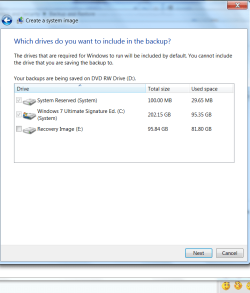
After you get your 7 up and running, type Backup into the start box, then in the Backup and Recovery Center click Create an Image, and save externally.

It will reimage your entire HDD flawlessly in 15 minutes.

There is no need to ever reinstall windows again.
 
Is there a way to make a bootable DVD or something of my laptop once I upgraded to windows 7 and I take kind of a snapshot of that moment. or something else'
You could take an image of your drive using a disk imaging program such as Macrium Reflect (free) or Paragon (paid). Some imaging programs allow saving the image to DVDs, some will only save to another hard drive. In any event, the image can be restored,
so you don't have to go through the process of reinstalling.

As Greg mentioned, the built-in imaging in windows will work too. I haven't used it so I don't know if the image is available if windows goes to never-never land. :confused: I would be annoyed if I needed to re-install before I could use the image.

I usually keep a set of images of my disk, the first one right after the install with minimal programs added.
 

My Computer My Computer

At a glance

Windows 7 Professional (64-bit) / OS X Snow L...Core i5 / Core i74 GB / 8 GB
Computer Manufacturer/Model Number
Lenovo ThinkPad E520 / MacBook Pro 17" (mid 2010)
OS
Windows 7 Professional (64-bit) / OS X Snow Leopard
CPU
Core i5 / Core i7
Memory
4 GB / 8 GB
Sound Card
built-in
Monitor(s) Displays
internal & Samsung SyncMaster 191T / internal
Screen Resolution
1366x768 & 1280 x 1024 /1920x1200
Hard Drives
2 WD Raptors (74 G)
1 WD Caviar (250 G)
1 HP Personal Media Drive (USB, 300 G)
etc.
Cooling
none
Keyboard
built-in
Mouse
generic mouse / Wacom Intuos 3 tablet
Internet Speed
(very variable) high-speed cable
As Greg mentioned, the built-in imaging in windows will work too. I haven't used it so I don't know if the image is available if windows goes to never-never land. :confused: I would be annoyed if I needed to re-install before I could use the image.

.

Yes, the news is good on 7 Imaging backup. It reimages using Win7 installer>Repair My Computer>Recover Using Image Backup. It also offers to make a System Repair Disk when you first make the image, which will provide the same Recovery console tools.

On each of my computers, I make a Primary partition named Backup Image where I have the Imaging program save the image, then I copy it to an external drive in case of HDD failure.

I have used it several times already to reimage a HDD flawlessly in 15 minutes, even a new drive I want to switch into a machine.

The only thing missing is more compression to make the file a lot smaller. I have only found this on Paragon Hard Disk Manager 2009 which I borrowed from a friend, but prefer having this built into Windows backing up my image on a set schedule while computer is idle.
 
As Greg mentioned, the built-in imaging in windows will work too. I haven't used it so I don't know if the image is available if windows goes to never-never land. :confused: I would be annoyed if I needed to re-install before I could use the image.

.
Yes, the news is good on 7 Imaging backup. It reimages using the Win7 installer>Repair My Computer>Recover using Image Backup. It also offers to make a System Repair Disk when you first make the image, which will provide the same Recovery console tools.

On each of my computers, I make a Primary partition named Backup Image where I have the Backup Imaging program save the image, then I copy it to an external drive in case of HDD failure.

I have used it several times already to reimage a HDD flawlessly in 15 minutes, even a brand new drive I want to switch into a machine.

The only thing missing is more compression to make the file a lot smaller. I have only found this on Paragon Hard Disk Manager 2009 which I borrowed from a friend, but like having this built into Windows better, backing up my image on a set schedule while computer is idle.

Great! :thumbsup:Thanks for clarifying this issue, it makes backing up soooo much easier.
 

My Computer My Computer

At a glance

Windows 7 Professional (64-bit) / OS X Snow L...Core i5 / Core i74 GB / 8 GB
Computer Manufacturer/Model Number
Lenovo ThinkPad E520 / MacBook Pro 17" (mid 2010)
OS
Windows 7 Professional (64-bit) / OS X Snow Leopard
CPU
Core i5 / Core i7
Memory
4 GB / 8 GB
Sound Card
built-in
Monitor(s) Displays
internal & Samsung SyncMaster 191T / internal
Screen Resolution
1366x768 & 1280 x 1024 /1920x1200
Hard Drives
2 WD Raptors (74 G)
1 WD Caviar (250 G)
1 HP Personal Media Drive (USB, 300 G)
etc.
Cooling
none
Keyboard
built-in
Mouse
generic mouse / Wacom Intuos 3 tablet
Internet Speed
(very variable) high-speed cable
Hum kind of stupid I never did that anyways then :-)

I saw tutorials on how to make a backup of your whole system. But didn't realize that I can just go back to that moment with a DVD. That is just awesome. Wow.

I guess there must be something about it on this forum.

So anyone else about the key thing?
 

My Computer My Computer

At a glance

Windows 7
OS
Windows 7
Hum kind of stupid I never did that anyways then :-)

I saw tutorials on how to make a backup of your whole system. But didn't realize that I can just go back to that moment with a DVD. That is just awesome. Wow.

I guess there must be something about it on this forum.

So anyone else about the key thing?

Keys have always been version-specific, so I don't know why you couldn't use a different language key on the same version. You can always call the MS store to ask: 1-877-696-7786

This is the first time Backup Imaging is breaking out to the masses, with Windows 7.

You may not want to use DVD to back up as it will take too many. THis calls for an external drive, or a partition on your HDD until you can get an external HDD.

What's beautiful about it with an external HDD is you can leave it plugged in and backing up your files (of choice) and/or the image on a schedule or in the background while idle.
 
So I can't make a DVD with just the fresh installation of the Windows 7 upgrade? :cry:
 

My Computer My Computer

At a glance

Windows 7
OS
Windows 7
About the key: I have quite a lot experience installing different language versions of Windows Vista and now even with Seven. I have never managed to use a key from a different language version i.e. IMO the keys are language dependent.

Just last week a Finnish Seven Ultimate clean install didn't accept a legal key for the German Seven Ultimate.

Sorry to say but I think OP's only possibility is to buy a key to an English version and upgrade with that because the Dutch version can not be used to upgrade an English Vista.

Kari
 

My Computer My Computer

At a glance

Windows 10 Pro x64 EN-GB1.6 GHz Intel Core i7-720QM Processor6 GBATI Mobility Radeon HD 5850 Graphics
Computer type
Laptop
Computer Manufacturer/Model Number
HP ENVY 17-1150eg
OS
Windows 10 Pro x64 EN-GB
CPU
1.6 GHz Intel Core i7-720QM Processor
Memory
6 GB
Graphics Card(s)
ATI Mobility Radeon HD 5850 Graphics
Sound Card
Beats sound system with integrated subwoofer
Monitor(s) Displays
17" laptop display, 22" LED and 32" Full HD TV through HDMI
Screen Resolution
1600*900 (1), 1920*1080 (2&3)
Hard Drives
Internal: 2 x 500 GB SATA Hard Disk Drive 7200 rpm
External: 2TB for backups, 3TB USB3 network drive for media
Cooling
As Envy runs a bit warm, I have it on a Cooler Master pad
Keyboard
Logitech diNovo Media Desktop Laser (bluetooth)
Mouse
Logitech Performance Mouse MX
Internet Speed
50/10 Mbps VDSL
Antivirus
Windows Defender 4.3.9431.0
Browser
Maxthon 3.5.2., IE11
About the key: I have quite a lot experience installing different language versions of Windows Vista and now even with Seven. I have never managed to use a key from a different language version i.e. IMO the keys are language dependent.

Just last week a Finnish Seven Ultimate clean install didn't accept a legal key for the German Seven Ultimate.

Sorry to say but I think OP's only possibility is to buy a key to an English version and upgrade with that because the Dutch version can not be used to upgrade an English Vista.

Kari

Ok thank you for your response. That's bad news :cry:. But well it will safe me the hassle i guess. So no need for me to try?
 

My Computer My Computer

At a glance

Windows 7
OS
Windows 7
Ok thank you for your response. That's bad news :cry:. But well it will safe me the hassle i guess. So no need for me to try?
You are free to hassle ;) I'm interested to hear about your mixed language upgrade experience. Please don't forget to tell how it went.
Kari
 

My Computer My Computer

At a glance

Windows 10 Pro x64 EN-GB1.6 GHz Intel Core i7-720QM Processor6 GBATI Mobility Radeon HD 5850 Graphics
Computer type
Laptop
Computer Manufacturer/Model Number
HP ENVY 17-1150eg
OS
Windows 10 Pro x64 EN-GB
CPU
1.6 GHz Intel Core i7-720QM Processor
Memory
6 GB
Graphics Card(s)
ATI Mobility Radeon HD 5850 Graphics
Sound Card
Beats sound system with integrated subwoofer
Monitor(s) Displays
17" laptop display, 22" LED and 32" Full HD TV through HDMI
Screen Resolution
1600*900 (1), 1920*1080 (2&3)
Hard Drives
Internal: 2 x 500 GB SATA Hard Disk Drive 7200 rpm
External: 2TB for backups, 3TB USB3 network drive for media
Cooling
As Envy runs a bit warm, I have it on a Cooler Master pad
Keyboard
Logitech diNovo Media Desktop Laser (bluetooth)
Mouse
Logitech Performance Mouse MX
Internet Speed
50/10 Mbps VDSL
Antivirus
Windows Defender 4.3.9431.0
Browser
Maxthon 3.5.2., IE11
Ok thank you for your response. That's bad news :cry:. But well it will safe me the hassle i guess. So no need for me to try?
You are free to hassle ;) I'm interested to hear about your mixed language upgrade experience. Please don't forget to tell how it went.

Kari

I will probably try anyways :-) Can't resist. lol

But ok I can do a fresh install with my dutch upgrade on an English Vista . Ugh so many questions . :-)
 

My Computer My Computer

At a glance

Windows 7
OS
Windows 7
I will probably try anyways :-) Can't resist. lol

But ok I can do a fresh install with my dutch upgrade on an English Vista . Ugh so many questions . :-)
Yes to that.

When doing a clean install, previous version and language have no difference.

Kari
 

My Computer My Computer

At a glance

Windows 10 Pro x64 EN-GB1.6 GHz Intel Core i7-720QM Processor6 GBATI Mobility Radeon HD 5850 Graphics
Computer type
Laptop
Computer Manufacturer/Model Number
HP ENVY 17-1150eg
OS
Windows 10 Pro x64 EN-GB
CPU
1.6 GHz Intel Core i7-720QM Processor
Memory
6 GB
Graphics Card(s)
ATI Mobility Radeon HD 5850 Graphics
Sound Card
Beats sound system with integrated subwoofer
Monitor(s) Displays
17" laptop display, 22" LED and 32" Full HD TV through HDMI
Screen Resolution
1600*900 (1), 1920*1080 (2&3)
Hard Drives
Internal: 2 x 500 GB SATA Hard Disk Drive 7200 rpm
External: 2TB for backups, 3TB USB3 network drive for media
Cooling
As Envy runs a bit warm, I have it on a Cooler Master pad
Keyboard
Logitech diNovo Media Desktop Laser (bluetooth)
Mouse
Logitech Performance Mouse MX
Internet Speed
50/10 Mbps VDSL
Antivirus
Windows Defender 4.3.9431.0
Browser
Maxthon 3.5.2., IE11
I will probably try anyways :-) Can't resist. lol

But ok I can do a fresh install with my dutch upgrade on an English Vista . Ugh so many questions . :-)
Yes to that.

When doing a clean install, previous version and language have no difference.

Kari

Ok awesome . Well I will be sure to let you know how things work out.
 

My Computer My Computer

At a glance

Windows 7
OS
Windows 7
One thing I have noticed is that the Win7 system image utility will not image a hidden Linux partition, while most of the third-party utilities like Macrium will do so. Just keep that in mind if you dual-boot with a Linux distro and expect the Win7 system image to take care of your entire HDD image.

Damon
 

My Computer My Computer

At a glance

Win7
OS
Win7
I am a Linux noob. Don't think I will get into that soon .

I am very happy with all the info guys. Was super helpfull.
 

My Computer My Computer

At a glance

Windows 7
OS
Windows 7
Is there a way to make a bootable DVD or something of my laptop once I upgraded to windows 7 and I take kind of a snapshot of that moment. or something else'
You could take an image of your drive using a disk imaging program such as Macrium Reflect (free) or Paragon (paid). Some imaging programs allow saving the image to DVDs, some will only save to another hard drive. In any event, the image can be restored,
so you don't have to go through the process of reinstalling.

As Greg mentioned, the built-in imaging in windows will work too. I haven't used it so I don't know if the image is available if windows goes to never-never land. :confused: I would be annoyed if I needed to re-install before I could use the image.

I usually keep a set of images of my disk, the first one right after the install with minimal programs added.

Ok I did my thing. Installed windows again. Made the image on my Lacie. But Windows doesn't see my Lacie for some odd reason.

It asks me to install the drivers from the CD but Lacie didn't give me any :-) Cause it ain't needed.

Anyways. I think I want to just put the image on a CD/ DVD. My image is about 17 GB. That would mean I will need a lot of DVDs to copy the image on right?

About 5 :shock: ?? Or does it shrink it while backing up ( sorry for the noob questions )

And Macrium Reflect do I still need to use windows image recovery or does this programm do it seperatly from windows?
 

My Computer My Computer

At a glance

Windows 7
OS
Windows 7
Back
Top