Enabling advanced and power options in insideH2O setup utility rev 3.5

Glitchdweller

New member
Local time
5:49 PM
Messages
5
I'm currently trying to enable an option that will help me with virtual machines in the bios (forget the name) and can't find it, here's some computer info:

Emachines E725
Bios revision: 3.5
Bios version: 3.04
Vga bios version: Intel V1800

I've already tried a few things people have said to no avail, but I'm hoping that is only because the computer is different from the others in a way.
Thanks for any replies!
 

My Computer My Computer

At a glance

Windows 7 Home Premium x64Intel T44004.00GBIntegrated Intel hd
Computer type
Laptop
Computer Manufacturer/Model Number
Emachines
OS
Windows 7 Home Premium x64
CPU
Intel T4400
Motherboard
unknown
Memory
4.00GB
Graphics Card(s)
Integrated Intel hd
Hard Drives
200gb HDD
Antivirus
expired malwarebytes free
Browser
Chrome
Hi Glitchdweller,
Are you trying to enable Hyper-V or are you simply trying to use a VM such as VMware Player Workstation?
Hyper-V will only work on Win 7 Pro, Ultimate & Enterprise.
 
Last edited:

My Computer My Computer

At a glance

Win 10 x64, Linux Lite, Win 7 x64, BlackArch,...
Computer type
PC/Desktop
Computer Manufacturer/Model Number
HP Desktop & Compaq Laptop
OS
Win 10 x64, Linux Lite, Win 7 x64, BlackArch, & Kali
Hard Drives
Samsung 850 Pro 256Gb,
Hitachi HDD 1Tb,
Crucial MX SSD 250Gb
Segate 3Tb USB 3.0 Ext. Backup HDD
Internet Speed
150Mbps dn, 20Mbps up
Antivirus
Avast Free, Malwarebytes Anti-Exploit & Anti-Ransomware
Browser
Firefox, Chrome, Opera, & VPN
i think he is talking about the hard switch in BIOS.
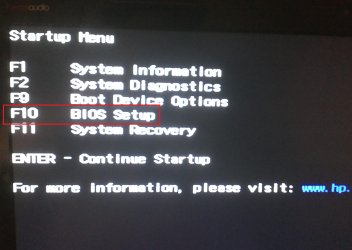
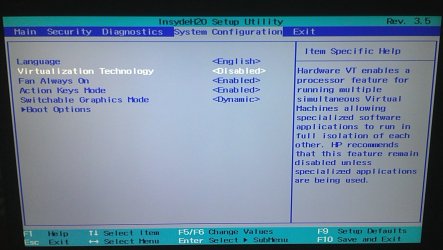
Glitchdweller u might get better help from ur oem support site (based on ur pc model), but just to give u an indication of how it might look like, i have a HP with InsydeH20 3.5 & here is my switch :-

1st Pic : At UEFI Boot, Enter BIOS Setup.
2nd Pic : In BIOS Setup, navigate to System Configuration, and there it is.
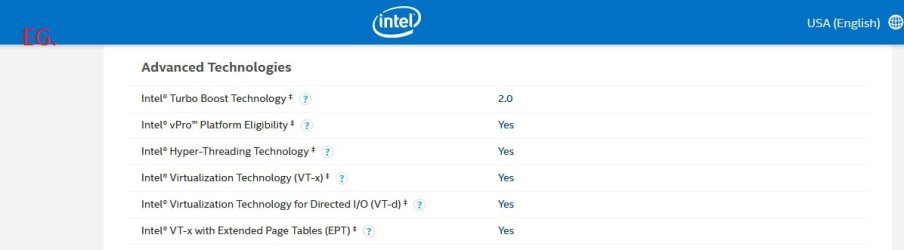
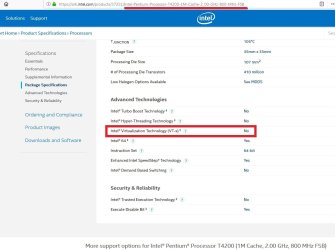
3rd Pic : take note that ur chip must support VT. U can google ur chip model at ARK Intel specifications, under Advanced technologies.

Sry i know this does not necessarily solve ur case for ur particular model of pc (which i know nothing about), but just to show u the switch if u wanted to see it.
 

Attachments

  • VT1.jpg
    VT1.jpg
    258.9 KB · Views: 0
  • VT2.jpg
    VT2.jpg
    302 KB · Views: 0
  • Intel VT.jpg
    Intel VT.jpg
    24.1 KB · Views: 0

My Computer My Computer

At a glance

Windows 7 Ultimate x64
Computer type
PC/Desktop
OS
Windows 7 Ultimate x64
Magnakai, thank you for your input.
Nic
 

My Computer My Computer

At a glance

Win 10 x64, Linux Lite, Win 7 x64, BlackArch,...
Computer type
PC/Desktop
Computer Manufacturer/Model Number
HP Desktop & Compaq Laptop
OS
Win 10 x64, Linux Lite, Win 7 x64, BlackArch, & Kali
Hard Drives
Samsung 850 Pro 256Gb,
Hitachi HDD 1Tb,
Crucial MX SSD 250Gb
Segate 3Tb USB 3.0 Ext. Backup HDD
Internet Speed
150Mbps dn, 20Mbps up
Antivirus
Avast Free, Malwarebytes Anti-Exploit & Anti-Ransomware
Browser
Firefox, Chrome, Opera, & VPN
Magnakai, thank you for your input.
Nic

I cannot seem to get help for my particular model of computer because emachines is owned by gateway, and gateway is owned by acer, and i simply cannot find help for it
 

My Computer My Computer

At a glance

Windows 7 Home Premium x64Intel T44004.00GBIntegrated Intel hd
Computer type
Laptop
Computer Manufacturer/Model Number
Emachines
OS
Windows 7 Home Premium x64
CPU
Intel T4400
Motherboard
unknown
Memory
4.00GB
Graphics Card(s)
Integrated Intel hd
Hard Drives
200gb HDD
Antivirus
expired malwarebytes free
Browser
Chrome
but what is the nature of help you need? like i showed you for my system, the only option dealing with VT inside BIOS concerns turning it ON or OFF.

you mean you are having difficulty calling up the UEFI panel to enter BIOS? you cannot enter BIOS setup is that it?
 

My Computer My Computer

At a glance

Windows 7 Ultimate x64
Computer type
PC/Desktop
OS
Windows 7 Ultimate x64
but what is the nature of help you need? like i showed you for my system, the only option dealing with VT inside BIOS concerns turning it ON or OFF.

you mean you are having difficulty calling up the UEFI panel to enter BIOS? you cannot enter BIOS setup is that it?
What I'm saying is that the tab the opportunity is contained in is simply missing from the bios menu
 

My Computer My Computer

At a glance

Windows 7 Home Premium x64Intel T44004.00GBIntegrated Intel hd
Computer type
Laptop
Computer Manufacturer/Model Number
Emachines
OS
Windows 7 Home Premium x64
CPU
Intel T4400
Motherboard
unknown
Memory
4.00GB
Graphics Card(s)
Integrated Intel hd
Hard Drives
200gb HDD
Antivirus
expired malwarebytes free
Browser
Chrome
View attachment 405325Hi i'm sry,

could u see if any of the links below are helpful to you?

How can I enable Intel-VT when the BIOS has no option for it?
virtualization is not found on bios, how to enable it? — Acer Community
Enable virtualization support - Gateway NE722 — Acer Community
How to enable VirTualization when Acer turned that option off in the BIOS ? - YouTube

but those acer ones deal mainly with notebooks i think

* EDIT *

hey wait a minute man; did u actually check on ur chip like we suggested?

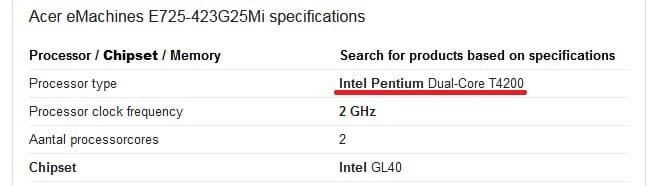
are these ur system specs :-

did u check ark intel :-

unless those aren't ur system specs- but then i would still try to seek help for ur specific model at acer support.
 

Attachments

  • aretheseyourspecs.jpg
    aretheseyourspecs.jpg
    14.7 KB · Views: 16
  • arkintelt4200.jpg
    arkintelt4200.jpg
    70.3 KB · Views: 1
Last edited:

My Computer My Computer

At a glance

Windows 7 Ultimate x64
Computer type
PC/Desktop
OS
Windows 7 Ultimate x64
Back
Top