
Solved Download Windows 7 iso from microsoft

Either reinstall or change the edition using dism. IIrc you need to sysprep before changing the edition.

To change edtion after sysprepping, boot into winpe , open cmd prompt and type:
[obviously, replace C with your Windows drive letter as seen from winpe]

Dism /Image:C: /Set-Edition:Ultimate

I really don`t think he`d understand any of this :(
 

My Computer My Computer

At a glance

Windows 10 Pro x64Intel Core i7 6700KGSkill TridentZ RGB 16GB 3600 16-16-16-36EVGA GTX 980 Ti SC x2
Computer type
PC/Desktop
Computer Manufacturer/Model Number
Skylake Special #666
OS
Windows 10 Pro x64
CPU
Intel Core i7 6700K
Motherboard
Asus Sabertooth Z170 Mark 1
Memory
GSkill TridentZ RGB 16GB 3600 16-16-16-36
Graphics Card(s)
EVGA GTX 980 Ti SC x2
Sound Card
Realtek High Definition
Monitor(s) Displays
AOC G2460PG
Screen Resolution
1920 x 1080 144Hz
Hard Drives
Samsung 860 Pro 256GB, Seagate Barracuda 4TB x2
PSU
EVGA 1000 P2, EVGA White Custom Braided Cables
Case
Corsair Vengeance C70 Gunmetal Black
Cooling
Corsair H100i v2, Corsair ML120 x2, Thermal Grizzly Kryonaut
Keyboard
Logitech G910 Orion Spectrum
Mouse
Logitech G700s
Internet Speed
Verizon Fios Quantum Gateway 75/75
Antivirus
Windows Defender, Malwarebytes Free 3.8.3
Browser
Chrome
Other Info
Corsair SP120 x4, LG Blu-ray Drive, Durabrand HT-395 100 Watt Dolby Digital Amp, Corsair H2100 Wireless 7.1 Headset
Hello everyone.
I would like to install Windows 7 too. Now I have OEM key but for some reason it won't let me download from MS site. Yes, I know i can download it from TechBench too but I would like to download it directly from MS, updated one (yes I can update older version later) but this one from TechBench says: File upload: 02/18/2012. HeiDoc also has one but that one doesn't seem to be up-to-date.
So if anyone could provide the download link for Windows 7 Ultimate SP1 x64 from MS site (and also yes, I know it expires after 24h or less) it would be much appreciated.
 

My Computer My Computer

At a glance

Windows 7 Ultimate SP1 x64Intel Core i7 3770 3,4ghZ16gb DDR3Nvidia GTX 1050TI 4gb ddr5
Computer type
PC/Desktop
OS
Windows 7 Ultimate SP1 x64
CPU
Intel Core i7 3770 3,4ghZ
Motherboard
ASUS H61M-K
Memory
16gb DDR3
Graphics Card(s)
Nvidia GTX 1050TI 4gb ddr5
Monitor(s) Displays
AOC
Screen Resolution
1920x1080
Hard Drives
Kingston SSD 240gb
Toshiba 500gb 700rpm
Case
Blueberry
Keyboard
Logitech g19S
Internet Speed
2MB/s
Antivirus
Avast
Hi parchessi, welcome to Seven Forums,

I would like to install Windows 7 too. Now I have OEM key but for some reason it won't let me download from MS site.

You won't be able to use your OEM product key on the Microsoft download site because it doesn't support product keys for OEM versions.

You will have to download the ISO from TechBench and use your OEM product key when installing.

I hope this helps!
 

My Computer My Computer

At a glance

Win 7 HP SP1 64-bit Vista HB SP2 32-bit Linux...Intel(R) Pentium(R) CPU P6200 @ 2.13GHz4.00 GBIntel(R) Graphics Media Accelerator HD
Computer type
Laptop
Computer Manufacturer/Model Number
Fujitsu LIFEBOOK
OS
Win 7 HP SP1 64-bit Vista HB SP2 32-bit Linux Mint 18.3
CPU
Intel(R) Pentium(R) CPU P6200 @ 2.13GHz
Motherboard
FUJITSU FJNBB06
Memory
4.00 GB
Graphics Card(s)
Intel(R) Graphics Media Accelerator HD
Sound Card
[1] Realtek High Definition Audio [2] Intel(R) Display Audio
Screen Resolution
1366 x 768 x 32 bits (4294967296 colors) @ 59 Hz
Hard Drives
TOSHIBA MK5076GSX
Antivirus
AVG FREE
That actually makes sence now why I can't download, thanks.
Now I know that I can download from TechBench but then every time something happens or I reinstall I would have to download 6 years of updates since I see it is uploaded in 2012. So from MS's site would be better because it contains all the updates till now, I wouldn't have to download them all. I know I would have to download maybe later updates from 2018 till later still, that would be only let's say 2 years of updates instead of then 8 (currently 6).
That's why I'm asking this.
 

My Computer My Computer

At a glance

Windows 7 Ultimate SP1 x64Intel Core i7 3770 3,4ghZ16gb DDR3Nvidia GTX 1050TI 4gb ddr5
Computer type
PC/Desktop
OS
Windows 7 Ultimate SP1 x64
CPU
Intel Core i7 3770 3,4ghZ
Motherboard
ASUS H61M-K
Memory
16gb DDR3
Graphics Card(s)
Nvidia GTX 1050TI 4gb ddr5
Monitor(s) Displays
AOC
Screen Resolution
1920x1080
Hard Drives
Kingston SSD 240gb
Toshiba 500gb 700rpm
Case
Blueberry
Keyboard
Logitech g19S
Internet Speed
2MB/s
Antivirus
Avast
Hi parchessi,

First off, let's get your system specifications sorted out in your UserCP > Edit System Spec setup and we can go from there!

The tutorial below (Published by Brink and written by CyberZeus) let's you easily see all of your system information, along with the option of easily filling out your system specifications here at Seven Forums easier.

How to See Your System Specs with "System Info"

This way it will be easier for people to help you in the future!

I hope this helps!
 

My Computer My Computer

At a glance

Win 7 HP SP1 64-bit Vista HB SP2 32-bit Linux...Intel(R) Pentium(R) CPU P6200 @ 2.13GHz4.00 GBIntel(R) Graphics Media Accelerator HD
Computer type
Laptop
Computer Manufacturer/Model Number
Fujitsu LIFEBOOK
OS
Win 7 HP SP1 64-bit Vista HB SP2 32-bit Linux Mint 18.3
CPU
Intel(R) Pentium(R) CPU P6200 @ 2.13GHz
Motherboard
FUJITSU FJNBB06
Memory
4.00 GB
Graphics Card(s)
Intel(R) Graphics Media Accelerator HD
Sound Card
[1] Realtek High Definition Audio [2] Intel(R) Display Audio
Screen Resolution
1366 x 768 x 32 bits (4294967296 colors) @ 59 Hz
Hard Drives
TOSHIBA MK5076GSX
Antivirus
AVG FREE
I think I filled it. Since I'm on my laptop currently preparing Win7 for my pc. MOBO died, and it was replaced by the same so I got Win 7 OEM. That's why I want MS offical iso, since it is most up to date out there.
 

My Computer My Computer

At a glance

Windows 7 Ultimate SP1 x64Intel Core i7 3770 3,4ghZ16gb DDR3Nvidia GTX 1050TI 4gb ddr5
Computer type
PC/Desktop
OS
Windows 7 Ultimate SP1 x64
CPU
Intel Core i7 3770 3,4ghZ
Motherboard
ASUS H61M-K
Memory
16gb DDR3
Graphics Card(s)
Nvidia GTX 1050TI 4gb ddr5
Monitor(s) Displays
AOC
Screen Resolution
1920x1080
Hard Drives
Kingston SSD 240gb
Toshiba 500gb 700rpm
Case
Blueberry
Keyboard
Logitech g19S
Internet Speed
2MB/s
Antivirus
Avast
Hi parchessi,

Yes that looks good.

As far as going about a clean install, once you have downloaded the ISO from TechBench, there are many many posts in this forum that cover the downloading of Windows Updates using different approaches. If you were to run Windows Update directly after the clean install you will be looking at around 300+ updates. This takes a considerable amount of time to complete (hours and hours in fact) because of the restarts needed and the re-running of Windows Updates again and again until there are non left. There are ways around this laborious method however. I, along with several other members here, have covered this topic many times before. It might be best for you to do a forum search and find which method will work best for you. If you need any help or advice then you can just ask!

I hope this helps!
 

My Computer My Computer

At a glance

Win 7 HP SP1 64-bit Vista HB SP2 32-bit Linux...Intel(R) Pentium(R) CPU P6200 @ 2.13GHz4.00 GBIntel(R) Graphics Media Accelerator HD
Computer type
Laptop
Computer Manufacturer/Model Number
Fujitsu LIFEBOOK
OS
Win 7 HP SP1 64-bit Vista HB SP2 32-bit Linux Mint 18.3
CPU
Intel(R) Pentium(R) CPU P6200 @ 2.13GHz
Motherboard
FUJITSU FJNBB06
Memory
4.00 GB
Graphics Card(s)
Intel(R) Graphics Media Accelerator HD
Sound Card
[1] Realtek High Definition Audio [2] Intel(R) Display Audio
Screen Resolution
1366 x 768 x 32 bits (4294967296 colors) @ 59 Hz
Hard Drives
TOSHIBA MK5076GSX
Antivirus
AVG FREE
Alright, thanks.
Just curious, where did you get windows 7 iso? From Tech or MS?
 

My Computer My Computer

At a glance

Windows 7 Ultimate SP1 x64Intel Core i7 3770 3,4ghZ16gb DDR3Nvidia GTX 1050TI 4gb ddr5
Computer type
PC/Desktop
OS
Windows 7 Ultimate SP1 x64
CPU
Intel Core i7 3770 3,4ghZ
Motherboard
ASUS H61M-K
Memory
16gb DDR3
Graphics Card(s)
Nvidia GTX 1050TI 4gb ddr5
Monitor(s) Displays
AOC
Screen Resolution
1920x1080
Hard Drives
Kingston SSD 240gb
Toshiba 500gb 700rpm
Case
Blueberry
Keyboard
Logitech g19S
Internet Speed
2MB/s
Antivirus
Avast
Everyone and anyone who installs W7 today has to install all the updates, there`s no way around this if you want to do a clean install.

The Techbench and the Microsoft Iso`s are the same exact thing.

Microsoft does not keep adding updates to the W7 SP1 Iso file, no idea where you heard that. Microsoft does not care about Windows 7 anymore.

A Windows 7 Pro Iso file is 3.09 GB, same as always. (And remember, that Iso has all 3 versions of W7 on it, 4 if it has starter )

If I downloaded a W7 Pro x64 Iso file from Microsoft today, it would be the same as the one I downloaded 5 years ago.

The only update ever added by Microsoft was Service Pack 1

If you have a W7 key, you`d be better off installing Windows 10, I can`t believe I just said that :rolleyes:
 

My Computer My Computer

At a glance

Windows 10 Pro x64Intel Core i7 6700KGSkill TridentZ RGB 16GB 3600 16-16-16-36EVGA GTX 980 Ti SC x2
Computer type
PC/Desktop
Computer Manufacturer/Model Number
Skylake Special #666
OS
Windows 10 Pro x64
CPU
Intel Core i7 6700K
Motherboard
Asus Sabertooth Z170 Mark 1
Memory
GSkill TridentZ RGB 16GB 3600 16-16-16-36
Graphics Card(s)
EVGA GTX 980 Ti SC x2
Sound Card
Realtek High Definition
Monitor(s) Displays
AOC G2460PG
Screen Resolution
1920 x 1080 144Hz
Hard Drives
Samsung 860 Pro 256GB, Seagate Barracuda 4TB x2
PSU
EVGA 1000 P2, EVGA White Custom Braided Cables
Case
Corsair Vengeance C70 Gunmetal Black
Cooling
Corsair H100i v2, Corsair ML120 x2, Thermal Grizzly Kryonaut
Keyboard
Logitech G910 Orion Spectrum
Mouse
Logitech G700s
Internet Speed
Verizon Fios Quantum Gateway 75/75
Antivirus
Windows Defender, Malwarebytes Free 3.8.3
Browser
Chrome
Other Info
Corsair SP120 x4, LG Blu-ray Drive, Durabrand HT-395 100 Watt Dolby Digital Amp, Corsair H2100 Wireless 7.1 Headset
Ha, alright then, my mistake about the updates.
Thanks.
 

My Computer My Computer

At a glance

Windows 7 Ultimate SP1 x64Intel Core i7 3770 3,4ghZ16gb DDR3Nvidia GTX 1050TI 4gb ddr5
Computer type
PC/Desktop
OS
Windows 7 Ultimate SP1 x64
CPU
Intel Core i7 3770 3,4ghZ
Motherboard
ASUS H61M-K
Memory
16gb DDR3
Graphics Card(s)
Nvidia GTX 1050TI 4gb ddr5
Monitor(s) Displays
AOC
Screen Resolution
1920x1080
Hard Drives
Kingston SSD 240gb
Toshiba 500gb 700rpm
Case
Blueberry
Keyboard
Logitech g19S
Internet Speed
2MB/s
Antivirus
Avast
Hi parchessi,

Just curious, where did you get windows 7 iso? From Tech or MS?

You can download the ISO file from here:

TechBench

Then use the following information:

Windows (Final) > Windows 7 SP1 (build 7601) > Windows 7 Ultimate SP1 > English > Win_Ult_SP1_English_x64.iso

Obviously change the language and bit type to suit.

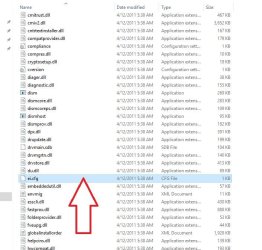
Once downloaded, extract the contents of the ISO using something like 7-Zip and then either delete or rename the ei.cfg [ISO > Sources > ei.cfg] file (this will make all the versions available) from the ISO and either burn it to a DVD or USB ready for a clean install.

If the version of Windows you are installing is Windows 7 Ultimate then there is NO need to remove the ei.cfg file as instructed above.

On the installation you can select whatever version of Windows 7 you have a valid Product Key for. This is also the only version you will be able to activate.

I hope this helps!
 
Last edited:

My Computer My Computer

At a glance

Win 7 HP SP1 64-bit Vista HB SP2 32-bit Linux...Intel(R) Pentium(R) CPU P6200 @ 2.13GHz4.00 GBIntel(R) Graphics Media Accelerator HD
Computer type
Laptop
Computer Manufacturer/Model Number
Fujitsu LIFEBOOK
OS
Win 7 HP SP1 64-bit Vista HB SP2 32-bit Linux Mint 18.3
CPU
Intel(R) Pentium(R) CPU P6200 @ 2.13GHz
Motherboard
FUJITSU FJNBB06
Memory
4.00 GB
Graphics Card(s)
Intel(R) Graphics Media Accelerator HD
Sound Card
[1] Realtek High Definition Audio [2] Intel(R) Display Audio
Screen Resolution
1366 x 768 x 32 bits (4294967296 colors) @ 59 Hz
Hard Drives
TOSHIBA MK5076GSX
Antivirus
AVG FREE
Delete this to have an all in one installer. It`s in the Sources folder of the Iso file, as explained by Paul above.

But it`s just simpler to download the version you need. You can always download another Iso file and goof around with it if you want, but seriously how many times are you gonna need an AIO W7 installer ?
 

Attachments

  • Capture.JPG
    Capture.JPG
    74.3 KB · Views: 68

My Computer My Computer

At a glance

Windows 10 Pro x64Intel Core i7 6700KGSkill TridentZ RGB 16GB 3600 16-16-16-36EVGA GTX 980 Ti SC x2
Computer type
PC/Desktop
Computer Manufacturer/Model Number
Skylake Special #666
OS
Windows 10 Pro x64
CPU
Intel Core i7 6700K
Motherboard
Asus Sabertooth Z170 Mark 1
Memory
GSkill TridentZ RGB 16GB 3600 16-16-16-36
Graphics Card(s)
EVGA GTX 980 Ti SC x2
Sound Card
Realtek High Definition
Monitor(s) Displays
AOC G2460PG
Screen Resolution
1920 x 1080 144Hz
Hard Drives
Samsung 860 Pro 256GB, Seagate Barracuda 4TB x2
PSU
EVGA 1000 P2, EVGA White Custom Braided Cables
Case
Corsair Vengeance C70 Gunmetal Black
Cooling
Corsair H100i v2, Corsair ML120 x2, Thermal Grizzly Kryonaut
Keyboard
Logitech G910 Orion Spectrum
Mouse
Logitech G700s
Internet Speed
Verizon Fios Quantum Gateway 75/75
Antivirus
Windows Defender, Malwarebytes Free 3.8.3
Browser
Chrome
Other Info
Corsair SP120 x4, LG Blu-ray Drive, Durabrand HT-395 100 Watt Dolby Digital Amp, Corsair H2100 Wireless 7.1 Headset
Either reinstall or change the edition using dism. IIrc you need to sysprep before changing the edition.

To change edtion after sysprepping, boot into winpe , open cmd prompt and type:
[obviously, replace C with your Windows drive letter as seen from winpe]

Dism /Image:C: /Set-Edition:Ultimate

IIrc ?
sysprep?

I just understand the dism cmd command and nothing else
Please elaborate in simple language step by step how to do
 

My Computer My Computer

At a glance

RajasthanIntelddr3nvidea
Computer type
Laptop
Computer Manufacturer/Model Number
Lenovo
OS
Rajasthan
CPU
Intel
Motherboard
Phoenix
Memory
ddr3
Graphics Card(s)
nvidea
Hard Drives
seagate 1 tb hdd
Antivirus
windows defender
Browser
opera
If you have a retail key:

Run Windows Anytime Upgrade, insert your retail key, accept the license agreement and click Next. It will run for a couple of minutes, then claims to have failed.

Reboot and the upgrade completes.

It will probably also work with a key from a COA sticker, or a system builder key.
 

My Computers My Computers

  • At a glance

    7 X64i5 84002x8gb 3200mhz
    Computer type
    PC/Desktop
    OS
    7 X64
    CPU
    i5 8400
    Motherboard
    gigabyte b365m ds3h
    Memory
    2x8gb 3200mhz
    Hard Drives
    various
    PSU
    pure power 11 400w cm
    Case
    Coolermaster
    Cooling
    cryorig m9i
  • At a glance

    7x64g54008gb ddr4 2400
    Computer type
    PC/Desktop
    OS
    7x64
    CPU
    g5400
    Motherboard
    ga b365m ds3h
    Memory
    8gb ddr4 2400
    PSU
    xfx pro 450w
Thanks
 

My Computer My Computer

At a glance

RajasthanIntelddr3nvidea
Computer type
Laptop
Computer Manufacturer/Model Number
Lenovo
OS
Rajasthan
CPU
Intel
Motherboard
Phoenix
Memory
ddr3
Graphics Card(s)
nvidea
Hard Drives
seagate 1 tb hdd
Antivirus
windows defender
Browser
opera
Hi mahesh69, welcome to Seven Forums,

You can download the ISO file from here:

TechBench

Then use the following information:

Windows (Final) > Windows 7 SP1 (build 7601) > Windows 7 Ultimate SP1 > English > Win_Ult_SP1_English_x64.iso

Obviously change the language and bit type to suit.

Then delete or rename the ei.cfg [ISO > Sources > ei.cfg] file (this will make all versions available) from the ISO and burn it to a DVD.
On the installation you can select whatever version of Windows 7 you have the Product Key for.
You will only be able to activate the version of Windows that you have a valid Product Key for.

I hope this helps!

link not working win 7 pro, File is not available for download.

Also usb drive to install should be in fat32 or ntfs ? can someone plz share link to software which makes a usb bootable drive from this iso thanks.
 

My Computer My Computer

At a glance

Windows 7 Ultimate x64
Computer type
PC/Desktop
OS
Windows 7 Ultimate x64
Hi robby10101, welcome to Seven Forums,

You can download the ISO file from here:

TechBench

Then use the following information:

Windows (Final) > Windows 7 SP1 (build 7601) > Windows 7 Ultimate SP1 > English > Win_Ult_SP1_English_x64.iso

Obviously change the language and bit type to suit.

Once downloaded, extract the contents of the ISO using something like 7-Zip and then either rename or delete the ei.cfg [ISO > Sources > ei.cfg] file [this will make ALL the versions available] from the ISO and either burn it to a DVD or USB ready for a clean install.

On the installation you can select whatever version of Windows 7 you have a valid Product Key for. This is also the only version you will be able to activate.

You will need to download Windows 7 Ultimate SP1 version.

Then either rename or delete the ei.cfg [ISO > Sources > ei.cfg] file [this will make ALL the versions available] from the ISO and either burn it to a DVD or USB ready for a clean install.

This will make Windows 7 Professional SP1 available when you come to installing.

I hope this helps!
 
Last edited:

My Computer My Computer

At a glance

Win 7 HP SP1 64-bit Vista HB SP2 32-bit Linux...Intel(R) Pentium(R) CPU P6200 @ 2.13GHz4.00 GBIntel(R) Graphics Media Accelerator HD
Computer type
Laptop
Computer Manufacturer/Model Number
Fujitsu LIFEBOOK
OS
Win 7 HP SP1 64-bit Vista HB SP2 32-bit Linux Mint 18.3
CPU
Intel(R) Pentium(R) CPU P6200 @ 2.13GHz
Motherboard
FUJITSU FJNBB06
Memory
4.00 GB
Graphics Card(s)
Intel(R) Graphics Media Accelerator HD
Sound Card
[1] Realtek High Definition Audio [2] Intel(R) Display Audio
Screen Resolution
1366 x 768 x 32 bits (4294967296 colors) @ 59 Hz
Hard Drives
TOSHIBA MK5076GSX
Antivirus
AVG FREE
Hi robby10101,

Also usb drive to install should be in fat32 or ntfs? can someone plz share link to software which makes a usb bootable drive from this iso thanks.

To burn the ISO to a USB you could either use Rufus 3.3 or Rufus 3.3 Portable: Create bootable USB drives

I hope this helps!
 

My Computer My Computer

At a glance

Win 7 HP SP1 64-bit Vista HB SP2 32-bit Linux...Intel(R) Pentium(R) CPU P6200 @ 2.13GHz4.00 GBIntel(R) Graphics Media Accelerator HD
Computer type
Laptop
Computer Manufacturer/Model Number
Fujitsu LIFEBOOK
OS
Win 7 HP SP1 64-bit Vista HB SP2 32-bit Linux Mint 18.3
CPU
Intel(R) Pentium(R) CPU P6200 @ 2.13GHz
Motherboard
FUJITSU FJNBB06
Memory
4.00 GB
Graphics Card(s)
Intel(R) Graphics Media Accelerator HD
Sound Card
[1] Realtek High Definition Audio [2] Intel(R) Display Audio
Screen Resolution
1366 x 768 x 32 bits (4294967296 colors) @ 59 Hz
Hard Drives
TOSHIBA MK5076GSX
Antivirus
AVG FREE
Hello, I am getting error on iso using deamon tools, if I delete any file from it, says don't have permission need from everyone (something like that )

1.USB format should be fat32 or ntfs ?

2. Is Microsoft still providing that tool which converts iso to USB boot on their site ?
 

My Computer My Computer

At a glance

Windows 7 Ultimate x64
Computer type
PC/Desktop
OS
Windows 7 Ultimate x64
Hi robby10101,

Hello, I am getting error on iso using deamon tools, if I delete any file from it, says don't have permission need from everyone (something like that ).

What exactly are you trying to do?
You initial post said that the download link for Windows 7 Professional SP1 was not working and the file is not available for download. I answered that giving the reasons why and what you should do!

1.USB format should be fat32 or ntfs ?

2. Is Microsoft still providing that tool which converts iso to USB boot on their site?

[1] It depends on whether your HDD is a Legacy - MBR or UEFI - GPT? The former uses FAT32 and the later uses both FAT32/NTFS. Rufus can deal with BOTH these!

[2] Download the Microsoft Windows ISO Download Tool from Microsoft Windows ISO Download Tool. The direct download is Microsoft Windows ISO Download Tool - Direct Download.

I hope this helps!
 
Last edited:

My Computer My Computer

At a glance

Win 7 HP SP1 64-bit Vista HB SP2 32-bit Linux...Intel(R) Pentium(R) CPU P6200 @ 2.13GHz4.00 GBIntel(R) Graphics Media Accelerator HD
Computer type
Laptop
Computer Manufacturer/Model Number
Fujitsu LIFEBOOK
OS
Win 7 HP SP1 64-bit Vista HB SP2 32-bit Linux Mint 18.3
CPU
Intel(R) Pentium(R) CPU P6200 @ 2.13GHz
Motherboard
FUJITSU FJNBB06
Memory
4.00 GB
Graphics Card(s)
Intel(R) Graphics Media Accelerator HD
Sound Card
[1] Realtek High Definition Audio [2] Intel(R) Display Audio
Screen Resolution
1366 x 768 x 32 bits (4294967296 colors) @ 59 Hz
Hard Drives
TOSHIBA MK5076GSX
Antivirus
AVG FREE
Back
Top